
You are in your clinic workroom. It is 5:52 p.m. You are already 40 minutes behind. There are three unsigned notes from this morning, six from this afternoon, two refill messages marked “urgent,” and your last patient is in the room with a chief complaint of “several things.”
Your cursor blinks in a blank progress note. You are thinking the same thing every outpatient doc is thinking right now:
“I need an AI scribe. But I also do not need to get sued, audited, or fired.”
This is the playbook you were looking for.
1. Decide If You Actually Need an AI Scribe (and What Kind)
Before you start demos and contracts, you need clarity on what problem you are actually solving.
A. What problem are you fixing?
Write down, on paper, in one sentence:
- “I am using an AI scribe to ________.”
Be concrete. Examples I have seen work:
- “…cut my after-hours charting from 2 hours to 30 minutes.”
- “…reduce my average note completion time by 50%.”
- “…document complex multi-problem visits accurately without missing billable elements.”
If your real problem is poor clinic workflow, overbooking, or a broken EHR, AI will not fix that. It will just make the mess more efficiently.
B. Know the main flavors of AI scribing tools
You are not just choosing “an AI scribe.” You are choosing a model of risk and workflow.
| Model Type | Example Use Case | Risk Level | Control Over Output |
|---|---|---|---|
| Ambient (room audio) | Full visit capture | Higher | Medium |
| Phone / telehealth audio | Video or phone visits | Medium | Medium |
| Text-only draft | You type brief summary, AI expands | Lower | High |
| Hybrid human + AI review | Scribe vendor uses AI + humans | Medium | Medium |
Quick opinions:
- Ambient audio tools are powerful, but bring the most privacy and consent complexity.
- Text-only AI drafting inside the EHR is the safest entry point.
- Hybrid services can be good if your group needs stronger QA and audit trails.
If you are risk-averse or in a tightly regulated environment (peds, psychiatry, HIV clinic), start with text-only or structured templates plus AI assistance.
2. Build a Safety Checklist Before You Talk to Vendors
If you start with vendor demos, you will get flashy features and hand-wavy answers to critical questions. Do it in reverse.
Here is the non-negotiable safety checklist you bring to every vendor conversation.
A. Regulatory and privacy basics
You ask, explicitly, in writing:
Is this product HIPAA-compliant and covered by a signed BAA?
- Not “we are secure.” You need: “Yes, we sign a Business Associate Agreement.”
- If they refuse a BAA: you walk. That simple.
Where is data stored and processed?
- You want: U.S.-based storage and processing for U.S. practices (or in-region for other jurisdictions).
- Ask if any data leaves that region for model training or analytics.
Is PHI used for model training by default? Can we opt out?
- Best answer: “No, PHI is never used for training.”
- Acceptable: “Not without an explicit, separate, opt-in agreement; our default is no PHI training.”
What data is retained and for how long?
- Press for specifics. “We keep audio transcripts for X days, then delete” is acceptable if needed for QA and audit.
- Ask for deletion guarantees and how you can request permanent delete.
If any answer is vague, market-y, or “we are still finalizing that,” you assume they are not ready for protected health information.
B. Security and access control
Minimum bar:
- SSO integration or at least strong 2FA.
- Role-based access: who can see what recordings and transcripts.
- Audit logs: who accessed which note/audio, when.
Questions to ask:
- “Could a random staff member access my room audio from their phone?”
- “If a patient disputes what I said, what logs or transcripts exist, and who can access them?”
If your risk management or compliance team cannot get straight answers, park the product.
C. Clinical reliability and legal posture
You are still legally responsible for the chart. The AI is just a very fast, very confident intern with no license.
You want clear statements from the vendor:
- “Clinician review and editing is required; output is not intended as a final medical record without clinician verification.”
- “We do not practice medicine, diagnose, or prescribe.”
Ask:
- “What is your documented error rate on factual inaccuracies or hallucinations in clinical notes?”
- “How do you handle known failure modes (e.g., mixing up medication doses, family vs personal history)?”
You will not get perfection. You want evidence that they track errors, not pretend they do not exist.
3. Design a Safe Workflow: How You Actually Use the AI Scribe in the Room
Most problems with AI scribes are not tech problems. They are workflow and boundary problems.
Here is the workflow that actually works in clinic.
A. The consent script you actually use
You need a standard, short script. You do not wing it.
For ambient audio:
“I use a secure AI scribe tool that listens to our visit and helps me write your note, so I can focus more on you and less on the computer. The recording is encrypted and becomes part of your medical record notes. It is not used to advertise or sold to anyone.
Are you comfortable with that, or would you prefer I turn it off and type manually?”
Key points:
- Short.
- Emphasizes benefit to patient (attention).
- Offers a real opt-out.
For telehealth / phone visits, same script, plus: “If your environment is not private, you may want to move or use headphones.”
Document refusal simply: “AI scribe not used today per patient preference.”
B. When you must absolutely NOT use the AI scribe
There are categories where the safer play is to turn it off, even if the vendor claims they are fine.
Common red-flag scenarios:
- Highly sensitive visits: sexual assault, domestic violence, active suicidality, undocumented status issues.
- Family conflicts where it is unclear who is the “patient” speaking.
- Third-party conversations: employer, school, lawyer on the line.
- Any time a patient looks uneasy when you mention “recording” or “AI.”
Your default: when in doubt, turn it off and document manually.
C. How to talk in the room when AI is listening
You are now partly “coaching the transcript.”
Some habits that reduce errors:
- Use explicit labels.
- “Assessment: uncontrolled hypertension, likely due to nonadherence.”
- “Plan: increase lisinopril from 10 mg daily to 20 mg daily.”
- Clarify who said what.
- “Patient reports chest pain with exertion but no rest pain.”
- “Wife adds that he snores heavily.”
- Spell or repeat critical items.
- New meds, rare diagnoses, complicated names: “Starting empagliflozin—E-M-P-A—10 mg daily.”
You are not doing this for the AI alone. You are also improving your own clarity.
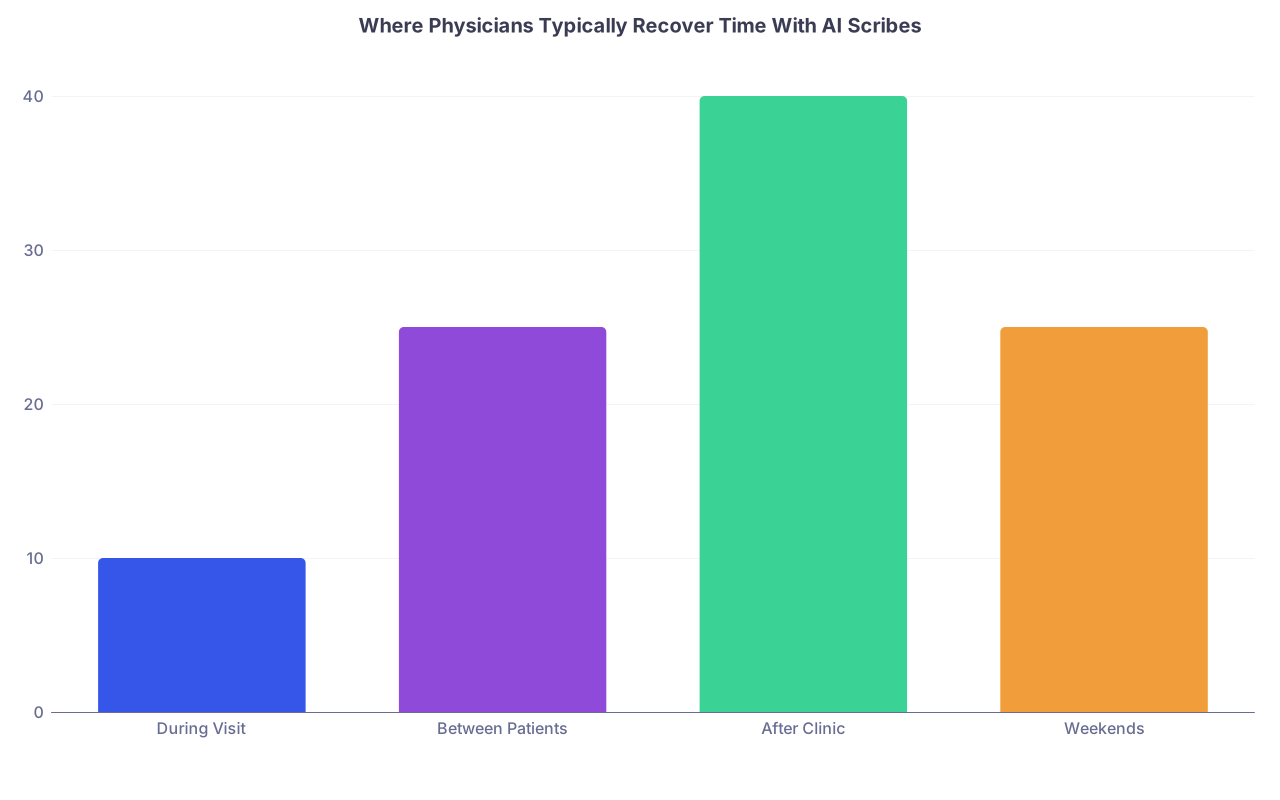
| Category | Value |
|---|---|
| During Visit | 10 |
| Between Patients | 25 |
| After Clinic | 40 |
| Weekends | 25 |
4. Build a “Human in the Loop” Protocol That Actually Works
The most dangerous mistake I see: clinicians trusting the draft too much when they are tired. Your guard is lowest when the tool is most tempting.
You need a protocol. Written. Shared. Enforced.
A. The 5-part review you do for every AI-generated note
For each note, you quickly check:
Chief complaint and HPI
- Is the primary problem correctly identified?
- Are timelines, severity, and key negatives correct?
Medications and allergies
- No new meds invented.
- Doses, frequencies, routes match what you actually said.
Assessment
- Each listed problem is real and discussed.
- No “chronic pain” added when you never talked about it, etc.
Plan
- Orders, referrals, labs, imaging match what you actually did.
- Follow-up interval is correct.
Boilerplate / templates
- No nonsense like “all systems reviewed and negative” when you did not do a full ROS.
- Remove generic safety language you did not actually discuss.
This review eventually takes 20–40 seconds per note. But that is only true if you hold the line early and do not let bad patterns creep in.
B. Hard rules: what you never just “let slide”
If you see these errors, you treat them as serious:
- AI adds diagnoses you never made (e.g., “pre-diabetes” from a vague sugar comment).
- AI documents counseling you never gave: smoking cessation, weight loss, contraception.
- AI copies forward old problems as “assessed today” that were not addressed.
This is not just “clean up the note.” This is billing fraud, risk exposure, or both.
You must:
- Delete misrepresentations completely.
- Turn off features that keep reintroducing them.
- Report patterns to the vendor if systemic.
C. Spot-checking and internal audits
You would be shocked how fast bad habits spread in a group.
If you are in a practice or group:
- Randomly select 5–10 AI-scribed encounters per clinician per quarter.
- Compare:
- Audio (if retained) vs final note.
- Orders placed vs documented plan.
- Billing level vs documented complexity.
If you are solo:
- Once a month, pick 10 visits where you were rushed and re-read the notes fresh.
- Ask yourself bluntly: “If this was read aloud in court, would I be comfortable?”
If the answer is no, your workflow needs tightening.
5. Billing, Compliance, and Malpractice: Staying Out of Trouble
AI scribes change how you generate documentation, but they do not change billing rules.
A. E/M coding realities
Post-2021 outpatient E/M is based on:
- Medical decision making (MDM) or
- Total time on date of service
AI can help you:
- Accurately capture data reviewed, independent historians, management options considered.
- Reflect risk (drug toxicity monitoring, unstable chronic illness, etc.).
AI can hurt you if:
- It inflates complexity: documents “extensive data review” you did not perform.
- It inserts copy-pasted risk language (e.g., “life-threatening if untreated”) in every note.
Your rule:
- Use AI to structure documentation around what you actually did.
- Never upcode because the AI padded the note.
B. Medical–legal perspective
Plaintiffs’ attorneys are not dumb. They will figure out AI notes quickly. The issues:
- Contradictions: note says detailed ROS, patient testifies “doctor barely asked anything.”
- Inaccurate counseling claims: documentation of risks/benefits not actually discussed.
- Internal inconsistency: plan mentions meds never prescribed; vitals inconsistent with EHR.
Your best defense:
- Keep notes accurate and lean. No fluff for padding.
- Avoid impossible perfection. A human-sounding note is safer than a robot-perfect, 1,500-word opus for a sore throat.
- Document refusals and uncertainty clearly:
- “Patient declined ED evaluation despite recommendation; understands risk of deterioration.”
AI should not erase your clinical judgment from the record. It should help you express it more clearly.
C. Role of your malpractice carrier and risk management
Before full deployment, do two things:
Ask your malpractice carrier in writing:
- “We plan to use [Product] as an AI scribe. Clinicians will review and edit all notes. Do you have any specific requirements or recommendations?”
Loop in your institution’s risk management / compliance:
- Provide vendor security documentation.
- Clarify who can access audio and transcripts.
- Build a brief policy: consent, opt-out, audit, error reporting.
You want alignment now, not during litigation.

6. Training Your Brain and Your Team: How to Implement Without Chaos
You are not just turning on a feature. You are changing habits and expectations.
A. Start small with a pilot, not a clinic-wide flip
Pilot design that actually works:
- 3–5 clinicians, mixed tech comfort levels.
- 4–6 weeks with clear goals:
- Target: “80% of notes closed same day.”
- Target: “Average after-hours charting under 30 minutes.”
Track:
- Note completion time.
- Patient complaints or concerns.
- Error patterns in AI drafts.
Then adjust. Change templates, consent wording, exclusion criteria. Only after that do you scale.
B. Train like this, not like a vendor webinar
You need three short, focused training blocks, not one bloated session.
Workflow basics (30–45 minutes)
- How to start/stop recording.
- Where drafts appear.
- How to edit and sign.
- What to do if the system is down.
Clinical accuracy and red flags (30 minutes)
- Show real examples of hallucinations, mislabeling, over-documentation.
- Walk through the 5-part review checklist as a live demo.
Consent and communication (20 minutes)
- Practice the consent script.
- Role-play a patient who is skeptical or refuses.
- Define when to disable recording.
After that: short office-hours style sessions for troubleshooting and sharing tips.
C. Bring your MAs, nurses, and front desk into the loop
Big mistake: training physicians only. Everyone touches the workflow.
Front desk:
- Can add a line to pre-visit paperwork mentioning AI scribe use.
- Knows how to answer “What is this AI thing my doctor mentioned?”
MA / nurse:
- Knows to pause recording during rooming if desired.
- Knows to flag visits where AI should not be used (e.g., assault disclosure during rooming).
IT / informatics:
- Monitors system stability.
- Coordinates with the vendor on downtime procedures.
The less surprised your staff is, the safer your implementation will be.

| Step | Description |
|---|---|
| Step 1 | Define Problem |
| Step 2 | Vendor Safety Checklist |
| Step 3 | Pilot With 3-5 Clinicians |
| Step 4 | Train Team and Set Consent Script |
| Step 5 | Human Review Protocol |
| Step 6 | Audit and Adjust |
| Step 7 | Scale to More Clinicians |
7. Metrics That Actually Matter (And How to Course-Correct)
If you do not measure, you will fool yourself. “Feels better” is not a metric.
A. Core metrics to track for 2–3 months
- Time after clinic spent charting
- Self-reported or time-tracking: average minutes per clinic day.
- Percentage of notes closed same day
- Note length and bloat
- Glance: have your notes doubled in length? That is a red flag.
- Patient feedback
- Any new complaints about privacy, feeling “recorded,” or lack of eye contact?
- Error incidents
- Any case where AI-generated content would have caused harm if left uncorrected.
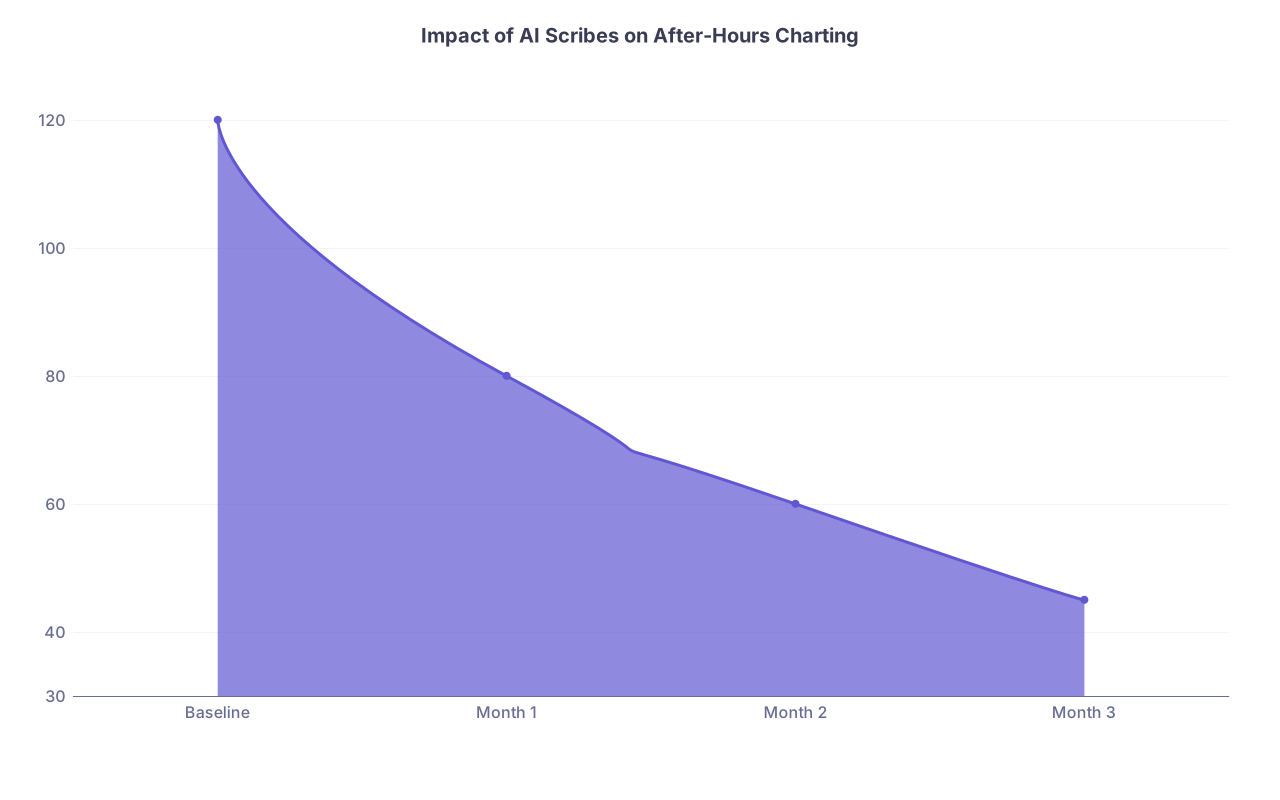
| Category | Value |
|---|---|
| Baseline | 120 |
| Month 1 | 80 |
| Month 2 | 60 |
| Month 3 | 45 |
If after 2–3 months your after-hours charting has not meaningfully dropped, something is off: vendor, workflow, or your own editing habits.
B. When to kill or change the product
You pull the plug or dramatically limit scope if:
- You see repeated serious hallucinations (wrong meds, wrong side, wrong patient elements).
- Your malpractice carrier or risk management raises explicit concerns.
- Your staff is spending more time fighting the tool than it saves.
- Patients start refusing in noticeable numbers or complaining about “being recorded” in surveys.
You are not married to a vendor. Tools that are unsafe or net-negative do not get second chances in your clinic.
C. How to keep improving
Every quarter, ask:
- “What parts of the note are still too manual?”
- “Where does AI consistently fail for my specialty?”
- “What can I simplify in my own style to make AI output cleaner?”
Small tweaks help:
- Standardize phrasing for common problems (“Type 2 diabetes, A1c 8.1, not at goal, on metformin only…”).
- Save your own edited templates as favorites.
- Turn off sections you never use (e.g., auto-ROS) in the AI configuration.
AI scribes become much safer and more helpful when you force them to work inside your structure instead of letting them sprawl.

8. Specialty-Specific Pitfalls You Should Anticipate
AI scribes are not specialty-agnostic. The risks shift.
A. Primary care / family med / internal med
- Risk: massive note bloat across multiple chronic problems.
- Fix:
- Limit to top 3–4 active problems unless others are truly addressed.
- Turn off auto-ROS.
- Standardize preventive care language.
B. Pediatrics
- Risk: confusion between parent report and child status, consent nuances with adolescents.
- Fix:
- Explicit speaker labels (“Mother states…”, “Child reports…”).
- Extra caution around sensitive adolescent topics (sex, substance use) with audio.
C. Psychiatry / behavioral health
- Risk: documenting highly sensitive statements that patients may not want in EHR; misrepresenting suicidal ideation nuance.
- Fix:
- Consider text-only AI based on your summary, not raw audio.
- Keep suicide risk documentation tightly controlled and explicitly reviewed line by line.
D. Surgical specialties
- Risk: AI invents detailed physical findings or exam components you did not perform.
- Fix:
- Use minimal, targeted templates.
- Focus AI use on HPI / plan; keep operative details and critical findings manual or carefully templated.
9. A Simple, Written Policy You Can Actually Live With
You do not need a 20-page policy. You do need something everyone can follow and defend.
Here is a skeleton you can adapt:
Purpose
- “AI scribe tools are used to assist clinicians in drafting visit notes; clinicians remain responsible for final content.”
Scope
- Specify which clinics, visit types, and providers can use the tool.
Consent
- Standard script.
- Documentation of refusals.
- Cases where AI use is discouraged or prohibited.
Use and review
- Requirement for clinician review and editing of every note.
- Prohibition on auto-signing or using drafts without review.
Data handling
- Vendor BAA on file.
- Retention period for recordings/transcripts.
- Who can access audio and under what conditions.
Monitoring and quality
- Quarterly audits.
- Process for reporting and addressing significant errors.
Training
- Required sessions for clinicians and staff before activation.
This document is not red tape. It is what you point to when something goes wrong to show you took this seriously.
FAQ (Exactly 4 Questions)
1. Can I let the AI auto-generate and sign simple visit notes (e.g., URI, refill visits) to save more time?
No. You must not allow auto-signing without human review, even for “simple” visits. Those are the cases that fool people—because they seem low risk, errors sneak in: wrong med, missing allergy, inaccurate ROS that contradicts prior notes. You can use AI to draft the entire note, but you still skim and confirm before signing. If your vendor pushes auto-signing, that is a red flag.
2. How do I respond if a patient says they are uncomfortable with AI but I am drowning in charting?
You respect the refusal. Turn off recording and chart manually for that visit. Then fix the root problem outside the room: reduce overbooking, adjust your template, improve your AI workflow on other visits so you gain enough time overall. Do not argue or “sell” patients hard on AI. A simple, calm explanation once is fine; anything beyond that risks trust.
3. Are AI scribes safe for sensitive visits like mental health, substance use, or intimate partner violence?
They can be used in limited ways, but you should be much more conservative. For high-stakes conversations—active suicidality, disclosure of assault, undocumented status issues—default to not recording audio. Use your own concise summary and, if you wish, a text-based AI helper to clean up wording. The more reputational and legal weight a note carries, the more you should control every word yourself.
4. How do I know if my AI scribe setup is actually helping rather than just feeling “cool”?
Track it. For 4–6 weeks, log your average after-hours charting time, percentage of notes closed same day, and any notable AI errors. If time is not dropping and notes are not closing faster—even after an initial learning curve—something is wrong: wrong product, poor configuration, or sloppy review habits. Be ruthless. If metrics do not improve, change workflows or shut the tool off. “Cool” does not pay your time debt or protect you in court.
Here is your next step:
Pick your last clinic day and estimate, honestly, how many minutes you spent charting after leaving the office. Write that number down. Then write your target (for example: “30 minutes max after clinic within 3 months”). That is the benchmark you will hold any AI scribe against. If it cannot get you there safely, it does not belong in your practice.