The way most clinics handle “busy days” is broken. They just add more patients to the same old workflow and hope you work faster.
You do not need to work faster. You need a tech‑augmented clinic template that makes high‑volume days predictable, structured, and almost boring.
Let’s build that.
1. Define the Problem You Are Actually Solving
Before you start downloading apps and tweaking templates, you need to be brutally clear about the bottlenecks. High‑volume clinic is not one problem; it is several distinct ones.
Typical pattern I see over and over on high‑volume days:
- You are double‑ or triple‑booked in the morning.
- The EHR inbox is exploding.
- Every patient needs a refill, paperwork, and “one quick question.”
- MA workflow is improvisational at best.
- You stay 90–120 minutes after the last patient just to finish notes and orders.
Technology only helps if you target the right failure points. Here are the main failure modes that a tech‑augmented template must address:
Unstructured visit types
Every 20‑minute slot treats a 3‑month diabetes follow‑up and a new complex multi‑comorbidity patient as “the same.”Unclear pre‑visit data work
Labs, prior imaging, prior notes, med lists—nobody preps them systematically.Fragmented communication
Patient messages, refill requests, staff questions, pharmacy calls all hitting you in random order, all day.Documentation overhead
You are recreating the same note structure 20–30 times a day.Decision fatigue
You are deciding the same things repeatedly: when to bring a patient back, what labs to order, what education to repeat.
Here is the thesis:
A tech‑augmented clinic template is a standardized, repeatable playbook for visit scheduling + rooming + documentation + communication, enforced and supported by your tools rather than your willpower.
We will build it in layers:
- Schedule and visit types
- Pre‑visit workflow
- In‑room workflow
- Documentation and orders
- Post‑visit and inbox strategy
- Monitoring and iteration
2. Start With the Schedule: Design for Volume, Not Chaos
Most “busy day” templates look like someone lost a bet: random 15s, 20s, 30s, double‑books, urgent slots. You cannot fix that with macros. You fix it with structure.
2.1 Build a High‑Volume Day Template (Not Every Day)
You should have at least two distinct templates:
- Standard clinic day – reasonable volume, normal complexity.
- High‑volume clinic day – shorter slots, tighter workflows, fewer exceptions.
You can also add a third:
- Procedure / complex day – longer slots, lower count, more focused.
For now, focus on a single high‑volume template that you can run 1–2 days a week when demand spikes.
| Block | Duration | Slot Length | Target Patients |
|---|---|---|---|
| AM Block 1 | 8:00–10:00 | 15 min | 8 |
| AM Micro-Buffer | 10:00–10:15 | 15 min | 0 (catch-up) |
| AM Block 2 | 10:15–12:00 | 15 min | 7 |
| PM Block 1 | 13:00–15:00 | 15 min | 8 |
| PM Micro-Buffer | 15:00–15:15 | 15 min | 0 (catch-up) |
| PM Block 2 | 15:15–17:00 | 15 min | 7 |
That is 30 patients in a day without formal double‑booking, but with planned buffers.
Now you add guardrails.
2.2 Restrict Which Visits Go Into High‑Volume Template
High‑volume days are not for:
- New patients with >3 chronic conditions
- Complex diagnostic workups
- Emotional bomb visits (new cancer diagnosis, major mental health crises)
They are for:
- Stable chronic disease follow‑ups with recent labs
- Medication follow‑ups
- Simple acute complaints with clear triage protocols
- Lab/diagnostic result follow‑ups where data is complete
Your tech stack should enforce this:
- Online scheduling rules: Only allow certain visit types on high‑volume days.
- Scheduling script for staff: A one‑pager that clearly states what can and cannot go on that template.
- EHR visit types: Distinct visit codes or types (e.g., “HV DM FU 15,” “HV Acute 15”) with prelinked templates.
You are not trying to be “fair.” You are trying to protect your ability to safely see more patients.
3. Pre‑Visit Tech: Front‑Load as Much Work as Possible
If the patient and your team show up unprepared, the visit will always run long. The busiest clinics I have seen run well have ruthless pre‑visit workflows.
3.1 Standardized Pre‑Visit Checklists (Automated Where Possible)
Create a problem‑oriented pre‑visit checklist tied to each high‑volume visit type. Then embed it in your EHR or tasking system.
Example for “HV DM FU 15”:
- Check last A1c, BMP, lipid panel within target time window.
- If missing, standing pre‑visit lab orders fire automatically 1–2 weeks before visit.
- Confirm med list with pharmacy fill history (if integrated).
- Add flowsheet data trend (BP, weight, A1c) to front page.
- Identify vaccine gaps based on age and conditions.
- Generate pre‑visit summary in EHR “Synopsis” or equivalent.
Use your EHR’s automation:
- Rule‑based reminders that trigger when a DM FU visit is scheduled.
- Bulk lab ordering protocols for chronic disease.
If your EHR is primitive, you can still do this with:
- A shared spreadsheet of upcoming high‑volume DM visits.
- Standard lab bundles with pre‑set frequent orders.
- MA‑driven pre‑visit planning the day before.
3.2 Patient‑Facing Pre‑Visit Tools
This is where tech can actually buy you minutes in each encounter.
At least 48 hours before the appointment, push:
- Pre‑visit questionnaires via portal / SMS link:
- Reason for visit in plain language
- Interval history (new meds, hospitalizations, symptoms)
- Self‑reported BP, glucose, peak flows, etc (if relevant)
- eCheck‑in:
- Insurance verification
- Updated contact info
- Medication list confirmation
- Consent forms
Tie it to your high‑volume template:
- Any patient booked into a “HV DM FU 15” visit automatically receives the DM FU questionnaire.
If your system does not have this:
- Use external tools like Typeform, Jotform, or Google Forms.
- Auto‑send links via your reminder system.
- Have MAs quickly copy key data into the EHR at rooming.
Does this work perfectly? No. But if even 30–40% of patients complete meaningful data ahead, you save multiple hours across a packed clinic.
4. In‑Room Workflow: Scripted, Tech‑Supported, Repeatable
High‑volume days are not improv theater. They are closer to a well‑run OR—protocolized with small room for deviation.
4.1 Rooming Protocol that Prepares the Note and Orders
Your MA is your force multiplier. Most clinics underuse them badly.
For each high‑volume visit type, build an MA protocol:
- Standard vitals and measurements
- Device data upload (glucometer, BP cuff, pump, etc)
- Short structured HPI or checklist:
- For DM FU: hypoglycemia episodes, med adherence, lifestyle changes
- Open the correct note template in the EHR and populate:
- Chief complaint using visit type language
- Structured PMH/FH/SH sections rarely change—autofill or import
- Med list reviewed and flagged where uncertain
- Launch order sets but do not sign:
- For example, DM FU set with A1c, BMP, lipid bundled and ready.
On a high‑volume day, by the time you walk in, you should see:
- 80% of the note skeleton ready.
- Labs and imaging reviewed or clearly flagged.
- Order set loaded, needing only confirmation / adjustment.
If your MA is not doing this now, train them with:
- A written Rooming Playbook for each high‑volume visit type.
- Short in‑service training with live demo in the EHR.
- Periodic audits: pick 5 charts, see if the pattern holds.
4.2 In‑Room Script: 10–12 Minute Visit that Still Feels Human
You cannot wing a 15‑minute slot with complex patients. But you can make them feel well‑cared for in that time.
Here is a rough structure that works:
Minute 0–1: Set the frame
- “I see you are here for diabetes follow‑up and to review your labs. We have about 15 minutes. Let us make sure we hit what is most important to you.”
Minute 1–3: Patient’s agenda, briefly constrained
- Ask: “What are the top 1–2 things you want us to focus on today?”
- If they list five: “We will not do justice to all five today. Let us pick two for today, and I can send you a message or plan follow‑up for the rest.”
Minute 3–7: Targeted HPI + data review
- Use your pre‑visit data and MA‑collected info.
- Show trends on screen if possible (A1c line graph, BP trends).
Minute 7–10: Decision and plan
- Use smartphrases or order sets for common pathways.
- Spell out: meds, labs, referrals, follow‑up.
Minute 10–12: Close the loop
- “Here is what you will see after you leave—summary in your portal, labs to get done by X date, and we will plan to see you in Y months.”
You do not need to say it exactly like that. You do need to control the agenda.
Technology supports this by:
- Displaying key data trends in a single view.
- Access to prewritten smartphrases for education.
- Order sets that match your spoken plan in 10 seconds, not 2 minutes.
5. Documentation: Build Industrial‑Grade Templates and Smart Tools
This is where most physicians waste half their day because they refuse to invest two hours building decent templates.
On a high‑volume day, you should not be free‑typing 90% of your notes.
5.1 Build Visit‑Type‑Specific Note Templates
Create these inside your EHR for each common high‑volume visit:
- HV DM FU 15
- HV HTN FU 15
- HV Med Refill FU 15
- HV Simple Acute 15 (e.g., URI, UTI, rash)
Each template should:
- Pre‑populate problem list structure:
- “Problem 1 – Diabetes” with fields for A1c, meds, GLP‑1, SGLT2, etc.
- Include one‑click access to:
- Current med list
- Recent labs
- Vitals trends
- Have dedicated sections for:
- Assessment by problem
- Plan by problem
- Follow‑up interval (with standard options)
You then add smartphrases / dotphrases that:
- Pull in the latest labs with interpretation framework.
- Insert standard counseling text that you modify slightly.
- Document shared decision‑making in one line.
Example pattern:
.dmstable– inserts: last A1c, prior A1c, trend comment, current regimen..dmlifestyle15– standard DM lifestyle counseling for a short follow‑up visit..return3m– “Return in about 3 months (around [date]) for diabetes follow‑up.”
If your EHR supports templates with conditional logic or problem‑based charting, use it aggressively.
5.2 Use Voice or AI‑Assisted Documentation—But Bound It
If you have:
- Voice recognition (Dragon, built‑in tools)
- Or AI ambient scribe (DAX, Nabla, Abridge, etc.)
Use them strategically on high‑volume days for the 10–20% of visits that will always be messy: complex, emotional, or multi‑problem visits that somehow end up on your template anyway.
Rules of thumb:
- Turn on ambient scribe only when complexity exceeds what your template can reasonably handle.
- Do not narrate everything; use focused summarizing statements.
- Always end with a structured “Assessment and Plan” that follows your own standard format.
You want AI/voice as a pressure release valve, not your default for every simple sinusitis follow‑up.
6. Orders, Referrals, and Tasks: Automate the Repetitive 80%
Order entry can silently eat 1–2 hours daily. Fix that with well‑built order sets and routing protocols.
6.1 Build Problem‑Based Order Sets
For each core chronic disease and common acute problem, create a high‑volume order set:
- DM FU bundle:
- A1c, BMP, lipid, urine microalbumin
- Eye exam referral if due
- Foot exam reminder
- HTN FU bundle:
- BMP, optional renin/aldo, etc. (depending on your usual practice)
- Home BP monitoring instructions
- Simple UTI:
- UA, culture, empiric antibiotic choices, pregnancy test (if relevant)
Use them to:
- Reduce clicks.
- Standardize care.
- Make it very fast to do “the right thing” every time.
6.2 Route Non‑Physician Work Away From You
Smart routing rules in your tech stack matter:
- Refill protocols that:
- Auto‑approve if last visit and labs met criteria.
- Route to MA or RN first for protocol check.
- Document templates for:
- Work/school notes
- Simple FMLA extensions
- Prior auth initiation
You want your inbox to be exceptions and judgment calls, not mechanical tasks.
7. Inbox and After‑Hours: Create a Containment Strategy
If you let messages and results bleed into clinic time randomly, tech will just make you busier. You need containment.
7.1 Time‑Box Inbox Work on High‑Volume Days
On high‑volume days, set specific tech‑supported inbox blocks:
- 20–30 minutes before clinic
- 15 minutes at midday
- 20–30 minutes after last patient
Use inbox filters:
- Separate “Results,” “Patient Messages,” “Refills,” “Admin.”
- Tackle them in a consistent order (e.g., results → urgent patient messages → refills → admin).
You can even build a micro‑protocol:
- Results:
- Use smartphrases for common normal/near‑normal results.
- Convert result handling into short “lab review” templates that auto‑document your interpretation.
- Patient messages:
- Use saved replies with minor customization.
- Convert appropriate messages into scheduled visits (video/phone) directly from portal.
7.2 Use Virtual Visits to Offload Some Complexity
Integrate tech‑supported quick visits as part of the plan:
- For questions that will not fit into 15 minutes:
- “We are short on time today and I want to address this properly. I am going to schedule a brief video visit later this week just for that topic.”
- Book these into a dedicated virtual micro‑clinic session (e.g., 30–60 minutes of 10‑minute slots twice a week).
This moves complexity off your highest‑volume template and into a more flexible, lower‑intensity block.
8. Monitor, Iterate, and Prove It Works
If you want staff and leadership support, show them data. If you want your own sanity, measure whether this is actually helping.
Here is what to track for your high‑volume template over 4–6 weeks:
- Average patients per day vs. non‑HV days
- Average notes still open after clinic
- Average after‑hours EHR time
- No‑show and late arrival rates
- Patient satisfaction (even basic survey: 3–4 questions)
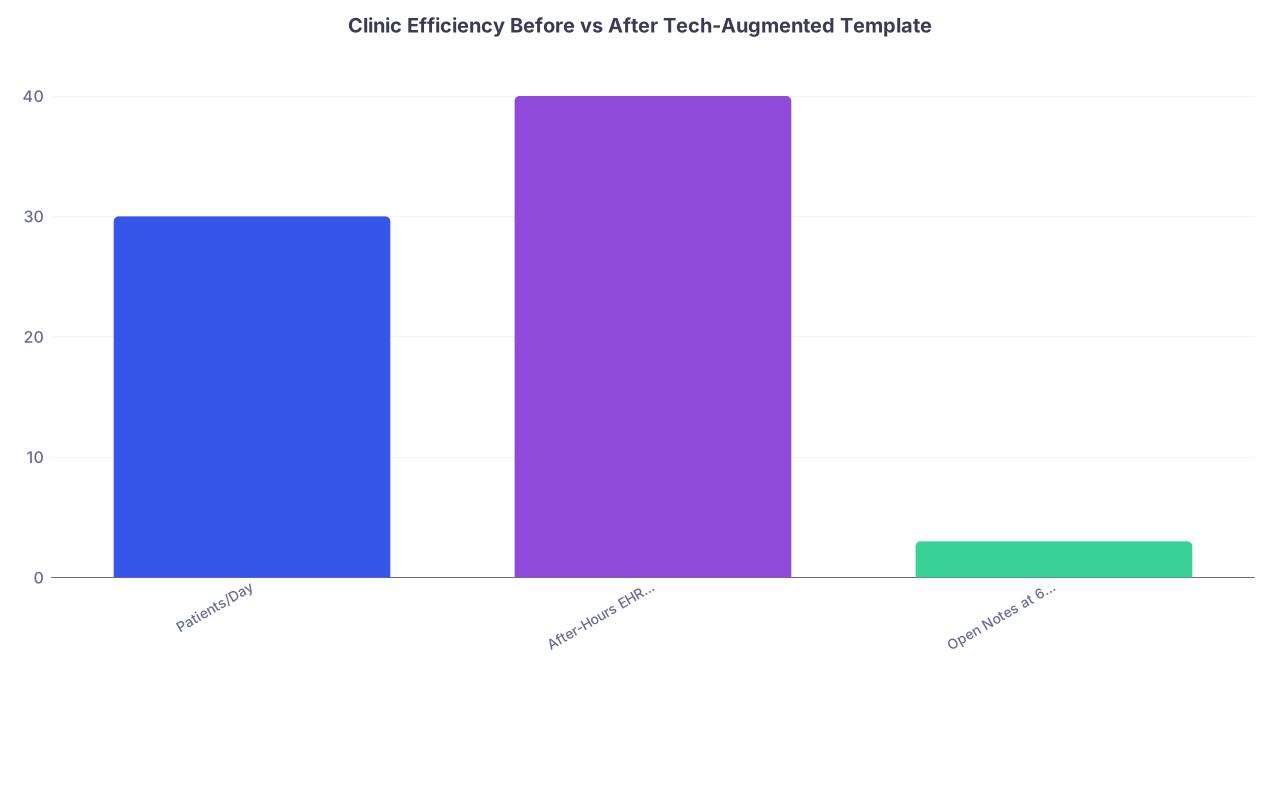
| Category | Value |
|---|---|
| Patients/Day | 30 |
| After-Hours EHR (min) | 40 |
| Open Notes at 6pm | 3 |
(Example: after implementing the template—30 patients/day, 40 minutes after‑hours EHR, 3 open notes versus 18 patients/day, 90 minutes after‑hours, and 10 open notes before.)
You do not need a quality improvement committee to do this. A simple spreadsheet, updated twice a week, is enough to know whether you are moving in the right direction.
Then, iterate:
- If you still drown in notes → strengthen templates and MA rooming work.
- If visits still run long → tighten your in‑room script and limit number of agenda items.
- If patients complain of rushed visits → adjust communication, not just time.
9. Concrete Tech Stack Components to Implement
Let us translate all of this into actual tools and configuration choices.
9.1 Inside the EHR
You want:
- Custom visit types with:
- Duration
- Allowed scheduling rules
- Linked default note templates
- Problem‑based note templates:
- DM, HTN, lipid, depression/anxiety, simple URI/UTI, etc.
- Order sets for:
- Core chronic conditions
- Common acute problems
- Smartphrases / dotphrases for:
- Lab interpretation
- Education
- Follow‑up instructions
- Tasks / routing rules:
- Refill workflows
- Result routing by type and severity
9.2 Patient‑Facing Tech
Minimum viable setup:
- Portal with:
- eCheck‑in
- Pre‑visit questionnaires
- Secure messaging
- Automated reminders with visit‑type‑specific pre‑visit instructions:
- “For diabetes follow‑up, please complete these labs and this short form.”
If your organization is slow on this, you can partially compensate with:
- Simple survey link texted from your front desk.
- Pre‑built handouts with QR codes linking to your forms.
9.3 Productivity and Communication Tools
On your side:
- Note‑taking or checklist tool for your own patterns (Notion, OneNote, even a Word doc).
- Shared digital space with MAs:
- Rooming protocols
- Visit‑type checklists
- Quick reference for order sets and smartphrases
For your team:
- Short Loom‑style screen recordings (or in‑person demos) showing:
- “Here is how I want DM FU 15 roomed.”
- “Here is the template I use for HV HTN FU 15.”
Do not rely on one training and hope it sticks. Refresh it monthly until everyone is fluent.
10. Implementation Roadmap: 4‑Week Build and Launch
You do not need a year‑long project plan. You need a ruthless 4‑week sprint.
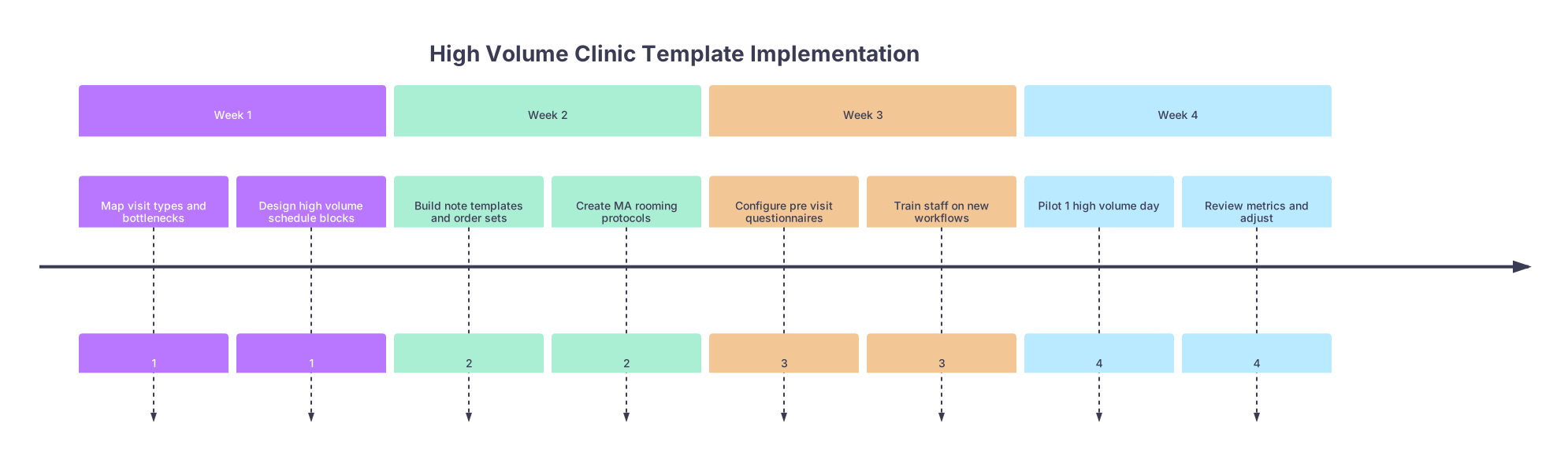
| Period | Event |
|---|---|
| Week 1 - Map visit types and bottlenecks | 1 |
| Week 1 - Design high volume schedule blocks | 1 |
| Week 2 - Build note templates and order sets | 2 |
| Week 2 - Create MA rooming protocols | 2 |
| Week 3 - Configure pre visit questionnaires | 3 |
| Week 3 - Train staff on new workflows | 3 |
| Week 4 - Pilot 1 high volume day | 4 |
| Week 4 - Review metrics and adjust | 4 |
Week 1 – Design
- Identify top 4–5 visit types that fill your schedule.
- Decide which of those are safe for high‑volume days.
- Define your high‑volume day template (time blocks, buffer slots).
Week 2 – Build
- Build EHR note templates for each selected visit type.
- Build matching order sets.
- Write MA rooming protocols (1 page each, max).
Week 3 – Connect and Train
- Set up pre‑visit questionnaires and eCheck‑in logic.
- Train your MA(s) and front desk:
- Walk through example visits.
- Clarify who does what and when.
Week 4 – Pilot and Adjust
- Run one high‑volume day.
- Track:
- How many notes left open at 5:30 pm?
- How many minutes of after‑hours EHR?
- Subjective “pain level” from you and staff (0–10).
- Fix the worst 2–3 friction points each week and repeat.
FAQ (Exactly 3 Questions)
1. What if my EHR is terrible and does not support complex templates or automation?
Then you build a lightweight parallel system. Use standardized Word templates for notes that you copy‑paste and quickly edit. Use order favorites as pseudo‑order sets. Use a spreadsheet or shared doc for pre‑visit planning. It will not be as smooth, but the core principles still work: visit‑type‑specific scripts, MA rooming protocols, and time‑boxed inbox work.
2. Won’t patients feel rushed with 15‑minute high‑volume visits, no matter how good the tech is?
They will feel rushed if you seem disorganized and reactive. If you open the visit with a clear frame, use their pre‑visit input, show that you are prepared, and end with a concrete plan and follow‑up options, they usually feel the opposite: “This was efficient and focused.” The perception of being rushed often comes from wasted time and poor communication, not from short visits alone.
3. How do I convince my clinic leadership to let me change my template?
Bring data and a plan, not complaints. Propose one or two high‑volume days per week with a clear structure, visit type restrictions, and measurable outcomes: access (patients/day), clinician after‑hours EHR time, and patient satisfaction. Offer to run a 4–6 week pilot, track metrics, and report back. Administrators respond well to “Here is the experiment, here is how we will measure success,” especially when it promises increased access without burning you out.
Open your EHR right now and create a single new visit‑type template—for the most common follow‑up you see—and link it to a basic note template and order set. That is your first concrete brick in a real tech‑augmented clinic day.