
You are sitting in your office at 7:38 p.m. Clinic ended at 5:00. The last patient left at 5:45. Your MA went home an hour ago. You are still there, eyes burning, speed‑typing the same phrases into the EHR that you already typed yesterday. And last week. And in residency.
You have “SmartPhrases” or “dot phrases” technically. The problem is they are trash.
- Too long.
- Hard to remember.
- Not specific enough.
- Or so bloated that you spend more time deleting junk than documenting.
You know there is a better way, but every time you open the SmartPhrase editor in Epic (or templates in Cerner, Athena, eClinicalWorks, whatever), you just stare at it and think: “I do not have time to fix this. I need to finish my notes.”
Here is the reality: you are going to spend that time one way or another. Either:
- 60–90 extra minutes every day doing manual documentation
or - A focused 3–5 hours once, designing SmartPhrases that actually work
Pick your pain.
Let’s walk through a concrete, step‑by‑step system to build SmartPhrases that:
- Cut your clicks and keystrokes dramatically
- Keep notes compliant and readable
- Do not annoy your colleagues or get you in trouble with compliance
- Are fast to maintain as guidelines change
This is not theory. This is exactly how I have watched attendings go from 20 open encounters a week to zero most days.
Step 1 – Decide What SmartPhrases Are For (And What They Are Not)
Most people try to make SmartPhrases do everything. That is why they fail.
SmartPhrases are good at:
- Repeated phrases and blocks of text
- Standardized structures (HPI frames, ROS, physical exam shells, plan formats)
- Inserting variables (name, age, gender, date, lab values)
- Forcing you to remember checklist items (e.g., red flag questions, counseling statements, billing elements)
They are terrible at:
- Thinking for you
- Replacing clinical judgment
- Documenting complex exceptions automatically
- Fixing sloppy clinical reasoning
So you use them where repetition is real. Not where you are just trying to avoid thinking.
Here is a simple filter:
If you write something 3+ times per week and the wording is at least 70% identical, it is a good SmartPhrase candidate.
Step 2 – Inventory Your Repetitive Work (Short, Ruthless Audit)
Set aside one half‑day. You can get fancy later. For now:
Open 10–15 recent notes of the same visit type.
- For example: “new patient consults” or “annual physicals” or “routine follow‑ups.”
Skim each note and highlight (mentally or literally if you print one) anything that:
- Looks copy‑pasted from another patient
- Is boilerplate (e.g., “Reviewed risks and benefits…”)
- Follows a pattern (similar HPI template, same ROS, same counseling)
On a scratchpad, list these chunks by category:
- Common chief complaints (e.g., back pain, URI, chest pain, DM follow‑up)
- Standard ROS sections
- Standard physical exam blocks
- Legal / compliance phrases (fall risk, capacity, informed consent)
- Patient education blocks (lifestyle counseling, chronic disease education)
- Communication notes (e.g., telephone encounters, refill protocols)
You are not designing yet. You are doing reconnaissance.
Now, rank them:
| Category | Frequency | Time per use | Priority |
|---|---|---|---|
| Annual wellness visits | Daily | 5–10 min | High |
| DM/HTN follow-ups | Daily | 3–5 min | High |
| Post-op checks | Weekly | 3–5 min | Medium |
| Telephone encounters | Daily | 2–3 min | High |
| Rare consult types | Monthly | 5–10 min | Low |
Start with the high frequency + moderate complexity items first. That is where the payoff is huge.
Step 3 – Set Ground Rules for Your SmartPhrase Design
Before you build the first phrase, define your “rules of the road.” This is where most people blow it.
Here is a set of rules that works in real clinics:
Short, mnemonic names only
- Bad:
.followup_visit_internal_medicine_annual - Good:
.fuaw(follow‑up annual wellness) or.awv - Rule: If you cannot type it from muscle memory in 1 second, it is too long.
- Bad:
One role per phrase
Do not make a “do everything” monster..hpi_backpain= HPI framework.exam_ms_neuro= focused exam.plan_backpain= plan and counseling
If you try to combine HPI + exam + plan in one, you will constantly be deleting irrelevant sections.
Bookmark sections with consistent markers
If your EHR supports placeholders (Epic’s smart lists, smart links, etc.), standardize:- Use ALL CAPS prompts:
***CHRONICITY***,***RED FLAGS*** - Use checklists or smartlists where possible
So your eyes instantly find what to edit.
- Use ALL CAPS prompts:
No autopopulated lies
Never prefill findings you did not actually perform. That “normal 12‑point ROS” that fires for a 90‑second urgent care visit? That is how you get burned in chart reviews.Output must look human
Your note should not read like a dump of macros. Complete sentences, clear structure, no Frankenstein padding lines.
Write these rules down. Stick them on your monitor.
Step 4 – Build a Core Library: 7–10 High-Yield SmartPhrases
You are not building 50 phrases on day one. That is how you get overwhelmed and quit.
Aim for a starter set of 7–10. Here is a proven structure.
1. Visit Shells (1–3 phrases)
These create the skeleton of your note.
Example for primary care follow‑up:
.visit_fu
- Chief complaint
- Problem‑based HPI slots
- Problem list review
- Med list review
- ROS summary placeholder
- Exam scaffold
- Assessment and Plan with problem‑based subheaders
Something like:
CHIEF COMPLAINT: CC
HPI:
PROBLEM 1
- Onset:
- Course:
- Associated symptoms:
- Prior evaluations/treatment:PROBLEM 2
MEDICATIONS:
- Reviewed and reconciled. Changes: CHANGESROS: ROS_SUMMARY
PHYSICAL EXAM:
.exam_genASSESSMENT AND PLAN:
- DX1 –
.plan_dx1- DX2 –
.plan_dx2FOLLOW UP: FOLLOWUP_INTERVAL
You embed other, more specific phrases inside this shell.
2. Complaint-Specific HPI Phrases (3–5 phrases)
Pick your top 3–5 complaints. In most outpatient settings, these cover half your week:
.hpi_backpain.hpi_chestpain.hpi_dmfu(diabetes follow‑up).hpi_htnfu.hpi_depression
Each template should:
- Mirror clinical reasoning (onset, location, quality, associated symptoms, pertinent negatives)
- Build in billing support (chronicity, severity, status of chronic illnesses)
- Force you to screen for red flags
For example, .hpi_backpain:
LOW BACK PAIN HPI
Onset: ACUTE/CHRONIC, began TIMEFRAME
Location: LOCATION
Quality: QUALITY (e.g., dull, sharp, burning)
Radiation: YES/NO, WHERE
Severity: MILD/MOD/SEVERE
Timing: CONSTANT/INTERMITTENT
Modifying factors: BETTER/WORSE WITH
Associated symptoms: NUMBNESS/WEAKNESS/BOWEL OR BLADDER CHANGESRed flag screening (patient denies unless stated):
- History of cancer: Y/N
- IV drug use: Y/N
- Fevers/chills/night sweats: Y/N
- Weight loss: Y/N
- Trauma: Y/N
Now, when QA, peer review, or a plaintiff’s attorney reads this, your thought process is obvious. And you did not have to reinvent it every time.
3. Exam Blocks (2–3 phrases)
You need:
- A general normal exam
- 1–2 focused exams for high‑frequency conditions
Example .exam_gen:
Vitals reviewed.
GEN: Well‑appearing, in no acute distress.
HEENT: Normocephalic, atraumatic, EOMI, sclera anicteric, oropharynx clear.
CV: RRR, no murmurs, rubs, or gallops.
RESP: CTAB, no wheezes, rales, or rhonchi.
ABD: Soft, non‑tender, non‑distended, no rebound or guarding.
EXT: No edema, pulses 2+ bilaterally.
NEURO: Alert, oriented, no focal deficits visible.
PSYCH: Appropriate affect, normal speech and behavior.
Then a .exam_backpain that you add or swap when relevant:
BACK:
- Inspection: NORMAL/ABNORMAL
- Palpation: TENDER/NT at LEVEL
- ROM: FULL/LIMITED with flexion/extension/rotation
- Straight leg raise: POS/NEG bilaterally
- Strength: 5/5 OR DESCRIBE DEFICIT
- Sensation: INTACT/DEFICIT DESCRIPTION
- Reflexes: 2+ SYMMETRIC/OTHER
Consistency = speed + defensibility.
4. Plan / Counseling Blocks (2–4 phrases)
This is where your documentation and risk management really benefit.
Examples:
.plan_dm– diabetes counseling, med adjustment framework.plan_abx– antibiotic discussion about risks/benefits and return precautions.plan_backpain_conservative– NSAIDs, PT, red flag review, expectations.plan_ssri– depression/anxiety counseling, black box warning, follow‑up
For .plan_backpain_conservative:
Assessment: Mechanical low back pain without red flags.
Plan:
- Medications: NSAID/MUSCLE RELAXANT as prescribed.
- Activity: Encourage gentle movement, avoid prolonged bed rest.
- Conservative care: Heat/ice, stretching, consider PT referral if not improving.
- Red flags reviewed: New or worsening numbness, weakness, saddle anesthesia, bowel or bladder incontinence, fevers, chills, or trauma.
- Patient instructed to seek immediate care or ED evaluation if any red flag symptoms occur.
- Follow‑up: 1–4 weeks or sooner if symptoms worsen.
You change the specifics. The structure is stable.
Step 5 – Wire In Variables and Smart Links (Make Them Truly “Smart”)
Typing a phrase that still forces you to manually type the patient’s name, MRN, today’s date, or last A1c is a waste. Use your system’s smart fields.
Most major EHRs support some version of:
- Patient name
- Age
- Gender
- PCP name
- Last lab result value and date
- Medication list
- Vital signs
You need to know 10–15 key smart links or variables for your system. Ask your super‑user or informatics person for a one‑page list.
Example in Epic style (your syntax may differ):
.ptname→@NAME@.lasta1c→@RESULT(A1C, LAST)@
Then your diabetes follow‑up HPI might include:
@NAME@ is a @AGE@‑year‑old @SEX@ with type 2 diabetes presenting for routine follow‑up.
Last HbA1c: @RESULT(A1C, LAST)@ on @RESULTDATE(A1C, LAST)@.
Home blood glucose readings: PATIENT REPORT.
Hypoglycemic episodes: YES/NO, DETAILS.
Now that phrase pulls half your data in automatically.
Step 6 – Build a Naming System You Will Remember
Here is what I see in burned‑out attendings’ accounts: 120 SmartPhrases, no system. They end up typing .plan and hitting tab randomly until something vaguely right appears.
Fix this now.
Create a prefix system:
v_for visit shells →.v_fu,.v_newh_for HPI →.h_backpain,.h_dmfue_for exam →.e_gen,.e_backp_for plan →.p_dm,.p_htnc_for communication/phone →.c_refill,.c_resultsi_for inpatient only (if you also round)
So to build a new HPI for migraine? You already know it will be .h_migraine.
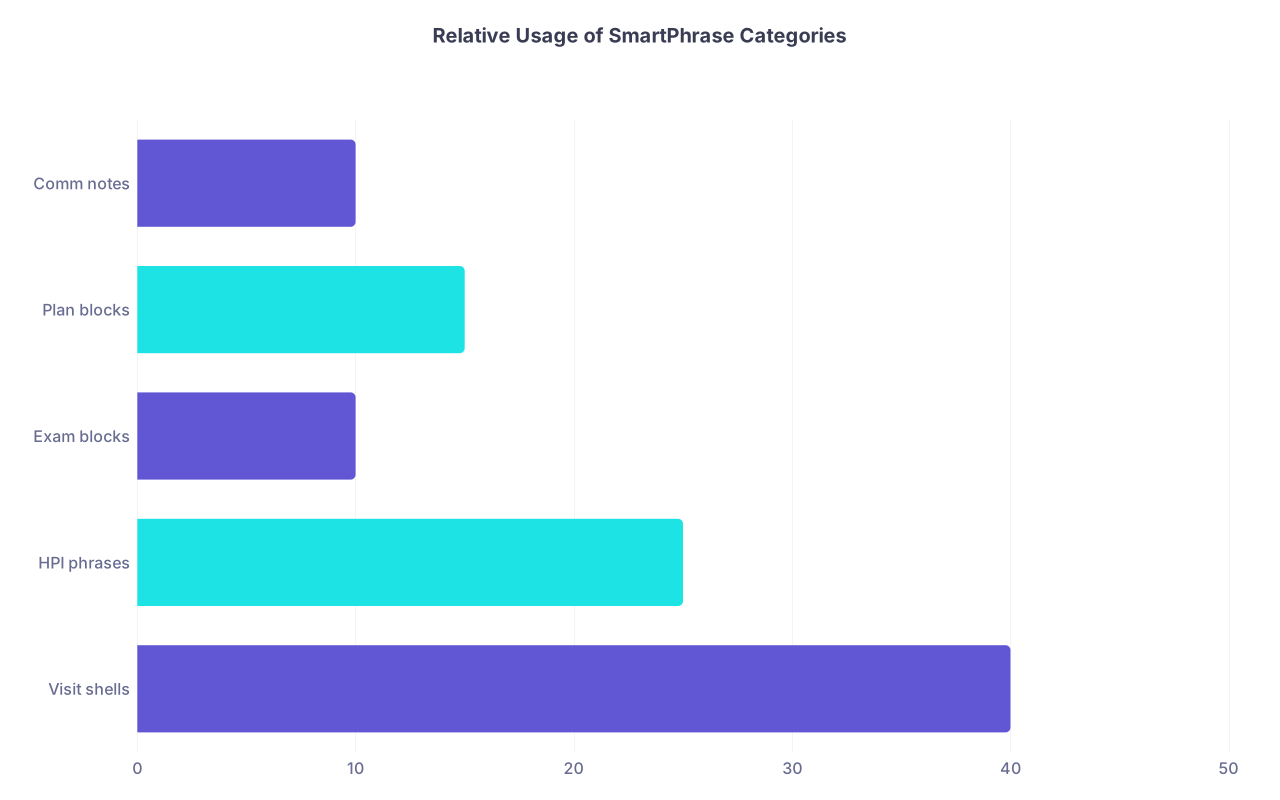
You can also use hbar charts mentally to rank which of these you use most.
| Category | Value |
|---|---|
| Visit shells | 40 |
| HPI phrases | 25 |
| Exam blocks | 10 |
| Plan blocks | 15 |
| Comm notes | 10 |
That rough distribution is what I see in practice.
Step 7 – Test on Live Patients (With Strict Rules)
You are not done because you wrote a phrase. It has to survive real clinic.
Put these guardrails in place for your first 2–3 weeks:
One new phrase per half‑day
Keep it controlled. Do not switch everything at once. Start with your main visit shell + one HPI.Never trust the macro blindly
After inserting a phrase:- Skim it top to bottom
- Delete parts that do not apply
- Edit prompts (ALL CAPS or placeholders)
- Confirm any autopopulated smart fields are correct
Track what annoys you
Any time you find yourself:- Deleting the same line 3 times in a row
- Rewriting the same sentence for nuance
- Skipping past a useless block
Put a sticky note or quick jot: “.h_backpain – red flag section too long” or “.v_fu – ROS placeholder is dumb.”
You will iterate much faster this way than trying to get perfection on day one.
Step 8 – Refine Ruthlessly (Cut More Than You Add)
After 2–3 weeks, sit down again with:
- A list of your actively used SmartPhrases
- Your annoyance notes
- 5–10 example notes where you used them
Your goal is aggressive simplification.
Ask of each phrase:
- Does this save me time every week? If not, delete or merge.
- Is any part of this phrase never edited? That can probably stay.
- Is any part always edited or deleted? That part belongs in free text or a separate phrase.
- Can I break this up into smaller pieces that are more flexible?
Example: If .v_fu contains a full ROS that you delete 90% of the time, then:
- Move ROS into its own phrase
.e_rosbasicor.ros_full - Or turn it into a slim summary placeholder that you can expand when needed
You want your library to be:
- Small enough to live in your head
- Powerful enough to handle 80% of your documentation patterns
You are not writing a novel; you are building a toolkit.
Step 9 – Protect Yourself: Compliance and Medico‑Legal Basics
SmartPhrases can hurt you if you use them badly. There are some non‑negotiables.
No pre‑checked normal findings you did not assess
If you insert a normal 12‑system exam into a telehealth visit where you barely saw the patient from the shoulders up, that is fiction. Do not do that.Make exceptions visually obvious
When you change a line from “no chest pain” to “chest pain present,” put it in a place that will not get lost in a wall of normal text.Avoid copy‑paste from other patients
SmartPhrases are generic frameworks. Do not build in specific names, ages, or “37‑year‑old man” anywhere.Make red flag documentation explicit
For higher‑risk complaints (chest pain, headache, abdominal pain, neurologic deficits), your HPI or plan phrases should show:- What you considered
- What you asked
- Why you felt outpatient management was reasonable
Your templates are evidence of your reasoning. Use them that way.
Step 10 – Scale Up: Team and Clinic‑Level SmartPhrase Strategy
Once your personal system works, you can go one level up.
Share the Good Stuff
Every clinic has one person with brilliant phrases. And five people reinventing the wheel. Stop that.
- Set up a 30‑minute lunch “SmartPhrase show‑and‑tell” once a month.
- One attending or NP or PA shares 2–3 of their best phrases.
- You import, edit for your style, and save.
You will discover new tricks quickly this way.
Standardize Where It Matters
Some sections should almost never vary between clinicians in a practice:
- Procedural consent language
- Post‑op instructions
- Opioid risk/benefit documentation
- Controlled substance agreements
- Routine vaccine counseling text
Create clinic‑approved SmartPhrases for these. Saves time and keeps everyone out of trouble.
Step 11 – Maintain a Lightweight “Update Routine”
Medicine changes. Guidelines move. Your SmartPhrases cannot be static.
Build a simple maintenance habit:
Once a quarter:
- Skim your 10 most used phrases
- Ask: “Still correct? Still efficient?”
- Update any guideline‑sensitive language (statin thresholds, A1c targets, BP goals)
When you notice repeating free‑text edits for 2–3 weeks:
- Fix the underlying phrase instead of rewriting it every time
Think of your SmartPhrase library like your personal formulary. Trim the junk. Upgrade the essentials.
Step 12 – Measure the Payoff (So You Actually Keep Doing This)
Physicians are skeptical for a reason. You have been promised “efficiency” tools before. Most were garbage.
So prove to yourself that this works.
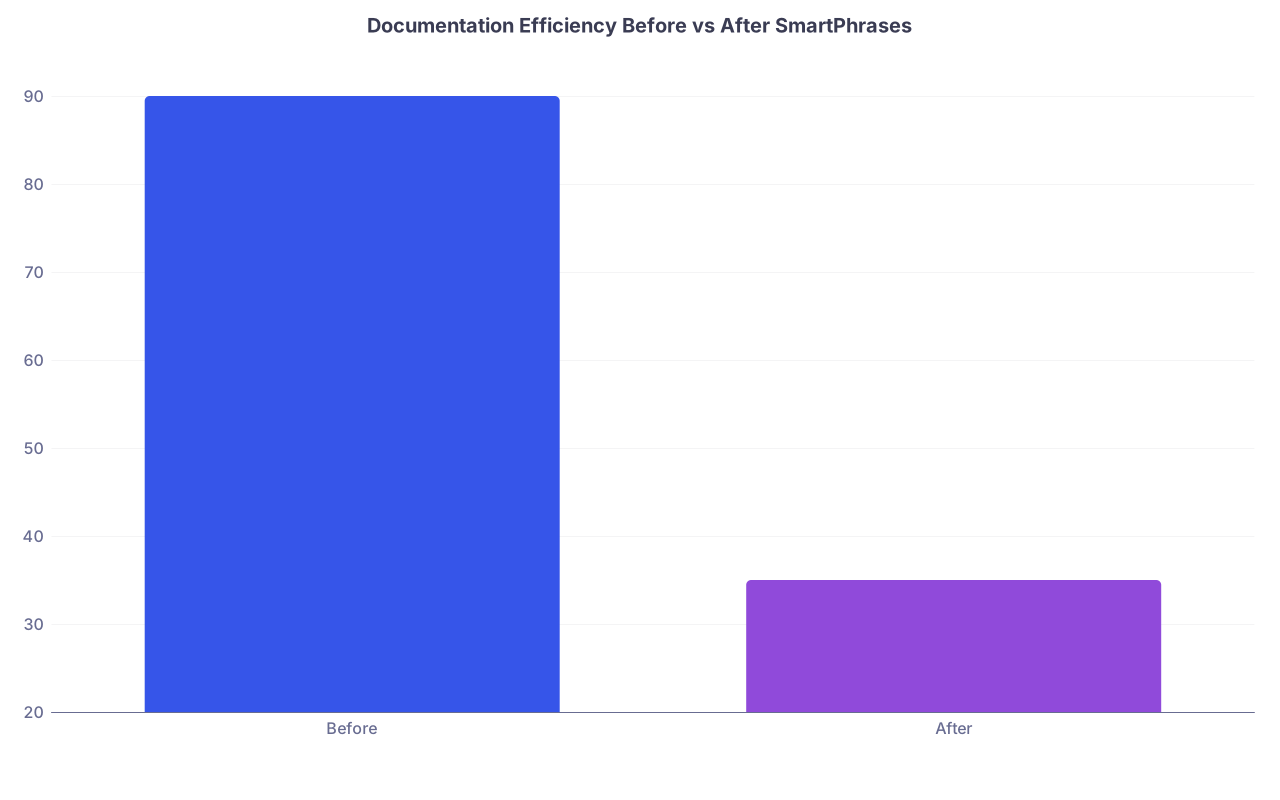
Track three simple metrics for 2–4 weeks before and after building your core SmartPhrases:
- Average time leaving clinic after last patient
- Number of open encounters at the end of each day
- Percent of notes finished same day
Then compare.
| Category | Value |
|---|---|
| Before | 90 |
| After | 35 |
Example: if you cut after‑hours charting time from 90 minutes to 35, that is 55 minutes per day. Over a 5‑day week, that is 4.5 extra hours. Every week.
Over a year, you just freed more than 200 hours. That is not a small upgrade. That is your kid’s soccer game, a regular workout, or just going home on time.
Common Pitfalls (And How to Dodge Them)
Let me be direct about what I see most often.
Macro Bloat
Symptom: You have 60+ phrases; you reliably use 8 of them.
Fix: Hard‑delete anything not used in 30 days. If you miss it, you will rebuild it better.Over‑automation
Symptom: Note looks perfect, but you are not actually thinking about the patient.
Fix: Build prompts into HPI sections that force you to think: “WHY IS THIS DIFFERENT TODAY”.Inconsistent style across phrases
Symptom: Some sections are bullet points, others are paragraphs, tone is scattered.
Fix: Pick a style (short sentences or bullets) and standardize the labeling and headings.Hiding behind templates for hard conversations
Symptom: Pressing “.plan_endoflife” feels easier than actually talking to the patient.
Fix: Use SmartPhrases to document the structure of the conversation, not to replace it.
Putting It All Together: A Simple Workflow for Tomorrow’s Clinic
Here is exactly what you can do in your next clinic session.
Pick one visit type you see multiple times tomorrow (e.g., DM/HTN follow‑ups).
Tonight or early morning, build:
.v_fu– simple follow‑up shell.h_dmhtn– combined diabetes/HTN HPI.p_dm– diabetes plan.p_htn– hypertension plan
During clinic:
- For each applicable patient:
- Insert
.v_fu - Add
.h_dmhtninto HPI - Use
.p_dmand.p_htnunder A/P - Edit all prompts and verify data
- Insert
- For each applicable patient:
After clinic:
- Ask yourself:
- What did I delete every time?
- What did I keep almost unchanged?
- What did I wish was there but was not?
- Ask yourself:
Modify the phrases that evening. You are done in 20–30 minutes. The next day, they are better.
Repeat this across your top 3–4 visit types over the next two weeks. You will feel the time savings within days.
Your Next Action: Build One SmartPhrase Right Now
Do not “plan” to fix your documentation someday. Do it today.
Here is your immediate next step:
- Open your EHR’s SmartPhrase/template editor.
- Create one new phrase: your core follow‑up visit shell.
- Name it something you will remember (for example,
.v_fu). - Add:
- Chief complaint line
- HPI section with 2–3 problem slots
- Meds review line
- ROS summary placeholder
- Physical exam scaffold (or link to existing exam macro)
- Assessment and plan headings with 2–3 bullet spots
- Follow‑up line
Save it.
Tomorrow, use that phrase for every appropriate patient. Time yourself leaving clinic compared with your usual.
Then iterate. That is how you design SmartPhrases that actually save you time, not add more noise to an already overloaded day.