
The EHR at your new job is not “a work in progress.” It’s a liability—and if you are not careful, it becomes your liability.
You have about 30 days to stop the bleed. Not fix everything. Just keep this mess from taking you down with it.
Here is a hard-nosed, practical 30‑day damage‑control plan for when you walk into a new attending job and realize the EHR is clunky, unsafe, or just flat‑out hostile to actual clinical work.
Step 0: Reality Check Before You Panic
You’re not crazy. If the EHR feels dangerous, it probably is.
Common scenarios I see all the time:
- Med‑surg floor using a Frankenstein EHR: meds in one module, labs in another, no unified patient summary.
- Outpatient clinic where refills, results, and messages are all in different queues with no ownership rules.
- Surgical group where post‑op orders live in “templates” that haven’t been updated in 6 years.
- ED using half‑built order sets that default to wrong doses or unnecessary imaging.
The mistake new attendings make is trying to “work harder” and personally compensate for all of it. That’s how you end up charting until midnight and still missing stuff.
Your goal in the first 30 days is not to reform the system. Your goal is:
- Protect patients from obvious, repeatable EHR‑driven harm.
- Protect yourself from blame when the system fails.
- Build enough credibility that, later, you can push for real fixes.
Days 1–3: Reconnaissance Mode, Not Hero Mode
Do not start by “fixing” anything. Start by mapping where the landmines are.
1. Ask These Questions Out Loud
Pull aside a trusted‑looking colleague and be blunt:
- “Where does this EHR actively screw people?”
- “What are the top 3 ways people get burned by this system?”
- “What do you double‑check manually because you don’t trust the software?”
- “How do you make sure nothing gets lost—results, messages, refills?”
Then ask the nurses/MA/front desk equivalents the same thing. Their list will be different. That’s good.
You’re looking for patterns. If three people say, “The refill queue is a mess—stuff sits there for weeks,” you have an early red flag: medication safety and patient expectations.
2. Trace a Single Patient End‑to‑End
Do this once or twice in your first few shifts/clinic days.
Literally:
- New patient → registration → scheduling → visit note → orders → follow‑up → messages → billing.
Click through each step with a real chart (on your own time, de‑identified in your head) and ask:
- Where are there multiple places the same data lives?
- Where can something silently “drop out” of the workflow (e.g., a lab result that doesn’t trigger a task)?
- Where is it unclear who is responsible next?
Note the points that feel like “black boxes”—where something goes in and you just hope it comes out right. Those are the danger zones.
Days 3–7: Build Your Personal Safety Net
You will not make the EHR good in a week. You can make yourself less dependent on it being good.
1. Create a “Do Not Trust” List
Anything that is:
- Frequently wrong
- Frequently missing
- Or silently changes without clear documentation
…goes on your mental “do not trust” list.
Typical examples:
- Medication histories imported from outside systems
- Problem lists that are junky, outdated, or used as “note graveyards”
- Auto‑populated ROS or physical exam blocks from templates
- Home med lists that clearly no one has reconciled in years
For these, you build your own manual habits:
- Always confirm home meds with the patient or pharmacy, not just the EHR.
- Build a short, accurate problem list in your note itself if the main one is chaos.
- Avoid relying on auto‑imported text as “evidence” you actually did something.
2. Build Simple, Tactical Checklists (On Paper if Needed)
Complex EHR, simple backup.
Make 2–3 fast checklists you keep on a notecard or OneNote:
- For inpatient:
- New admission: allergies confirmed, home meds verified, DVT prophylaxis, code status, key consults ordered.
- Daily: result review (labs/imaging), pending consults, discharge readiness criteria.
- For outpatient:
- End‑of‑visit: meds reconciled, follow‑up interval set, pending tests ordered, key problems addressed.
- End‑of‑day: messages checked, results inbox reviewed, refills processed or deferred with plan.
This is not airline‑level complexity. You want 6–10 line items max.
The EHR may have tools for this (in‑basket rules, task lists), but initially, assume it doesn’t. The physical checklist is your backup until you’re confident nothing is falling through cracks.
3. Turn Off As Much Noise as You Can
Bad EHRs often drown you in alerts about nonsense while hiding the important stuff.
In your first week:
- Ask IT or superusers to help you:
- Turn off irrelevant alerts (e.g., duplicative drug–allergy warnings that fire for saline).
- Filter your inbox so you don’t receive items you’re not supposed to act on.
- Ask colleagues:
- “Which alerts do you actually pay attention to?”
- “Which ones did everyone just give up on?”
You’re aiming to reduce background alert fatigue so you can actually see the critical warning when it pops.
Days 7–14: Lock Down High‑Risk Areas
Now you’ve survived the first week. You’ve seen a few things you didn’t like. Time to actively protect the highest‑risk parts of your practice.
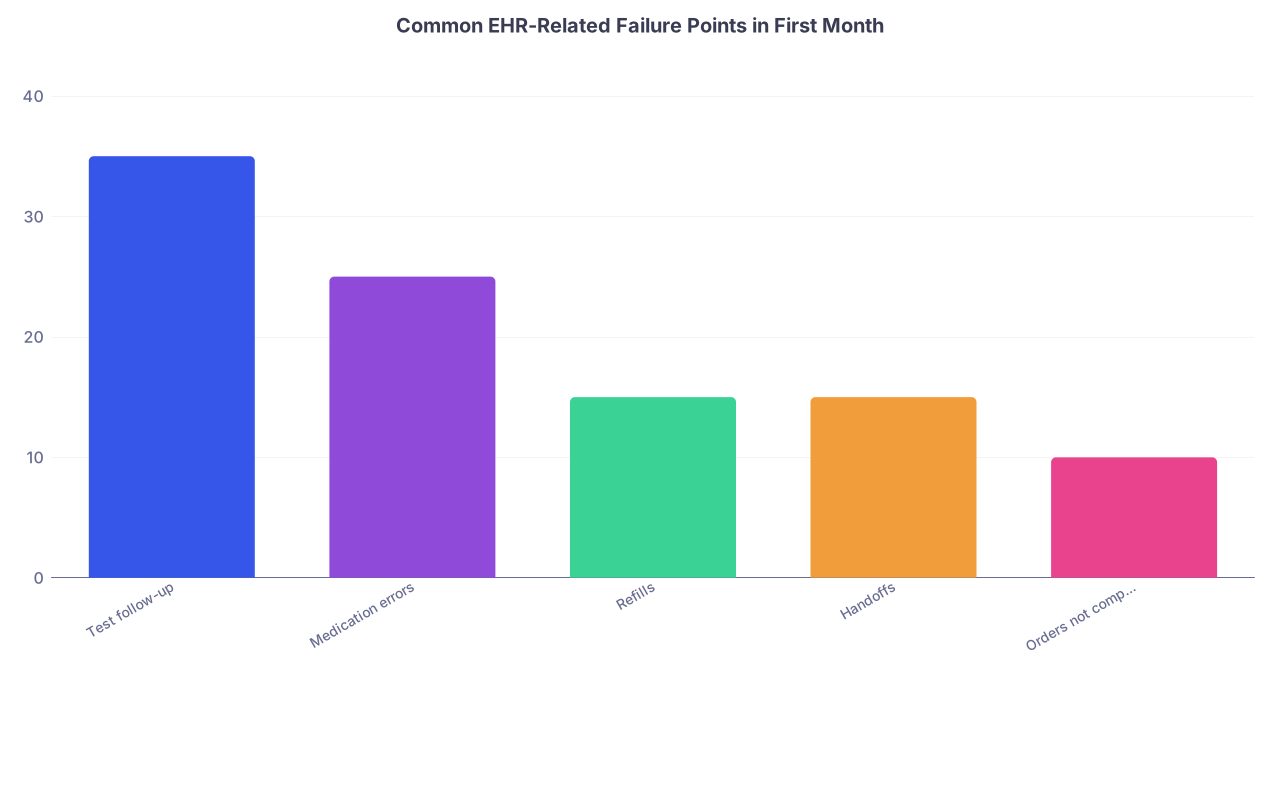
| Category | Value |
|---|---|
| Test follow-up | 35 |
| Medication errors | 25 |
| Refills | 15 |
| Handoffs | 15 |
| Orders not completed | 10 |
1. Test Results and Follow‑Up: Your Biggest Legal Risk
Lost or ignored results are where attendings get sued. Not clunky interfaces.
You need a personal, redundant system for:
- Labs
- Imaging
- Biopsies/procedures
Concrete moves:
- Learn exactly:
- Where results land (which queue, which tab).
- How they get routed (to you vs “pool” vs PCP).
- Decide your habit:
- Inpatient: daily result review for your patients, at a fixed time.
- Outpatient: review all new results once or twice per day, no exceptions on clinic days.
Then add backup:
- For any critical test (e.g., CT r/o PE, biopsy, echo for new cardiomyopathy):
- Add a dated to‑do in your own system (Outlook task, paper list, whatever works) when you order it.
- Cross it off only when you’ve seen the result and documented a plan.
Yes, the EHR “should” handle this. Many do not.
2. Medication Safety: Don’t Trust Templates Blindly
Common EHR screwups around meds:
- Old order sets with bad doses.
- Duplicate meds when hospital vs home lists are merged badly.
- Auto‑resumed meds after surgery or ICU stays when they should be re‑evaluated.
Damage control:
- Identify one or two colleagues who seem safe and ask:
- “Which order sets are safe to use?”
- “Which ones do you avoid?”
- For high‑risk meds (insulin, anticoagulants, opioids, chemo, narrow‑therapeutic drugs):
- Double‑check doses manually—don’t trust defaults.
- Document your reasoning in plain language in the note if there’s any deviation.
If the EHR is especially bad, you might use fewer order sets early on and build orders from scratch for critical things until you know which sets are safe.
3. Inbox Management: Stop the Backlog Before It Starts
A bad EHR plus a chaotic inbox is how attendings end up with 1,200 unread messages and “patient not called about critical result” in a chart review.
In your second week:
- Ask:
- “What’s the realistic expectation for inbox turnaround here?”
- “What’s considered acceptable by risk management?”
- Negotiate:
- Clarify what staff can handle (routine refills, routing non‑clinical messages, scheduling).
- Make your expectations explicit: “All messages with symptom concern → route to me or triage nurse, not left in pool.”
Set non‑negotiable personal rules:
- You clear your critical categories (results, clinical messages) daily on days you’re working.
- If you’re off for several days, set coverage rules so someone is looking.
You’re not trying to be perfect. You’re trying to avoid the big, visible, documentable failures.
Days 14–21: Handoffs, Documentation, and Covering Your Back
At this point, you’ve seen enough to know where the system is weak. Now you need documentation and handoff habits that don’t rely on it magically improving.
1. Handoffs: Do Not Rely on the EHR Alone
If the EHR has a “handoff tool,” odds are it’s partial at best.
Your goal: if something bad happens, anyone reading your notes and handoff can see you did your part.
For inpatient:
- When handing off:
- Use a standard format (even if informal): identification, active problems, what you’re worried about, what absolutely must happen next.
- Put critical contingencies directly in the note or handoff: “If BP > X, start Y,” “If lactate rising, call ICU early.”
- Don’t assume:
- That the off‑going team will find the one cryptic comment buried in the “plan” section you dictated at 1 a.m.
For outpatient:
- Transition to another provider (covering physician, transferred care, etc.):
- Put a short, clear “handoff summary” note, even if the EHR doesn’t have a formal field.
- Highlight unresolved open items: pending tests, referrals, medication questions.
2. Document Intelligently, Not Just to Bill
In EHR hell, people either over‑document (pages of garbage) or under‑document (“see prior notes”).
You want your notes to:
- Show your reasoning.
- Show your awareness of system limitations.
- Show you took reasonable steps to mitigate risk.
Examples of strong language:
- “Medication list in EHR inconsistent with patient report; reconciled per patient, pharmacy contacted for confirmation.”
- “Multiple historical problem list entries removed as inactive; current active problems summarized above.”
- “Ordered X test, will follow result and contact patient with plan; patient aware to call if not contacted within Y days.”
You are quietly building a record that, if this EHR burns you, at least it will be very clear you didn’t just click through blindly.
3. Start a Quiet “Issues” File
This is not for venting. This is for protecting yourself and, later, making a case for improvements.
Keep a simple running log (personal, de‑identified where possible):
- Date
- What happened
- EHR component involved (ordering, meds, inbox, billing, etc.)
- Patient impact (none, near miss, minor harm, severe harm)
- Whether it was reported internally (ticket, safety report, email)
Something like:
- “7/10 – CT PE order set defaults to full dose Lovenox despite patient on DOAC. Almost double‑anticoagulated. Near miss. Told IT, ticket #12345.”
This does two things:
- Reminds you where the true danger zones are.
- Gives you evidence if later someone asks, “Why didn’t you say anything?”
Days 21–30: Engage Just Enough With the System
By now you’ve stabilized your personal workflow. You’re not drowning quite as much. Time to selectively engage the larger system without wasting your life in meetings.

| Step | Description |
|---|---|
| Step 1 | Arrive at New Job |
| Step 2 | Recon Days 1-3 |
| Step 3 | Build Safety Nets Days 3-7 |
| Step 4 | Lock Down High Risk Days 7-14 |
| Step 5 | Handoffs and Docs Days 14-21 |
| Step 6 | Targeted Engagement Days 21-30 |
| Step 7 | Decide Long Term Strategy |
1. Identify One or Two EHR Allies
You do NOT need to join the EHR optimization committee and spend 10 hours a month in purgatory.
You do need:
- One clinician “superuser” who:
- Knows where the buttons are.
- Has some influence on build/changes.
- One IT or informatics person who:
- Can actually submit/track tickets.
- Knows what’s realistic in this environment.
Schedule 20 minutes with each. Be specific:
- “These are the 3 biggest safety risks I keep running into.”
- “These are 2 workflow changes that would save hours a week and reduce errors.”
- “What’s the fastest path to actually getting small changes approved here?”
Come with examples, not a rant. People tune out vague “this EHR sucks” energy.
2. Submit 1–3 High‑Yield Change Requests
You’re not redesigning Epic or Cerner in your first month. You’re aiming for small, surgical wins:
Good candidates:
- Fixing an order set with a wrong default.
- Adding a frequently used lab/imaging bundle that reduces clicks and avoids missed items.
- Adjusting a routing rule so critical messages go to a real person, not a dead pool.
When you submit:
- Attach specific chart examples (with MRNs via secure internal channels).
- Describe actual or potential patient harm.
- Suggest a concrete fix, not just “please improve.”
Then track it. Politely follow up once or twice. Demonstrate that you’re the kind of attending who notices real problems and pushes for rational solutions—not just noise.
3. Decide Your Longer‑Term Strategy Honestly
By day 30, you’ll have a decent sense of whether:
- This EHR is terrible but survivable.
- Or it’s truly unsafe and no one cares.
Ask yourself:
- Can I safely practice here with the workarounds I’ve put in?
- How much of my burnout is EHR‑related vs everything else?
- Are leadership and IT responsive in any meaningful way?
If the honest answer is:
- “I can work with this. It’s ugly, but at least people are trying to improve it.” → Stay, keep your personal systems, and maybe slowly get involved in optimization.
- “Nobody here cares about safety implications, they just push volume and clicks.” → Start quietly planning your exit in the background.
You do not need to martyr yourself fixing an institution that likes its dysfunction.
Quick Comparison: Surviving vs. Fixing a Bad EHR
| Focus Area | Survival Tactic (First 30 Days) | System-Fix Tactic (After 30+ Days) |
|---|---|---|
| Test Follow-Up | Manual log and daily result review | Request automatic tracking/alerts |
| Med Safety | Avoid risky order sets, double-check meds | Update and standardize order sets |
| Inbox Management | Daily clearing rules, clear delegation | Redesign routing rules, add protocols |
| Handoffs | Clear manual handoff notes | Improve or build structured handoff tool |
| Documentation | Focus on reasoning and contingencies | Advocate for better templates/macros |
How to Stay Sane While You Do All This
A messy EHR is not just a tech problem. It’s a cognitive load problem.
A few sanity moves:
- Limit your “EHR learning time.”
- 1–2 focused hours per week to explore better shortcuts, macros, and workflows.
- Outside that, just use what you know works safely.
- Lean on colleagues for micro‑tips.
- “What’s the easiest way you do X?” is better than watching generic training videos.
- Refuse to internalize systemic failure as personal incompetence.
- If everyone struggles with the same thing, it’s not you.
And very practically: sleep. The worse the EHR, the more your memory and attention have to compensate. You cannot brute force this with caffeine forever.
If You’re Already in Trouble
If the EHR has already burned you (missed result, medication error, bad documentation), don’t just duck and hope it blows over.
Minimum steps:
- Document your corrective actions clearly.
- File an internal safety report if appropriate.
- Quietly log it in your personal issues file.
- If you’re being blamed individually for a clear system failure, consider talking to risk management or a trusted senior colleague who’s not afraid of administration.
You’re not trying to start a war. You’re making sure you do not become the scapegoat for a known, documented system problem.
Bottom Line: First 30 Days Are About Containment, Not Perfection
Distill this down:
- Map the landmines fast. In the first week, figure out exactly where this EHR creates risk—results, meds, inbox, handoffs.
- Build your own safety scaffolding. Checklists, manual logs for critical tests, daily result review, tight documentation that shows your reasoning and awareness.
- Engage selectively. Find one or two allies, fix 1–3 high‑yield issues, and then decide: is this a place you can safely practice, or is this a stepping stone?
You can’t fix a broken EHR in 30 days. You can absolutely keep it from taking you down with it.