
You just got the calendar invite: “Annual Performance Review – 60 minutes.” Your stomach drops a little. You know you work hard, patients like you, your outcomes are fine. But your hospital runs on the EHR now, and you have no idea what data your boss is actually looking at behind that dashboard.
Here’s the answer you’re looking for: not every EHR metric matters. A few specific ones quietly drive your contract renewals, bonus payouts, and whether leadership sees you as “high-performing” or “a problem.” You need to know which numbers those are, how they’re calculated, and where you actually have leverage.
Let’s walk through the ones that usually count.
1. The Core EHR Metrics Admins Actually Use
Most organizations pull from the same bucket of metrics the EHR vendors push by default. Out of the mess, these are the ones that realistically show up in performance conversations:
| Metric Category | Likely Impact Level |
|---|---|
| Productivity/RVU | Very High |
| Panel/Access Metrics | High |
| Documentation Timeliness | High |
| In-basket Management | Moderate–High |
| Quality/Compliance | High |
| EHR Efficiency Scores | Moderate |
If your hospital uses Epic, they’re probably pulling from Signal, SlicerDicer, and a bunch of canned “Provider Performance” reports. Cerner, Allscripts, athena – same concept, different names.
Broadly, the “review conversation” boils down to:
- Are you generating enough work (volume/RVUs)?
- Are you closing the loop on care (docs, orders, inbox)?
- Are you hitting quality and compliance targets?
- Are you using the damn system without breaking it?
Let’s break that down into actual, concrete metrics.
2. Productivity Metrics: RVUs and Throughput
Like it or not, these are the kings of modern performance reviews, especially post-residency.
a. RVUs (or Equivalent Productivity Measures)
Even in salaried settings, leadership tracks RVUs. They tell a blunt story: how much billable work you’re generating.
What they look at:
- Total RVUs per month/quarter
- RVUs per clinical FTE (if you’re part-time)
- RVUs per visit or per case (efficiency)
If you’re in a system that uses the EHR scheduling and billing end-to-end, these numbers come straight from your encounter documentation, orders, and charge capture.
Watch for:
- Big discrepancies between “scheduled volume” and “billed RVUs”
- Frequent down-coding or missing charges (often shows up as “lost RVUs” reports)
- RVUs far below group median without a documented reason (admin role, heavy teaching, complex panel mix)
Where you actually have control:
- Making sure all billable work is documented and closed
- Avoiding “no charge” visits that should have been billed
- Using correct visit types (not everything is a level 3 out of habit)
b. Throughput and Template Utilization
For ambulatory:
- “Slots filled” vs “slots available”
- Average visits per session
- No-show and late-cancellation rates
For inpatient:
- Daily census vs expected
- Discharge order timing
These live in the EHR scheduling and ADT systems. They may not say “you saw 20 vs 18 patients,” they’ll say “template utilization 93% vs group target 85%.”
If your numbers are low but you’re actually working hard (complex patients, long visits), document that explicitly. Admins do not magically infer complexity; they see slot counts.
3. Documentation Timeliness and Completion
This is the one that quietly burns people.
a. Note Completion Time
Most systems track:
- Percentage of notes signed within 24 hours
- Outliers: notes older than X days
- Average time from encounter to signed note
This matters for:
- Billing (you can’t bill what isn’t signed)
- Compliance and audits
- Handoffs and continuity of care
If you’re the person routinely with 60 unsigned notes, you’re on someone’s list, even if nobody has said it yet.
A realistic target:
90% of outpatient notes signed within 24–48 hours
- Inpatient daily notes signed by end of day
- Discharge summaries within 24–48 hours of discharge
b. Incomplete Documentation and Queries
Coding/quality teams use the EHR to track:
- Number of documentation queries sent to you
- Time to respond to those queries
- Percentage closed without response
High query volume plus slow response times is a red flag. Not because they hate you personally, but because it ties to reimbursement and risk adjustment.
Fixable by:
- Responding to queries at a set time daily (even 10–15 minutes helps)
- Learning the 5–10 chronic conditions and phrases that coders really care about (e.g., “acute on chronic systolic heart failure,” not just “CHF”)
4. In-basket and Message Management
Your inbox behavior is more visible than you think.
Most organizations track:
- Average message response time
- Volume of patient messages
- Number of overdue or unread messages
- Percentage handled by you vs pooled team
Here’s a typical pattern from Epic or similar:
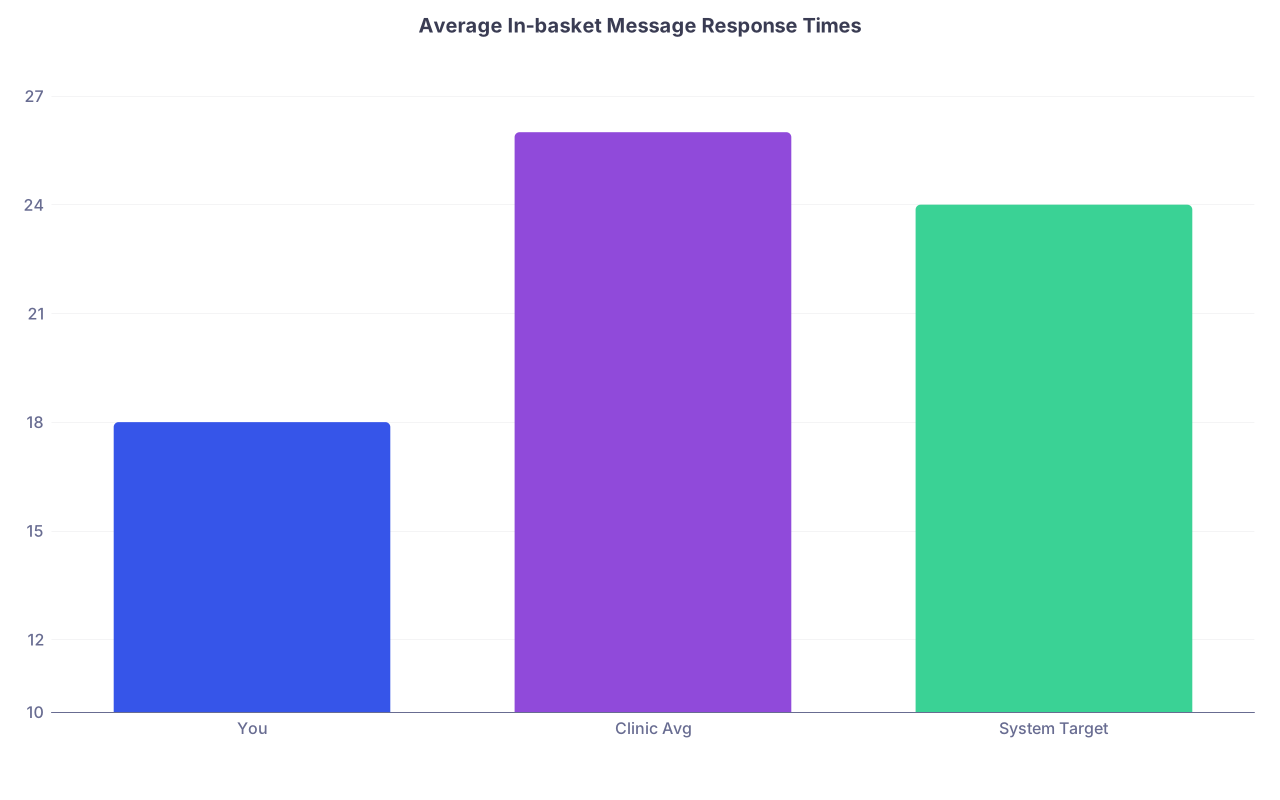
| Category | Value |
|---|---|
| You | 18 |
| Clinic Avg | 26 |
| System Target | 24 |
If “You” is at 48 hours while the clinic average is 22, this will show up in your review. It also directly connects to patient satisfaction scores and complaint routes.
What actually matters:
- Chronic backlog (e.g., always have >50 undread patient messages)
- Time to respond to critical buckets (results, refill requests, urgent clinical questions)
- Patterns of messages being “forwarded on” without resolution
You don’t win an award for being the fastest replying robot. You do get flagged if your inbox looks like a hoarder’s garage.
Where to focus:
- Clear a specific category daily (e.g., labs first, then refills)
- Use team pools and protocols if your system has them
- Stop turning every message into a visit if a 2-line response would do, and vice versa
5. Quality, Compliance, and “Care Gaps”
This is where the EHR becomes your report card for “good doctoring,” at least on paper.
Common metrics:
- Percentage of eligible patients with:
- A1c checked in last 6 months
- BP controlled (under a certain threshold)
- Statin use for high-risk patients
- Cancer screenings up to date
- Vaccine completion rates
- Chronic disease registry metrics (HF, COPD, CKD)
Most orgs track these by provider panel using EHR registries and “gap in care” dashboards. Then they tie pieces of your bonus to hitting targets.
For example:
| Measure | Target Rate |
|---|---|
| A1c checked in 6 months | ≥ 85% |
| BP controlled in HTN pts | ≥ 75% |
| Statin in ASCVD | ≥ 80% |
| Colon cancer screening | ≥ 70% |
You don’t control everything here. Patients refuse tests; they no-show; data from outside systems is missing. But your performance review usually does not drill into that level of nuance unless you bring it.
How to not get crushed by this:
- Know exactly which 3–5 quality measures are on your bonus grid
- Learn how your EHR shows “care gaps” during the visit (health maintenance flags, BPA pop-ups, registry icons)
- Use pre-visit planning or team-based workflows to close easy gaps (vaccines, labs, screenings) before the patient leaves
If you crush RVUs and totally ignore these, that’s now a problem in most large systems.
6. EHR “Efficiency” Metrics: Time in System, Pajama Time, Clicks
These get talked about a lot. They matter, but not the way people think.
Typical EHR efficiency data includes:
- Time in chart per encounter
- Total time in system per day
- After-hours EHR time (“pajama time”)
- Percentage of notes using templates or smart tools
- Number of clicks per order set / visit
Here’s a very common pattern admins like to look at:
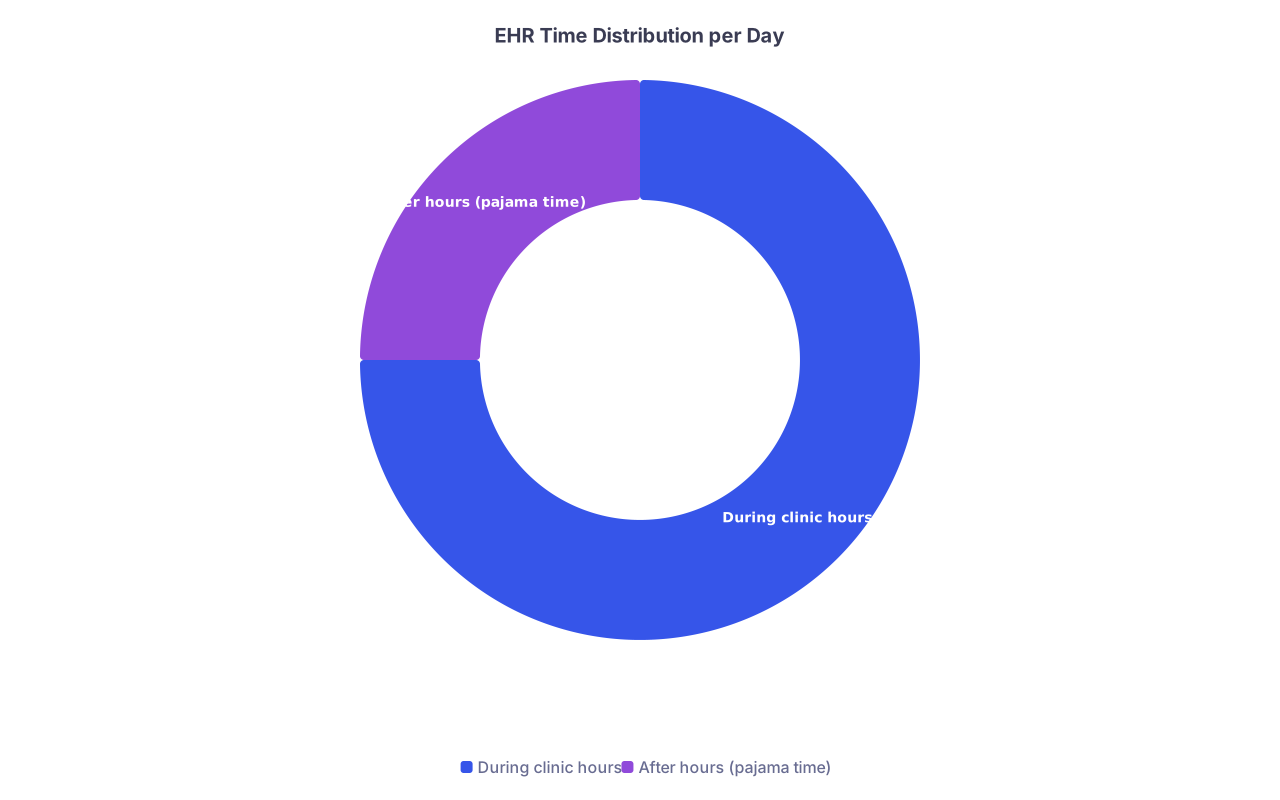
| Category | Value |
|---|---|
| During clinic hours | 75 |
| After hours (pajama time) | 25 |
What leaders actually use this for:
- Identifying clinicians who may be at risk for burnout (high after-hours time)
- Justifying investments in scribes, in-basket support, or better training
- Comparing “super-users” vs struggling users
What they generally do NOT do (yet):
- Fire someone because they spend 5 more minutes per chart
- Micromanage your every click
Where it can hurt you:
- If your metrics clearly show you’re not using the tools available (auto-texts, order sets, routing pools) and you’re also behind on notes, slow on messages, and missing quality targets. Then it becomes part of a “you’re resisting the system” narrative.
Where it can help you:
- You can walk into your review and say:
- “I’m consistently in the top quartile for RVUs and patient satisfaction, but my after-hours EHR time is high. I need scribe support or protected admin time.”
- “My in-basket time is spent mostly on prescription refills that could be protocolled. Here’s the data.”
Use these numbers as leverage, not as a guilt trip.
7. Safety and Compliance Metrics: The Quiet Tripwires
Nobody advertises these, but they’re absolutely in the background.
Commonly tracked from the EHR:
- Number of unsigned verbal/telephone orders
- Medication reconciliation completion rates
- Use of restricted orders (e.g., high-risk meds) without appropriate documentation
- “Workarounds” that break policy (copy/paste misuse, inappropriate sharing of logins, bypassing allergy checks)
You won’t see this nicely summarized in a pretty dashboard. You’ll see it when something goes wrong and risk management pulls an audit.
Basic rule: if the EHR clearly flags something as a safety step and you keep bypassing it, assume it’s recorded somewhere.
8. How to Prioritize: What to Actually Watch and Fix
You don’t need to obsess over every metric. Focus on the ones that reliably show up in contracts, bonus plans, and “concern” emails.
If I had to stack-rank what to care about for a typical employed doc:
- RVUs / workload vs expectations
- Documentation timeliness (notes and discharge summaries)
- In-basket backlog and message response times
- Quality metrics tied to your bonus
- Obvious safety/compliance issues
- EHR efficiency only as it impacts the first five
Quick personal checklist before review season:
- Am I consistently in range for RVUs for my FTE?
- Are my unsigned notes under control (ideally single digits)?
- Is my inbox at a “normal” level compared to colleagues?
- Do I know my key quality scores, and are any way off target?
- Do I have EHR data that supports requests I want to make? (scribe, MA support, different template, schedule changes)
If any of those are weak, that’s where to spend effort—not on shaving 10 clicks off a workflow nobody cares about.
9. Using EHR Data to Your Advantage in Reviews
Most clinicians walk into reviews defensive. Flip that.
Before your review:
- Ask for your EHR performance reports or dashboards
- Identify:
- 1–2 strengths you want to highlight (e.g., throughput, quality scores, fast inbox turnaround)
- 1–2 pain points you want resources for (e.g., high after-hours time, complex paneI dragging down quality metrics)
- Prepare concrete examples: “My A1c control rate looks low, but my panel has 30% uninsured and limited access. Here’s what I’m doing to improve it, and here’s where I need support.”
You look much better saying, “I’ve looked at my numbers; here’s my plan,” than just acting surprised by a graph.
Key Takeaways
- A small set of EHR metrics actually drive your performance review: RVUs, documentation timeliness, in-basket behavior, and a handful of quality/compliance measures. The rest is mostly noise unless it’s extreme.
- Your goal isn’t to game the system; it’s to understand what story your data tells and fix the parts that create real problems—backlogged notes, lagging quality scores, or visibly overloaded inboxes.
- Use the EHR metrics proactively: know your numbers, come to your review with a narrative and specific asks, and turn the data from a weapon pointed at you into a tool you control.