
The biggest reason new private practices bleed cash in year one isn’t lack of patients. It’s missed deadlines six months before go‑live.
At this point on your timeline—T‑6 months—you’re not “getting ready.” You’re already late if you treat this like vague planning. Credentialing clocks, vendor lead times, and hiring windows don’t care that you’re exhausted after residency. They just keep ticking.
Here’s how to run the six‑month mark like a project manager, not a bystander.
At Six Months Before Go‑Live: Lock the Big Dates and Start the Clocks
At T‑6 months, you should already know (or decide this week):
- Your target go‑live date (first day seeing patients, even if soft opening)
- Your practice address (or at least final LOI/lease in legal review)
- Your legal entity formed (LLC/PC, tax ID in hand)
- Your EHR/billing model (in‑house vs outsourced RCM)
If any of those are missing, your first job this week is to stop everything and lock them. Every credentialing, hiring, and vendor timeline flows from these.
Week 1–2 (Month ‑6): Build the Master Timeline
At this point, you should:
Create a master launch calendar
- Start from go‑live date and work backwards.
- Mark:
- Payer panels you must be on by day one
- EHR go‑live date
- Phone number activation
- Staff start dates
- Furniture/equipment delivery
- Use something visual—Gantt chart, shared Google calendar, Trello, whatever you’ll actually look at.
Decide your credentialing strategy
- DIY (you or a manager)
- Credentialing service
- Billing company that includes credentialing
- Hybrid (service for big payers; you handle the rest)
List all deadlines that can kill you
- Payers that only accept new panel applications certain months
- Hospital medical staff office meeting dates for privileges
- State licensing board meeting cycles (if relevant for facility/clinic licenses)
- EHR implementation minimum lead times
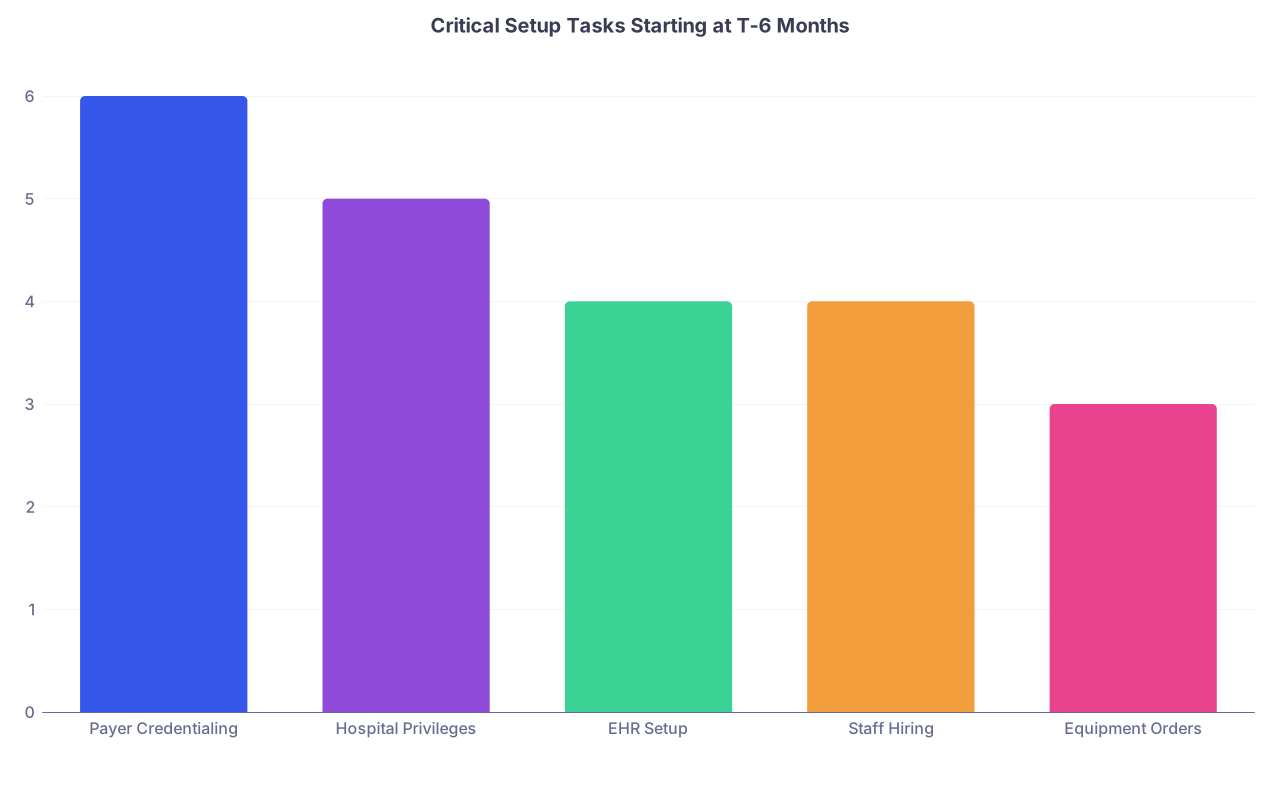
| Category | Value |
|---|---|
| Payer Credentialing | 6 |
| Hospital Privileges | 5 |
| EHR Setup | 4 |
| Staff Hiring | 4 |
| Equipment Orders | 3 |
Interpretation is simple: anything starting at 4–6 months out isn’t “optional early.” It’s required.
Month ‑6: Credentialing Foundations and Key Applications
If credentialing isn’t underway by six months out, you’re gambling with your first 60–120 days of revenue. I’ve watched brand‑new practices “open” but not get paid for three months because they were out‑of‑network with 70% of their patients.
Weeks 1–2: Clean Up Your Identity Data
At this point you should:
Verify your professional identity details match everywhere:
- Legal name (including middle initial vs no middle initial)
- NPI 1 (individual) and NPI 2 (organization)
- SSN and DOB
- Practice name and DBA
- Tax ID (EIN)
- Physical address and billing address
Update NPPES with:
- Correct practice address
- Phone/fax
- Provider taxonomy
- Organization NPI if applicable
-
- Complete every section—no blanks “to be filled later”
- Upload:
- License(s)
- DEA
- Board certification or eligibility letter
- Malpractice certificates
- CV with exact month/year dates and no gaps
- Authorize specific payers to access your CAQH file
- Calendar a reminder to re‑attest every 90 days
If your CAQH is half‑finished or inconsistent, payers will sit on your file. Or worse, pend it quietly.
Weeks 2–4: Start Payer Credentialing (Not “Research”, Actual Submissions)
At this point you should:
Identify your must‑have payers
- Look at local market:
- Top 3 commercial plans (often BCBS, Aetna, United, Cigna, regional)
- Medicare
- Medicaid (if you plan to take it)
- Major employer‑based plans in your area
- Look at local market:
Check panel status and timelines
- Call or check provider portals for:
- “Panels closed” vs “accepting new providers”
- Average credentialing time (believe 90–120 days, not the optimistic 45 they sometimes quote)
- Special documentation for independent practices
- Call or check provider portals for:
Submit these first (week 3–4 at latest):
- Medicare enrollment (PECOS)
- Medicaid enrollment (if applicable)
- Dominant commercial payer in your geography
- Any payers that your big referral sources rely on
You’re not too early at six months. With Medicare, 90–120 days is common if nothing gets kicked back. Something will get kicked back.
| Payer Type | Typical Range (Days) | Risk if Started After T‑4 Months |
|---|---|---|
| Medicare | 90–120 | Not enrolled by go‑live |
| Medicaid | 90–150 | 1–3 months of unpaid visits |
| Major commercial | 60–120 | Delayed contracting, OON status |
| Smaller regional | 60–90 | Manageable if late |
| Hospital privileges | 60–120 | No admits or procedures |
Month ‑5: Hospital Privileges, Remaining Payers, and HR Groundwork
By five months out, your first credentialing packets should be submitted. Now you layer in hospital privileges, remaining payers, and the start of hiring.
Weeks 1–2: Hospital Medical Staff and Facility-Related Items
At this point you should:
Start hospital medical staff applications if you plan:
- Admissions
- Procedures
- Call coverage
- ED consults
Collect:
- 3–5 professional references with emails and phone numbers
- Case logs (for procedural specialties)
- Board certification documentation
- Training verification (residency/fellowship)
Confirm:
- Medical staff committee meeting dates
- Deadlines for having your file “complete” to make the next meeting
Missing one committee meeting can push you back 4–8 weeks. That can kill a new surgical or OB practice.
Weeks 2–4: Finish Payer Applications and Decide on Out‑of‑Network Strategy
At this point you should:
Submit all remaining payer applications
- Second‑tier commercial plans
- Workers’ comp if relevant
- TRICARE if your market has a lot of military families
Document your OON policy for early months
- Which payers you’ll wait on before scheduling?
- Will you:
- Discount cash‑pay while credentialing is pending?
- Hold claims and submit retroactively (when contract allows)?
- Require signed acknowledgment from patients about your status?
Get this in writing. Front desk staff will be the ones explaining it. They need a script, not vibes.
Month ‑4: Hiring Core Staff and Nailing Down Vendors
Four months out is where practices either build a competent team—or panic hire two weeks before opening and regret it for two years.
Weeks 1–2: Finalize Vendor Selections
At this point you should have decided and contracted (or be negotiating final terms) with:
- EHR/PM system
- Billing/RCM arrangement (in‑house or outsourced)
- Phone system (VOIP vs local)
- Clearinghouse (if not bundled with EHR)
- Medical waste & sharps
- Lab relationships (in‑house CLIA‑waived vs reference lab)
- Credit card processing & merchant account
- IT support & network/security vendor
Do not treat these as last‑minute purchases. Many have 6–12 week implementation cycles.
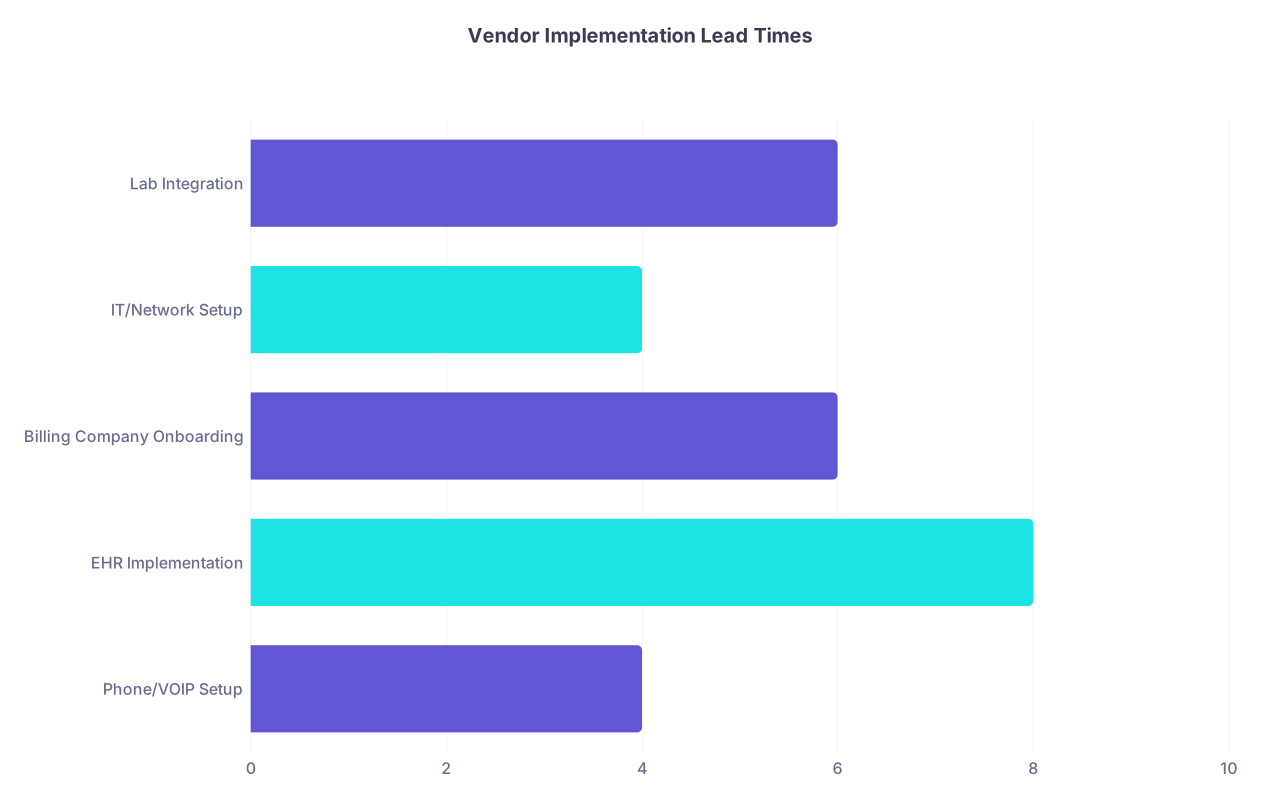
| Category | Value |
|---|---|
| Phone/VOIP Setup | 4 |
| EHR Implementation | 8 |
| Billing Company Onboarding | 6 |
| IT/Network Setup | 4 |
| Lab Integration | 6 |
Weeks 2–4: Define Your Org Chart and Start Recruiting
At this point you should:
Define your minimum day‑one team
- Front desk / Patient access
- Medical assistant or nurse (depending on specialty)
- Biller (internal or outsourced)
- Office/practice manager (often part‑time early on, but someone owns the operations)
Write real job descriptions
- Responsibilities (check‑in, prior auths, phones, referral coordination, etc.)
- Required skills (EHR use, insurance familiarity, bilingual if needed)
- Hours and expected start dates (typically 2–4 weeks before go‑live for training)
Post jobs and start interviews
- Aim to have key hires selected by T‑3 months
- Background checks and references will eat 1–2 weeks easily
Do not wait for your space to be fully built out to start hiring. You can train on workflows and systems long before the paint dries.
Month ‑3: Confirmations, Training Plans, and Chasing Stragglers
Three months out is your checkpoint. Here’s where you find out whether you’re on track—or whether your future self will be working six weeks for free.
Weeks 1–2: Audit Credentialing Status
At this point you should:
Log into every payer portal / call reps
- Confirm:
- Application received
- Any missing documents
- Target completion date
- Document:
- Reference numbers
- Rep name and ID
- Promised timelines
- Confirm:
Fix anything “pending due to…” immediately
- Address mismatches (EIN vs NPI vs W‑9)
- License or DEA copies missing
- CAQH not attested
- Malpractice certificate not current
Decide on hard cutoffs
- For payers not likely to be active by go‑live:
- Will you hold those patients?
- See them as cash‑pay only?
- See them as OON and explain benefits?
- For payers not likely to be active by go‑live:
Weeks 2–4: Finalize Hiring and Schedule Training
At this point you should:
Extend offers to selected candidates
- Front desk / intake
- Clinical support (MA/LPN/RN)
- Office manager
Set start dates:
- Manager: 6–8 weeks before go‑live
- Front desk/clinical staff: 3–4 weeks before go‑live
Build a training plan:
- EHR workflows (templates, orders, messaging)
- Phone scripts
- Registration and insurance capture
- Referral and prior auth processes
- Payment collection and financial policies
You want staff making their first mistakes before a live patient is sitting in front of them.
Month ‑2: Systems, Dry Runs, and Final Vendor Integrations
Two months out is integration season. Pieces that looked fine on paper now need to actually talk to each other.
Weeks 1–2: EHR and Billing System Go‑Live (Internal)
At this point you should:
Have your EHR/PM fully configured
- Provider profiles
- Superbill / charge master built
- Common visit templates set up
- Referral and order workflows defined
Run test claims
- Send test claims through clearinghouse
- Confirm payer connections established
- Verify ERA/835 enrollment for remits and payments
Set up your fee schedule
- Build a simple, consistent fee schedule
- Load it into your PM/billing system
- Decide on prompt‑pay discounts or cash rates (if applicable)
Weeks 2–4: Phone, Scheduling, and Front‑End Workflows
At this point you should:
Activate phone numbers and call flows
- Main line
- After‑hours coverage (service or call group)
- Voicemail routing and backups
Open scheduling (carefully)
- Start booking 4–6 weeks out
- Reserve blocks for:
- Same‑day/urgent visits
- New patients (longer slots)
- Make sure staff understand payer status when booking
Run front‑desk simulations
- Staff practice:
- New patient registration
- Insurance verification
- Collecting copays and balances
- Explaining OON status where relevant
- Staff practice:
This is where you catch the “Oh, we never decided how to handle high‑deductible plans” problem.

Month ‑1: Final Checks, Contingencies, and Go‑Live Readiness
One month out, the die is mostly cast. You’re not starting big new processes. You’re confirming, tightening, and making backup plans where things slipped.
Weeks 1–2: Credentialing Final Review and Contingency Planning
At this point you should:
Re‑confirm payer activation
- Get written confirmation where possible:
- Effective dates
- Network status (participating vs OON)
- Linked tax ID and NPIs
- Get written confirmation where possible:
Map each payer to “ready” or “not ready”
- READY: OK to schedule and bill normally
- NOT READY:
- Decide per payer:
- Hold scheduling until effective date
- Allow visits but as cash‑pay with signed acknowledgment
- See as OON and bill accordingly
- Decide per payer:
Update staff scripts
- Exactly how they explain:
- “We’re in network”
- “We are not yet in network, here’s what that means”
- Deposit or payment expectations for each scenario
- Exactly how they explain:
Weeks 2–4: Staff Dress Rehearsals and Vendor Finalization
At this point you should:
Run a full “mock clinic day”
- Simulate:
- Phone call → schedule appointment
- Insurance verification
- Patient check‑in
- Clinical encounter (you chart in the EHR)
- Check‑out, payment collection
- Claim creation and submission
- Simulate:
Walk the space with operations eyes
- Is there:
- A place for patients to hand in forms?
- A clear path from waiting room to exam rooms?
- Protected workstation space for staff?
- Is there:
Confirm all vendor services live
- Medical waste pick‑up scheduled
- Lab courier arranged and supply stock checked
- IT support on standby for go‑live week
- Credit card terminals tested and merchant account live
If something goes wrong in the dress rehearsal, fix it now. Not at 8:15 a.m. on your first real clinic day.
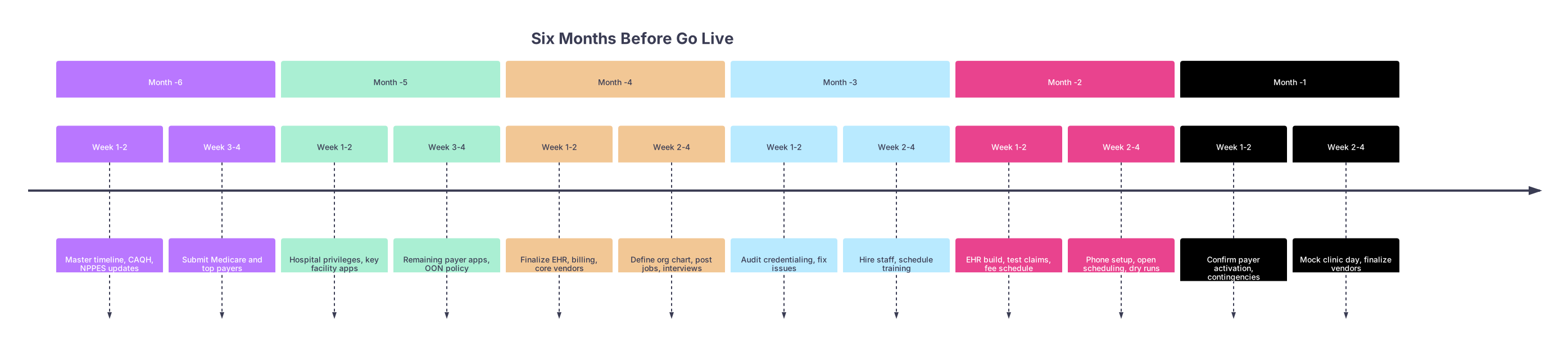
| Period | Event |
|---|---|
| Month -6 - Week 1-2 | Master timeline, CAQH, NPPES updates |
| Month -6 - Week 3-4 | Submit Medicare and top payers |
| Month -5 - Week 1-2 | Hospital privileges, key facility apps |
| Month -5 - Week 3-4 | Remaining payer apps, OON policy |
| Month -4 - Week 1-2 | Finalize EHR, billing, core vendors |
| Month -4 - Week 2-4 | Define org chart, post jobs, interviews |
| Month -3 - Week 1-2 | Audit credentialing, fix issues |
| Month -3 - Week 2-4 | Hire staff, schedule training |
| Month -2 - Week 1-2 | EHR build, test claims, fee schedule |
| Month -2 - Week 2-4 | Phone setup, open scheduling, dry runs |
| Month -1 - Week 1-2 | Confirm payer activation, contingencies |
| Month -1 - Week 2-4 | Mock clinic day, finalize vendors |
Final 2 Weeks: Tighten, Don’t Add
In the last two weeks before go‑live, your mantra is: stabilize, do not expand.
At this point you should:
- Freeze major decisions:
- No new software
- No large last‑minute staff hires unless absolutely unavoidable
- Focus on:
- Patient communication (directions, parking, what to bring)
- Staff readiness and confidence
- Double‑checking that someone owns:
- Daily deposit reconciliation
- Claim submission and rejection workqueues
- Credentialing follow‑ups still in progress

Three Things to Remember
- Credentialing is a six‑month project, not a form you fill out on a Sunday. If it’s not started by T‑6, you’re already behind.
- Vendors and staff need runway. EHR, phones, and your first two hires should be in motion no later than T‑4 months if you want a smooth opening.
- Rehearse before you go live. A mock clinic day one month out will surface more problems than any planning meeting—and that’s exactly the point.