
The last 90 days before opening your private practice will expose every weak system and half-written policy you have. If you treat this phase casually, you will pay for it with chaos, staff turnover, billing disasters, and angry patients.
Let me walk you through exactly what to lock down three months before opening day—month by month, then week by week—so your practice does not implode in the first quarter.
90 Days Before Opening: Lock the Foundations
At this point you should stop “vision boarding” and start operationalizing. Every system needs an owner, a written process, and a test run.
1. Confirm Your Non-Negotiables (Week 12)
By 90 days out, you should:
- Have your legal entity formed and NPI/DEA in process or approved
- Have a signed lease (or finalized contract with a shared space)
- Know your EHR vendor, billing solution, and phone system provider
Now you need to translate big decisions into operational rules.
At this point you should:
- Define your practice model in one sentence:
- “Insurance-based, high-volume general IM”
- “Direct primary care with cap of 600 patients”
- “Cash-pay psychiatry, 60-minute intakes, 30-minute follow-ups”
- Decide your appointment philosophy:
- Double-booked? Never.
- Same-day slots? How many?
- Virtual vs in-person ratio?
Write this into a simple one-page “Clinical Operations Overview.” This becomes the backbone for scheduling rules, staffing, and patient communication.

2. Build Your Core Systems Map (Week 12)
You need a clear picture of every recurrent process in your practice. Not in your head. On paper.
At this point you should map, in simple boxes and arrows:
- New patient journey:
Online search → website → call/online form → scheduling → reminders → intake forms → visit → payment → follow-up - Established patient journey:
Portal login → message/request → triage → scheduling (if needed) → visit → billing → follow-up - Revenue cycle:
Eligibility check → charge entry → claim submission → clearinghouse → denial/acceptance → patient statement → collections - Clinical workday:
Huddle → pre-visit planning → rooming → visit → documentation → orders → close chart
Use this to identify where you need explicit policies and where you need click-by-click workflows.
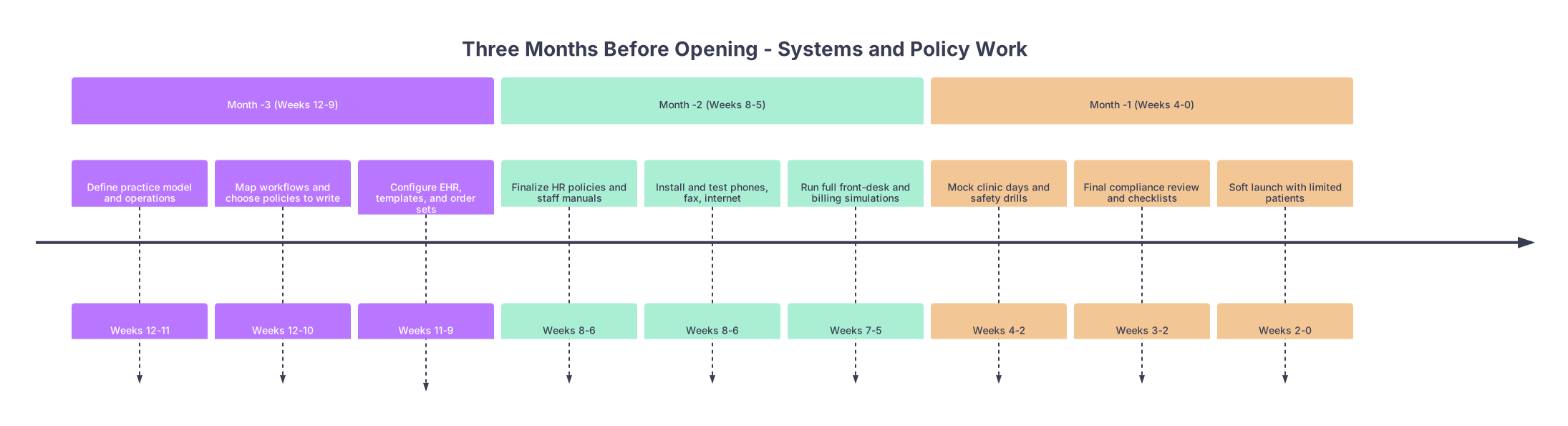
| Period | Event |
|---|---|
| Month -3 (Weeks 12-9) - Define practice model and operations | Weeks 12-11 |
| Month -3 (Weeks 12-9) - Map workflows and choose policies to write | Weeks 12-10 |
| Month -3 (Weeks 12-9) - Configure EHR, templates, and order sets | Weeks 11-9 |
| Month -2 (Weeks 8-5) - Finalize HR policies and staff manuals | Weeks 8-6 |
| Month -2 (Weeks 8-5) - Install and test phones, fax, internet | Weeks 8-6 |
| Month -2 (Weeks 8-5) - Run full front-desk and billing simulations | Weeks 7-5 |
| Month -1 (Weeks 4-0) - Mock clinic days and safety drills | Weeks 4-2 |
| Month -1 (Weeks 4-0) - Final compliance review and checklists | Weeks 3-2 |
| Month -1 (Weeks 4-0) - Soft launch with limited patients | Weeks 2-0 |
60–90 Days Before Opening: Configure and Codify
This month is about taking abstract “we’ll do X” and turning it into real behavior in your EHR, phone system, and staff playbook.
3. EHR and Clinical Workflow Setup (Weeks 11–9)
By 9 weeks before opening, your EHR should be 80% configured. No more “we’ll figure it out later.”
At this point you should:
- Lock in:
- Appointment types (e.g., New 60, F/U 30, Annual 40, Telemed 20)
- Visit reasons mapped to those types
- Telemedicine platform integration
- Build clinical templates:
- HPI/ROS templates for your top 5–7 visit types
- Common order sets (e.g., diabetes, HTN, annual exam, ADHD, prenatal labs)
- Smart phrases/text macros for:
- Counseling on common conditions
- Follow-up plans
- Referrals and care coordination notes
- Set documentation policies:
- Charts closed by end of day? 24 hours? 72 hours?
- Who can pend orders, medication refills, letters?
Write a “Clinical Documentation Policy” – 1–2 pages, clear and direct.
Admissions, Scheduling, and Phones: No Chaos Allowed
If you open your doors with a messy phone tree and no scheduling rules, you will hate your life by Week 2.
4. Phone, Scheduling, and Access Policies (Weeks 10–8)
You must hardwire how patients contact you and what happens when they do.
At this point you should:
- Configure your phone system:
- Main greeting script
- Phone tree options (0–4 max; more than that and people get lost)
- Business hours and after-hours routing
- Voicemail boxes and who checks them (and when)
- Write clear phone and access policies:
- Response time for voicemails, portal messages, and emails
- Same-day/urgent slot rules:
- How many per day
- What qualifies as “urgent”
- Telehealth eligibility (which visit types, which states, what tech)
- Build your no-show and late cancellation policy:
- How much notice required
- Repeat offenders: when do you dismiss?
- Any fees? How much? When do you waive?
You are not just writing this for yourself. This becomes front-desk training material and website content.
| Policy Area | Recommended Standard |
|---|---|
| Phone response time | Same business day |
| Portal messages | Within 1–2 business days |
| New patient wait | Under 14–21 days to first appt |
| Same-day slots | 2–4 reserved per clinic day |
| No-show rate goal | Under 10% after 3 months |
Financial and Billing Systems: 60–90 Day Checklist
You cannot fix a broken revenue cycle once you are drowning in denials. This is the month to build it correctly.
5. Insurance, Pricing, and Billing Policies (Weeks 10–8)
By now, you should have:
- Credentialing underway or complete with your core payers
- A billing partner selected (in-house staff or outsourced)
- A clearinghouse set up or in progress
At this point you should:
- Create a payer matrix:
- Which plans you are in-network with
- Effective dates
- Key contacts/rep info
- Prior auth portals for each
- Define your self-pay pricing:
- New vs established visit rates
- Procedure pricing (EKG, spirometry, IUD insertion, joint injections, etc.)
- Package memberships (if DPC or hybrid)
- Write billing policies:
- Copay collection: always at check-in, no exceptions
- High-deductible plans: how you collect at time of service
- Payment plans: minimum amount, max duration, who approves
- Collections: after how many statements does an account go to collections?
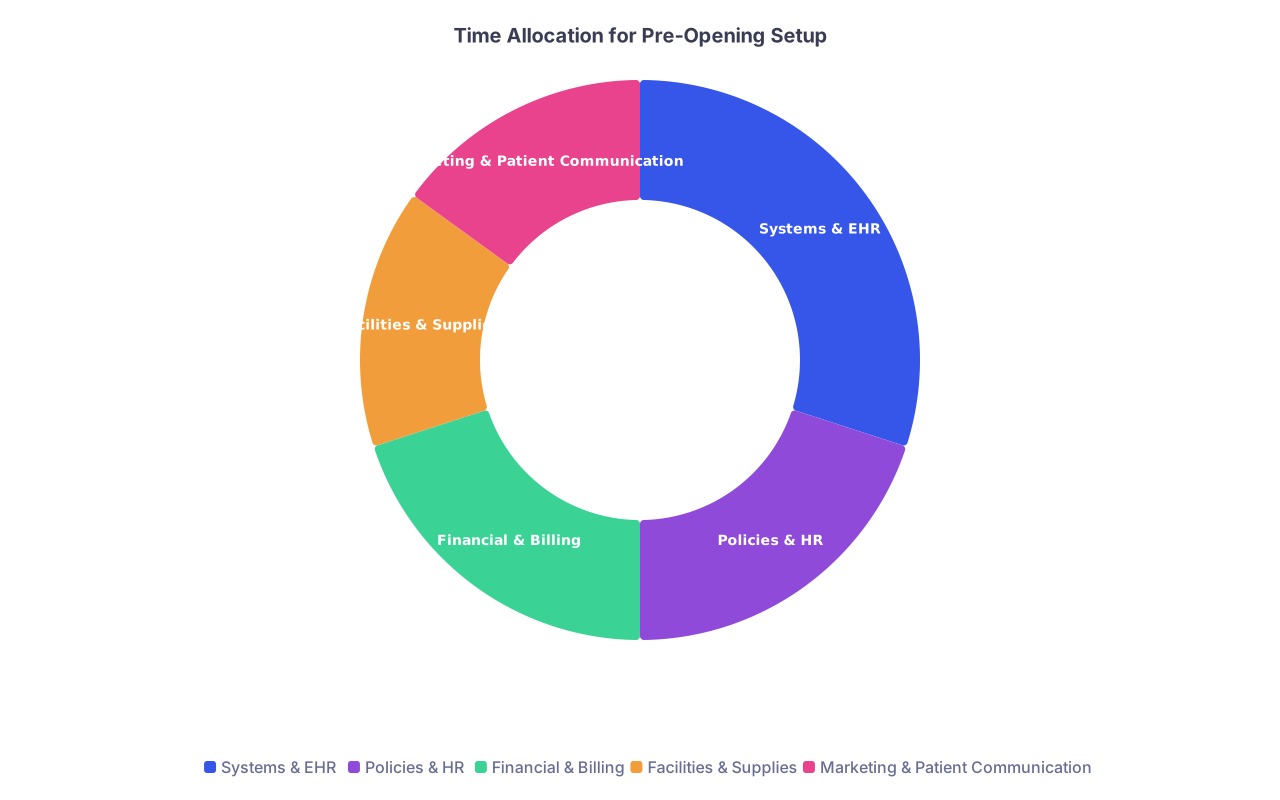
| Category | Value |
|---|---|
| Systems & EHR | 30 |
| Policies & HR | 20 |
| Financial & Billing | 20 |
| Facilities & Supplies | 15 |
| Marketing & Patient Communication | 15 |
45–60 Days Before Opening: People, Policies, and Training
Now you move from “systems on paper” to “systems in human beings.” This is where most new practices stumble because they under-train and over-assume.
6. HR, Staff Roles, and Manuals (Weeks 8–6)
If you are hiring, your first staff should be selected 6–8 weeks before opening. No later.
At this point you should:
- Finalize:
- Job descriptions (front desk, MA, nurse, biller, office manager)
- Work hours and clinic schedule
- Compensation structures and benefits (including any productivity bonuses)
- Create a basic employee handbook that covers:
- Work hours, overtime rules, time-off request process
- Dress code and professionalism standards
- Cell phone and social media policy (do not skip this)
- Confidentiality and HIPAA reminders
- Performance review schedule and expectations
- Write role-specific SOPs (standard operating procedures):
- Front desk: check-in, check-out, insurance verification, collecting copays, handling late arrivals
- MA/nurse: rooming scripts, vitals, using EHR, refill protocols, patient education materials
- Biller: charge entry, denial workflows, patient statements, refund handling
Then schedule formal training days. Not “shadow me and figure it out.” Real, structured training.

30–45 Days Before Opening: Full-System Testing
At this point you should behave as if your clinic is already open. You just do it without real patients (or with very few, as a soft launch).
7. Technology and Communication Dry Runs (Weeks 6–5)
You want everything that can break to break now, not during your first clinic day.
At this point you should:
- Test your entire communication stack:
- Call your main line from outside → time how long until someone (or voicemail) picks up
- Leave voicemails → verify routing and transcription (if enabled)
- Test after-hours call forwarding and message logging
- Send and receive test faxes (lab, imaging, referrals)
- Send and receive patient portal messages from a test account
- Test EHR workflows end-to-end:
- Create a fake patient → schedule → check in → room → document encounter → order labs/imaging → create claim → send to clearinghouse (test mode)
- Verify that documentation templates are usable, not cluttered
Document every glitch and fix it within the week.
8. Full Front-Desk and Billing Simulations (Weeks 5–4)
Now simulate full days of clinic operations. Seriously. Block 3–4 hours, gather staff, and run scenarios.
At this point you should run:
- Scenario 1: New patient, commercial insurance
- Phone call to schedule
- Insurance verification
- Reminder calls/texts
- Check-in, copay collection
- ICD/CPT coding (use realistic codes)
- Claim creation and mock submission
- Patient portal summary sent
- Scenario 2: Self-pay patient
- Quote visit cost ahead of time
- Payment collected at check-in or check-out
- Receipts and documentation flow
- Scenario 3: Same-day urgent add-on
- Limited slots → how to override or reschedule
- Communication to staff and to you while you are in-room with another patient
Have staff run these while you watch silently. Then review what failed or took too long. Update policies or templates accordingly.
14–30 Days Before Opening: Safety, Compliance, and Risk
This is your compliance sprint. Not sexy, but essential. You want to sleep at night.
9. Clinical Safety and Emergency Policies (Weeks 4–3)
You need written policies for how your clinic handles bad days.
At this point you should have:
- Medical emergency protocols:
- Chest pain in lobby
- Anaphylaxis after injection
- Syncope in exam room
- Aggressive or threatening visitor
- A clinic emergency plan:
- Fire/evacuation routes
- Power outage protocol (what happens to refrigerated meds, vaccines, biologics?)
- IT downtime: how you chart and schedule when EHR is down
Do a literal walk-through:
- Where is your crash cart / emergency kit?
- Where is oxygen? Who checks it weekly?
- Who calls EMS? Who meets them at the door?
Write it up. Keep a printed copy at nurse station and front desk.
10. Privacy, HIPAA, and Data Policies (Weeks 4–3)
Even solo practices get investigated. Do not be sloppy here.
At this point you should:
- Confirm BAAs (Business Associate Agreements) are signed with:
- EHR vendor
- Billing company
- Cloud fax / scanning services
- IT vendor or MSP
- Any third-party communication tools handling PHI
- Write basic privacy policies:
- How you handle release of records (form, time frame, fees)
- How staff can communicate about patients via phone, voicemail, and in hallways
- Policy for texting/emailing patients (what is allowed, what is not)
- Set password and device rules:
- Auto-lock times
- No sharing logins. Ever.
- Remote access rules (VPN, remote desktop)
Have every staff member sign a confidentiality/HIPAA acknowledgment.
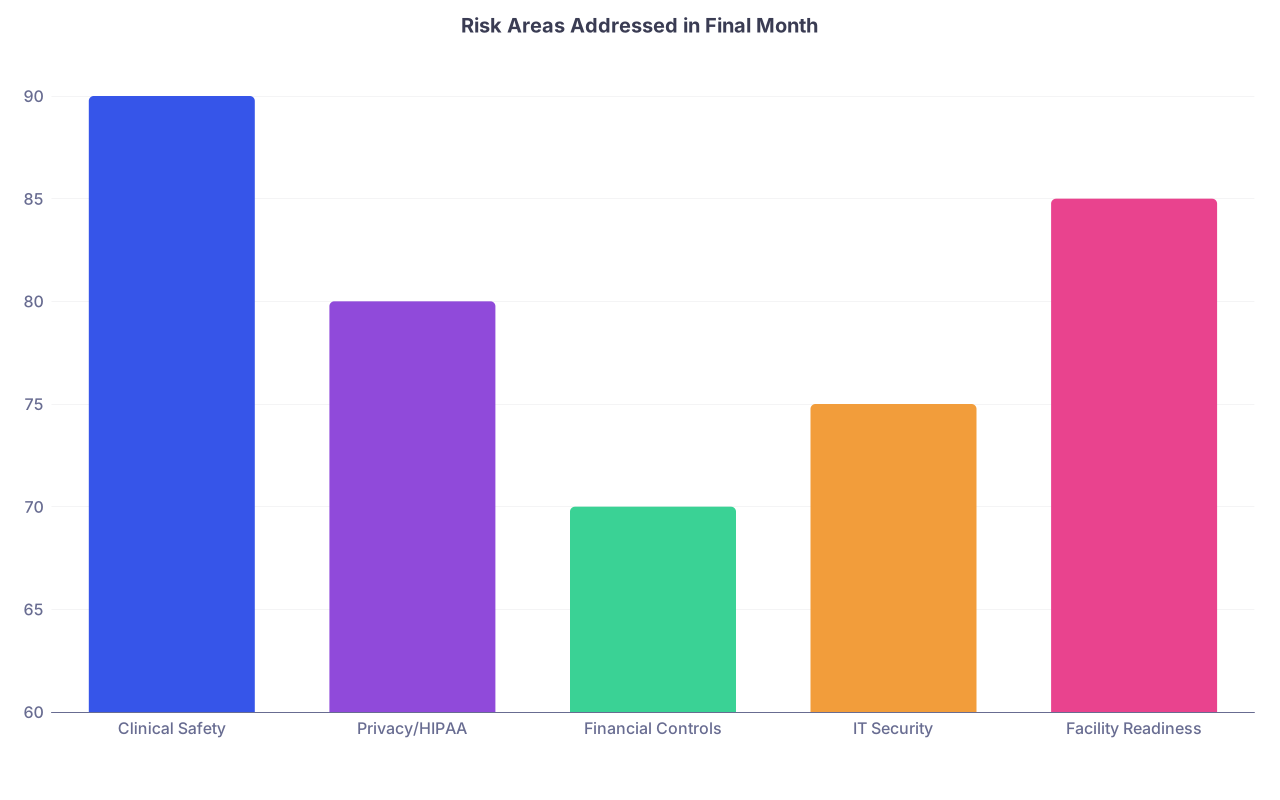
| Category | Value |
|---|---|
| Clinical Safety | 90 |
| Privacy/HIPAA | 80 |
| Financial Controls | 70 |
| IT Security | 75 |
| Facility Readiness | 85 |
7–14 Days Before Opening: Dress Rehearsal
You are nearly there. This is not the time to add new features. This is the time to refine what you already decided.
11. Mock Clinic Days and Soft Launch (Weeks 2–1)
At this point you should:
- Run at least one full mock clinic day:
- 6–8 “patients” (friends, family, staff role-playing)
- Include at least:
- One telehealth visit
- One same-day add-on
- One no-show
- One refill request between visits
- Time everything:
- Average check-in duration
- Rooming time
- Your visit length vs scheduled slots
- Chart completion time
Correct your schedule template if you are consistently running behind even with fake patients. Reality will be worse.
Consider a soft opening:
- 3–5 real patients per day for the first 3 days
- Limited services (no complex procedures)
- Extra buffer between visits
This lets you discover dumb issues (label printer in wrong room, sharps container placement, noise in waiting room) with minimal damage.

Final 7 Days: The Ultimate Systems and Policy Checklist
This last week is checklists and confirmations. No major new projects. If it is not critical to safe, functional care, it can wait.
At this point you should walk through these lists line by line.
12. Systems Go/No-Go Checklist (Days 7–3)
Verify:
- Phones:
- Main line active, greeting correct
- After-hours routing tested
- Voicemail boxes labeled and monitored schedule set
- EHR:
- All users have logins, tested
- Templates and order sets finalized
- Lab and imaging interfaces live or clear manual workflow in place
- Billing:
- Payer IDs configured
- Demographics, insurance, and charge entry tested
- Patient statements format set and approved
- Facility:
- Exam rooms fully stocked (and inventoried)
- Waiting room presentable
- Internet stable; backup (hotspot) ready
13. Policy and Communication Checklist (Days 7–1)
Confirm your policies are:
- Written
- Accessible to staff (binder + digital)
- Communicated and trained on
Critical policies to confirm:
- Scheduling and access (phone, portal, same-day slots)
- No-show/late cancellation and financial agreement
- Refill protocol (time frames, who can deny, documentation)
- Test result communication:
- How soon reviewed
- How soon conveyed to patient
- Which results trigger direct calls vs portal messages
- Safety and emergency response
- Privacy and social media
External communication:
- Website updated with:
- Hours, address, parking instructions
- Accepted insurances and self-pay info
- Basic policies (no-show, refill, portal messaging expectations)
- New patient packet:
- Demographics/insurance
- Medical history
- Financial agreement and assignment of benefits
- Practice policies acknowledgment
Three Days Before Opening: One Last Run-Through
At this point you should:
- Hold a 60–90 minute all-staff huddle:
- Walk through “opening day” hour by hour
- Review what to do if:
- The first patient is 20 minutes late
- The EHR goes down
- Phone lines glitch
- Someone becomes medically unstable in the waiting room
- Assign point people:
- Phone lead
- Rooming flow lead
- Billing/eligibility lead
- “Firefighter” for any weird issues (usually you for week one)
Then go room by room with a printed checklist and verify:
- Each exam room:
- Functional exam table, stools, otoscope/ophthalmoscope (if relevant)
- Stocked disposables and basic instruments
- Biohazard and sharps disposal
- Computer logged in and working
- Front desk:
- Printer and scanner working
- Cash box and card reader tested
- Forms organized and accessible
The Day Before Opening: Stop Tinkering
The temptation to make “one more change” is strong. Do not do it. Last-minute adjustments create inconsistencies your staff cannot absorb.
On the day before opening, you should:
- Send staff home on time. Tired staff make mistakes.
- Review your own templates and note phrases one more time.
- Print:
- Your emergency protocols
- Contact list (IT, EHR support, building management, labs, imaging centers)
- Quick-reference codes for common diagnoses and visits
- Walk through the door as if you are a patient:
- Can you find the entrance?
- Is signage clear?
- Is it obvious where to check in?
- Does the space feel calm and professional?
If the basics are right, the small imperfections will not matter.
Open your calendar right now and mark your target opening date. Count back exactly 90 days and block off 2–3 hours each week from that point forward for “systems and policy work.” Then start with a single task: spend 30 minutes drafting your Clinical Operations Overview on one page. That document will anchor every checklist you build from here.