
The way most physicians “track” CME across states is broken. Sticky notes, half-remembered emails, and a vague sense that something is due “next spring.” That is how licenses get flagged and audits go badly.
You need a 24‑month map. Not vibes. Not inbox searches. A concrete, time-based plan that ties every CME hour you earn to specific state renewals.
Here is how to build that, step by step, over two years.
Step 0 (One Weekend Before Your 24 Months Start): Build Your CME Control Sheet
At this point you have nothing reliable. You might think you do. You do not. So your first move is a single weekend of deep setup.
0.1 – List every license and its rules
Block 2–3 hours. Open a spreadsheet. Create one row per state license.
Columns should include:
- State
- License number
- Expiration date
- Renewal cycle length (years)
- Total CME hours required
- Category 1 hours required
- Opioid/pain/addiction requirement (yes/no; hours)
- Ethics/professionalism requirement
- State-specific topics (HIV, domestic violence, cultural competency, etc.)
- Controlled substance registration CME (if separate)
- In-person vs online constraints (if any)
- Carryover allowed? (yes/no; how much)
- Audit documentation rules (how long to keep, what proof)
Now, you go to each state medical board website. Not blogs. Not some random CE vendor’s “summary.” The actual board.
For each license you:
- Verify the exact wording for CME rules.
- Confirm what counts as Category 1.
- Note if they accept AMA PRA Category 1 only, or also AOA, AAFP, AAPA, etc.
- Check if CME is tied to:
- Birth month
- Fixed date (e.g., June 30)
- License issue date
Do not trust memory. Copy and paste critical phrases into a “Notes” column.
| State | Cycle (yrs) | Total Hours | Category 1 | Opioid CME | Other Mandates |
|---|---|---|---|---|---|
| CA | 2 | 50 | 50 | 12 | Pain mgmt focus |
| TX | 2 | 48 | 24 | 2 | Ethics/jurisprudence |
| FL | 2 | 40 | 20 | 2 | Domestic violence, HIV |
| NY | 2 | 40 | 40 | 3 | Infection control |
| IL | 3 | 150 | 60 | 3 | Implicit bias |
0.2 – Convert everything into 24‑month hour targets
Your planning window is 24 months. Some licenses will renew inside this window, some just after it. You are mapping what must be completed within the 24 months to safely clear at least one renewal for each license.
For each license:
- Identify the next renewal date.
- Count the number of months from “now” to that renewal.
- Confirm whether the CME period is:
- The 1–2 years before expiration
- The fixed calendar years (e.g., Jan–Dec of the previous two years)
Now add more columns:
- CME period start date
- CME period end date
- Months remaining in this CME period
- Hours still needed in this period (if you know what you already have)
- Hours per month needed = (Hours remaining) / (Months remaining)
If you have no records yet, assume you have zero and let the math hurt. Better to overdo CME than underdo it and scramble.
0.3 – Decide your “anchor month” and audit strategy
Pick one month in your 24‑month window that becomes your CME reconciliation month every year. Many physicians pick:
- January (clean year boundary)
- Their birth month (often tied to renewals)
In that month, every year, you will:
- Download transcripts from CME providers.
- Update your master spreadsheet with completed hours.
- Match each CME activity to at least one state requirement bucket.
- Save PDFs into a clean folder system (e.g.,
CME/2025/Opioid,CME/2025/General).
At this point you should have:
- A complete multi-state requirement sheet.
- A rough hours-per-month target per license.
- One chosen “reconciliation month” each year.
Months 1–3: Build the 24‑Month Calendar and Baseline CME Load
Now you turn rules into a schedule.
1.1 – Plot renewals and CME deadlines on a 24‑month timeline
Use a big wall calendar, a digital calendar, or project tool. I prefer one 24‑month view where you can see both years at once.
Mark:
- Every license renewal date (bold, red).
- For each renewal, a “CME must be done by” date:
- Usually 30 days before the official expiration.
- That is your personal deadline.
Then draw backward:
- 6‑month checkpoints leading into each renewal:
- “6 months to FL renewal – need 20 hours completed by now”
- “3 months to TX renewal – opioid requirement must already be done”
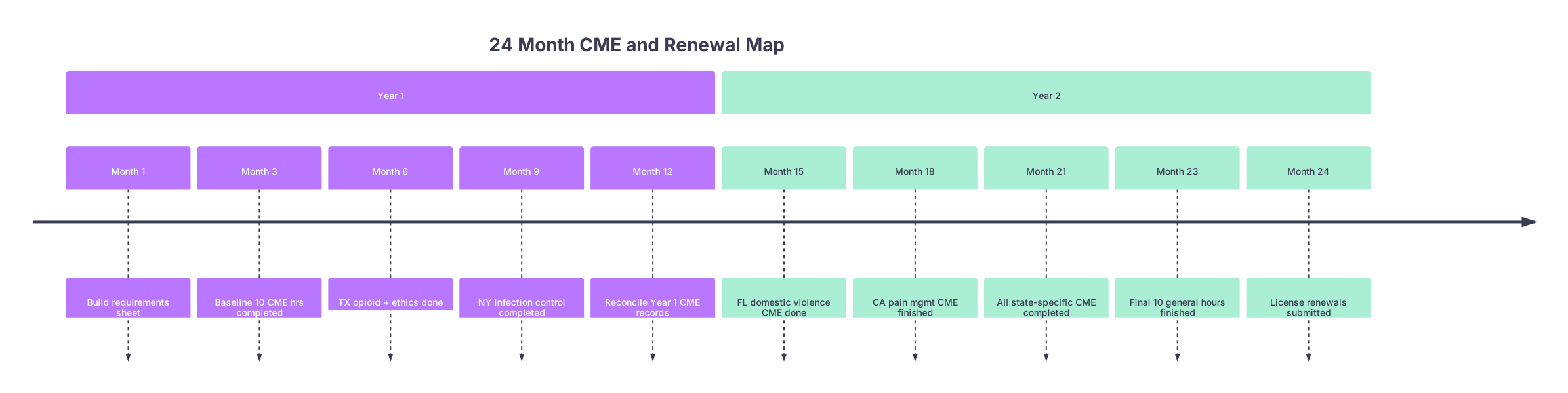
| Period | Event |
|---|---|
| Year 1 - Month 1 | Build requirements sheet |
| Year 1 - Month 3 | Baseline 10 CME hrs completed |
| Year 1 - Month 6 | TX opioid + ethics done |
| Year 1 - Month 9 | NY infection control completed |
| Year 1 - Month 12 | Reconcile Year 1 CME records |
| Year 2 - Month 15 | FL domestic violence CME done |
| Year 2 - Month 18 | CA pain mgmt CME finished |
| Year 2 - Month 21 | All state-specific CME completed |
| Year 2 - Month 23 | Final 10 general hours finished |
| Year 2 - Month 24 | License renewals submitted |
1.2 – Set a global monthly CME target
You now have per-license monthly needs that probably overlap. The trick is to set one global minimum that easily covers everything.
Example:
- CA: 50 hours / 24 months = ~2.1 hours/month
- TX: 48 hours / 24 months = 2 hours/month
- FL: 40 hours / 24 months = 1.7 hours/month
- NY: 40 hours / 24 months = 1.7 hours/month
Most Category 1 CME counts for multiple states. You do not need to add these linearly.
Look for:
- The highest total hours per 24 months among your states.
- The tightest CME period (where you have the least time remaining).
Then set a global baseline, for example:
- 4 hours / month as a non-negotiable minimum
- Plus strategic intensive bursts around specific needs (opioid, ethics, etc.)
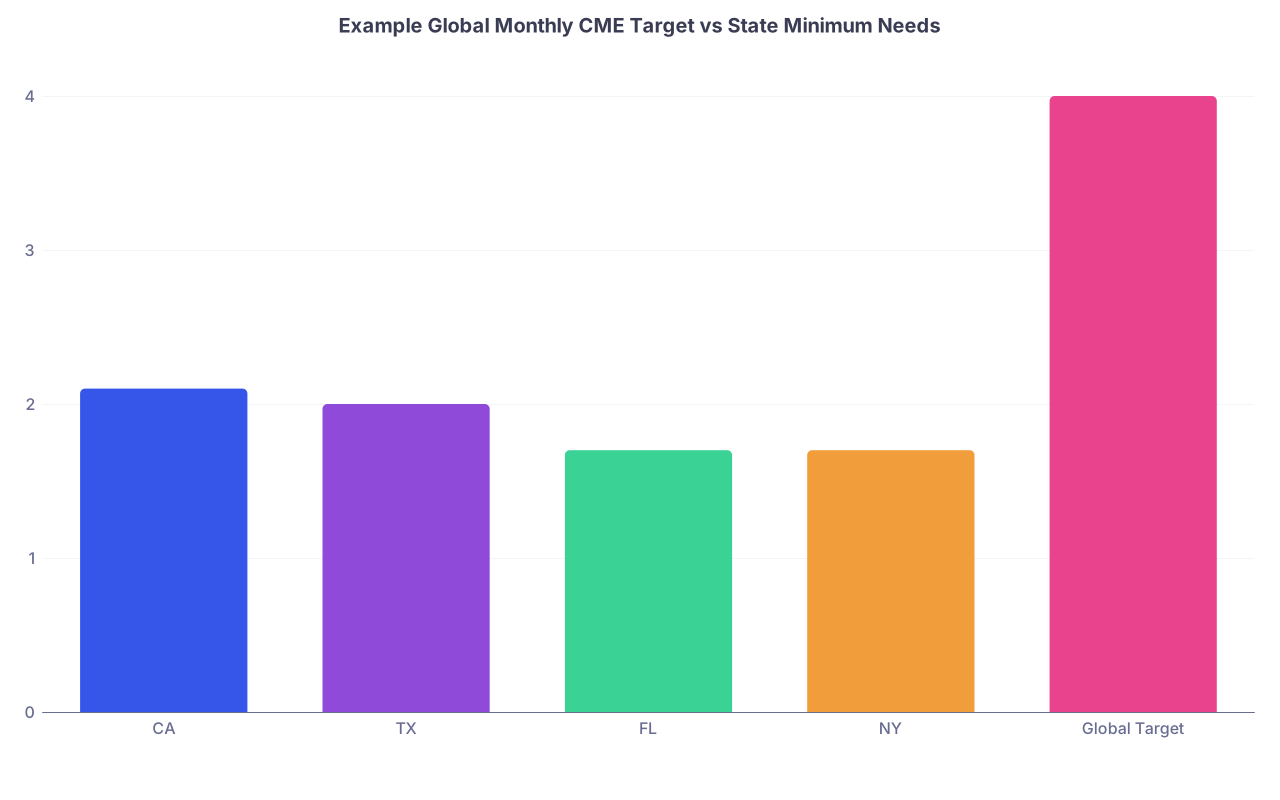
| Category | Value |
|---|---|
| CA | 2.1 |
| TX | 2 |
| FL | 1.7 |
| NY | 1.7 |
| Global Target | 4 |
1.3 – Front-load state-specific requirements in Months 1–12
State-specific content is what burns people. They “have the hours” but not in the right category.
So you front-load them early in the 24 months:
- Months 1–6:
- Finish all opioid/pain CEs across states.
- Complete infection control / HIV / domestic violence where needed.
- Months 7–12:
- Ethics, professionalism, implicit bias, cultural competency.
The goal by Month 12: every quirky requirement is done. The second year is pure volume and maintenance.
At this point you should have:
- All renewals and deadlines on a 24‑month calendar.
- One global CME hours-per-month target.
- Months 1–12 earmarked for every state-specific mandate.
Months 4–12: Quarterly Execution and Documentation Rhythm
Now you move from planning to a repeatable cycle.
2.1 – Quarterly CME sprints (3‑month blocks)
Think in quarters, not weeks. Over 24 months you have eight 3‑month blocks. Use them.
For each quarter (Months 1–3, 4–6, 7–9, 10–12, etc.) define:
- General CME goal (e.g., 12 hours of Category 1).
- State-specific goal (e.g., “Finish NY infection control + FL domestic violence”).
Example for the first year:
- Q1 (Months 1–3): 12 general hours + 2 hours opioid
- Q2 (Months 4–6): 12 general hours + 2 hours opioid + 1 hour ethics
- Q3 (Months 7–9): 12 general hours + NY infection control module
- Q4 (Months 10–12): 12 general hours + remaining 1–2 odd topics
By the end of Month 12 you ideally have:
- 40–50 total hours completed.
- All opioid/pain, infection control, and at least half of your ethics/other mandates finished.
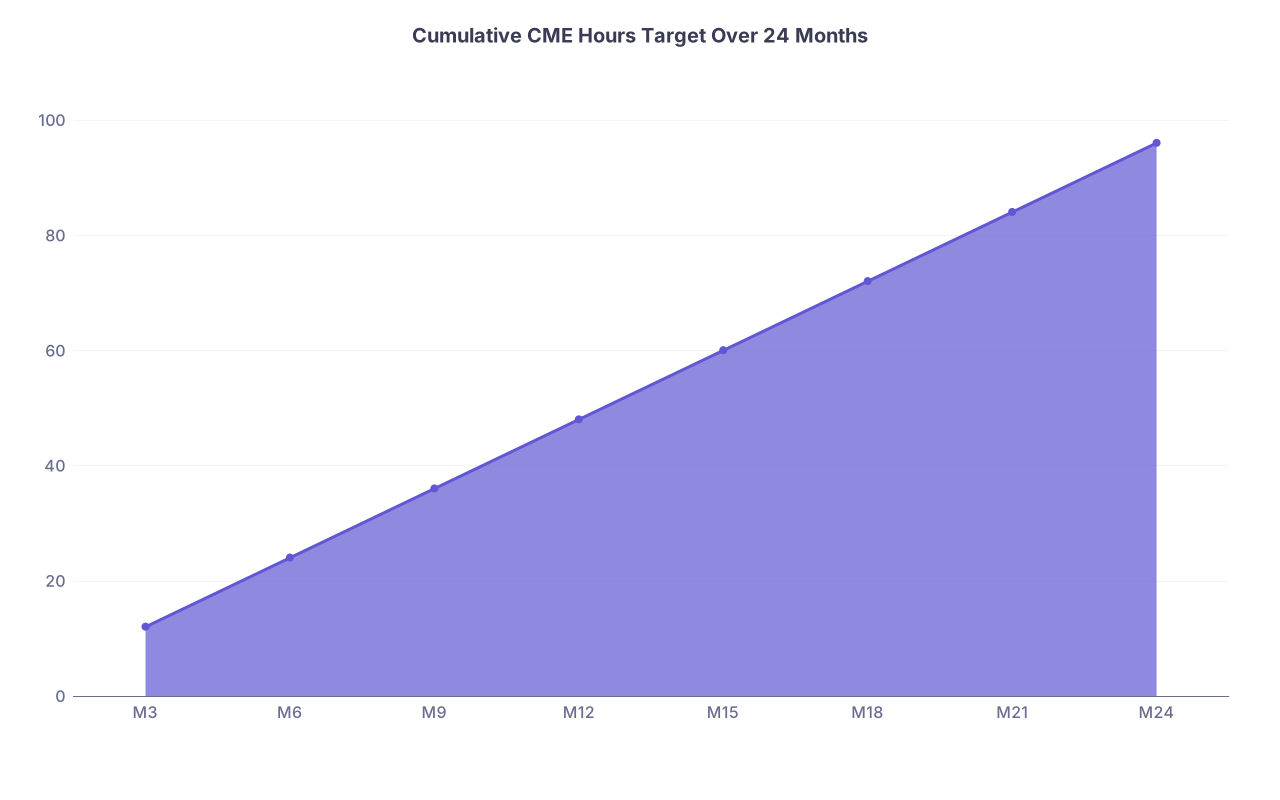
| Category | Value |
|---|---|
| M3 | 12 |
| M6 | 24 |
| M9 | 36 |
| M12 | 48 |
| M15 | 60 |
| M18 | 72 |
| M21 | 84 |
| M24 | 96 |
2.2 – Monthly micro-plan: when you are actually on call and exhausted
At the start of each month, spend 15 minutes:
- Look at:
- Your total hours completed (from your spreadsheet).
- Which state mandates are still open.
- Slot two CME blocks into your calendar:
- One 2‑hour session on an easier weekend.
- One 1–2‑hour evening or post-call half-day.
Then match the content:
- If a state-specific topic is still open: that goes first.
- Remaining time: high-yield general CME that satisfies multiple boards.
Rule of thumb: never end a month with zero CME time logged unless you are clearly ahead of schedule.
2.3 – Documentation discipline: same-day or you will lose it
Every time you finish a CME:
- Download the certificate immediately.
- Rename it
YYYY-MM Provider Topic Hours StateTags.pdf(e.g.,2025-03 NEJM OpioidPrescribing 2hrs CA_TX_FL.pdf). - Log it into your spreadsheet:
- Date
- Provider
- Title
- Hours (Category 1 / other)
- Topic tags (opioid, ethics, etc.)
- States that this helps satisfy
Organize files like:
CME/Year01/CertificatesCME/Year01/TranscriptsCME/Year02/...
This is where physicians usually fail. They do the CME. They never centralize the proof. When the audit letter comes, they are clicking through five vendor portals and hospital LMS screens like it is an escape room.
At this point (end of Month 12) you should:
- Have 40–50 hours logged.
- Be mostly done with mandated topics.
- Have a working documentation system that you actually use.
Month 12: Midpoint Reconciliation and Reforecast
Now you stop and check if your 24‑month map is still accurate.
3.1 – Midpoint audit against each state
In Month 12 (your reconciliation month):
- Pull a transcript from every major CME provider you use.
- Cross-check with your spreadsheet:
- Fix missing entries.
- Correct any hour discrepancies.
- For each state license:
- Count how many total hours you already have toward that board.
- Confirm whether each mandated topic is done or still open.

Update your spreadsheet with:
- “Hours completed this cycle for STATE X”
- “Mandates remaining for STATE X”
3.2 – Recalculate the remaining 12‑month load
Now recompute hours needed for Months 13–24:
For each state:
- Remaining hours = Required hours – Completed hours
- Remaining months in that CME cycle
- New hours-per-month needed
If you front-loaded correctly, these numbers will be comfortable.
If you see anything like “need 35 hours in 6 months” for a state with a near-term renewal, you adjust now:
- Move from 4 hours/month global to 6–8 hours/month for the next 3–6 months.
- Pick one or two CME conferences that will give you a big chunk (15–20 hours) in a focused period.
Months 13–21: Strategic Completion of All State-Specific Requirements
The second year is where you clear the board.
4.1 – Target any state that renews inside the next 12–18 months
Look at:
- Which licenses will renew between Month 13 and Month 30 (since some cycles extend beyond your 24‑month window).
- Prioritize those that have:
- High hour requirements.
- Rigid topic requirements.
Set explicit quarterly goals, for example:
- Q5 (Months 13–15):
- Finish remaining TX ethics/jurisprudence.
- Add 12–16 general hours.
- Q6 (Months 16–18):
- Complete CA pain CME to full requirement.
- Add another 12–16 general hours.
- Q7 (Months 19–21):
- Clean up any lingering small topic modules (e.g., 1‑hour domestic violence).
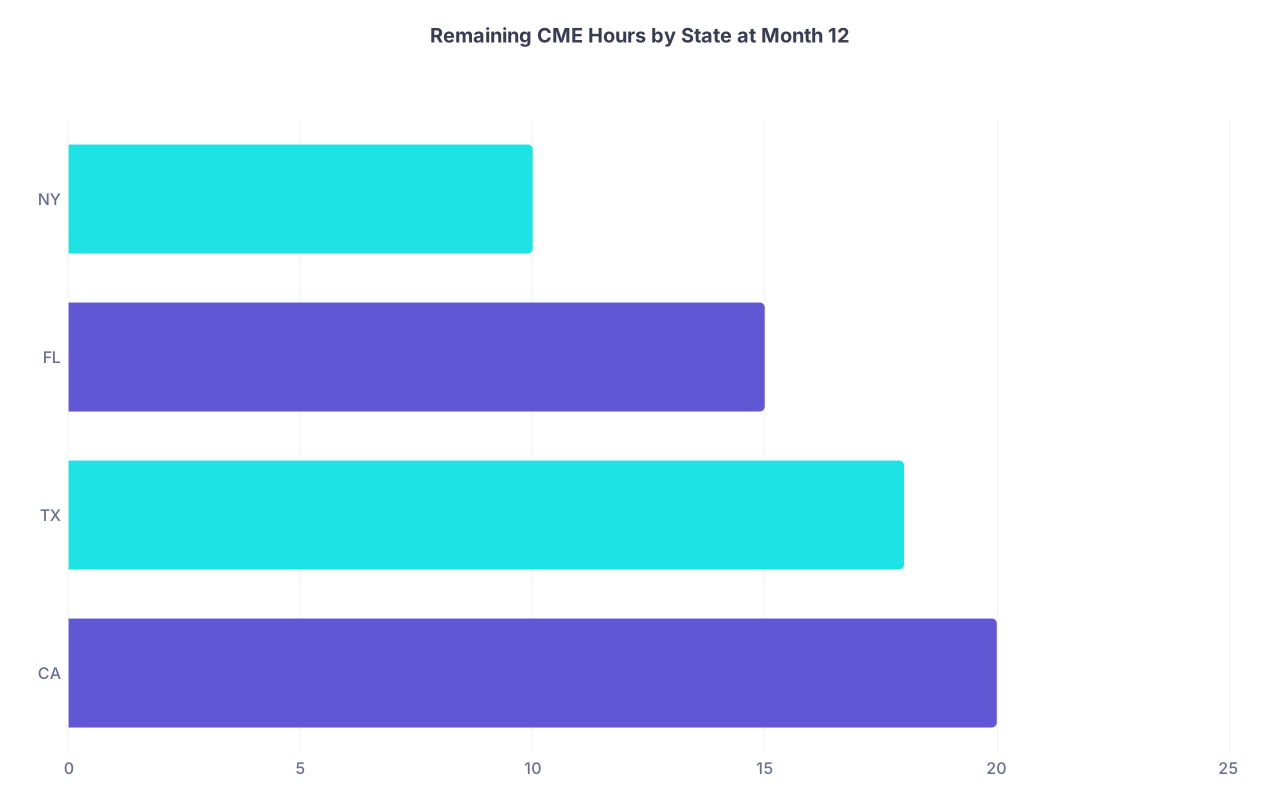
| Category | Value |
|---|---|
| CA | 20 |
| TX | 18 |
| FL | 15 |
| NY | 10 |
4.2 – Use overlapping content deliberately
Smart move: choose CME activities that satisfy multiple state mandates:
- A high-quality opioid prescribing course that:
- Satisfies 3–4 states’ opioid or pain requirements.
- Counts fully as Category 1 everywhere.
- An ethics/professionalism bundle that covers:
- Ethics hours for one board.
- Professional conduct / boundaries for another.
When you register for a course, ask yourself:
“Which states does this help me not think about again?”
If the answer is “just one, for 1 hour,” it is a low-yield pick unless you are plugging a very specific gap.
At this point (around Month 21) you should:
- Have all state-specific topic requirements completed across licenses.
- Be working only on raw hour accumulation.
Months 22–24: Finalization, Buffer Hours, and Renewal Submissions
Here is where people usually panic. You will not, because you pre-built slack.
5.1 – Month 22: Gap analysis and buffer creation
In Month 22:
- Update spreadsheet with everything completed through Month 21.
- For each state:
- Confirm: total hours vs required.
- Double-check: mandated topics vs checkboxes on board’s renewal form.
Then:
- Add a buffer of 8–10 extra general hours over the final 3 months.
- This covers:
- Miscounted hours.
- Activities that boards decide are not Category 1.
- Last-minute changes.
You want to be in the position where if one course gets disallowed, you still clear the bar.
5.2 – Month 23: “Renewal Ready” check
One month before license renewal (or before your personal “CME must be done by” date), you do a final readiness check.
For each state, create a short checklist:
- Total CME hours ≥ requirement
- Category 1 hours ≥ requirement
- All opioid/pain/addiction topics done
- All ethics/professionalism/jurisprudence done
- All odd mandates (HIV, DV, infection control, etc.) done
- Documentation filed for each activity
- Provider transcripts downloaded and saved

Create one PDF per state called something like:
STATE_CME_Summary_2026.pdf
Include:
- A table listing each CME activity, date, provider, hours, and topic category.
- Totals at the bottom that clearly exceed the requirement.
If you are ever audited, you send that PDF plus underlying certificates. Clean, fast, and obviously organized.
5.3 – Month 24: Submit renewals early and lock in the next cycle’s map
In Month 24:
- Submit license renewals as soon as the portal opens.
- Keep screenshots or PDFs of:
- Confirmation pages.
- Any CME attestation screens.
Then you immediately:
- Roll forward your 24‑month calendar:
- Add the new renewal dates.
- Mark the new CME periods.
- Reset hour counters in your spreadsheet:
- Start tracking hours for the new cycle separately.
- Keep prior-cycle data archived for at least 6–7 years, in case of retroactive audits.

At this point you should:
- Have all renewals submitted without drama.
- Have a full, auditable trail of 24 months of CME.
- Already see a clean map for the next 24.
Putting It All Together: The 24‑Month Rhythm
If you want the entire process on one page, it looks like this:
Month 0 (Setup weekend)
- Build master requirements spreadsheet from each state board.
- Mark every renewal and CME deadline on a 24‑month calendar.
- Pick your annual reconciliation month.
Months 1–3
- Start global baseline (e.g., 4 hours/month).
- Knock out 1–2 opioid/pain courses that cover multiple states.
Months 4–12
- Quarterly targets: ~12 general hours + 1–2 state-specific modules.
- Same-day documentation for every activity.
- End Month 12 with 40–50 hours and most special topics done.
Month 12 (Midpoint)
- Full reconciliation vs each state’s rules.
- Reset hour-per-month needs if behind or ahead.
Months 13–21
- Prioritize states with near-term renewals.
- Finish every remaining mandated topic.
- Build comfortable surplus of general Category 1 hours.
Months 22–24
- Gap analysis and 8–10 hour buffer.
- “Renewal ready” checklists by state.
- Early renewal submissions and roll-over to next 24‑month map.
Final Takeaways
- Requirements are a math problem, not a guessing game. Put every state’s rules into one spreadsheet and compute real monthly targets.
- Front-load weird mandates and use the first 12 months to wipe them out. The second year should be almost all flexible general CME.
- Documentation is non‑negotiable. Same-day file saving and an annual reconciliation month turn audits from a nightmare into a formality.