
The way most clinicians handle CME is backwards—and it is why you end up doom-scrolling CME modules on December 30 at 11:47 p.m.
You should never be “discovering” your CME requirements in the last month of the year. At this point, you should be executing a clean 4‑week plan, not guessing. Let’s fix that.
Below is a practical, no-drama, day‑by‑day style timeline for the End-of-Year CME Crunch—assuming you’re about 4 weeks from your licensure or board CME deadline and you’re realizing, “I might be short.”
I’ll walk you week by week, with specific checkpoints and what to do if you’re behind.
Before Week 1: Know What You Actually Owe
If you’re already inside the last month, you do not have time for vague assumptions. At this point, you should know your exact targets.
You’re dealing with at least three possible CME layers:
- State license CME
- Specialty board MOC/Continuing Certification
- Hospital/credentialing or employer-specific requirements
Here’s how they usually stack:
| Requirement Type | Typical Cycle | Total CME | Specs / Notes |
|---|---|---|---|
| State Medical License | 2 years | 20–50 | Often includes risk/ethics |
| ABIM / ABFM / ABP etc. | 5–10 years | 100–250 | Mix of CME & MOC points |
| Hospital Privileges | 1–2 years | 10–25 | May require ACLS, PALS, etc. |
| DEA / Controlled Subst. | Varies | 2–8 | Opioid prescribing content |
| Specialty Societies | Annual | 10–30 | For member in good standing |
If you are not sure where you stand, assume you’re behind until proven otherwise.
Week 1: Audit, Confirm, and Design the Plan
Week 1 is not about collecting points. It’s about eliminating uncertainty.
Days 1–2: Do a Hard CME Audit
At this point, you should block 60–90 minutes, sit down, and pull exact numbers.
You’re going to:
Check your state license board
- Log into your state medical board portal.
- Confirm:
- CME cycle dates (start and end)
- Total hours required
- Any mandated topics (opioids, pain, ethics, cultural competency, implicit bias, etc.)
- Note whether they:
- Require Category 1 vs. allow Category 2
- Require live activities or accept all enduring/online
Check your specialty board portal (ABIM, ABFM, ABA, etc.)
- Go to your certification dashboard.
- Pull:
- Current cycle dates
- CME/MOC points completed
- Gaps in specific requirements (e.g., patient safety modules, “knowledge check-in” tests)
Check employer/hospital requirements
- Login to your hospital credentialing system (e.g., MDStaff, Echo, etc.).
- Look for:
- Annual training: HIPAA, compliance, risk, bloodborne pathogens
- Any CME-equivalent modules you might already have credit for
- Confirm if they double count for license CME (sometimes they do, sometimes not).
Pull everything into one simple tracker
Do not trust your memory. Use a simple table:
| Source / Requirement | Hours Required | Hours Completed | Hours Remaining | Deadline |
|---|---|---|---|---|
| State License | 40 | 22 | 18 | 12/31/24 |
| Controlled Subst. | 3 (opioids) | 0 | 3 | 12/31/24 |
| Specialty Board | 100 over 5 yrs | 70 | 30 | 12/31/26 |
| Hospital | 10 | 8 | 2 | 01/15/25 |
By the end of Day 2, you should know:
- Total hours needed in the next 4 weeks
- Topic‑specific hours needed
- What can carry over (or not) into the next cycle
Day 3: Decide Your CME Strategy
Now that you see the gap, you need a structure. Not vibes.
Pick your primary CME platforms
You do not have time to chase 10 different sites.Think in these buckets:
- Fast, focused online CME:
- Audio CME (for commute time)
- Case-based modules for internal medicine, family med, EM, etc.
- Bundled annual subscriptions:
- Board review platforms that give CME + MOC + sometimes gift cards
- Mandated topics packages:
- “State X 3-hour opioid prescribing” courses
- “Risk management CME for State Y” bundles
- Fast, focused online CME:
Match format to your reality
Be blunt with yourself:- If you’re on call 1 in 3 nights → favor short 15–30 minute modules
- If you commute 45 minutes each way → use audio CME to fill that time
- If you have one free weekend → consider a 1–2 day intensive virtual course
Set concrete weekly targets
Convert “I need 20 hours” into weekly numbers:- 20 hours over 4 weeks → 5 hours/week
- 18 hours over 3 weeks → 6 hours/week
Then push the target slightly higher to provide a buffer. So if you need 20 hours, aim for 22–24.
Days 4–7: Build and Start the Calendar
At this point, you should stop thinking and start scheduling.
Block fixed CME “appointments” on your calendar:
- 2 weekday evenings per week (e.g., Tue/Thu 8–9:30 p.m.)
- 1 chunk on the weekend (e.g., Sunday 2–5 p.m.)
- Optional: 2–3 commutes per week dedicated to audio CME
Pair each block with specific modules
Do not open your laptop at 8 p.m. and then start browsing. That’s how you waste half the hour.Example for Week 1 schedule:
Tue 8–9:30 p.m.:
- 1-hour opioid prescribing course (state mandated)
- 30-minute risk management module
Thu 8–9:30 p.m.:
- 2 × 30-minute board review CME activities
- 30 minutes uploading certificates and updating your tracker
Sun 2–5 p.m.:
- 3 × 45-minute case-based CME modules
- Breaks between modules, but keep the tab open until done
Start collecting and filing certificates now
Create a folder on your computer or cloud:- “CME 2024”
- Subfolders: “State License”, “Board”, “Opioid/Risk”, etc.
Any time you finish an activity, download the certificate immediately, rename it “2024-12-07 Provider – Course Title – X CME.pdf” and file it.
Future you will be grateful.
Week 2: Execution and Topic Coverage
By Week 2, you should already have put hours on the board. If your tracker is still blank, you need to double up this week.
Early Week 2 (Days 8–10): Check Progress vs. Plan
Quick audit:
- Target for Week 1: X hours (from your plan)
- Actual completed: Y hours
- If Y < 0.75X, you must adjust Week 2 upward.
Use a simple visual to keep yourself honest:
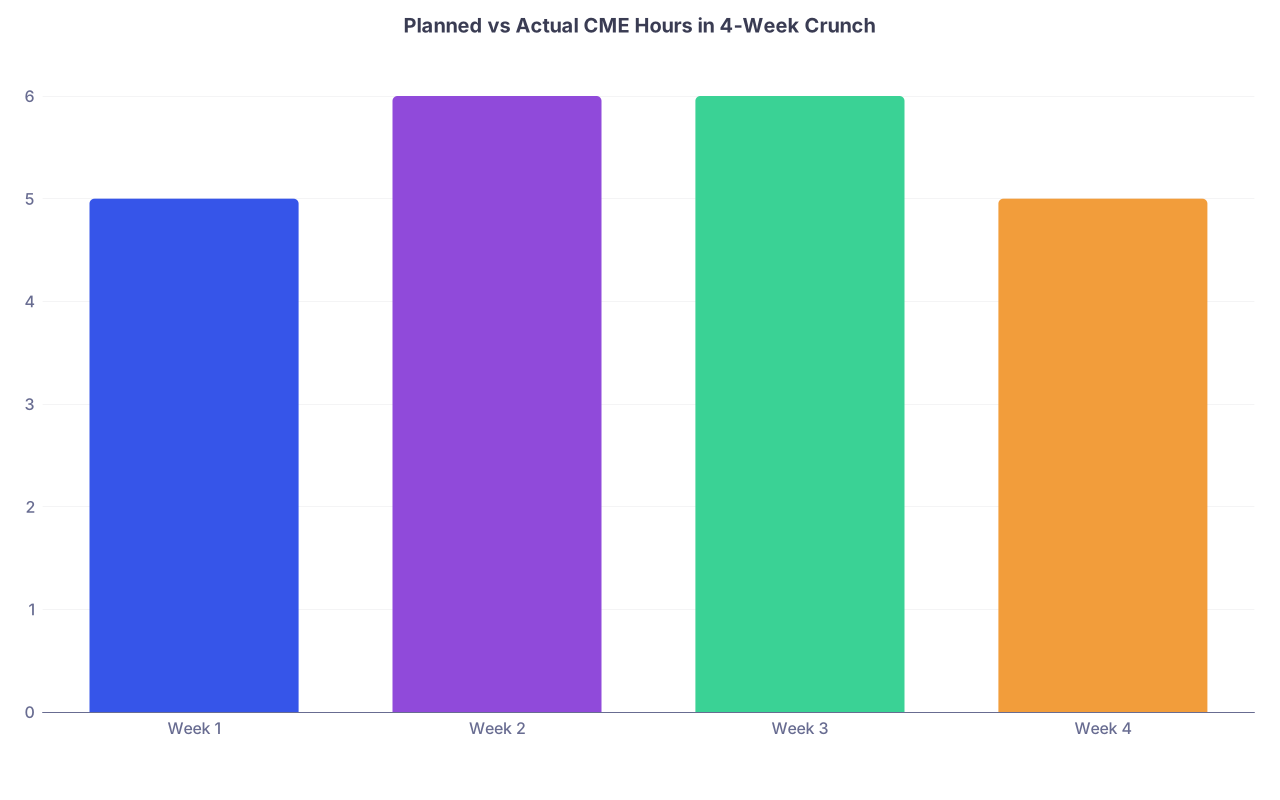
| Category | Value |
|---|---|
| Week 1 | 5 |
| Week 2 | 6 |
| Week 3 | 6 |
| Week 4 | 5 |
Think of the “values” above as your planned weekly hours. Track your actual against it in your own notebook or spreadsheet.
Mid Week 2 (Days 11–12): Prioritize Mandated Content
(See also: CME documentation mistakes to avoid for more details.)
At this point, you should front-load any non-negotiable content:
- State-required:
- Opioid prescribing
- Pain management
- Implicit bias
- Ethics / professionalism
- Board-required:
- Specific “patient safety” or “practice assessment” modules
Do these early for two reasons:
- They’re often only available through certain portals—if there’s a tech issue, you want time to resolve it.
- They’re easy to forget in a last-day scramble, and that’s how people end up technically non-compliant even with enough total hours.
Late Week 2 (Days 13–14): Mix High-Yield and Easy Wins
Now you’re balancing two goals:
- Finish your hours
- Get educational value you actually care about
Strong structure for Week 2:
- 50–60%: Topic gaps or practice-relevant CME (e.g., new heart failure meds, diabetes updates, sepsis bundles)
- 40–50%: Simple, fast-scoring modules to fill the total hours
You should:
- Pick 3–5 clinical domains that actually improve your day-to-day work (e.g., anticoagulation in AFib, asthma in kids, ED chest pain workups).
- Complete 2–3 modules in each over Weeks 2 and 3.
Do not waste your entire CME crunch on things you’ll never use just because they’re “quick.” You need some signal, not just noise.
Week 3: Close the Gap and Clean the Paper Trail
By the start of Week 3, you should be at least 50–60% of your target total hours. If you are not, this is your make‑or‑break week.
Early Week 3 (Days 15–17): Recalculate and Compress
At this point, you should sit down again with your tracker and do a mid-course correction:
Recount your completed hours by category:
- State license total vs. required
- Mandated topics hours vs. required
- Board CME/MOC points vs. remaining for this year (if applicable)
Recalculate what’s left:
- Total hours remaining
- Topic-specific gaps
- Any live vs. enduring requirements
Adjust your calendar:
- If you’re 5+ hours behind → add one extra evening session this week and one more weekend block.
- If you’re on track or ahead → keep steady, don’t coast yet.
Mid Week 3 (Day 18–19): Handle Edge-Case Requirements
This is where people get burned: obscure, easily missed requirements.
At this point, you should verify:
- Does your state require CME from approved providers only?
- Does your board require specific MOC Part II/IV activities, not just generic CME?
- Are there any DEA-specific opioid CME requirements tied to your controlled substance registration renewal?
If yes, then:
- Complete those specific activities this week.
- Confirm your credits post properly to the relevant board or system (many major providers transmit automatically, but not all).
Late Week 3 (Days 20–21): Documentation and Redundancy
You’re going to be tempted to ignore the paperwork until the very last day. That’s how certificates vanish.
By the end of Week 3, you should:
Have all certificates downloaded and backed up
- Local folder
- Cloud (Dropbox, Google Drive, OneDrive)
- If your board allows upload now, do it instead of waiting.
Create a quick summary document (1 page) listing:
- Course title
- Provider
- Date completed
- Hours earned
- Category/topic (e.g., “Opioid Prescribing – 3 hr”)
Verify at least once that:
- Your state board accepts the type of CME you completed
- Your specialty board shows updated points on the dashboard (if auto-reported)
If something isn’t showing, you still have a full week to deal with customer support or redo something if absolutely necessary.
Week 4: Final Push, Verification, and Future-Proofing
Week 4 is about two things:
- Finishing any remaining hours
- Making sure you never end up in this mess again
Early Week 4 (Days 22–24): Final Hours and Safety Margin
At this point, you should know exactly how many hours are still missing. If you’re guessing, repeat the Week 1 audit quickly.
Plan for:
- Your official requirement + 1–3 “buffer” hours.
- If the state needs 40 and your log says 40, aim for 42–43.
- That covers rounding errors, miscategorized activities, and any activity that ends up not counting.
Use this last big block to finish:
- Remaining general CME hours
- Leftover topic-specific content
- Any short “filler” modules (15–30 minutes) to top off your total
(Related: Annual CME strategy and milestones)
Mid Week 4 (Days 25–26): Confirm All Reporting and Submissions
This is where organized people pull away from the cliff edge and everyone else is banging on portals on December 31.
You should:
Log into:
- State board portal
- Specialty board portal
- Hospital/employer credentialing system
Confirm:
- All required hours are completed and logged
- Mandated topics are clearly documented
- If you must attest instead of submit certificates:
- Make sure your personal log and files match your attestation. No guessing.
Check cross-reporting:
- Some platforms auto-report to ABIM/ABFM/ABP, etc.
- Confirm that the credits actually show up. If they don’t, download certificates anyway.
If something is missing, you still have a few days to:
- Email support for the CME provider
- Manually upload certificates
- Worst case: knock out a replacement module from a different provider
Late Week 4 (Days 27–28): Backup, Attest, and Lock It In
At this point, you should be entirely done with the learning. These last days are administrative.
Do this:
Export or screenshot portal summaries from:
- State board CME transcript (if they provide one)
- Board MOC dashboard
- Hospital learning management system
Back up your entire CME folder to:
- External drive or encrypted USB
- Cloud drive (labeled clearly by year/cycle)
Complete any formal attestations:
- Some boards just ask, “Have you completed the required CME? Yes/No.”
- Answer honestly—and confidently because you’ve actually verified.
A Simple Visual Timeline of Your 4-Week CME Crunch
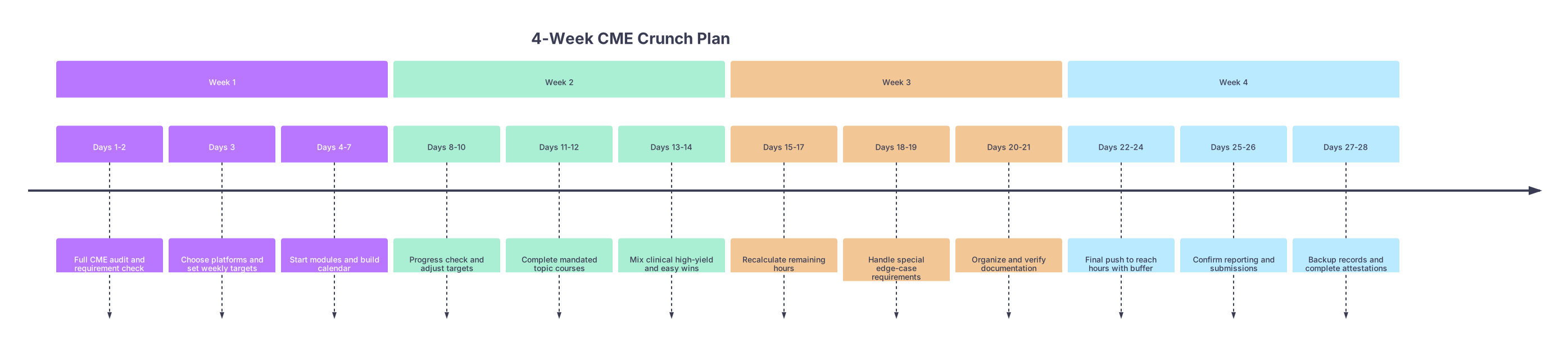
| Period | Event |
|---|---|
| Week 1 - Days 1-2 | Full CME audit and requirement check |
| Week 1 - Days 3 | Choose platforms and set weekly targets |
| Week 1 - Days 4-7 | Start modules and build calendar |
| Week 2 - Days 8-10 | Progress check and adjust targets |
| Week 2 - Days 11-12 | Complete mandated topic courses |
| Week 2 - Days 13-14 | Mix clinical high-yield and easy wins |
| Week 3 - Days 15-17 | Recalculate remaining hours |
| Week 3 - Days 18-19 | Handle special edge-case requirements |
| Week 3 - Days 20-21 | Organize and verify documentation |
| Week 4 - Days 22-24 | Final push to reach hours with buffer |
| Week 4 - Days 25-26 | Confirm reporting and submissions |
| Week 4 - Days 27-28 | Backup records and complete attestations |
How to Stop Ever Doing a CME “Crunch” Again
You survived the crunch. Good. Now use this moment while the pain is fresh.
At this point—right after finishing your year-end CME—you should build a system for the next cycle.
Step 1: Convert Annual Requirements into Monthly Targets
You know the problem: “40 hours every 2 years” sounds easy until month 23.
Break it into chunks:
- 40 hours every 2 years → 20 hours/year → ~1.7 hours/month
- Simplify your life: 2 hours/month of CME and you’re always safe.
Then think practically:
- 1 evening a month = 2 hours of online CME
- Or 2 commutes a month = 2 hours of audio CME
Step 2: Create a Standing CME Slot
At this point, you should open your calendar and:
- Add a recurring 2-hour monthly block labeled “CME – Do not book clinic.”
- Put it:
- On a lighter clinic day afternoon
- On a predictable evening when you’re usually free
Honor that slot like you would an OR case or clinic session. Because if your license lapses, nothing else matters.
Step 3: Use One Primary CME “Home Base”
Pick a single main platform that:
- Covers your specialty well
- Reports to your board (if possible)
- Has a decent mobile or audio option
Then use 80–90% of your monthly CME time there. Keep the random one-off courses only for mandated topics.
Step 4: Keep a Living CME Log
You absolutely do not want to reconstruct this from scratch again.
Create a simple spreadsheet with:
- Date
- Course title
- Provider
- Hours
- Category (general, opioid, risk, etc.)
- Notes (board MOC points? state-mandated?)
Update it the same day you complete any CME.
When You’re Really, Truly Down to the Wire
Sometimes you don’t have 4 weeks. You have 7 days or less. I’ve seen it. More than once.
In that case:
- Prioritize state license above everything else. If that lapses, game over.
- Use bundled, fast online CME that:
- Guarantees instant certificates
- Explicitly lists your state and topic requirements
- Accept that you might do a few modules that are pure box-checking. Then fix your system so it never happens again.
A Quick Visual to Diagnose Your Risk for CME Panic Next Year
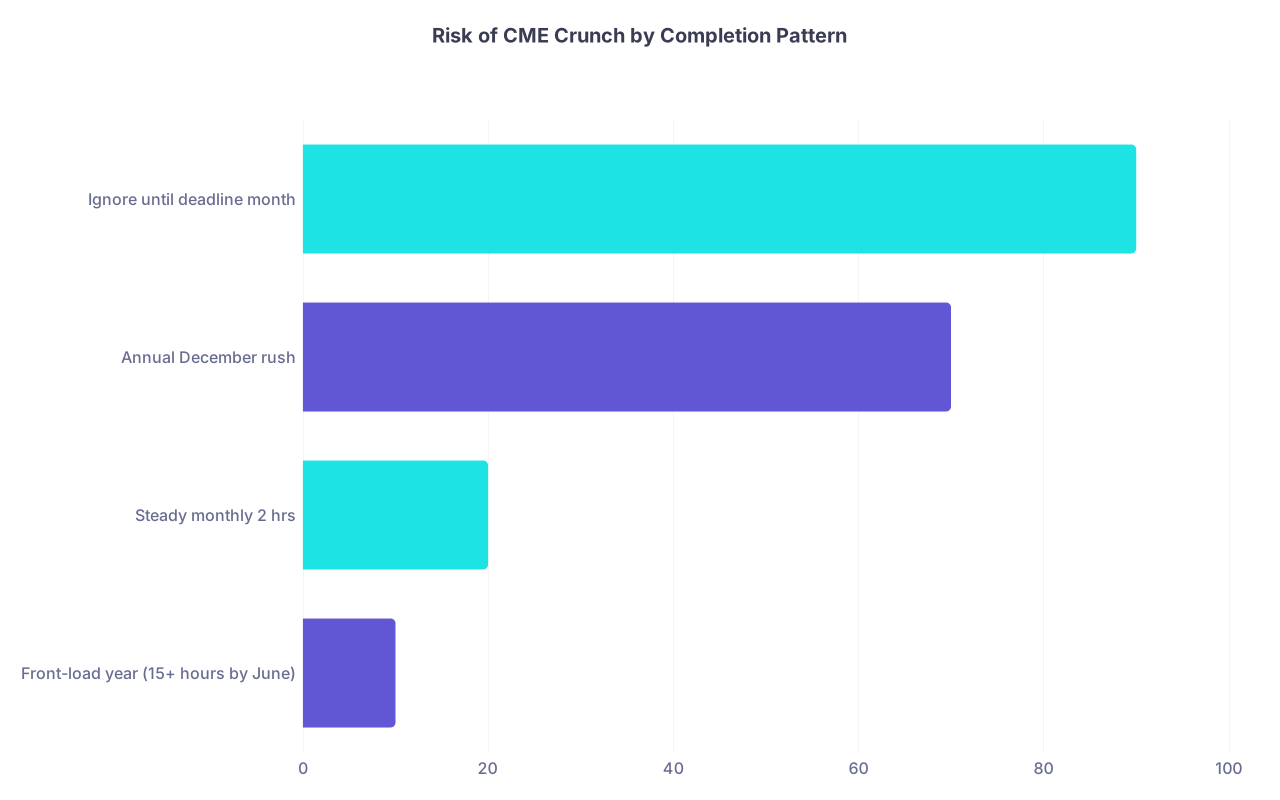
| Category | Value |
|---|---|
| Front-load year (15+ hours by June) | 10 |
| Steady monthly 2 hrs | 20 |
| Annual December rush | 70 |
| Ignore until deadline month | 90 |
You do not want to live in the last two bars.
Your Next Step (Today)
Open your state board portal right now and write down your exact CME requirement and current completed hours. Do not guess. Once you have that number, block your first dedicated 90‑minute CME session on your calendar within the next 72 hours. That’s how you start turning the end-of-year CME crunch into a controlled, predictable process instead of a yearly panic.