
CME Documentation Mistakes That Trigger Audits and How to Avoid Them
What happens when your credentialing office asks for five years of CME proof and you realize half your “certificates” are emails, screenshots, and calendar reminders?
Let me be blunt: CME documentation is boring right up until it threatens your license, your hospital privileges, or triggers a payer/compliance audit. Then it becomes the most important thing in your professional life—for about two panicked weeks.
You do not want to learn this the hard way.
Below are the documentation mistakes I see over and over that light up auditor radar. If you fix these now, you dramatically lower your audit risk and your stress level.
Mistake #1: Treating “I Did It” as Proof You Did It
Most physicians assume good faith is enough.
“I attended that conference, of course I did. I even gave a talk there.”
Auditors don’t care. Licensing boards don’t care. Hospitals definitely don’t care.
They care about verifiable documentation. And they’re picky.
What auditors actually want
For each CME activity, they want to be able to see:
- Who you are (name, ideally license or NPI somewhere in the file chain)
- Who provided the CME (accredited provider name)
- What the activity was (title/topic)
- When it occurred (date or date range)
- How many credits you earned
- What type of credit (AMA PRA Category 1, 2, MOC points, etc.)
If your “proof” doesn’t clearly show those elements, you’re flirting with trouble.
The specific mistakes that trigger questions
Relying on calendar entries
- “Cardiology conference – 8 hours” on your Outlook calendar is not proof.
- There’s no accredited provider, no credit type, no unique identifier.
Saving emails as certificates
- A marketing email saying “Thanks for attending!” without credit details is useless.
- If there’s no explicit statement of credits awarded, auditors will treat it as zero.
Screenshots of completion pages
- That “Congratulations, you finished the module” page? Often not enough.
- If it doesn’t list credits, date, and provider, it’s weak evidence.
Handwritten notes on your own tracking sheet
- Your spreadsheet is great for you.
- It’s not primary documentation. It’s self-reported data, which holds almost no weight in an audit.
How to avoid this
- Rule for your future self: If it doesn’t look like a formal certificate now, it won’t magically become one during an audit.
- Always download or save:
- Official completion certificates (PDF preferred)
- Final transcript from conferences
- CME summaries from online providers
- If the system offers “View/Print Certificate” and you don’t click it and save it, that’s on you.
Mistake #2: Mixing Categories and Credit Types Sloppily
A common audit trigger: totals that look impressive but fall apart when anyone checks categories.
You might have 60 total hours, but if your state needs 30 Category 1 and you documented 40 Category 2 and 20 “unspecified,” that’s a problem.
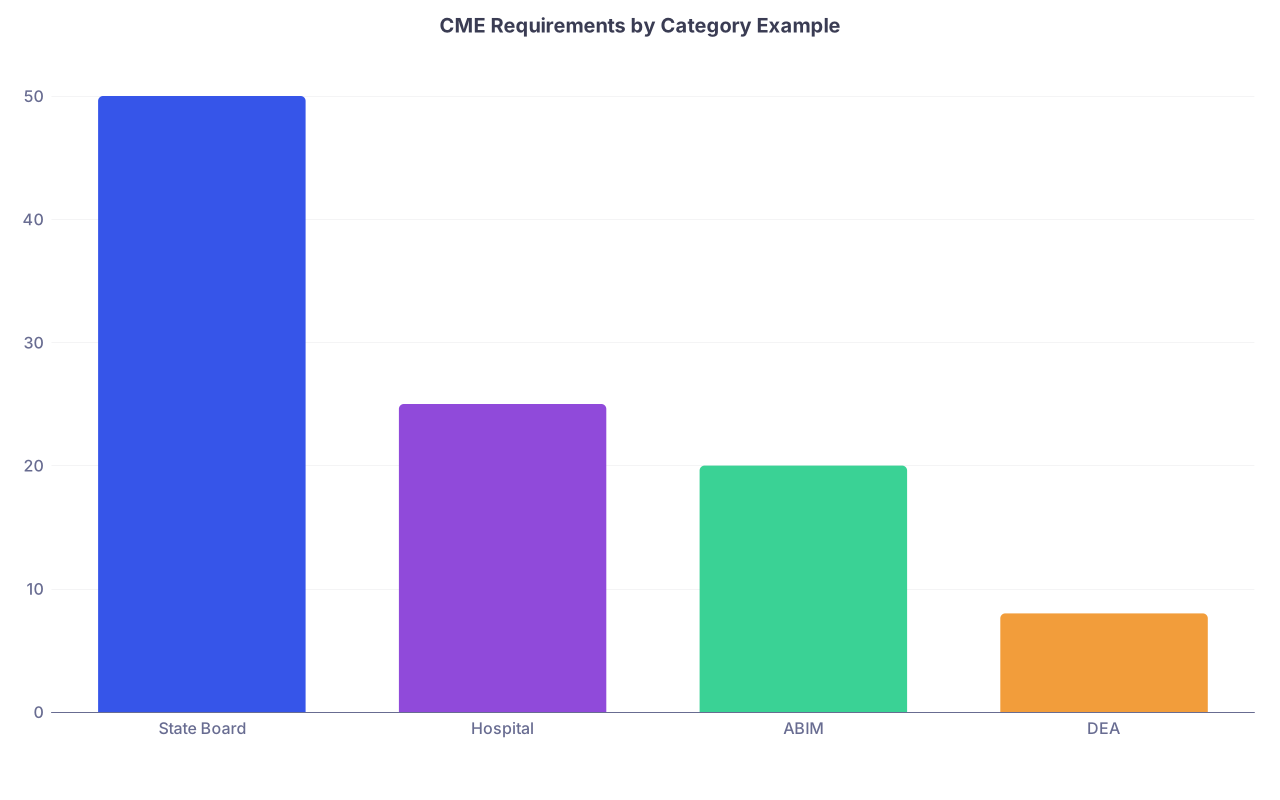
| Category | Value |
|---|---|
| State Board | 50 |
| Hospital | 25 |
| ABIM | 20 |
| DEA | 8 |
Where people screw this up
Calling everything “CME” without detail
- “CME – 80 hours” on a renewal form.
- Auditors will ask: How many were Category 1? How many were opioid/prescribing? Any risk management?
Confusing Category 1 and Category 2
- Category 1: From accredited CME providers, pre-approved, formally structured.
- Category 2: Self-directed learning (journal reading, teaching, QI work), which some boards limit or scrutinize.
- Sloppy: Logging journal reading as Category 1 because “it was definitely educational.”
Not separating MOC from CME correctly
- MOC points are not automatically CME credits.
- Some activities are both; some are only one.
- Auditors hate when you double-count the same hours in incompatible ways.
Missing mandatory topic categories
- Opioid prescribing/pain management
- Ethics/professionalism
- Cultural competency
- Risk management
- If your state requires a specific number of hours in a content area and you’ve lumped all CME together, that’s a red flag.
How to avoid this
- When you log or file a certificate, always capture:
- Category (1 vs 2)
- Special designation (opioid, ethics, etc., if listed)
- Whether it includes MOC points
- Maintain separate columns or tags for:
- State license CME
- Hospital medical staff requirements
- Board MOC requirements
- Never “upgrade” Category 2 to Category 1 in your log because it “felt formal.” That’s how you invite trouble.
Mistake #3: Scattered, Fragile, and Unverifiable Storage
Your documentation system is only as good as it looks when someone else tries to use it.
I’ve watched physicians scramble through:
- A dying laptop
- Old email accounts they can’t access
- Paper folders lost during office moves
- CME websites that changed vendors and “lost” history
That’s how you end up with gaps, inconsistencies, and panic.

| Step | Description |
|---|---|
| Step 1 | Complete CME |
| Step 2 | High audit risk |
| Step 3 | Partial documentation |
| Step 4 | Low audit risk |
| Step 5 | Saved certificate? |
| Step 6 | Storage reliable? |
Storage mistakes that blow up during audits
Trusting the provider to keep everything forever
- “It’s in my CME portal somewhere.”
- Then the hospital switches vendors. Or the site purges old records. Or your account is deactivated when you leave a system.
Using only local storage on one machine
- Desktop folder called “CME Stuff” on a hospital PC.
- You change jobs, IT wipes the machine, data is gone.
Mixing personal and CME files carelessly
- Certificates buried in Downloads between your kid’s school forms and random PDFs.
- You can’t find anything when you actually need it.
No version control for logs
- You update an Excel file yearly, but overwrite old versions.
- When dates change or you correct errors, there’s no paper trail.
A simple, low-friction system that works
You don’t need enterprise software. You do need discipline.
Set up:
- A cloud-based folder (OneDrive, Google Drive, Dropbox) named something obvious:
- “CME–[Your Last Name]–License Docs”
- Within that:
/Certificates_by_Year/2023,/2024, etc./Transcripts/(for big conferences, board providers)/Licensing_And_Audit_Submissions/(what you actually submitted to boards)
Every time you complete CME:
- Download the certificate as PDF immediately.
- Rename the file in a consistent, audit-friendly way:
2024-03-15_ACME_Hospital_Medical_Staff_Update_2.0_AMA_CAT1.pdf
- Save to the appropriate year folder.
If it takes longer than 30 seconds, you’re overthinking it.
Mistake #4: Back-Filling Logs and Guessing Dates
Nothing screams “audit me” like a log that was clearly built in one frantic sitting the week before renewal.
Auditors can smell it:
- Identical fonts and formatting for five years of entries
- Vague dates (“Spring 2021,” “Fall 2022”)
- Round numbers (lots of 1.0, 2.0, 5.0 with no variation)
- Missing providers listed for half the activities

How people get themselves in trouble
Recreating a five-year log from memory
- “I usually go to that conference every year, so I’ll put 8 hours for each year.”
- If they audit, they’ll check the conference roster. If your name isn’t there, that’s not a minor problem. That’s falsification.
Padding hours to meet a requirement
- You’re short 4 hours one cycle, so you “remember” some journal reading.
- Then you list it vaguely: “Various articles – 4 hours.”
- It looks artificial and non-credible.
Generic, copy-paste titles
- “Online CME” repeated 12 times with different dates.
- Looks lazy at best, dishonest at worst.
Changing dates to fit cycles
- Moving a December 2020 activity into 2021 because you were short.
- If anyone pulls the original certificate, you’ve just been caught altering records.
How to avoid this
- Do not log what you cannot prove. Period.
- If you missed past cycles:
- Accept the gap.
- Be prepared to explain and show what you’ve done since.
- Log real titles and providers, even if they’re a hassle to type.
- Use date ranges accurately for multi-day conferences (e.g., 2024-05-12 to 2024-05-14).
Mistake #5: Ignoring State- or Specialty-Specific Rules in Your Documentation
Another reliable way to invite scrutiny is to meet the total hours but fail the specific requirements.
Boards have gotten stricter, especially around controlled substances, ethics, and implicit bias.
| Requirement Type | Common Example |
|---|---|
| Total CME Hours | 50 hours / 2 years |
| Cat 1 Minimum | 30 hours / 2 years |
| Opioid/Prescribing | 3–8 hours / cycle |
| Ethics/Professionalism | 2–4 hours / cycle |
| Specialty-Specific | e.g., Radiology Safety |
What trips people up
Opioid or pain management requirements
- You did 6 hours of pain CME but:
- The certificate doesn’t mention opioids, prescribing, or pain.
- You log it as “General Internal Medicine Update.”
- During audit, it doesn’t count toward the opioid requirement because it’s not clearly documented as such.
- You did 6 hours of pain CME but:
Ethics/professionalism content
- You assume anything “quality” or “communication” counts.
- But your documentation doesn’t explicitly identify it as ethics/professionalism.
Specialty board quirks
- Some boards require practice assessment or QI project CME.
- You did the project but have only an email from your department chair, no formal CME certificate.
State vs. board misalignment
- You focus on MOC and assume that’s “good enough” for the state license.
- Then you find out your state wants a specific number of hours in a narrow topic that’s not obviously documented in your MOC activities.
How to avoid this
- Once per cycle, sit down and map your certificates to:
- State board requirements
- Board MOC requirements
- Hospital medical staff requirements
- When you do a topic-required CME (opioid, ethics, etc.):
- Make sure the title or the certificate text clearly reflects that topic.
- If it doesn’t, keep the agenda or course description along with the certificate as supporting documentation.
Mistake #6: Assuming “Attendance” Always Equals “Credit”
This one stings people who travel for big-name conferences and assume the presence badge is the same as completed CME.
It is not.
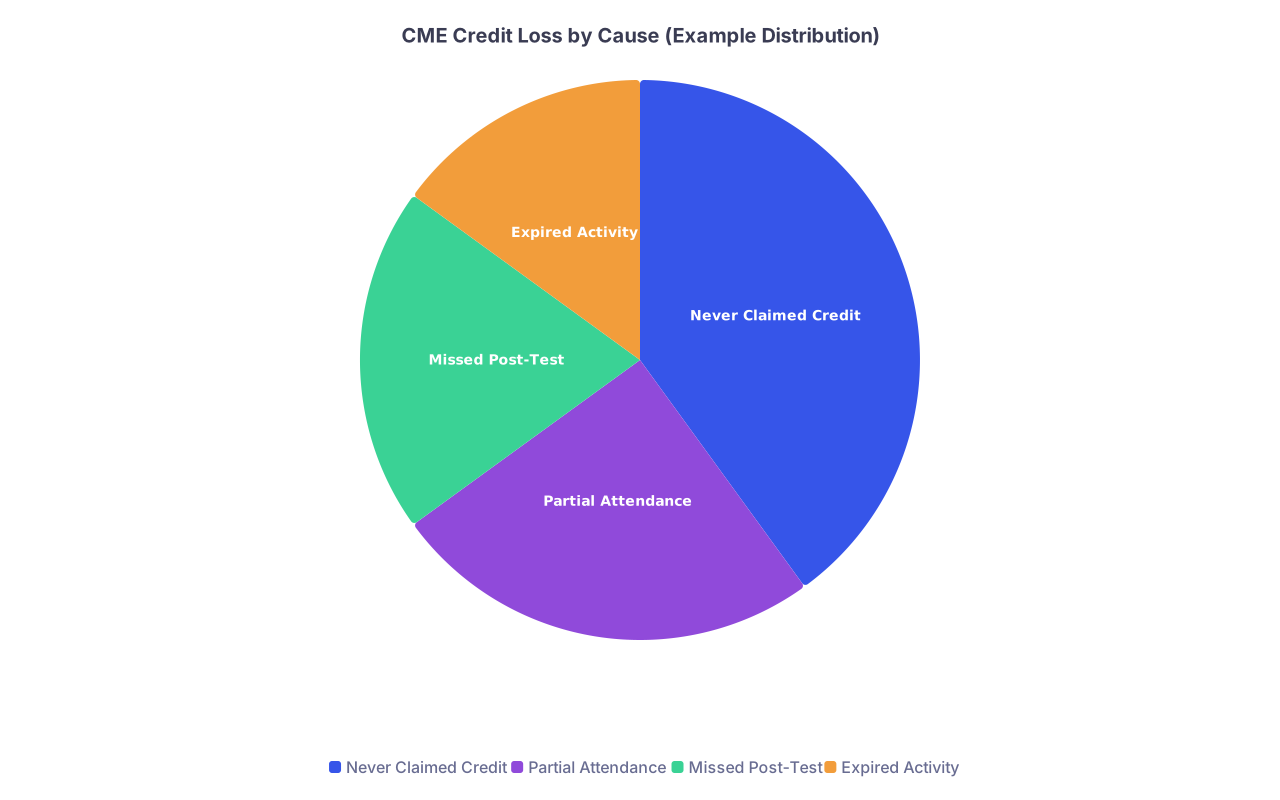
| Category | Value |
|---|---|
| Never Claimed Credit | 40 |
| Partial Attendance | 25 |
| Missed Post-Test | 20 |
| Expired Activity | 15 |
Common ways credits silently disappear
Not claiming credit after conferences
- Many conferences require you to:
- Log in to a portal
- Attest to sessions attended
- Complete an evaluation
- If you leave at noon on the last day and never do that, you might get zero credits.
- Many conferences require you to:
Missing the post-test
- For enduring materials (online modules, recorded webinars):
- You must pass a post-test to get credit.
- Watching 90% and closing the browser does not count.
- For enduring materials (online modules, recorded webinars):
Letting the activity expire
- Activities have an expiration date for claiming credit.
- Doing the activity in 2023 but trying to generate a certificate in 2025 can fail quietly.
Assuming teaching or QI work is automatically CME
- Your hospital grand rounds might be accredited. Or not.
- Your QI project might qualify for CME. Or not.
- If it isn’t part of an approved CME structure, you don’t get CME credit for it.
How to avoid this
- For every conference or course:
- Before you leave, check: “Have I actually claimed my credits and downloaded the certificate?”
- For online modules:
- Don’t close the browser until you see and save the certificate.
- For teaching/QI:
- Confirm with your CME office before the project whether it’s set up to provide CME.
Mistake #7: Presenting Sloppy, Inconsistent Data When Asked
Sometimes the audit is triggered not by your hours, but by the way you respond.
You can have technically sufficient CME but still alarm compliance people with disorganized, inconsistent submission.

Red flags in your response
- You send:
- Partly scanned documents
- Half-legible photos from your phone
- Different versions of the same log
- Certificates without any structure or explanation
- Dates don’t match:
- Your log says 4 hours, the certificate says 2.5.
- Your log shows 2022, certificate shows 2021.
- You change entries after they ask questions.
- “Oh, I updated that; here’s the corrected version.”
- From their perspective, it looks like you’re adjusting the story to fit what they find.
How to avoid this
When someone requests CME documentation:
- Freeze your working log
- Save a copy as “CME_Log_for_[Board/Hospital]Request[Date].xlsx”.
- Match every line item to a certificate
- If you can’t find the certificate in under 2 minutes, delete that entry from what you submit.
- Create a single, organized folder or PDF packet
- Sort by date.
- Make it easy for them to follow your logic.
- Don’t “fix” old data quietly.
- If you discover a mistake:
- Correct it.
- Be ready to explain briefly if asked.
- If you discover a mistake:
Auditors are human. If you make their job easy and your numbers line up, they’re less likely to dig deeper.
Mistake #8: Not Having a Simple, Written CME Documentation Policy—for Yourself
You are your own compliance officer. Whether you like it or not.
Most physicians just “wing it” and hope they remember to print certificates. That’s how you get five different systems in five years and a disaster when you need to reconstruct history.

| Step | Description |
|---|---|
| Step 1 | Complete CME Activity |
| Step 2 | Claim Credit |
| Step 3 | Download Certificate |
| Step 4 | Rename File Clearly |
| Step 5 | Save to Cloud CME Folder |
| Step 6 | Update CME Log |
Build a 1-page personal rule set
Something like:
- Immediately after any CME activity:
- Claim credit if needed.
- Download certificate as PDF.
- Rename using
YYYY-MM-DD_Provider_Title_Hours_Type. - Save in cloud folder
/Certificates_by_Year/[Year].
- Once per quarter:
- Update CME log (spreadsheet) with:
- Date
- Title
- Provider
- Hours
- Category
- Topic tags (opioid, ethics, etc.)
- Cross-check your totals with:
- State requirement
- Hospital requirement
- Board requirement
- Update CME log (spreadsheet) with:
- Once per cycle (before renewal):
- Run through requirements line by line.
- Create an “Audit Packet” PDF that you could send tomorrow if asked.
If you follow that, you’ll almost never be caught off guard.
FAQs
1. How many years of CME documentation should I keep?
Keep at least one full cycle beyond the longest requirement you’re subject to. Practically:
- Minimum: 6–7 years of complete records is a sensible baseline.
- If your state or board specifies longer, follow that.
- Storage is cheap. Over-saving is not your problem. Under-saving is.
2. Can I use a self-made spreadsheet as my only CME record?
No. Use your spreadsheet as a summary tool, not your primary proof. For audits, you need:
- Actual certificates or official transcripts
- Clear linkage between each spreadsheet line and a specific document
Think of the spreadsheet as your table of contents and the certificates as the book.
3. What should I do if I’ve already lost documentation for past CME?
Stop digging the hole deeper.
- Do not fabricate or guess past entries.
- Reconstruct what you legitimately can:
- Log back into CME providers and download what’s still available.
- Ask conference organizers or CME offices for past transcripts.
- Accept that you may have gaps for older cycles and focus on:
- Being completely solid and well-organized from this moment forward.
- Having a clear, honest explanation if anyone asks about prior periods.
Key takeaways:
- “I did the CME” is worthless without clean, verifiable documentation.
- Sloppy categories, missing topic documentation, and after-the-fact reconstruction are what trigger audits and escalations.
- A simple, consistent system—cloud folder, clear file names, and a structured log—protects your license, your sanity, and your future self.