
It is late at night, your ERAS CV is finally “done,” and you are staring at it thinking, “Looks fine… I guess?” You are tempted to upload and forget it. But here is the part people underestimate: a program director will decide in under 20 seconds whether you look organized, careful, and safe to interview. A sloppy CV does not just look bad. It screams: “This person cuts corners.”
You are not getting rejected because Times New Roman offended someone. You are getting rejected because your CV quietly tells PDs you do not respect details. That is a fatal impression in a field where missing one zero on a dosing calculation can harm a patient.
Let me walk you through the formatting mistakes that label you as disorganized and how to avoid them.
1. Inconsistent Formatting: The Fastest Way to Look Careless
This is the silent killer. Not one giant error. A hundred small ones.
The red flags PDs notice instantly
Here is what I see all the time:
- Dates sometimes “06/2021–08/2022” and sometimes “June 2021 – Aug 22”
- One section has bullets; the next is a paragraph wall
- Job titles bolded here, institution names bolded there, random italics sprinkled in
- Spacing between entries: single line here, double line there
- Periods after some bullet points but not others
Every tiny inconsistency whispers the same message: “I do not proofread my work.” PDs extrapolate that to: “I will not proofread my notes or orders.” That is the problem.
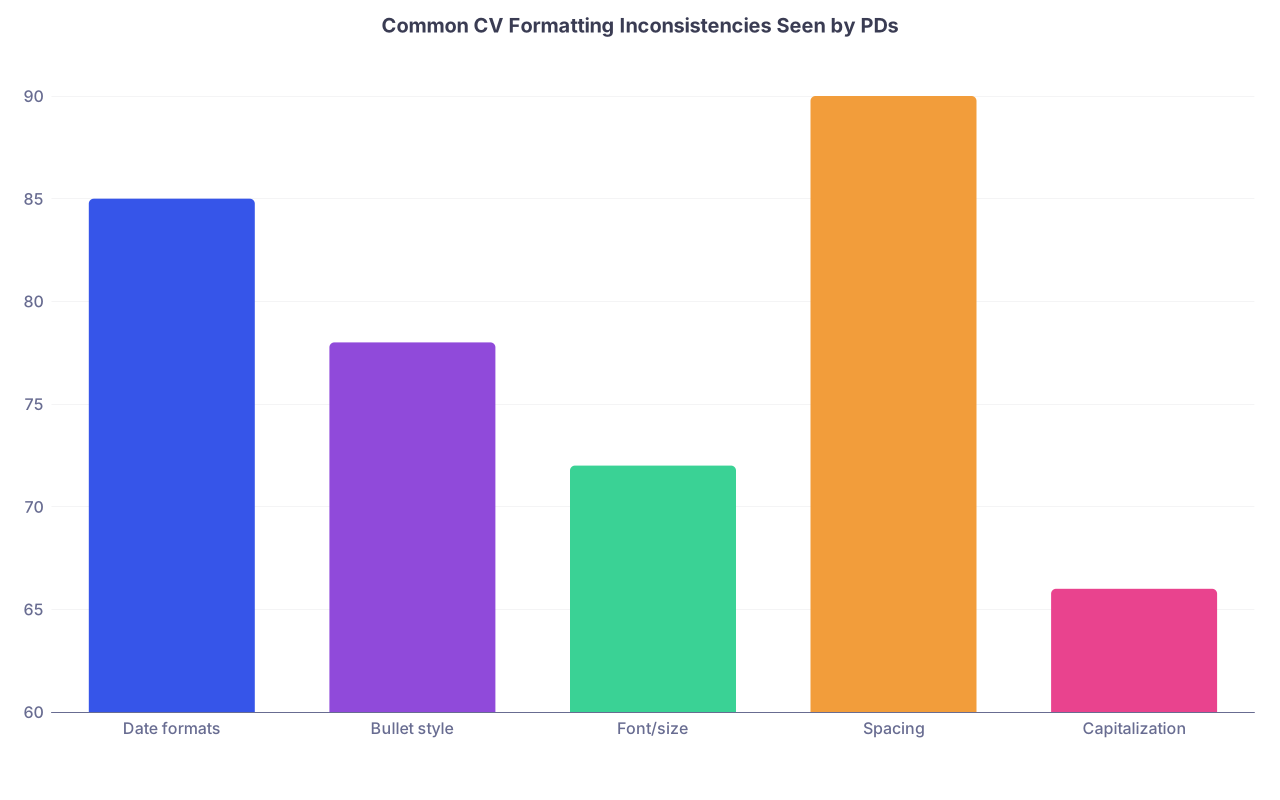
| Category | Value |
|---|---|
| Date formats | 85 |
| Bullet style | 78 |
| Font/size | 72 |
| Spacing | 90 |
| Capitalization | 66 |
How to avoid this
Pick a style for each of these and stick to it across the entire document:
- Date format
- Example:
Jun 2021 – May 2022(month abbreviation, year, en dash, spaces)
- Example:
- Section headings
- Example: ALL CAPS, bold, slightly larger font
- Entry layout
- Example:
- Line 1: Role (bold), Institution (regular), City, State
- Line 2: Dates, right-aligned
- Line 3+: Bulleted responsibilities/achievements
- Example:
- Bullet style
- Use simple solid dots. No arrows, stars, or fancy icons.
Print it out once. Circle every inconsistency. Fix them in batches. Do not trust that “it probably matches.”
2. Overcrowded, Dense Layouts That Look Like Chaos
You are trying to squeeze in every award since middle school. The result? A CV that looks like the fine print of a credit card contract.
What PDs actually think
No white space = no breathing room = no hierarchy.
When your CV is a dense brick of text:
- PDs cannot skim quickly
- They miss your best experiences
- They label you as “disorganized” or “can’t prioritize”
I have heard faculty say, “I don’t have time to decode this,” and just move on.
Common overcrowding mistakes
- Margins under 0.5 inches to “fit one more line”
- Tiny font (9–10 pt) to fit it all on 1–2 pages
- Zero spacing between entries
- 6–8 bullets per position
- Long bullet points that run 3–4 lines each
You are trying to look impressive. You end up looking cluttered.
How to fix it
Aim for this:
- Font: 11–12 pt (Calibri, Arial, Garamond, Times New Roman – pick one)
- Margins: at least 0.7–1.0 inches
- Line spacing: 1.0–1.15, with a small space between entries
- Bullet count: 2–4 strong bullets per position. Not 10 weak ones.
- Bullet length: 1–2 lines max
If your CV looks full but clean from 3 feet away, you are doing it right. If it looks like a block of gray ink, you are not.
3. Wildly Inconsistent Dates and Timelines
Nothing makes a PD twitch faster than dates that do not line up. It looks sloppy at best and dishonest at worst.
Mistakes that raise eyebrows
- Using different formats:
- “6/2020 – 5/21”
- “2019–2020”
- “Jan 2022 – Present” all on the same page.
- Overlapping dates that do not make sense:
- “Full-time research fellow 07/2021 – 06/2022”
- “Full-time scribe 01/2022 – 12/2022”
- Missing months, just years, making gaps look suspicious
- Using “Present” in one place and specific end dates in others without reason
PDs are used to reading timelines. They notice when things feel off.
| Style Type | Bad Example | Better Example |
|---|---|---|
| Mixed formats | 6/20–5/21 and 2022–Present | Jun 2020 – May 2021 |
| Missing months | 2021–2022 | Jul 2021 – Jun 2022 |
| “Present” usage | 2021–Present (everywhere) | Aug 2022 – Present |
How to fix your dates
Choose one format:
- I recommend:
Mon YYYY – Mon YYYYorMonth YYYY – Month YYYY - Use “Present” only for truly ongoing roles.
- I recommend:
Check for impossible overlaps:
- If two roles overlap heavily, be ready to explain.
- For genuine overlaps (e.g., research + part-time tutoring), it is fine. Just do not claim both were “full-time.”
Make gaps intentional, not mysterious:
- If you took 6 months for family reasons, research, or exam prep, that is fine. Just make sure the rest of the timeline is crystal clear so it does not look like a formatting error.
Disorganized or sloppy timelines are an easy avoidable strike against you.

4. Unprofessional Fonts and Visual Experiments
You are not designing a tech startup pitch deck. You are asking to be trusted with patient care.
Fonts that make you look unserious
I have seen:
- CVs in Comic Sans (yes, really)
- Script or cursive-style fonts for headings
- Mixed fonts: body in Times, headings in something random
- Colored fonts – blue sections, red dates, gray bullets
What this signals to PDs:
- Poor judgment
- Lack of understanding of professional norms
- More style than substance
They do not care what font you pick among the standard options. They care that it looks like an adult made it.
Safe choices
Use any of these, and PDs will not care:
- Calibri (11 or 12)
- Arial (10.5–11)
- Times New Roman (11 or 12)
- Garamond (11 or 12)
Pick one. Use it everywhere.
Style mistakes that hurt you
Avoid:
- Underlining section headings (looks like hyperlinks)
- ALL CAPS for everything (hard to read, aggressive)
- Multiple colors (black only, unless your name is a subtle dark gray)
- Overuse of italics (especially for long sections)
Think: quiet, boring, readable. Let your content do the talking.
5. Misaligned Sections and Chaotic Structure
You know those CVs where Education is halfway down page 1, Research appears twice, and Work Experience is tucked behind Honors? That is how you look disorganized without even realizing it.
Structures PDs expect
Programs reading ERAS-type CVs are used to a certain rough sequence. If you go rogue, you force them to hunt for basic facts.
Here is the basic safe order:
- Name + Contact Info
- Education
- USMLE/COMLEX (if in a free-form CV, not ERAS)
- Clinical Experience
- Research
- Publications / Presentations
- Teaching / Leadership
- Honors / Awards
- Volunteer / Community Service
- Skills / Languages (optional)
When you bury key sections under random headings like “Other Experience” or “Professional History,” PDs lose patience.

| Step | Description |
|---|---|
| Step 1 | Name and Contact |
| Step 2 | Education |
| Step 3 | Clinical Experience |
| Step 4 | Research |
| Step 5 | Publications and Presentations |
| Step 6 | Leadership and Teaching |
| Step 7 | Honors and Awards |
| Step 8 | Volunteer Service |
| Step 9 | Skills and Languages |
Specific structural mistakes
- Multiple “Research” sections scattered in different places
- “Leadership” buried under “Volunteer” with no clear header
- Mixing work, volunteering, and research all under one vague heading
- No clear section breaks – just a long scrolling blob
Fix it like this
- Use clear, obvious section headings: EDUCATION, RESEARCH, LEADERSHIP, etc.
- Group like with like: all research together, all clinical together.
- If you have too many tiny headings, combine:
- “Teaching” + “Leadership” into “Leadership & Teaching”
- “Volunteer” + “Community Service” into one section
If a PD can find any major category in under 2 seconds, you are organized. If they have to scan back and forth? You look scattered.
6. Sloppy Bullet Points That Look Rushed
Formatting is not just layout. It is also how you structure the content inside each section.
What screams “disorganized” inside bullets
- Switching tense for no reason:
- “Managed clinic flow”
- “Teach patients about medications”
- “Assisted physician with procedures”
- Random capitalization:
- “Assisted with Patient Education on Diabetes”
- “Led quality improvement project on sepsis protocol”
- Inconsistent punctuation:
- Some bullets end with periods, some do not
- Varying indentation or bullet symbols:
- Circles here, dashes there, arrows in another section
PDs see this and think: “This person does not track details. They just type and submit.”
Clean bullet rules
Use these defaults:
- Tense:
- Past roles: past tense (“Led,” “Created,” “Assisted”)
- Current roles: present tense (“Lead,” “Create,” “Assist”)
- Capitalization: sentence case, not title case inside bullets
- Punctuation: either
- All bullets end with periods, or
- None do.
Just be consistent.
- Bullets: one type throughout (standard round bullet)
And for the love of efficiency: do not start every bullet with “Responsible for.” It wastes space and makes you sound passive.

7. Awkward Page Breaks and Orphaned Lines
You might think nobody cares if one lonely bullet falls to the next page. PDs notice. They may not consciously analyze it, but they feel the sloppiness.
Problem patterns
- Section headers at the bottom of a page with all content on the next page
- A single bullet orphaned on page 2
- Huge blank space at the bottom of page 1 while page 2 is packed
- Random line breaks from copy-pasting
This is like coming to an interview with your shirt half untucked. It is not fatal, but it looks off.
How to fix pagination
- Use “Print Preview” and scroll once top to bottom
- Manually insert page breaks if needed:
- Do not let headings sit alone at the bottom of a page
- Move at least 2 lines of content with each heading
- Adjust spacing slightly:
- Reduce or increase spacing before/after headings by small amounts (1–2 pts) to keep sections together
- Keep it to 1–2 pages for most med students. Rare exceptions go to 3.
If your second page is only one-third full, cut content or tighten spacing. A nearly blank second page looks careless.
8. Overusing Bold, Italics, and Emphasis
Every applicant thinks their leadership award is special. So they bold it, italicize it, maybe even ALL CAPS it. The result? Visual chaos.
What over-formatting looks like
- Role title bolded in one entry, institution bolded in the next
- Italics for some dates but not others
- Random “KEY PROJECT:” in bold mid-bullet
- Underlines under book titles or project names
From a PD’s eyes, the page starts to flicker. There is no clear pattern.
Simple rules that keep you out of trouble
- Bold one thing per entry, consistently:
- Either the role title or the institution, but not both
- Use italics sparingly:
- Journal names, maybe a thesis title. That is it.
- Avoid underlining entirely:
- It looks like a hyperlink from the 1990s
- Avoid all caps for emphasis inside bullets:
- It reads like shouting
Think of formatting emphasis like salt. A little makes it better. Too much ruins the dish.
9. Contact Information That Looks Amateur
The top of the CV is prime territory to prove you are mature and organized. Some people blow it in the first line.
Contact info mistakes that look bad
- Unprofessional email:
[email protected]baller23@...
You laugh. I have seen worse.
- Incomplete phone or international formatting errors
- Multiple addresses with no labels, crowding the top
- Tiny font crammed into a single impossible line
Remember: this is what they see first.
Clean, professional contact block
Example:
Jane Smith, MD Candidate
Email: [email protected] | Phone: (555) 123-4567
Address: City, State
No need for your full street address in most cases. Certainly no need for 2–3 addresses. Keep it simple.
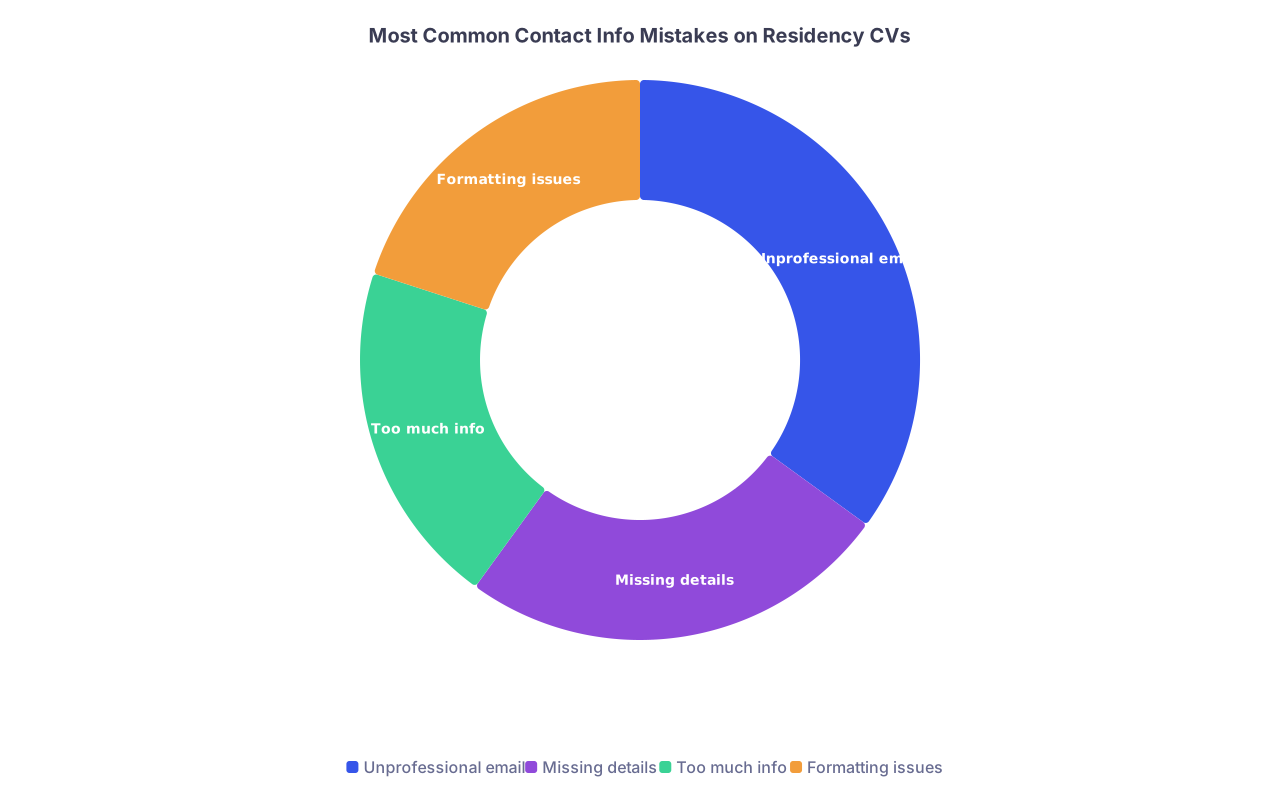
| Category | Value |
|---|---|
| Unprofessional email | 35 |
| Missing details | 25 |
| Too much info | 20 |
| Formatting issues | 20 |
10. Mixing ERAS Entries With “Traditional CV” Formatting
One more subtle mistake: people treat the ERAS-generated “CV” and an attached PDF CV as if they are completely unrelated. Then they format them totally differently.
Result: PD prints both and sees two different stylistic personalities. That looks disjointed.
Typical mismatch issues
- Different date formats ERAS vs PDF
- Different section names:
- ERAS: “Work Experience”
- PDF: “Professional Activities”
- Entries appearing in different orders or with different titles
- Different terminology:
- “Research Assistant” in one place, “Clinical Research Fellow” in the other
How to avoid this
- Let ERAS dictate terminology and ordering, then mirror that in your separate CV
- Use the same date and capitalization style in both
- If you update something in ERAS (e.g., end date), update your PDF CV the same day
If a PD holds both documents in their hands, they should feel like they came from the same person on the same day.
FAQ (Exactly 3 Questions)
1. Does a single formatting mistake really matter that much to program directors?
One isolated typo will not sink you, but patterns will. PDs are not grading you like an English teacher. They are asking, “Does this person consistently miss small details?” When dates jump formats, bullets shift styles, and sections look slapped together, they start doubting your reliability. One error is human. A messy CV is a habit.
2. Is it worse to have a slightly crowded one-page CV or a clean two-page CV?
The crowded one-page CV is worse. When you shrink fonts or crush spacing just to “stay on one page,” you create a document that is hard to skim. PDs skim. If a clean, well-organized second page is what it takes to present your experiences clearly, use it. Just do not let page two be mostly white space.
3. Should I hire someone or use a template to fix my CV formatting?
You do not need to pay anyone, but you also should not freestyle. Use a simple, professional template (university career office templates are usually safer than random internet ones). Then customize cautiously. The goal is not “unique design.” The goal is clean, consistent, and skimmable. If a friend can find any section in 2 seconds and spot no obvious inconsistencies, you are in good shape.
Key points to keep:
- Consistency is everything: same fonts, same dates, same bullet style throughout.
- Make it skimmable: reasonable spacing, clear section order, no visual clutter.
- Avoid attention-grabbing design; let the content stand out by not making basic formatting mistakes that broadcast disorganization.