

Only 11% of program directors say they “reliably” look at applicant personal websites, but almost all of them will read a clearly linked, targeted project or research page if it answers a specific question they already have about you.
That is the gap. Most applicant sites are vanity projects. Program directors do not have time for vanity.
You are in a gap year before residency. You want a portfolio site. The bar is high: if it does not save a PD time or reduce their uncertainty about you, it is useless. Let me walk you through how to build something that actually earns clicks—and keeps them.
1. What PDs Actually Want To Know (That Your Site Can Answer)
Forget what you think looks cool on a website. Start with this: what concrete questions is a PD or faculty evaluator trying to answer about you?
Here is the short list I see over and over on selection committees:
- Can this person do the work at our level?
- Are they actually productive, or just “interested” in everything?
- Was this gap year intentional, or are they hiding a problem?
- Do they fit our specialty’s culture and priorities?
- If I rank them, will they represent our program well in research / QI / education?
Your portfolio website should answer those, fast, without fluff.
That means:
- Clear proof of output (papers, posters, QI projects, code, dashboards, curricula).
- Evidence of longitudinal commitment, not random one-off experiences.
- A convincing story for your gap year that matches what you put in ERAS.
- Specialty-aligned work: an anesthesia applicant’s portfolio should not look like a psychiatry applicant’s portfolio.
If your site does not move the needle on those questions, it is just a distraction.
2. The Only Structure That Makes Sense For A Gap Year Portfolio
Program directors will not wander around your site exploring. They will land, scan for 20–40 seconds, and either close or click exactly one more link.
So you build for that pattern.
Here is the lean structure that works:
- Homepage: 30-second overview + one-sentence gap year explanation + 3 strongest highlights.
- Projects / Portfolio page: each item is structured, skimmable, with outcome metrics.
- Publications / Presentations page: simple, well-formatted, easily copyable citations.
- About / CV page: short “who I am now” paragraph, link to PDF CV.
- Optional: Technical / Teaching section, if relevant to your specialty.
Anything else (blog, photo gallery, “travel during my gap year”) is a liability unless it directly reinforces a professional narrative.
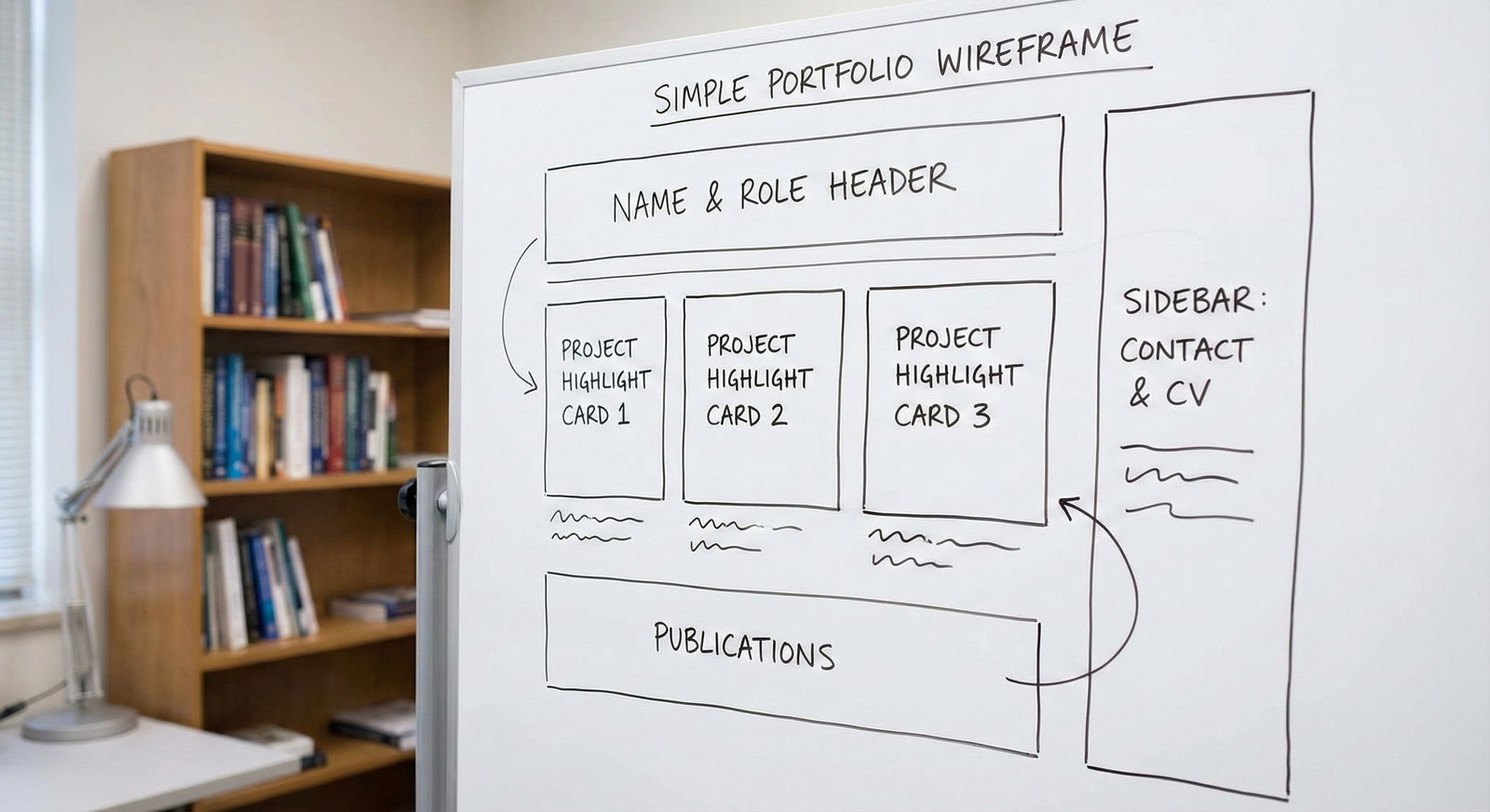
A minimal, PD-friendly homepage layout
Above the fold (what is visible without scrolling) should answer:
- Who you are
- What specialty you are applying to
- What this year is about
Then, three clickable highlights.
Example homepage copy that works:
Header:
Jane Doe, MD
Gap Year Research Fellow – Pulmonary & Critical Care Medicine
Applying Internal Medicine, 2025 MatchSubheader (one sentence):
I spent my gap year leading data-driven ICU quality projects focused on sepsis care and rapid response activation.3 Highlight Cards:
- Sepsis Order Set Redesign – Reduced time-to-antibiotics by 26%
- ICU Transfer Risk Score – Predictive model integrated into EHR pilot
- National Presentation – ATS 2024, Sepsis Quality Improvement
Each card should link to a project detail page. Not a blog post. A structured, concise, outcomes-focused page.
3. Technical Setup Without Getting Lost In The Weeds
You do not need to become a web developer. You do need to avoid looking like an amateur.
Here is the honest rundown.
| Platform | Best For | Pros | Cons |
|---|---|---|---|
| Notion page | Quick, structured project lists | Fast to build, easy updates | Can look generic, clunky URLs |
| Squarespace | Polished, minimalist portfolios | Clean templates, no coding | Annual cost, more setup |
| Wix | Highly customized visual layouts | Drag-and-drop, flexible design | Easy to over-design, slower |
| Hugo/GitHub | Tech-oriented, coding applicants | Free, powerful, very professional | Requires technical comfort |
If you are not tech-savvy: use Squarespace or a single well-structured Notion page with a custom domain.
If you are applying to a field that values tech (radiology, EM, anesthesia, informatics, anything with AI): GitHub Pages + a simple Hugo template is a quiet signal that you are serious.
Domain and URL discipline
PDs do not care what registrar you use. They do care about:
- A professional URL:
firstname-lastname-md.comordrfirstname.com. - A clean, short slug you can paste into ERAS (when allowed) and emails:
janedoe-md.com.
Absolutely avoid:
cooldoc123.wixsite.comjanedoemedicalresearchportfolio2024.something.io
If it looks like a hobby, they will treat it like a hobby.
4. Designing For PD Brain: Clarity Over Creativity
Let me be blunt: program directors hate cute.
They scan in patterns. Left to right. Big headings. Bold numbers. They are not hunting for Easter eggs or clever animations.
The visual rules that matter
- White background. Black or very dark gray text. No script fonts.
- One primary accent color; keep it subtle.
- Font sizes large enough to read on a laptop at arm’s length.
- No auto-playing anything. No background video.
- Always show your full name and specialty on every page (top left is fine).
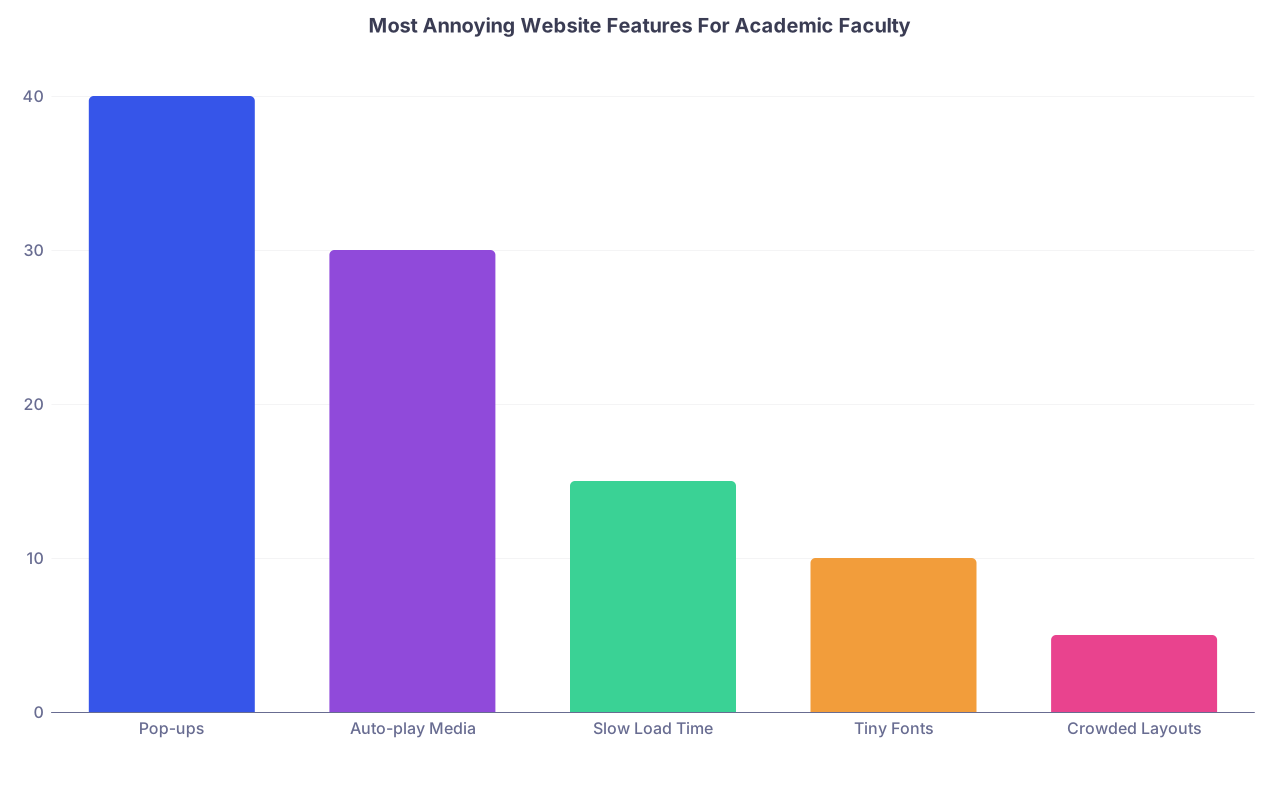
| Category | Value |
|---|---|
| Pop-ups | 40 |
| Auto-play Media | 30 |
| Slow Load Time | 15 |
| Tiny Fonts | 10 |
| Crowded Layouts | 5 |
The best compliment I have heard a PD give a website: “I did not have to hunt for anything.”
Your design goal is boring in the best way.
5. How To Present Gap Year Projects So They Look Like Serious Work
Most applicants undersell—or oversell—their projects. Both are obvious.
You want each project to look like a mini case report of your work.
Use a consistent structure for every project page:
- Title
- Role
- Setting
- Problem
- Approach
- Outcome
- Skills and tools
Example (this is the level of detail that actually helps a PD):
Title:
Sepsis Order Set Redesign to Reduce Time-to-Antibiotics in the Medical ICURole:
Primary project lead (under supervision of Dr. Smith, ICU Medical Director)Setting:
24-bed academic MICU, University Hospital, July 2023–June 2024Problem:
Baseline time from ICU admission to first antibiotic dose for septic patients was 163 minutes, above national benchmarks.Approach:
- Retrospective chart review of 180 MICU admissions with sepsis ICD codes.
- Identified workflow delays at CPOE step and pharmacist verification.
- Led 3 multidisciplinary meetings (pharmacy, nursing, residents) to redesign order sets.
- Implemented default STAT antibiotic orders for septic shock, pre-checked lactate + cultures.
- Built real-time dashboard (SQL + Tableau) to monitor key time intervals.
Outcome (preliminary):
- Median time-to-antibiotics decreased from 163 to 121 minutes over 4 months (26% reduction).
- Order set adoption: 82% of sepsis admissions using new pathway by month 4.
- Abstract submitted to SCCM 2025; manuscript in preparation.
Skills and tools:
SQL, Tableau, basic R for data cleaning, interdisciplinary team leadership.
No adjectives, just evidence.
If you led a clinical education project instead of research, the same structure works: “Problem → Approach → Outcome → Your role.”

| Step | Description |
|---|---|
| Step 1 | Identify Problem |
| Step 2 | Define Outcome Metric |
| Step 3 | Design Intervention |
| Step 4 | Implement Pilot |
| Step 5 | Collect & Analyze Data |
| Step 6 | Present/Publish |
| Step 7 | Add to Portfolio Site |
Your website should make each of your substantial projects look like it went through that lifecycle, even if the “publish” step is in progress.
6. Handling The “Gap Year” Narrative Directly
PDs are suspicious of unexplained gaps. A portfolio site gives you the space to explain, once, cleanly, and in a way that matches ERAS.
You want a short “Gap Year Focus” section on the homepage or About page. Not a full essay.
Structure it:
- 1 sentence: why the gap year exists.
- 2–3 sentences: what you focused on.
- 1 sentence: what changed in you / your skills.
- 1 sentence: where this leads in residency.
Example:
I chose to take a dedicated research year between medical school and residency to gain deeper experience in ICU quality improvement and clinical data analysis. During this year, I led a sepsis order set redesign, helped develop an ICU transfer risk score, and co-authored two manuscripts related to critical care outcomes. This work strengthened my skills in SQL, data visualization, and multidisciplinary team leadership. I plan to bring this QI and data mindset into an Internal Medicine residency with the long-term goal of a Pulmonary & Critical Care fellowship.
If your gap year was partly for remediation (failed Step, personal leave, etc.), your website is not where you litigate that in detail. You acknowledge the pivot in tone, not the specifics.
Something like:
After addressing personal and academic challenges early in my training, I used this year to rebuild with structured clinical research, consistent mentorship, and deliberate practice in clinical reasoning. The projects on this site reflect that focus on reliability, follow-through, and measured improvement.
That signals insight without oversharing.
7. Publications, Presentations, and Making Them Copy-Paste Friendly
One job of your site: make it effortless for a PD or faculty interviewer to pull a citation, figure, or quick summary.
Your Publications / Presentations page should:
- Group by type: Peer-reviewed articles, Abstracts, Posters, Oral presentations.
- List items in reverse chronological order.
- Bold your name.
- Use a standard citation style (I usually default to AMA for U.S. residency).
Example entry:
Peer-reviewed articles
Doe J**,** Smith AB, Lee C. Implementation of a redesigned sepsis order set in a medical ICU and its impact on time-to-antibiotics. Crit Care Med. 2024;52(3):e210–e218. doi:10.1097/CCM.0000000000009999Abstracts and posters
Doe J**,** Patel R, Nguyen M. Development of an ICU transfer risk score using EHR data. Abstract presented at: Society of Critical Care Medicine Annual Congress; January 2024; Phoenix, AZ.
Also: link selectively.
If a paper is on PubMed, link the title. If a poster is on your institution’s repository or a PDF you host, again, link the title.
Just do not overload with links that go nowhere or to “manuscript in preparation” Google Docs. That looks amateur.
8. Specialty-Specific Tweaks That Actually Matter
Your portfolio should not look the same if you are applying to dermatology versus general surgery versus psychiatry. Every specialty has quiet signals.
A few concrete examples
Internal Medicine / IM subspecialties:
Show QI, longitudinal clinic projects, clinical research, teaching. Emphasize data, continuity, outcomes, and communication.General Surgery:
Emphasize OR-related QI, ERAS pathways, trauma workflows, procedural simulations, any cadaveric / skills lab teaching. Be direct about responsibility and ownership. Surgeons like clear, no-nonsense presentation.Emergency Medicine:
Show systems work: flow, throughput, triage, resuscitation protocols, FOAMed contributions, ultrasound curricula. Fast, high-yield summaries appeal to EM brains.Psychiatry:
Showcase longitudinal work, psychotherapy training, community or systems projects, outcome tracking in clinics, educational materials for patients or staff. Tone should be thoughtful, not flashy.Radiology / Pathology / Informatics-heavy roles:
Your site itself becomes part of the evaluation. Clean tech stack, clear descriptions of data pipelines, dashboards, any ML work. A GitHub link with a tidy README is better than a fancy Squarespace site with no substance.
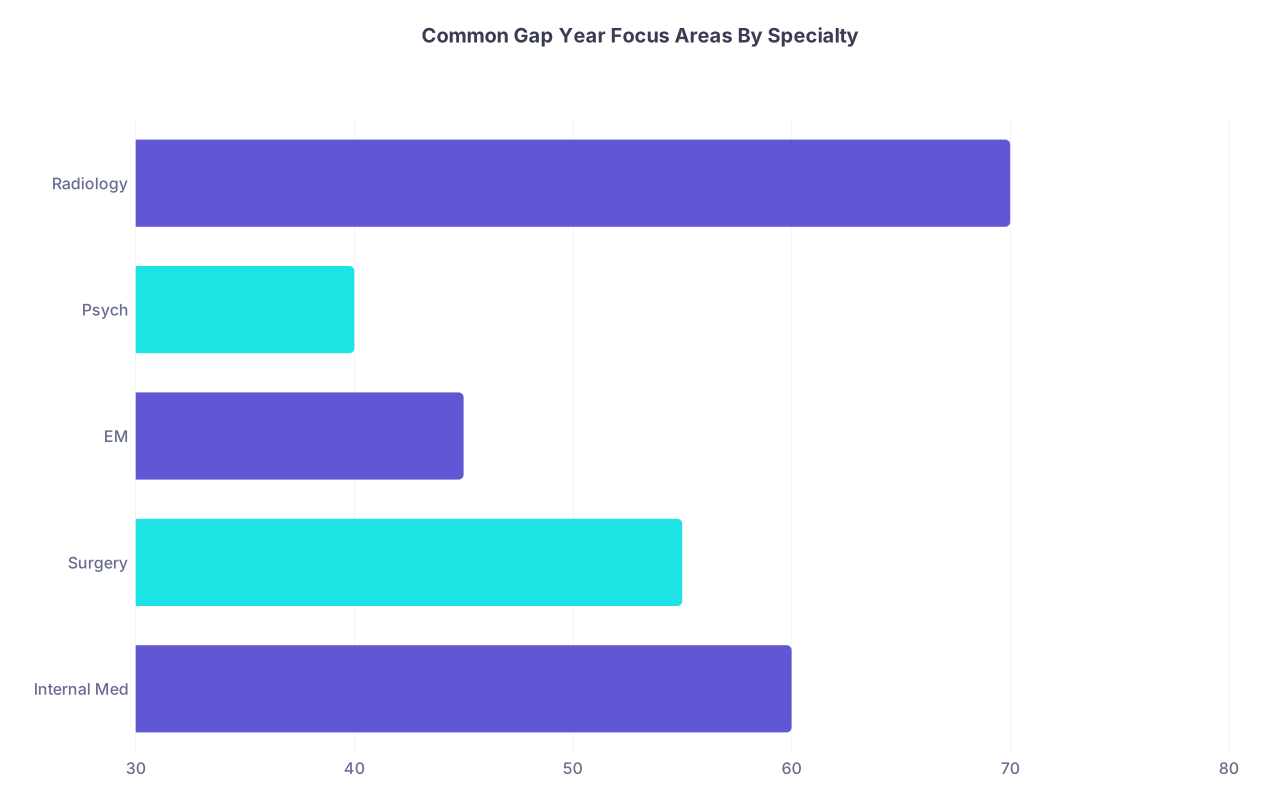
| Category | Value |
|---|---|
| Internal Med | 60 |
| Surgery | 55 |
| EM | 45 |
| Psych | 40 |
| Radiology | 70 |
(Values above represent approximate percentage of applicants in that specialty who have at least one research or QI project during a gap year, in my experience across several programs. The takeaway: you are competing against other people who also “did research.” Your site needs to show how you did it.)
9. How PDs Actually Find And Use Your Site
Most PDs are not Googling applicants. They barely have time to pee between interviews.
Where your site actually gets used:
- Pre-interview: Faculty interviewer skims your app, sees a link in your ERAS experiences description or personal statement (“Project details at: janedoe-md.com/projects”), clicks.
- Interview day: You mention “I led a sepsis QI project; I have a brief before-and-after figure on my site if helpful.” They pull it up on their phone or second monitor.
- Rank list meeting: A faculty member defending you references your concrete outcomes because they saw them laid out clearly.
So you need:
- A domain simple enough to type from memory.
- One clean URL for projects, one clean URL for publications.
- The same phrasing between ERAS and the site to avoid suspicion.
I have literally heard: “Her ERAS sounded vague, but the project page had real numbers and timeline. That sold me.”
Your portfolio is not for showing off. It is a tool your advocates can use in the room when you are not there.
10. Stuff That Will Make PDs Close The Tab Instantly
Let me be direct about what kills credibility:
- Overlong personal narrative on the homepage.
- Photos of you traveling, partying, or doing non-clinical hobbies dominating the layout.
- Music, sound, or any auto-play content.
- Blog posts ranting about medical school, healthcare politics, or toxic training environments.
- Anything that looks like HIPAA violation: “case stories” with too much detail, screenshots of EHRs, patient photos.
- Typos on the first screen. This sounds harsh. It is. People judge.
Your hobbies can have a paragraph in the About section, fine. But if the hero image is you on a mountain with “Passion. Purpose. Medicine.” as the overlay text—no.
11. Maintenance And Version Control (Without Going Nuts)
You are busy during interview season. The site should not become a second job.
Simple rules:
- Update projects and publications 2–3 times per year, not every week.
- Freeze major changes once interview invitations start going out, except for adding newly accepted publications.
- Put a “Last updated: Month Year” line in the footer or About page. It signals that this is intentional, not abandoned.
For works-in-progress:
- Mark them clearly: “Manuscript in preparation,” “Abstract submitted,” “Pilot ongoing (data collection through Dec 2024).”
- Do not inflate. If you are third author doing chart review, say that. PDs can smell resume inflation from orbit.
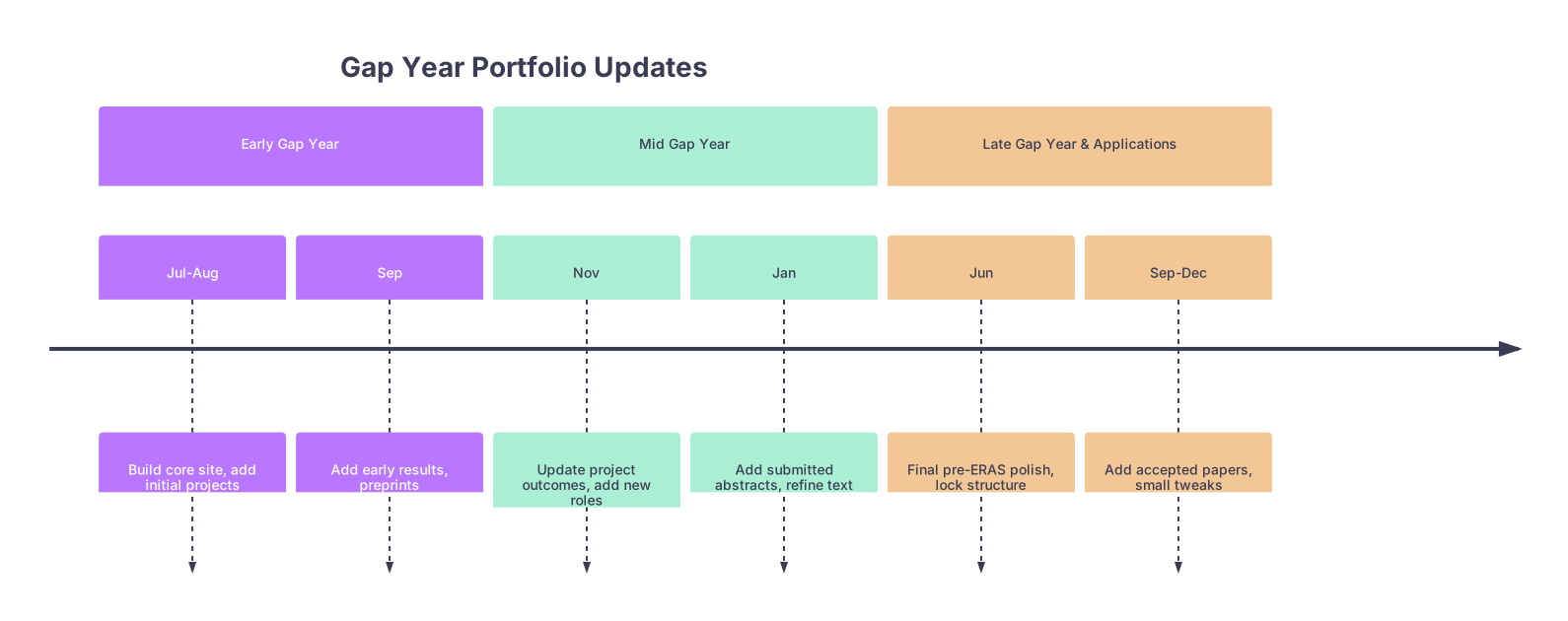
| Period | Event |
|---|---|
| Early Gap Year - Jul-Aug | Build core site, add initial projects |
| Early Gap Year - Sep | Add early results, preprints |
| Mid Gap Year - Nov | Update project outcomes, add new roles |
| Mid Gap Year - Jan | Add submitted abstracts, refine text |
| Late Gap Year & Applications - Jun | Final pre-ERAS polish, lock structure |
| Late Gap Year & Applications - Sep-Dec | Add accepted papers, small tweaks |
12. A Quick Build Blueprint (If You Want A Stepwise Plan)
If you are starting from scratch and do not want to overthink it, follow this order:
- Buy a clean domain (
firstname-lastname-md.com). - Choose one platform and one minimalist template. Do not tweak colors for 3 hours.
- Draft homepage copy in a text editor first. Keep it under 200 words.
- List your gap year projects. For each, fill in the template: Role / Setting / Problem / Approach / Outcome / Skills.
- Paste these into a Projects page; use headings, not fancy widgets.
- Build a Publications page with properly formatted citations.
- Write a 4–6 sentence About / Gap Year Focus section.
- Add a visible email contact (Gmail or institution, not “docdude1995”).
- Have one mentor or faculty member review the site for tone, typos, and over-sharing.
- Once stable, add the URL selectively to ERAS where it makes sense (e.g., in a QI project description: “See project summary: janedoe-md.com/sepsis-qi”).
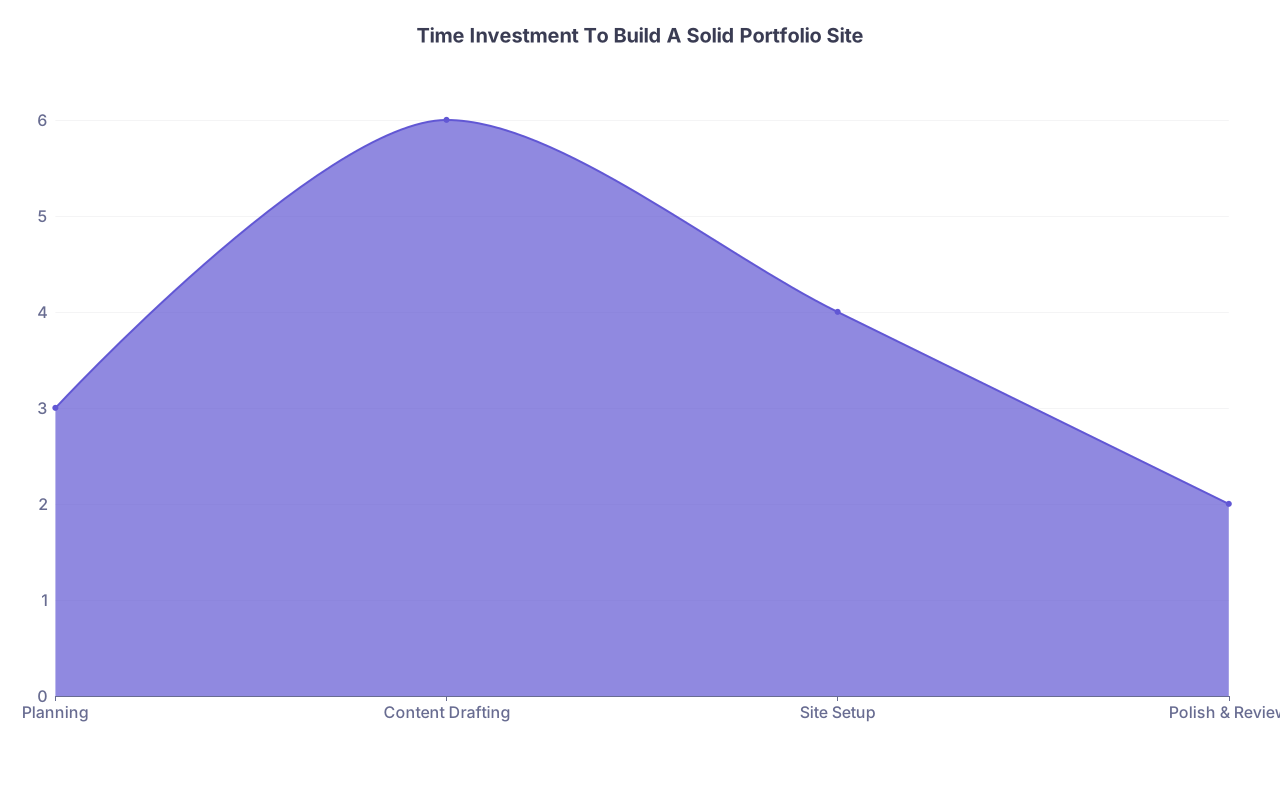
| Category | Value |
|---|---|
| Planning | 3 |
| Content Drafting | 6 |
| Site Setup | 4 |
| Polish & Review | 2 |
Rough hours: 15. Maybe 20 if you have a lot of projects. That is less than a single wasted weekend on “studying” with your phone open.
FAQ (Exactly 4 Questions)
1. Should I put my portfolio website URL directly in my ERAS application?
Yes, but in a targeted, restrained way. Do not slap it into your demographic info or as a random line in your personal statement. Instead, link it where it adds clarity. For example, under a major research or QI experience, you might end the description with: “Project summary and outcomes: janedoe-md.com/icu-qi.” That way, PDs see it in context. Never require the site to understand your application; it should be a value-add, not a dependency.
2. Is a portfolio website worth it if I only have one or two projects?
If those one or two projects are substantial—with real data, outcomes, or educational products—then yes, it can still help. Your site would essentially be a clean, expanded project dossier and an organized publications list. If your “projects” are minor shadowing experiences or passive observerships, skip the website. This tool is best for applicants with at least one serious research, QI, tech, or curriculum project they can unpack in detail.
3. How polished does the site need to be for highly competitive specialties (derm, ortho, ENT, etc.)?
For the hyper-competitive fields, the bar for content is far more important than the bar for design. If you have strong first-author work, cohesive projects, and a clear narrative, a simple, even slightly plain site is fine. Over-designing is a bigger risk than under-designing. What matters is that a subspecialist can land on your projects page, quickly see where you fit into their world, and recognize real, ongoing scholarly productivity. If you are spending more time tweaking animations than writing or submitting abstracts, your priorities are backward.
4. Can I include non-medical projects or hobbies on my portfolio site?
You can, but sparingly and with intention. A short paragraph under About that mentions your music, athletic, or artistic pursuits is enough. A separate “Hobbies” page is usually overkill. The exception: if your non-medical work directly reinforces your value as a resident—for example, serious software development, data science consulting, or a long-standing teaching role—then giving it a structured project page makes sense. Always ask: would a tired PD, glancing at this at 10:30 pm, see this as evidence I am more reliable and useful as a resident? If not, keep it brief.
Two things to remember:
- Your portfolio website is not for you. It is for overworked faculty trying to decide whether you are a safe, productive bet.
- Clarity beats creativity. Show your work. Show your outcomes. Make it easy to see how this gap year made you a better resident, not just a more “interesting” person.


