You’re sitting in your apartment in Karachi / Lagos / Manila / São Paulo. It’s 10:30 p.m. You’ve got an email open:
“Interview Date: January 15
Time: 9:00 AM EST
Format: Virtual via Zoom”
You quickly Google “9am EST in my time” and see… 7:00 p.m.? 3:00 a.m.? Depends on daylight savings, which you’re not even sure the US is using then. You’ve also got an invite for “8:00 AM PST” on a different date. And one program’s email just says “We’ll send your schedule closer to the date.”
You’re trying to decide:
- Can you do a 4 a.m. interview and still sound alive?
- How do you avoid mixing up CST with CDT and EST with EDT?
- What if the program messes up the time zone on their side? (Yes, it happens.)
- And how do you handle back-to-back interviews that are in US time while you’re 8–12 hours ahead?
This is exactly the mess distant IMGs run into with virtual interviews. The problem is not only when to be awake, but also how to look normal, safe, and polished when your “9 a.m. interview” is actually at 1 a.m. for you.
Let’s sort this out step by step like a real person who needs to survive interview season, not as some ideal robot who never gets tired.
Step 1: Lock down the real interview time (no guessing, no “I think”)
Do not trust your memory. Do not trust “I’ll just remember EST = +x hours.” You will eventually screw it up, usually on the worst possible day.
Here’s what you do for every invite the moment it arrives:
Copy-paste exactly what the program wrote:
- “9:00 AM EST”
- “8:30 AM PT”
- “1:00 PM Central”
- Or the vague ones: “Morning session”
Confirm the time zone in a bulletproof way. Use:
- timeanddate.com “Meeting Planner” or “Time Zone Converter”
- Google: type exactly:
9am EST to [Your City]
Then you double-check daylight saving. Many IMGs get burned here. For US/Canada:
- November–March: Standard Time (EST, CST, PST)
- March–November: Daylight Time (EDT, CDT, PDT) Programs might casually write “EST” but actually mean “ET” (Eastern Time), which flips between EST and EDT.
If anything looks unclear (like “Interview at 9:00 AM Eastern” in October when clocks just changed recently), you send a short, professional email:
Subject: Interview Time Zone Confirmation – [Your Name]
Dear [Coordinator Name],
I am very much looking forward to my virtual interview on [Date].
To ensure I join at the correct time from abroad, can you please confirm that the interview start time is 9:00 AM [Eastern Time] (UTC-5/UTC-4)?
Thank you for your help.
Best regards,
[Your Name], MD
You’re not being annoying. You’re being responsible. I’ve seen coordinators reply, “Oh thank you, the invite had a mistake, it’s actually 8:00 AM.” You’d rather catch that early.
Now, once confirmed, convert it once and capture it in your own system.
Step 2: Build a time zone–proof schedule (and never do math again)
Stop doing mental conversions. That’s how people show up one hour late and then send those painful emails: “I miscalculated the time difference…”
You need one master schedule with:
- Program name
- City / State
- Official program time
- Your local time
- Meeting link
- Buffer alarms
Here’s what that looks like in practice:
| Program | Program Time | Your Local Time | Time Diff | Alarm Times (Local) |
|---|---|---|---|---|
| NY Community IM | 9:00 AM ET | 7:00 PM | +10 hrs | 5:30, 6:15, 6:45 PM |
| CA FM Program | 8:00 AM PT | 9:00 PM | +13 hrs | 7:30, 8:15, 8:45 PM |
| TX IM University | 1:00 PM CT | 1:00 AM (next) | +12 hrs | 11:15 PM, 12:15 AM, 12:45 AM |
Use a spreadsheet or Notion/ClickUp/whatever you like. Non-negotiable rule: always show both times. If you only list your local time, you’ll eventually confuse which program was which.
Then, use calendars properly:
- Set your primary calendar to your local time zone.
- For each event, title it like:
“NY Community IM – 9:00 AM ET (7:00 PM Local)” - Paste the Zoom/Teams/WebEx link into the event description.
- Turn on:
- 24-hour clock (avoids AM/PM mistakes)
- 2–3 reminders:
- 90 minutes before (start getting into interview mode)
- 45 minutes before (final check)
- 10 minutes before (log on)
If you’re juggling many interviews, this extra step saves your brain.
Step 3: Decide your sleep strategy based on your time difference
This is the part most IMGs get wrong. They try to “just power through” a 3 a.m. interview like it’s nothing. Then they look like zombies on camera and wonder why the conversation felt flat.
You need to plan your body clock based on how far you are from US time.
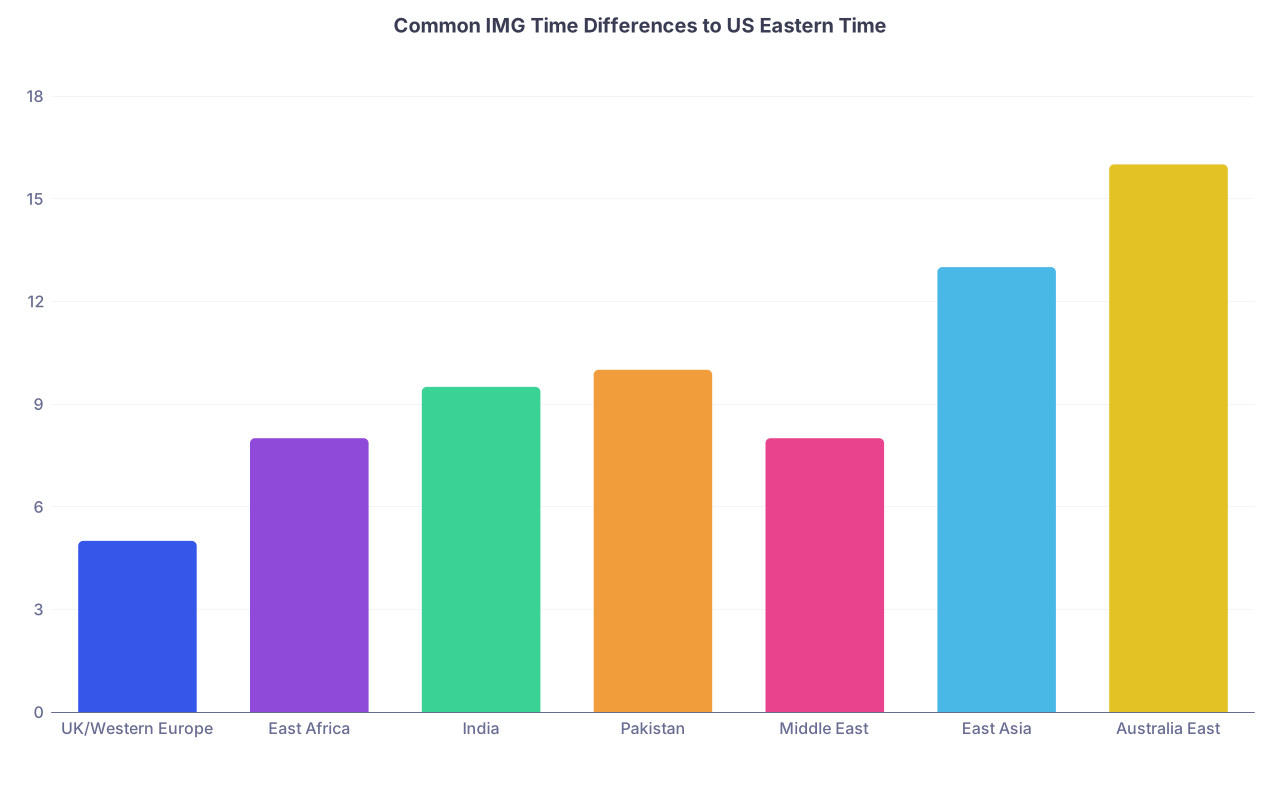
Roughly how bad is your time difference?
| Category | Value |
|---|---|
| UK/Western Europe | 5 |
| East Africa | 8 |
| India | 9.5 |
| Pakistan | 10 |
| Middle East | 8 |
| East Asia | 13 |
| Australia East | 16 |
If you’re:
- 4–7 hours ahead: You’ll mostly get afternoon/evening interviews. Manageable. You might be a bit mentally tired, but you won’t be fighting your circadian rhythm.
- 8–12 hours ahead: You’re in the danger zone where 8–10 a.m. US interviews can be evening, late night, or pre-dawn for you.
- 13–16 hours ahead: Some interviews will land in your middle-of-the-night or very early morning.
You need a simple rule: you must be fully awake for at least 2 hours before the interview. Not “half-asleep scrolling your phone.” Actually awake.
So, for a 1:00 a.m. local-time interview, your options:
- Sleep 7–10 p.m., wake up at 11:00 p.m., be fresh at 1:00 a.m.
- Or stay up, nap in the afternoon or early evening, and treat the interview like a night shift.
Whichever you choose, plan it like you would a call night. People underestimate how obvious sleep deprivation is on camera.
Step 4: Build a pre-interview routine that works at 3 a.m. and 3 p.m.
You need something you can run on autopilot, no matter the hour.
Here’s a streamlined routine I’ve seen work well for IMGs across time zones:
60–90 minutes before:
- Light meal or snack. Nothing greasy or heavy. You do not want reflux when you’re talking.
- Hydrate, but stop 20–30 minutes before so you’re not running to the bathroom.
45 minutes before:
- Quick physical wake-up: brisk walk indoors, jumping jacks, stretches. You’re not training for a marathon. You’re telling your body, “We are awake now.”
- Vocal warm-up: read a paragraph out loud, practice your “Tell me about yourself” answer once. You don’t want your first spoken sentence of the day to be to a PD.
30 minutes before:
- Log in to the platform once. Check:
- Camera framing
- Mic level
- Background
- Name displayed correctly
- Close all non-essential apps and browser tabs. Your old WhatsApp call ping popping up in the middle of a PD conversation is not the vibe.
10–15 minutes before:
- Log into the actual meeting or waiting room.
- Do nothing fancy. Breathe. Glance at your one-page “cheat sheet” of key cases, research, and questions for the program.
That routine should be the same whether your local time is 7 p.m. or 2 a.m. Consistency is what keeps you from freezing.
Step 5: Technical backup for people whose Wi-Fi is not perfect
If you’re a distant IMG, I assume your internet is not always flawless. Hoping for “it’ll be fine” is a terrible strategy.
You set up three layers.
Layer 1: Your primary setup
- Wired connection if possible (Ethernet > Wi-Fi).
- If not, sit directly next to the router.
- Use a laptop, not a phone, whenever you can. Programs expect laptop-level framing.
- Check your upload speed on speedtest.net. You want at least:
- 5 Mbps upload minimum
- 10+ Mbps is comfortable
If your normal internet doesn’t give you even that, you need Plan B as your real Plan A.
Layer 2: Backup connection
- Hotspot from your phone with enough data.
- Or a second ISP/4G router if your area has frequent outages.
- Test the hotspot in advance on the actual video platform the program is using.
Layer 3: Backup location
You identify in advance:
- A friend’s place / relative’s home with better internet.
- Coworking space, hotel business center, or private office you can book.
- Hospital conference room only if you can guarantee no one will interrupt you. (People walking in with emergencies behind you is not charming; it’s distracting.)
If your home internet is weak and your interview is at 2 a.m. local, talk to your backup-location person now. Not the night before. Arrange keys, access, lights, and noise control.
Step 6: Handling multiple US time zones without losing your mind
You’re not only dealing with EST. You’ll see:
- ET (Eastern Time)
- CT (Central Time)
- MT (Mountain Time)
- PT (Pacific Time)
Quick rule:
- ET = New York, Boston, Florida
- CT = Chicago, Texas, most of Midwest
- MT = Colorado, Utah, Arizona (except Arizona cheats with DST)
- PT = California, Washington, Oregon
Programs are bad at specifying this sometimes. If an email just says “9 a.m. local time,” you confirm.
Your workflow:
- In your spreadsheet, always write: “9:00 AM ET (New York)” or “8:00 AM PT (Los Angeles).”
- In your calendar title: “XYZ IM – 8:00 AM PT / 9:30 PM Local”
You should never be asking yourself on the day, “Wait, was this central or eastern?”
Step 7: What to do when interview times are brutal for you
If your time difference is huge, some slots will be ugly. I’ve seen IMGs in Sydney doing 11 p.m.–4 a.m. interview days. That’s rough, but doable with planning.
You have a few options:
1. Ask (politely) for a different slot
You only do this if:
- All your offered options are extreme (e.g., 1–3 a.m. local)
- Or you have overlapping interviews
How to word it:
Dear [Coordinator Name],
Thank you very much for the interview invitation. I am currently located in [Country], which is [X] hours ahead of [Time Zone]. The offered time of [Time] falls at [very late hour] locally.
If there is any flexibility for a slightly later or earlier time on the same day, or an alternative date, I would be very grateful. If not, I will of course do my best to attend at the assigned time.
Best regards,
[Your Name]
You’re not demanding. You’re requesting. Many programs won’t change; some quietly will.
2. Choose your battles
If you have:
- One interview at 3 a.m.
- One at 10 p.m.
- One at 1 a.m.
You prioritize:
- Most competitive program
- Or best fit for you
- Or university vs. community, etc.
You can still attend all three, but you prepare mentally that the 3 a.m. one will require extra discipline.
3. Protect the 24 hours before your worst-time interview
If you know you have a pre-dawn interview:
- Reduce clinical duty the day before if possible.
- Don’t stack another late-night interview right before it if you can help it.
- Tell your family/roommates that you cannot be disturbed those hours.
You cannot function like normal and then magically be sharp at 3 a.m.
Step 8: Environment control when your interview is at insane local hours
You can have perfect answers and still ruin the impression with chaos behind you.
For off-hours interviews:
Lighting: Your room will be dark. Fix that.
- Use a desk lamp behind your screen, shining toward your face.
- Avoid a single harsh light from overhead that makes raccoon eyes.
- Test at the exact hour your interview will be.
Noise: This is a big one in shared housing or busy cities.
- Tell everyone the exact time: “From 12:30 a.m. to 3:00 a.m., please no loud TV/music/visitors.”
- If your environment is never quiet, consider your backup location.
Backup power: In countries with load-shedding or unstable electricity:
- Charge everything to 100% well before.
- If you have a UPS or power bank for your router, use it.
- Know in advance the load-shedding schedule, if applicable, and adjust location if needed.
Camera background:
- Plain wall, bookshelf, neutral curtain. No bed with someone sleeping behind you. It has happened. It’s as bad as you’re imagining.
Step 9: Mental performance hacks when your brain says “It’s 2 a.m., go to bed”
You’re not trying to become a new human. You’re just trying to bump your alertness up 20–30% for a few key hours.
- Caffeine:
- Use it strategically. One moderate dose (coffee/tea) 30–60 minutes before interview.
- Don’t pound four energy drinks and then have tremors during your PD interview.
- Cold water:
- Wash your face with cold water right before.
- Keep a glass of water within reach during the interview.
- Posture:
- Sit at the edge of your chair, not reclined.
- Feet flat, shoulders back. Your brain actually gets the “we’re active” signal.
- Small movement:
- Between sessions, stand up, stretch, walk a few steps. Don’t just scroll on your phone.
- Micro-scripts:
- Have your first line ready for common questions:
- “Tell me about yourself.”
- “Why our program?”
- “What are you looking for in residency?” At 2 a.m., you don’t want to generate these from scratch.
- Have your first line ready for common questions:
Step 10: Handling tech failures or time confusion in real time
Even with all of this, sometimes:
- Your internet drops.
- Zoom won’t open.
- You misread the time by 30 minutes.
Here’s how to not turn a small disaster into a big one.
If your connection drops mid-interview
- Reconnect immediately using backup internet if needed.
- When you’re back:
- “I apologize, my internet dropped briefly. I’ve switched to my backup connection, and it should be stable now.”
- Stay calm. Most interviewers are used to this post-COVID.
If you cannot reconnect quickly:
- Email the coordinator immediately from your phone’s data:
Dear [Coordinator Name],
My internet connection just failed during the interview session, and I am trying to reconnect. I am also available by phone at [Number with country code] if that is easier.
I am very sorry for the disruption.
Best regards,
[Your Name]
If you log in late due to time confusion
First: don’t lie. They know what time zone you’re in.
- When you join: “I’m very sorry I’m joining late. I miscalculated the time difference on my end. I appreciate your understanding.”
- Afterward, a short apology email to the coordinator can help, but do not write a novel.
This is why you build such a careful system. You want this scenario to be extremely rare, not routine.
Step 11: After the interview day: reset your clock properly
If you’re doing multiple “night shift” interview days in a row, you need to protect your brain from turning into mush.
After a late/early interview:
- Eat something light.
- Decompress with 15–20 minutes of something non-screen if you’re wired—reading, stretching.
- Then sleep. Not “let me just check Instagram for an hour.” Actually lie down in a dark room.
If you have another interview within 24–36 hours, plan your sleep backward again. Treat this like flipping between day and night shifts.
Step 12: Use tools that are actually built for this headache
There are a few systems that help IMGs a lot:
- World Time Buddy app or site: lets you see several time zones lined up.
- Google Calendar: automatic time zone detection when you paste event invites from programs.
- Timeanddate.com “Add to Calendar” function: after converting, you can add to your local calendar with one click.
And one underrated move:
On your wall, keep a handwritten mini reference:
“US Eastern: my time + X hours
US Central: my time + Y hours
US Pacific: my time + Z hours”
You’re tired, maybe stressed, maybe on call. That tiny reference will save you from a mistake.
You’re not going to make interview season “easy” across 8–12 time zones. That’s not the goal. The goal is to make it controlled. Predictable. You want your energy spent on answering questions and connecting with people, not on panicking over clocks.
Here’s your next step for today:
Open your calendar and your email right now. For every interview invite you already have, create or update a calendar event titled with both times: “Program – [US Time Zone] / [Your Local Time].” Add at least two reminders to each. Do the conversions once, correctly, and let the system carry you through the chaos.