The 30 minutes before a virtual interview will make or break you more than the 3 months you spent polishing your personal statement.
You’re not “waiting” in that half hour. You’re on the clock. And there’s a right way to use every five‑minute block.
Below is a strict, time-stamped playbook: what to do from T‑30 minutes to T‑0 before you click “Join Meeting” for a med school or premed interview (MMI, traditional, virtual second look, all of it).
Overview Timeline: Your 30-Minute Countdown
At this point, you should stop improvising and start running a checklist. Here’s the high-level breakdown before we zoom in minute-by-minute:
| Time Window | Primary Focus |
|---|---|
| T-30 to -25 | Tech & environment check |
| T-25 to -20 | Frame, lighting, background |
| T-20 to -15 | Content & key talking points |
| T-15 to -10 | Calm body, sharpen mind |
| T-10 to -5 | Final logistics & backup |
| T-5 to 0 | Enter “interview mode” |
Now let’s walk through it in order. No fluff. Just what you actually do.
T-30 to T-25 Minutes: Lock Down Your Tech and Space
At this point, you should not be scrolling email or texting. You’re securing your battlefield.
Step 1: Hard reset on distractions (30:00–28:00)
- Put your phone on Do Not Disturb. Face down, out of arm’s reach.
- Silence laptop notifications:
- Quit Slack/Discord/WhatsApp desktop apps.
- Turn off system notifications (Focus mode on Mac / Focus Assist on Windows).
- Close every tab except:
- Interview platform (Zoom, Teams, Webex, proprietary portal).
- One tab with your notes or school one-pager.
- Maybe email, in case the program sends last-minute instructions.
You do this now because your brain will not calm down if notifications are popping in the corner.
Step 2: Confirm platform access and updates (28:00–26:00)
You do not want to be the person updating Zoom at 10:01 while the faculty interviewer waits.
- Open the platform you’ll use:
- If Zoom: click “Check for Updates”.
- If Teams/Webex: open the app, confirm you’re logged in.
- Test your meeting link:
- Click it once. If it dumps you in a waiting room, fine—leave immediately.
- If it says “this meeting hasn’t started yet,” good. You know the link works.
- Keep the link somewhere idiot-proof:
- Pinned note on desktop.
- Email starred and left open.
If the link doesn’t work, you still have 25 minutes to email the coordinator with a calm “just confirming the link” message instead of a panicked one.
Step 3: Basic internet and backup check (26:00–25:00)
- Run a quick speed test (Google “speed test” and hit run).
- If your connection looks weak (<5 Mbps upload), move closer to your router or plug in via Ethernet.
- Turn off high-bandwidth stuff in your space:
- Ask roommates/family not to stream or game for the next hour.
- Identify a backup device:
- Tablet or phone with the app installed and updated.
- Confirm you’re logged in or can join as guest.
You’re not trying to design a network. You’re just reducing the odds of a freeze at “Tell me about yourself.”
T-25 to T-20 Minutes: Fix Your Frame, Lighting, and Background
Now we handle what they actually see.
Step 4: Camera angle and distance (25:00–23:00)
Open your camera app or a test meeting.
You’re aiming for:
- Camera at eye level (stack books or use a stand if needed).
- Head and upper shoulders visible—no extreme close-ups, no empty ceiling.
- You centered, not drifting to one corner.
Quick checklist:
- Tilt laptop screen so your eyes align about one-third from the top of the frame.
- Push the chair in or out until you’re not a floating head.
- If you wear glasses, check angle to minimize glare.
You should look like you’re talking to a colleague, not to a security camera.
Step 5: Lighting reality check (23:00–21:00)
Bad lighting screams “unprepared” more than you think.
- Best: face a window with indirect natural light.
- If no window:
- Put a lamp behind your camera, shining toward your face.
- Avoid strong light from behind you (it makes you a silhouette).
Do this fast test:
- Look at your preview. If you can see clear eyes and normal skin tone (not gray, not orange), you’re good.
- If half your face is in shadow, rotate the lamp or yourself slightly.
You’re not shooting a film. But you should look awake and professional.
Step 6: Background and noise sweep (21:00–20:00)
Turn around and look at what’s behind you as if you’re the interviewer.
- Remove:
- Piles of laundry.
- Messy bed (pull a solid blanket over it if needed).
- Any questionable posters or personal items that distract.
- Add (if available, not mandatory):
- A bookshelf.
- A plant.
- A plain wall.
Then address sound:
- Close windows if there’s traffic or street noise.
- Tell anyone at home: “I’ll be in an interview from [time] to [time]. Please avoid knocking, loud TV, or vacuuming.”
- Turn off loud appliances (dishwasher, loud fans) if they’re right next to you.
Do not overthink décor. Clean and boring beats “personality” that distracts.
T-20 to T-15 Minutes: Sharpen Your Content, Not Cram
At this point, you should stop reading 20-page school PDFs. That ship sailed. Now you’re priming your brain with short, targeted prompts.
Step 7: Open your 1-page “battle card” (20:00–18:00)
You should have one page max (digital or printed) with:
- 3 bullet points: Why this school/program specifically.
- 3 bullet points: Why medicine / why this specialty (if residency).
- 3 stories:
- Clinical experience.
- Leadership/initiative.
- Challenge/failure and what changed after.
Look at each bullet and say it out loud in 1–2 sentences.
Not a script. Just: “Ah, yes, this is the story about the free clinic intake chaos and how I built a new workflow.” You’re reactivating neural pathways, not memorizing lines.
Step 8: Rehearse the first 60 seconds (18:00–16:00)
You only rehearse one thing verbatim-ish: your opening.
Most interviews start with some version of “Tell me about yourself” or “Walk me through your path to medicine.” Have a clean, practiced answer.
In these 2 minutes:
- Say your opener out loud once or twice:
- 3-part structure works well:
- Where you’re from / academic anchor.
- Key experiences that shaped your interest.
- Where you are now and what you’re excited to do next.
- 3-part structure works well:
- Keep it to 45–60 seconds. If it goes longer, cut details.
If you stumble here during the interview, you’ll be playing catch-up mentally for the next 20 minutes. Get this part smooth now.
Step 9: Skim your “must-ask” questions list (16:00–15:00)
Interviewers expect you to ask questions. You don’t want to be inventing them under pressure.
- Have 3–5 questions ready like:
- “How do students typically interact with [specific curricular structure]?”
- “What distinguishes your clinical training environment from others in the region?”
- “How does the program support students interested in [your stated interests: research, primary care, rural med, etc.]?”
Scan them and choose:
- 1 question for faculty.
- 1–2 questions for students (if there’s a student panel or breakout).
Now they’re fresh in your head; you won’t need to dig for them later.
T-15 to T-10 Minutes: Calm Your Physiology, Not Just Your Thoughts
At this point, you should stop fiddling with your résumé. Your body is the real problem now—heart rate, shaky hands, shallow breathing.
Step 10: Stand up and reset your posture (15:00–13:00)
Get out of your chair.
- Roll your shoulders back 10 times.
- Neck rolls—slow, not violent.
- Shake out your hands. Literally. It looks stupid; it works.
Then:
- Sit back down, plant both feet flat on the floor.
- Sit slightly forward on your chair (keeps you engaged and alert).
- Put your hands where they’ll rest naturally (desk, lap).
You’re telling your body: “We’re safe. We’re in control.” Your brain listens to posture more than you think.
Step 11: Two-minute breathing pattern (13:00–11:00)
You’re not doing a full meditation session. You’re just killing the adrenaline spike.
Use a simple 4–4–6 pattern:
- Inhale through your nose for 4 seconds.
- Hold for 4 seconds.
- Exhale slowly through your mouth for 6 seconds.
Do this 5–6 cycles. That’s about two minutes.
Target:
- Slightly slower heart rate.
- No chest tightness.
- Ability to speak a full sentence without gasping.
If you feel dizzy, you’re overdoing it. Calm down. Normal breaths.
Step 12: Voice and articulation quick warm-up (11:00–10:00)
You want your first words in the interview to sound like you—not like someone who just woke up or hasn’t spoken all morning.
- Take a sip of water.
- Read 2–3 sentences from your notes out loud at interview volume.
- Over-enunciate one or two tongue-twister type lines (even just “unique New York, unique New York”) to get your mouth moving.
You’re not doing Broadway. You’re just making sure your voice is there when you need it.
T-10 to T-5 Minutes: Final Logistics and Fail-safe Prep
At this point, you should be functionally ready. Now you’re checking for failure points.
Step 13: Micro-check on clothes and appearance (10:00–8:00)
Fast, not vain.
- Look at yourself in the video preview:
- Collar straight?
- Tie (if wearing) centered?
- Hair not doing something wild?
- Remove:
- Distracting jewelry that clangs against the desk.
- Overly shiny lip balm or reflective makeup that the camera hates.
Bottom half:
- Yes, wear real pants or at least something you can stand up in without shame.
- If they ask you to stand for some reason and you’re in gym shorts… you’ll never forget it. And not in a good way.
Step 14: Arrange your desk like a cockpit (8:00–6:00)
What stays on your desk:
- Water (still, not sparkling—no burps).
- Your 1-page notes.
- Pen and small notepad (quiet pages, no spiral squeaking).
Where you put them:
- Notes slightly off to the side so you’re not constantly glancing down.
- Pen and pad where you can jot a phrase without looking away for long.
What you remove:
- Extra papers.
- Snacks (you’re not eating mid-interview).
- Fidget toys, unless they’re silent and fully off-camera.
This is not the time for a 17-item shrine of good luck charms.
Step 15: Backup plan clarity (6:00–5:00)
You don’t want to improvise if tech fails. Decide now what you’ll do.
- Keep:
- Program contact email and/or phone number on a sticky note or visible doc.
- Backup device within reach, unlocked.
- Script one sentence in your head:
- “I’m having technical issues. I’ve switched devices and am rejoining now. Thank you for your patience.”
- Or, in email: “I’m having difficulty connecting to the platform. I’m attempting to rejoin and wanted to keep you updated.”
If something goes wrong, you execute that script. Not panic.
T-5 to T-0 Minutes: Enter Interview Mode
This is where people either stay sharp or unravel. Here’s how not to unravel.
Step 16: Join the room early, not too early (5:00–3:00)
At this point, you should be clicking “Join” if they gave you a firm start time without explicit “don’t join early” instructions.
- Aim to enter 3–5 minutes before the scheduled start.
- If you land in a waiting room, perfect. Sit quietly.
- If you’re dropped into a group room with other applicants:
- Say a brief, friendly hello if it feels natural.
- Do not start a weird flex competition about research or Step/MCAT scores. You’re not there to network.
If instructions say “Do not log in more than 10 minutes early,” obey that. Programs notice rule-following.
Step 17: Silent observation and micro-adjustments (3:00–2:00)
Camera and mic are on? Good. Now:
- Check your framing one last time in the actual platform window, not just your camera preview.
- Ensure:
- Name displayed correctly (First Last, no nicknames, no old Zoom handle like “BioStudyGroup”).
- Background not pixelating (if using virtual background; if it is, switch to real background).
Then: stop touching things.
Step 18: Mental script and posture lock-in (2:00–0:00)
You’re in the last 120 seconds. No more notes. No more browser hopping.
Do this sequence:
- Take one normal breath in and out.
- Silently run a 10-second script in your head:
- “I’ve done the work. I’m here to have a conversation, not prove my worth as a human. Listen carefully. Answer honestly. Be specific.”
- Plant your feet. Hands relaxed.
- Look directly at the camera for a couple seconds so your eyes get used to that focal point.
When the interviewer appears:
- Smile, small but real.
- Greet them clearly:
- “Good morning, Dr. [Name]. It’s nice to meet you. Thank you for taking the time today.”
You’re on. The 30 minutes of prep are now doing their job.
Quick Reference: 30-Minute Countdown Snapshot
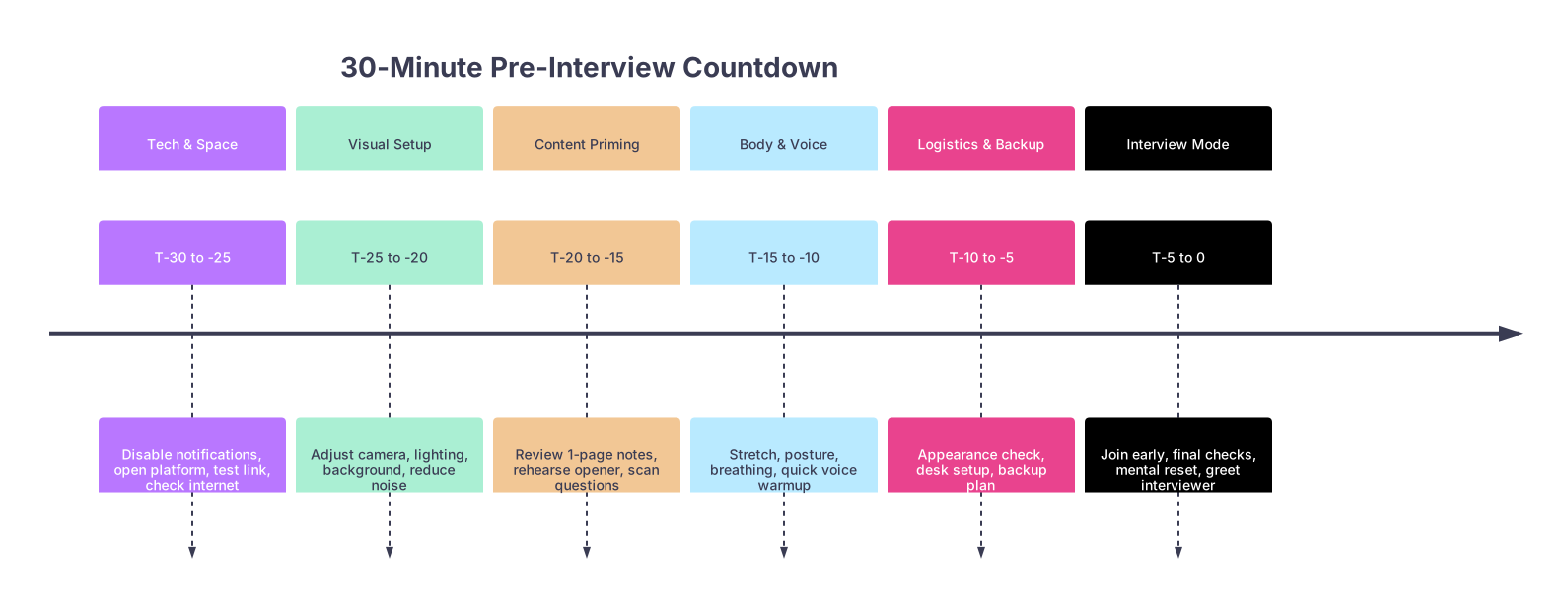
| Period | Event |
|---|---|
| Tech & Space - T-30 to -25 | Disable notifications, open platform, test link, check internet |
| Visual Setup - T-25 to -20 | Adjust camera, lighting, background, reduce noise |
| Content Priming - T-20 to -15 | Review 1-page notes, rehearse opener, scan questions |
| Body & Voice - T-15 to -10 | Stretch, posture, breathing, quick voice warmup |
| Logistics & Backup - T-10 to -5 | Appearance check, desk setup, backup plan |
| Interview Mode - T-5 to 0 | Join early, final checks, mental reset, greet interviewer |
What You Should Not Be Doing in Those 30 Minutes
People sabotage themselves here. Let me be blunt about what to avoid.
At this point, you should not:
- Be reading Reddit or SDN “interview experiences” threads.
- Be rewriting answers in your head every 30 seconds.
- Be slamming coffee or chugging energy drinks.
- Be deeply editing your personal statement or ERAS/AMCAS activities. That’s over.
- Be arguing with anyone at home or replying to stressful messages.
Those actions jack up your adrenaline and split your focus. Your only job in this half hour: show up as the best version of the applicant you already are. Not build a new one.
Short, Honest Summary
Three things matter in the 30 minutes before a virtual interview:
- You remove preventable problems: tech, noise, lighting, links, and backups. That’s the first 10–15 minutes.
- You prime, not cram: a one-page cheat sheet, a clean “Tell me about yourself,” and 2–3 smart questions. No last-minute rabbit holes.
- You stabilize your body and mind: posture, breathing, voice, and a clear, simple script to walk in calm.
Run this timeline a couple of times before your actual interview day. By the time you’re sitting in that virtual waiting room, you’ll feel one thing most applicants don’t: ready.