
It is Monday, 7:42 a.m. Your first telemedicine clinic starts in 18 minutes.
The waiting room is “virtual,” your MA is on Teams, IT swears everything is “already configured,” and your attending just asked, “So… what link do I click?”
This is where chaos usually begins.
Let’s not do that.
You want a stepwise, time-based plan to roll out telemedicine that:
- Actually works
- Does not destroy clinic culture
- Still lets people laugh, tease, and be human on screen
You are the right kind of paranoid. Good.
Below is a chronological guide: from 1–2 months before launch, down to what you are doing minute‑by‑minute on Day 1, and how you keep it fun in the long run.
1–2 Months Before Go-Live: “We Are Doing Telemedicine, Not Tele-Misery”
At this point, you are not touching patients online yet. You are designing the thing. This is where you decide whether your future self hates you.
Week 1: Assemble the Chaos Control Team
You need a small, bossy group. Too many people and nothing happens. Too few and it is an IT hobby project.
Aim for 5–7 humans:
- 1 clinician who is respected and slightly grumpy (they will catch the silly ideas)
- 1 front desk lead
- 1 MA or nurse who actually runs the rooming process
- 1 IT rep who knows your EHR and likes you enough to answer emails
- 1 operations/admin person who speaks “billing” and “compliance”
- Optional: 1 resident or fellow who cares about UX and memes
Their job: design a telemedicine workflow that:
- Patients can follow
- Staff can survive
- Still allows jokes, small talk, and actual eye contact
Make this explicit:
“Goal is safe, efficient, and not soul-crushing. If this process kills all fun, we break it and redo it.”
Week 2: Map Your Current In-Person Clinic
You cannot move something online if you do not know what it is now.
Grab a whiteboard or shared doc and write down chronologically:
- Patient calls / portal message to schedule
- Front desk registration
- MA pre-visit call, vitals, med rec
- Patient waits in room
- Clinician visit
- Orders, scripts, referrals
- Check-out, follow-up booked
- Billing, documentation, closing charts, inbox chaos
Now, for each step, decide:
- Keep as is
- Modify for telemedicine
- Kill it entirely
Use something like this:
| Step | Keep / Modify / Remove | Telemedicine Version Brief |
|---|---|---|
| Registration | Modify | Done via portal/phone |
| MA vitals/med rec | Modify | Pre-visit call or video |
| Waiting in room | Remove | Virtual queue in platform |
| Clinician encounter | Keep | Video visit |
| Check-out | Modify | Phone or portal |
Any place you see “this is where we usually chat and calm them down” — preserve that. Telemedicine strips idle small talk by default; you have to plant it back on purpose.
Week 3: Choose Your Platform Like You Will Be Stuck With It (Because You Will)
At this point you are picking your platform, or at least committing mentally.
You want:
- Integrated with your EHR, or at least not fighting it
- One-click join for patients (if it takes more clicks than a pizza order, forget it)
- Team-based features: internal chat, ability for MA to join first, easy “handoff” to clinician
- Stable on mediocre Wi‑Fi and older devices
And for fun/culture:
- Decent video quality so you can see facial expressions
- Simple muting/unmuting and “admit from waiting room” controls
- Ability to bring in students or another clinician without sacrificing your soul to IT
If you have multiple options, force a 30‑minute live test clinic with fake patients:
- One on a bad Android phone
- One on an old iPad
- One on a browser that should have been killed in 2015 (yes, that one)
Whoever survives that test wins.
3–4 Weeks Before Go-Live: Build the “Tele-Clinic Day” Template
Now you design your schedule and roles. This is where you decide whether everyone will be sprinting or strolling.
Week 4: Redesign the Daily Schedule
At this point you should block out a prototype half‑day teleclinic on the calendar, even if it is weeks away.
Decisions:
- Visit length
- If in-person is 20 minutes, start telemedicine at 25–30 minutes. Everyone is slower at first. That is normal.
- Buffer slots
- Put a 10‑minute buffer every 2–3 patients for tech disasters, late joiners, and actual bathroom breaks.
- “Fun” anchor
- Start your session with an easier, chattier patient you know well. Let people warm up. This matters more than you think.
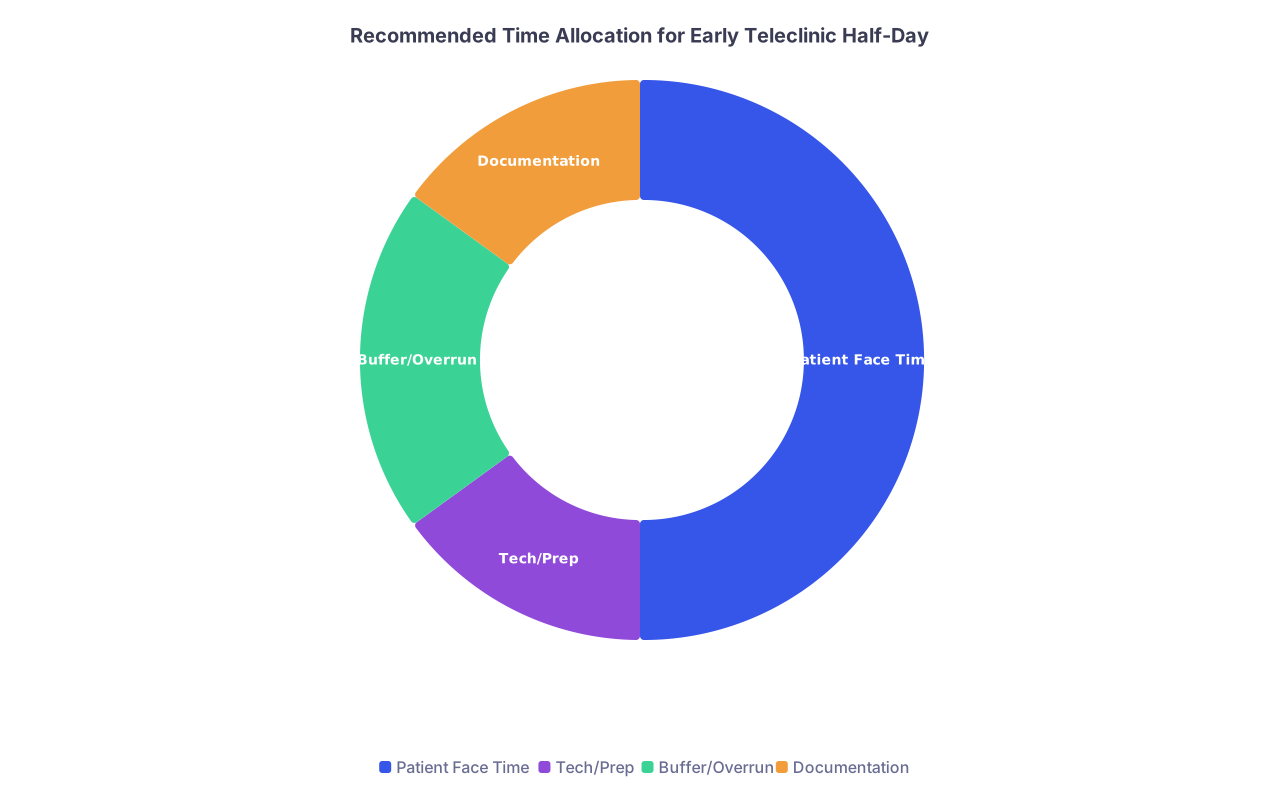
| Category | Value |
|---|---|
| Patient Face Time | 50 |
| Tech/Prep | 15 |
| Buffer/Overrun | 20 |
| Documentation | 15 |
Week 3: Define Team Roles for a Teleclinic Session
At this point you should have a written, one-page “roles document”:
Tele-Host MA/Nurse
- Calls patient 15–20 minutes before visit
- Does vitals (home BP, weight, etc.), medication reconciliation
- Walks them through “click this link; if it breaks, call this number”
- Joins video first, confirms identity, then brings in clinician
Clinician
- Joins on time (or as close as your personality allows)
- Has one default cheerful opener ready (you will be saying it 20 times)
- Knows where to look (camera) so you do not appear to be staring at your knee
Front Desk / Scheduling
- Sends clear instructions the day before (email/portal + phone backup for tech-fragile patients)
- Manages last-minute reschedules when someone’s router spontaneously dies
Tele-Floater (optional but magical)
- Monitors tele-waiting room
- Jumps into rooms with “You are on mute” and “Let me help you move your camera so we can see your ankle, not your ceiling fan”
Write this like a mini-script, not policy prose.
1–2 Weeks Before Go-Live: Rehearsal and Culture Engineering
Yes, culture. Fun does not appear by magic on Zoom. It dies there, unless you plant it.
Week 2: Do a Full Mock Teleclinic
At this point you should schedule a 2-hour fake clinic with staff and volunteers pretending to be patients.
Use real workflow:
- Front desk “schedules” them
- MA calls them, does a brief intake
- They join from actual phones/laptops in another room
- Clinician does a 5‑minute mini-visit
Script at least one “tech disaster”:
- Patient joins with no audio
- Someone points the camera at their forehead for the entire visit
- Wi‑Fi drop in the middle of an emotional conversation
Run it, then immediately debrief:
- What took too long?
- Where did everyone feel stupid?
- Where was there zero room for humor or reassurance?
Fix those spots deliberately.
Use a quick debrief board with three columns:
- “Worked”
- “Painful”
- “Unexpectedly funny — keep this”
That third column is how you preserve clinic fun.
Week 1: Pre-Launch “Fun Rules” and Guardrails
You should have a short, half-serious document for your team: “How We Stay Human on Video.”
Examples:
- Start each session with a 60-second staff check-in on video.
One prompt only. “High/low since last clinic.” Or “Best patient quote of the week.” - Agree on one running inside joke for the first month.
Example: everyone has one unobtrusive item in the background (a plant, a mug, a tiny dinosaur) and you see who notices. - Set hard lines:
- No making fun of patients’ homes or backgrounds, even off-camera.
- No recording without explicit, documented consent.
- No “multitasking” on unrelated work during visits. Patients can see your eyes.
You are not creating a sitcom. You are creating permission for people to still act like humans.
Go-Live Week: Day-By-Day Timeline
Now you are in it. This is where time-based detail matters.
T−3 Days: Patient Communication Blast
At this point your first teleclinic is 3 days out.
- Send:
- Email/portal message with:
- How to join (with screenshots)
- What devices work
- What to do if the video fails (backup phone number)
- SMS reminder 24–48 hours before (if you use SMS)
- Email/portal message with:
- Flag:
- Patients with weak tech skills or language barriers → schedule extra MA pre-call time
T−1 Day: Staff Huddle and Sanity Check
Run a 30-minute huddle:
- Review tomorrow’s schedule:
- Identify tech-risk patients
- Identify “anchor” patients who will likely be easy and kind
- Test:
- Every clinician logs into platform
- Everyone does a 1-minute test call
- Rehearse the opener:
- “Welcome to our first online clinic day — if something breaks, we will fix it together.”
Set expectation:
“There will be problems. Nobody gets blamed for platform bugs. We only blame people for not asking for help.”
Telemedicine Day 1: Hour-By-Hour Plan
Now the fun part. Or the panic part. Depends how you prep.
30–45 Minutes Before First Appointment
At this point you should:
- Log in to:
- EHR
- Telemedicine platform
- Internal chat (Teams/Slack)
- Check:
- Camera, mic, headphones
- Background lighting (no mysterious horror‑movie backlighting)
- Quick team huddle:
- 5 minutes max
- Each person says:
- One thing they are watching out for
- One thing they are looking forward to
15–20 Minutes Before First Patient
- MAs start pre-calls:
- Confirm ID, meds, vitals
- Walk them through:
- “Click the link in the message”
- “If it does not open, try this browser”
- “If all else fails, we will call you instead”
- Tele-Floater (if you have one) opens the virtual waiting room and keeps a list of:
- Who is connected
- Who is struggling
- Who is missing
During Each Visit – Micro-Timeline
You are on with a real patient now. Here is a simple internal script:
Minute 0–1: Warm-up
- “Hi, I am glad this worked. Where are you calling from today?” (Let them show their dog/kitchen/plant. That is the physical exam of their life context.)
Minute 1–2: Tech sanity
- “Can you hear and see me clearly?”
- “If video freezes, I will call your phone — let us agree on that now.”
Minute 2–4: Agenda setting
- Same as in-person.
- “What is most important to you to cover today, so we use this online time well?”
Minute 4–18+: Actual clinical work
- Keep your usual style.
- Keep small talk in small bursts. Video fatigue is real, but so is human connection.
Last 2–3 minutes: Wrap + next steps
- Summarize plan.
- Confirm follow-up: in-person vs video vs phone.
- Optional fun closer:
- “Thank you for being part of our first online clinic. You are helping us figure this out.”
The First Week After Launch: Fixing the Leaks and Keeping the Jokes
You made it through Day 1. Nothing exploded. But you are not done.
End of Day 1: 20-Minute Debrief
At this point everyone is tired. Keep it short and structured.
Ask the same three questions:
- “One moment that made you smile today?”
- “One thing that absolutely did not work?”
- “One change we will test tomorrow?”
Write them down. Actually implement one change before the next teleclinic. If staff see improvements, they stay engaged (and funny).
End of Week 1: Tiny Metrics, Not a Dashboard
You do not need a 40-slide report. You need four numbers:
| Metric | Target Start Point |
|---|---|
| No-show rate vs in-person | Within +5% |
| Average visit overrun (minutes) | ≤ 5 |
| % of patients successfully on video | ≥ 80% |
| Staff-reported stress (1–10) | Track trend |
Pair this with one qualitative question for staff:
- “Did this feel more draining, same, or less than in-person clinic?”
And yes, ask: “Did you laugh at all today with a patient?” If that number is near zero, you have a problem.
1–3 Months After Launch: Iteration and Advanced Fun
At this point you should be past sheer survival. Time to tune.
Month 1: Clean Up the Clunky Parts
Patterns will appear:
- Frequent tech-fail patients
- Time slots that always run over
- Certain visit types that are simply not good for video
Make a basic “Telemed Fit” matrix.
| Visit Type | Good for Telemed | Comment |
|---|---|---|
| Medication follow-up | Yes | Easy to keep online |
| New complex patient | Mixed | Consider hybrid first visit |
| Rash / skin issue | Often yes | Good lighting and camera needed |
| Acute chest pain | No | Direct to urgent evaluation |
Move what works. Pull back what plainly does not.
Month 2–3: Deliberate Culture-Building Online
This is where most clinics get lazy. They say, “Telemed is just normal now,” and morale slowly dies.
Do the opposite.
Introduce small, scheduled fun into teleclinic days:
- 5-minute “Good Story Break” mid-session
Someone shares a patient quote, a tech fail that turned into a bonding moment, or a tiny win. - Rotating “background theme” days for staff (but subtle):
- Plant Day, Mug Day, Art Day. Nothing that distracts patients, but enough that colleagues notice and smile.
- Occasional co-visit:
- Resident and attending, or two clinicians, see a complex patient together. Patients love the feeling of “a team,” and clinicians enjoy not being alone staring at the screen.
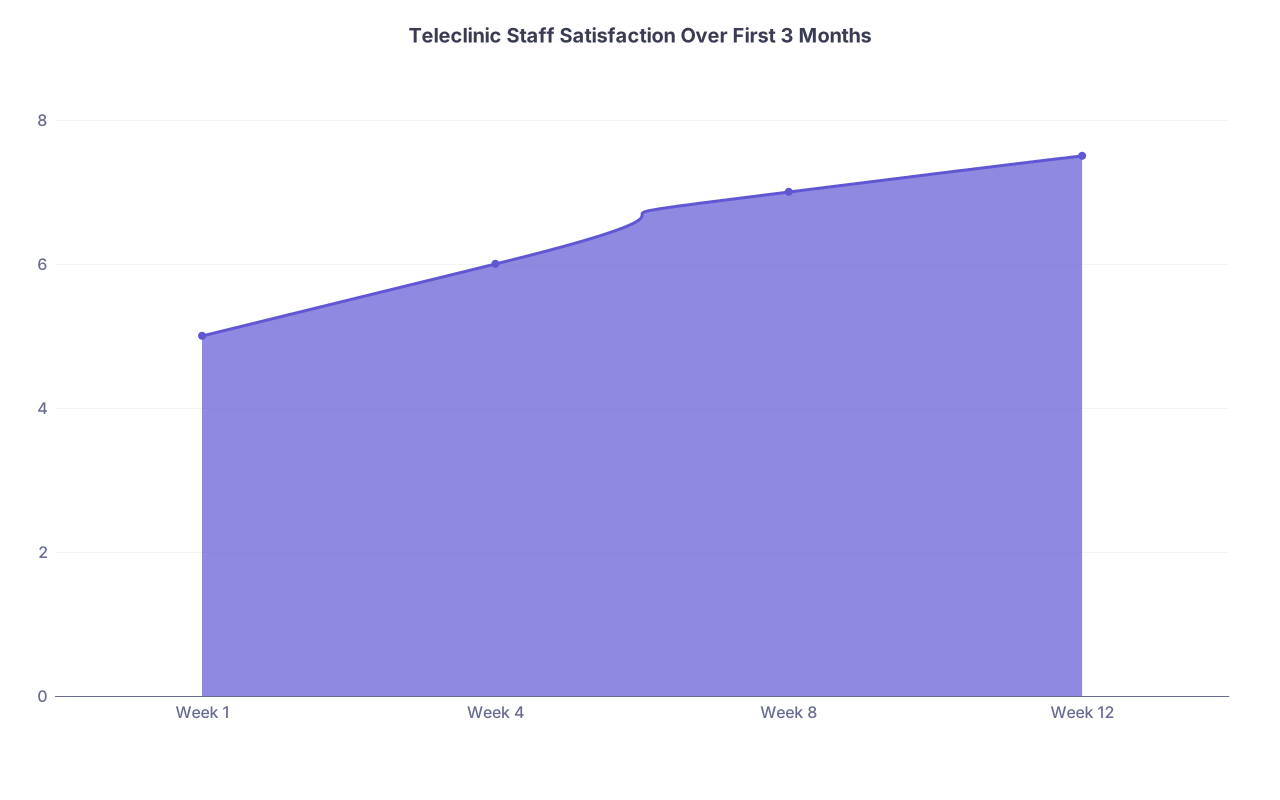
| Category | Value |
|---|---|
| Week 1 | 5 |
| Week 4 | 6 |
| Week 8 | 7 |
| Week 12 | 7.5 |
Watch for this:
If people stop turning on their cameras for internal huddles, your culture is slipping. Fix that early.
Longer Term: Hybrid, Boundaries, and Not Burning Everyone Out
You are now several months in. Time to think like a grown-up system.
Design a Predictable Hybrid Pattern
Do not sprinkle telemedicine randomly through everyone’s week. It kills rhythm.
Better pattern:
- Block one recurring half-day per clinician as teleclinic
- Keep remaining sessions in-person
- Optional: create a “Telemedicine Team Day” where multiple clinicians have teleclinic at the same time and share a support staff pool
This lets you:
- Put your best tele-nurse/MA on when they are needed most
- Have peer support in real time (“Hey, can someone jump on this multi-language disaster with me?”)
Protect Boundaries So Telemedicine Does Not Become 24/7 Medicine
Patients will assume video = any time, anywhere.
Set:
- Clear hours in the portal and auto-replies
- Policy: video visits are visits, not just pretty phone calls
- A rule for yourself: no tele-visits from your couch at 10 p.m. “Just this once” becomes culture very fast.
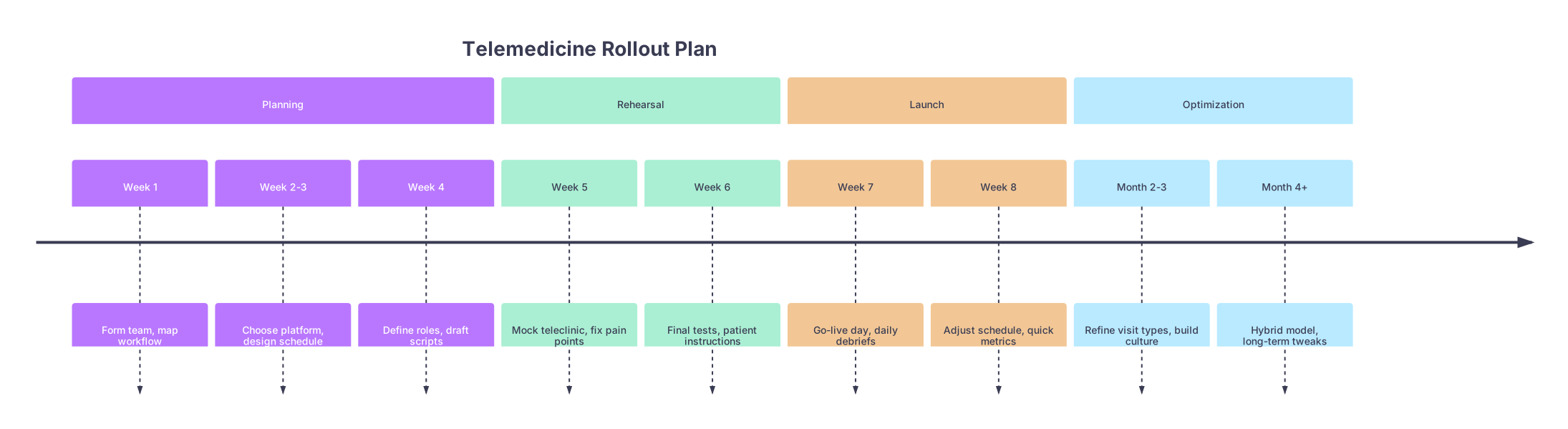
Visual: The Overall Telemedicine Rollout Timeline
| Period | Event |
|---|---|
| Planning - Week 1 | Form team, map workflow |
| Planning - Week 2-3 | Choose platform, design schedule |
| Planning - Week 4 | Define roles, draft scripts |
| Rehearsal - Week 5 | Mock teleclinic, fix pain points |
| Rehearsal - Week 6 | Final tests, patient instructions |
| Launch - Week 7 | Go-live day, daily debriefs |
| Launch - Week 8 | Adjust schedule, quick metrics |
| Optimization - Month 2-3 | Refine visit types, build culture |
| Optimization - Month 4+ | Hybrid model, long-term tweaks |
FAQs
1. How do I keep visits from feeling awkward and stiff on video?
Front-load two things: warm-up and clarity. Start with a quick personal question (“How is the puppy / garden / grandkids?”) and a tech check. Then set a clear agenda so the visit has structure. The combination of brief human connection and clear plan kills most awkwardness.
2. What if my older or less tech-savvy patients cannot handle video?
Do not abandon them. Build a short pre-call script for MAs, add extra lead time for those patients, and always have a fallback: a straightforward phone visit plus in-person follow-up as needed. Track who consistently fails video and offer them a “phone-first” option rather than forcing the same frustration repeatedly.
3. How many telemedicine sessions per week should we start with?
For most clinics, a single half-day per clinician in the first month is enough. That gives you repetition without overwhelming the schedule. Once the team is comfortable and your numbers (no-shows, overruns, satisfaction) stabilize, you can expand deliberately, not reactively.
4. How do I keep staff morale up when video fatigue sets in?
Build in micro-breaks and micro-connection. Ten-minute buffers every few visits, a 5-minute positive huddle mid-session, and small, recurring rituals (theme mugs, quick stories, shared wins) go a long way. If teleclinic days become “camera on, soul off,” your rollout is failing even if the metrics look fine.
Key points:
- Design telemedicine as its own clinic with its own workflow, schedule, and roles — not a tacked-on video button.
- Build culture and fun in on purpose: short huddles, shared jokes, space for humanity in the script.
- Iterate in small cycles: mock clinic, go-live, daily/weekly tweaks, then stable hybrid patterns that protect both patients and staff.