
Telehealth visits are not “the future of medicine.” They are the current circus tent we are all already performing in.
Let me break this down specifically: if you practice medicine in 2026 and you have not been interrupted by a barking dog, a frozen “O-face” on Zoom, or a patient doing their visit from the driver’s seat, you are either lying or you are not seeing real patients.
People pretend telehealth is clean and efficient. It is not. It is messy, glitchy, sometimes unsafe, and often very, very funny. The trick is learning to manage the comedy without compromising care—or your sanity.
We will walk through the three main categories of chaos:
- Lag and tech fails
- Pets, kids, and background madness
- Accidental Zoom disasters (mics, cameras, nudity, and felony-level multitasking)
And then I will show you how to turn them from total trainwrecks into structured, survivable, occasionally delightful encounters.
1. Lag, Freezes, and the Art of Talking to a Statue
The biggest lie in telehealth marketing is the smooth video call. In real life you get:
- Audio lag
- Video lag
- Random freezes
- Delayed laughter that makes you sound like an unfunny psychopath
The classic scenarios
You have seen these:
The Permanent Nod
Patient with a 2-second lag nodding at exactly the wrong moments.
You say, “This could be serious, we need labs tomorrow.”
They hear, “Your labs look fine, no worries,” and nod happily.The Frozen Horror Face
Patient freezes mid-blink or mid-yawn. Stays that way for 30 seconds while you are trying to explain blood thinners.
You keep talking because you have 20 visits booked and no time to restart.The Echo Chamber
Their phone, their spouse’s phone, and the living room TV are all logged in to the same visit.
You say, “Any chest pain?” and hear yourself ask, “Any chest pain? Any chest pain? Chest pain?” three seconds later.
Here is how you manage this like a pro, without losing your temper.
Set “lag-proof” communication rules up front
Within the first 20 seconds, you should be doing a tech script. Not just “Can you hear me?”—that is amateur hour. You want:
- “If we get cut off, I will call you at this number. Is this your cell?”
- “If the video freezes, stay where you are and wait 30 seconds. If it is still frozen, hang up and I will call you by phone.”
- “If my voice and video do not match, I am going to repeat the plan twice at the end so you can write it down.”
You say this once, clearly. You do not need to make it cute. This is defensive medicine for Zoom.
Tempo-control: How to speak through lag
Telehealth with lag is like using an interpreter. You have to change your rhythm:
- Short sentences, one idea at a time.
- Pause after questions. Do not rapid-fire.
- Visible cues: hold up a finger when you are asking a yes/no question, then drop it when you are done.
- Confirm back critical items: “Tell me what you are going to do when we hang up.”
I have seen way too many miscommunications because people talk like they are in person. You are not. You are on a glitchy pipeline with intermittent loss of nuance.
When the video is useless
If the screen is repeatedly freezing:
- After two freezes in the first 2–3 minutes, stop pretending.
- Say: “This video is not stable enough for a safe visit. I am going to switch this to a phone call. We can reschedule an in-person if I need to examine you.”
Now you have a decision tree in your head: can this be done safely audio-only? Chronic refills, mood check-ins, basic follow-up—often yes. Abdominal pain in a 70-year-old? No, you reschedule in-person or send to urgent care / ED based on risk.

| Step | Description |
|---|---|
| Step 1 | Start Telehealth Visit |
| Step 2 | Proceed as usual |
| Step 3 | Attempt quick fix |
| Step 4 | Switch to phone visit if safe |
| Step 5 | Reschedule or send in person |
| Step 6 | Safety check and clear plan |
| Step 7 | Stable audio and video |
| Step 8 | Improved after 2 min |
| Step 9 | Issue audio or video |
The comedy you accept, the safety you do not
Tech fails will always be funny. Lag will always make you look like you are interrupting your patient. That is fine.
But there are hard lines:
- If you cannot hear them reliably: this is not a medical visit, it is a guessing game. Stop.
- If they cannot hear you reliably: they will not follow the plan. You document that you switched to phone or rescheduled.
- If the platform repeatedly crashes: this is an organizational problem, not your personal failing. Escalate it, do not just “make do.”
You do not get extra points for powering through a broken platform. You just get extra liability.
2. Pets, Kids, and the Living Room Zoo
Let us talk about the other half of telehealth: the unscheduled cast members.
The dog that barks at every UPS truck.
The cat that walks directly across the laptop camera—tail first.
The toddler that climbs into the patient’s lap and starts mashing the keyboard while you are discussing contraception.
The pet show
Nobody tells you this in telehealth training: pets are actually clinically useful.
I am not kidding.
The anxious patient whose affect you have never seen relaxed? Watch them with their dog for 10 seconds. You get more real mood data from that than from five PHQ-9s. The older patient with “I walk daily” in their health maintenance? You see the 100-pound lab and suddenly that “daily walk” makes more sense.
But pets also derail visits. So you use a predictable move:
“Okay, your dog is stealing the show. Let’s do this—can you put them in the other room for five minutes so we can focus, then they can come back for the encore at the end?”
You acknowledge, redirect, and you make it time-limited. Patients comply more when they know it is not permanent exile for the beloved fur child.
Kids in the frame: triage the chaos
Kid appearances fall into categories:
Harmless cameo
Kid runs through, waves at the doctor, disappears. Fine. Wave back, move on.Background noise
Cartoon blaring, sibling screaming, some sort of Fortnite battle. You cannot hear. Not fine.Actively interfering
Climbing the patient, tugging on phone, yelling into the mic.
Here is your script for 2 and 3:
- “There is a lot of background noise, and I want to make sure I hear you clearly.”
- “Can you move to a quieter room or put the TV on mute for the next 10 minutes?”
- “If the kids need you right now, we can pause for a minute and then pick back up.”
If that fails and the visit is clinically important (suicidal ideation, chest pain follow-up, complex med changes): you bite the bullet and reschedule in-person or at least for a time when they can arrange child care. Document that you offered that.
Using the environment as clinical data
Telehealth gives you something clinic cannot: a glimpse into how they actually live.
You learn a lot from:
- The patient with “controlled asthma” using a space heater in a tiny closed bedroom with two cats and no visible rescue inhaler.
- The CHF patient with 12 soda bottles in the background and no scale in sight.
- The elderly patient who “manages fine at home” but cannot find their pill bottles without leaving the camera for 10 minutes.
You do not comment like a judgey HGTV host. You use it clinically:
- “I see a lot of soda bottles; how many of those do you drink in a day?”
- “Do you have a scale at home? If yes, can we look at where it is?”
- “Show me where you keep your medications. Let’s line them up and go through them one by one.”
Telehealth is environment exposure therapy for clinicians. Use that data. It is gold.
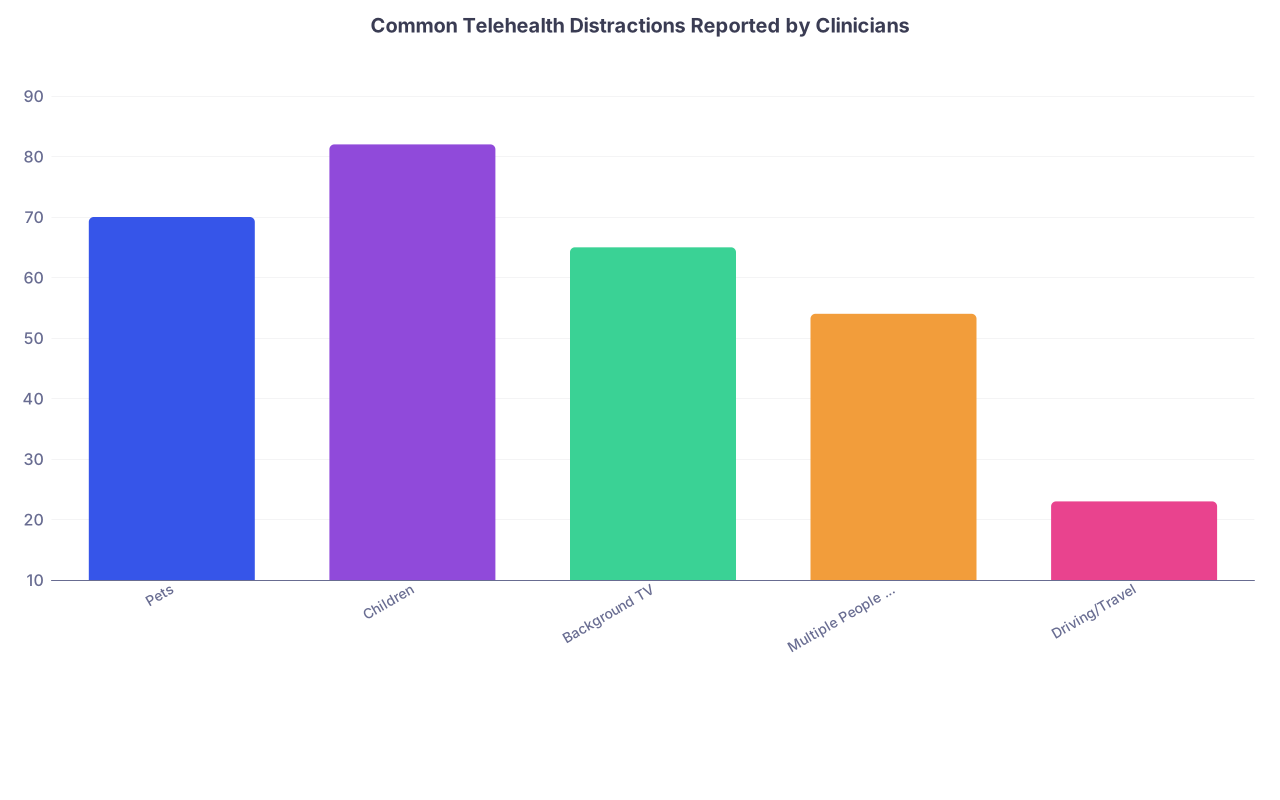
| Category | Value |
|---|---|
| Pets | 70 |
| Children | 82 |
| Background TV | 65 |
| Multiple People Talking | 54 |
| Driving/Travel | 23 |
When comedy becomes safety risk
Some background chaos is charming. Some is a red flag.
Examples where you stop laughing and switch gears:
- Adult supposed to be in a confidential depression visit but three other adults are audibly in the room.
- Domestic conflict audible in the background. Shouting, threats.
- Patient “whispering” about intimate partner violence while partner moves around behind them.
You respond differently:
- “Do you have a private place where we can talk for five minutes? If not, we may need to do part of this by secure message or in-person.”
- For suspected danger, you go by your local IPV and safety protocols. Ask yes/no questions. Offer code phrases if your system has them. Document carefully and clearly.
Telehealth gives you a window into risk you never saw in clinic. Do not ignore it because it feels awkward to address.
3. Accidental Zoom Fails: Mics, Cameras, and Way Too Much Skin
Let me be blunt: if you do enough video visits, at some point you will see more of a patient than you ever wanted. Or hear things you cannot un-hear.
The greatest hits include:
- Patient on the toilet during the visit
- Half-dressed patient accidentally flipping front camera
- Spouse shouting medical details off-screen
- Patient walking through a store with the phone at waist level so you are broadcasting aisle 7
The toilet visit
This one is now so common it borders on cliché. You log in:
- Echoey bathroom acoustics
- Strange angle
- Then the unmistakable flush.
Your move:
- “I am going to disconnect this visit until you are finished in the bathroom. Then you can rejoin when you are in a private, non-bathroom space.”
- If they argue: “For privacy and infection control reasons, I cannot complete a medical visit while you are on the toilet.”
Yes, I have had to say that sentence. More than once.
Nudity, underwear, and “I did not know the camera was on”
This is not a prurient issue. It is professionalism and mutual respect.
Your steps:
- Immediately stop the exam part. Look away from the screen if needed.
- Say, calmly: “You are not fully covered. Please put on clothing and then return to the visit. I will pause here for two minutes.”
- Turn off your camera or temporarily disconnect and message them through the platform to rejoin when dressed.
Document succinctly: “Video visit briefly interrupted due to patient lack of appropriate attire; resumed when patient was dressed.”
If you feel uncomfortable proceeding (and sometimes you should), you convert to phone or reschedule.
Hot mics and oversharing
You will eventually hear something like:
- “Is this the doctor who gave you the rash cream?” shouted from the next room.
- “Tell them about the weed, you did not tell them about the weed last time!”
- Inappropriate jokes from someone who thinks the mic is off.
You have two jobs:
- Keep the visit clinically on track.
- Maintain boundaries without turning it into a power struggle.
A simple line works: “I appreciate your partner’s help. For this part, I need to speak directly with you first, and then we can bring them in if you want.”
Or: “Some of what I am hearing may be sensitive. Let us decide together who you want involved in this visit.”
You are not obligated to absorb abuse or lewd commentary just because it is coming through a laptop. Same zero tolerance policy applies.
4. The Weirdest Category: Driving, Working, and “I’m Kinda Busy Right Now”
The most infuriating telehealth pattern is people doing the visit while:
- Driving
- Operating machinery
- Actively at work in a semi-public space
- On a treadmill or at the gym
Telehealth convenience does not override basic safety.
The driving visit: zero tolerance
You see the seatbelt, the moving background, or—my favorite—the eyes flicking between you and the road.
Your response is not optional or negotiable:
- “I see that you are driving. For safety reasons, I am ending this video visit now. You can pull over and rejoin in a parked location, or we can switch to phone if it is safe and legal where you are.”
In many systems, this is a policy, not a suggestion. You document:
“Visit terminated due to patient driving a vehicle during video encounter; offered option to rejoin from parked location or reschedule.”
If they refuse and keep driving, you disconnect. They may be annoyed. Let them be annoyed and alive.
The “I’m at work” half-attention visit
They are in a break room. Or a stairwell. Or standing outside the restaurant with coworkers walking past.
Here is the problem: you may be about to discuss diagnoses they do not want broadcast. HIPAA is not just your job; it is also your responsibility to warn them.
You say:
- “We may need to discuss private health information, including results. Can anyone around you hear this conversation?”
- “If other people can hear us, I recommend we reschedule or you move somewhere private. I do not want to share something you did not intend to share in public.”
If they insist on continuing, you can proceed, but keep a low profile on details and document that patient chose to continue in non-private setting.
When the multitasking crosses the line
Answering the door, letting the dog out, grabbing their pills—fine. That is life.
But there is a threshold where your internal alarm bells should go off:
- They keep leaving the camera for long stretches.
- They clearly are not listening (you ask a question, they answer something else entirely).
- They are actively doing complex tasks (shopping, supervising kids at the playground, working the register).
At that point, you say:
- “You have a lot going on right now. I am concerned you will not be able to fully focus on this visit. This is important for your health. Should we reschedule for a time when you can give this your full attention?”
Telehealth does not mean “squeeze into spare brain cycles while doing everything else.” Your standards for informed consent and comprehension do not change just because there is a webcam.
5. How to Build a Telehealth System That Survives the Chaos
Let me zoom out from the comedy for a minute. There are structural ways to make all of this less insane.
Pre-visit education that is not an unread email
Most “telehealth prep” is a wall of text patients ignore. You need something different:
A 30–60 second auto-play video in the portal showing:
- “Find a private room.”
- “Do not do your visit while driving.”
- “Have your meds and recent home readings with you.”
- “Wear clothing you would wear to clinic.”
SMS reminders that are brutally simple:
- “30 minutes until your video visit. Please: 1) Charge your device 2) Find a private, quiet room 3) Have your meds nearby.”
You teach people how to use the medium. Repetition matters.
Your own micro-checklist
You do not need a laminated poster. You need a 20-second internal routine you do before every visit:
- Confirm identity and location (vital for emergencies).
- Confirm callback number.
- Confirm they are not driving and are in a reasonably private place.
- Tech check: audio/video okay?
- State the backup plan if disconnected.
You do this enough and it becomes muscle memory. It also quietly prevents a ton of disasters.
| Step | Target Time | Purpose |
|---|---|---|
| Confirm identity & location | 20–30 sec | Safety / legal |
| Confirm phone number | 10–15 sec | Backup if dropped |
| Ask about driving / privacy | 15–20 sec | Safety / confidentiality |
| Audio/video functional check | 10–15 sec | Tech reliability |
| State backup plan | 10–15 sec | Reduce confusion in drops |
Documentation that protects you
Some of your funniest stories will also be your riskiest notes if you are sloppy. So you write like an adult:
- “Visit intermittently affected by poor video quality; final plan confirmed verbally and repeated back by patient.”
- “Patient initially joined visit while driving; encounter paused and resumed once patient was parked.”
- “Significant background noise and multiple people present; discussed privacy concerns, patient elected to proceed.”
You do not write: “Patient had crazy screaming kids and a demon chihuahua, lol.” Tempting after the day you have had. Not smart.
The future: this gets more complicated, not less
Everyone keeps talking about the “future of telehealth” like we are not already living it. Here is what is coming down the pipeline:
- Patients joining from integrated devices (BP cuffs, wearables) that stream data mid-visit.
- Multi-participant telehealth (patient + caregiver + home nurse + specialist). More boxes, more chaos.
- AR/VR exams, where you are basically doing remote-care “escape rooms” trying to guide someone through a neuro exam with a headset on.
All of those amplify the current problems: lag, distraction, privacy failures. If you do not build good habits now, the future platforms will just multiply your pain.
FAQs
1. How do I politely tell a patient their environment is not appropriate for a telehealth visit?
Use clear, neutral language. For example: “I want to make sure this visit is private and focused so we can take good care of you. Right now there is a lot of noise / other people in the room / you are in a public space. Can you move to a quieter, more private place? If not, we may need to reschedule or switch to phone.” You are not shaming them; you are explicitly tying the request to their care quality.
2. What should I do if a patient continues to drive after I ask them to stop?
Terminate the video visit. State clearly: “For your safety and the safety of others, I cannot continue this visit while you are driving. I am going to end the video now. You can pull over and rejoin, or we can reschedule.” Document it verbatim. You are on very solid ethical and medicolegal ground stopping the visit.
3. How do I handle a telehealth visit when kids keep interrupting and the parent cannot get privacy?
Decide first: is this visit clinically urgent? If yes, do the best you can in shorter, concrete bursts, and focus only on safety-critical issues. If no, say: “I can see you are juggling a lot right now. I am concerned we will not get through everything you need. Let us find a time when you can have someone watch the kids or when they are asleep.” Put the burden on the logistics, not their parenting.
4. Is it ever acceptable for a patient to do a telehealth visit at work?
Yes, but only with informed awareness of privacy risks. Ask: “Can anyone nearby hear this conversation?” If yes, warn them that sensitive results or diagnoses may be overheard. If they still choose to continue, keep your language discreet and avoid unnecessary specifics. For sensitive topics (mental health, STI, pregnancy), I lean strongly toward rescheduling or asking them to step into a truly private space.
5. How much tech troubleshooting should I do before giving up and switching to phone?
Give it 2–3 minutes, max. After that, if video is still unstable but audio is clear, say: “Video is not cooperating, but I can hear you well. For today, I will switch to phone so we do not waste your time.” If audio is unstable too, reschedule or bring them in person. You are a clinician, not unpaid IT support.
6. Can I refuse to complete a visit if the patient is not dressed or is in the bathroom?
Yes. In fact, you should. Your professional boundaries and the integrity of the clinical encounter matter. You can say: “For professional and privacy reasons, I need you to be fully dressed and not in the bathroom for this visit. Once you are ready, we can continue or reschedule.” Document briefly and without judgmental language.
Key points, bluntly:
- Telehealth chaos is inevitable—your job is not to erase it, but to structure it so care is still safe and clear.
- Pets, kids, and background noise are data, not just distractions; use what you see, and draw hard lines when safety or privacy is compromised.
- You control when a visit is acceptable to continue. Driving, nudity, toilet visits, and unintelligible lag are not “quirks,” they are reasons to stop, redirect, and document.