You lock your office door at 5:45 p.m. and tell yourself, “I’ll just clear a few messages before I go.” You open the EHR inbox “for 10 minutes.” Suddenly it is 7:20 p.m., you are still nursing cold coffee, and you have barely touched tomorrow’s notes. Your kid’s soccer game? Gone. Your workout? Forget it.
This is not “the job.” This is preventable workflow failure. And you are about three bad habits away from making this your permanent normal.
Let me walk you through the biggest EHR inbox mistakes that quietly destroy evenings, tank clinical quality, and burn people out faster than an RVU spreadsheet.
Mistake #1: Treating the Inbox as a Bottomless To‑Do Pile
The first big mistake: you think the EHR inbox is where work goes and stays until you “get to it.”
So messages pile up. Patient calls. Pharmacy requests. Lab alerts. Referral letters. FYI messages that are not FYI at all. You keep scrolling, searching for what feels urgent, while the rest sits and rots.
The problem is not “too many messages.” It is that you have no taxonomy. No rules. No clear difference between what you touch, what your team touches, and what never should have landed in your inbox in the first place.
Here is what I see over and over in new attendings:
- Every refill comes to the physician, even for stable chronic meds.
- Every patient call gets routed to you “just to be safe.”
- Every normal lab result is cc’d to you, even when already released to the patient portal.
- Every external consult letter hits your inbox with no summary, no triage.
Result: mismatch between message type and message owner. Predictable chaos.
Do not let your inbox become the junk drawer of your clinic.
You need a structure. Think of messages in three buckets:
- Clinical decision required by me
- Clinical action that can be protocolized and delegated
- Noise that should never reach me
If you cannot mentally label a message as one of those three in 3 seconds, that is a systems problem.
Start being ruthless:
- Normal labs on stable chronic meds? Protocol to MA/RN with standing orders.
- Administrative forms that do not require a physician signature? Keep them away from your inbox entirely.
- Refill requests on long-term unchanged meds? Written protocols or refill centers.
If you do not fight this battle early as an attending, you will drown under “just a few clicks” that add up to hours.
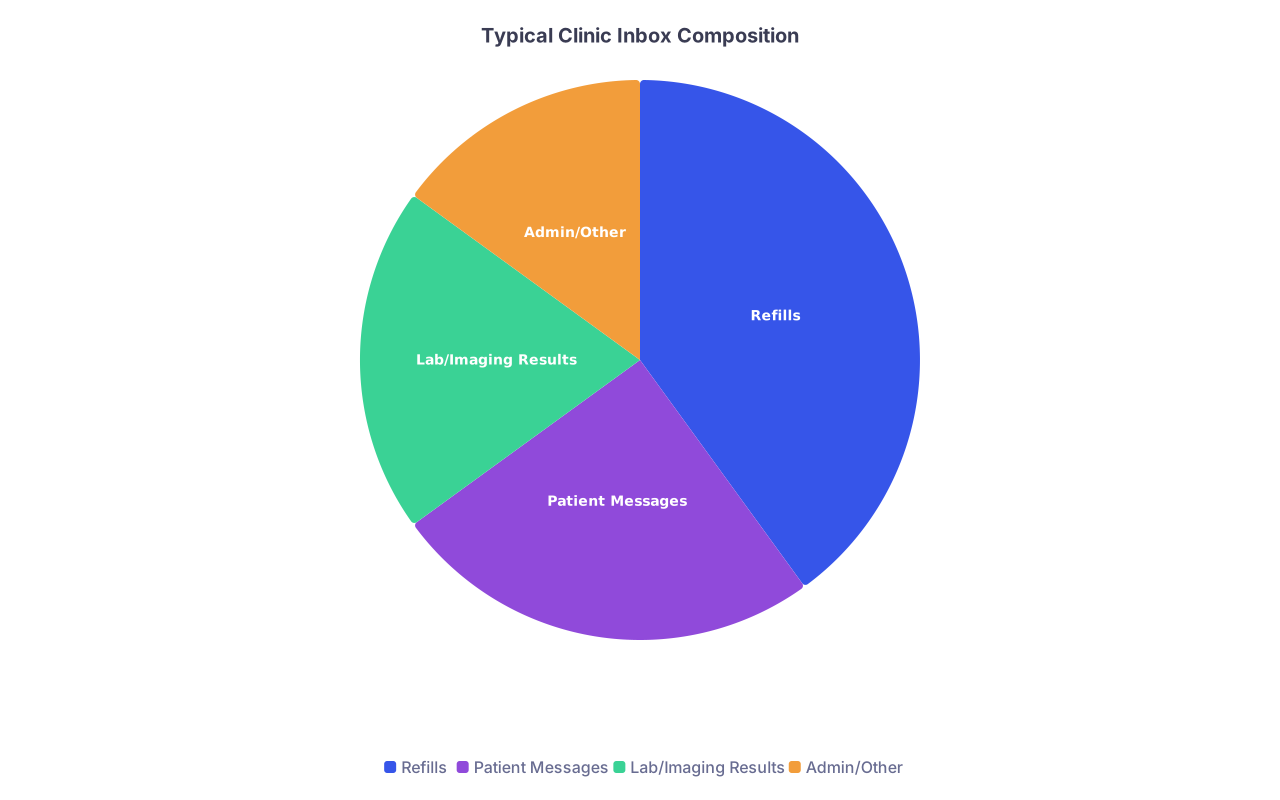
| Category | Value |
|---|---|
| Refills | 40 |
| Patient Messages | 25 |
| Lab/Imaging Results | 20 |
| Admin/Other | 15 |
The mistake is tolerating this composition unchanged. At least half of that pie should be off your desk.
Mistake #2: Living in “Always On” Inbox Mode
Another common disaster: you keep the inbox open all day on a second monitor and respond in real time. Like you are doing live chat tech support.
Every ping interrupts your thought process. Every “quick answer” pulls you out of the room mentally, even when you are physically sitting with a patient. You end up half-present with everyone, and fully exhausted by evening.
Two predictable outcomes:
- Your note quality drops, so you spend evenings fixing and finishing documentation.
- Inbox work expands to fill all visible time, because you let it.
You cannot afford constant context switching. Cognitive switching between patient encounters, documentation, and inbox tasks is not free. There is data showing that physicians lose huge chunks of time switching tasks in the EHR. I have watched attendings bounce from a chest pain workup to a portal question about “Can I drink kombucha with lisinopril?” with no guardrails. That friction is killing them.
Fix this with time boxing. And do not make the rookie mistake of “I’ll just batch it at the end of the day.” That is how your evenings evaporate.
Use 2–3 defined inbox blocks during the day, and guard them. Example for a typical outpatient day:
| Time Block | Purpose |
|---|---|
| 8:00–8:20 a.m. | Overnight results, urgent triage |
| 12:10–12:30 p.m. | Refill approvals, quick questions |
| 4:30–4:50 p.m. | Remaining results, messages that affect tomorrow |
Outside those windows, change your workflow:
- Close the inbox pane. Literally. Do not stare at the growing number.
- Turn off pop-up notifications if your EHR allows it.
- Train staff on what constitutes a true interruption (same-day chest pain, recent surgery issue, unsafe lab).
If you let your attention be held hostage by every ding, you will be finishing actual thinking work at home.
Mistake #3: Doing Clerical Work You Should Have Delegated
This one is non-negotiable. If you personally handle every prescription renewal, every letter, every prior auth, every portal message, you are not a hero. You are a burned-out scribe.
The EHR inbox often reveals whether someone can lead a team or not. Poor delegators drown. Good delegators work hard, yes, but not endlessly.
Common self-sabotaging behaviors:
“It’s just faster if I do it myself.”
True for today. Catastrophic over a year.“My nurse is already overwhelmed; I don’t want to add more to her plate.”
So you silently take it on yourself, and then you both suffer differently.“I don’t absolutely trust the protocols, so I’d rather see everything.”
Then you never improve the protocols. And you guarantee you will be checking potassium on stable ACE inhibitor patients for the rest of your career.
You need to build triage and standing order protocols. Written. Approved. And actually used.
Think in categories:
Refills
Stable chronic meds with recent visit and labs → RN/MA protocol renewal. Only exceptions land on your desk.Test results
Clearly normal follow-up with standard language → nurse or pool message to patient with prewritten templates. Abnormal or unexpected → physician.Portal questions
Non-clinical (forms, appointments, billing) → front desk or admin.
Simple clarifications (“Can I take this with food?”) → RN with standard teaching scripts.
New or worsening symptoms, med changes, diagnostic decisions → you.
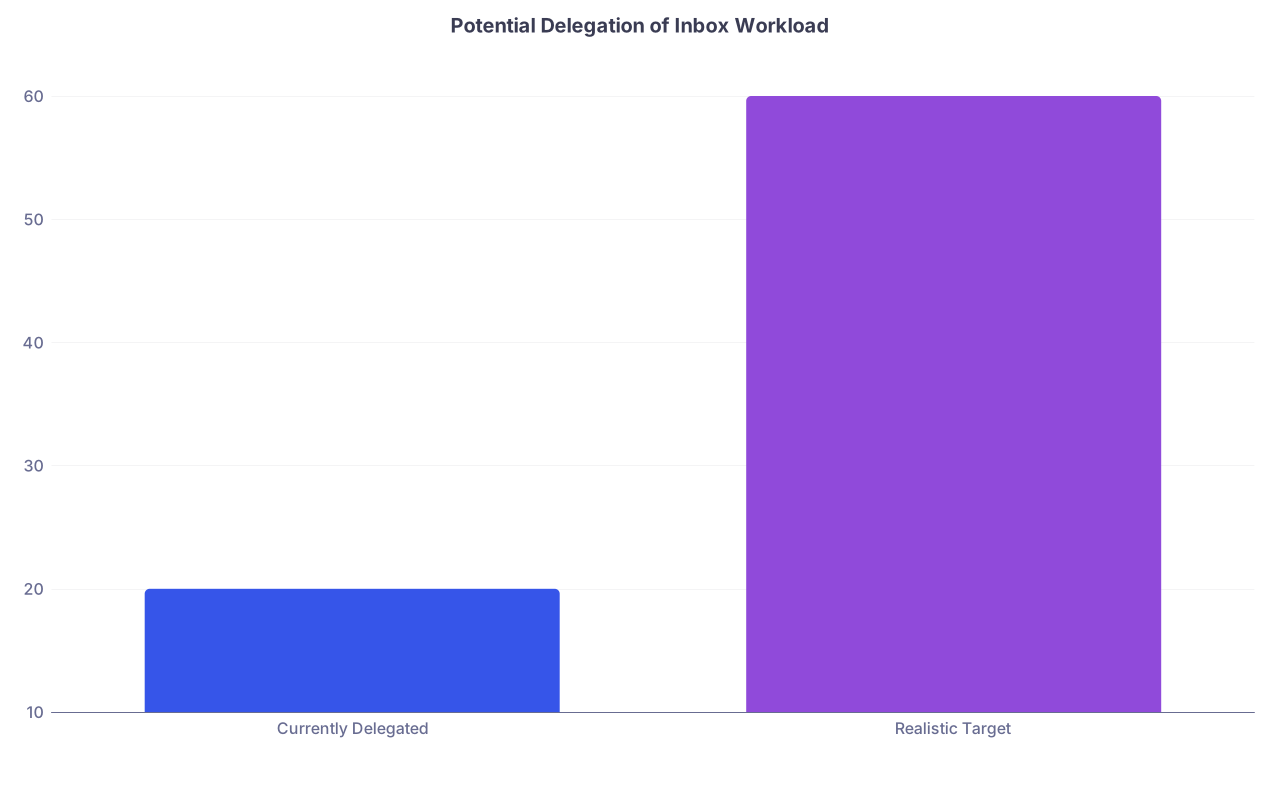
| Category | Value |
|---|---|
| Currently Delegated | 20 |
| Realistic Target | 60 |
If you are delegating less than half of your inbox volume, you are probably making this mistake.
Do not wait for leadership to create these workflows. Sit down with your RN or MA, pull up 50 recent messages, and categorize them. Create 3–5 protocols that cover 80% of the recurring stuff. Expand over time.
Mistake #4: Confusing “Reviewed” with “Actually Managed”
EHRs reward checking boxes. “Reviewed” is one click. Thoughtful action takes longer. When you are tired and trying to get out the door, it is very tempting to treat a “reviewed” lab or message as “done.”
That is how care gaps and near-misses show up.
Patterns I have seen:
- Potassium comes back at 5.9 on someone with CKD. Lab is marked reviewed. No documentation, no plan, no phone call. It sits until the next visit.
- Abnormal mammogram result is reviewed, but no order for additional imaging and no reminder for staff to arrange it.
- Patient sends a portal message describing worsening dyspnea. You answer with a brief reassurance after skimming. No vitals, no appointment scheduled, no documentation beyond “advised patient to monitor.”
You got it out of your inbox, but not out of your life. It will come back as an ED note, a complaint, or a missed diagnosis.
The safeguard here: separate triage from closure.
When you open a result or message, you should do one of three things:
- Fully address it now: decision, documentation, orders, and communication.
- Turn it into a discrete, trackable task (for you or your team) with a clear owner and due date.
- Re-route it to the correct person with a brief note on what is needed.
What you must not do: “review” and hope that your memory will bridge the gap.
Most decent EHRs allow you to convert messages into tasks or place follow-up reminders. Use that. Sloppy use of “Mark as Reviewed” is a malpractice magnet.
Mistake #5: Letting Patient Portal Messages Expand Into Free Unbounded Care
The portal is not evil. The lack of boundaries around it is.
Post-residency, this mistake gets expensive very quickly: answering long, complex clinical questions through the portal without visits, without clear documentation, and without clarity on what should trigger a visit.
Here is what I see repeatedly:
Multi-paragraph novel: “I have had chest pain and fatigue for 3 weeks, also my ankle is swollen, and by the way can you refill all my meds and look at this rash picture?”
You respond with a half note in the portal. No vitals, no structured review, no billing. That “quick reply” takes 8 minutes of real cognition.Chronic disease management entirely via portal, because the patient “does not like coming in.” You agree out of kindness. So they now expect asynchronous management of complex problems at any hour.
Portal turned into opinion hotline: “My other doctor said X, what do you think?” or “Should I stop my statin because of that article?”
You are offering consult-level advice with no visit, no documentation, and often no compensation.
If half your inbox is portal, your evenings are gone.
You need rules, and your staff needs to know them:
- Symptoms? New, worsening, or complex issues → convert to visit (in person or telehealth). Do not manage entirely by back-and-forth messaging.
- Multi-topic messages → schedule a visit. Politely. “This is complex enough that I want to talk through it with you directly.”
- Repeated messaging on same issue without visit → boundary. “We should schedule time to go over this in detail.”
Also: use message templates that prompt you into appropriate documentation. If your EHR supports billing for time spent on eligible portal messages, learn the exact criteria and apply them systematically. Do not do free half-visits every evening because you feel guilty charging.
Mistake #6: No Triage Rules with Your Staff
If you have an MA or RN who “sends you everything just in case,” that is not their fault. That is your leadership failure.
What they are scared of:
- Missing something dangerous and getting blamed.
- Acting beyond their role.
- Approving refills or giving advice without clear guardrails.
So they default to forwarding. Everything. To you.
You fix this by:
- Writing down simple, clear triage rules for common scenarios.
- Role-playing what they handle vs what comes to you.
- Explicitly backing them when they follow the protocol and something still goes sideways.
Example triage guidelines for phone/portal messages:
- Same-day call: chest discomfort, shortness of breath, neuro symptoms, fever with immunosuppression, post-op concern → immediate clinical triage by RN, notify physician if criteria met.
- Refill without recent visit → follow protocol: schedule visit + provide bridge refill within safe limits, unless red-flag meds.
- Non-urgent administrative (work letter, school form) → staff handles forms within 3 business days; message never reaches you except for signature if required.
Your job is to stop invisible escalation. If you routinely answer complex clinical questions without redirecting to visits or triage, your staff learns: “Everything belongs in the inbox to doctor.” That is how your evenings get filled with problems that should have been scheduled or triaged differently.
Mistake #7: No Hard Stop for “Inbox Zero” Fantasy
Chasing “inbox zero” every day is a perfectionist trap. EHRs are engineered to refill that inbox the moment you clear it. You will not win.
What actually works is defining what “good enough to go home” looks like. And that standard should be rational, not obsessive.
A reasonable daily cutoff might be:
- All critical or abnormal results acted on or clearly delegated.
- Messages that affect tomorrow’s care (schedule changes, pre-op issues) addressed.
- No open messages older than X days without being turned into tasks / visits.
- The rest? Parked for tomorrow’s inbox block.
If you refuse to leave until everything is gone, say goodbye to your evenings. The volume is not compatible with daily absolute clearance in most busy practices.
Set rules like:
- After 6:00 p.m., I do not open any new patient messages unless flagged urgent by staff.
- I stop inbox work 30 minutes before my intended departure time to wrap up notes and prioritize follow-up.
- I do not do routine inbox work from home after 8 p.m. Unless there is a truly urgent result, it waits.
Without a personal “stop rule,” the EHR will eat as much of your life as you offer it.
Mistake #8: Ignoring Metrics That Should Scare You
You would not manage hypertension without BP readings. Yet many physicians manage enormous inbox loads without ever looking at basic metrics.
A few numbers should make you pause:
- Average daily message volume
- Proportion handled by you vs staff
- Average response time
- Number of messages more than 72 hours old
- Evenings/week you log in from home purely for inbox
If you have access to EHR analytics, pull them. If not, do a manual one-week snapshot.
If you are frequently in the “dozens of messages still untouched at 6 p.m.” zone, that is not “just how it is.” That is a workflow failure. You either need:
- Better delegation,
- Fewer inappropriate messages (policy + training),
- More protected time during the day,
- Or fewer scheduled face-to-face visits relative to your actual work.
Most people never make the case to leadership because they cannot show data. Two weeks of simple tracking beats a year of vague complaints.
Mistake #9: Building No Separation Between Work Brain and Home Brain
The last, quieter mistake: letting inbox anxiety live in your head all evening even when the computer is off.
You know the feeling: “There is probably something bad in there I have not seen yet.” So you check at 9:30 p.m. on your phone. Then 10:15. Then you wake up at 3 a.m. thinking about that borderline lab you glanced at while half-asleep.
If you do this routinely, you never truly turn off. You erode whatever is left of your resilience.
You avoid this by:
- Setting a personal policy: no routine inbox check after a certain time.
- Arranging coverage and escalation rules for true after-hours urgency (call answering service, on-call rotation, etc.).
- Ending the day with a 5-minute “shutdown” routine: confirm there is no outstanding critical result, no clearly unsafe delay, and then consciously decide, “Everything else is safe to wait until tomorrow.”
The EHR will not give you boundaries. You have to impose them.

| Step | Description |
|---|---|
| Step 1 | Start Clinic Day |
| Step 2 | Morning Inbox Block |
| Step 3 | See Patients |
| Step 4 | Midday Inbox Block |
| Step 5 | Afternoon Patients |
| Step 6 | End of Day Inbox Block |
| Step 7 | Delegate or Address Now |
| Step 8 | Shutdown Routine |
| Step 9 | Leave Work - No Routine Inbox at Home |
| Step 10 | Critical Items Left? |
If your actual day looks nothing like this and more like “constant inbox trickle from 8 a.m. to 10 p.m.,” you know where your evenings went.
Keep this simple. The EHR inbox is not going away, but it does not have to own you.
Key points:
- Do not treat your inbox as an unfiltered dumping ground. Define what should reach you, what gets delegated, and what never belongs there.
- Stop living in real-time inbox mode. Use defined blocks, written triage rules, and aggressive delegation so you can actually think during the day and leave on time more than once a month.
- Never confuse “reviewed” with “managed.” Either fully address, delegate with a clear task, or convert to a visit. Anything else will come back at you later—usually after hours.