
The fastest way to burn out a good clinician is to handle patient portal messages badly. Not the volume alone—the mistakes around how those messages are handled.
Most doctors think the problem is “too many messages.” That’s lazy thinking. The real damage comes from poorly set expectations, sloppy triage, and legal landmines you did not even realize you’re stepping on at 11:47 p.m. from your couch.
Let’s stop you from becoming that cautionary story.
1. Treating Portal Messages Like Casual Texts
The portal is not iMessage. If you treat it like it is, you will eventually get hurt—clinically, legally, or professionally.
Mistake: Answering like you’re texting a friend
I’ve watched attendings reply from their phone between cases with things like:
- “Looks fine, keep an eye on it”
- “Try ibuprofen and rest”
- “We’ll adjust meds next visit”
No vitals. No timeline. No safety net. No documented rationale.
You don’t see the trap until something goes wrong and your half‑sentence answer becomes Exhibit A in a chart review.
What to avoid:
- One‑line answers with no context
- No follow‑up plan or timeframe
- No explicit instructions about when to call/ER/urgent care
- Agreeing to things (like med changes) without documenting your reasoning
Better pattern:
When you respond, build in three elements:
- What you’re doing now
- What they should watch for
- What they should do if things change or worsen
Example instead of “Looks okay”:
Based on your description and the photo, this appears consistent with mild contact dermatitis.
For now:
• Use the steroid cream twice daily for 7 days.
• Avoid new soaps/lotions in the area.Red flags: If you notice spreading redness, fever, drainage, or pain worsening over 24 hours, please call our office or seek urgent care. If you develop severe pain, trouble breathing, or feel very unwell, go to the emergency department.
Still not long. But defensible. And actually helpful.
Mistake: Writing like there’s no medical record
Everything you write in a portal is chartable. Many systems auto‑import replies into the EMR. Patients see this, other clinicians see this, auditors see this.
Do not:
- Vent (“This is the third time I’ve explained…”)
- Be sarcastic (“As I said before…”)
- Blame the patient (“You should have called sooner.”)
- Make casual speculation (“Probably just anxiety.”) without supporting evaluation
Act like:
- Every message might be printed in court
- The quality committee might read it
- Your future self will need to remember why you said what you said
Because all three will eventually be true for someone. Don’t make it you.
2. Ignoring the “On‑Call” Boundary
You will regret letting the portal follow you into your personal life without rules.
Mistake: Checking portal messages “just to clear the queue” off‑hours
This one is subtle. You’re off. You open the app “just to see what’s there.” You answer two quick questions. No big deal, right?
Here’s what you just did:
- You trained patients that you respond at 10 p.m.
- You undermined your clinic’s stated message response policy
- You created a new, undocumented standard your group may now be judged against
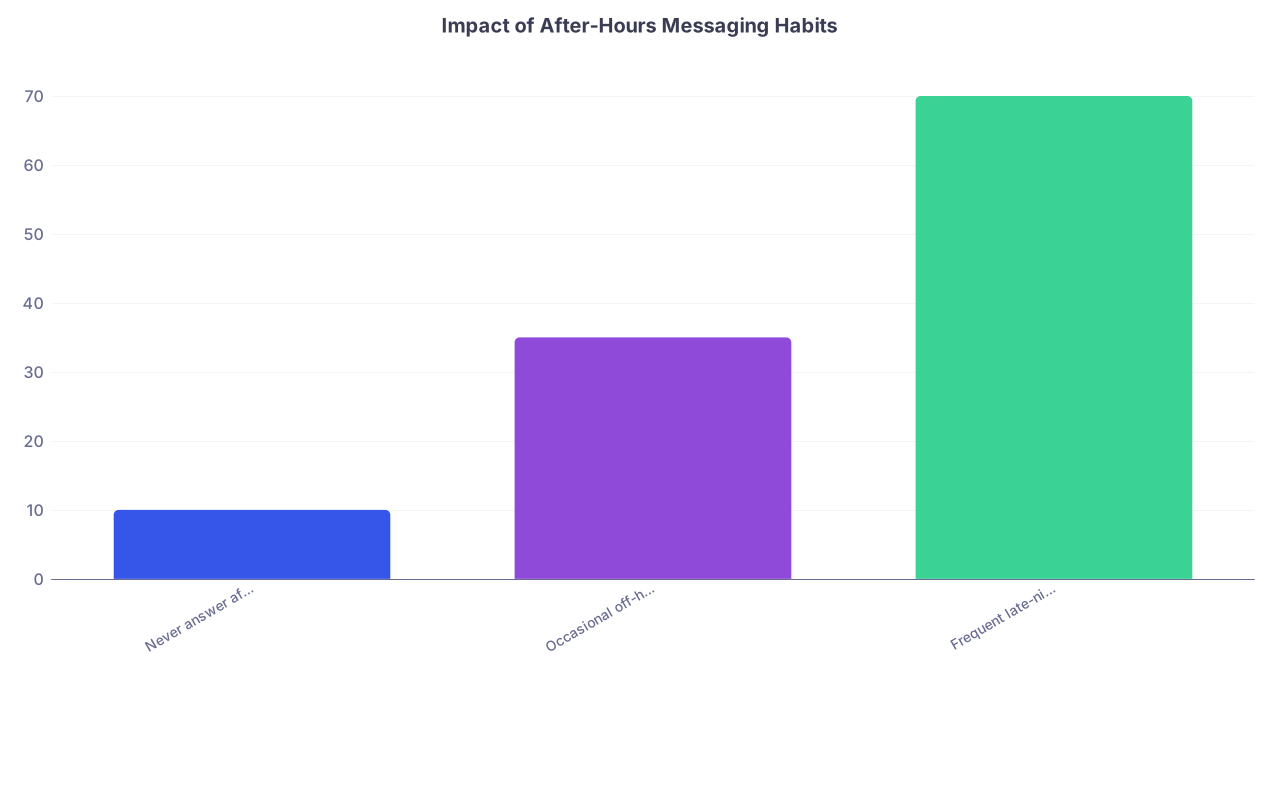
| Category | Value |
|---|---|
| Never answer after-hours | 10 |
| Occasional off-hours replies | 35 |
| Frequent late-night replies | 70 |
Those numbers aren’t from one specific study; they reflect what patterns I’ve seen in multiple practices: once you start regular off‑hours reply behavior, messages spike. People test the boundary you created.
How to avoid this:
- Turn off portal notifications on your personal phone after hours
- Use a separate work device if your system allows
- Follow your group’s written policy—if you don’t have one, push for one
And if you must open it (you’re on call, covering vulnerable patients), be intentional:
- Only look at messages flagged as urgent or triage‑relevant
- Leave non‑urgent questions for clinic hours
- Do not respond just because it’s “quick”—respond because it’s necessary
Mistake: Blurring on‑call coverage with portal coverage
On‑call means you’re available for urgent issues through the designated route (usually phone). Not that you’re on live chat in the portal all night.
Big red flag: practices that quietly expect their docs to manage both without compensation or staffing support.
If your system:
- Has no clear statement separating on‑call from portal message expectations
- Allows patients to message “on call doctor” through the portal without triage
- Does not define what’s appropriate for portal vs phone vs visit
…you’re set up to fail.
You should insist on:
- A standard message at the top of the portal: “For urgent or emergent issues, do not use this message system. Call XXX‑XXX‑XXXX or go to the ER.”
- Automatic after‑hours replies stating messages will be reviewed next business day
- Clear scripting your front desk and nurses follow about portal vs phone
If leadership resists this, they’re not protecting you—or the patients.
3. Letting Emergencies Hide in the Inbox
The most dangerous portal mistake? Letting a true emergency sit in a message queue because nobody designed a triage process.
I’ve seen it too many times. Monday morning: “Patient sent a chest pain message at 11 p.m. Friday.”
Mistake: No triage or escalation rules
If your portal inbox is treated like email, someone will eventually miss:
- New chest pain in a 65‑year‑old at 8 p.m.
- Suicidal thoughts buried in a rambling 3‑paragraph message
- Neurologic symptoms sent on a Friday at 4:57 p.m.
You cannot personally fix system design, but you can refuse to pretend it’s safe.
At minimum, your practice needs:

| Step | Description |
|---|---|
| Step 1 | Patient sends message |
| Step 2 | Auto reply with emergency instructions |
| Step 3 | Staff triage first |
| Step 4 | Call patient |
| Step 5 | Direct to ER or urgent slot |
| Step 6 | Route to clinician for response |
| Step 7 | After hours? |
| Step 8 | Urgent symptoms? |
If this doesn’t exist where you work, that’s not a small oversight. That’s a hard stop safety issue.
Push for:
- Auto‑replies after hours redirecting emergencies
- Staff triage of all new messages during business hours before they reach you
- Clear triage scripts for staff to distinguish:
- Emergency → 911/ER
- Urgent → nurse call same day
- Routine → portal response or visit scheduling
And do not let admin call that “too complicated.” They’re guarding phone trees and user interface, you’re guarding actual human lives.
Mistake: Answering high‑risk messages only through the portal
Anything involving:
- Chest pain, shortness of breath, severe abdominal pain
- Neuro changes (weakness, slurred speech, facial droop)
- Suicidal ideation, self‑harm thoughts
- Rapidly worsening symptoms in a fragile or complex patient
…should not be handled as an asynchronous text.
If you see these:
- Call the patient or have staff call.
- Give clear, verbal instructions (ER, urgent clinic, same‑day slot).
- Document the interaction in the chart, including your clinical reasoning.
- Optional but often smart: brief portal reply summarizing what’s been arranged.
You avoid the disaster scenario: “Doctor saw my message and just typed ‘monitor for now.’”
4. Turning Yourself Into Free 24/7 Telehealth
Let me be blunt: if you let portal messages become unlimited, uncompensated mini‑visits, your time will get eaten alive and your income will not reflect your work.
Mistake: Answering complex questions that should be visits
You know the type:
- Multiple new symptoms
- Chronic condition totally off the rails
- “Quick question” with five attached labs from outside hospital
- “Can you review my three‑page disability form and tell me what to do”
These are visits. Not messages.

What you should not do:
- Type out a full consult worth of advice in a portal reply
- Manage multi‑medication changes via back‑and‑forth messages over days
- Let patients “message shop” instead of scheduling needed follow‑ups
You’re not just hurting yourself. You’re lowering care quality by pretending nuanced problems can be handled like customer support tickets.
Better pattern:
When a message is too complex:
The concerns you raised are important but too complex to safely address by message. I recommend we schedule a visit (in‑person or video) so we can review everything together and make a clear plan.
Then route to scheduling. Be consistent about this. Patients adapt.
Mistake: Ignoring billing and documentation options
Many systems now support billing codes for online digital E/M (like 99421‑99423 in the US). Admin sometimes “forgets” to mention this. Or pretends it’s not worth the hassle.
Let me be clear: it is a mistake to ignore this entirely if you are spending real clinical time on messages.
| Message Type | Handling Approach |
|---|---|
| Simple refill, no change | Staff protocol / quick sign |
| Clarification of recent visit | Brief reply, no billing |
| New minor issue, brief advice | Consider digital E/M if time > 5 min |
| Complex new concern or multiple issues | Convert to visit |
| High-risk symptoms | Phone/ER guidance, not portal-only |
You are not “greedy” for wanting proper valuation of your work. You’re realistic. The only people who benefit from invisible labor are the ones not doing it.
If your system supports visit‑level billing and your leadership discourages its use without reason, that’s a sign. They’re okay with your time being free.
5. Failing to Set and Reinforce Expectations
Most portal chaos is not patient malice. It’s your system failing to tell them the rules—and clinicians being too nice to enforce boundaries.
Mistake: Vague or non‑existent messaging guidelines
If patients do not know:
- What is appropriate to send via portal
- How long replies typically take
- What types of problems require a visit
- What to do after hours
…they will guess. And their guesses will be based on consumer apps, not clinical workflow.
You need clear, repeated communication, not one line in the sign‑up email.
Examples of bad messaging banners:
- “Send a message to your provider any time!”
- “Have a question? Use the portal!”
Examples of safer messaging banners:
- “Portal messages are for non‑urgent questions. Responses usually within 2 business days.”
- “For medication refills, appointment changes, and simple follow‑up questions, use Messages. For new or worsening symptoms, schedule a visit or call.”
And this one matters: make sure the portal visibly states not to use it for emergencies, every time they open the message screen.
Mistake: Saying “no problem” when it is a problem
I’ve seen this dynamic:
- Patient sends 10 multi‑page messages a month.
- Clinician is exhausted and behind.
- When patient apologizes, clinician responds: “No problem, that’s what I’m here for.”
That is a lie. You’re not actually there to be a 24/7 primary care think tank for free. And pretending you are just cements unsustainable behavior.
Instead, you can be kind and honest:
I want to make sure we give your concerns proper attention. The portal is best for brief, focused questions. For everything you’ve raised, a visit will let us go into the necessary detail. Let’s schedule one.
You’re not rejecting them. You’re refusing to provide low‑quality care in a low‑quality format.
6. Poor Team Use: Trying to Do It All Yourself
If your portal messaging depends on you personally triaging, answering, and closing every thread, you will drown.
Mistake: No team protocols or message routing logic
I’ve seen inboxes where:
- All refills go directly to the physician
- All scheduling questions go directly to the physician
- All administrative forms arrive as portal messages to the physician
That’s not “patient centered.” That’s poorly designed.
You should work with your team to set up:
- Nurse pool for symptom questions with protocols
- Front desk pool for appointments, referrals, forms
- MA pool for prep work (pulling labs, imaging, med lists) before you respond

| Step | Description |
|---|---|
| Step 1 | New portal message |
| Step 2 | Staff process per protocol |
| Step 3 | Front desk handles |
| Step 4 | Nurse triage |
| Step 5 | Physician review |
| Step 6 | Reply or convert to visit |
| Step 7 | Type? |
If leadership insists everything must go to the physician “for best patient experience,” remind them:
- Burned‑out physicians do not provide good experiences.
- Delayed responses because you’re inundated are worse for patients than efficient team‑based handling.
Mistake: Not using templates or smart phrases
Typing the same instructions manually 20 times a day is a rookie move.
You should have templates for:
- Non‑urgent response expectations
- Refill policies (how often, what’s needed)
- “This needs a visit” redirection
- After‑hours and emergency instructions
- Common chronic disease follow‑up advice (hypertension, diabetes, etc.)
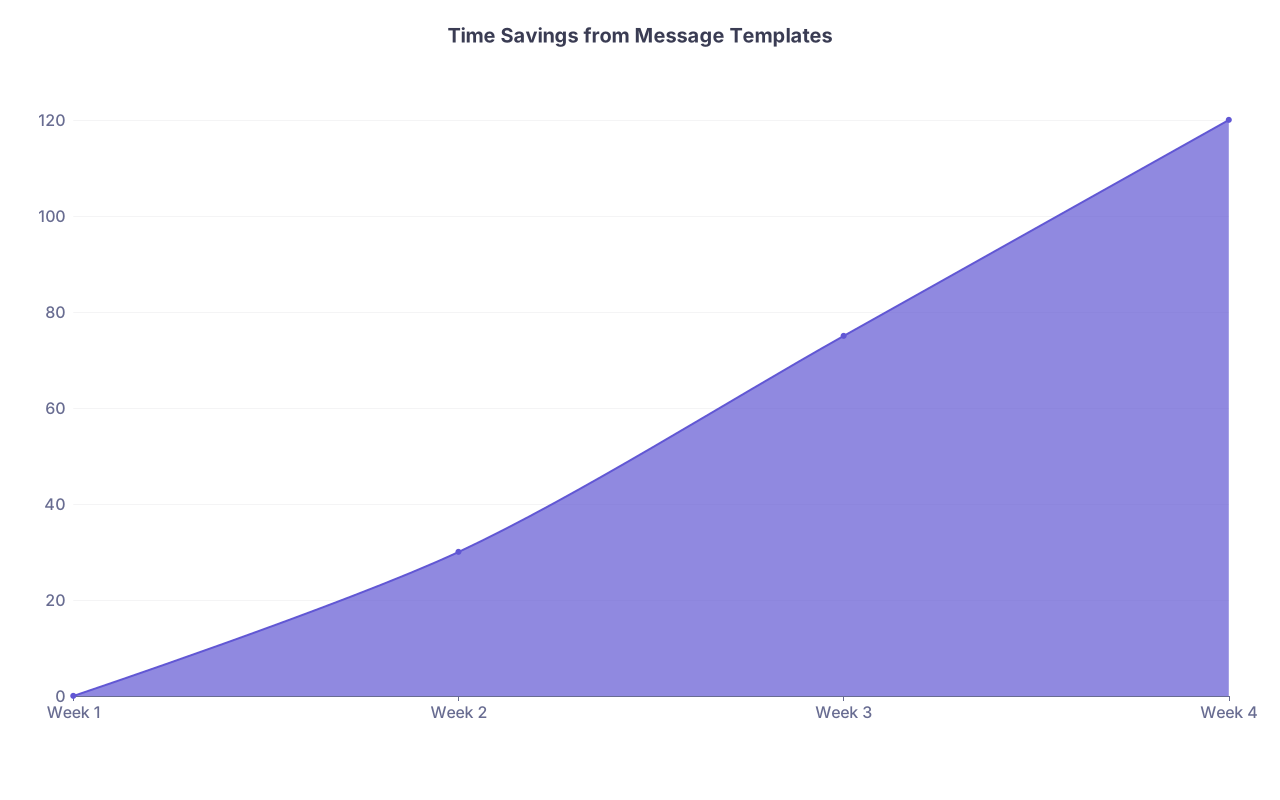
| Category | Value |
|---|---|
| Week 1 | 0 |
| Week 2 | 30 |
| Week 3 | 75 |
| Week 4 | 120 |
Again, those are illustrative, but the pattern is real: once you build sane templates, your mental load drops. And your messages get safer and more consistent.
7. Forgetting Privacy, Security, and Documentation Traps
You think you’re being helpful. Plaintiff attorneys think you’re building their case file.
Mistake: Discussing other people’s info in the thread
Classic scenario:
- Spouse messages about the patient from their own portal account
- Parent messages about an adult child
- Sibling messages “on behalf of” cognitively impaired patient
You reply with detailed medical info. To the wrong chart. Or the wrong legal entity.
If the message is in the wrong patient’s portal chart, do not dump PHI into it.
You can respond with:
For privacy and safety, I’m limited in what I can discuss in this message. I recommend [patient name] send a message through their own portal account or call our office so we can confirm permissions and talk by phone.
Yes, it feels clunky. No, you don’t want to explain to compliance why you shared lab results in someone else’s record.
Mistake: Letting portal threads become your only documentation
Your thought process should live in the chart, not be buried in a scrolling message thread.
If you give significant clinical advice via the portal, do this:
- Create (or link to) a chart note
- Summarize: what they reported, your assessment, your plan, and follow‑up instructions
- Reference the portal message in the note if needed
Think forward: Will you be able to understand what you did 18 months from now? If not, it’s not documented enough.
8. Ignoring Your Own Red Flags
Last category is about you.
There are warning signs that your current portal workflow is unsustainable. Ignoring them is how people end up quitting, getting disciplined, or both.
Red flags:
- You’re spending >1–2 hours most evenings on messages.
- Your first thought when you see a portal notification is dread.
- You catch yourself speed‑answering without really reading.
- You’ve sent a reply and immediately thought, “That wasn’t safe.”
- You’re behind on documentation because you’re buried in messages.
If you see this pattern, the mistake is pretending it’s individual “time management” failure. It’s not. It’s a system issue that requires system fixes.
What you can do:
- Track your messaging time for 2–4 weeks (rough estimate is fine).
- Categorize messages: admin vs clinical vs refill vs FYI.
- Bring data to leadership. And be specific: “I’m spending X hours weekly on tasks we could move to staff templates or nurse protocols.”
They may ignore you at first. Don’t make the mistake of dropping it. Burnout is expensive. Turnover is expensive. Leadership usually understands those numbers.
Key Takeaways
- The portal is not a casual chat app. Every message is part of the medical record and must be treated with clinical, legal, and safety awareness.
- Do not let on‑call coverage quietly expand into 24/7 free telehealth through the portal. Set and enforce boundaries—for yourself and for patients.
- Complex, urgent, or high‑risk issues do not belong in asynchronous messaging. Use visits and phone calls, and build team‑based triage systems that protect both patients and you.