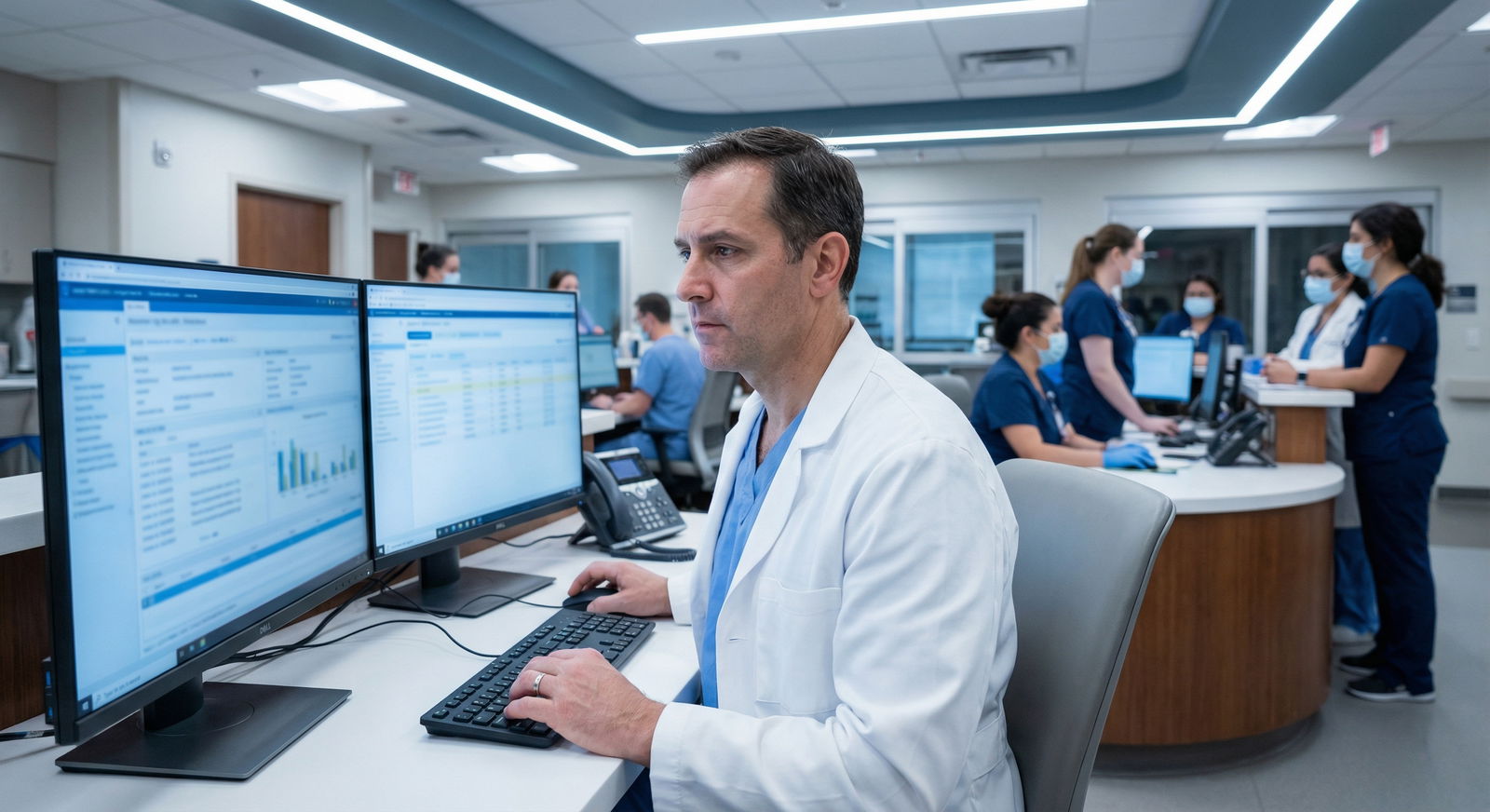
Most attendings complain about their EHR, but very few actually understand why Epic feels “smoother” than Cerner or why Meditech can be lightning fast in one hospital and unbearable in another.
Let me break this down the way people talk about it in real work rooms, not at vendor demos.
We are going to look at Epic, Cerner, and Meditech specifically from the standpoint of an attending physician’s daily workflow: pre‑rounding, rounding, orders, documentation, in-basket/results, cross-cover, and discharge. I am not interested in which company’s stock is doing well. I care about which system makes you finish notes by 6 pm versus 9:30 pm.
1. The Core Personality of Each System
Before we get granular, you need a mental model for each platform.
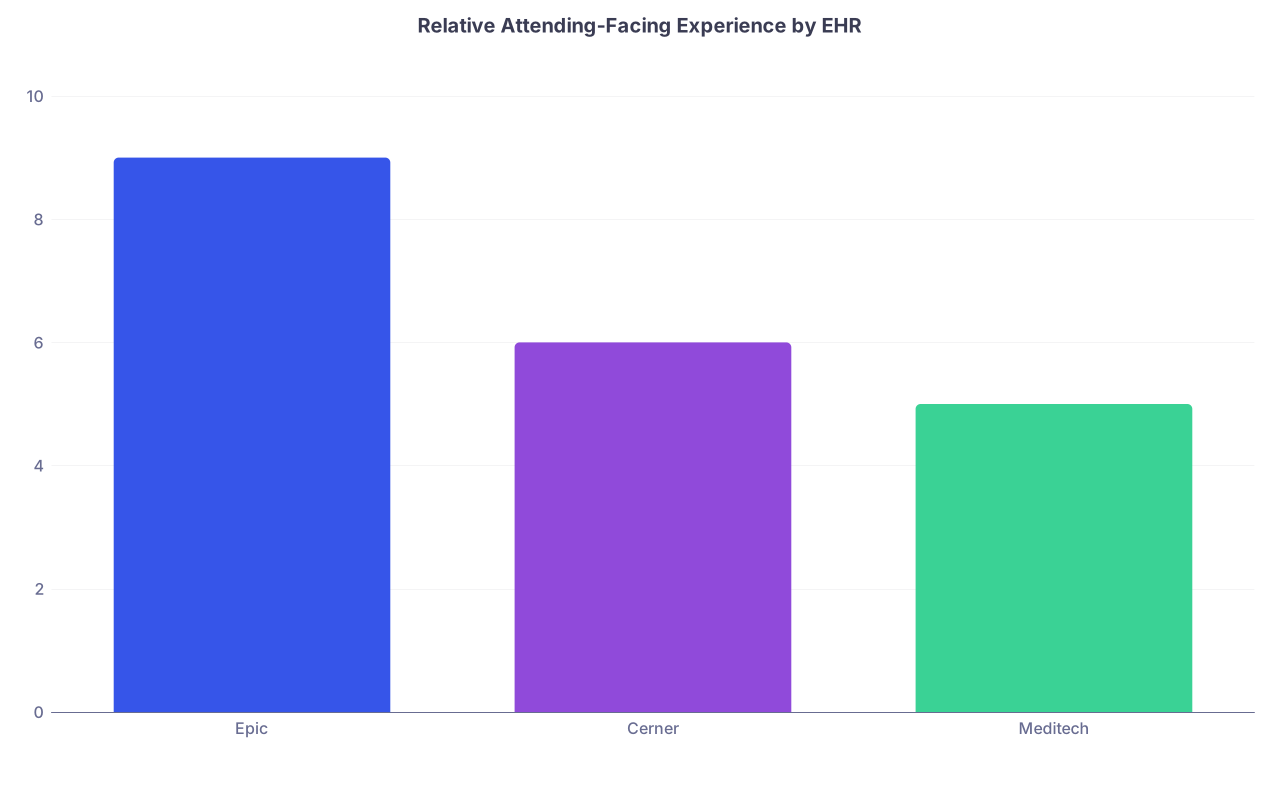
| Category | Value |
|---|---|
| Epic | 9 |
| Cerner | 6 |
| Meditech | 5 |
Here is the blunt version I give fellows looking at jobs:
- Epic: Designed to let you live in “your” workspace. Heavy up‑front build, but once dialed in, it is the closest thing to a cockpit. Fast when well-implemented. Can be bloated with garbage if your hospital has no governance.
- Cerner (now Oracle Health): Fragmented feel. Powerful and flexible, but the attending experience depends brutally on local configuration. When it is bad, it is really bad: click-heavy, context switching all the time.
- Meditech: Older DNA. Often very fast in terms of raw speed and low system lag, but workflow is modal and rigid. You feel like you are stepping into tasks instead of keeping situational awareness across the patient.
If you remember nothing else: Epic optimizes for provider-centric workflows, Cerner for data structures and flexibility, Meditech for structured, low-resource stability. That drives everything downstream.
2. Pre‑Rounding and Chart Review
This is the first 30–60 minutes of your day that either makes you feel in control… or constantly behind.
Chart Review: How Fast Can You Rebuild The Story?
Epic
Epic’s Chart Review and Synopsis are the gold standard here when built properly.
What most attendings like:
- One-click view of key trends: vitals, labs, imaging, notes, meds all in configurable tabs.
- “Synopsis” that surfaces last 24–72 hour trends, last significant events, and active lines/drains.
- SmartLinks/SmartTexts that can pull overnight data into your note automatically.
Common pattern:
You log in, open your “My Patients” list, right-click > Chart Review. In 10–20 seconds you see: overnight events (from nursing notes), vitals trends graph, new labs, PRNs given, tele strips, and read the intern’s note, all without leaving that patient’s chart.
You can pre-build:
- Custom Synopsis sections (ICU vs medicine vs cards).
- Filters for “New since last review” on labs/imaging.
That means you spend the first hour thinking instead of hunting.
Cerner
Cerner’s story is “it depends”. I have seen:
- Beautiful, custom “Summary” MPages with inline vitals, recent labs, last note, active orders.
- And I have seen six different tabs that all say “Results” but each opens a slightly different viewer, none of which show what you actually want together.
Baseline experience:
- You usually jump between “PowerChart” summary panels, “Results Review,” and “iView” (nursing flowsheets).
- Good builds can mimic Epic-like synopsis views; poor builds scatter everything across tabs.
A key friction point: context loss. You open labs. New window or big panel. Then want imaging. Different panel. Then you want prior notes. Yet another tab. Not terrible in isolation, but it adds up all day.
Meditech
With Meditech, chart review feels more “stepwise”:
- You pick a patient.
- Then pick “Results,” “Orders,” “Notes,” etc., usually from a text-driven or older GUI navigation.
- Less integrated “all on one screen” snapshot in many implementations.
The upside:
Once you know the keystrokes and paths at your site, it is fast, low lag, and predictable. The downside is cognitive friction: you are piecing together the patient’s story in your head, not supported by a strong integrated visual.
Net effect for attendings on pre‑rounding
If you are in a high-acuity service (ICU, cards, heme/onc) where you pre‑round deeply on 15–25 patients daily:
- Epic gives you the best chance of having a stable 30–45 minute review window where you move linearly through the list and rarely feel lost.
- Cerner can be adequate to excellent if the site has invested in MPage configuration for providers.
- Meditech works if your volume is lower or your hospital is small/community with less complex data to synthesize.
3. Orders and CPOE: How Many Clicks To Common Orders?
This is where people either love or hate their EHR.

Epic: Order Sets With Muscle
Epic’s order entry feels like it was built assuming you will place the same clusters of orders a thousand times.
Common attending tools:
- Personal “favorites” quickly accessible.
- Specialty- and diagnosis-specific order sets (CHF, COPD, DKA, post-op pathways).
- Embedded decision support (DVT prophylaxis prompts, dose range checking, renal adjustment suggestions).
Typical workflow:
From your patient list, you:
- Click the patient.
- Click “Orders.”
- Hit a pre-built order set (e.g., “CHF Admission Medicine”).
- De-select what you do not want.
- Sign with a single-click or a PIN/passcode.
If your institution has good governance, these sets evolve to match current practice. When governance is absent, you get 50 garbage order sets named “CHF Med v1, v2, Academics, Obs, HF Clinic,” etc. That is an institutional failure, not a software problem.
Cerner: Powerful But Often Clunky
Cerner’s PowerOrders and PowerPlans are capable but often less cohesive from an attending’s perspective.
You typically:
- Search for individual orders more frequently.
- Use order sets that are less optimized (unless your site has a very strong build team).
- Encounter more modals and extra confirmation clicks.
I have watched attendings in Cerner:
- Place 10–15 separate orders manually for what in Epic would have been one order set.
- Click “Sign” and then be hit with a series of separate pop-up warnings, some of which you must scroll through.
When well configured with robust PowerPlans, Cerner can be much better. The issue is inconsistency between environments, and the fact that many hospitals do not invest enough in cleaning up legacy content.
Meditech: Structured, Less Flexible
Meditech’s order entry tends to:
- Be more menu-driven and less “search heavy.”
- Feel like stepping through a wizard: choose category → subcategory → specific order.
- Require more familiarity with the local build and shorthand.
For a hospitalist in a small community hospital where the menu structure is tightly aligned with typical workflows, this can be very quick. You know exactly where “Pneumonia Pathway” lives, and you never type a search term.
But if you are a subspecialist with more nuanced orders, you can feel hemmed in. Less flexible, more rigid categories.
4. Documentation: Notes, Macros, and Real Time-Savers
Where attendings lose or gain hours.
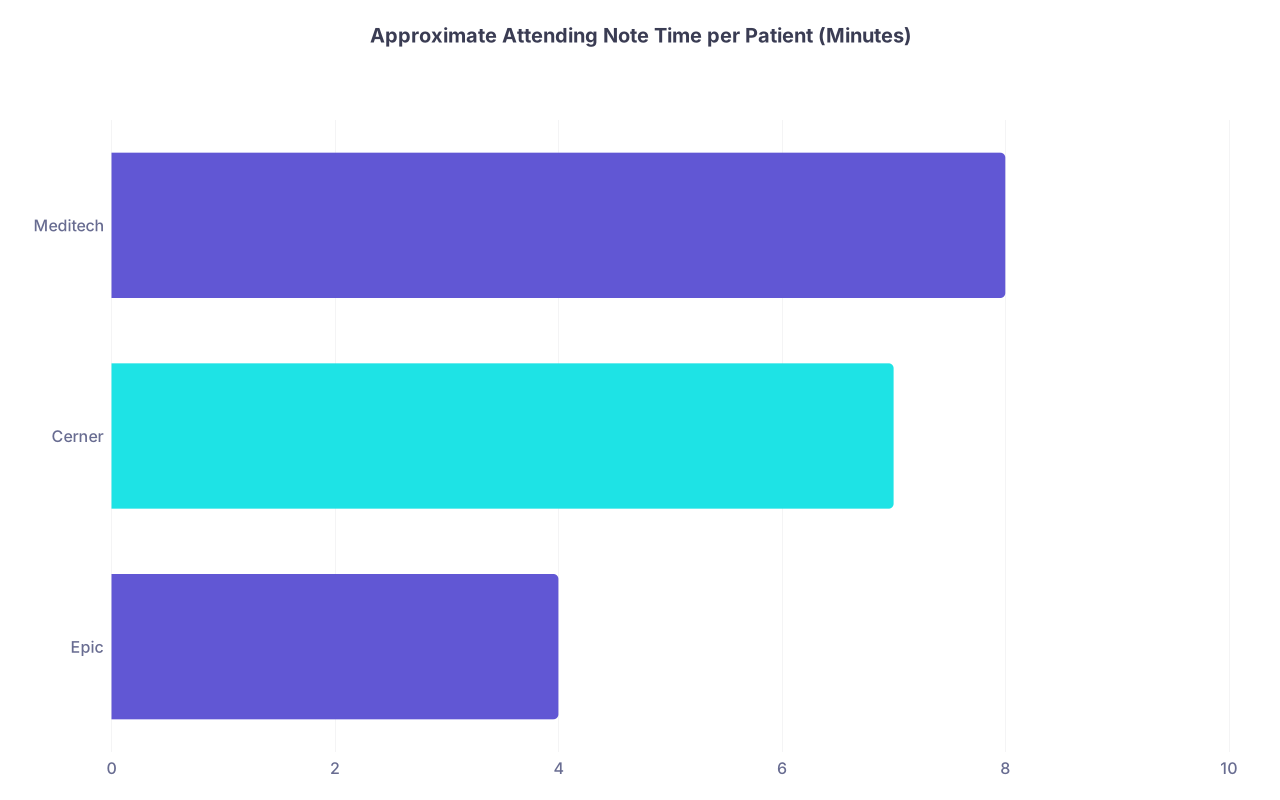
| Category | Value |
|---|---|
| Epic | 4 |
| Cerner | 7 |
| Meditech | 8 |
Epic: SmartTools Are A Force Multiplier
If you know how to drive them.
Key tools:
- SmartPhrases: Text shortcuts (e.g.,
.afibnote) that explode into full notes. - SmartLinks: Pull specific data into the note (latest vitals, I/O, labs, imaging impressions, MAR summaries).
- SmartTexts: Structured templates with embedded logic.
- SmartLists: Clickable options to customize sections quickly.
Example:
Your daily progress note on Epic might be:
" .medprog "
And it inserts:
- HPI with yesterday’s summary.
- Auto-populated last 24-hour vitals and new labs.
- Problem list section with SmartLists to toggle assessment wording.
- Auto-documented DVT prophylaxis, code status, lines, and devices with SmartLinks.
You then adjust a handful of sentences. Total time: often under 4 minutes for a stable patient if your template is good.
Epic also supports:
- “NoteWriter” for more structured, checkbox-style notes (widely used in ambulatory).
- Dragon voice with strong integration.
Cerner: Macros, But Less Cohesive
Cerner has:
- AutoText macros (similar concept to SmartPhrases).
- Discrete data insertion features.
- Templates that can pull vitals and labs.
But the UX for building and editing these is less polished. Many attendings never get past basic text expansion. They end up copying yesterday’s note, editing manually, and using a few Dragon macros.
Common pattern in Cerner sites:
- Heavier reliance on free text.
- More variability in note structure across providers.
- Less institutional push to optimize templates for speed.
The consequence: more typing, more editing, more time.
Meditech: Structured Notes, Less Automation
Meditech documentation feels like an evolution of paper forms:
- Strong emphasis on sections and structured data fields.
- Less flashy integration of dynamic content (though newer Expanse builds are better).
You can:
- Use templates that predefine the sections.
- Use some level of text macros and copy-forward.
But you rarely see the same depth of granular, dynamic SmartLink-like automation that Epic users take for granted. The system often expects you to type or select more items manually.
Result: solid, consistent notes, but time cost is higher per note if you want nuance.
5. In-Basket, Results, and Task Management
This is where attending burnout quietly accumulates. Unread results. Messages. Refill requests. Patient portal noise.
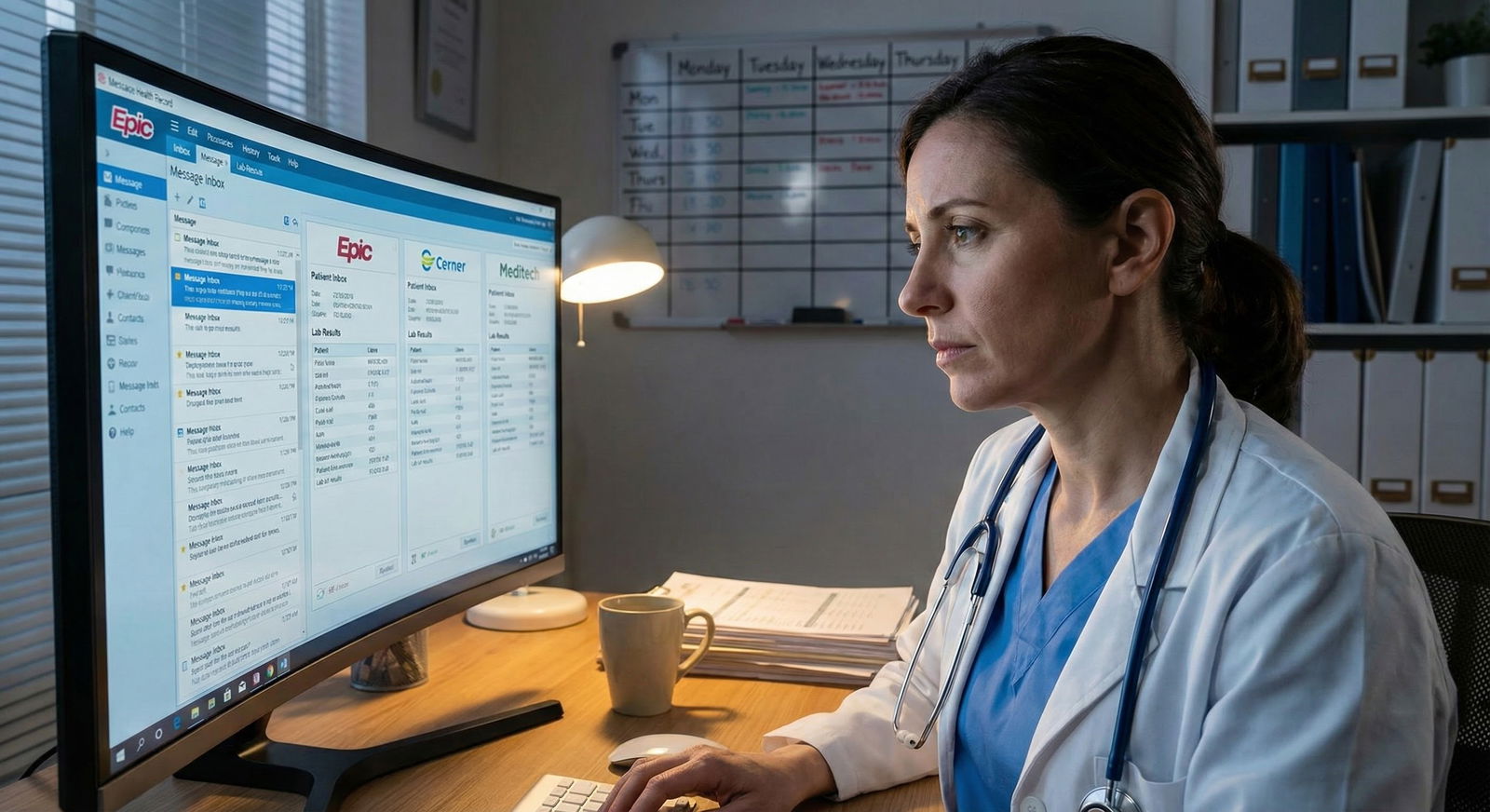
Epic: In Basket Is A Real Workflow Hub
Epic’s In Basket is legitimately strong when tuned well.
You get:
- Separate folders for results, Rx refills, patient messages, staff messages, cosignatures, and more.
- Customizable routing, delegation to pool users, and clear read/unread status.
- “QuickActions” that bundle documentation, result review, and a templated message reply into one click.
Example:
A new lab result (slightly elevated creatinine) triggers:
- Alert in Results folder.
- You click, see current and prior values, meds, and relevant data in a side panel.
- Hit a QuickAction: adds a pre-set SmartPhrase to your note, sends a MyChart message to the patient, and closes the task.
That is real time savings. If your group’s leadership has thought about it.
Cerner: Messaging and Results, Less Integrated Feel
Cerner can:
- Route results and messages.
- Provide shortcuts to view data and respond.
But the provider experience often feels like disparate components:
- One workflow for results acknowledgement.
- Another for clinical messaging.
- Another for portal communication.
You can get used to it, but you rarely feel like the system is actively helping you close the loop quickly. It is more “here are the components, you figure out the workflow.”
Meditech: Basic But Serviceable
Meditech’s messaging and results:
- Tend to be more straightforward and less feature-rich.
- Rely heavily on each site’s configuration of worklists and notifications.
- Often feel more “page and callback” era, just digitized.
You can of course:
- Acknowledge results.
- Send quick in-system messages.
- Use portal communication (on newer systems).
But the lack of sophisticated macros, QuickActions, and deeply integrated triage workflows means more manual handling.
6. Rounding, Team Workflows, and Cross-Cover
Now we are in the trenches: walking the halls, talking to patients, managing changes on the fly.

| Step | Description |
|---|---|
| Step 1 | Open Patient List |
| Step 2 | Chart Review |
| Step 3 | Place Orders |
| Step 4 | Write Note |
| Step 5 | Sign Orders and Note |
| Step 6 | Manage In Basket Items |
Patient Lists and Team Visibility
Epic
- My Patients, My Teams, and cross-cover lists are robust.
- You can slice lists by service, attending, resident team, location, etc.
- Column customization is powerful: add LOS, latest creatinine, last BP, pending tests, discharge barriers.
As an attending, you often have:
- One primary list for “My service.”
- Another for “All patients on my call/backup.”
- A cross-cover list that auto-populates on certain nights.
You can quickly filter for “who has new results,” “who has an open consult from my team,” etc.
Cerner
- Patient lists exist and can be customized, but controls are less intuitive.
- Shared lists can become cluttered if not governed.
- You sometimes lose the sense of “this is my team’s list, and everything is visible at a glance.”
Meditech
- Lists are usually simple: by location, by attending, by service.
- Enough to get the job done, but less rich column-level signaling.
- Cross-cover arrangements often rely more on call sheets and verbal handoffs than dynamic shared lists.
On-Rounds Workflow
Where things actually diverge:
Epic On-Rounds
You walk into a room with the chart already teed up on the WOW (workstation-on-wheels) or tablet:
- Review most recent events from Synopsis.
- Enter new orders inline without leaving the context.
- Jot a “sticky note” or start a note stub while the resident presents.
- Use dot phrases live to draft an interim plan.
If your team is Epic-savvy, much of this happens in real time, and your note is 70% done by the time you step out of the room.
Cerner On-Rounds
You can absolutely:
- Place orders during rounds.
- Pull up flowsheets and review data.
But the context switching between different views and windows often breaks the rhythm. Many attendings prefer to:
- Hear the full presentation.
- Jot the plan on paper or in a separate note.
- Then sit down later and place all orders and finish notes.
That is more time at the end of the day.
Meditech On-Rounds
Given the structured, stepwise nature:
- Rounds are often less “chart-in-hand” and more “mental checklist, then chart later.”
- Some sites with Meditech Expanse on tablets are better, but many still use fixed stations.
The psychological effect is simple: more mental load, less real-time closing of tasks.
7. Discharge, Handoffs, and “End of Day” Work
This is where the system either lets you get home, or keeps you tied to a workstation until late.
| Feature | Epic | Cerner | Meditech |
|---|---|---|---|
| Discharge Summary Tools | Strong templates | Variable | Basic-Moderate |
| Med Rec Usability | High (if tuned) | Moderate | Moderate |
| Printed Instructions | Custom, flexible | Adequate | Structured |
| Task Coordination | Integrated | Fragmented | Task list based |
Epic Discharge
Strengths:
- Discharge navigator that walks you through: med rec, follow-up, documentation, patient instructions, work/school notes.
- Strong medication reconciliation with comparison across prior to admission, inpatient, and discharge meds.
- SmartPhrases for common disposition instructions.
For an attending:
- Preview and sign resident-written discharge summaries quickly (with SmartPhrases for attestation).
- Close the loop on follow-up providers, pending tests, and contingencies within a single workflow.
When optimized, a stable medicine discharge can be fully processed in under 10 minutes of attending time, including summary review, orders, and patient instructions oversight.
Cerner Discharge
Cerner can do all this, but the pieces do not always feel as integrated:
- Separate places for discharge summary vs instructions vs med rec.
- More click paths to tie everything together.
If the site has built good discharge PowerPlans and templates, this improves. But many do not. You end up double-checking more things manually.
Meditech Discharge
Meditech’s discharge process:
- Is often checklist-heavy but reliable.
- Strong on required elements and compliance.
- Weaker on physician-side shortcuts.
You will:
- Step through structured discharge forms.
- Rely heavily on residents or APPs to pre-complete everything.
- Review and sign, often with less flexibility to customize quickly on the fly.
8. Job Search Reality: How EHR Choice Should Influence Your Decision
You are post-residency, looking at jobs. You absolutely should factor EHR into your decision. Pretending “it is all the same” is naive.
Here is the candid view:
- If you are used to Epic and efficient with SmartTools, moving to a Cerner or Meditech shop will hurt your productivity for at least 6–12 months. Your brain will keep reaching for tools that are not there.
- If your main career goal is high-volume clinical efficiency with minimal after-hours charting, an Epic-based organization that invests in physician optimization is a major advantage.
- If you are going to a small community hospital that uses Meditech but has low census and simpler patients, the EHR penalty may be minor. You trade features for simplicity.
- Cerner environments are highly variable. A large academic center with strong informatics support can be pretty good. A poorly configured community Cerner site can be a morale drain.
Ask very specific questions on interviews:
- “Do attendings have personalized SmartPhrases/AutoText support and build help?”
- “How many clicks does it take, on average, to admit a typical CHF patient from the ED, including all orders and documentation?”
- “What percent of your physicians finish charts during the day versus after hours?”
- “Do you have a physician builder or clinical informaticist dedicated to our department?”
You are not being picky. You are protecting your time and sanity.
FAQ (Exactly 4)
1. If I am fast on Epic, how long will it take me to become equally efficient on Cerner or Meditech?
Realistically, several months to a year. The first 2–3 months, you will feel about 20–30 percent slower on routine tasks because your muscle memory is wrong. Around 6 months, you will be reasonably competent. You may never reach the same speed you had with Epic if the local build is poor or the macro system is weaker, but you can get “good enough” for a normal clinical load.
2. Is any EHR inherently “bad,” or is it all about local configuration?
Epic is intrinsically more physician-centric and more cohesive. Cerner is intrinsically more modular and can feel fragmented. Meditech is intrinsically more rigid. But configuration is decisive. A well-built Cerner can beat a badly governed Epic. I have seen both. The system’s baseline philosophy matters, but your local implementation can override a lot of that.
3. Should I avoid a job solely because it uses Cerner or Meditech instead of Epic?
No. That is lazy thinking. Look at total package: schedule, support staff, census, acuity, compensation, and whether there is serious EHR optimization support. A low-volume Meditech job with great staffing can be less painful than an understaffed Epic hospital drowning you in In Basket junk. The EHR is one factor, not the only one.
4. As an attending, how much can I realistically influence EHR workflows at a new job?
More than you think, if you approach it correctly. Join or start a physician EHR committee. Volunteer as a pilot user for new templates. Partner with an analyst to build specialty SmartPhrases or PowerPlans. The worst thing clinicians do is complain in the lounge but never show up to design meetings. The people who engage early usually end up shaping workflows for everyone else.
With these differences in your sightline, you are no longer just “hoping” your next job’s EHR will be tolerable. You are ready to interrogate it, shape it, and choose an environment where the system actually lets you practice medicine like an attending, not a data-entry clerk. The next step is learning how to ask those questions during contract negotiations and site visits—but that is a separate conversation.