
SmartPhrases, SmartLinks, and Macros are the only things standing between you and a 9 pm documentation grind. Most attendings never move past the basics. That is a mistake.
You are post‑residency now. Your leverage is time, not test scores. And in the EHR, the only real time leverage you get comes from ruthless customization of text expansion, data pulling, and workflow automation.
Let me break this down specifically.
The Real Goal: Cut Clicks, Not Corners
You are not trying to “document faster” in some vague way. You are trying to:
- Reduce keystrokes and clicks per encounter
- Reduce cognitive load (decisions and hunting around)
- Make documentation more consistent, auditable, and defensible
- Free enough mental bandwidth to actually think like an attending
SmartPhrases (dot phrases, QuickTexts, etc.), SmartLinks (dynamic data fields), and macros (keystroke/step automation) are three different tools that attack different parts of that problem.
Think of it like this:
- SmartPhrases: Text expansion with logic. Save your brain from rewriting the same sentences.
- SmartLinks: Data plumbing. Pull structured EHR data into your note so you stop copy‑pasting.
- Macros: Workflow robotics. Mimic the steps your hands and mouse take and compress them.
If you just spam generic templates, you get bloated, unreadable notes. If you combine all three intelligently, you get fast, precise encounters that are actually usable in court, in peer review, and in your own future.
Ground Rules Before You Automate Anything
A few rules I use with new attendings I mentor:
Every template must earn its keep
If a phrase or macro does not save you at least 30 seconds each time, and you do not use it at least weekly, you probably do not need it.Never template clinical thinking
Template structure, not judgment. You can template how you present differential options, not the choice itself. Anything that could be dangerous if blindly inserted should either:- Require manual completion (prompts), or
- Be visible in ALL CAPS or brackets until customized.
Build for the next version of you
You are building a system that your busier, more senior self will use in 18 months. Make it scalable from day one: clear naming, version control, and periodic pruning.Assume legal review
Anything machine‑generated or heavily templated must still read like an individual encounter. Boilerplate that contradicts vitals, labs, or what actually happened in the room is malpractice bait.
Now we can talk tactics.
SmartPhrases: Precision‑Engineered Text Instead of Bloated Templates
Most physicians misuse dot phrases. They create monster paragraphs that try to do everything, then spend more time deleting irrelevant chunks than they save.
You want the opposite: small, granular, composable phrases you can stack.
Core categories every attending should build
These are the minimum sets I expect a competent attending to maintain.
Identity / Demographics blocks
Short, targeted demographics segments you can insert anywhere instead of rewriting or hunting:.ptage– “42‑year‑old male”.ptcontext– “42‑year‑old male with history of type 2 diabetes and hyperlipidemia presenting with…”
These often include SmartLinks (we will get to that) so age, sex, MRN auto‑populate.
HPI skeletons by complaint
Not gigantic note templates. Think complaint‑specific scaffolds:.hpi_chestpain.hpi_sob.hpi_abdominalpain
Example structure for
.hpi_chestpain:- Onset, location, quality, radiation
- Timing, duration, triggers, relievers
- Associated sx: SOB, diaphoresis, N/V, palpitations
- Risk factors: CAD history, DM, HTN, smoking, family hx
Each line can be a short prompted field or bracketed placeholder:
“Onset: [sudden/gradual], Location: [substernal / left sided]…”ROS / Exam modules by system and specialty
Not one 14‑system monstrosity. Build modular:.ros_cardio_short.ros_neuro_brief.exam_gen_cardio.exam_ms_backpain
You should have 3–5 core exam blocks that cover 80% of your encounters, plus a few specialty‑specific.
Counseling and shared decision‑making phrases
This is where good SmartPhrase design pays medicolegal dividends:- Risk/benefit discussions
- Refusal of tests or treatments
- Return precautions
- Goals of care and code status discussions
Example:
.ed_chestpain_risksmight explicitly document that negative troponins do not eliminate all ACS risk, shared decision about admission vs discharge, and specific return instructions.Procedure notes
Every procedure you do more than once per week should have:.proc_cvl.proc_lp.proc_lacrepair_simple.proc_paracentesis
Break them down further if needed (e.g., simple vs complex laceration repair).
Follow‑up and disposition blocks
.dispo_ed_dc– ED discharge block with follow‑up, meds given, return precautions.dispo_admit_impression– for inpatient admits summarizing ED course and rationale.dispo_ama– detailed AMA documentation with capacity assessment and risks discussed
Naming conventions that actually scale
I see too many attendings with .a, .aa, .ttt as names. Six months later, they have no idea what anything does.
Use a short, structured naming convention:
- Prefix by context:
hpi_,ros_,exam_,proc_,plan_,dispo_,counsel_ - Then system or complaint:
cardio,sob,uti,dm2 - Then verbosity if needed:
_brief,_detail,_peds
So: .hpi_chestpain_brief, not .cp or .hpi1.
You are future‑proofing your brain.
Prompted SmartPhrases vs static text
Most modern EHRs support “prompted” or “smart” fields inside a phrase:
- Bracketed text or a special symbol to mark required customization
- Dropdown lists or multiple‑choice fields
- Free‑text slots that jump to with the TAB key
Use these aggressively in high‑risk content.
Example (abstracted notation, no system‑specific syntax):
“Patient presented with [chief complaint] for [duration]. Pain is [location], [quality], [severity 0–10]. Associated symptoms include [associated sx]. Denies [red flag sx].”
Then set it up so you can tab through each bracket.
That keeps the phrase short but forces your brain to engage.
SmartLinks: Stop Typing What the EHR Already Knows
If you are retyping vitals, meds, or lab results, you are wasting time and creating error.
SmartLinks (Epic’s term; other EHRs use different names) are your dynamic data merge fields. They pull structured data directly into your note: labs, prior imaging impressions, last BP, med list, allergies, problem lists, and more.
Used correctly, they:
- Reduce transcription errors
- Improve note accuracy and consistency
- Make your templates “self‑updating” as data change
Used poorly, they dump pages of noise into your note and make it unreadable.
High‑value SmartLinks to build into your phrases
Exact syntax varies by EHR, but the concepts are the same.
Demographics and encounter identifiers
- Patient age, sex, MRN
- Date/time of service
- Location and provider name
Embed these at the top of HPI or in procedure notes for legal clarity.
Vitals and key metrics
Not all vitals, all the time. Be deliberate:- Last set of vitals
- Worst vitals over past X hours (e.g., max HR, min BP)
- BMI, weight
- For peri‑op/anesthesia: hemodynamic trends or last BP before incision
Labs and diagnostics
Use concise versions:- Last basic metabolic panel, last CBC
- Last troponin(s) with timestamps
- Pertinent positive/negative lab subsets: e.g., only abnormal values
For imaging, prefer:
- Final read impression only
- Echo summary line (EF, major valvular pathology)
Meds and allergies
Use SmartLinks for:- Current med list (with or without doses)
- New meds ordered this encounter
- Allergies and reactions
And then explicitly document how you reconciled or adjusted.
Problem list and diagnosis
- Active problem list
- Assessment/plan diagnoses you are assigning today
Combine those with your text to show clearly that your assessment comes from real data.
Practical pattern: data + interpretation
Never just drop raw data. Pair SmartLinks with your interpretation.
Example pattern in an inpatient daily note:
“Labs reviewed: [SmartLink – basic lab summary here]. Renal function is stable compared with yesterday; mild hyponatremia persists but unchanged. No new cytopenias.”
Or in an ED note:
“Imaging: [SmartLink – CT head impression]. No acute intracranial abnormality; diagnosis of migraine remains most likely.”
The SmartLink handles the mechanical part. You add the thinking.
Macros: Teaching the EHR To Click For You
SmartPhrases and SmartLinks fix text. Macros fix movement.
Every EHR has some flavor of macro functionality:
- Keyboard macros (text expansion, command sequences)
- Click macros (recording mouse clicks and navigation)
- Order sets driven by macros (bundled orders triggered by a shortcut)
- “Favorite” or canned workflows tied to shortcuts
If you are in a large hospital system, there may be administrator‑level limits on what is allowed. Within those limits, you should still push as hard as policy allows.
High‑yield macro categories
Opening commonly used workflows
- Jump to orders, then load a specific order panel
- Switch to a particular documentation section and insert a chosen template
- Open the discharge navigator with the cursor in the instructions box
Multi‑order bundles beyond standard order sets
Yes, there are institutional order sets. They are often bloated and politically negotiated.
Your goal is “micro‑order sets”:
- ED “abdominal pain basic” macro: CBC, BMP, LFTs, lipase, pregnancy test, UA, pain control, IV fluids, NPO, imaging suggestion placeholder
- Outpatient “new diabetes workup”: A1c, fasting lipid panel, urine microalbumin, foot exam flow sheet, eye exam referral, diabetes education referral
Documentation + order combos
Example: a macro that:- Inserts your
.proc_lacrepair_simplenote - Adds a local anesthetic order
- Suggests a tetanus booster if due
- Pushes a wound care handout to AVS
- Inserts your
Templated phone calls / secure messages
For post‑visit calls or patient portal messages:- Macro opens message
- Inserts prebuilt SmartPhrase with prompts
- Positions cursor at the first variable part
That sounds small. It saves minutes per day.
Workflow design: record your best version, then encode it
Do not design macros in the abstract. Sit down for a real case, do it once in the perfect order at full speed, and write down each step.
Example for a new clinic patient:
- Review active problem list and meds
- Review last 2 specialist notes
- Open HPI note template for “new patient”
- Insert
.hpi_newpt_dm2if they have diabetes - Insert
.exam_gen_internalmed - Insert
.plan_dm2_newdxif indicated - Open orders
- Place labs, referrals, meds
- Open patient instructions and insert
.avsinstructions_dm2_new
Now you turn chunks of that into macros:
- Macro A: Steps 3–6
- Macro B: Step 7–9
- SmartPhrases wired inside each section so you still adjust thinking, but you are never manually hunting through menus.
Combining All Three: Concrete Specialty Scenarios
You will get more out of this if you see how SmartPhrases, SmartLinks, and macros stack together in real workflows.
1. Emergency Medicine: Chest Pain in a Busy ED
Scenario: 12‑hour shift, 28 patients, 40% chest pain or SOB. You are already tired.
Your optimized flow for a “moderate risk” chest pain patient:
- SmartPhrase
.hpi_chestpain_brief- Includes a SmartLink to patient age/sex
- Prompted fields for onset, quality, risk factors
- SmartPhrase
.ros_cardio_briefand.exam_cardio_ed- Exam phrase auto‑pulls last vitals set via SmartLink
- SmartLink bundle
.data_cardio_corein your assessment:- Last 3 troponins, last ECG interpretation text, basic labs summary
- Macro
.orders_cp_moderaterisk(or some keyboard shortcut):- Orders serial troponins, ECG, CXR, basic labs
- Sets frequency for vitals
- SmartPhrase
.ed_chestpain_sdmdiscussionin assessment/plan:- Structured template for shared decision‑making about admission vs discharge, risk of missed ACS
- SmartLinks for HEART score elements or similar metrics
- SmartPhrase
.dispo_ed_dcfor discharge with chest pain specific variation:- SmartLink for follow‑up appointment date/time if scheduled
- Explicit ED return precautions for chest pain
You have not automated judgment. You have removed friction everywhere else.
2. Hospitalist: Daily Progress Notes for Multi‑Morbid Patients
Daily notes are 80% the same structure, with 20% changed content. Perfect macro territory.
Setup:
- SmartPhrase
.note_im_daily– a lean daily note skeleton:- CC / Brief interval history
- Objective (vitals, labs, imaging)
- Assessment and plan per problem
- Inside objective:
- SmartLink block for last 24h vitals summary
- SmartLink block for last 24h intake/output
- SmartLink for last basic labs and any new imaging impressions
- SmartPhrases for common problem plans:
.plan_dm2_controlled.plan_dm2_uncontrolled.plan_chf_exacerbation.plan_pna_community
Each includes SmartLinks (e.g., last echo EF in CHF) plus your thinking structure.
- Macro
.prognote_roundingthat:- Opens today’s progress note
- Inserts
.note_im_daily - Moves cursor to HPI area
- Jumps sequentially to each problem slot in A/P
You round, you think, you tab. Your note stays structured, clear, and consistent.
3. Outpatient Primary Care: Chronic Disease Management
Clinic days live or die on template design.
Example chronic disease flow for type 2 diabetes:
- Pre‑visit SmartLink block auto‑inserted into a
.dm2_snapshotphrase:- Last 3 A1c values with dates
- Last LDL, last urine microalbumin
- Last BP readings (3)
- List of active diabetes meds with doses
- HPI SmartPhrase
.hpi_dm2_followupwith prompted fields:- Hypoglycemia episodes
- Home glucose ranges
- Medication adherence
- Diet/exercise summary
- Exam SmartPhrase
.exam_dm2_focuswith feet exam placeholders - Plan SmartPhrases:
.plan_dm2_adjust_oral.plan_dm2_add_glp1.plan_dm2_add_insulin
Each with phrasing around shared decision‑making, cost concerns, and follow‑up.
AVS instructions SmartPhrase
.avsinstructions_dm2- Simple, non‑jargon explanation of med changes, goals, what to do if sugar is too low/high.
Macro
.dm2_visitthat:- Starts a follow‑up note
- Inserts the core DM2 snapshot and HPI/Exam skeleton
- Opens orders panel focused on labs/endocrine orders
- Opens patient instructions box at the end
Now your 20‑minute chronic care visit does not devolve into 8 minutes of EHR wrestling.
Comparing the Tools: When to Use What
| Tool | Best For | Risk if Misused |
|---|---|---|
| SmartPhrases | Repeated text structure and wording | Bloated, generic notes |
| SmartLinks | Pulling data already in EHR | Massive data dumps |
| Macros | Multi-step workflows and navigation | Hidden or opaque behavior |
The basic rule:
- If you are typing the same sentence > 5 times per week → SmartPhrase.
- If you are retyping or manually checking data → SmartLink.
- If you are doing the same 4–10 clicks per patient → macro.
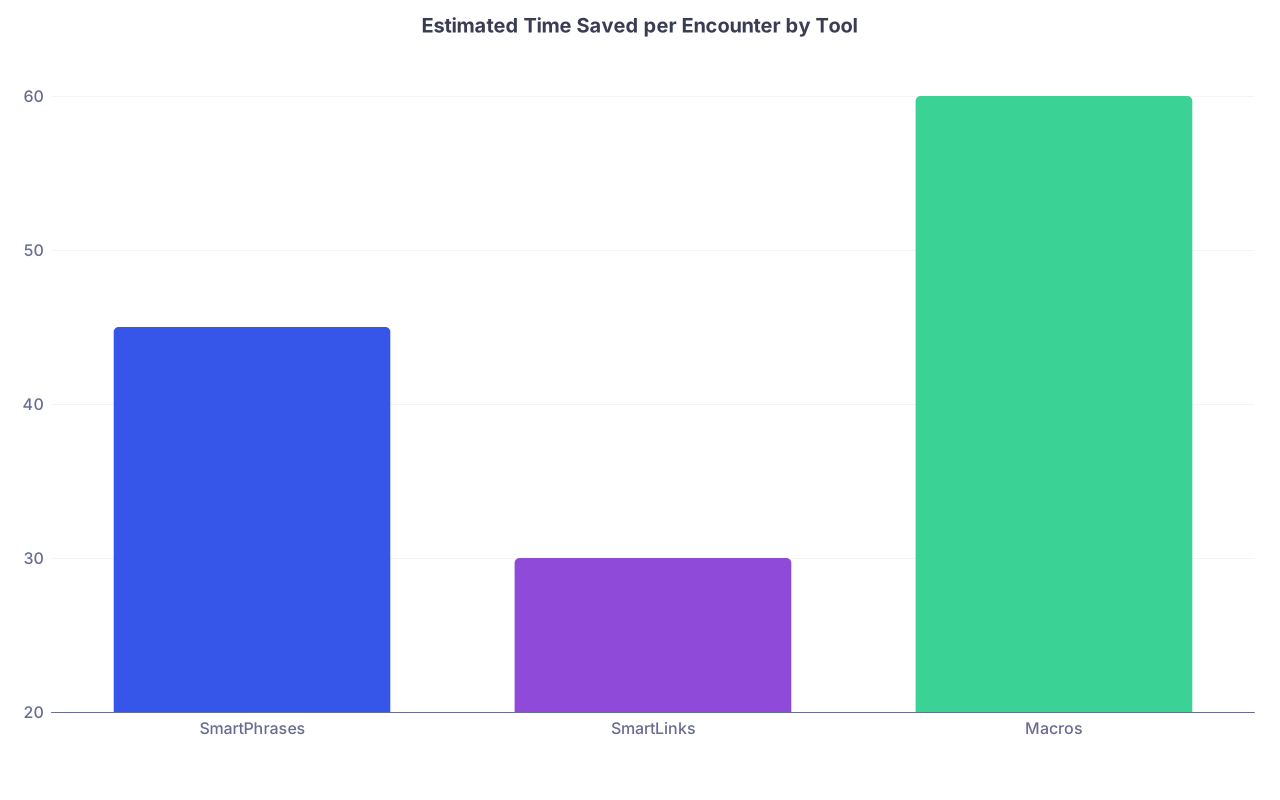
| Category | Value |
|---|---|
| SmartPhrases | 45 |
| SmartLinks | 30 |
| Macros | 60 |
The bars here are seconds. Multiply by 20–30 encounters per day, then by weeks. This is why serious attendings treat customization as part of their job, not a hobby.
Building Your System: A 4‑Week Implementation Plan
You cannot build all of this in one night. If you try, you will end up with a mess you never use.
Do this in structured passes over ~4 weeks.
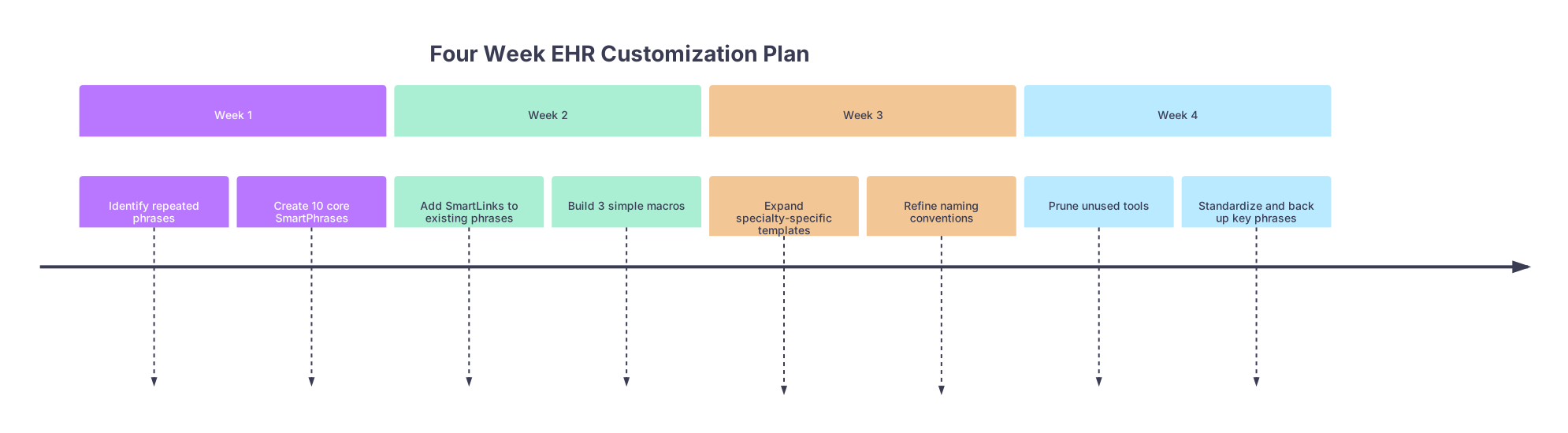
Week 1: The 80/20 SmartPhrase set
- Keep a small notepad (physical or digital) open for every shift/clinic day
- Any time you type something twice, write it down
- End of week: build 10 high‑value SmartPhrases that cover:
- 3 complaint‑specific HPI skeletons
- 3 exam blocks
- 2 counseling / shared decision templates
- 2 disposition / follow‑up templates
Use them heavily for the next week. Ruthlessly tweak.
Week 2: Inject SmartLinks and simple macros
- Take your 10 SmartPhrases and:
- Add SmartLinks for vitals, labs, or demographics where it makes sense
- Add prompted fields for high‑risk content
- Build 3 macros:
- One that opens your documentation area and inserts your main note skeleton
- One that opens orders and loads your most used order set
- One that opens discharge or patient instructions and inserts a follow‑up phrase
Test them in low‑stakes settings first. Fix any weird behavior.
Week 3: Specialty‑specific templates and bundles
Now you know what feels right.
- Add 5–10 more SmartPhrases focused on your specialty’s bread‑and‑butter:
- Cardiology: chest pain, CHF, atrial fibrillation, ACS, post‑cath follow‑up
- Ortho: fracture clinic, post‑op TKA/THA, back pain, shoulder pain
- Psych: med management follow‑ups, crisis assessment, suicide risk documentation
- Create 2–3 “micro‑order set” macros that reflect how you practice, not a committee.
Week 4: Prune, standardize, and back up
Your list is starting to grow.
- Delete or rename any SmartPhrases you do not use
- Standardize naming so you can find things without thinking
- Document your key phrases and macros somewhere offline (name, purpose, approximate content). If you change jobs or EHRs, this becomes your blueprint.
Avoiding Common Failure Modes
I have watched dozens of attendings crash their documentation efficiency by “optimizing” the wrong way. Here is what goes wrong and how to avoid it.
Problem 1: Giant all‑in‑one note templates
The 3‑page SmartPhrase that tries to cover every HPI, exam, and plan. You insert it, then spend 5 minutes deleting 70% of it.
Fix: Design modular, stackable phrases. For an internal medicine daily note: one note skeleton + 3–5 problem‑specific plan phrases. For ED: complaint‑specific HPIs, separate ROS/exam blocks, procedure notes as separate items.
Problem 2: Notes that contradict the chart
Classic example: Template says “No acute distress” and “NAD” while the triage vitals show HR 150, RR 32, and patient on BiPAP.
Fix:
- Use SmartLinks that pull CURRENT vitals and flowsheet values
- Avoid pre‑filled normal findings when the encounter is high acuity
- Build “abnormal” exam variations for ICU / unstable patients instead of always starting from “normal”
Problem 3: Inflexible templates in edge cases
If your only chest pain HPI is for classic middle‑aged male ACS risk, you will misuse it on atypical female patients, older adults, or low‑risk cases.
Fix: Build at least two variations where your practice meaningfully differs:
.hpi_chestpain_highriskvs.hpi_chestpain_lowrisk- Add prompts for non‑typical risk factors and alternative diagnoses
Problem 4: Over‑reliance on others’ templates
In big systems, there is always a “template king” who shares a huge folder of SmartPhrases. They can be helpful. They can also bury you.
Fix: Borrow selectively. Import a phrase only when:
- You understand every line
- You immediately customize names to your convention
- You remove fluff and shrink it to the core you actually use
Negotiating EHR Customization as a New Attending
You are entering jobs or contracts where EHR performance is not “nice to have”; it impacts RVUs, burnout, and turnover.
You should treat EHR customization support as a tangible job feature, just like scribes, APP support, or call expectations.
Concrete things to ask or push for:
- Protected time in your first 3–6 months to meet with an EHR analyst / trainer specifically about SmartPhrases, SmartLinks, and macros
- Ability to create and share personalized SmartPhrases locally (some systems lock this down)
- Access to super‑user or physician builder support for more advanced macros and order sets
- Data on documentation time per encounter and click counts, if your organization tracks it
You are not being “needy.” You are preventing future burnout and errors.
Final Tightening: Quality, Not Just Speed
One last pass. Efficiency is only half the story. The other half is quality control.
Ask yourself for any new SmartPhrase/macro:
- Does this make my thinking clearer or just my typing faster?
- Could a lazy version of me misuse this and create a dangerous note?
- If this note was read in a deposition 3 years from now, would I be comfortable explaining how it was generated?
If the answer to #2 scares you, redesign it. Add prompts. Remove auto‑filled judgments. Force your brain to engage where it matters.
Key Takeaways
- SmartPhrases, SmartLinks, and macros are complementary: use phrases for structure, links for data, macros for workflow.
- Build small, modular, high‑yield tools—then iterate weekly; avoid giant monolithic templates that create more work than they save.
- Optimize for both speed and defensibility: dynamic data + explicit clinical reasoning beats bloated, generic copy‑paste every time.