
You are six months into your first attending job. It is 10:30 p.m., you are finally home, and your phone buzzes with an email from Compliance:
“We are conducting a routine review of EHR access logs. You have been identified as accessing the chart of a patient to whom you were not assigned on [date]. Please respond within 5 business days.”
Your brain starts replaying the day. Did you click the wrong chart? Was that the ICU trauma case everyone was talking about? You vaguely remember opening it “just to see what happened.”
Here is the problem: the EHR remembers precisely. Every click, every scroll, every view. Logged. Time-stamped. Searchable. Correlated with your badge, your device, your location.
Let me break down what that actually means.
1. What an EHR Audit Trail Really Is (Not the Sanitized Version IT Gives You)
Forget the vague “we keep logs” line you got during Epic or Cerner training. An EHR audit trail is a detailed transaction history of what every authenticated user does in the system with protected health information (PHI). And it is far more specific than most clinicians realize.
Conceptually, almost every modern EHR audit log tracks the same core elements:
- Who did it
- To which patient or encounter
- From which device or location
- What exactly they did
- When they did it
- Sometimes, why (based on workflow / context fields)
That sounds abstract, so let me spell out what “what exactly they did” actually translates to in practice.
| Category | Example Fields |
|---|---|
| Identity | User ID, username, role, department |
| Patient/Chart | MRN, encounter ID, visit number |
| Time/Session | Timestamp, session ID, login/logout |
| Location/Device | Workstation ID, IP, physical location |
| Action | View, edit, sign, print, export, message |
| Object | Note, meds, lab, imaging, flowsheet, tab |
Different vendors name things differently, but the structure is the same. Think relational database: user table, patient table, device table, action table — all linked.
You are not “invisible” because you did not write a note. Opening, scrolling, and closing a chart leaves a very visible signature.
2. What Gets Logged When You Open a Chart (Step by Step)
Let us walk through a simple, very typical action: you click on a patient chart from your inpatient list, glance at labs, and close it 30 seconds later.
Under the hood, that usually generates multiple log events, not one.
Chart access event
- User ID: your network/EHR ID
- Patient: MRN / encounter ID
- Timestamp: down to the second (sometimes millisecond)
- Access type: “View chart” / “Encounter open”
- Source: workstation / device ID, IP address
- Context: “Access initiated from Inpatient List – Hospital Medicine”
Module / tab navigation events When you click the “Labs” tab or the “Results Review” section:
- Action: “View results” / “Navigate to Labs tab”
- Object: specific module (e.g., “LabResults”)
- Sometimes: specific result types or time ranges
Detail view events If you expand a specific result (say, “HIV Ag/Ab combo”):
- Action: “Result detail viewed”
- Object: that specific lab’s internal ID
- Context: ordering provider, date, status
Chart close or session idle
- Action: “Encounter closed” / “Session timeout”
- Duration: can be derived (time from open → close/idle)
Even a “quick peek” has a forensic trail. And all of this can be reconstructed with alarming clarity if Compliance decides to review it.
To visualize how messy (and complete) this can be for a single day:
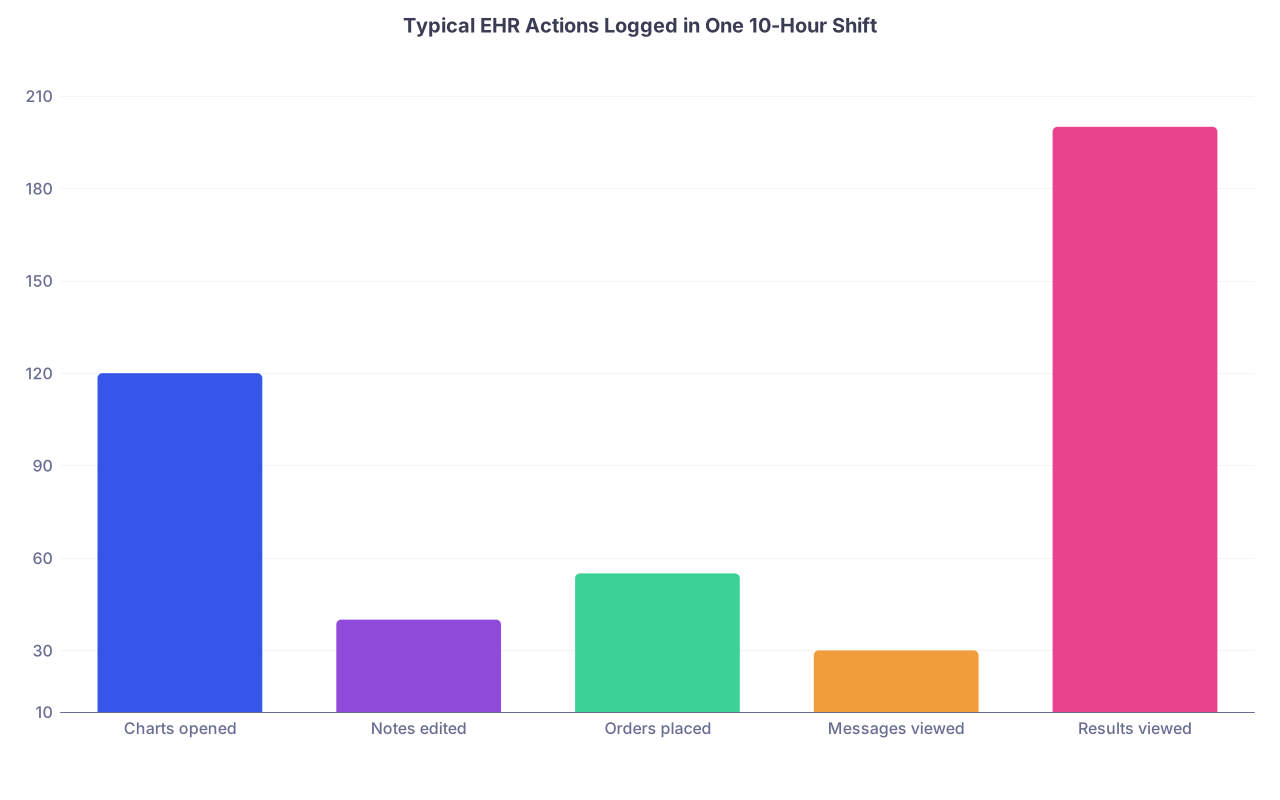
| Category | Value |
|---|---|
| Charts opened | 120 |
| Notes edited | 40 |
| Orders placed | 55 |
| Messages viewed | 30 |
| Results viewed | 200 |
Multiply that by weeks, months, years. Your footprint in that system becomes very large, very fast.
3. The “Every Click” Reality: Categories of Events That Are Logged
Let me go through the major buckets of actions that are almost always logged in a modern EHR, and what details they tend to include.
3.1 Logins, Logouts, and Session Behavior
This is the baseline:
- Login success/failure
- Authentication method (password, badge tap, SSO, MFA)
- Workstation / device ID
- IP address or subnetwork
- Timestamp of login and logout
- Session timeouts, auto-locks, re-authentications
From this alone, IT can reconstruct patterns:
- You log in from ICU workstations 7–3, then from the physician lounge at 3:15 p.m.
- Failed login attempts from an offsite IP at 2 a.m. under your account.
If you think, “I tapped into someone else’s open session, so it won’t trace back to me,” you are wrong. Workstation usage, badge access to rooms, and physical camera footage can all be correlated.
3.2 Patient Chart Access
This is where most privacy investigations live.
For each chart you open:
- Patient ID (MRN) and encounter ID
- User ID and role (attending, resident, RN, MA, billing, etc.)
- Access type: inpatient, ED, ambulatory, results-only, break-the-glass, etc.
- Context: from schedule, from census list, from global search, from report, from hyperlink (e.g., from an Inbasket message)
Many systems tag this with a “relationship” at the time of access:
“Assigned provider”, “Covering provider”, “Care team member”, “Non-care access”.
If you open a chart and you are not on the treatment team (and there is no other documented justification), it stands out in an audit.
3.3 Viewing Specific Components: Notes, Labs, Imaging, Flowsheets
EHR vendors know that from a regulatory perspective, “viewing PHI” is subject to the same privacy law as “editing PHI.” So they track granular views.
Examples:
Clinic notes:
- Actions: “Note viewed”, “Note list viewed”, “Note previewed”
- Metadata: note author, note type, service, date, encounter
Labs and results:
- Actions: “Results summary viewed”, “Result detail viewed”
- Object: specific lab test, panel, or imaging result ID
Imaging:
- Actions: “Imaging report viewed”, “Image launched in viewer”
- Sometimes: how many images, which series, time spent in viewer
Flowsheets / vitals / device data:
- Actions: “Flowsheet viewed”, “Vital sign detail viewed”
- May include which columns (e.g., HR, BP, SpO₂) and time range seen
I have seen privacy investigations where they could say, “You opened this patient chart at 10:14:03 and specifically viewed the HIV result at 10:14:12 and closed at 10:14:28.” That precise.
3.4 Creating, Editing, and Signing Documentation
This is where malpractice and documentation disputes meet audit trails.
For notes:
Created vs edited vs signed events
Exact timestamps for each status change
User IDs for:
- Original author
- Editor (if addendum or correction)
- Cosigner (attending, supervising physician)
Sometimes: Old → new content differences stored in a version history.
For example, if you sign a discharge summary at 09:00, then at 13:00 after a bad outcome you add “Patient aware of risks and agreed,” that edit and exact timing are visible in the log. Even if the note “looks” like one final text block in the chart.
For orders:
- Order placed by, modified by, discontinued by
- Order mode: verbal order, telephone order, written order, protocol-generated, standing order
- Acknowledgement events by nursing or ancillary staff
- Execution timestamps (first dose given, test resulted, etc.)
That is why in legal review, audit logs are gold. They cut through “I think I documented that earlier” very quickly.
4. Break-the-Glass, VIP Flags, and “Just Curious” Access
Three high-risk zones you need to understand: break-the-glass, VIP charts, and curiosity-driven access.
4.1 Break-the-Glass (BTG) Events
BTG is designed for sensitive charts: psych, HIV, reproductive health, some pediatrics, celebrity or high-profile patients. The idea: default access is restricted; if you truly need it for care, you can “break the glass.”
When you hit BTG, the system logs very noisy events:
- Who broke the glass
- For which patient
- Timestamp
- Workstation/location
- Any selected reason code (e.g., “Direct care”, “On-call coverage”, “Emergency”)
- Sometimes: your relationship to patient flag
Compliance loves reviewing BTG logs because there is an implied extra threshold. If you break the glass to look up your neighbor’s psych admission because the nurse at the desk mentioned their name, you are practically begging for a sanction.
Most organizations run routine monthly or quarterly BTG audits.
4.2 VIP and Restricted Flags
High-profile patients (hospital staff, board members, local politicians, newsworthy trauma patients) often have a “VIP” or “Restricted” flag.
Access to those charts is logged like everything else, but:
- Reports are often prebuilt: “All VIP chart accesses in last 30 days.”
- Privacy officers review those accesses more frequently.
- Any access without a clear care-team relationship gets flagged.
I have seen residents disciplined for opening the chart of a colleague who went through a miscarriage or suicide attempt, “just to see what happened” because they were worried. Intent does not save you from a policy violation when the log shows non-care access to a restricted chart.
4.3 “Curiosity” Access to Friends / Family / Self
Let me be very blunt:
Looking up your own labs or imaging in the same EHR where you are an employee is usually against policy unless there is a formal “patient portal” mode or explicit policy allowing it.
Audit logs can easily extract:
- All accesses where staff member’s MRN = staff member’s user account identity
- All accesses to charts where the emergency contact / guarantor name matches staff member or their last name / address
You will see these types of outputs in internal reports:
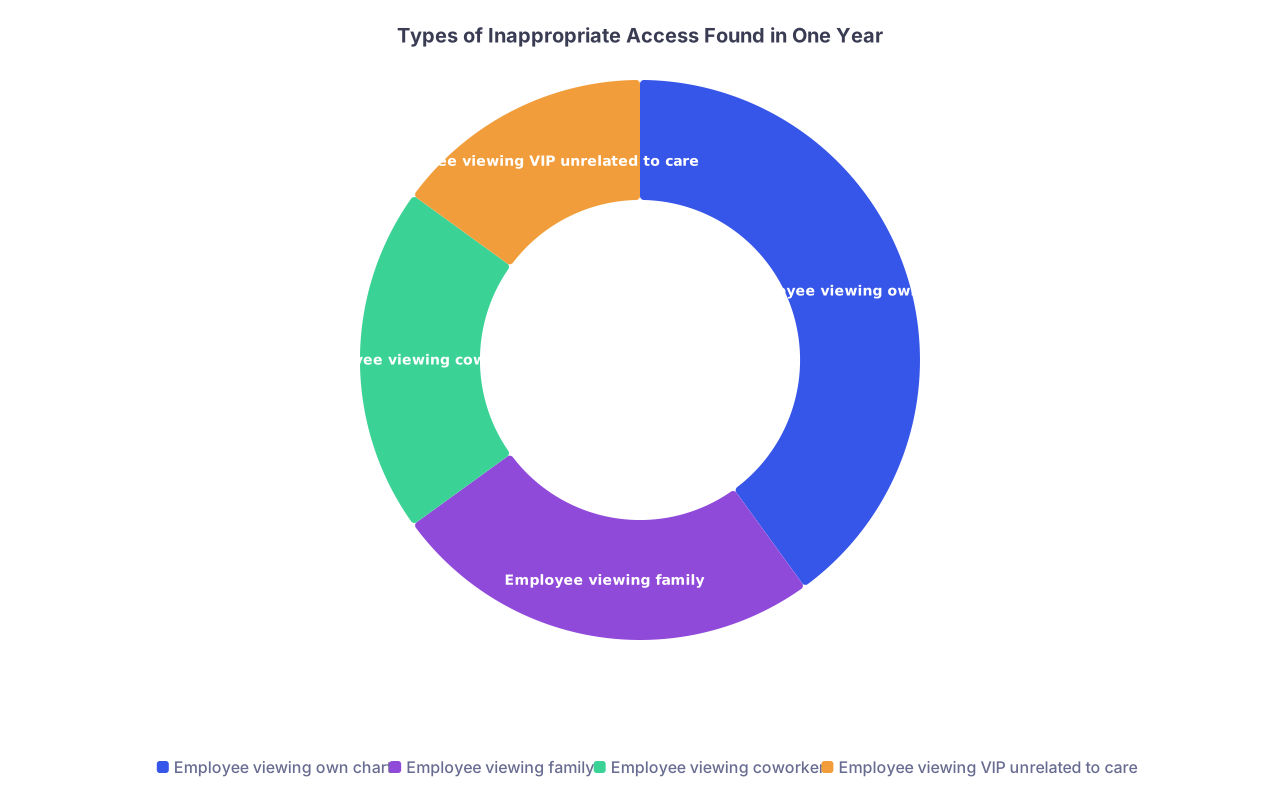
| Category | Value |
|---|---|
| Employee viewing own chart | 40 |
| Employee viewing family | 25 |
| Employee viewing coworker | 20 |
| Employee viewing VIP unrelated to care | 15 |
The fact that “everyone does it” is irrelevant. When someone complains or a routine query flags you, the audit trail is unforgiving.
5. What IT and Compliance Can Actually See and Reconstruct
You might assume logs are unwieldy and buried. That used to be true with older systems. Not anymore.
5.1 Common Investigations That Use Audit Trails
Here is what actually triggers a deep-dive review:
- Patient complaint: “I think my ex who works at this hospital looked at my chart.”
- Employee complaint: “I feel like coworkers are snooping on my recent admission.”
- VIP case: High-profile trauma, shooting, celebrity delivery.
- Behavioral red flags: unusual access from offsite, odd patterns of access to one patient by many staff.
- Regulatory event: breach notification, OCR investigation, malpractice litigation.
Investigation steps:
- Identify patient MRN(s) and time windows
- Pull all user access to those MRNs in a period (e.g., -7 to +7 days)
- Filter for role, department, care team relationships
- Highlight out-of-relationship access for explanation
That is usually phase one. Phase two drills into what exactly was viewed or changed.
5.2 Examples of Reconstructable Detail
Compliance can pull a report that shows:
For Patient X, every user who:
- Opened the chart
- Viewed specific sensitive results (HIV, genetic testing, pregnancy test)
- Accessed notes from psychiatry, oncology, OB/GYN
For Provider Y, every:
- Chart opened in a given month
- Access where no encounter was scheduled or assigned
- BTG events and justifications
- Notes edited after signing and when
And yes, they can build timelines that look exactly like:
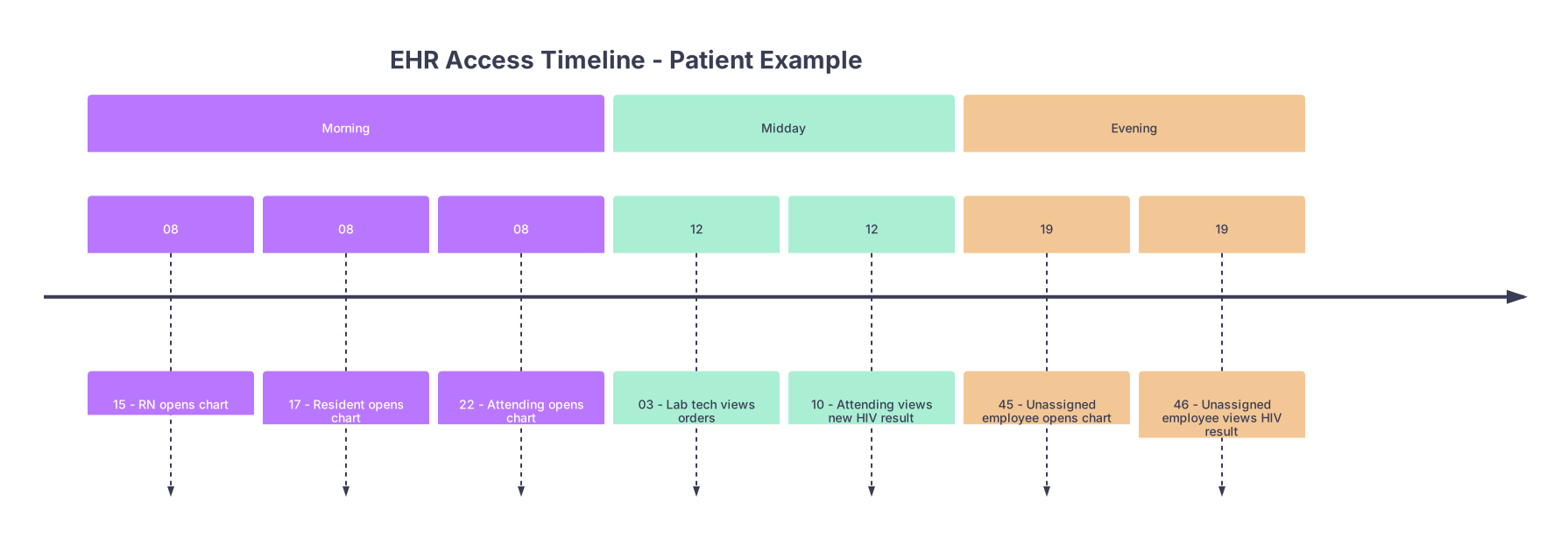
| Period | Event |
|---|---|
| Morning - 08 | 15 - RN opens chart |
| Morning - 08 | 17 - Resident opens chart |
| Morning - 08 | 22 - Attending opens chart |
| Midday - 12 | 03 - Lab tech views orders |
| Midday - 12 | 10 - Attending views new HIV result |
| Evening - 19 | 45 - Unassigned employee opens chart |
| Evening - 19 | 46 - Unassigned employee views HIV result |
Then they call you in and ask about the 19:45 access and the 19:46 result view. With that level of specificity.
6. Legal, Regulatory, and Employment Consequences (Beyond “A Slap on the Wrist”)
You are post-residency now. You are no longer “the trainee who did not know better.” Your risk profile is different.
6.1 Regulatory Overlay: HIPAA and Beyond
Audit trails exist largely because of:
- HIPAA Security Rule: requires mechanisms to record and examine activity in systems containing PHI
- HITECH and Meaningful Use: reinforced audit capabilities as part of certification
- State laws: some stricter than federal rules, adding explicit logging requirements or notification timelines
In a breach or complaint, regulators want to see:
- That you had logging in place
- That you can reconstruct what happened
- That you take inappropriate access seriously and sanction staff accordingly
So when a hospital disciplines you for one inappropriate access, part of the reason is to demonstrate to regulators that they enforce their policies.
6.2 What “Sanctions” Realistically Look Like
Depending on severity and pattern:
- Verbal counseling documented in your HR file
- Written warning
- Mandatory HIPAA/privacy retraining
- Suspension (unpaid)
- Termination “for cause”
Termination for cause over privacy violations is not theoretical. I have seen nurses, MAs, and physicians fired for:
- Looking up ex-partners’ ED visits
- Snooping on co-workers’ psych admissions
- Sharing screenshots via text of celebrity patients’ records
And yes, that follows you. Future employers ask prior organizations if you are “rehire eligible.” A privacy-related termination is toxic in that context.
6.3 Malpractice and Litigation Use of Audit Logs
In lawsuits, audit trails are discovery gold. Plaintiff and defense both love them for different reasons.
Used against clinicians:
- Showing a note was heavily edited after an adverse event
- Demonstrating that a critical lab/result was viewed at a specific time but no action was documented for hours
- Highlighting access from a non-credentialed location or by someone not on call
Used in defense:
- Proving you actually did open and review critical information before making a decision
- Showing that another provider, not you, modified or discontinued an order
- Documenting that your involvement with a patient ended before a specific outcome
If you ever find yourself deposed, expect questions like:
“At 14:18 you opened the patient’s chart and viewed the CT report showing free air. What did you do next?”
They have that timestamp because of the audit trail.
7. How This Impacts Your Day-to-Day Practice and Career Decisions
So what do you do with all this? You cannot change the existence of audit trails. You can change how you operate in a system that remembers everything.
7.1 Red-Line Habits: Things You Simply Stop Doing
Be very clear with yourself:
No curiosity access.
- No looking at coworkers, neighbors, friends, or family unless you are formally involved in their care and policy explicitly allows it.
No casual self-lookups.
- Use the patient portal or request records like any other patient, unless your hospital has an explicit, documented workflow for staff self-access.
No “teaching cases” by name search.
- If you want to learn from an interesting case you heard about, do it through de-identified teaching materials, conferences, or formal QA/QI processes. Not by MRN hunting.
Do not “check on” patients after your involvement ends unless you have a defined role (e.g., you are still on their care team, or formal continuity program) and your policy supports that.
Yes, some of this feels clinical unnatural. It does not matter. The audit system does not care about your intentions, only actions.
7.2 Documentation Strategy with Audit Trails in Mind
Second, you adjust how you document and edit.
Assume every note has a visible version history.
If you must correct something after an event:
- Use an addendum with a clear timestamped statement rather than stealth editing prior content to change the story.
- Do not backdate understanding or discussions you did not actually have at that time.
Be cautious with templated language that might conflict with the actual sequence of care. If your template says, “All labs and imaging were reviewed,” but the audit shows you never opened the imaging tab before the intervention, that disconnect will come up.
Your goal is not paranoia. It is consistency. Your documented narrative should align with what the audit trail will later show you did.
7.3 When You Are a Leader: How This Impacts Your Group and Staff
If you are an attending, a section chief, or heading toward leadership, you also need to think about:
- Educating your team (residents, APPs, nurses) about real-world consequences, not the fluffy privacy slide deck they slept through at onboarding.
- Setting expectations for not accessing each other’s charts just because you are “concerned” or “curious.”
- Working with IT/Compliance if you see patterns of unhealthy behavior (e.g., residents screen-sharing PHI during teaching outside secure platforms).
You also may eventually be the one getting notified that “a member of your department” is under privacy review. Understanding audit trails makes that conversation less naive.
8. What is Not Usually Logged (The Edges People Ask About)
There are a few gray zones you should understand, mostly so you do not overestimate what is tracked.
Screenshots
- EHRs generally do not track if you hit PrintScreen or use your phone camera on the monitor.
- But: if you print, export, or generate a PDF through the system, that is usually logged.
Verbal PHI sharing
- Obviously not logged. But email, secure messaging, paging tied to the EHR often is.
Some internal UI micro-actions
- Hovering over a lab without clicking may not be distinct in the log (depends on implementation).
- Expanding or collapsing a UI panel may or may not be logged. Vendors choose trade-offs for performance.
Non-EHR access to PHI systems
- PACS, lab systems, and third-party viewers have their own logs, sometimes less mature than EHR logs. But in integrated systems, there is often enough linkage.
The mistake is assuming “not logged” means “safe.” In practice, you leave traces in multiple systems (badge access to units, VPN logs, Wi-Fi associations, email). EHR is just one part of the picture.
9. Looking Ahead: Audit Trails Are Getting Smarter, Not Softer
You are entering the part of your career where your digital footprint will be larger each year. The direction of travel is clear: more analytics, more monitoring, more cross-system correlation.
Where this is going:
- Behavioral analytics: algorithms that flag “unusual access” patterns for a given role.
- Cross-site identity: health systems consolidating logs across multiple hospitals and clinics under one ID.
- Real-time alerting: privacy teams getting instant notifications when high-risk patterns occur, not six months later in a routine audit.
The days of “no one will notice” access are over in large, modern systems. Smaller community hospitals may lag, but they will catch up as vendors ship these capabilities baked in.
With that context, you are in a better position than most of your peers. You understand that an EHR is not just a chart; it is a surveillance system for PHI access that can and will be used for privacy enforcement, litigation, and performance review.
That does not mean you stop practicing good medicine or become afraid to open charts you legitimately need. It means you practice like someone who knows there is a high-fidelity black box recorder running in the background of every clinical interaction.
From here, the next step in your career is not just surviving audit trails. It is using your understanding of them to shape safer workflows, smarter documentation, and better training for the people who will work under you. That intersection of clinical practice and digital trace is going to define a lot of careers over the next decade. How you adapt now decides whether yours benefits from it—or gets burned by it.