The fantasy that “FHIR will make everything plug‑and‑play” is wrong.
Modern EHR integrations work, but they are not magic. They are layers of standards, vendor quirks, security constraints, and frankly, politics. If you are a post‑residency physician walking into your first job and you think “oh, we have Epic with FHIR, I can just add whatever app I want,” you are in for a rude awakening.
Let me break down how this actually works in the real world—what FHIR does, what it does not do, how SMART-on-FHIR apps launch, how data actually flows, and where it all usually breaks.
1. The Real Stack: What “FHIR-Based Integration” Actually Means
FHIR is not an app store. It is a data model plus API standard. Modern EHR integration usually layers like this:
- Transport and format
- Data model
- Authentication / authorization
- Launch workflow in the EHR
- Governance and approvals
You will see this stack over and over, regardless of vendor or app.
Transport & format: HTTP + JSON, not HL7 v2 spaghetti
Older integrations: HL7 v2 messages via a broker (ADT, ORU, ORM, etc.), XML or pipe-delimited formats, MLLP, interface engines like Cloverleaf, Rhapsody, Mirth.
Modern API‑based integrations:
- HTTP(S) requests
- JSON payloads
- RESTful pattern:
GET /Patient/{id},POST /Observation, etc. - Standard set of resources defined by FHIR (Patient, Encounter, Condition, Observation, MedicationRequest, Procedure, etc.)
That’s the plumbing. If someone says “we integrate via FHIR,” they are really saying, “we expose a REST API that follows the FHIR resource definitions (more or less).”
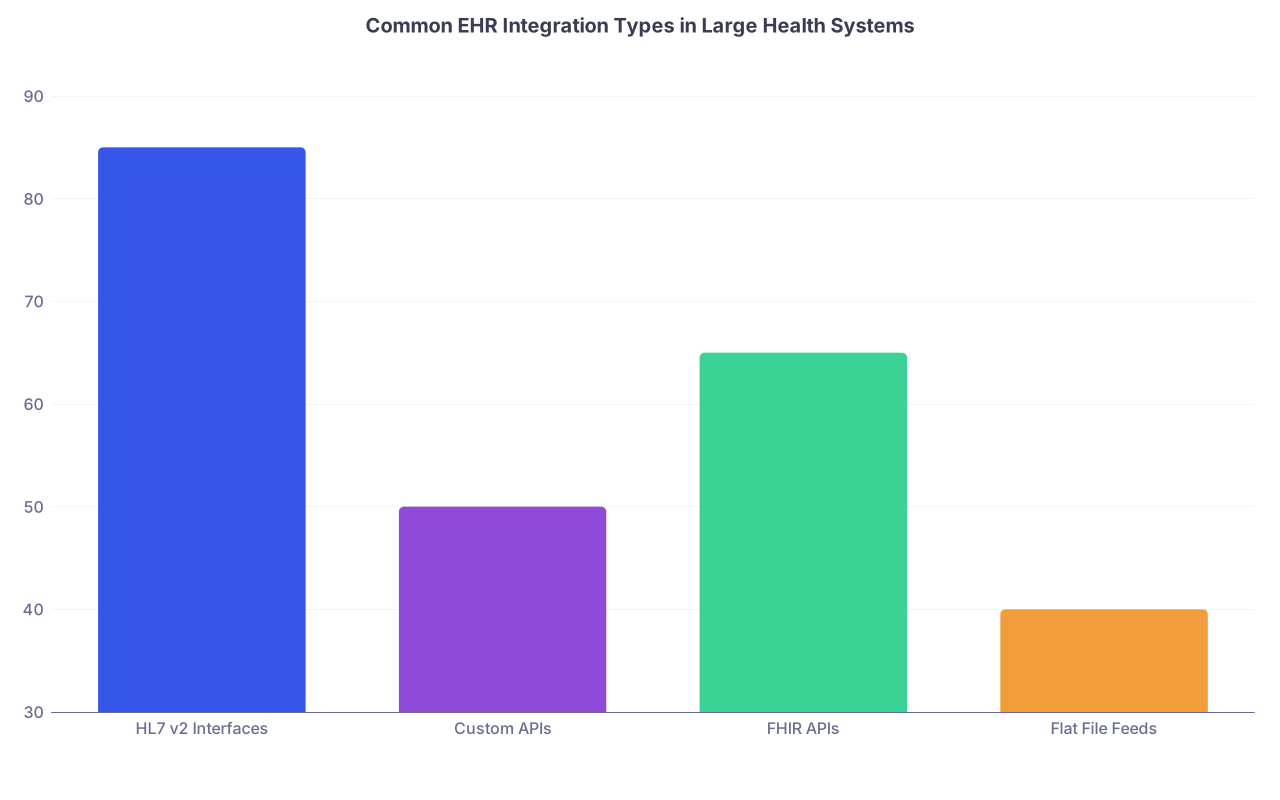
| Category | Value |
|---|---|
| HL7 v2 Interfaces | 85 |
| Custom APIs | 50 |
| FHIR APIs | 65 |
| Flat File Feeds | 40 |
Notice the overlap: most systems run HL7 v2 + custom APIs + some FHIR. FHIR is additive, not a full replacement yet.
Data model: resources, not tables
FHIR defines resources—small, structured units of clinical data. Example: a basic Patient resource in English, not JSON:
- Identifier(s): MRN, maybe national ID
- Name(s)
- Gender
- Birth date
- Address, telecom (phone/email)
- Links to managing organization, general practitioner
Then Observation holds vitals, lab results, scores. Condition holds diagnoses. MedicationRequest is the active order, Medication is the drug description, and so on.
You do not directly query “the medication table” anymore. You query a bundle of FHIR resources, which the EHR vendor maps from its internal schema.
This mapping is where reality diverges:
- Some fields are perfectly mapped (MRN, DOB, sex)
- Some are half‑baked (social history, problem list status)
- Some are vendor‑specific extensions (
extensionfields) that are “FHIR‑ish” but not interoperable
Authentication: OAuth2 and OpenID Connect
We are not doing basic auth with shared passwords for real apps anymore. Standard pattern:
- OAuth2 for authorization
- OpenID Connect for identity (user info, roles)
- Scopes: granular permissions like
patient/Observation.read,user/Patient.read,launch/patient,offline_access
The app never directly sees the user’s password. It gets an access token from the EHR’s authorization server after a proper login / SSO flow.
SMART-on-FHIR: how apps actually show up in the EHR
Here is the critical distinction:
- FHIR = data model + API endpoints
- SMART-on-FHIR = launch framework + security model on top of FHIR
SMART-on-FHIR solves:
- How the app gets launched from within the EHR
- How the app learns which patient and encounter context it should use
- How the app obtains a token to call the FHIR APIs securely
No SMART, no embedded buttons in Epic/Cerner launching browser-based apps that “know” which chart you are in.

| Step | Description |
|---|---|
| Step 1 | Clinician clicks app in EHR |
| Step 2 | Launch request with launch id |
| Step 3 | EHR authorization server |
| Step 4 | User login or SSO |
| Step 5 | App receives auth code |
| Step 6 | App exchanges code for token |
| Step 7 | App calls FHIR API with patient id |
2. SMART-on-FHIR in Practice: What Happens When You Click the App
Let’s walk it through as if you are using Epic or Cerner on a busy clinic day and launch a third‑party app.
Step 1: App registration with the EHR
Before your click ever happens, your IT and the vendor have done this dance:
- The app is registered with the EHR’s authorization server
- Client ID, redirect URI, allowed scopes, logo, name
- For SMART “EHR‑launched” use, the EHR knows this app can receive a “launch context”
There is usually a review board. Security, compliance, maybe an “EHR steering committee” meet. They read a 20‑page PDF from the vendor. They worry about PHI leaving the system. This can take months.
Step 2: Launch from within the patient chart
You click a button. It might be:
- In the “More” menu
- Embedded in the patient storyboard
- Part of an order set
- A sidebar app in Cerner MPages or Epic Hyperspace
The EHR:
- Creates a launch context: patient id, encounter id, user id, maybe location and role
- Generates a temporary
launchparameter tied to this context - Redirects your browser to the app URL with:
iss(the EHR FHIR server base URL)launch(the launch context token for that specific session)
Example URL format (simplified):
https://app.vendor.com/launch?iss=https://ehr.org/fhir&launch=xyz123
Step 3: SMART authorization flow
The app, on receiving that URL, does not yet have access to data. It:
- Discovers the EHR’s
.well-known/smart-configurationendpoint fromiss(which tells it where to send OAuth requests). - Redirects you to the EHR’s authorization server with:
client_idredirect_uriscope(e.g.,launch patient/Observation.read)aud(the FHIR server)launch(so the auth server can tie to the context)
You see either:
- Nothing (if SSO is already active and silent)
- Or your usual login / MFA screen
After you authenticate, the EHR:
- Issues an authorization code back to the app’s redirect URI
The app then exchanges that code for:
access_token(short‑lived, used in FHIR API calls)id_token(info about user identity/roles)refresh_token(optional, for long-lived access like background sync)
Step 4: App retrieves context via FHIR
The app now calls the FHIR server using the access_token in the Authorization: Bearer header.
It either:
- Gets patient id / encounter id in the token or
- Calls the SMART
$patientor$everythingstyle endpoints or - Uses the
launchcontext to fetch the patient/encounter resources
Then it starts pulling what it needs:
GET /Patient/{id}GET /Encounter?patient={id}&status=in-progressGET /Observation?patient={id}&category=vital-signsGET /Condition?patient={id}&clinical-status=active
If you see your patient’s data instantly in the vendor app, that is what just happened.
Step 5: Writing back: where it gets messy
Reading is easy. Writing is where every CIO starts sweating.
To write back, the app might:
POST /Observation(e.g., risk scores, derived metrics)POST /Task(to request clinical actions)POST /Communication(notes, messages)- Or use vendor‑specific extension endpoints or CDS Hooks (we will come back to that)
Common problems:
- IT restricts scopes to read‑only:
patient/*.readbut no.write - Vendor requires a specific profile or extension for writeable resources
- Regulatory / legal concern about “who authored” what goes into the legal record
- Quality and safety concerns about external algorithms documenting into the chart directly
So the real pattern in many hospitals:
- Lots of SMART-on-FHIR read‑only analytics and calculators
- Very few third‑party apps writing directly into the core legal record
That is not a technical limit. It is a risk tolerance limit.

3. CDS Hooks, Background Integrations, and Non-UI Workflows
Not everything is an app you click. A lot of value is hidden under the hood.
CDS Hooks: external decision support in the clinician’s face
CDS Hooks is a spec that lets the EHR call out to a CDS service at specific workflow “hooks,” then display cards back to the clinician.
Typical hooks:
patient-view: clinician opens a chartmedication-prescribe: starting an orderorder-sign: about to sign ordersappointment-book: scheduling
Flow:
- EHR triggers the hook, sending:
- FHIR server URL
- Patient/encounter context
- Relevant FHIR resources as a prefetch bundle (e.g., meds, problems, labs)
- External CDS service evaluates rules or ML models
- Returns one or more “cards”:
- Info card (e.g., “This patient meets criteria for XYZ trial.”)
- Suggestion card (e.g., “Add ACE inhibitor.”)
- Or blocking card (e.g., “High‑risk drug interaction.”)
These cards appear inline in the EHR UI.
Key difference from SMART:
- SMART ‑ EHR launches the app (app pulls data)
- CDS Hooks ‑ EHR calls the service (service pushes recommendations)
Both end up using FHIR data, but the control point is different.
Background data sync: “FHIR bulk” and analytics
For population analytics, registries, or AI models, you do not query per-patient in real time. You use:
- FHIR Bulk Data / Flat FHIR export, often exposed via
$export - Asynchronous job: EHR exports NDJSON files (newline-delimited JSON) of FHIR resources over a time window
- Your system ingests once daily / hourly
Example:
- Nightly export of all patients with heart failure conditions and their last 12 months of Observations and MedicationRequests
- Analytics server runs models and feeds results into a registry or internal application
Most clinicians never see this “integration” directly. They just see reports or dashboards built on top of it.
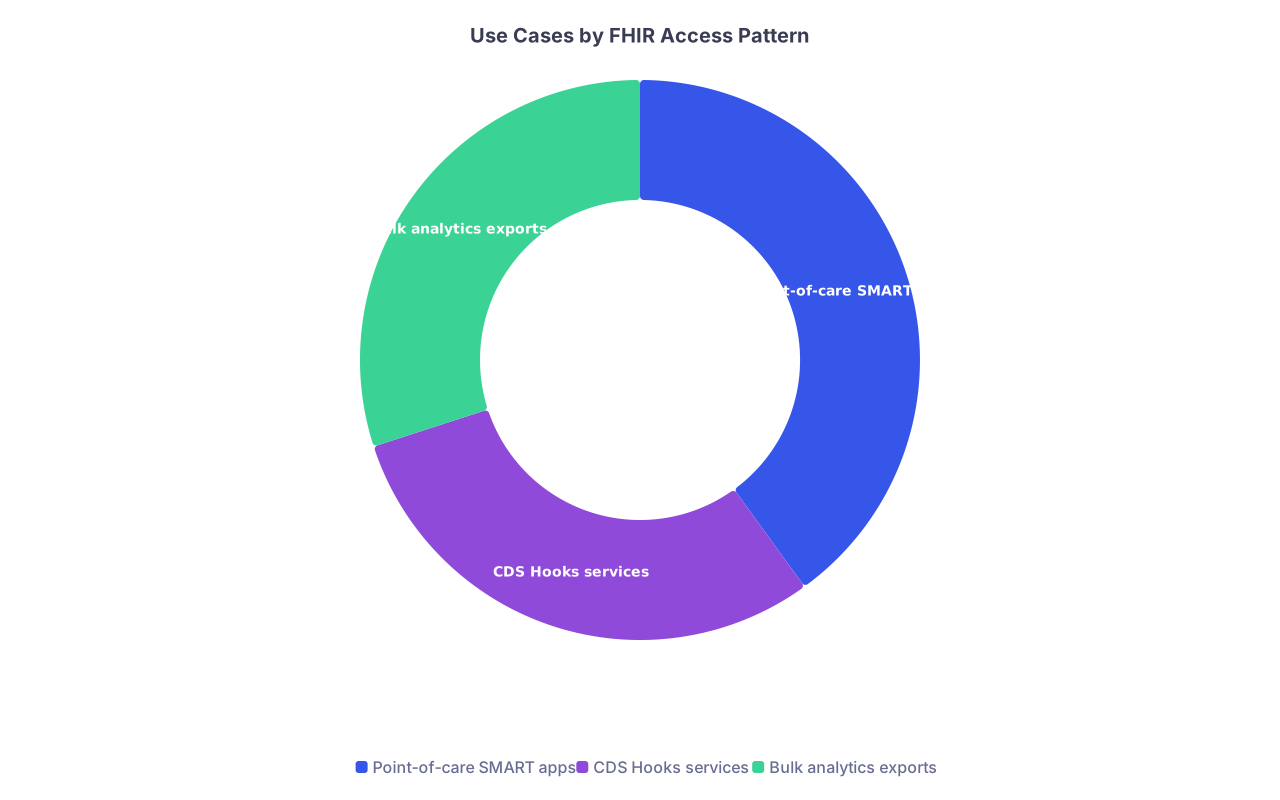
| Category | Value |
|---|---|
| Point-of-care SMART apps | 40 |
| CDS Hooks services | 30 |
| Bulk analytics exports | 30 |
Legacy pipelines still everywhere
Even in “modern” environments:
- ADT still flows via HL7 v2 to downstream systems
- Radiology still exports DICOM + HL7
- Billing interfaces via X12 transactions and custom APIs
- Lab systems often expose their own proprietary or LIM-specific APIs
FHIR is layered on top. It does not erase your hospital’s last 20 years of interfaces.
4. Vendor Reality: Epic, Cerner, and the Others
You will not get the same experience across vendors, even though they “support FHIR.”
Epic: App Orchard / Connection Hub
Epic has invested heavily but controls the gate tightly.
- App Orchard (now Epic Connection Hub) is the official developer program
- Public FHIR endpoints exist, but the real power is in Epic’s specific profiles and extensions
- SMART‑on‑FHIR support is mature: patient‑launched, EHR‑launched, standalone
- Write access is heavily governed. Many orgs allow:
- Read scopes in production
- Write scopes only for a very small set of vetted apps
REAL example I have seen: an AI risk stratification app gained read access easily, but writeback of “AI predicted risk” into the problem list as structured data took a year of meetings. Legal, risk, clinical governance, “does this count as clinical decision making,” etc.
Oracle Cerner
Cerner’s Ignite APIs provide SMART-on-FHIR and CDS Hooks capabilities.
- A bit more variable across client deployments
- Some sites aggressively expose APIs, others are still in HL7 v2 land
- UI integration often uses embedded URLs in PowerChart and wraps the SMART launch
Writeback pattern often uses:
- FHIR resources for structured data
- But sometimes still HL7 v2 or custom APIs for orders and results
Meditech, Allscripts (Veradigm), and mid-tier vendors
They support the same buzzwords but with more gaps:
- FHIR R4 coverage may be incomplete
- SMART-on-FHIR sometimes limited to patient-facing apps, not full clinician EHR launch
- Custom “vendor‑flavored” API calls still required for workflows like prescribing, scheduling, or messaging
| Vendor | SMART-on-FHIR (Clinician Apps) | CDS Hooks Support | FHIR Bulk Export | Typical Write Access |
|---|---|---|---|---|
| Epic | Strong | Supported | Emerging | Tightly controlled |
| Oracle Cerner | Moderate-Strong | Supported | Variable | Mixed |
| Meditech | Moderate | Limited | Limited | Narrow |
| Allscripts | Moderate | Limited | Limited | Variable |
None of these rows are static. But if you join a large health system, you will quickly learn where on this spectrum your deployment actually sits.
5. Security, Governance, and Why Your Favorite App Is “Blocked”
Everyone loves innovation until legal reads the BAA.
Security concerns are not theoretical
Third‑party app integration means:
- PHI leaves the EHR boundary, even if for a few seconds
- Some vendor you barely know stores clinical data
- Tokens, scopes, and refresh tokens have to be managed correctly
Standard questions from security:
- Does the app vendor store PHI? Where? How long?
- Are tokens encrypted at rest and in transit?
- Does the app support least‑privilege scopes? Or does it request
patient/*.readfor everything? - Is there a documented process for incident response, audit logging, and data deletion?
If a vendor tries to shortcut this with “trust us, we are HIPAA compliant,” you will see IT shut the door.
Governance bottlenecks: the real blocker
I have seen more projects delayed by “EHR governance councils” than by FHIR itself. Common patterns:
- Clinical leads unsure whether to accept “black box” AI recommendations
- Fear that external apps will clutter the chart or confuse workflows
- Concern about medico‑legal attribution: who is responsible for app‑generated documentation?
- Integration committee that meets once a month to approve changes. That alone can add 3–6 months.
So if you plan to champion a new app at your new job:
- Expect 6–12 months from “we like this” to “it is in production”
- Expect multiple rounds of security review
- Expect to scale back initial writeback ambitions

6. What This Means For You as a Post‑Residency Physician
You are not expected to implement FHIR servers. But if you want to influence your future workplace, you do need to understand where the sharp edges are.
Reading capabilities: where you will get wins quickly
The lowest‑resistance category:
- Point‑of‑care calculators that read vitals, labs, and meds
- Clinical dashboards that show risk scores or trends
- Population tools that run against nightly exports
Why? Because:
- Read‑only scopes are easier for security to approve
- There is no question about who authored what in the chart
- If the app misbehaves, you can turn it off without corrupting the record
Examples:
- AFib stroke risk tool that reads meds and CHADS2‑VASc inputs
- Heart failure dashboard reading weights, diuretics, BNP
- Oncology registry pulled via bulk FHIR export every night
These are the kinds of tools you can push for early in your attending career and actually get built.
Writeback capabilities: choose your battles
Directly writing to:
- Problem lists
- Med lists
- Orders
- Clinical notes
…will trigger maximum governance review.
Better strategies:
- Start with writing Observations tagged as “derived” or “AI‑generated”
- Use Communication or Task resources that route to a human for confirmation
- Ask for a “pre-populated” draft note that requires provider signoff, instead of autonomous documentation
In other words, design the integration so the EHR is not depending entirely on the external app’s correctness.
Don’t confuse “we have FHIR” with “we can integrate anything”
Ask specific questions in your job interviews or early meetings:
- Which FHIR version is supported (R4, R5 pilot, etc.)?
- Do you support SMART-on-FHIR for clinician apps or only patient‑facing?
- Are CDS Hooks live in production?
- Do we have any existing third‑party SMART apps installed now? How long did they take?
You will immediately see whether “we are very innovative” actually means “we connected one wellness app once and it was painful.”
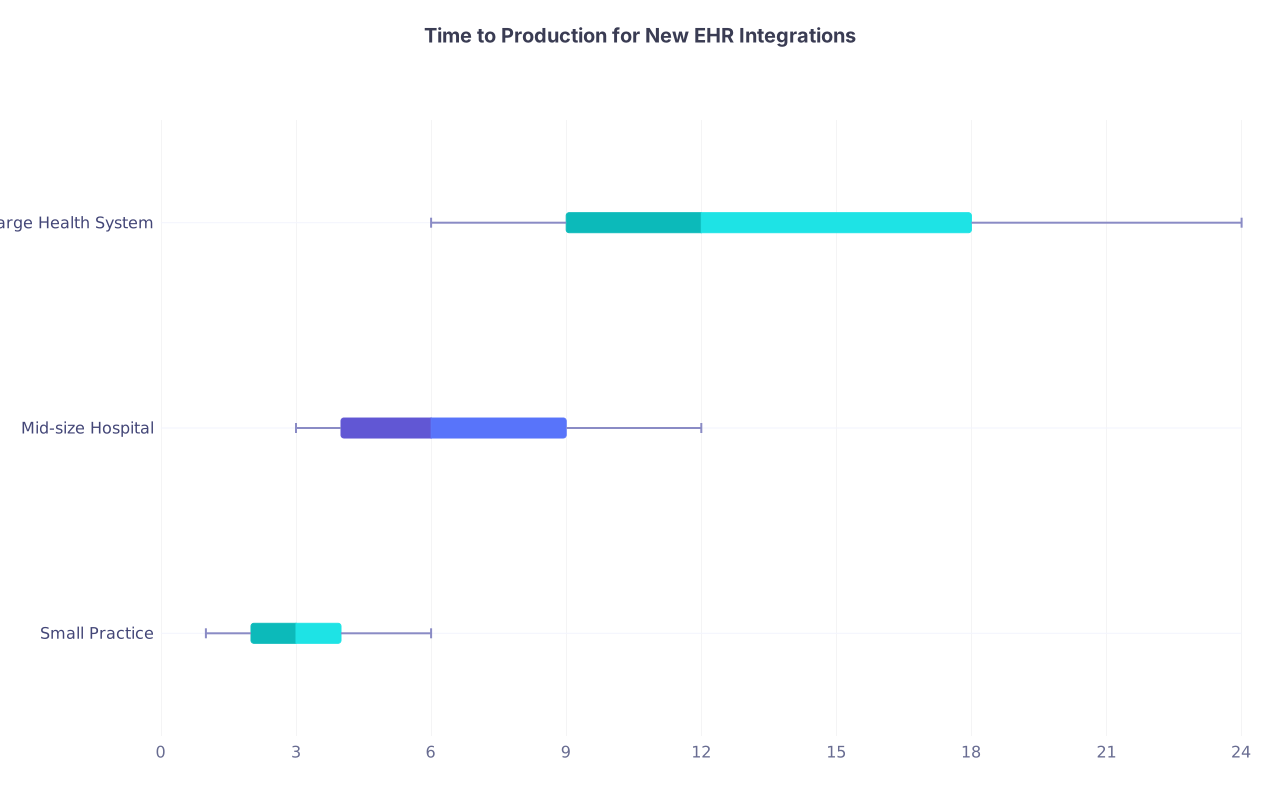
| Category | Min | Q1 | Median | Q3 | Max |
|---|---|---|---|---|---|
| Small Practice | 1 | 2 | 3 | 4 | 6 |
| Mid-size Hospital | 3 | 4 | 6 | 9 | 12 |
| Large Health System | 6 | 9 | 12 | 18 | 24 |
Those numbers (in months) are very close to what I have personally seen.
7. How an Integration Actually Gets Done (Concrete Example)
Let me ground this with a realistic end‑to‑end case: you want to deploy a sepsis risk prediction app.
High-level goal
- Clinicians see a “Sepsis Risk” banner in the EHR for inpatients
- App reads vitals, labs, meds, and flowsheets
- If high risk, displays guidance and suggests an order set
Here is how it actually unfolds.
Step-by-step reality
Business sponsor
- ICU director and hospitalist lead agree “we want this.”
- They bring it to the CMIO and EHR governance group.
Technical scoping
- IT and vendor identify required FHIR resources:
- Patient, Encounter, Observation (vitals, labs), MedicationRequest, Condition
- Confirm EHR supports CDS Hooks
patient-viewand/or SMART-on-FHIR launch. - Map local codes (lab codes, custom flowsheet rows) to what the model expects.
- IT and vendor identify required FHIR resources:
Security review
- BAA with vendor
- Description of what PHI is sent, where it is stored, retention policies
- Review OAuth2 scopes; push to narrow from
patient/*.readto a curated list
Pilot design
- Start in one ICU and one med/surg unit
- Read‑only CDS Hooks cards first; no automatic order placement
- Parallel run against retrospective data to check calibration
Implementation
- Configure CDS Hooks endpoint in EHR
- Set up prefetch bundle: relevant Observations, Conditions, MedicationRequests for
patient-view - Build Epic or Cerner configuration to display cards in an obvious but not intrusive place
- Integrate optional SMART launch from the card to a detailed risk dashboard
Training and go‑live
- Short training for ICU/hospitalist staff
- Clear guidelines: “This is decision support, not a mandate”
- Monitoring period with frequent feedback sessions
Iteration
- Adjust thresholds to reduce alert fatigue
- If adoption is good, consider:
- Writing a structured Observation for each risk score
- Linking to a pre‑built sepsis order set (still requiring clinician signoff)
You will notice what is missing: nobody “flipped on FHIR” and went live in a weekend. The standard eased the mechanics, but the heavy lifting was governance, mapping, workflow design.
8. Where This Is Going (And What To Watch Next)
Despite my bluntness, the direction of travel is clear: APIs and apps are not going away. They are finally becoming routine.
Key trends worth watching:
- FHIR R5 and beyond: More mature resources for workflow, scheduling, and clinical reasoning.
- Better writeback patterns: Organizations learning to accept controlled external documentation (esp. Observations and decision support artifacts).
- EHR vendor ecosystems: True app stores where approved apps can be turned on with less friction.
- Regulatory pressure: U.S. information blocking rules are forcing vendors and health systems to expose more standardized APIs.
From your perspective as a practicing physician:
- Learn at least the vocabulary: FHIR, SMART-on-FHIR, CDS Hooks, scopes, bulk export.
- Identify one or two integration projects that would actually improve your daily practice, not just sound cool in a meeting.
- Partner with your CMIO and informatics staff. The best projects are clinician‑led, not vendor‑led.
Do that, and you will be the rare attending who can sit in an IT meeting and cut through the nonsense.
Three key points:
- FHIR and SMART-on-FHIR make EHR integrations possible, not effortless; governance and vendor constraints are the real bottlenecks.
- Read‑only, point‑of‑care apps and background analytics are the easiest wins; writeback into the legal record is where politics and risk explode.
- If you understand how SMART launches, scopes, and data flows actually work, you can drive realistic integration projects that improve care instead of dying in committee.