
It is Sunday night. You just finished building a 45‑minute lecture for residents on a topic you know cold—say “Outpatient Heart Failure Management in 2026.” You spent 6 hours on it. They will see it once. You might give it two or three more times this year. And then it will die in a shared drive or some forgotten USB.
That is the standard physician pattern: high‑value intellectual work, paid once, then buried.
Let us fix that.
What I am going to walk you through is how to take a single clinical or academic lecture and systematically convert it into three distinct, reliable income streams that can run with minimal extra clinical time:
- A paid, evergreen mini‑course
- A digital asset (booklet / guide / toolkit)
- A licensed education product for groups and institutions
You are not starting a media empire. You are repurposing what you already do, in a way that is structured, compliant, and profitable.
Step 1: Choose the Right Lecture (Most People Screw This Up)
Not every talk should be monetized. A surprising number of lectures are either:
- Too generic (e.g., “Hypertension Overview” that competes with 10,000 free videos), or
- Too narrow (e.g., “Very Rare Enzyme Defect X” that five people care about).
You want a sweet spot: niche but with demand, and relevant to people who can and will pay.
Here is the filter I use when advising physicians:
| Type | Good Candidate Example |
|---|---|
| Practical clinical “how‑to” | Outpatient HF optimization for PCPs |
| Coding / billing | E/M coding for hospitalists under new rules |
| Career / systems navigation | How to build a telehealth panel from zero |
| Patient‑facing self‑management | Migraine self‑management for high‑functioning adults |
| Leadership / admin | Running effective M&M conferences |
Your lecture should meet at least three of these five criteria:
Solves a painful problem
- PCPs drowning in HF readmits
- Residents terrified of RVU‑based compensation
- Patients confused about GLP‑1 safety, etc.
Has a clear, tangible outcome
- Fewer readmissions
- More collections / better coding
- Better symptom control / fewer urgent visits
Target audience is already paying for similar education
- CME conferences, specialty board review, disease‑specific courses.
You can deliver real expertise
Not “I read three UpToDate articles.” Actual experience:- You run the HF clinic.
- You sit on the coding committee.
- You built a successful virtual practice.
Content is not owned by your employer
Critical. If you built the slides fully on hospital time with hospital branding, your contract may claim ownership. You want:- Neutral branding
- Created off‑hours, on your own equipment, or
- Explicit written permission to reuse and monetize
If your lecture fails this filter, do not force it. Pick a different topic before you burn time building around the wrong asset.
Step 2: Clean Up the Lecture So It Can Survive Outside the Auditorium
Before monetization, you need one master, high‑quality version of the lecture that you control.
A. Strip out institutional baggage
Go through the deck and:
- Remove hospital logos, name badges, proprietary templates.
- Delete any internal performance data, screenshots of EMR, or QI dashboards.
- Replace them with:
- Public guidelines
- De‑identified case summaries (no dates, no locations)
- Generalized process diagrams
If your contract is aggressive about IP, run the idea past legal or your department chair in one email. Get something short and written like: “I plan to use a modified, de‑identified version of my HF lecture for independent educational work. No institutional logos or data will be used.” If they object, you have clarity. If they do not, screenshot and file the response.
B. Convert from “live talk” to “standalone teaching asset”
A live lecture survives on your presence. An income‑producing asset needs structure.
Turn your 40–60 minute talk into:
Clear outline with 3–5 modules
Example for HF:- Module 1 – Core framework: Staging, phenotyping, goals
- Module 2 – Med management: GDMT steps and titration
- Module 3 – Comorbidities and common traps
- Module 4 – Follow‑up workflows and team roles
- Module 5 – Case walk‑throughs
Explicit learning objectives for each module
Not filler. Think like a CME provider:- “By the end of this module, you can list the three most common reasons HF patients bounce back to the ED within 7 days.”
- “You will be able to design a titration schedule that fits a 15‑minute visit.”
Checkpoints / questions
Seed questions you can later turn into quizzes, reflection prompts, or workbook sections.
Do this once. You will reuse this skeleton for every income stream below.
Step 3: Income Stream #1 – The Evergreen Mini‑Course
This is your lowest‑friction, highest‑leverage move: take your refined lecture and turn it into a paid online course that can sell 24/7.
A. Recording: stop overcomplicating this
You do not need studio production. You need:
- A decent USB microphone (e.g., Audio‑Technica ATR2100x, ~$100)
- Any modern laptop
- Screen recording software (Loom, Camtasia, ScreenFlow, or even Zoom recording)
Process:
- Record each module separately, 10–20 minutes per module.
- Shorter chunks are easier to re‑record and easier for learners to consume.
- Use simple slide + voice format.
- No background music. No fancy animations. Clean is fine.
If you stumble, pause, restart the sentence. You can trim later. Perfectionism kills output here.
B. Basic course structure
You can host this on:
- Teachable
- Podia
- Kajabi
- Thinkific
Or—if you are deeply allergic to platforms—private Vimeo + email delivery. But honestly, pick a dedicated course platform. They handle payments, logins, and video hosting.
Your course should include:
- 3–5 modules of video lessons (from your chunked recordings)
- Downloadable PDF of your revised slides
- A short PDF “cheat sheet” (we will reuse this later)
- Optional: short quiz questions (3–5 per module)
C. Pricing that actually respects your expertise
Most physicians chronically underprice.
For a niche, high‑value professional course (e.g., HF optimization for PCPs):
- Entry range: $97–$197 per learner if it is practical and solves a real pain
- Higher range: $297–$497 if it:
- Includes templates, checklists, or
- Has CME attached (you can partner with an accredited provider later)
For patient‑facing courses:
- Usually $49–$149 depending on condition, outcomes claimed, and support offered.
Do not price at $19. You are not selling meditation apps. You are selling years of clinical pattern recognition compressed into a few hours.
Here is why these numbers work:
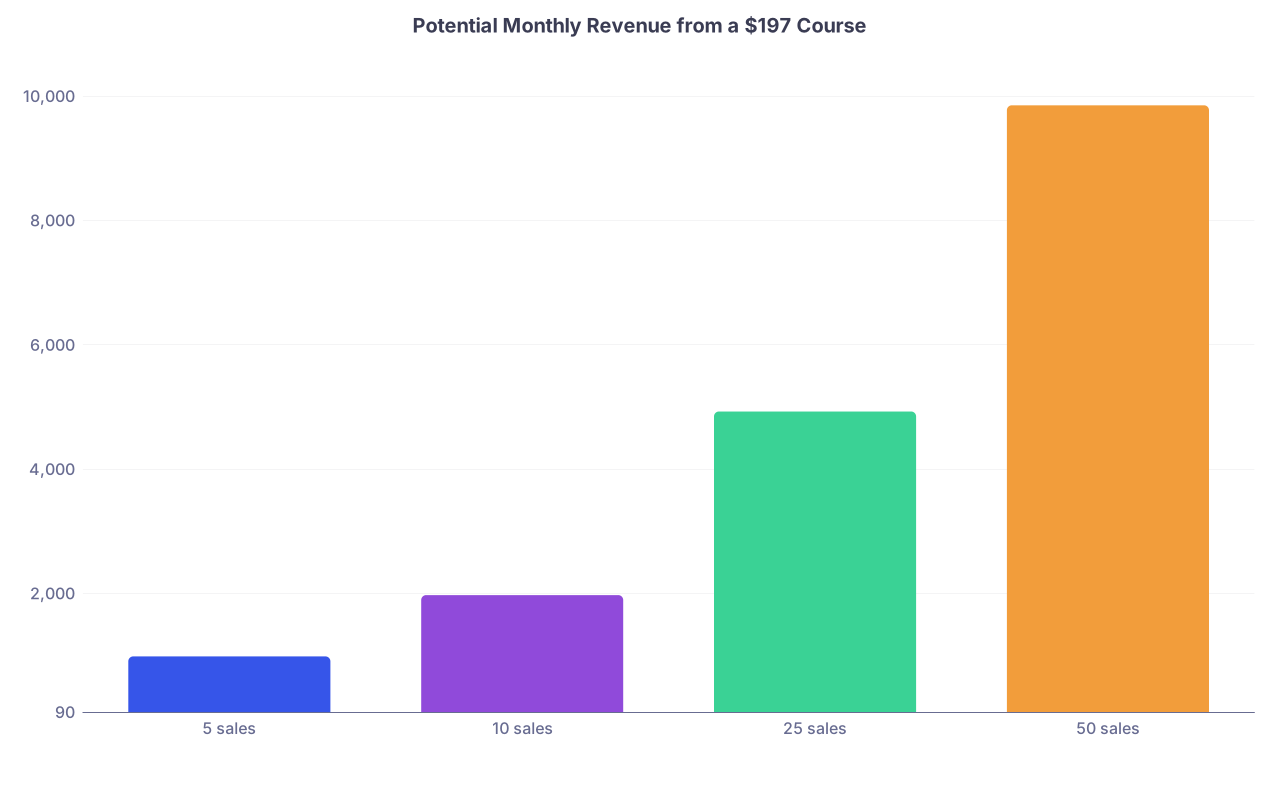
| Category | Value |
|---|---|
| 5 sales | 985 |
| 10 sales | 1970 |
| 25 sales | 4925 |
| 50 sales | 9850 |
Ten sales per month is hardly aggressive once the system is built—and it covers a lot of call you might otherwise be picking up.
D. Sales without becoming “that” doctor on social media
You do not need 100,000 followers. You need the right 500–2,000 people to know this exists.
Concrete channels:
Talks you already give
At the end of your next grand rounds or CME talk:- “If you want a step‑by‑step video walkthrough with checklists, I have an online mini‑course. Here is the link.”
Email signature & profile
- Add one line: “HF Management Mini‑Course for PCPs → [link]”
Professional social
- One focused LinkedIn post per month with a case vignette, ending in:
“I break down my full approach in a short, structured mini‑course here: [link]”
- One focused LinkedIn post per month with a case vignette, ending in:
Collaborations
- Offer your course at a discount for a chapter of ACP, AAFP, etc. They get value. You get volume.
The goal: You create one well‑designed funnel, not a full‑time influencer persona.
Step 4: Income Stream #2 – Turn the Lecture into a Digital Asset
Now that you have the structured content and maybe even transcripts, creating a paid digital product is low friction.
Think:
- Short e‑book or handbook
- Implementation guide + templates
- Toolkit with sample workflows, scripts, and checklists
A. Choose the right format for your topic
You want a product that:
- Can be consumed quickly (under 2–3 hours)
- Is practical: something people print, annotate, and use
- Is easy to update once a year as guidelines change
Examples:
HF topic: “Outpatient HF Clinic Playbook”
- Initial assessment template
- Sample medication titration schedule
- Follow‑up visit checklist
- Patient handout template
Coding topic: “2026 E/M Coding Field Guide for Hospitalists”
- Examples of properly documented notes
- Common denial scenarios and how to avoid them
- Quick reference one‑pagers
Telehealth topic: “Telehealth Visit Toolkit for Busy PCPs”
- Pre‑visit scripts
- Tech troubleshooting FAQ
- Follow‑up messaging templates
B. Building the asset from what you already have
Process:
Export your lecture slides as PDF
- This is your raw content repository.
Use your course transcripts (if you recorded video)
- Extract explanations, refine the language, and reorganize into sections.
Create a 20–60 page PDF (not a 300‑page textbook) with:
- Clear sections aligned with your modules
- Key algorithms or pathways illustrated simply
- “Do this, do not do that” bullet lists
- Ready‑to‑use templates and checklists at the end
You can use:
- Microsoft Word or Google Docs → export as PDF
- Canva for nicer design (professional but not overstyled)
C. Pricing and positioning
Your digital asset should not undercut your course. It should either:
- Stand alone at a lower price for “readers,” or
- Be bundled with your course at a slight discount
Reasonable standalone ranges:
- Professional guide: $39–$99
- Patient‑facing toolkit: $19–$49
Bundle examples:
- Course alone: $197
- Guide alone: $59
- Course + guide bundle: $227
This moves most serious buyers into the bundle while preserving margin.
D. Where and how to sell it
Options:
- Direct on your course platform (Teachable, Podia, etc.)
- Gumroad or Payhip for simple digital product sales
- Your own website (Stripe + a simple sales page)
Tie it tightly to your lecture:
- Every time you give the live lecture, offer the guide as a “implementation shortcut.”
- Inside the guide, include links/QR codes pointing back to the course.
If you have 100 people hear your talk in a year and 15–20 of them buy a $59 guide, that is $885–$1,180 from a single lecture’s “side” derivative. And you can do this with multiple lectures.
Step 5: Income Stream #3 – Licensing and Group Access
This is where most physicians leave serious money on the table.
Once you have:
- A clean, structured lecture
- A recorded mini‑course
- A solid digital guide
You have something institutions, practices, and professional groups can license.
Instead of selling $197 courses to individuals, you sell bulk access or content licenses to:
- Large group practices
- Hospital systems
- Residency programs
- Specialty societies
A. Productizing your content for organizations
You need to frame it as:
- “A plug‑and‑play education solution for [audience] that improves [metrics].”
Examples:
HF outpatient course + toolkit
- Target: PCP network, ACO, insurer care‑management arm
- Outcome: Reduced readmissions, better GDMT adherence
E/M coding course + field guide
- Target: Hospitalist group, ED group, large multispecialty clinic
- Outcome: Higher coding accuracy, reduced denials, better RVU capture
You package:
- 12‑month access to the mini‑course for X users
- Download rights for your guide for internal use (non‑resale)
- Optional: One live Q&A session per year
B. Pricing models that work
Three simple models:
Per‑user license
- Example: $97 per clinician per year for 50–100 clinicians
- Great for smaller groups.
Tiered flat‑fee
- 1–25 users: $2,500 / year
- 26–75: $5,000 / year
- 76–200: $9,000 / year
Enterprise license (one or two big clients)
- Negotiated flat fee (e.g., $12,000–$25,000 / year)
- Often includes some white‑label customization or extra Q&A calls
Even conservative numbers add up:
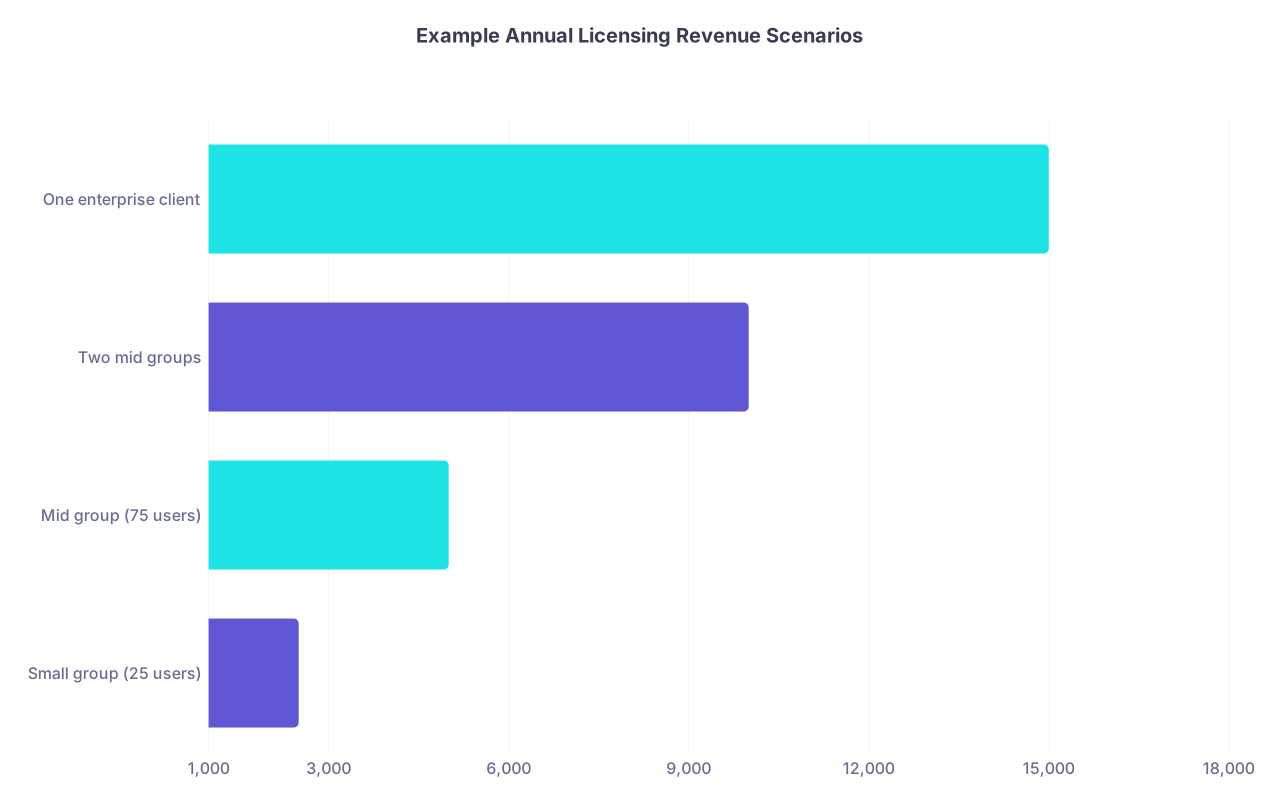
| Category | Value |
|---|---|
| Small group (25 users) | 2500 |
| Mid group (75 users) | 5000 |
| Two mid groups | 10000 |
| One enterprise client | 15000 |
One mid‑size group licensing your HF course and guide at $10,000 per year is not crazy. It is standard corporate training budget. And it comes from work you already did.
C. Simple licensing agreement essentials
You do not need a 20‑page contract to start. You do need:
- Who gets access (roles, number of users)
- What they can do (view, download PDFs, internal use only)
- What they cannot do (resell, share externally, rebrand as their own)
- Duration of access (e.g., 12 months from start date)
- Payment terms (upfront, net 30, etc.)
Get a basic template from a healthcare‑savvy attorney once. Reuse with modifications.
Pro tip: Many institutions move faster if you frame it as “educational resource” or “training” rather than “consulting,” which may trigger heavier procurement policies.
Step 6: Compliance, Liability, and Not Getting Yourself in Trouble
Here is where physicians get (rightly) nervous. Let us be blunt about the main issues.
A. Medical advice vs education
Your products are educational, not individualized care.
Every asset needs a clear disclaimer:
- “This material is for educational purposes only and does not constitute medical advice. Clinical decisions must be made based on individual patient circumstances, local protocols, and current guidelines.”
If patient‑facing:
- “This course is not a substitute for personal medical care. Always consult your own clinician before making changes to your treatment.”
B. Employer conflicts
You must read:
- Your employment contract
- Any “outside activities” or “IP ownership” clauses
Common pitfalls:
- Requirement to disclose paid external work
- Prohibition on using employer resources (computers, data, logos) for paid projects
- Broad claims on anything related to your field developed while employed
Solutions:
- Build and record on your own equipment, on your own time.
- Keep content free of employer logos and proprietary material.
- If in doubt, file a formal disclosure of outside activity.
C. Patient privacy
This is non‑negotiable:
- No identifiable patient stories.
- No dates, room numbers, or small‑N cases that could “jigsaw” identify.
- Composite cases are your friend.
If you include real de‑identified data, confirm it meets HIPAA de‑identification standards or use public datasets / published examples.
D. Professional responsibility
Your name and credentials are on this. You cannot be sloppy.
- Keep a version log of your content: v1.0 (Jan 2026) based on XYZ guideline.
- Review for major updates yearly or when big guideline changes drop.
- If you materially update content, notify current licensees and course buyers.
Step 7: Putting It All Together – One Lecture, Three Streams
Let us walk a concrete example so you see the full chain.
Scenario
You are a cardiologist who built a strong 50‑minute lecture:
“Practical Outpatient Heart Failure Optimization for Busy PCPs.”
You invested 6–8 hours in it already.
Phase 1 – Upgrade the lecture (week 1–2)
- Remove hospital branding, de‑identify cases.
- Reorganize into 4 modules.
- Create clear learning objectives and 10–15 knowledge check questions.
Time: 3–4 hours
Phase 2 – Record the course (week 2–3)
- Record 4 video modules (15 minutes each) with screen + voice.
- Light editing (you or a freelancer).
Time: 4–6 hours total.
Upload to Teachable or Podia, set price at $197, create a simple sales page.
Phase 3 – Build the digital guide (week 3–4)
- Use slides and transcripts to write a 30–40 page “HF Outpatient Playbook” as PDF.
- Include:
- Visit templates
- Titration algorithms
- Patient education checklist
Price: $59 standalone; $227 when bundled with the course.
Time: 6–8 hours.
Phase 4 – Licensing offer (month 2–3)
- Create a one‑page PDF: “HF Optimization Training for PCP Networks.”
- Offer:
- Annual access to the course for up to 50 clinicians
- Internal use rights for the playbook
- One annual live Q&A session
Price: $5,000 for up to 50 clinicians.
Time: 2–3 hours to assemble the proposal + a few emails / calls.
Realistic Outcome Numbers (Year 1)
You do this properly, no heroics, just persistent, low‑key promotion.
Reasonable year‑one scenarios from this one lecture:
- 60 individual course sales @ $197 → $11,820
- 40 guide sales @ $59 (separate) → $2,360
- 1 group license @ $5,000 → $5,000
Total: $19,180 from content you mostly already built.
Not fantasy. I have seen busier physicians, with worse content and worse systems, do this by accident once they put something online.
Year 2, with updates and another license or two? You see where this goes.
Execution Roadmap (Do This in Order)
Here is a simple flow you can follow:

| Step | Description |
|---|---|
| Step 1 | Choose Lecture Topic |
| Step 2 | Clean and Reorganize Content |
| Step 3 | Record Mini Course |
| Step 4 | Create Digital Guide |
| Step 5 | Launch to Individuals |
| Step 6 | Package for Licensing |
| Step 7 | Pitch to Groups and Institutions |
If you try to start at group licensing without a clean course and guide, you stall in bureaucracy. Follow the sequence.
FAQs
1. What if I am not a “tech person” and hate marketing?
Then keep it brutally simple:
- Use one course platform (Teachable / Podia).
- Use one digital product platform (or the same one).
- Promote only through:
- Talks you already give
- Your email signature
- Occasional LinkedIn posts
You do not need funnels, webinars, or constant posting. You need one solid product and a few well‑chosen distribution channels.
2. How do I know if my topic is marketable before I invest the time?
Quick validation steps:
- Email 10–20 colleagues in your target audience. Ask:
“If there were a concise, practical mini‑course on [topic] that helped you [outcome], would you pay ~$100–$200 for it?” - Search existing platforms (Medmastery, Coursera, Udemy) for similar topics.
If there are zero results, either you found an untapped niche or there is no demand. If there are many, read reviews to see what is missing—then position your angle there. - Mention the concept at your next talk and watch reactions when you describe the outcome. Strong engagement is your green light.
3. Should I do this under my own name or build a separate brand/company?
For one lecture and its derivatives, start under your own name with a simple LLC for liability and tax separation. Use:
- Your professional name as the “expert” front‑end
- The LLC for contracts, licensing agreements, and payments
If, later, you build multiple courses or bring in other faculty, you can expand to a broader brand. Do not let naming and branding paralysis stop you from doing the first, simple iteration.
Open the slide deck of the lecture you have already built and ask one question: “How do I split this into 3–5 modules?”
Do that outline right now. That is the first concrete move toward turning this one‑off talk into three reliable income streams.