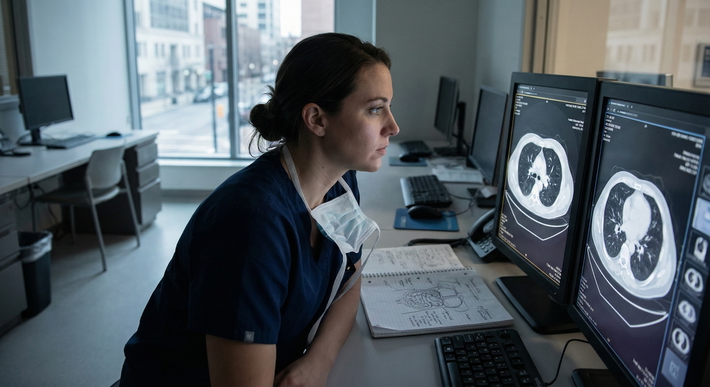
The idea that you can “make up” for low operative volume just by reading more is a lie. If your hands are not moving, your skills are not improving. Simulation is the only real way to close that gap—and most people are using it badly or not at all.
You want a framework, not another feel‑good pep talk about “life‑long learning.” Here it is.
1. Start With Brutal Clarity: What Are You Actually Missing?
Before you touch a simulator, define the problem like a surgeon, not like a committee.
You are not “behind.” You are deficient in specific, trainable skills:
- Exposure and setup (port placement, incision planning, retraction)
- Tissue handling (atraumatic handling, economy of motion)
- Dissection and hemostasis (using the correct plane, safe use of energy)
- Suturing and knot tying (open, laparoscopic, robotic)
- Intraoperative decision making (when to bail, when to convert, when to call for help)
- Crisis management (bleeding, bile duct injury, hypotension, equipment failure)
Now match that to your reality:
- You are seeing fewer index cases (COVID backlog, centralization of complex surgery, seniors taking everything complex).
- OR time is unpredictable.
- Attendings are more risk‑averse with juniors due to productivity pressure.
So the question becomes:
For each of those domains, how much of the skill can I realistically build outside the OR with simulation?
A lot more than most programs are getting out of it. But you need structure.
2. The Framework: Four Levels of Simulation That Actually Move the Needle
Think in levels. Not toys.
| Level | Focus | Primary Tools |
|---|---|---|
| 1 | Psychomotor basics | Box trainer, part-tasks |
| 2 | Procedure steps | Synthetic/VR task trainers |
| 3 | Full procedure flow | High-fidelity/VR scenarios |
| 4 | Team and cognition | Crisis and decision sims |
You need all four. Most residents stop at level 1 or 2 and then complain simulation “does not translate.”
Level 1: Psychomotor Basics (The Foundation Everyone Skips Once They Can Tie a Knot)
Target: PGY‑1–2 baseline, FMGs entering new systems, anyone who feels clumsy on camera.
Goals:
- Camera control that does not make everyone nauseated.
- Two‑handed instrument use with minimal wasted motion.
- Reliable, reproducible knots in all directions and positions.
- Ambidexterity to a functional level.
Tools:
- Simple box trainer (homemade is fine).
- Laparoscopic instruments (two graspers, needle driver, scissors).
- Suture, beads, rubber tubing, foam models.
- Timer + phone camera for recording.
Core tasks (non‑negotiable):
- Peg transfer (FLS‑style, timed).
- Pattern cutting (circle within 1–2 mm of the line).
- Endoloop application on a simulated appendix or vessel.
- Intracorporeal suturing and knot tying (horizontal and vertical plane).
- Extracorporeal knot tying with safe cinching.
You drill these until your numbers are boring.
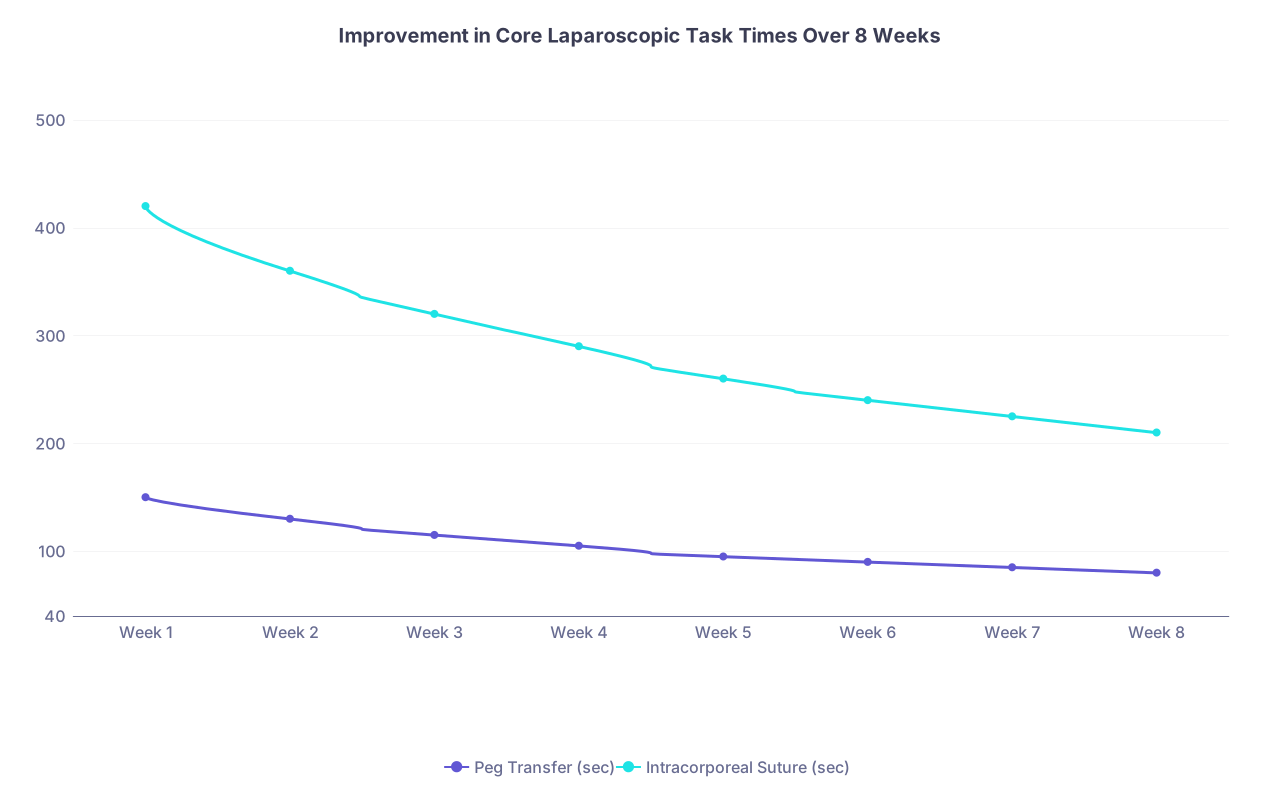
| Category | Peg Transfer (sec) | Intracorporeal Suture (sec) |
|---|---|---|
| Week 1 | 150 | 420 |
| Week 2 | 130 | 360 |
| Week 3 | 115 | 320 |
| Week 4 | 105 | 290 |
| Week 5 | 95 | 260 |
| Week 6 | 90 | 240 |
| Week 7 | 85 | 225 |
| Week 8 | 80 | 210 |
If your peg transfer does not consistently sit under 80–90 seconds and your intracorporeal knot under ~2–3 minutes (while keeping quality high), you are not done.
How to use Level 1 in a low‑volume environment:
- Daily micro‑sessions: 15–20 minutes, 5–6 days per week. Set a number of repetitions (e.g., 10 peg transfers, 3 sutures) rather than a vague “practice for a bit.”
- Objective tracking: Write times in a logbook or spreadsheet. Color code improvements. If it is not measured, it is fake progress.
- Video review once per week: Self‑critique: wasted motion, hand crossing, unnecessary instrument exits, camera drift.
Level 2: Procedure Components (The “I Can Do Parts of the Operation” Level)
This is where you convert random dexterity into relevant steps.
Goal: Break down target operations into chunks and simulate those chunks repeatedly.
Example: Laparoscopic cholecystectomy broken into:
- Port placement and patient positioning.
- Grasping and retraction strategy.
- Dissection of Calot’s triangle.
- Clipping and division of cystic duct/artery.
- Gallbladder fossa dissection.
- Extraction and port closure.
You rarely get to practice all of that early on. But you can absolutely drill:
- How you will position the patient and ports (on a whiteboard, then on a mannequin).
- How your hands and instruments will be oriented for dissection.
- How you will interpret the “critical view” consistently.
Tools:
- Organ models (gallbladder, bowel, vascular).
- Synthetic tissue pads for fascial closure, anastomoses.
- VR simulators with task modules (if available).
- Procedure step cards or checklists.
Protocol for Level 2:
- Select 2–3 bread‑and‑butter operations in your specialty.
- General surgery: lap chole, lap appy, hernia repair.
- Ortho: arthroscopy portals and camera work, basic screw fixation.
- OB/GYN: lap salpingo‑oophorectomy, TLH key steps.
- Define 5–10 steps per procedure. Not 30. Focus on pivotal steps where juniors can participate.
- Assign simulation tasks to each step:
- Step: “Enter abdomen safely” → Task: repeated trocar insertion on a trainer with deliberate hand placement and angle.
- Step: “Calot’s triangle dissection” → Task: dissect colored rubber bands in a model without injuring a simulated duct/artery.
- Repetition goal: 20–30 reps of each critical step over 4–6 weeks.
This is boring. Good. Mastery is boring.
3. Level 3 and 4: Full Procedures and Cognitive/Team Simulation
You will never fully replicate a 3‑hour Whipple in a sim lab. But you can simulate the flow and decisions of common operations and crises.
Level 3: Full Procedure Flow
This is where you string steps together with time pressure and fatigue.
Approach:
- Use VR modules that approximate full cases (e.g., Lap chole, appendectomy, colon resection).
- Or set up a low‑fidelity but complete “OR” around a box or cadaveric model:
- Draping.
- Checklist.
- Port placement.
- Full sequence of dissection, division, and closure.
Why this matters:
- You practice mental mapping of the operation from start to finish.
- You reduce the cognitive load of remembering the sequence, freeing your brain to think about trouble.
- You experience the “middle of the case fatigue” and still have to maintain technique.
Run simulated “OR days”:
- 2–3 cases back‑to‑back in the lab.
- Limited break time.
- Decreasing help from faculty with each case.
It feels artificial until you show up in a real OR day and you are the only one whose brain is not fried by 3 p.m.
Level 4: Cognitive and Team Simulation (Where Many Programs Fail Completely)
This is the part that actually compensates for lack of complex emergencies in your case log.
You will not see enough major intraoperative disasters as a trainee. Which is good for patients but bad for your future patients if you never train it.
You need scripted scenarios for:
- Uncontrolled bleeding from a major vessel.
- Bile duct injury recognition.
- Anesthesia crisis (hypotension, anaphylaxis, airway loss).
- Post‑operative hemorrhage requiring return to OR.
- Equipment failure (CO2 insufflation loss, tower goes down).
Use high‑fidelity sim if you have it. If not, run table‑top or low‑fidelity drills:
- One person plays anesthesia.
- One plays scrub.
- One plays circulating nurse.
- One plays attending or consultant on phone.
Run through:
- Recognition of the problem.
- Immediate technical actions (packing, compressing, calling for vascular clamp, etc.).
- Communication: who says what to whom, when.
- Decision points: convert to open, call for backup, abort case.

| Step | Description |
|---|---|
| Step 1 | Start Scenario |
| Step 2 | Recognize Source |
| Step 3 | Check Vitals and Anesthesia |
| Step 4 | Pack and Expose |
| Step 5 | Definitive Repair |
| Step 6 | Call for Help and Convert |
| Step 7 | Communicate With Team |
| Step 8 | Intervene or Abort |
| Step 9 | Abnormal Event |
| Step 10 | Controlled? |
You run these not to “win,” but to habituate:
- Saying “I need help now.”
- Delegating clearly: “Scrub, keep pressure here; circulator, call vascular.”
- Not freezing when the unexpected happens.
This is where simulation pays off years later. When it is 2 a.m., you are the only attending in-house, and your patient starts bleeding in real life.
4. Building a Personal Simulation Plan When Your OR Volume Is Garbage
Now the part everyone skips: how to make this a system rather than a good intention.
Step 1: Audit Your Actual Case Volume and Gaps
Sit down with your case log or EMR records. Identify:
- Operations you have seen but not scrubbed.
- Operations you have scrubbed but not performed key steps.
- Operations you have never even watched.
Then classify:
- High frequency, low complexity (lap appy, hernia repair).
- Moderate frequency, moderate complexity (lap chole in obese patient, colectomy).
- Low frequency, high complexity (Whipple, emergency laparotomy with massive bleeding).
For residents, your responsibility is to be independently safe and competent in the first two categories by graduation, and not dangerous in the third.
That means your simulation plan should center on:
- Bread‑and‑butter operations you will be expected to do solo.
- High‑risk steps you could be forced into on call (closing fascia, controlling basic bleeding).
Step 2: Translate Volume Gaps into Simulation Targets
Take a specific example.
You are a PGY‑3 gen surg resident who has:
- Assisted on 40 lap choles.
- Performed only 5 critical Calot’s triangle dissections yourself because attendings are cautious.
You should not accept that.
Simulation target:
- 30–40 simulated Calot’s triangle dissections in a lab setting or VR over 2–3 months.
- Each with:
- Set time limit.
- Checklist (identify cystic duct/artery, no tenting of CBD, critical view).
- Faculty or senior review every 5–10 cases.
Do the same for:
- Open midline closure.
- Lap port placement.
- Bowel anastomosis.
You are manufacturing experience deliberately.
5. Time and Frequency: How Much Simulation Is Enough To Matter?
There is a common excuse: “I do not have time for simulation.” I have watched residents waste more time in the resident lounge than it would take to become technically excellent.
You do not need 10‑hour simulation marathons. You need short, high‑frequency, structured sessions.
Use this as a starting framework:
| Level | Frequency | Duration per Session | Weekly Total |
|---|---|---|---|
| 1 | 3–5x/week | 15–20 min | 1–1.5 hours |
| 2 | 2x/week | 30–45 min | 1–1.5 hours |
| 3–4 | 2x/month | 60–90 min | 2–3 hours |
This is not heroic. You can carve this out even on a busy service if you stop scrolling your phone for half an hour.
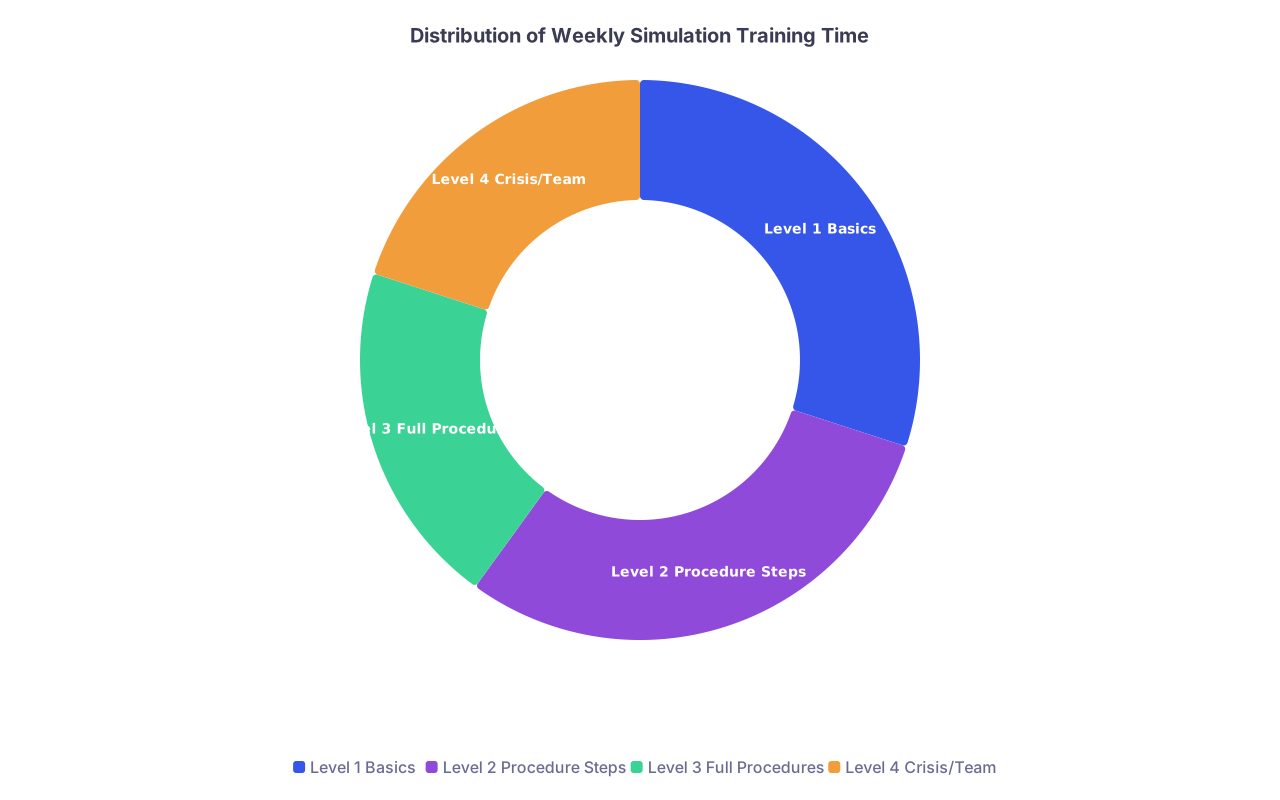
| Category | Value |
|---|---|
| Level 1 Basics | 30 |
| Level 2 Procedure Steps | 30 |
| Level 3 Full Procedures | 20 |
| Level 4 Crisis/Team | 20 |
Key rules:
- Schedule it like a case. Put it on your calendar.
- Protect it from “optional” cancellations (unless there is an actual emergency).
- Always know before you start: “What am I trying to improve in this session?”
6. Measuring Progress So You Know Simulation Is Not Just Entertainment
If all you do is “play” on a simulator, you may feel better but you will not be better.
You need objective metrics, and you need to review them.
Metrics that matter:
- Time to complete a standardized task (peg transfer, pattern cut, single suture).
- Error counts:
- Tissue injuries.
- Instruments out of view.
- Dropped objects.
- Incorrect sequence of steps.
- Economy of motion (if VR provides this: path length, number of movements).
- Checklists for procedure steps (completed/not completed, done in correct order).
Build a simple tracking sheet with:
- Date.
- Task.
- Time.
- Errors (count).
- Self‑rating of performance quality (1–5).
If your times improve but errors explode, you are training speed at the cost of safety. That is not what you want.
7. Integrating Simulation Gains Back Into the OR
Simulation is not the point. The OR is the point.
Most residents fail at the handoff—they do sim work in a vacuum and never cash it in.
Here is how to fix that.
Before the Case
- Identify 1–2 steps you have rehearsed in simulation that you want to do in the real case.
- Tell your attending the day before or morning of:
- “I have been working on intracorporeal suturing in the sim lab; I would like to close the enterotomy today if appropriate.”
- “I have done 20 simulated Calot dissections; can I take first pass at dissection if the anatomy looks straightforward?”
This does two things:
- It signals preparation and seriousness.
- It gives the attending a specific, bounded task to hand to you.
Attending surgeons are more comfortable letting someone operate if they trust that person has been deliberate about training.
During the Case
- Verbally preview your plan: “I will start by retracting the fundus toward the shoulder, then take down the peritoneum over Calot from lateral to medial.”
- Execute exactly as rehearsed. Same hand positions. Same sequence.
- Ask for feedback on one thing: “How was my plane selection?” Not “How did I do?”
After the Case
- Write down what deviated from your “simulation script.”
- If there was a complication or near‑miss, recreate that scenario in the sim lab within a week.
This closes the loop and converts real experience into simulated repetition.
8. What Programs and Departments Should Do (If You Have Any Influence)
I will be blunt. If your department thinks “one skills day per year” meets the bar for simulation, they are behind.
At the program level, you want:
- Standardized simulation curriculum mapped to PGY level and milestones.
- Required minimum simulation encounters per rotation (not just optional access).
- Faculty time protected to run sims and debrief.
- Structured remediation pathways:
- Residents with low operative numbers or poor evaluations get intensive simulation blocks with specific targets.
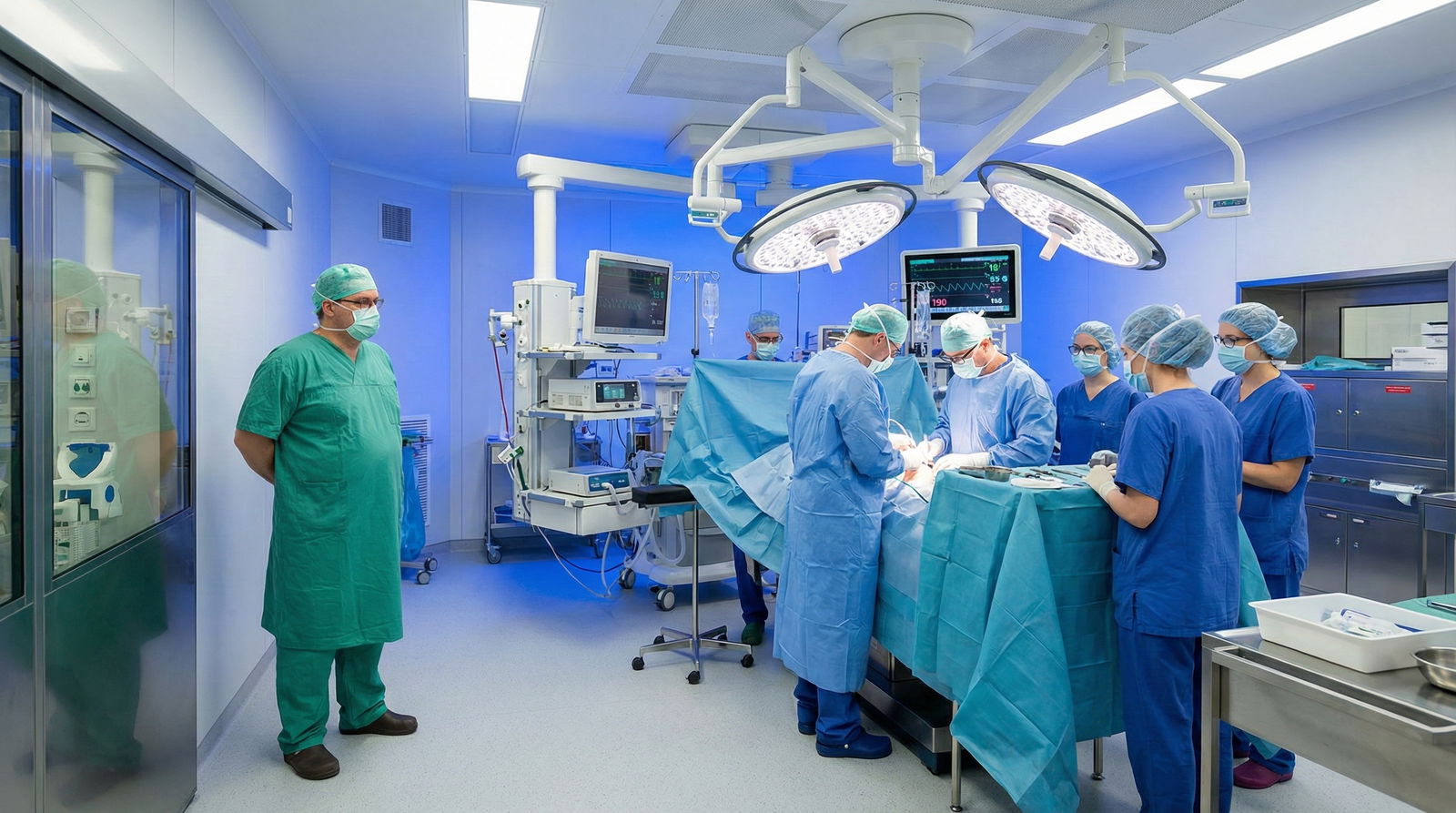
Departments under financial pressure often cut simulation first. That is short‑sighted. Simulation is the only safe way to:
- Evaluate technical skills objectively.
- Provide exposure to rare but critical events.
- Standardize training despite random case assignments.
If you are a chief or faculty member, push for:
- Linking simulation performance to progression decisions.
- Using sim data in Clinical Competency Committee decisions.
- Making simulation labs accessible 24/7, not locked behind bureaucracy.
9. Pitfalls That Make Simulation Useless (Or Worse Than Useless)
You can absolutely waste years in a sim lab and come out mediocre. I have seen it.
Common screw‑ups:
- No deliberate goal. You “go play with the robot” without deciding what you are training (e.g., wristed suturing on posterior plane).
- No feedback. You practice the same bad habit 200 times and engrain it.
- Heroics without basics. You jump into full procedure VR without ever mastering basic tasks.
- Simulation as performance. You only show up for evaluative sessions to impress people, not for private, ugly practice.
- Treating metrics as a game. You chase time scores by sacrificing precision, making yourself faster but sloppier.
Avoid these and simulation becomes a force multiplier instead of a time sink.
10. Future Direction: AI, Adaptive Sim, and What You Should Actually Care About
There is a lot of buzz: haptics, AI tutors, immersive VR ORs. Most of it is noise unless it does one of three things:
- Provides better metrics (e.g., instrument path analysis, error detection).
- Adapts difficulty to your performance to keep you in the challenge zone.
- Integrates with real case data to match what you are actually doing clinically.
Expect:
- Sim platforms that can ingest anonymized OR video and compare your performance to expert templates.
- Adaptive scenarios that escalate complexity as you improve.
- Real‑time AI coaching (“rotate your wrist here,” “reduce unnecessary instrument swaps”).
Until then, do not wait for the perfect tech. Residents have become very good surgeons using cheap box trainers and basic task models. High tech is nice. High frequency and high intent matter more.
Three Things To Remember
- You cannot read your way out of low operative volume. You must move your hands—deliberately, repeatedly, and with feedback.
- A structured, multi‑level simulation plan (basics, procedure components, full cases, crisis/team) can partially close the volume gap if you track metrics and integrate gains back into the OR.
- The residents who own their simulation training—schedule it, measure it, ask for specific OR steps—graduate competent despite system constraints. The ones who wait for the program to fix it do not.