The worst-kept secret in surgical training is this: most residents are under-logging their cases, and many will not realize how bad it is until it is almost too late.
If you are reading this, you are probably already behind. That is fixable. But only if you stop hand-waving and start using a systematic approach. You do not need “motivation.” You need a protocol.
Below is exactly that: a practical, stepwise checklist to rebuild an incomplete surgical case log before it hurts your graduation, board eligibility, or fellowship applications.
1. Get Clear On Your Actual Risk
Before you fix anything, you need to know how bad the problem is. Not vibes. Numbers.
Step 1: Pull your current official data
Do this today, not “when I get a minute.”
- Log into your official case log system
- ACGME Case Log (general surgery, ortho, etc.)
- ABOG/ABOto/ABO/ABO-HNS logging tools
- Specialty-specific portal (e.g., Ophthalmology’s AOC, vascular’s VQI-based logs, etc.)
- Export your cases:
- Time range: from the start of residency (or the earliest available) through today
- Include: date, CPT or procedure type, role (surgeon, first assist, teaching assistant), service/rotation
If the system has a dashboard that compares you to minimums or national medians, screenshot it. Multiple times if you rotate at different sites.
Step 2: Compare against your year and specialty targets
You need three numbers:
- Program/specialty minimums for graduation
- Board/ACGME minimums for certification
- Where you should be today in training to stay on pace
If you do not know them, ask your program coordinator or PD directly. Not in vague terms—ask for exact target numbers and breakdowns.
Use a quick comparison structure like this:
| Metric | Target | Current | Gap |
|---|---|---|---|
| Total Major Cases | 850 | 490 | -360 |
| Laparoscopic Cholecystectomy | 85 | 38 | -47 |
| Endoscopy (EGD + colon) | 140 | 62 | -78 |
| Chief Year Cases | 150 | 28 | -122 |
Once you see the gaps, stop telling yourself “it is probably fine.” You either have a logging problem, an exposure problem, or both.
- If you know you have been operating a lot → you have a logging problem
- If you have not been operating much → you have a training exposure problem (different issue)
This article focuses on the first group: under-logged, not under-trained.
2. Rebuild Your Case History: A Backward Timeline
You will not reconstruct everything perfectly. The goal is adequate and honest reconstruction, not fantasy numbers.
Step 1: Start with the easiest 6–12 months
You remember the recent cases better. You also have more accessible data.
Sources to pull:
- OR schedules (electronic or printed PDFs)
- EHR operative notes (search by your name as assistant/surgeon)
- Anesthesia records (if your system allows searching by provider)
- Daily assignment emails (“Tomorrow’s OR schedule” emails are gold)
- Old personal calendars (Outlook, Google Calendar, call calendars)
- Text threads and group chats (“You can take my lap appy if you cover my call”)
Process:
- Pick a time window: “Last 6 months”
- For each week:
- Pull OR schedule
- Mark cases where you know you scrubbed
- Cross-reference with op notes to verify role
- Log these in bulk, even if the details are not perfect (but honest)
Use this mental rule: if you distinctly remember being scrubbed from incision to closure or performing critical portions, it is loggable. If you vaguely recall “being in the room” but basically observing, do not stretch it.
Step 2: Extend backward month by month
After that first 6–12 month block, keep going back in time in chunks:
- PGY2…PGY1
- Intern year OR blocks
- Early specialty rotations
Older data will feel fuzzier. That is where hard data beats memory.
3. Use Every Data Source You Actually Have
Most residents do not realize how many digital footprints their cases leave behind.
Core data sources
EHR Operative Reports
- Search by:
- Your name in the “assistant” or “surgeon” field
- Attending names you worked with often
- Specific procedures (e.g., “laparoscopic appendectomy”)
- Filter by date ranges that line up with your rotations
- Search by:
OR Board / Scheduling Systems
- Cerner board exports
- Epic OpTime schedule reports
- Standalone OR scheduling software
- Ask OR clerk or service line coordinator for:
- “List of cases for Dr. X’s service for months A–B with assistants listed”
Resident assignment emails
- Search your inbox for:
- “OR schedule,” “assignment,” “tomorrow’s schedule,” “pod call”
- Reconstruct each day’s room:
- Room 12 – Lap chole, hernia, appy – You were assigned there all day
- Search your inbox for:
-
- Some services can pull monthly CPT lists where you are attached as assistant
- These can be exported as spreadsheets for quick filtering
Paper artifacts
- Old sign-out sheets with case lists
- Attendings’ printed block schedules with your name scribbled in
- Your old pocket cards with rough notes (“2 appy, 1 lap chole with Dr. K”)
How to handle missing details honestly
You will often know “I did an appy with Dr. J around that time” but not the exact date. Here is how to fix that without cheating:
- Use the OR schedule to find a plausible matching case with that attending on that service in that month.
- Confirm via op note that:
- Patient roughly matches what you remember (age/diagnosis)
- The case was not cancelled or converted to something completely different
- Log it with that specific date only if:
- There is a clear, honest benefit of the doubt that you were the listed assistant
If you cannot reasonably anchor it to a specific patient/date, do not invent one. You are rebuilding, not rewriting history.
4. Create a Case Reconstruction Workflow (So You Do Not Go Insane)
If you try to fix years of under-logging in one weekend, you will burn out and quit. You need a workflow, like a QI project.

| Step | Description |
|---|---|
| Step 1 | Pull Current Case Log |
| Step 2 | Define Target Numbers |
| Step 3 | Gather Data Sources |
| Step 4 | Reconstruct Last 6 Months |
| Step 5 | Extend Backward by Rotation |
| Step 6 | Spot Check With Attending |
| Step 7 | Set Weekly Logging Routine |
Step 1: Chunk your work
Break reconstruction into discrete, finishable blocks:
- Block 1: Last 3 months on home general surgery service
- Block 2: Last 3 months subspecialty (e.g., colorectal, MIS)
- Block 3: Prior 6 months trauma/acute care
- Block 4: Earlier years during high-OR rotations
- Block 5: Early “low recall” period (intern, off-service)
Each block gets a specific 1–2 hour session. Put it on your calendar just like call.
Step 2: Use a temporary spreadsheet before final logging
Do not enter directly into ACGME/board systems during reconstruction. That is a great way to lose track and duplicate.
Instead:
- Build a simple spreadsheet with columns:
- Date
- Attending
- Procedure type (free text + CPT later if you need)
- Role
- Site / hospital
- Source (OR schedule, op note, email)
- For each session, fill this sheet first
- After each block is complete, transfer to the official log in a single sitting
This keeps your official log cleaner and lets you catch duplicates.
Step 3: Avoid double-counting and fantasy inflation
Common cheats I have seen (and that will bite you):
- Logging the same case twice because it shows up in different systems
- Logging cases where you scrubbed for ten minutes then left
- Logging every colonoscopy on the list when you only scoped two
Your sanity check: could you defend that entry to your PD, your board, and the patient if they were in the room? If not, leave it out.
5. Attending and Program Director Involvement: Use Them
You are not the first resident to under-log. Program leaders have seen this movie.
Step 1: Be direct with your PD or APD
Say something like:
“I realized my case log is substantially under-reported, especially for the last 18–24 months. I am reconstructing it from OR schedules and op notes and want to make sure I do this in a way that is accurate and acceptable to the program and ACGME. Can I review my plan with you?”
This does three things:
- Shows insight and honesty
- Brings them in as an ally
- Protects you if some numbers look like a late surge
Step 2: Ask attendings to sanity-check specific blocks
You do not need every case personally validated. You need a few targeted checks.
- Pick 2–3 attendings you worked with most
- Bring them short summaries:
- “From July–September on your service, I reconstructed 46 cases with you as attending, breakdown: 18 lap chole, 7 appy, 9 hernia, etc. Does that volume and mix match your recollection of my time with you?”
- If they say, “That seems high” → adjust down
- If they say, “That is about right or maybe a little low” → you are fine
Document these conversations in a short email afterward:
“Thanks for reviewing my reconstructed case list for July–September. As discussed, the volume and mix appear consistent with your recollection…”
6. Fix Your System So You Never End Up Here Again
Rebuilding is painful. Use that pain to build a bulletproof forward process.
Step 1: Set a non-negotiable logging rhythm
Daily is ideal. Weekly is acceptable. Monthly is fantasy.
Minimum viable system:
- Trigger: End of each OR day or post-call morning
- Action: Open case log while you still remember:
- Case sequence
- Your real role
- Details like emergent vs elective, approach, etc.
If your system allows mobile logging, use it. I have seen residents log cases between ORs while eating a granola bar. Those are the ones who are never surprised at the end.
Step 2: Use templates and smart defaults
If your case log tool supports:
- Favorite procedures
- Common attending-procedure pairs
- Default hospital/site
Set these up so logging a standard “lap appy with Dr. S at main campus” takes 15 seconds, not 2 minutes.
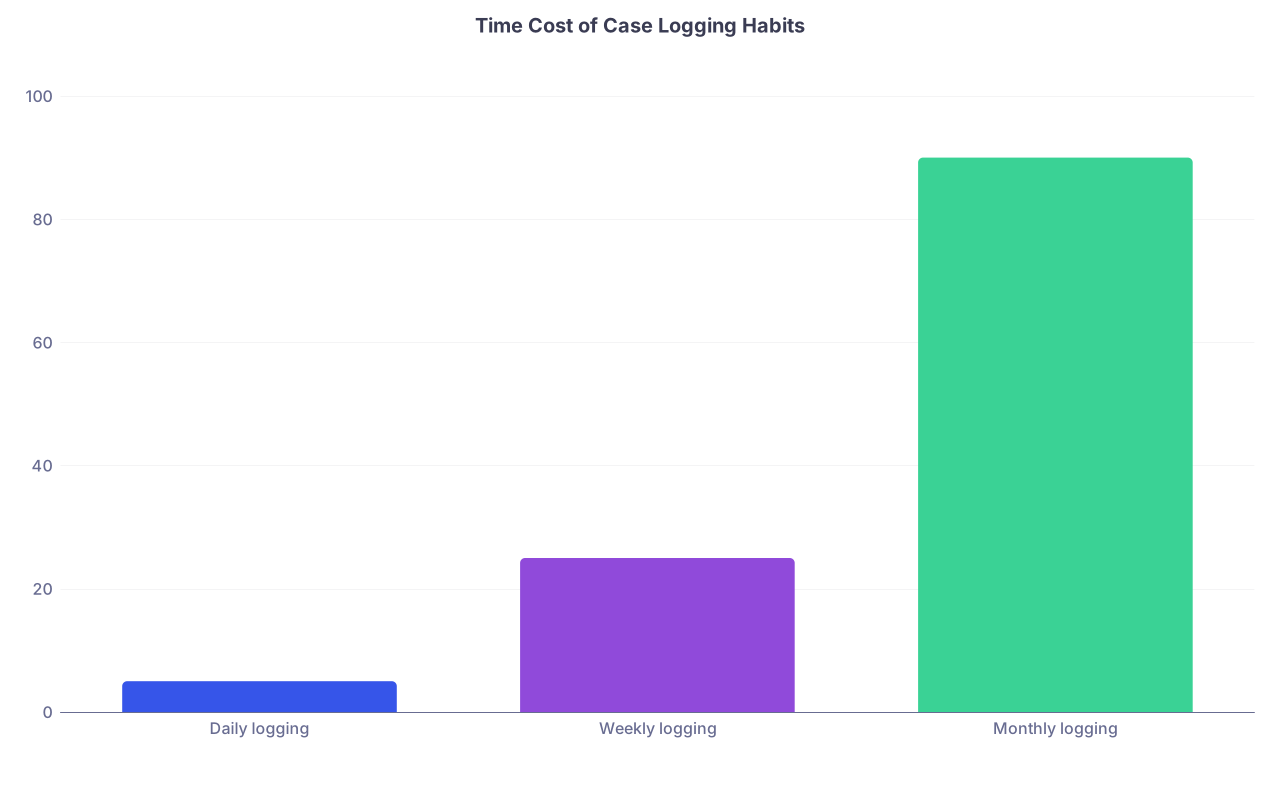
| Category | Value |
|---|---|
| Daily logging | 5 |
| Weekly logging | 25 |
| Monthly logging | 90 |
Interpretation: the further you wait, the more time and pain per month.
Step 3: Quarterly reality checks
Every 3 months, you should:
- Export your case log
- Compare to:
- Expected numbers for your PGY level
- Prior quarter (is your volume going up, down, sideways?)
- Bring it to your semi-annual evaluation and ask specifically:
- “Am I on track for case volume in [core procedure categories]?”
If the PD or CCC has concerns, you want to know at month 6, not month 60.
7. When Under-Logging Exposed a Real Volume Problem
Sometimes, once you reconstruct honestly, you realize the ugly truth: it was not only logging. You legitimately did not get enough reps in certain areas.
That is a different problem—and still fixable if you address it early.
Step 1: Identify true exposure gaps
Look for:
- Very low numbers in essential index cases:
- For general surgery: lap chole, appy, hernia, bowel resections, endoscopy
- For ortho: arthroscopies, fractures, arthroplasties
- For OB/GYN: C-sections, hysterectomies, operative vaginal deliveries
- Chief-level cases that are far under target
Separate:
- “I know I did plenty but never logged” → documentation issue
- “I truly have not done enough of these” → training issue
Step 2: Negotiate targeted rotations or case assignments
With hard numbers in hand, talk to your PD:
- “My reconstructed log shows I am 30 lap choles and 40 scopes under target. I would like to build a plan:
- More time on acute care
- Specific endoscopy block
- Prioritized primary-surgeon assignment on these procedures when possible.”
Most reasonable programs will bend over backward to fix truly deficient exposure once it is clearly documented and you show initiative.
8. Special Situations and Edge Cases
Some of you are dealing with more complicated messes than “I was lazy.”
Scenario 1: Changed hospitals / EMR systems
If you switched systems mid-residency:
- Ask IT or medical records for a:
- “List of all operative reports where I am listed as assistant or surgeon, for dates X–Y”
- If they say no, escalate through PD or DIO
- Be prepared for a CSV dump that is ugly but usable
Scenario 2: You were told “we log for you”
This happens with some subspecialty services or fellowship-like rotations.
- Verify: contact the coordinator or fellow:
- “Can you confirm whether your service has been logging cases on my behalf into [system]? If so, can I get an export to reconcile with my main log?”
- If they never did it or it is incomplete, you go back to the reconstruction workflow above.
Scenario 3: You are within 3–6 months of graduation
Now it is time-critical.
- Drop everything and:
- Reconstruct as much as possible for the last 24–36 months
- Get PD, APD, or program coordinator looped in immediately
- Ask explicitly:
- “Given these reconstructed numbers and remaining time, can I still meet ACGME/board requirements? What concrete rotations or schedule shifts do we need?”
- Document everything. Email summaries of:
- Reconstructed counts
- PD’s guidance
- Any agreed-on remediation plan
If graduation is clearly not possible on time because of volume, you want that plan in writing with institutional support, not vague promises.
9. A Brief Reality Check on Honesty and Risk
You are going to be tempted to “round up” aggressively. Everyone does. That is where people get into trouble.
Understand the stakes:
- ACGME and boards assume truthful attestation of case logs
- Serious discrepancies discovered later (chart audits, peer complaints, board investigations) can:
- Delay or revoke board certification
- Trigger formal investigations
- Damage your reputation permanently
You do not need to be perfect. You do need to be honest. Conservative but accurate numbers plus a clear remediation plan are far safer than inflated fantasy numbers that cannot withstand scrutiny.
10. Quick Practical Checklist: Rebuilding Your Case Log
If you remember nothing else, use this as your operational checklist.
Today (or this week):
- Export your current official case log.
- Get your target numbers from PD/coordinator.
- Make a simple “gap table” for total and key procedures.
- Build a reconstruction spreadsheet with basic columns.
- Block 1 hour to reconstruct the last 4–6 weeks from OR schedules and op notes.
Over the next 2–4 weeks:
- Work backwards by rotation, in 1–2 hour sessions.
- Use all data sources: OR board, emails, EHR op notes.
- Avoid double-counting; log only cases where you truly participated.
- Periodically transfer batches into your official case log.
- Meet with your PD to review progress and confirm you are on an acceptable path.
Going forward:
- Log cases daily or at worst weekly.
- Run a quarterly export and compare to expected milestones.
- Address real volume gaps early by negotiating rotations or targeted case exposure.
This is how you stop being the resident who “hopes” they are on track and become the one who actually knows.
FAQ
1. What if I truly cannot remember many early-year cases—should I estimate?
No. Do not estimate counts without anchoring to real data. Use early-year OR schedules and op notes as your primary sources. If you cannot tie a case to a specific op note and your name is not clearly documented as assistant or surgeon, leave it out. You are better off under-logging the distant past and compensating with higher volume and rigorous logging now than fabricating numbers.
2. How many cases can I log from a single multi-procedure operation?
Follow your specialty and ACGME/board rules. Commonly, different major components with separate CPT codes can be logged as distinct cases (e.g., lap chole plus intra-op cholangiogram may count as one or two depending on rules; combined colon resection and hernia repair may be logged separately). When in doubt, check your program’s case logging guide or ask your PD or program coordinator. Never inflate by splitting trivial subcomponents that clearly should not count as separate operations.
3. Can I get in trouble for reconstructing and back-entering a large number of cases at once?
You can get in trouble for making things up, not for delayed honest entry. Large backlogs look suspicious if they are obviously inflated or inconsistent with rotation exposure. That is why you should:
- Use documented sources (OR schedules, op notes)
- Involve your PD early
- Be conservative where memory is weak
- Keep an audit trail (your reconstruction spreadsheet and emails)
If someone ever questions your sudden case log increase, you will have a clear, rational explanation and supporting data.