
Most students are terrified of biostatistics on Step 1 for the wrong reasons.
The math is easy. The traps are not. Step 1 biostats is about precision under pressure, not calculus-level brainpower.
If you can add, subtract, multiply, divide, and keep your units straight, you can crush this section. But you need a very specific toolkit of core calculations and a way to execute them fast and reliably when your brain is fried from renal physiology.
Let me walk through the biostatistics calculations that actually show up, the forms they take on questions, and the stupid little mistakes that cost people points every single year.
1. The 2×2 Table: Your Home Base
Every serious biostats calculation for Step 1 hangs off one thing: the 2×2 table. If you cannot set this up in 10 seconds flat, everything else becomes shaky.
You will see screening test questions, association questions, and risk ratio/odds ratio problems that all reduce to the same grid.
Here is the master template; you should be able to draw this in your sleep:
| Disease + | Disease - | Total | |
|---|---|---|---|
| Test + / Exposed | a | b | a + b |
| Test - / Unexposed | c | d | c + d |
| Total | a + c | b + d | a + b + c + d |
Memorize the letters with meaning, not as random symbols:
- a = true positive (TP) or exposed + disease
- b = false positive (FP) or exposed + no disease
- c = false negative (FN) or unexposed + disease
- d = true negative (TN) or unexposed + no disease
If you change the rows to “Smokers / Nonsmokers” or “Drug / Placebo” and the columns to “Cancer / No cancer” or “Improved / Not improved,” it is the same structure.
Classic trap: mislabeling the table
Question writers love this move:
- They say “Exposure” in the rows and “Outcome” in the columns in the text, but the table is drawn with outcome on rows, exposure on columns.
- Or they give you percentages in a weird way (“20% of the exposed group developed disease”) and you must reverse-engineer the counts.
You absolutely must:
- Decide what goes on rows (exposed vs not)
- Decide what goes on columns (disease vs not)
- Fill a, b, c, d explicitly before doing any math
That 5–10 seconds of setup prevents half the errors.
2. Screening Test Performance: Sensitivity, Specificity, Predictive Values, Likelihood Ratios
Screening test questions are bread-and-butter Step 1 biostats. The equations are simple; the examiners are testing whether you remember which fraction is which and whether you think about prevalence.
2.1 Sensitivity and specificity
Core definitions:
- Sensitivity: “Of all people who actually have the disease, how many tested positive?”
- Specificity: “Of all people who do not have the disease, how many tested negative?”
Mathematically (from the 2×2):
- Sensitivity = a / (a + c) = TP / (TP + FN)
- Specificity = d / (b + d) = TN / (FP + TN)
Mnemonic that actually works:
- “SNOUT”: Highly SeNsitive test, when Negative, rules OUT disease
- “SPIN”: Highly SPecific test, when Positive, rules IN disease
But do not just memorize that. Know why:
- High sensitivity → few false negatives → a negative result is reliable for excluding
- High specificity → few false positives → a positive result is reliable for confirming
Exam-style calculation:
A new test is performed on 200 patients, 80 with disease, 120 without. The test is positive in 72 of those with disease and 12 of those without.
Build the table:
- Among diseased (80): 72 positive → a = 72; so c = 8
- Among non-diseased (120): 12 positive → b = 12; so d = 108
Sensitivity = 72 / (72 + 8) = 72 / 80 = 0.90 (90%)
Specificity = 108 / (12 + 108) = 108 / 120 = 0.90 (90%)
This is the pattern you will repeatedly see.
2.2 Positive and negative predictive value (PPV, NPV)
Key point: PPV and NPV are about the patient in front of you, not the test itself. They depend heavily on prevalence.
Definitions:
- PPV: “Given a positive test, what is the probability the patient actually has the disease?”
- NPV: “Given a negative test, what is the probability the patient truly does not have the disease?”
From 2×2:
- PPV = a / (a + b) = TP / (TP + FP)
- NPV = d / (c + d) = TN / (FN + TN)
The denominator changes:
Sensitivity/specificity → denominator = all who truly have or do not have disease
PPV/NPV → denominator = all who tested positive or negative
Classic Step 1 conceptual questions:
- “As disease prevalence increases, what happens to PPV and NPV?”
- PPV increases, NPV decreases.
- “As disease prevalence decreases?”
- PPV decreases, NPV increases.
They love giving you a screening test used in low-risk vs high-risk populations and asking which value changes. Sensitivity and specificity stay the same if the test is unchanged; PPV and NPV move with prevalence.
2.3 Likelihood ratios (LR+ and LR−)
These look fancy but are mechanically straightforward and very testable.
Formulas:
- LR+ = Sensitivity / (1 − Specificity) = [TP / (TP + FN)] ÷ [FP / (FP + TN)]
- LR− = (1 − Sensitivity) / Specificity = [FN / (TP + FN)] ÷ [TN / (FP + TN)]
Meaning:
- LR+ tells you how much a positive test result increases the odds of disease
- LR− tells you how much a negative test decreases the odds
Key mental anchors:
- LR+ > 10 → strong evidence to rule in disease
- LR− < 0.1 → strong evidence to rule out disease
- LR ~ 1 → useless test
Step 1 may directly ask you to calculate LR+, or they may ask a conceptual question: “Which test characteristic is least affected by disease prevalence?” Candidates: sensitivity, specificity, PPV, NPV, LR+ → answer: sensitivity, specificity, AND likelihood ratios are independent of prevalence.
They also like the “which test would be best to confirm the diagnosis?” style. High specificity and high LR+ are what they are after.
3. Disease Frequency: Risk, Rate, Prevalence, Incidence
Most scoring mistakes here are about mixing risk and rate, or mixing prevalence and incidence. The math itself is trivial division.
3.1 Incidence vs prevalence
Definitions you must have word-perfect:
- Incidence: new cases per population at risk over a specified time
- Prevalence: existing cases (new + old) at a given point or period / total population
Formulas:
- Incidence = (# of new cases) / (population at risk during that time)
- Prevalence = (# of existing cases) / (total population)
Step 1 will give you data like:
“Over 1 year, 40 new cases of disease X occur in a town of 10,000 people. At the end of the year, there are a total of 100 people living with disease X in the town.”
- Incidence = 40 / 10,000 = 0.004 = 4 per 1,000 per year
- Point prevalence at year-end = 100 / 10,000 = 0.01 = 1%
They may dress it up with person-years, but the core remains: new vs existing.
Conceptual anchor:
If incidence is stable but patients live longer with the disease (lower mortality, better treatment), prevalence goes up. That pattern is tested relentlessly.
The quick relation in chronic stable disease:
Prevalence ≈ Incidence × Disease duration
Not a hard formula but conceptually what they want.
3.2 Risk vs rate
You will see:
- Risk (cumulative incidence): probability that an individual will develop disease over a defined period.
- Example: “5-year risk of myocardial infarction is 10%.”
- Rate (incidence rate): cases per person-time.
- Example: “5 cases per 1000 person-years.”
Risk is dimensionless probability, rate has time in denominator.
They can give you:
“40 new cases over 20,000 person-years.”
→ Incidence rate = 40 / 20,000 = 2 per 1,000 person-years.
You rarely have to do more than that, but you need to not mix up what they are asking.
4. Measures of Association: Relative Risk, Odds Ratio, Attributable Risk
This is where people start making algebra errors they absolutely do not need to make.
Again, go back to the 2×2 with exposed/non-exposed and disease/no disease.
4.1 Relative risk (RR)
Used for: cohort studies, clinical trials. You start from exposure and follow forward to outcome.
Formula:
- Risk in exposed = a / (a + b)
- Risk in unexposed = c / (c + d)
- Relative risk (RR) = [a / (a + b)] / [c / (c + d)]
Interpretation:
- RR = 1 → no association
- RR > 1 → exposure associated with increased risk (possible risk factor)
- RR < 1 → exposure associated with decreased risk (possible protective factor)
Step 1 style example:
“Among 1000 smokers, lung cancer develops in 90. Among 2000 nonsmokers, lung cancer develops in 30.”
Table:
- Exposed (smokers): a = 90, b = 910 → risk = 90 / 1000 = 0.09
- Unexposed: c = 30, d = 1970 → risk = 30 / 2000 = 0.015
RR = 0.09 / 0.015 = 6.0
Interpretation: Smokers have six times the risk of lung cancer compared to nonsmokers.
If they ask for “percentage increase in risk”:
( RR − 1 ) × 100% = (6 − 1) × 100% = 500% increased risk.
This is a typical exam trap—RR vs percent increase.
4.2 Odds ratio (OR)
Used for: case-control studies. You start with diseased vs non-diseased and look backward to exposure history.
From the 2×2:
- Odds of exposure in cases = a / c
- Odds of exposure in controls = b / d
- Odds ratio (OR) = (a / c) / (b / d) = ad / bc
That cross-product formula ad / bc should be automatic.
Example:
“Among 100 patients with myocardial infarction (MI), 60 have a history of hypertension. Among 100 community controls without MI, 30 have a history of hypertension.”
Table:
- Disease (MI): a = 60 (exposed), c = 40 (unexposed)
- No disease: b = 30 (exposed), d = 70 (unexposed)
OR = (60 × 70) / (30 × 40) = 4200 / 1200 = 3.5
Interpretation: Odds of prior hypertension are 3.5 times higher in MI patients than controls.
Important conceptual link:
When disease is rare (low prevalence), OR approximates RR. They love to state “rare disease” and expect you to treat OR ≈ RR for interpretation.
4.3 Attributable risk and related measures
Now we talk about how much of the risk can be “blamed” on the exposure.
From the 2×2:
- Risk in exposed = a / (a + b)
- Risk in unexposed = c / (c + d)
Formulas:
- Attributable risk (AR) = Risk_exposed − Risk_unexposed
- Attributable risk percent (ARP, in exposed) = (AR / Risk_exposed) × 100
= [(Risk_exposed − Risk_unexposed) / Risk_exposed] × 100 - Population attributable risk (PAR) requires prevalence of exposure in population; Step 1 touches this only lightly.
Using the smoking example again:
- Risk_exposed = 0.09
- Risk_unexposed = 0.015
- AR = 0.09 − 0.015 = 0.075 (7.5% absolute risk difference)
ARP = (0.075 / 0.09) × 100 ≈ 83%
Interpretation: 83% of lung cancer risk in smokers can be attributed to smoking.
If they ask population AR, they may give: “30% of the population are smokers.” Then:
- Population risk = (risk in smokers × 0.3) + (risk in nonsmokers × 0.7)
- PAR = Population risk − Risk_unexposed
Mechanically easy; you just cannot panic when they throw a mixture problem at you.
5. Diagnostic Cutoffs, ROC Curves, and Tradeoffs
These questions are half math, half concept.
You must understand what happens when you move the cutoff threshold for a continuous test (like fasting glucose):
- Lower the cutoff (more people labeled “positive”):
- Sensitivity ↑
- Specificity ↓
- False positives ↑, false negatives ↓
- Raise the cutoff (fewer positives):
- Sensitivity ↓
- Specificity ↑
- False positives ↓, false negatives ↑
They may ask: “To use this test as an initial screening tool, what change should be made?”
Answer: Lower the cutoff to maximize sensitivity and minimize false negatives.
ROC curves (receiver operating characteristic) are tested conceptually:
- X-axis: 1 − specificity (false positive rate)
- Y-axis: sensitivity (true positive rate)
- A ‘better’ test has a curve closer to the upper-left corner; area under the curve (AUC) closer to 1.0
You do not need to calculate area. You just need to recognize:
- Curve A above Curve B → A has better overall test performance.
This is usually a “which of the following curves represents the most accurate test?” type question.
6. Risk Reduction, NNT, and NNH
Therapy effectiveness questions always show up, and the math is straightforward.
Again, start from event rates in two groups: “treatment” and “control.”
6.1 Absolute and relative risk reduction
Given:
- Event rate in control (CER) = c / (c + d)
- Event rate in treatment (TER) = a / (a + b)
(Or they might call them “risk in placebo” and “risk in drug.” Labels change, structure does not.)
Formulas:
- Absolute risk reduction (ARR) = CER − TER
- Relative risk (RR) = TER / CER
- Relative risk reduction (RRR) = (CER − TER) / CER = 1 − RR
Example:
Placebo: 20% heart attack rate
Drug: 10% heart attack rate
ARR = 0.20 − 0.10 = 0.10 (10% absolute reduction)
RR = 0.10 / 0.20 = 0.5
RRR = (0.20 − 0.10) / 0.20 = 0.10 / 0.20 = 0.5 (50% relative risk reduction)
Board questions love to give RRR as a marketing trick and ask something like: “The drug company claims a 50% reduction in risk. What is the absolute risk reduction?” And the absolute reduction is only 10%. That contrast is the whole point.
6.2 Number needed to treat and number needed to harm
Once you have ARR, the rest is one division and a ceiling function.
- Number needed to treat (NNT) = 1 / ARR
- Number needed to harm (NNH) = 1 / ARI (absolute risk increase for adverse effect)
Use absolute proportions (0.10, not 10%).
Example from above: ARR = 0.10
NNT = 1 / 0.10 = 10 → need to treat 10 patients to prevent 1 event.
They like fractional ARR:
If ARR = 0.03 (3%), exact NNT = 33.3…
You always round up (worst case): NNT = 34.
Same for NNH: if adverse effect risk goes from 1% to 4%, ARI = 0.03; NNH = 1 / 0.03 ≈ 33.3 → report 34.
Exam trap: mixing ARR and RRR. Only ARR goes into NNT.
7. Hypothesis Testing Numbers: Type I/II Error, Power, Confidence Intervals
The actual multiplication/division is light here, but wording precision is everything.
7.1 Type I and Type II errors
You should know these without hesitation:
- Type I error (α): Concluding there is a difference (rejecting null) when in reality none exists. “False positive.”
- Type II error (β): Concluding there is no difference (failing to reject null) when in fact there is one. “False negative.”
α is usually set to 0.05. This links directly to p-values and confidence intervals.
Power = 1 − β.
- Higher power → less chance of Type II error → better ability to detect a true effect.
Ways to increase power (might be asked conceptually):
- Increase sample size
- Increase effect size
- Decrease data variability (better measurement, more homogeneous groups)
- Use a higher α (but that increases Type I error; tradeoff)
7.2 Confidence intervals (CI)
Core formula logic you need:
For a mean:
CI = mean ± (Z or t) × (standard error)
You do not need to crank this out; the board usually gives you CIs pre-computed. More important is interpretation.
95% CI for a mean difference between groups:
- If CI does not include 0 → difference is statistically significant at α = 0.05 (p < 0.05)
- If CI includes 0 → not statistically significant
For ratios (RR, OR):
- If CI does not include 1 → association is statistically significant
- If CI includes 1 → not significant
Example:
RR = 1.8 with 95% CI 1.2–2.4 → does not include 1 → significant.
RR = 1.8 with 95% CI 0.7–2.9 → includes 1 → not significant.
They also like this flavor: “Which sample size will produce the narrowest confidence interval?”
Answer: The largest sample size.
8. Correlation, Regression, and Basic Scatterplots
The math here is often too heavy for Step 1, so the exam focuses on interpretation.
8.1 Correlation coefficient (r)
Facts to have memorized:
- r ranges from −1.0 to +1.0
- r > 0 → positive linear correlation (as X increases, Y tends to increase)
- r < 0 → negative linear correlation
- |r| closer to 1 → stronger linear relationship
- r = 0 → no linear correlation (could still be non-linear)
Coefficient of determination = r²
- Proportion of variation in Y explained by X.
They can ask:
If r = 0.8 between systolic blood pressure and age in a cohort, r² = 0.64 → 64% of variation in SBP is explained by age.
8.2 Simple regression
Typically you see something like “best-fit line of Y vs X” with slope interpretation:
- Positive slope → as X increases, Y increases
- Negative slope → as X increases, Y decreases
They may ask something more subtle: “Which of the following best describes the variable on the x-axis?”
Answer: The independent or predictor variable.
You will not be expected to compute slope from raw data in Step 1; just interpret.
9. Study Design Terminology That Hides Calculations
The math is not explicit here, but some questions indirectly test whether you understand what can and cannot be calculated from a given design.
Key patterns:
- Cohort study (prospective or retrospective):
- Start with exposure → measure incidence of outcome
- You can calculate risk, relative risk (RR), attributable risk
- Case-control study:
- Start with outcome → look back at exposure
- You cannot calculate risk or RR directly
- You calculate odds ratio (OR) as measure of association
- Cross-sectional study:
- Snapshot at one point in time
- You calculate prevalence, not incidence
If a question describes “100 people with newly diagnosed gastric cancer and 100 matched controls without cancer… previous H. pylori infection recorded,” you should reflexively think “case-control → OR, not RR.”
10. A Quick Visual of How These Bits Fit Together
Sometimes seeing the flow helps people anchor all these pieces.

| Step | Description |
|---|---|
| Step 1 | Question Stem |
| Step 2 | Build 2x2 Table |
| Step 3 | Frequency Measures |
| Step 4 | Treatment Effect |
| Step 5 | Sensitivity/Specificity |
| Step 6 | PPV/NPV |
| Step 7 | LR+/LR- |
| Step 8 | RR / OR / AR |
| Step 9 | ARR / RRR / NNT / NNH |
| Step 10 | Data Type |
| Step 11 | Question asks for... |
And a rough sense of what you are likely to see, topic-wise:
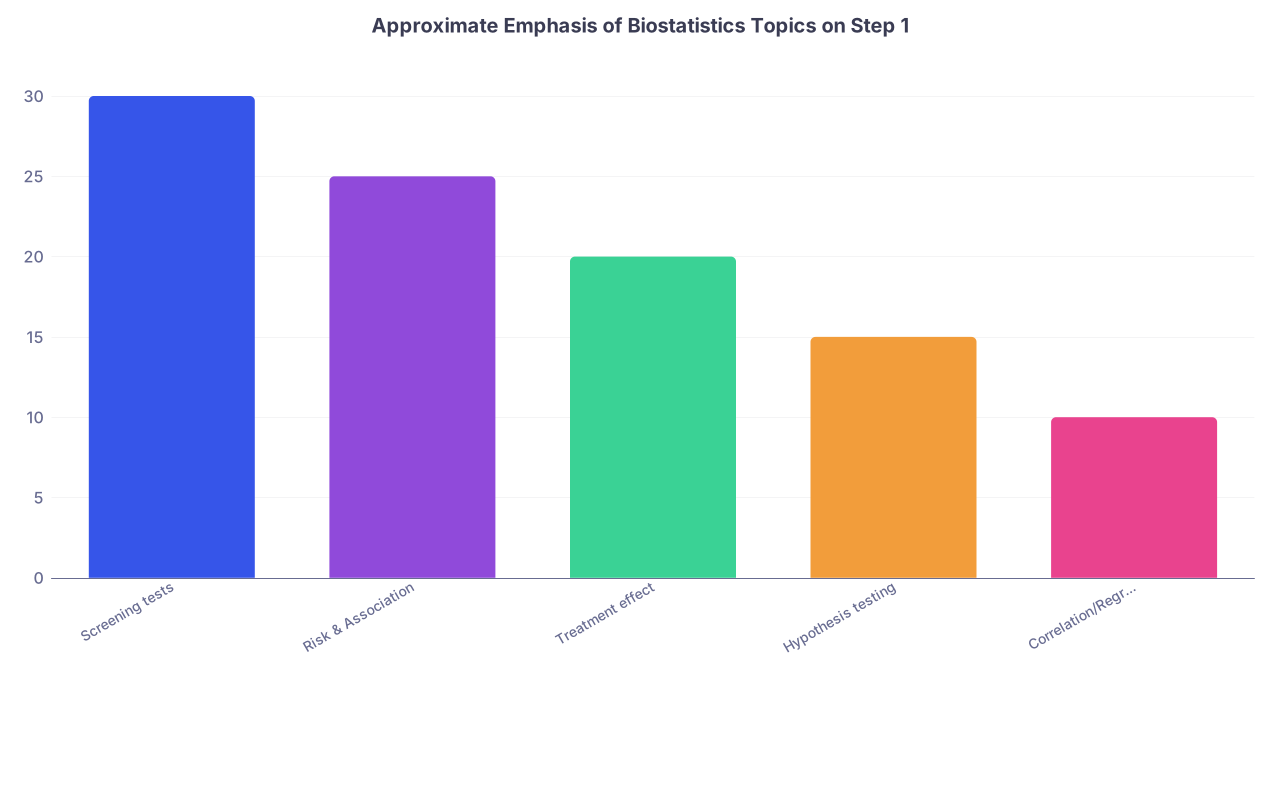
| Category | Value |
|---|---|
| Screening tests | 30 |
| Risk & Association | 25 |
| Treatment effect | 20 |
| Hypothesis testing | 15 |
| Correlation/Regression | 10 |
11. Practical Test-Day Strategy for Biostats Calculations
Let me be concrete about how to execute this on exam day. Because knowing formulas is one thing; doing them at question 235 with a headache is another.
11.1 Always externalize the math
Never try to keep fractions in your head. On your scrap sheet:
- Draw the 2×2 table whenever you see anything about:
- Sensitivity, specificity, PPV, NPV
- Relative risk, odds ratio, attributable risk
- New screening test, exposed vs unexposed, etc.
- Label a, b, c, d explicitly, even if you feel it is slow.
That 15 seconds is repaid in correct answers.
11.2 Round late, not early
If they give you decimals, carry at least 2–3 decimal places until the last step. Many answer choices are very close. If you round each intermediate step aggressively, you can miss the closest answer.
Example:
Risk_exposed = 0.123, Risk_unexposed = 0.087
ARR = 0.123 − 0.087 = 0.036
NNT = 1 / 0.036 ≈ 27.78 → choose 28, not 25 or 30.
11.3 Watch units and “per 1000” wording
If incidence is reported as “4 per 1000 person-years,” and another rate is “8 per 10,000 person-years,” you must normalize to same denominator before comparing.
Quick conversion trick:
- 8 per 10,000 = 0.8 per 1000
So 4 per 1000 vs 0.8 per 1000 → first is higher.
They occasionally build a question around this.
11.4 Know which direction to interpret
Sometimes the question stem is long and the actual ask is purely conceptual:
- “Which quantity changes with disease prevalence?”
- “Which study design cannot estimate incidence?”
- “Which measure is most appropriate for a case-control study?”
Do not jump into math without reading the final sentence.
12. Putting It All Together: A Compact Formula Sheet
You should be able to recreate this sheet from memory the week before the exam.
| Concept | Formula (using a, b, c, d) |
|---|---|
| Sensitivity | a / (a + c) |
| Specificity | d / (b + d) |
| PPV | a / (a + b) |
| NPV | d / (c + d) |
| LR+ | Sens / (1 − Spec) |
| LR− | (1 − Sens) / Spec |
| Risk (exposed) | a / (a + b) |
| Risk (unexposed) | c / (c + d) |
| Relative Risk | [a / (a + b)] / [c / (c + d)] |
| Odds Ratio | (a × d) / (b × c) |
| Attributable Risk | Risk_exposed − Risk_unexposed |
| ARR (therapy) | Risk_control − Risk_treated |
| RRR | ARR / Risk_control |
| NNT / NNH | 1 / ARR or 1 / ARI |
And for incidence/prevalence and basic power concepts:
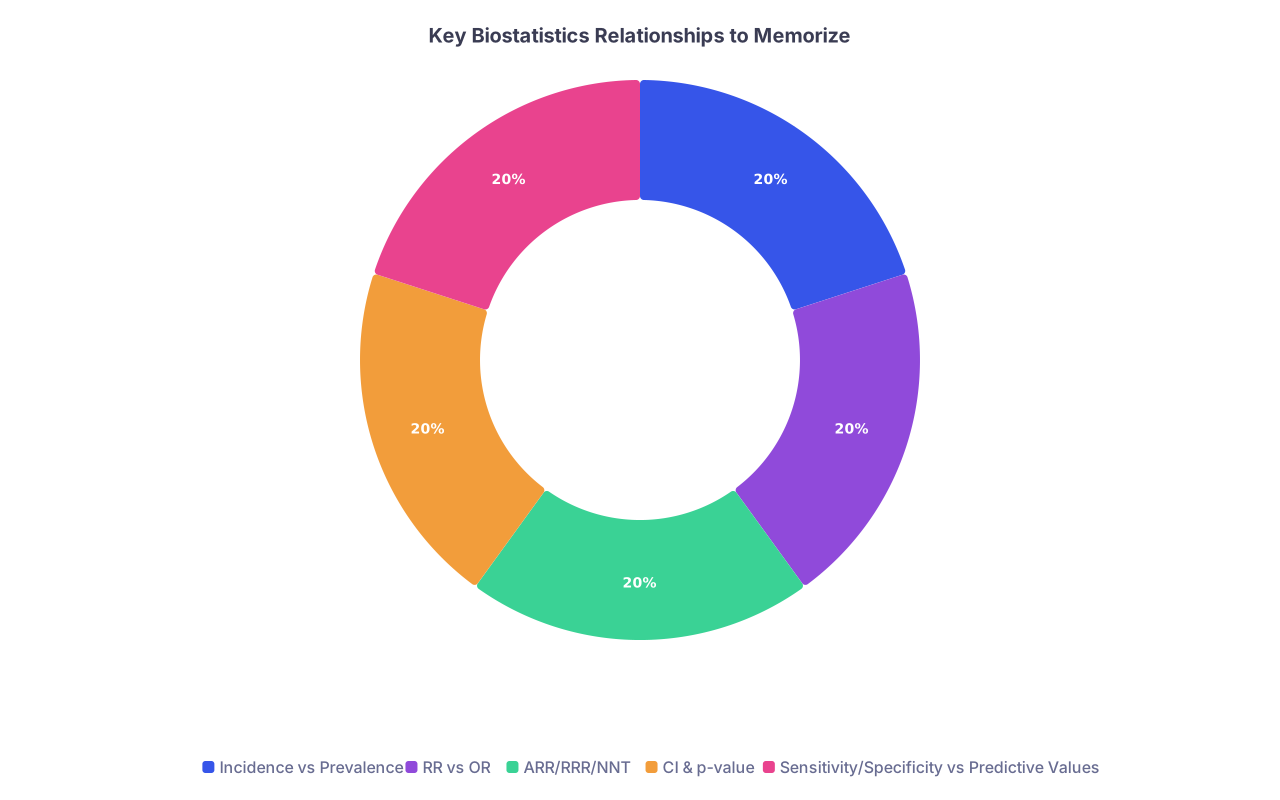
| Category | Value |
|---|---|
| Incidence vs Prevalence | 20 |
| RR vs OR | 20 |
| ARR/RRR/NNT | 20 |
| CI & p-value | 20 |
| Sensitivity/Specificity vs Predictive Values | 20 |
13. How to Practice Biostat Calculations Efficiently
You do not need to spend 50 hours on this. But you do need focused repetitions.
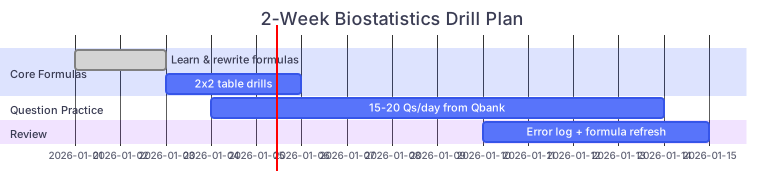
| Task | Details |
|---|---|
| Core Formulas: Learn & rewrite formulas | done, a1, 2026-01-01, 2d |
| Core Formulas: 2x2 table drills | a2, after a1, 3d |
| Question Practice: 15-20 Qs/day from Qbank | a3, 2026-01-04, 10d |
| Review: Error log + formula refresh | a4, 2026-01-10, 5d |
And if you want to sanity-check your progress, keep a tiny log:
| Day | # Biostats Qs | % Correct | Main Error Type |
|---|---|---|---|
| 1 | 15 | 53% | Table setup |
| 4 | 20 | 70% | OR vs RR |
| 7 | 25 | 80% | CI interpretation |
| 10 | 30 | 88% | Minor arithmetic |

Key Takeaways
- Almost every Step 1 biostatistics calculation collapses to a correctly labeled 2×2 table plus a handful of core formulas (sensitivity/specificity, PPV/NPV, RR/OR, ARR/RRR/NNT).
- The math is simple; the exam tests your setup, your understanding of which measure fits which study design, and your conceptual grasp of prevalence, error types, and confidence intervals.
- If you can reliably build the table, keep your denominators straight, and avoid mixing relative vs absolute changes, biostatistics becomes free points rather than a stressor.