The biggest myth about digital health pilots is that you need grant money and a full-stack team to start. You do not. You need focus, constraints, and the discipline to say no to almost everything.
You are not building a product. You are running an experiment. On a student budget. Very different game.
Here is how to design a small-scale digital health pilot that is:
- Ethical
- Feasible with limited money and time
- Credible enough that people will take it seriously
And no, “we built an app and showed it to five friends” does not count as a pilot.
Step 1: Define a ruthlessly narrow problem
Your biggest enemy is scope creep. Students try to “fix physician burnout,” “optimize chronic disease management,” or “make telehealth better.” That is startup theater, not a pilot.
You want a very specific, observable problem in a specific setting.
Use this template:
“In [setting], [defined user group] struggle with [concrete problem] which leads to [measurable consequence]. We will test whether [very simple digital tool] can improve [single metric] over [short time frame].”
Examples that actually work on a student budget:
- “In a student-run free clinic, patients with hypertension often miss follow-up appointments, leading to uncontrolled blood pressure. We will test whether automated SMS reminders can increase follow-up attendance over 8 weeks.”
- “On the inpatient general medicine service, medication reconciliation errors occur during discharge. We will test whether a simple digital checklist (web form) used by interns decreases documented discrepancies over 4 weeks.”
- “In a med school psychiatry clinic, patients on SSRIs frequently miss PHQ-9 assessments. We will test whether a pre-visit digital questionnaire (mobile-friendly survey) increases completion rates over 6 weeks.”
Notice:
- One setting
- One user type
- One problem
- One main outcome
Write your version in 2–3 sentences. If you cannot, you are still at the “idea fog” stage. Fix that before touching any code.
Step 2: Pick an intervention you can actually build
Next mistake: building a full mobile app when a Google Form would do.
On a student budget, your tools are:
- Low-code/no-code platforms
- SMS and email
- Simple web apps
- Basic EHR adjuncts (if your institution allows it)
- Off-the-shelf integrations
If you are not sure what to use, assume you will not get:
- Custom iOS/Android apps in the App Store on time
- Deep EHR integration
- AI anything that touches real patient data
You want the minimum viable intervention (MVI), not a minimum viable product.
Practical options:
SMS-based intervention
- Tools: Twilio, Vonage, or institution-approved messaging platforms
- Example: Daily medication reminders, visit reminders, symptom check-ins
- Why it works: Cheap, no app install, works on basic phones
Survey + feedback loop
- Tools: REDCap, Qualtrics, Google Forms (if acceptable), institutional survey tools
- Example: Pre-visit symptom survey that generates a summary PDF for clinicians
- Low lift: Can be built in days, not months
Web dashboard or micro-tool
- Tools: Glide, Bubble, Retool, or simple HTML/JavaScript
- Example: Simple risk calculator, triage checklist, education resource hub
Workflow support tool
- Tools: Shared spreadsheet, Forms + Sheets + email notifications
- Example: Tracking patients who missed labs and sending standardized follow-up messages
Your constraint: The whole build (including testing) should be doable in 2–4 weeks of part-time work by 1–2 people.
If your idea needs:
- A full front-end and back-end
- Custom API integration with the hospital’s EHR
- Legal review from five departments You are trying to do a product rollout, not a student pilot.
Step 3: Design outcomes that are measurable and realistic
If you say “we will improve patient outcomes,” you have already failed. You will not show mortality reduction with 30 patients over 6 weeks.
Focus on:
Process metrics (what people do)
- Response rate to SMS check-ins
- Completion rate of pre-visit surveys
- Time to complete discharge tasks
Intermediate clinical metrics
- Change in symptom scores (PHQ-9, GAD-7, pain scores)
- Blood pressure control percentage
- HbA1c follow-up status (not actual large shifts)
Satisfaction and usability
- Simple user ratings (1–5)
- SUS (System Usability Scale) score
- “Would you use this again?” yes/no
Make your primary outcome painfully clear:
“Primary outcome: Proportion of scheduled follow-up visits attended in 8 weeks, comparing baseline 8 weeks vs. intervention 8 weeks.”
Or:
“Primary outcome: Percentage of clinic patients completing PHQ-9 prior to provider encounter.”
Do not stack 8 primary outcomes. You get one primary, 1–3 secondary. That is it.
Now pick a time frame:
- 4–12 weeks is realistic for most student pilots
- Anything shorter than 2 weeks gives you noise, not signal
Step 4: Sample size and scope that match your life
You are a student. You have exams. Rotations. A life (hopefully).
Your pilot must fit inside that.
Rough guide for student-scale pilots:
20–40 users if:
- You are testing basic feasibility or usability
- You mainly want to see “can this work at all?”
50–100 users if:
- You want decent descriptive stats
- You hope to show a trend, not publish in NEJM
100–200 users if:
- You have strong operational support
- The data collection burden is low
- You are aiming for a poster or small publication
Do not get fancy with power calculations if this is your first rodeo. But do not pretend n=7 is meaningful for anything beyond “we tried this and it did not explode.”
| Pilot Type | Users Range | Duration |
|---|---|---|
| Usability / feasibility | 15–30 | 2–4 weeks |
| Workflow / process change | 30–80 | 4–8 weeks |
| Clinic-based behavioral | 60–150 | 6–12 weeks |
Start at the low end. It is much better to over-deliver on a small, clean pilot than drown in a monster you cannot manage.
Step 5: Get early buy-in from the right people
Students underestimate politics. That is how pilots die.
You need three categories of allies:
Clinical champion
- Attending, faculty, or senior resident
- Has authority in the setting you want to pilot in (clinic director, rotation lead, etc.)
- Role:
- Blesses the idea
- Helps navigate staff concerns
- Signs off on workflow changes
Operational ally
- Clinic manager, charge nurse, front desk supervisor
- The people who actually run the place day to day
- Role:
- Tells you what is realistic
- Helps change workflows and schedules
- Stops your pilot from being sabotaged by pure inertia
Data / IT / compliance contact
- Someone who understands your institution’s rules
- Could be: research coordinator, IRB staff, IT liaison
- Role:
- Keeps you from violating HIPAA
- Helps with data access and storage issues
Do not show up with a finished solution and say, “We just need a place to test this.” That is backwards. Start with conversations.
Pitch structure for a 10-minute ask:
- “Here is the exact problem we see in your clinic.”
- “Here is a simple, low-risk digital tool we want to test.”
- “Here is how it would affect your staff and patients, step by step.”
- “Here is our plan for ethics, consent, and data privacy.”
- “Here is what you and the clinic get out of it” (better metrics, fewer no-shows, student help, poster with faculty co-authorship, etc.)
- “Here is why this will not create a mess for you.”
If you cannot explain how your pilot changes their day in under 3 minutes, keep refining.
Step 6: Ethics, IRB, and patient safety on a budget
You cannot skip this. I have seen pilots die at the “IRB desk” because students treated it as an afterthought.
Ask yourself:
- Is this research or quality improvement (QI)?
- Research: intended to produce generalizable knowledge, usually needs IRB review
- QI: focused on local improvement, may not require full IRB but often still needs some review or exemption letter
Do not self-declare QI because it is “easier.” Talk to your institution’s IRB office or QI department. Many have a short pre-review form.
Key points you must address:
Risks to participants
- Data privacy
- Emotional distress (if dealing with mental health)
- Clinical safety (if intervention can change care decisions)
Informed consent
- Are you obtaining written consent?
- Is consent implied (e.g., by using a clinic tool that is part of standard care)?
- How will you explain what is happening in plain language?
Data handling
- Where is data stored? (No, not your personal Gmail or Dropbox.)
- Who has access?
- How is data de-identified for analysis?
Cheap but compliant strategies:
- Use institution-approved tools: REDCap, institutional Qualtrics, secure drives
- Use coded IDs instead of names in analysis
- Keep a separate, locked key file for mapping IDs to individuals
If your pilot touches:
- Safety-critical decisions
- Suicidality or crisis pathways
- Medications or dosing You must have a clear escalation and supervision plan. Full stop.
Step 7: Map the workflow before you build anything
Most student pilots fail not because the tech is bad, but because the workflow is stupid.
You want a clear picture of:
- Who does what
- At what moment
- With what tool
- In what order
Draw it. On paper or with a simple diagram tool.
Then refine it with actual clinicians or staff.
Here is a simple way to map a pilot workflow:

| Step | Description |
|---|---|
| Step 1 | Identify Eligible Patients |
| Step 2 | Introduce Pilot and Obtain Consent |
| Step 3 | Enroll and Collect Baseline Data |
| Step 4 | Deliver Digital Intervention |
| Step 5 | Monitor Use and Collect Ongoing Data |
| Step 6 | Collect Outcome Measures |
| Step 7 | Analyze and Share Results |
Now force yourself to answer:
- At 8:05 on a clinic morning, who is actually doing step A?
- How long does step B take, and where does it occur (check-in desk, exam room)?
- What happens when the Wi-Fi is down or the tablet is missing?
- How do you handle patients who do not speak English well, are visually impaired, or do not have smartphones?
If you cannot walk through a real patient scenario without hand-waving, you are not ready.
Step 8: Build the leanest version and test it violently
On a student budget, you do not have QA engineers. So you compensate with structured abuse testing.
Process:
Build a “version 0.5” prototype
- Ugly is fine
- Functionality over design
- Limited features—only what your pilot absolutely needs
Run through 5–10 detailed user journeys
- One as a patient with low tech literacy
- One as a busy clinician between patients
- One as front-desk staff under time pressure
- One as a patient with intermittent connectivity
Act out failures
- SMS never arrives
- Patient enters nonsense responses
- User closes the browser mid-survey
- Timeouts and back button usage
Fix only the critical breaks
- Anything that creates patient risk → fix
- Anything that completely blocks use → fix
- Cosmetic annoyances → maybe later or never
You are not aiming for perfection. You are aiming for “reliable enough that it does not embarrass you in front of your attending or harm patients.”
Step 9: Plan data collection and analysis before launch
Students often decide what to analyze after the pilot. That is backwards.
For each outcome, specify:
Data source
- Manual logs
- Clinic records
- Survey responses
- SMS logs
Collection method
- Automatically recorded (ideal)
- Entered by staff (risk of missing data)
- Entered by you or your team (time-consuming but controlled)
Timing
- Baseline (before intervention)
- During (weekly? per visit?)
- Endline (end of pilot window)
Set up a basic data structure. A simple spreadsheet can work:
Columns:
- Participant ID
- Group (baseline vs intervention period)
- Dates of visits / messages
- Outcome fields (e.g., attended? yes/no, PHQ-9 score, BP value)
- Usability / satisfaction metrics
Then decide your basic analysis plan:
Descriptive stats:
- Means, medians, proportions
- Pre vs. post comparisons
Simple tests (if n is decent):
- Chi-square or Fisher’s exact for categorical
- t-test or nonparametric equivalent for continuous
Do not overcomplicate the stats. A clean descriptive story is often more convincing than tortured p-values from underpowered data.
If statistics scare you, pair with:
- A public health student
- A biostats TA
- A research-oriented resident
Step 10: Run a short pilot-of-the-pilot
Before you go wide, do a “pilot-of-the-pilot” with 3–5 users.
Goals:
- Catch embarrassing problems
- Measure how long each step actually takes
- Get brutal feedback
Ask:
- “Was there any part of this that was confusing?”
- “Where did this get in your way?”
- “If we never did this again, would you miss it?”
For staff:
- “What part of your day did this interfere with?”
- “What would make this take less time or effort?”
- “If this continues beyond the pilot, what would have to change?”
Make 1–2 rounds of small, targeted adjustments. Then lock it. No big feature changes mid-pilot unless you discover a safety issue.
Step 11: Execute with discipline
When you actually start the pilot:
Lock your protocol
- Document procedures
- Who does enrollment
- What scripts are used
- What happens in special cases
Train everyone involved
- 15–30 minute session with staff
- Printed or digital one-page quick guide
- Short demo with real devices
Monitor weekly
- Enrollment numbers
- Usage metrics
- Any complaints or adverse events
- Data completeness
Have a stop rule
- Clear criteria for pausing:
- Repeated technical failures
- Patient safety concerns
- Workflow chaos that staff cannot tolerate
- Clear criteria for pausing:
You are not running a randomized controlled trial. But you are also not doing a casual side project. Treat it like real work.
Step 12: Squeeze maximum value from the results
If you stop after “we learned a lot,” you wasted effort.
You should aim to walk away with:
A short, clean story
- “We tried X digital tool with Y users in setting Z. It was feasible, staff mostly liked it, and we saw improvement in A and B, but not C.”
- 5–7 slide deck: problem, intervention, methods, results, lessons
Something you can show
- Screenshot of the tool
- Diagram of the workflow
- Before/after metrics
One concrete next step
- Expand to another clinic?
- Modify based on feedback and rerun?
- Hand off to a tech group or QI team?
Scholarship
- Abstract for a local or national conference
- Short paper in a medical education or digital health journal
- At minimum, a poster at your school’s research day
Use visuals to communicate results quickly:
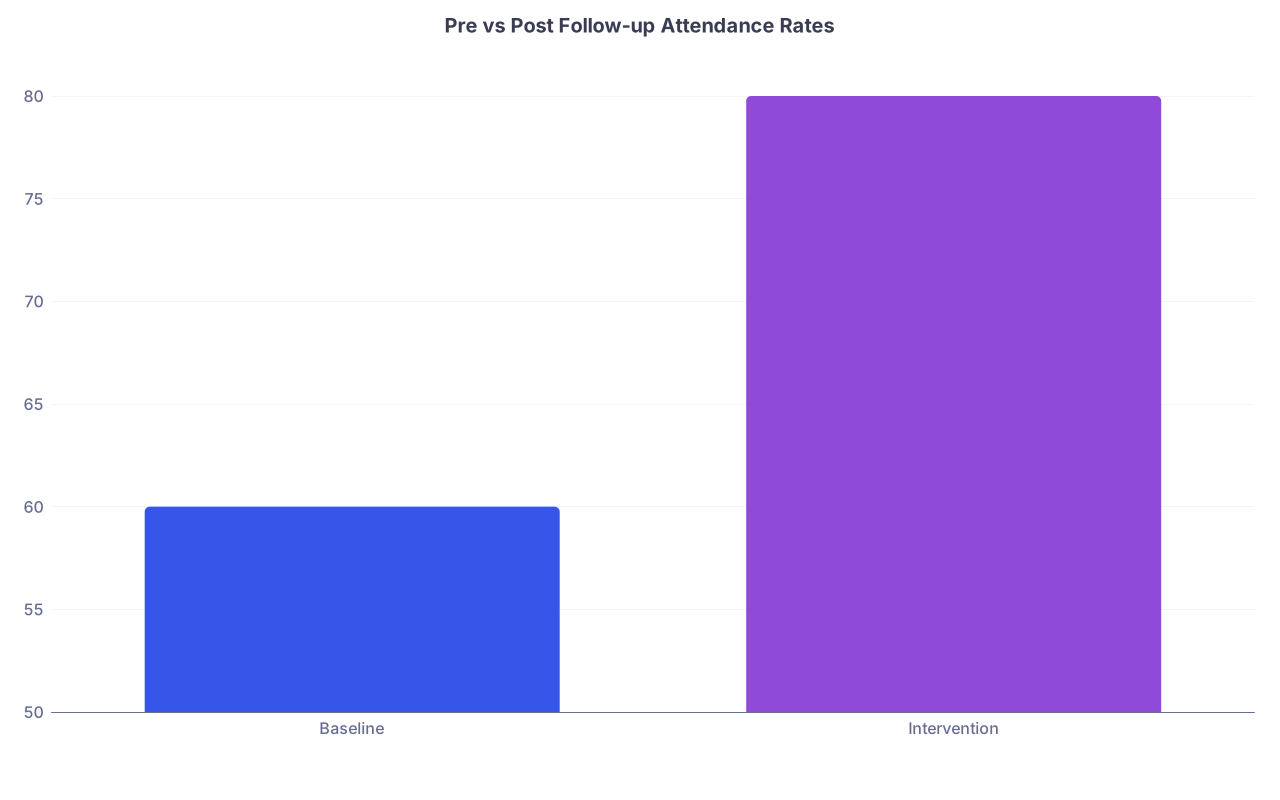
| Category | Value |
|---|---|
| Baseline | 60 |
| Intervention | 80 |
A simple chart like this tells people more in 3 seconds than three paragraphs of text.
Also, debrief with your clinical champion and staff:
- “If we had funding/IT support, what would you want this to become?”
- “Would you support a broader rollout?”
These conversations are where next opportunities appear.
Step 13: Keep your costs brutally low
Let us talk money, because you are a student.
Biggest cost buckets:
- Software and services
- Devices (tablets, phones)
- Incentives for participants (sometimes)
- Printing and materials
Money-saving tactics:
Leverage institutional licenses
- REDCap, Qualtrics, Microsoft Forms, institutional SMS solutions
- Avoid paying for tools your university already has
Free or cheap SMS/email
- Twilio has low per-message costs
- For tiny pilots, you might manually send messages from clinic-approved email with careful protocols (if permitted)
Borrow devices
- Old clinic iPads
- IT department loaners
- Do not buy hardware until you absolutely must
Modest incentives
- Gift cards in small amounts
- Raffle entries instead of guaranteed payouts
- Check local rules on incentives for patients
Track your expenses in a simple table. Treat it like a real budget. That alone will make you more disciplined.
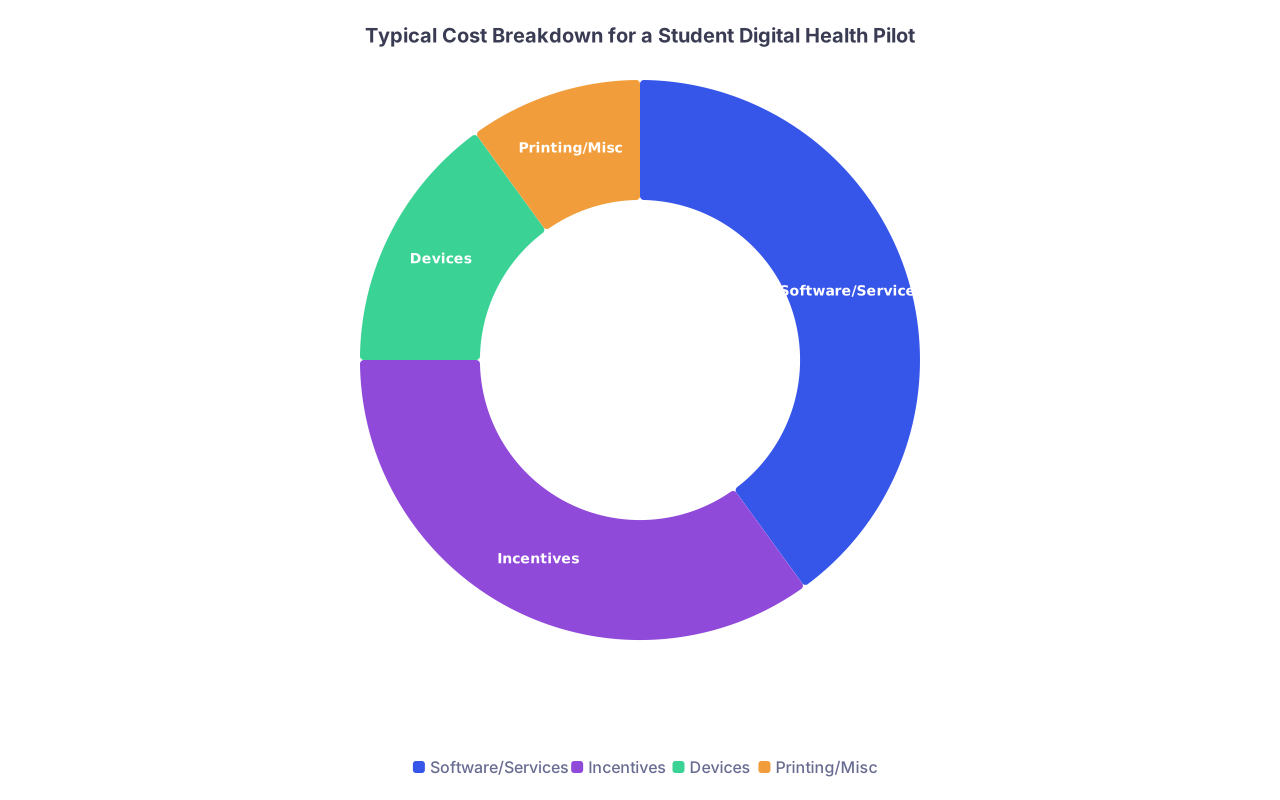
| Category | Value |
|---|---|
| Software/Services | 40 |
| Incentives | 35 |
| Devices | 15 |
| Printing/Misc | 10 |
If your software line item goes above a few hundred dollars, you are probably overbuilding.
Step 14: A concrete example to steal from
Let me outline a realistic pilot you could almost copy-paste.
Setting: Student-run free clinic, adult patients with hypertension
Problem: High no-show rate for follow-up visits
Intervention: Automated SMS reminders 3 days and 1 day before appointment, plus a same-day “running late?” message with a phone number to call
Plan:
- Primary outcome: Follow-up visit attendance rate
- Time frame: 4 months (2 months baseline, 2 months intervention)
- Sample size: Aim for ~80 follow-up appointments per period
Build:
- Use Twilio + a simple Google Sheets integration or a secure institutional tool
- Clinic staff or students enter appointment date and phone number into a form
- Script sends scheduled reminders
Workflow:
- At time of booking, patients are asked if they want SMS reminders
- Consent logged in the chart or separate consent log
- Student enters data into the SMS system at check-out
Ethics:
- Likely QI, but confirm with IRB
- Simple written opt-in explanation for patients
- No protected health information (PHI) beyond appointment date, clinic name, and generic reminder text
Data:
- From clinic scheduling system: scheduled appointments vs attended
- Log of SMS messages sent
- Short staff and patient feedback survey at end of pilot
Result:
- Even a modest increase (say, from 60% to 75% attendance) is meaningful
- You get concrete metrics, workflow insights, and a publishable QI project
This is the right scale and complexity for a student. Not sexy. But real.
The 3 things you must not forget
You can absolutely design a small-scale digital health pilot on a student budget that people take seriously. But only if you respect your constraints and avoid the usual traps.
Remember:
- Start smaller than your ego wants. One narrow problem, one setting, one main outcome, one simple tool. That discipline is what lets you finish.
- Design the workflow and ethics as carefully as the tech. If staff hate it or it violates rules, it dies. Map the real day-to-day, get buy-in early, and clear IRB/QI properly.
- Plan your story from day one. Know what metrics you will collect, how you will analyze them, and how you will communicate results. The value of the pilot is in what you can clearly show and share, not just what you built.
Do that, and your “student project” stops being a toy. It becomes your first real contribution to the future of healthcare.