The way most residents handle call nights is broken. You are trying to brute-force a systems problem with more coffee and “grit.”
Stop doing that.
If you treat every task on call as a bespoke, artisanal project, you will drown. The only residents who stay sharp at 4 a.m. are the ones who quietly automate, template, batch, and systematize everything that does not require their brain and judgment.
This is a practical toolkit for that. Not vague “use technology” fluff. Concrete workflows, examples, and checklists you can steal tonight.
1. Core Mindset: Treat Call Like an Automation Problem
You are not just covering patients; you are running a small, chaotic operations center from 6 p.m. to 7 a.m.
On a typical call night, your work falls into a few categories:
True cognitive work
- Triage: “Is this guy crashing or not?”
- Diagnosis and management decisions
- Discussing goals of care / difficult conversations
Semi-cognitive but repeatable work
- Admission H&Ps
- Cross-cover pages (pain, nausea, constipated, hypertensive, low K, low Mg)
- Discharge summaries
Purely mechanical work
- Re-writing the same orders
- Dictating the same phrases
- Calling the same numbers
- Repeated documentation language for common events (falls, rapid responses, transfusion reactions, etc.)
You cannot automate the first bucket. You absolutely can partially or fully automate the other two.
The goal is simple:
Conserve brainpower for real decisions by ruthlessly templating and automating everything else.
If something happens more than twice in a night, it needs a template, a shortcut, or a protocol.
2. Documentation Automation: Templates That Actually Save You
If your documentation is not templatized, you are voluntarily doing extra call.
2.1 SmartPhrases and Macros in the EHR
Most EHRs (Epic, Cerner, Meditech, Allscripts) allow:
- SmartPhrases / dot phrases
- Macros / quick texts
- Order sets & preference lists
If you are not using them aggressively, you are working with one hand tied behind your back.
Set aside 30–60 minutes on a non-call day and build these:
Admission H&P skeletons
- Medicine, surgery, ICU, OB – separate variants
- Include:
- Standard ROS
- Physical exam with blank spots or defaults
- Common sections for “Assessment and Plan” by system
- Example (Epic-style):
.admim_hpi– inpatient medicine HPI template.admim_acs– chest pain/ACS focused H&P.admim_copd– COPD/respiratory failure H&P
Cross-cover note templates
- For “nursing call about X” events:
- Chest pain
- Hypotension
- Fever
- Hypoxia
- Each template includes:
- Subjective: what nurse reported, patient symptoms
- Objective: vital sign fields, focused exam fields, data you usually check
- Assessment & Plan: placeholders for your differential, workup, and immediate orders
- For “nursing call about X” events:
Standard event notes
Templates for:- Rapid response / code blue documentation
- Fall without major injury
- Transfusion reaction
- Seizure event
- Stroke code
- Intubation or central line placement
Discharge summary skeletons
Even on call, you get stuck doing these. Use:.dsum_med– generic medicine discharge summary.dsum_surg– surgery summary with postop course, drains, etc.
If you build them correctly, an admission H&P goes from 40 minutes to 15–20. That is the difference between “I got 2 hours of sleep” and “I did not close my eyes.”
2.2 SmartLinks and Auto-Pulling Data
Most EHRs have fields that auto-pull:
- Latest vital signs
- Lab results
- Imaging impressions
- Problem list
- Medication list
Learn the exact SmartLinks your system uses. Example (Epic-style, will vary by institution):
.lastvitals– pulls last documented vitals.lastlabs– pulls recent labs.medlist– pulls all meds
Ask your super-user or your hospital’s informatics person for the internal list. They usually have a PDF or intranet page with every SmartLink available. Spend one lunch break skimming it and steal the 10 you will use every night.
2.3 Text Expander Outside the EHR
If your system does not support strong templates or you document in multiple systems (EHR, email, incident reports), use a text expander app on your device:
- Windows: AutoHotkey, PhraseExpress
- Mac: TextExpander, aText, Keyboard Maestro
- Mobile: Text replacement in iOS/Android keyboard settings
Create expansions like:
;fever→ yields a full structured fever evaluation note;painnote→ focused pain assessment skeleton;handoff→ your standard handoff paragraph structure
You type 6–8 characters, you get 4–5 lines of text. That compounds over hundreds of notes.
3. Order Automation: Stop Rebuilding the Same Treatment Plans
Order entry is one of the highest-friction tasks overnight, especially when you are tired and prone to error. Good automation here does two things:
- Speeds you up
- Reduces “stupid” errors that come from fatigue
3.1 Build Personal Order Sets / Favorites
You need custom order panels for the things you do every single call:
- Hypokalemia correction (KCl oral + IV, repeat labs timing)
- Hypomagnesemia
- Nausea / vomiting
- Constipation
- Pain ladder (mild, moderate, severe) with PRNs and bowel regimen
- New chest pain workup
- New fever in inpatient
- Suspected sepsis bundle
- Hyperglycemia in a non-DKA patient
- Post-op pain and nausea bundle
| Panel Name | Typical Use Case |
|---|---|
| HypoK Protocol | K < 3.5 on labs |
| Fever Workup | T ≥ 38.0 C in stable patient |
| Chest Pain Workup | New chest pain on the floor |
| Nausea/Vomiting | Single episode or recurrent |
| Constipation Bundle | No BM in 48–72 hours |
Example: “Fever Workup” panel might include:
- CBC, BMP, LFTs, lactate
- Blood cultures x2
- UA with reflex culture
- CXR
- Tylenol PRN
- Nursing instructions: notify MD if T > 39, MAP < 65, etc.
Instead of building that from scratch each time, you add one panel and tweak.
3.2 Standard PRN Bundles
One of the biggest time-wasters on night call: getting paged for trivial things because you (or the day team) did not set up PRNs well.
Work with your coresidents and attendings to standardize:
PRN pain ladder:
- First line: acetaminophen
- Second line: low-dose opioid
- Max frequency and total daily dose ceilings pre-set
Nausea:
- Ondansetron
- Prochlorperazine or metoclopramide alternative
Bowel regimen:
- Senna
- Polyethylene glycol
- Suppository or enema if needed
Sleep:
- One or two safe institutional favorites in elderly and general adults
Put these into:
- Admission order sets
- Post-op order sets
- Specific service templates (e.g., Oncology, GI, Ortho)
Good PRNs can cut your non-urgent pages by 20–40%. That is not a guess. I have seen services where one intern was getting slammed every night until they updated their standard post-op orders.
4. Communication Automation: Taming the Pager and Phone
Your pager is not the problem. The chaos is.
You can use lightweight automation to triage communication before it ever hits your brain.
4.1 Structured Nurse Communication Templates
If your hospital uses secure messaging (Voalte, Epic Secure Chat, TigerConnect, WhatsApp-equivalent in-house), push your unit to use structured templates. SBAR is the classic (Situation, Background, Assessment, Recommendation), but on nights you want something even more targeted.
For common issues, negotiate “send me this format” with the nurses you work with regularly:
Example: Hypoxia page format
- Room/Name:
- New O2 level:
- Baseline O2 level:
- Current O2 delivery:
- Recent changes (diuretics, opioids, transfusion, procedure):
- Associated symptoms (chest pain, dyspnea, wheeze, cough, confusion):
If they message you that way, you decide in 10 seconds whether to:
- Go now
- Call and clarify
- Send targeted orders
You cannot automate the nurse, but you can standardize the channel. You will need to model it first—reply using that structure, say explicitly, “Send it to me like this next time, it saves both of us time.” Many nurses will adopt it if it makes their life easier too.
4.2 Prebuilt Message Snippets
If your messaging system supports quick replies or templates, build a small library. If not, your phone keyboard can.
Snippets for:
- “I saw the message, I am in a code, I will be there in ~X minutes.”
- “Please send vitals, last labs (Cr, K, lactate), and any new symptoms.”
- “Please obtain EKG and I will review as soon as it results.”
You minimize back-and-forth, which is what actually eats your time.
4.3 Call / Task Tracking Board
On hard call nights, keeping track of what you still have to do becomes the real battle.
Use something—anything—that timestamps and organizes tasks:
- EHR integrated task lists
- A simple Notion / OneNote page
- A task app (Todoist, Microsoft To Do)
- Worst case: a physical index card system (but that is not automation)
Minimum structure:
- Time received
- Source (nurse, consultant, ED, family)
- Patient room/name
- Task
- Status: To Do / Ordered / Done / Needs Follow-up
Aim to batch callbacks: do 3–5 calls at once when you have a breather, not one at a time in a constant interrupt cycle.
5. Personal Workflow Automation: Protecting Your Brain Overnight
You are not a robot. You will get slower, less accurate, and more irritable as the night goes on. Good automation includes protecting future-you from present-you.
5.1 Standard Night Call Routine
Automate your own behavior with a repeatable script.
First 30–60 minutes of call:
Check handoff list and immediately:
- Star/highlight unstable or “watch closely” patients
- Note pending labs/imaging you must follow up
- Note any “family will call overnight” landmines
Open:
- Task/tracking app
- EHR order entry and notes windows you know you will need
- Your commonly used templates/macros (maybe pinned, maybe printed cheat sheet)
Walk the unit if feasible:
- Introduce yourself to nursing on high-acuity floors
- Ask: “Who are you worried about tonight?”
- You just automated risk prediction—nursing gestalt is strong.
5.2 Decision Tree Checklists for High-Stress Events
Your brain at 3 a.m. is not the same as at 3 p.m. This is where actual stepwise tools help.
Build or print short checklists for:
- Rapid response / acute hypotension
- New chest pain
- New fever
- New confusion/agitation
- Acute respiratory distress
These checklists are not meant to replace judgment. They serve as an automated backup to make sure you:
- Do not forget to check basic labs
- Do not forget a lactate in possible sepsis
- Do not forget blood cultures before antibiotics when appropriate
You can keep them:
- As a one-page laminated card in your coat
- In your notes app on your phone
- As a “Favorites” note in the EHR sidebar
Create them once, then stop reinventing how to handle the same 8 problems every night.

| Step | Description |
|---|---|
| Step 1 | Page received |
| Step 2 | Go to bedside now |
| Step 3 | Secure chat or call nurse |
| Step 4 | ABCs and vitals |
| Step 5 | Activate RRT or code if needed |
| Step 6 | Gather symptoms and vitals |
| Step 7 | Orders and follow up plan |
| Step 8 | Is patient unstable |
| Step 9 | High risk issue |
This is the mental algorithm you want baked in. Your checklist is just a physical reminder.
6. Data, AI, and “Future” Tools You Can Use Right Now
You are not going to install some fancy AI system on your hospital’s EHR as a PGY-2. You can, however, piggyback on what already exists and use consumer tools in safe ways.
6.1 EHR Built-in Predictive Tools
Many hospitals already have:
- Sepsis prediction alerts
- Deterioration indices / early warning scores
- Fall risk scores
- Readmission risk scores
Do not ignore them just because they are imperfect.
Here is how to use them intelligently:
When a patient you were not worried about suddenly trips a deterioration/sepsis alert, use it as:
- A prompt for a focused re-evaluation
- A trigger to scan their vitals and labs for the last 12–24 hours
Ask your ICU or quality team which alerts have decent predictive value and which are noise. Some alerts are garbage; some are gold. Learn the difference.
6.2 AI-Assisted Note Drafting (Carefully)
Some institutions have AI documentation pilots that:
- Draft notes from your voice recording
- Suggest HPI summaries based on chart review
- Auto-structure physical exams
If your hospital has them, here is the sane way to use them:
Use AI to create the first draft of:
- Routine progress notes
- Discharge summaries
- Admission summaries
You still:
- Edit for accuracy
- Insert your actual reasoning
- Make sure nothing fabricated gets through
The point is not to abdicate responsibility. It is to get a 70% draft you can polish in 2 minutes instead of writing from scratch in 10.
6.3 Personal “Micro-Automations” with Consumer Tech
There are small hacks no compliance officer will care about that still give you leverage.
Examples:
Alarm automations
- Set automatic reminders at:
- 23:00 – “Check pending critical labs / cultures on ICU list”
- 02:00 – “Quick scan of ED admits and high-risk patients”
- Set automatic reminders at:
Voice-to-text for personal scratch notes
- Use your phone’s built-in voice typing to record:
- Key to-dos per patient after a rapid response
- Details you do not want to forget before you write the note
- Convert to text in your secure notes app, then transfer mentally into the EHR later. Do not copy protected health information into unsecured apps; keep it de-identified or minimal.
- Use your phone’s built-in voice typing to record:
Timers for time-sensitive tasks
- When ordering:
- Repeat lactate
- Neuro checks
- Recheck potassium after repletion
- Set a quick timer or reminder on your watch/phone so it does not disappear into the chaos.
- When ordering:
These are low-tech automations. They offload memory to devices, which is exactly what you should do at 3 a.m.
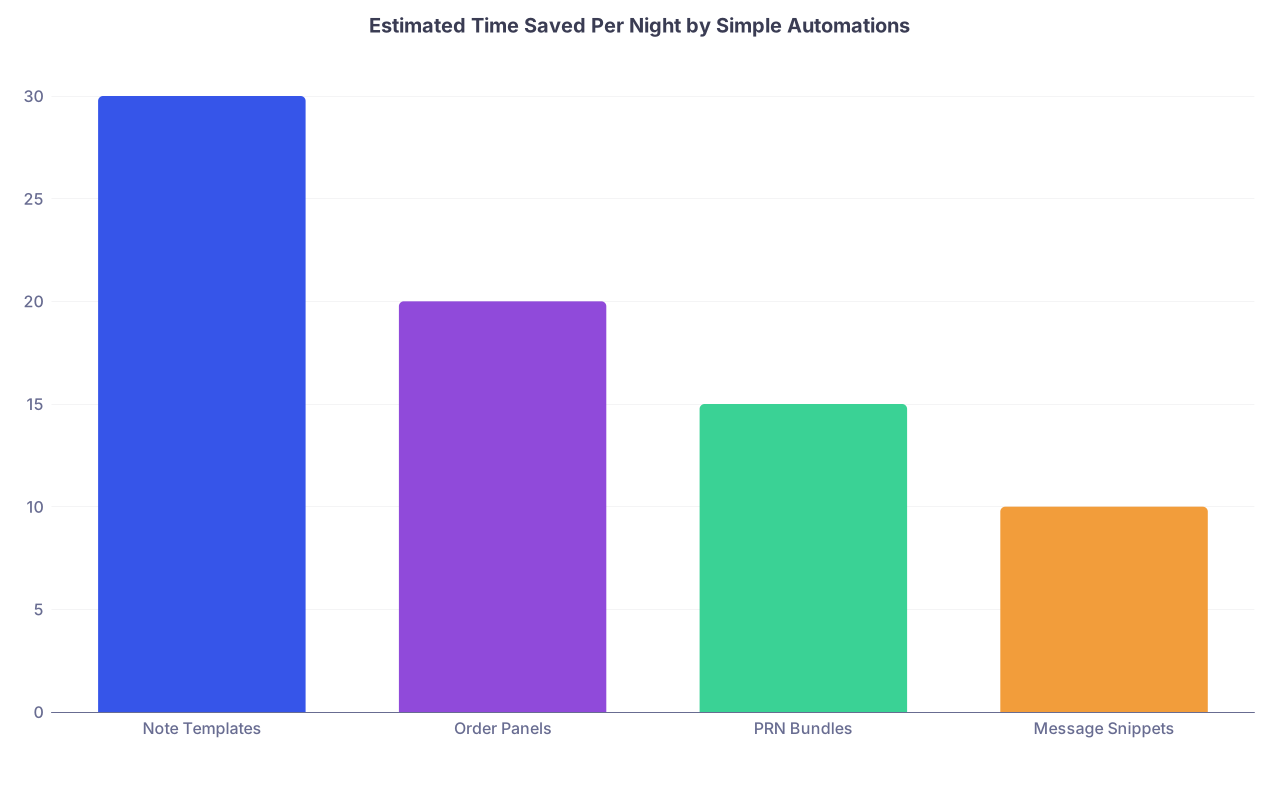
| Category | Value |
|---|---|
| Note Templates | 30 |
| Order Panels | 20 |
| PRN Bundles | 15 |
| Message Snippets | 10 |
Those numbers are conservative. Half an hour saved on notes alone is standard once your templates are decent.
7. Building and Maintaining Your Personal Automation Toolkit
You will not build this all at once. And if you wait for dedicated time, it will never happen.
Here is the realistic approach.
7.1 The “3 Repetitions” Rule
Anytime you do something the third time on a shift, you ask:
“Can I template or automate this so I never have to build it from scratch again?”
Examples:
- You wrote almost the same “fall without head trauma” note three times this month → build a template.
- You ordered the same constipation regimen again → make a panel.
- You typed the same discharge instructions yet again → make it a SmartPhrase.
Process:
- Recognize repetition #3.
- After the acute crunch, take 3–5 minutes to:
- Copy the text into a template
- Save the order panel
- Create the text expander shortcut
You lose 5 minutes once. You gain hours over the rest of the year.
7.2 Versioning and Refinement
Your first templates will be clunky. That is fine.
- Keep a mental or physical note of:
- “Stuff I always end up adding”
- “Stuff I always delete as irrelevant”
Every 2–4 weeks, on a calmer day:
- Open your commonly used templates.
- Update them:
- Add frequently used sections
- Remove junk you never fill
- Fix formatting that slows you down
Treat templates as living tools, not sacred texts.
7.3 Sharing and Stealing from Co-Residents
The fastest way to build a strong toolkit:
- Ask seniors for:
- Their SmartPhrase lists
- Preferred order panels
- Their “night call” cheat sheets
Most residents are happy to share. Some will send you entire libraries of macros. Review them with a critical eye and adapt to your style and your attendings’ expectations.
If your program is not already doing this, you can push to have:
- A shared drive folder with templates by specialty
- A brief “EHR efficiency and automation” session for interns every July
- A running doc of “high-yield night-call tips” updated yearly
8. Guardrails: What Not to Automate (Or How Not to Get Burned)
Automation can hurt you if you are reckless or lazy about it. A few hard boundaries:
Never blindly sign off on auto-generated content
- AI tools or copy-forward documentation can introduce errors
- You must read what goes under your name
Do not let templates override clinical judgment
- Example: fever template suggests full sepsis workup; your patient has a clearly benign cause. Modify appropriately.
Beware of template creep
- Notes that are 80% irrelevant fluff because you keep adding and never deleting
- Bloated panels that order unnecessary labs in every scenario
Stay compliant with privacy and policy
- No patient identifiers in personal apps outside approved tools
- No screenshots of EHR into your personal phone gallery
- Use hospital-sanctioned secure messaging only
Automation should reduce risk, not create new failure points.
9. A Concrete 7-Day Implementation Plan
If you want to stop reading and actually fix your next month of call, use this.
Day 1–2 (non-call day):
- Build:
- 1 general admission H&P template
- 1 discharge summary skeleton
- 3 cross-cover note templates (fever, chest pain, confusion)
Day 3 (first call night after that):
- Use the templates aggressively.
- Write down 2–3 tasks you repeated multiple times (orders, messages, etc.).
Day 4 (post-call + later in the day):
- Turn the top 2 repeated tasks into:
- 1 order panel (e.g., constipation bundle)
- 2 text snippets for common messages
Day 5–6:
- Ask one senior resident:
- “What are your top 5 SmartPhrases and order sets for nights?”
- Steal at least 3 and adapt.
Day 7:
- Build a 1-page “Night Call Playbook” for yourself:
- Top templates/macros
- Top order panels
- Short checklists for RRT/fever/chest pain
Tape it to your workstation, keep it open on your phone, or save it in the EHR sidebar.
Repeat this cycle every 2–3 weeks and your nights will feel completely different by the end of the block.
Key Takeaways
- Stop trying to “muscle through” call nights. Treat them as an automation and systems problem, not a stamina contest.
- Build and refine concrete tools: note templates, order panels, PRN bundles, message snippets, and simple checklists. Use anything that cuts repetition.
- Implement slowly but relentlessly: every time you do something for the third time, create a template or shortcut. Those small moves compound into calmer, safer, and more survivable call nights.