
The most dangerous thing about AI study tools is not that they might be wrong. It is that they quietly collect more about you—and your patients—than you realize.
If you treat AI like a harmless digital highlighter, you will eventually leak something you cannot take back: a patient detail, a personal identifier, an exam question, or enough breadcrumbs to build a profile of you that you would never knowingly consent to.
Let me walk you through the biggest privacy mistakes I see students making with AI tools right now—and exactly how to avoid being the cautionary tale in your cohort.
1. Dumping Clinical Details into Public AI Chats
This is the cardinal sin. And it happens constantly.
I have watched students type things like:
“Can you create a SOAP note for a 47-year-old male with HIV, seen at Mercy Clinic on 5/12, with this history: [long copy-paste from EMR]”
You might as well email that note to a random tech employee.
Most general-purpose AI tools:
- Log your prompts by default
- May use them to improve models (depending on settings / version)
- Store them in ways you cannot audit or delete meaningfully
That means:
- Patient data can end up on external servers
- You lose control over where that information goes
- You may be violating HIPAA, GDPR, or your school/hospital policies
Red flags you are making this mistake
- You copy-paste directly from the EHR into an AI chat
- You can identify the patient from what you typed (even if you did not give a name)
- You share exact dates, locations, or rare conditions in a way that clearly narrows the identity
The legal test is harsh: “De-identified” is not “I removed the name.” If a motivated person could reasonably re-identify the patient from the information plus other available data, you are exposed.
How to avoid it
Never put protected health information (PHI) into consumer AI tools.
PHI is not just names and MRNs. It includes:- Dates of service
- Geographic information smaller than a state
- Contact information
- Unique codes, images, or rare disease scenarios tied to a specific setting
Use aggressive de-identification when you are learning.
- Change ages and dates meaningfully (e.g., 47 → 40s; “May 12” → “recent visit”)
- Remove hospital/clinic names entirely
- Strip any free-text that could reveal identity (“lives next door to the pharmacy,” “employed at the only factory in town,” etc.)
Do not use AI at all on real charts unless:
- Your institution has explicitly approved a specific, integrated tool, and
- That tool is documented as HIPAA-compliant (or equivalent for your jurisdiction), and
- You have completed training on how to use it
If you are not sure whether it is allowed, it probably is not.
2. Trusting “Free” AI Study Tools With Your Entire Digital Life
If you are not paying, you are usually the product.
Many AI-based study sites and apps:
- Offer “unlimited” free questions / flashcards / notes
- Ask you to sign in with Google, Apple, or your university email
- Quietly track your usage, location, device, and more
- May resell or aggregate your data for marketing or future products
Here is the part students ignore: your study behavior is incredibly valuable. It can reveal:
- Your exam dates
- Your weak topics
- Your approximate schedule and location
- Your level of training and specialty interests
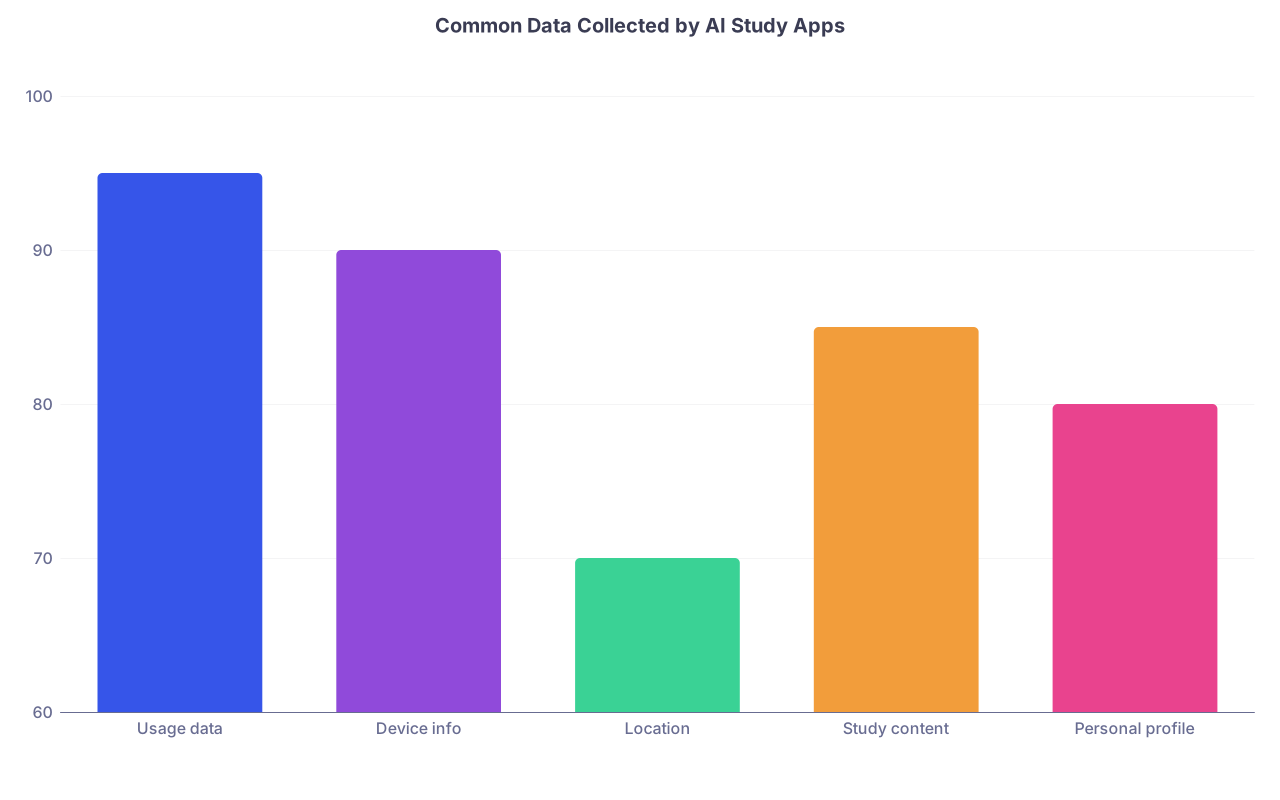
| Category | Value |
|---|---|
| Usage data | 95 |
| Device info | 90 |
| Location | 70 |
| Study content | 85 |
| Personal profile | 80 |
Do you really want an unknown company building a detailed learning and performance profile on you, forever?
Mistakes to watch for
- Signing in with your institutional email to every AI tool
- Granting “full drive access” or “full email access” just to use an app
- Accepting a 25-page privacy policy you never even skim
- Uploading your entire Anki deck, lecture slides, or OneNote notebook to “optimize” your studying
How to protect yourself
Segregate your identities.
- Use a separate email for experimental tools
- Do not link AI tools to your main cloud storage or email, unless absolutely necessary
Check privacy policies for three specific things:
- “Do we use your data to train models?”
- “Do we share data with third parties?”
- “How can you delete your data permanently?”
Prefer tools that explicitly state:
- No use of your content for training without opt-in
- Limited retention times
- Clear data export / deletion options
If the policy is vague or evasive, treat the app like public social media: never put anything into it that you would not want on a billboard.
3. Uploading Exam Content and Proprietary Materials
Students routinely violate exam and course policies in the name of “efficient studying.” AI just makes it faster.
Here is what I have seen people upload to AI tools:
- Screenshots of NBME practice exams
- Copyrighted UWorld question stems
- PDFs of entire question banks or textbooks
- Internal faculty slide decks marked “For institutional use only”
That is not just a privacy issue. It is:
- A violation of licensing agreements
- A potential honor code breach
- Sometimes a clear legal risk
And your data is not sitting in a locked drawer. It is on servers, logs, backups.
Why this is worse with AI than with old tools
With a normal drive or notes app, your data:
- Stays in your account, mostly
- Does not get ingested into global models
With many AI platforms, your uploads:
- May be scanned for model improvement
- May be accessible to internal staff
- Might be exposed if the vendor misconfigures security (and that happens more often than you think)
Safer alternatives
- Summarize questions yourself before asking AI for help
- Ask concept-level questions, not verbatim stems
- Use AI to explain why an answer is right or wrong once you have paraphrased the scenario
You do not want your exam provider tracing leaked content back to your IP address and login.
4. Over-Sharing About Yourself in “Personalized” AI Study Assistants
The marketing is seductive:
“An AI tutor that understands you. Tailored to your personality, schedule, and career goals.”
The privacy cost? Often hidden.
These tools might ask you for:
- Full name, school, year of training
- Specific rotation sites, preceptor names
- Detailed schedule (locations, times, days)
- Personal stressors, mental health notes, relationship details
Individually, each piece looks harmless. Together, it is a profile:
- Who you are
- Where you are
- When you are vulnerable
You do not want an unregulated company holding that file indefinitely.
Red flags
- Chat prompts like: “Tell me about your family so I can support your work-life balance.”
- “Share a photo of your study space so I can optimize it.”
- Requests to connect to your calendar, contacts, or location permanently
- Personality quizzes that collect deeply personal values and beliefs
How to use “personalization” without selling yourself
Give coarse-grained data only.
- “Third-year med student in the US, interested in IM” is enough
- You do not need to specify “at [small regional school] rotating at [named hospital]”
Refuse unnecessary permissions.
If a study app wants location or contact permissions, ask yourself why. Then say no.Keep life details vague.
AI does not need to know your partner’s name, your therapy history, or which nights you feel the worst.
Personalization is helpful. Hyper-identification is not.
5. Assuming Institutional Tools Are Automatically Safe
Here is the mistake:
“My hospital/school integrated an AI tool into the EHR / LMS / portal. So it must be secure.”
Sometimes true. Sometimes dangerously wrong.
I have seen:
- Homegrown “AI assistants” with minimal security review
- Student-facing bots built on top of public APIs with weak data controls
- Admins who do not fully understand how data flows to upstream vendors
Just because you log in with your institution credentials does not mean:
- The tool is fully HIPAA-compliant
- Your queries stay inside the firewall
- Your prompts are excluded from vendor training

What to clarify before you trust it
Ask (or look for documentation on) these questions:
- Is this AI tool hosted on-premises or by an external cloud vendor?
- Does any identifiable patient data leave the institution’s environment?
- Is vendor use of data for model training explicitly disabled?
- Who can access the logs of what I type?
You are allowed to ask. In fact, you should.
If the answer is “We are not sure” or “The vendor handles that,” then you do not type anything you would not comfortably defend in a disciplinary hearing.
6. Forgetting That AI Chats Become Your Permanent, Searchable Record
Students treat AI chats like a whiteboard. Wipe it clean, move on.
That is fantasy.
In reality:
- Prompts are often logged
- Logs may be used for debugging
- “Delete chat” usually does not guarantee log deletion
- Backups may persist for months or years
Now mix in what students actually type:
- “I bombed the cardiology block, I’m terrified I will fail out.”
- “My attending at [clinic name] is cutting corners.”
- “I am on benzos and can’t focus.”
You are creating a long-term, third-party record of:
- Academic performance fears
- Professional complaints
- Mental health struggles
- Incriminating behavior, sometimes
If that company suffers a data breach—and many do—you do not control what leaks.
Smarter habits
- Assume anything you type may be stored longer than you think
- Keep emotional venting out of AI chats; talk to a human instead
- Avoid mentioning other people by name or identifiable description
AI is not your diary. Treat it like a semi-public message board with bad search settings.
7. Ignoring Device-Level Privacy While Obsessing Over App Policies
You can have the most privacy-respecting AI tool on earth and still blow everything if:
- Your laptop is unlocked
- Your phone has no PIN
- You stay logged into AI tools on shared devices
- Your browser auto-saves everything
Students make this mistake constantly in shared study spaces, libraries, and clinical workrooms.
I have literally watched someone:
- Step away from a workstation
- Leave an AI chat open with half-written text about a specific patient
- While a nurse and two other students were hovering nearby
That is not a “digital policy” problem. That is basic operational security.
Minimum baseline protections
- Use a strong device lock (PIN, password, biometrics)
- Enable auto-lock after a few minutes of inactivity
- Avoid opening AI tools with sensitive content on shared or clinical workstations
- If you must, log out and close the browser entirely when done
You would never leave a patient chart open on a shared screen. Treat AI tools the same way.
8. Letting AI Erode Your Sense of Professional Boundaries
This one is subtle but dangerous.
Medicine runs on confidentiality. That is not just legal. It is cultural. The expectation that you protect:
- Patient privacy
- Colleague reputation
- Institutional trust
AI tools constantly blur this line. You start with:
- “Help me understand this rare vasculitis case I saw today.”
Then slide into: - “My attending always mismanages these patients; help me prove it.”
And pretty soon, you are sharing:
- Disparaging comments about specific supervisors
- Internal politics, conflicts, and emails
- Sensitive institutional documents “for help rewriting”
You are not just risking privacy; you are eroding your own professionalism.
Guard rails to keep
- Ask: “Would I be comfortable if my dean, program director, or this person read this exact prompt?”
- Do not use AI to gossip, triangulate, or build cases against people
- Keep internal conflict resolution in human channels, not exported into some company’s training corpus
Your digital footprint should reflect the kind of clinician you plan to be. AI does not change that.
9. Blindly Accepting “Anonymization” As a Magic Shield
Students love to say:
“It’s fine, I removed the name.”
Wrong. That is level-one privacy thinking.
De-identification that actually protects you (and the patient) is hard. It requires thinking about:
- Combinations of variables
- Rarity of the condition
- Contextual clues
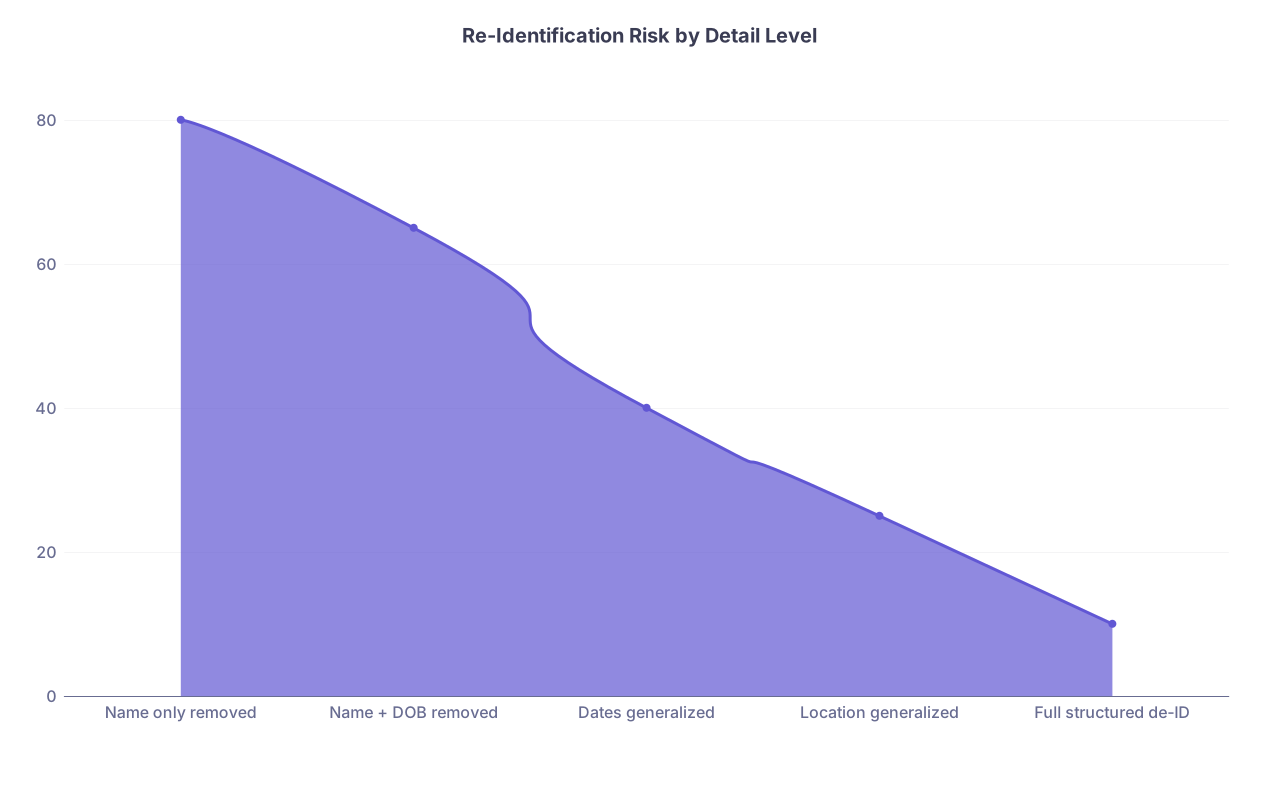
| Category | Value |
|---|---|
| Name only removed | 80 |
| Name + DOB removed | 65 |
| Dates generalized | 40 |
| Location generalized | 25 |
| Full structured de-ID | 10 |
A woman with:
- A specific rare cancer
- At a small regional hospital
- On a specific approximate date
Is often uniquely identifiable, even if you never say her name.
Better anonymization practices
When using AI for learning or case analysis:
- Mix details from multiple patients into a composite case
- Generalize ages (“in their 60s”), times (“recent admission”), and locations (“regional hospital”)
- Remove occupational and family details that could easily re-identify (“local TV anchor,” “only neurosurgeon in town”)
If the case is so unique that any colleague would know exactly who you mean, do not run it through a public AI at all.
10. Not Realizing How Quickly Regulation and Policy Will Catch Up
Many students assume:
“Everyone is using AI like this. If it were really a problem, the school or board would have said something.”
That is not how this works.
Right now, we are in the Wild West phase:
- Institutions are still drafting policies
- Regulators are catching up
- There is a lag between behavior and enforcement
But when something goes wrong—when:
- A data breach exposes prompts with PHI
- An exam provider traces leaked content to AI usage
- A hospital audits logs and finds improper data sharing
The hammer will fall retroactively.
You do not want to be the test case that:
- Gets cited in guidance documents
- Ends up in a disciplinary file
- Becomes the example whispered to new cohorts

| Step | Description |
|---|---|
| Step 1 | Student uses AI improperly |
| Step 2 | Data logged by vendor |
| Step 3 | Incident or breach occurs |
| Step 4 | Institution notified |
| Step 5 | Internal investigation |
| Step 6 | Student identified |
| Step 7 | Disciplinary action |
Assume future you will have to justify present you’s behavior under stricter rules. Use that standard now.
11. Treating AI as the Future of Healthcare, While Ignoring Its Future Privacy Fallout
You are training in a world where:
- Clinical decision support AIs will be embedded in EHRs
- AI scribes will listen in every room
- Predictive models will influence risk scores, referrals, even billing
The habits you form now with “innocent” study tools will carry over.
If you normalize:
- Casual sharing of identifiable context
- Blind trust in vendor claims
- Minimal concern for logs and retention
You are setting yourself up to be the clinician who:
- Chats about patients on non-compliant apps
- Clicks through AI prompts without questioning where the data goes
- Signs off on tools that quietly expand surveillance of both patients and clinicians

Future healthcare will absolutely be AI-heavy. It does not have to be privacy-hostile. But that outcome depends on the boundary habits you practice now, as a student.
12. Practical Checklist: “Am I About to Make a Privacy Mistake?”
Before you send anything to an AI tool, run through a short, ruthless checklist:
Could this identify a real patient?
If yes or maybe, stop. Either de-identify aggressively or do not send it.Am I violating an explicit policy or license?
Exams, question banks, internal slides. If you signed or clicked “I agree” somewhere, respect it.Would I be embarrassed if my dean saw this exact prompt tied to my name?
If the answer is yes, do not send it.Does this tool claim rights to use my data for training, marketing, or sharing?
If you do not know, assume the worst and keep content generic.Is this logging in through my institutional account with unclear data flows?
If documentation is vague, keep sensitive material out.
| Scenario | Risk Level |
|---|---|
| Asking AI to explain “Starling forces in heart failure” | Low |
| Uploading a de-identified, composite case you created | Moderate |
| Pasting real EHR notes into a consumer AI chat | Extreme |
| Feeding NBME/UWorld screenshots to an AI | Extreme |
| Describing a colleague or attending by name | High |
Tape that logic to your mental monitor and use it every time.
Final Takeaways
Three points you cannot afford to forget:
- Anything that could identify a patient, a person, or a protected exam has no business inside a generic AI tool. De-identification must be real, not cosmetic.
- Vendors remember. Your prompts, uploads, and confessions are often logged and kept. Treat AI chats as semi-public, permanent records, not private journals.
- Your habits now are your habits later. The way you handle AI for studying will echo in your clinical practice. Set strict boundaries today, before the stakes involve real patients and your medical license.