
The fastest way to torpedo a promising medical career right now is deceptively simple: install the wrong app and use it in clinic.
Not a wrong medication. Not a wrong incision. A wrong icon on your phone.
Everyone loves to talk about AI, digital health, and “innovation at the bedside.” What almost nobody is blunt enough to tell you is this: using unapproved apps at work is already getting students, residents, and attendings disciplined, reported, and in some cases fired. And most of them genuinely thought they were “just being efficient.”
Let’s make sure you are not the next cautionary story.
1. The Seductive Myth: “I’m Just Using My Own Phone, So It’s Fine”
You know this scene. You might be living it.
You’re on rounds, slammed, and need to:
- Translate a phrase quickly for a patient’s family
- Text a photo of a rash to your senior for advice
- Share a CT image with a consultant who is “not in the system”
- Dictate a quick note because you’re drowning in charting
So you:
- Open Google Translate
- Snap a photo with your phone camera
- Use WhatsApp / iMessage / Signal / Telegram to send PHI
- Dictate into some slick AI note app you found on Reddit
You think: “I’m helping the patient. I’m saving time. It’s my device.”
Here’s the mistake: in the eyes of regulators, privacy officers, and hospital leadership, the device doesn’t matter. The data does. And if protected health information (PHI) touches an unapproved, non–business associate–compliant system? You’ve just turned your phone into a liability, and yourself into a risk.
Let me be explicit:
Good intent does not protect you from bad consequences.
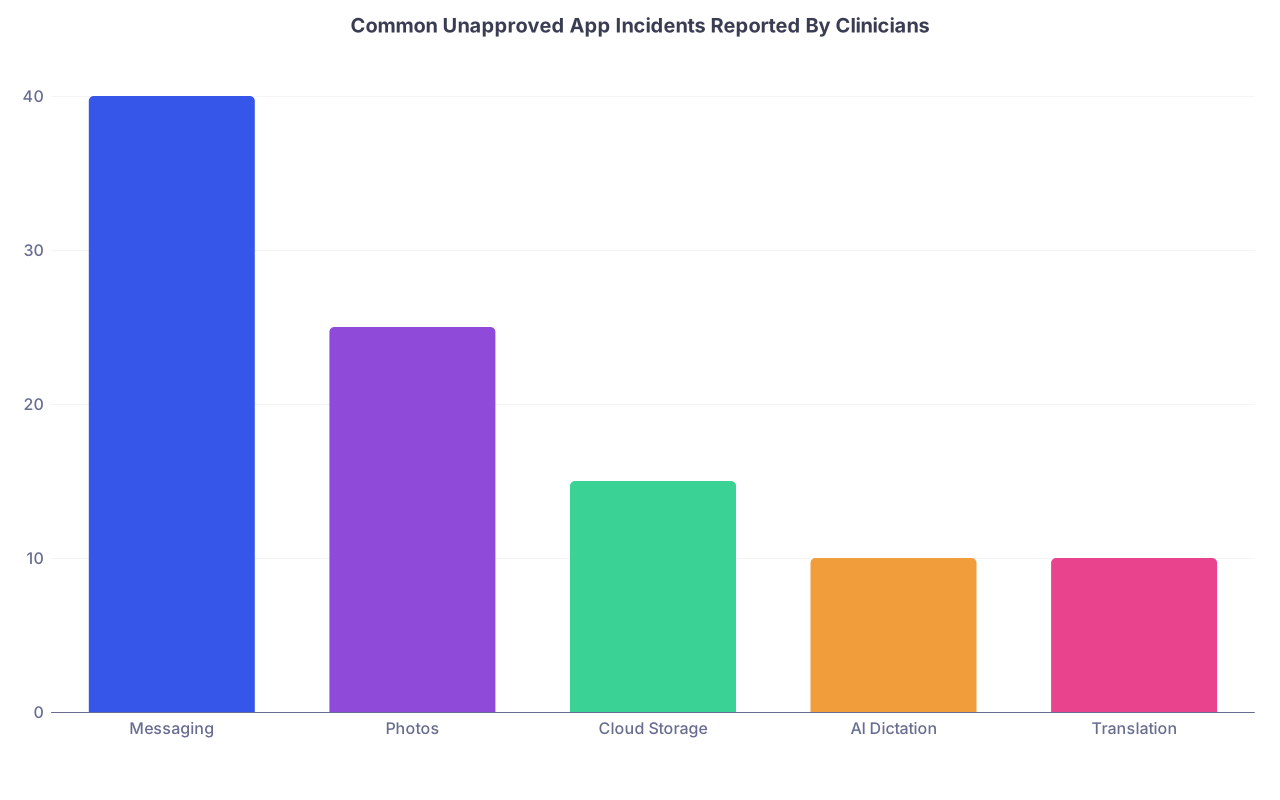
| Category | Value |
|---|---|
| Messaging | 40 |
| Photos | 25 |
| Cloud Storage | 15 |
| AI Dictation | 10 |
| Translation | 10 |
Those categories? They’re where careers quietly go to die.
2. The Biggest Digital Missteps That Get Clinicians in Trouble
These aren’t theoretical. I’ve seen variations of all of these lead to complaint letters, investigations, and mandatory meetings with Risk & Compliance.
Misstep #1: Using Consumer Messaging Apps for Clinical Communication
“I just texted the cardiologist on WhatsApp—faster than paging.”
On the surface, this sounds reasonable. In reality, it’s a landmine.
The problem areas:
- PHI in unsecured environments
- Messages stored on foreign servers, sometimes outside your country
- Screenshots saved to personal photo streams, auto-backed up to iCloud/Google Photos
- Forwarding to others who were never part of the care team
Even “encrypted” apps like Signal or WhatsApp are almost always not covered by a Business Associate Agreement (BAA) with your institution. Translation: from a regulatory standpoint, they are consumer tools, not clinical tools.
Regulators and hospital lawyers don’t care that it was “just a picture of the wound.” If the image can be tied to an identifiable patient—even indirectly—that’s PHI.
Misstep #2: Storing Patient Photos on Your Personal Device
You take a clinical photo to document:
- A wound
- A rash evolution
- A pressure ulcer
- A post-op finding
And you:
- Save it to your iPhone camera roll
- Back it up automatically to iCloud or Google Photos
- Maybe later use it (de-identified “enough” in your mind) for teaching
Here’s the trap: your phone and associated cloud accounts are almost never covered under institutional controls. Even if the hospital has mobile device management (MDM), your personal backup service does not.
So when you:
- Trade in your phone
- Lose it
- Show vacation photos to a friend and accidentally swipe too far
- Get your cloud account breached
You’ve created a reportable privacy event. That’s the kind of thing that triggers incident reports, apology letters, and possible disciplinary action.
Misstep #3: Emailing PHI to Yourself “To Finish Notes at Home”
Everyone thinks they’re being “efficient” here. They aren’t.
Common variations:
- Exporting a patient list or rounding list to Excel and emailing it to Gmail
- Sending discharge summaries to your personal email to “review later”
- Downloading clinical PDFs to your home laptop Dropbox
All of that is data leaving controlled systems and landing on consumer services with no BAA, no institutional monitoring, and no authorized PHI handling agreement. It’s also incredibly easy to mis-send, forward, or leave visible on a shared home device.
One wrong autocomplete in the address line (“[email protected]” instead of “[email protected]”) and you’ve just sent PHI to a random stranger. That’s a reportable breach in most jurisdictions.

Misstep #4: Feeding PHI into Unapproved AI Tools
Everyone’s excited about AI charting and “smart scribe” tools. The market is crowded with:
- Note generators
- Summarizers
- Voice-to-text systems
- Clinical decision support chatbots
Plenty of them:
- Are not HIPAA-compliant
- Do not sign BAAs
- Use your data to “improve the model”
- Store data on servers you will never see and cannot control
I’ve seen residents copy-paste full consult notes into a random AI website to “summarize” or generate an assessment/plan. I’ve seen attendings dictate full H&Ps into consumer dictation apps that explicitly state in their terms they are not suitable for PHI.
If an app’s marketing page doesn’t clearly state “HIPAA-compliant” and your institution hasn’t vetted and approved it, assume the worst. And even “HIPAA compliant” means nothing if your own hospital hasn’t signed an actual BAA and put it on the approved list.
Misstep #5: Translation Apps That Leak More Than They Help
Handheld translation devices and apps are everywhere now. Great in theory, dangerous in practice.
Pitfalls:
- Audio recordings stored on third-party servers
- Transcribed text that includes name, date of birth, diagnosis
- No clear deletion or retention policy
You think you’re helping with communication. In reality, you might be piping sensitive clinical details into a low-budget startup’s unprotected server somewhere.
If your institution provides an approved translation tool or phone interpreter service, using anything else puts you on thin ice. Yes, even if “the approved app is terrible” or the phone wait is annoying.
3. Why “Everyone Else Does It” Won’t Save You
Let me be blunt. “But everyone does it” is the weakest defense you can offer when Compliance shows up.
Common rationalizations that fail instantly:
- “My attending told me to send it on WhatsApp.”
- “The nurse asked me to text the photo.”
- “We’ve always done it this way.”
- “The patient was fine with it.”
Do not confuse normalized with acceptable. Hospital cultures are often 3–5 years behind what regulators are already watching. Just because a senior physician shrugs at WhatsApp does not mean Risk Management will.
Also, the enforcement is rarely fair or evenly distributed. Who gets burned?
- Students. Easy to blame, easy to “educate.”
- Residents. Disposable in the system.
- Junior hires. No clout, no protection.
The senior department chair who’s been using Gmail for 15 years? Somehow, the hammer lands softer there. You don’t have that luxury.
| Role | Likely Scrutiny Level | Typical Consequence |
|---|---|---|
| Medical Student | High | Formal write-up, professionalism flag |
| Resident/Fellow | Very High | Disciplinary meeting, probation risk |
| New Attending | Medium-High | Mandatory training, HR file note |
| Senior Attending | Medium | “Coaching,” quiet handling |
| IT/Compliance | Variable | Process review, policy updates |
You cannot control fairness. You can control your behavior.
4. How These Digital Missteps Turn Into Formal Discipline
Let’s connect the dots between “I just used my phone” and “I’m in a professionalism remediation meeting.”
Most serious cases follow this pattern:
Trigger event
- Patient sees their own photo on someone’s phone or a photo accidentally shown in front of them
- Email or message accidentally sent to the wrong recipient
- Cloud service suffers a breach and the institution has to review what data was there
Discovery
Someone asks: “Where is this data stored? How did it get there?” That’s when phones, laptops, and app usage come under the microscope.Incident report
Privacy office and Risk Management get involved. They ask:- Was PHI involved?
- Was the app/service institutionally approved?
- Has this happened before?
Documentation and notification
If it’s a reportable breach, they may:- Notify the patient
- Notify regulators
- Possibly issue public notifications if many patients are affected
Internal review of individual behavior
Then the focus turns to you:- Are you a repeat offender?
- Did you ignore prior training?
- Did you go against explicit policy?
Consequences
These range from:- Mandatory privacy training
- Written warnings in your file
- Professionalism flags that follow you into residency or job applications
- Suspension or termination in severe or repeated cases

| Step | Description |
|---|---|
| Step 1 | Unapproved App Use |
| Step 2 | Trigger Event |
| Step 3 | Incident Discovered |
| Step 4 | Privacy Investigation |
| Step 5 | Coaching or Training |
| Step 6 | Reportable Breach |
| Step 7 | Patient and Regulator Notice |
| Step 8 | Individual Behavior Review |
| Step 9 | Warning and Training |
| Step 10 | Discipline or Termination |
| Step 11 | PHI Involved |
| Step 12 | Policy Violation |
That entire chain can start because you wanted to share a “quick pic” or dictate one progress note into a shiny AI toy.
5. Future of Healthcare ≠ Do Whatever Looks Innovative
We’re heading into a healthcare world where:
- AI scribes listen in every room
- Patient data moves across telehealth platforms and wearables
- Remote monitoring feeds app dashboards
- Decision support tools run in the background of everything
This means your margin for digital error is shrinking, not expanding.
The naive assumption is: “The future of medicine is digital, so using more apps makes me progressive.” That’s wrong. The smart stance is: “The future of medicine is heavily regulated digital, so I only use what’s been properly vetted.”
Let’s contrast the mindsets.
| Mindset Type | Typical Behavior | Risk Level |
|---|---|---|
| Gadget Chaser | Installs any cool app seen on Twitter | Extreme |
| Quiet Resistor | Refuses all digital tools, even approved | Medium |
| Controlled Adopter | Uses only institution-approved solutions | Low |
| Policy Expert | Helps evaluate and implement new tools | Lowest |
You want to live in the Controlled Adopter / Policy Expert categories. That’s where innovation and job security coexist.
6. Practical Rules To Stay Out of Trouble (Without Going Back to the Stone Age)
You do not need to become anti-technology. You do need a strict internal rule set.
Here’s the version I wish every trainee memorized:
If it touches PHI, it must be on an institution-approved platform.
No exceptions. If IT or Compliance hasn’t blessed it, you don’t use it with real patients.No PHI on personal email. Ever.
Not even once. Not even “temporarily.” Not even if you plan to delete it.No patient photos in your personal camera roll.
If your institution doesn’t have a secure camera app that saves directly to the EHR or a controlled server, push them for one. Until then, avoid taking photos yourself.No clinical messaging on consumer apps.
If your hospital has a secure messaging tool (TigerConnect, Vocera, Epic Chat, etc.), use that—and accept its annoyances as the cost of safety.Treat all AI tools as unsafe until proven otherwise.
Assume they’re not HIPAA-compliant unless your institution has specifically approved them and signed a BAA.
“But the website says ‘HIPAA-ready’” does not mean “our hospital signed off.”Never copy-paste full notes into random web tools.
If you must, strip all identifying details, diagnosis codes, and time markers. And even then, be stingy.Ask IT/Compliance before adopting any new app for patient care.
Yes, this slows you down. That’s the point. Most career-ending mistakes happen when people are in a hurry.
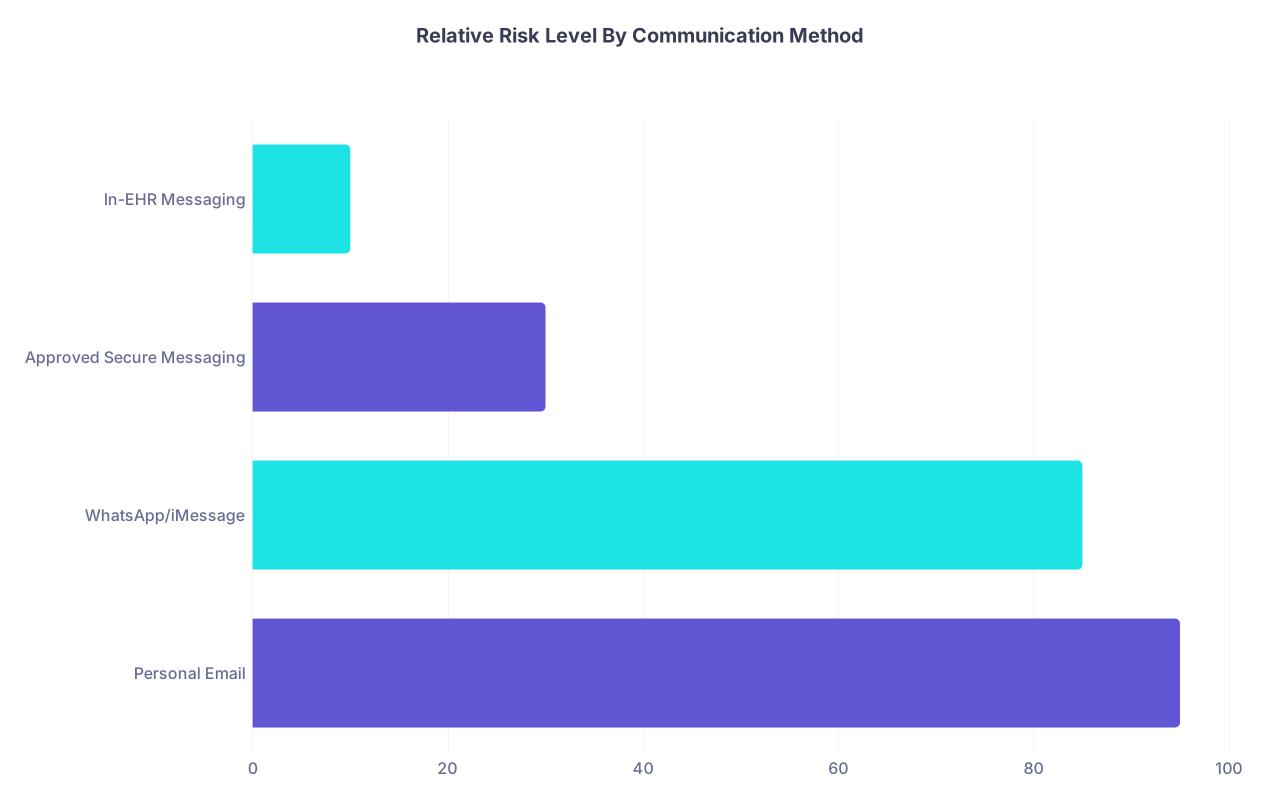
| Category | Value |
|---|---|
| Personal Email | 95 |
| WhatsApp/iMessage | 85 |
| Approved Secure Messaging | 30 |
| In-EHR Messaging | 10 |
If you remember nothing else, remember this scale. Stay on the right side.
7. How To Handle Pressure From Others To “Just Send It”
One of the most dangerous forces you’ll face isn’t your curiosity. It’s social pressure.
You’ll hear:
- “Just text the pic, I don’t have access to the chart right now.”
- “Can you email me the list to my Gmail? I’m at home.”
- “Use that free app; it’s way better than the hospital one.”
You need scripted lines ready, so you don’t cave in the moment. Here are ones that work and won’t make you sound sanctimonious:
- “I’d rather keep everything on the hospital system—saves us trouble if there’s ever an audit.”
- “I can only send this through secure messaging per policy. Let me use that instead.”
- “My training was very clear about no PHI on personal devices. I’m not risking a professionalism report.”
If they push? That’s a red flag about them, not you. Document the interaction if it feels bad, and quietly run it by a trusted mentor or program director later.
And if an attending explicitly orders you to do something you know violates policy (e.g., “Just email it to my personal address, we all do it”)? That’s exactly when you protect yourself:
- “I’m not allowed to send PHI to personal email, but I can [alternative]: upload it to the EHR / send via secure message / have IT grant you access.”
If they’re still insistent, that’s when you escalate carefully—to your chief, PD, or privacy office. Yes, that’s uncomfortable. It’s still better than being the name on the investigation report.
FAQ (Exactly 3 Questions)
1. What if I remove the patient’s name—does that make it safe to use any app I want?
Not necessarily. PHI is broader than just names. Dates, locations, unique conditions, rare diagnoses, and even photos can make a patient identifiable. If you’re working with real clinical scenarios, assume it’s PHI unless your privacy office tells you otherwise. When in doubt, do not feed it into unapproved systems.
2. My hospital’s approved messaging app is terrible and everyone ignores it. Do I really have to be the only one who follows the rules?
You do if you care about your career. Being the only one following policy is annoying, but being the only one formally disciplined when something goes wrong is worse. Use the official channel, log its shortcomings, and push (on record) for improvements. That protects patients and protects you.
3. How can I safely experiment with digital tools and AI if I’m interested in the future of healthcare tech?
Use synthetic data, anonymized test records, or sandbox environments explicitly set up for development and research. Get formal IRB and IT involvement if you’re doing a project. Keep your experimental work completely separate from real, identifiable patient care. Future-focused does not mean reckless; it means you respect the rules while building what comes next.
Open your phone right now and scroll through your apps. For each one you’ve ever used with patient information—even “just once”—ask yourself: is this institution-approved and covered by a BAA? If the answer is no, stop using it today and purge any stored data before it turns into an incident with your name on it.