
You are post-call, it is 6:45 pm, and you still have six unfinished notes glaring at you from the EHR. Your co-intern mutters, “I just paste into ChatGPT, let it clean it up, then copy back.” Your stomach drops. You have heard the warnings: HIPAA, privacy, “don’t put PHI into public AI tools.” You want the time savings. You do not want the career-ending board complaint.
Here is the good news: you can use AI to move much faster on notes without burning your license or getting dragged into compliance hell. But you have to stop winging it and start using a protocol.
Below is that protocol.
1. Get Clear On The Line You Cannot Cross
Let me be blunt. Most of the risk is not “AI hallucinations.” It is you feeding protected data into systems your institution cannot control.
There are three levels of AI use:
- Totally safe – No patient data. Ever. Think: grammar help, boilerplates, phrases, templates.
- Safer with controls – De‑identified data or synthetic cases, used in compliant tools.
- High risk – Real patient identifiers in consumer AI (public ChatGPT, Gemini, Copilot web, etc.) outside a signed BAA. This is where people get fired.
You must know your institution’s stance before you type anything:
- Does your hospital have:
- An approved AI note assistant in the EHR? (Epic’s “DAX Copilot,” “Dragon Ambient eXperience,” etc.)
- An enterprise license for an AI tool (e.g., “ChatGPT Enterprise,” “Microsoft Copilot in Azure,” etc.) covered by a Business Associate Agreement (BAA)?
- Do they have written guidance on what is allowed?
If you do not know, assume:
- No PHI in any external AI tool.
- No screenshots of the EHR uploaded anywhere.
- No copy‑paste of full H&Ps or consult notes into public AI sites.
You can still use AI. But you must use it the right way.
2. Build A “Safe Use” Playbook (Personal Policy You Actually Follow)
You need your own simple rule set. Something you can remember at 2 am.
Use this 5‑rule version:
- Never send direct identifiers (name, DOB, MRN, address, phone, email, photos, full dates tied to events).
- Never send raw EHR text (copy‑paste) to public AI. Rewrite or summarize first.
- Treat AI like a loud intern – helpful, never final authority. You check everything.
- Keep AI out of the permanent record when it is obviously generic filler. Your note should sound like you, not a marketing brochure.
- If you need PHI-level help, only use tools:
- Approved by your institution and
- Documented in policy or training as PHI‑safe.
If you follow those five, you avoid 90% of stupid mistakes.
3. Where AI Helps Most Without Touching PHI
You can cut your documentation time significantly just by offloading the “English teacher” work. No patient data needed.
A. Speed Up Structure and Boilerplate
Have AI:
- Generate templates for:
- Admission H&P
- Daily progress note
- ICU transfer note
- Post‑op check
- Standardize your review of systems phrasing
- Draft common counseling paragraphs (e.g., “new diabetes education,” “anticoagulation risk discussion,” “smoking cessation”)
You give it zero PHI. Just:
“Create a concise internal medicine daily progress note template with sections for subjective, objective, assessment, and plan. Focus on brevity and clear bullet points. No institutional headers.”
Save those outputs in:
- EHR “dot phrases”
- Text expanders (like AutoHotkey, TextExpander)
- Your own snippet library
Then, during real charting, you only type what matters: the patient‑specific details.
B. Turn Bullet Points Into Polished English
You do not need to paste the note. Just provide sanitized fragments:
You write (in AI tool, not EHR):
“Rewrite this to be clear and concise for a progress note, do not add new details:
- 65M with HFpEF, COPD.
- Doing better, less SOB.
- Tolerating PO, off pressors.”
AI returns:
“65‑year‑old male with HFpEF and COPD reports improved shortness of breath. He is tolerating oral intake and no longer requires vasopressor support.”
Now you copy that back into the chart. No name, no dates, no location. It is essentially generic clinical English.
C. Generate Differential and Plan Skeletons (Carefully)
You can describe a scenario in abstract terms:
“Create a brief assessment and plan skeleton (no patient identifiers) for: 70‑year‑old with new onset atrial fibrillation with RVR, hypotensive, history of CAD and CKD3. Assume inpatient medicine in US. Use 3–5 key bullet points for each problem.”
Then you:
- Use that as a checklist.
- Adjust to what you actually did.
- Avoid copy‑pasting anything that does not match your real decisions.
This is support, not autopilot.
4. If Your Institution Has An Approved AI Tool – Use It Correctly
Some of you already have AI built into the EHR or via your health system’s “virtual scribe.” If your compliance team already vetted it and signed a BAA, your life is easier.
You still need a protocol, though, or you will create new problems.
Step 1: Learn The Exact Boundaries
Ask (in writing if possible):
- “Can I use this tool for all notes including consults and procedures?”
- “Is voice capture allowed in patient rooms?”
- “Is AI‑generated text stored anywhere outside our EHR?”
- “Is any AI output labeled or logged as such?”
If they cannot answer, that is a red flag. Push your chief, PD, or informatics lead to clarify.
Step 2: Use AI For Drafting, Not Deciding
When you use AI note tools that listen to the visit:
- Let it generate the first draft.
- You:
- Remove inaccuracies.
- Tighten the assessment.
- Align the plan with what you actually said and did.
Do not accept:
- Suggested diagnoses you do not agree with.
- “Upcoded” complexity you did not earn.
- Med lists that contradict your actual orders.
Your signature = your responsibility. “The AI wrote it” will not save you in court.
Step 3: Watch For Silent Creep Of Garbage
I have seen this a dozen times: team installs AI scribe; 3 months later, every note is 3 pages of fluff with 5 lines of actual clinical reasoning.
You must actively prune:
- Delete repeated template paragraphs.
- Cut irrelevant social history on every daily note.
- Shorten ROS to what is actually relevant.
A good rule: If you are embarrassed to read your note out loud to another clinician, you let AI take over too much.
5. Using Public AI Without Violating Policy (The Red‑Team Protocol)
Assume you have no approved PHI‑safe tool. You still want help. Here is how to do it without crossing any major legal line.
Step 1: Strip All Identifiers
Before you touch an AI tool, mentally walk through HIPAA elements:
- Name
- Geographic detail smaller than state (city, street, hospital name tied to the patient)
- All elements of dates (except year) directly related to an individual
- Phone, fax, email
- Social security, MRN, account numbers
- Device identifiers, URLs, IP
- Biometric identifiers
- Full‑face photos or images
Your prompt to AI should look like:
“Adult male, seventh decade, hospitalized for sepsis currently on day 3 of treatment…”
Not:
“Mr. Robert Smith, 68‑year‑old from Boston admitted on 1/2/2026…”
If you cannot anonymize a situation safely (e.g., very rare disease, highly identifiable scenario in a small community), do not use a public tool at all. Period.
Step 2: Summarize, Do Not Copy
Do not paste your full H&P. Instead:
You write a brief scenario from scratch:
“Patient: older adult with diabetes, CKD4, and recent MI. Presenting with shortness of breath and orthopnea. Findings: elevated JVP, bibasilar crackles, mild pedal edema, CXR with pulmonary congestion, troponin stable from baseline, BNP elevated…”
Now ask AI to:
“Generate a succinct assessment and plan outline only. I will modify for clinical accuracy.”
That difference matters. You are not moving the EHR into the model. You are using AI on a scenario you constructed.
Step 3: Keep The Final Note Authentically Yours
You can borrow structure and phrasing. But:
- Do not paste whole AI‑generated notes without editing.
- Do not let AI invent exam findings, vitals, or labs.
- Do not let AI “smooth out” or hide diagnostic uncertainty you actually have.
You are still the doctor. The note should reflect your thought process, not a generic textbook voice.
6. Concrete Ways To Cut Note Time With AI (Safely)
Let us get specific. Here is where I have seen clinicians reliably save time without crossing lines.
A. Pre‑Built Smart Phrases (Designed With AI, Used Locally)
Work once, win daily.
- Ask AI (no PHI) to draft:
- A concise template for your top five note types.
- Variants for consult vs daily vs discharge.
- Edit them yourself for:
- Local practice patterns.
- Required billing elements.
- Your personal style.
- Store as:
.hpi,.plan,.dischargephrases in the EHR.- Keyboard shortcuts in your text expander.
Now, for each patient, you:
- Fire the template.
- Fill in the blanks with what is unique.
- Spend your brain cycles on assessment and plan.
B. AI‑As‑Editor, Not Author
Workflow:
- Write a rough, short version in a separate window (no identifiers):
- “Older man with pneumonia, improving. Still febrile overnight but trending better. Needs 2 more days IV, then likely home on PO.”
- Paste into AI with prompt:
- “Rewrite for a professional progress note, concise, do not change clinical meaning.”
- Copy the polished result to your EHR and:
- Add vitals, labs, and specifics directly from the chart.
- Adjust any nuance AI blurred.
You reduce wordsmithing time but keep clinical accuracy under your control.
C. Standardized Counseling and Education Text
Use AI to generate blocks for common discussions:
- Anticoagulation risk/benefit with AFib
- Steroid side effects
- New insulin start
- Smoking cessation talk
- Advanced directives conversation structure
Prompt example:
“Create a 3–4 sentence paragraph suitable for a discharge summary documenting that I discussed anticoagulation risks and benefits for a patient with nonvalvular atrial fibrillation. Neutral, non‑legalese tone.”
You paste the paragraph into your personal templates, then for each patient:
- Add specifics: drug chosen, key concerns addressed, patient’s decision.
No PHI ever leaves the EHR. AI is only used in the design phase.
7. Guardrails: What You Should Not Use AI For (Right Now)
If you want to stay out of trouble, avoid using AI for:
- Diagnostic decision‑making with PHI in unapproved tools.
- Interpreting imaging or pathology based on uploaded clinical photos or screenshots.
- Autonomous documentation – hitting sign without reviewing AI drafts.
- Copying entire AI‑generated notes directly into the chart with no edits.
- Creating patient‑facing letters with sensitive content using public AI tools and real identifiers.
Also, be careful about this subtle trap: using AI to justify billing levels. If the note is longer and more “complex” than what you actually did, you are manufacturing documentation to support higher billing. That is fraud, not “efficiency.”
8. Skills You Still Need – AI Will Not Save You From These
Even the best AI tooling will not fix weak fundamentals. If your notes are already vague, AI will just generate prettier vagueness.
You still need:
- A clear mental model of:
- Assessment vs narrative.
- Problem‑based notes.
- What matters for each specialty (surgery vs psych vs ICU).
- Baseline documentation literacy:
- When to document critical thinking.
- How to capture uncertainty honestly.
- What regulatory boxes must be checked in your setting.
If your notes routinely get feedback like “unclear plan” or “cannot tell why this med was started,” your first job is not AI. It is learning how to write a tight, clinically meaningful note. Then AI can make you faster.
9. Practical Implementation Plan – What To Do This Week
Let me give you a concrete 7‑day ramp‑up that will not get you fired.
Day 1–2: Clarify Rules
- Email or ask:
- Program director
- Clinic director
- Compliance / privacy officer
- Questions:
- “Do we have any approved AI tools for clinical documentation?”
- “What is our policy on using public AI tools like ChatGPT for note drafting if I remove identifiers?”
- “Is a written guideline available?”
Document their responses somewhere you can reference.
Day 3–4: Build Your Templates (Offline, No PHI)
Using any AI tool without PHI:
- Create and refine:
- 2–3 H&P templates
- 2–3 daily note templates
- 1–2 discharge summary skeletons
- Build 3–5 counseling paragraphs for common scenarios.
Store them in your EHR or text expander.
Day 5: Start Using AI As Editor (For Non‑PHI Text)
Pick 3–4 notes that day where you:
- Draft a short, anonymized version of one paragraph (HPI or assessment) in a separate window.
- Ask AI to clean it up.
- Paste the cleaned text into your note.
- Compare time spent vs your usual.
Day 6–7: Tighten Your Personal Rules
Based on what you learned:
- Write your personal AI usage guide (literally, 1 page):
- What you will use AI for.
- What you will not touch with AI.
- Tools you are allowed to use with PHI (if any).
- Share a distilled version with your coresidents or team. You will quickly hear if compliance objects.
10. Quick Comparison: Low‑Risk vs High‑Risk AI Uses
| Use Case | Risk Level |
|---|---|
| Designing generic templates with no PHI | Low |
| Grammar and clarity edits of anonymized text | Low |
| Using institution‑approved AI scribe in EHR | Low–Med |
| De‑identified scenario help for A/P skeletons | Medium |
| Uploading EHR screenshots to public AI | Very High |
| Copy‑pasting full notes with identifiers anywhere | Very High |
11. The Future: Where This Is Heading (So You Can Plan)
Where this is going is not vague.
- Ambient documentation: Devices passively listen to encounters and generate drafts. Already here in multiple systems.
- EHR‑native AI: Your chart suggests the next line in your A/P the way Gmail suggests your next email phrase.
- Regulators will catch up: Expect explicit rules from boards, CMS, and hospitals about:
- Disclosure of AI use in documentation.
- Audit trails showing where AI contributed.
- Liability when AI suggestions are wrong.
Your best move is to build good habits now:
- Clear thinking first.
- AI as tool, not crutch.
- Absolute respect for privacy boundaries.
If you look like the person who uses AI responsibly and understands the policy landscape, you will be the one asked to help design the next generation of workflows. Not the one explaining to a board why your note matches ChatGPT output word for word.
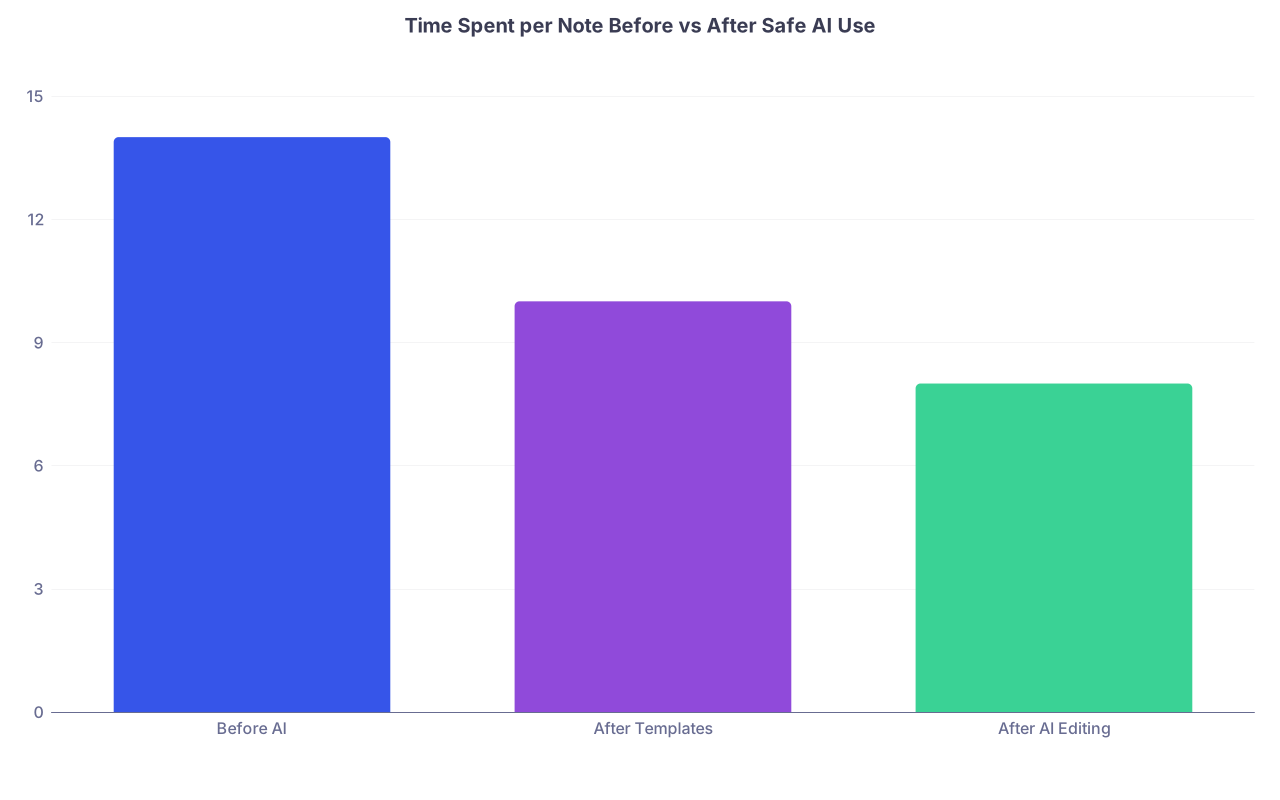
| Category | Value |
|---|---|
| Before AI | 14 |
| After Templates | 10 |
| After AI Editing | 8 |

| Step | Description |
|---|---|
| Step 1 | Need to write note |
| Step 2 | Use approved AI in EHR |
| Step 3 | Write note manually |
| Step 4 | Remove identifiers and summarize |
| Step 5 | Use public AI for structure or wording |
| Step 6 | Review and edit for accuracy |
| Step 7 | Enter final note in EHR |
| Step 8 | PHI safe tool available |
| Step 9 | Need AI help? |
FAQ (Exactly 3 Questions)
1. Is it ever okay to paste part of a real note into ChatGPT if I remove the name and MRN?
Only if you have fully stripped all identifiers and cannot reasonably re‑identify the patient from what remains. In practice, that means no specific dates, locations, rare conditions in small communities, or detailed timelines that scream “this patient.” Many institutions still forbid any clinical text sharing with public AI, even de‑identified, so your local policy overrides everything. When in doubt, do not paste.
2. Can I get in trouble for using my hospital’s built‑in AI scribe?
You are unlikely to get in trouble simply for using an institution‑approved tool, but you can be held responsible for any inaccurate, misleading, or upcoded documentation it produces. You still must review and edit every note before signing. If the AI routinely generates fluff or errors and you sign them, that is on you, not the vendor.
3. Should I tell patients I am using AI to help with their notes?
If you are using an ambient scribe tool that is obviously recording the visit, yes—briefly explain that the system is helping with documentation and that the note is still yours. For behind‑the‑scenes template creation or anonymized editing, disclosure is generally not required, but some patients appreciate transparency. If your institution has guidance on this, follow that first.
Key points:
- Respect the hard line: no identifiable PHI in public AI tools, ever.
- Use AI for structure, wording, and templates; keep clinical reasoning and final decisions yours.
- Push your institution for clear AI policies, then build a personal playbook you can follow even when you are exhausted.