You’re on call. It’s 10:47 p.m. The list is 30 patients deep. The pager has finally calmed down, but instead of closing your eyes you’re staring at a backlog of 18 unfinished notes, 12 unsigned orders, and 9 messages in your inbox with “urgent” flags that were actually urgent… 6 hours ago.
You did maybe 5 hours of real patient care today and 9 hours of clicking boxes.
You’re not burned out “in theory.” You’re actively drowning in documentation, and some attending just said, with a straight face, “make sure your notes are more comprehensive.”
Here’s the situation: you are stuck on a documentation-heavy service, and unless you change how you work, this rotation is going to steamroll you. The only way to survive without wrecking your sleep and sanity is to get ruthless about automation and workflow.
This is the playbook.
Step 1: Get Honest About What’s Killing Your Time
Do not start with fancy AI or shiny tools. Start with a blunt time audit.
For 2–3 shifts, keep a tiny running log in your pocket or notes app. Every hour, jot down where the last 60 minutes actually went:
- Notes (H&Ps, progress, discharge summaries)
- Orders and order sets
- Messaging (inbox, staff messages, patient portal)
- Phone calls
- Hunting info (labs, imaging, prior notes)
- “Stupid clicks” (reconciliation, med lists, re-entering the same crap for the 10th time)
You’ll usually see something like:
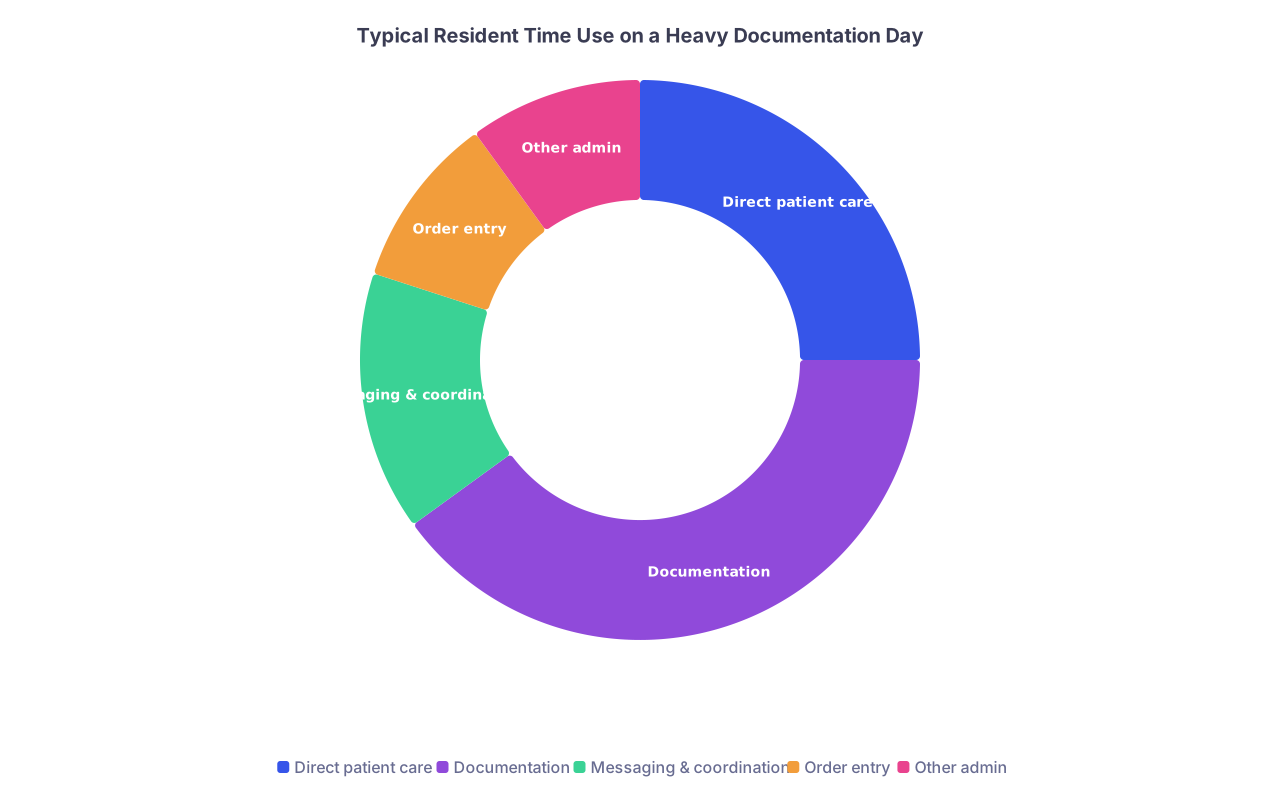
| Category | Value |
|---|---|
| Direct patient care | 25 |
| Documentation | 40 |
| Messaging & coordination | 15 |
| Order entry | 10 |
| Other admin | 10 |
Once you see that 40–50% of your day is going into documentation and low-value clicks, now you have permission—mentally and practically—to be aggressive about automation. You’re not “cutting corners.” You’re correcting a broken system.
Write down the 3 most painful, repetitive tasks. Those are the first targets.
Examples I keep seeing:
- Same HPI/PMH being re-typed on every new admission in a similar template.
- Progress notes that are 70% identical day-to-day.
- Discharge summaries that require re-assembling information already in the chart.
Now we fix those.
Step 2: Squeeze Everything Out of Your Existing EHR
Before you dream about AI scribes, you need to max out what your current system already offers. Most people use maybe 20% of their EHR’s efficiency features.
Here are the levers, and if your EHR doesn’t have some version of these, your hospital is behind.
| Feature Type | Examples / Names You Might See |
|---|---|
| Smart phrases | .hpi, .plan, .discharge, .hx |
| Smart links | @lastlab, @lastculture, @medlist |
| Templates/macros | Admission note, progress note, consult |
| Order sets | Sepsis, chest pain, COPD, DKA |
| Task routing | “Route to RN”, “Route to PharmD” |
Build ruthless templates, not pretty ones
You’re not designing art. You’re designing speed.
For each of these, build (or steal) templates:
- Admission H&P for your service’s bread-and-butter diagnoses.
- Daily progress note with sections already labeled and half-completed.
- Discharge summary that pulls in:
- Hospital course skeleton
- Problem list
- Med list
- Follow-up placeholders
The key is to make your template 60–70% identical across patients and tweak the rest, instead of starting from scratch.
Concrete structure (example for medicine progress note):
- Subjective: one line with a dot-phrase:
.overnightupdate - Objective: auto-import vitals, I/O, key labs, and last 24h imaging summary
- Assessment/Plan: bullet list per problem, same order every time
You should be able to populate 80% of your daily note by:
- Calling one template
- Answering 2–3 text prompts you embedded for yourself (e.g., “Biggest change in last 24h:”)
- Editing the plan section
Smart phrases + smart links = pseudo-automation
If your EHR has anything like “smart links,” learn the 10 you’ll use daily. For example:
- Last BMP
- Last CBC
- Active medications
- Micro results
Instead of:
- Clicking Labs → Basic Metabolic Panel → scrolling → reading → then re-typing
You:
- Type
.lastbmpand it drops structured data straight into your note.
If your system does not have this? Ask your superuser or IT person how people are doing it locally. There’s almost always some workaround others already figured out.
Step 3: Use AI Tools, But Use Them Correctly
This is “Future of Healthcare” territory, but for you this month it’s “will I get out before midnight” territory.
There are three main buckets you can use AI for right now:
- Turning messy text into structured notes.
- Summarizing long chart histories.
- Drafting boilerplate written content (discharge instructions, letters, appeal notes).
Where to safely plug AI in today
You have to respect HIPAA and local rules. Some institutions now have integrated AI into their EHR (Epic’s ambient scribe, integrated GPT tools, etc.). If you have this, use it. Aggressively.
If you don’t, here’s the practical rule: only de-identified info leaves the chart. That means:
- No names
- No dates of birth
- No MRNs
- No room numbers
- No super-distinct rare conditions that obviously identify the person
You can still do a lot.
Example:
You copy your rough bedside note from your own scratchpad (not the chart). It looks like:
“76M, CHF, CKD, came in with SOB 2 days, worse when lying flat, up 5kg from baseline. CXR pulm edema. BNP 1600. On 2L NC. Home meds include carvedilol, lisinopril, furosemide. Poor med adherence. Social: lives alone, adult daughter helps intermittently. Plan: IV diuresis, re-start home meds, echo in AM, PT/OT, arrange visiting nurse.”
You feed this into your AI assistant and say:
“Turn this into a concise HPI and A/P for an internal medicine admission note. Do not invent details. Keep length moderate.”
You get back a structured, readable block. You then paste that into your actual note and adjust as needed. You just cut 10 minutes off one admission.
Multiply by 8 admissions over a call cycle. That’s a real difference.
Same idea for daily notes:
- Dictate or type a few rough bullets: “Feels better. Less SOB. Peeing well. Weight down 2 kg. Cr stable. Still some LE edema. Still needs PT.”
- Ask AI to turn it into a short Subjective/Objective/Assessment/Plan.
- You bring that back into the EHR and fine-tune.
This is not “AI doing your note.” It’s you offloading the busywork of formatting and phrasing.
Step 4: Make “Ambient Scribing” Work for You (If You Have It)
If your institution has some version of ambient documentation—Epic’s ambient scribe, Dragon Ambient eXperience, Abridge, whatever—this is where you either win big or waste potential.
The mistake a lot of people make is thinking they can talk like they normally do and get a perfect note. That’s fantasy. You need to speak in “scribe-friendly” language.
Three rules:
- Speak your structure out loud.
- “Assessment and plan, problem one, acute decompensated heart failure. Patient improving. We will…”
- State key negatives explicitly.
- “No chest pain, no fever, no new neurological symptoms.”
- Summarize at the end.
- “In summary, this is hospital day 3, symptoms improving, labs stable, we’re targeting discharge in 1–2 days pending PT and diuresis response.”
What the AI does well: turning that structured conversation into a coherent, decently formatted note with the right headings.
What you still must do: sanity check, edit key details, and confirm that the plan is exactly what you want documented. You are still on the hook legally and ethically.
But instead of typing out a full progress note, you’re editing one. Massive difference.
Step 5: Use Automation Beyond Notes – Orders, Tasks, Communication
Documentation hell isn’t just notes. A ton of your time goes into repetitive orders and micro-communications that could be streamlined.
Order sets: your best low-tech automation
If your service doesn’t have robust order sets, build them or get someone to. I’ve watched one well-built COPD exacerbation order set save 15–20 minutes per admission.
You want order sets that include:
- Standard labs and imaging
- Common meds with default doses/frequencies
- Nursing orders (I/O, weights, oxygen parameters)
- PT/OT, dietary, DVT prophylaxis
Yes, you still need to individualize. But you stop re-building the wheel every time.
Use message routing like a manager, not a martyr
You should not be the sole sink for every micro-task.
- Pharmacy question about dosing that any pharmD could answer? Route.
- Scheduling follow-up imaging? Route to scheduling pool with a quick standardized message.
- Nursing question that’s purely logistics? Route to charge nurse if appropriate.
You’re a clinician, not everyone’s general help desk.
Step 6: Design a Daily Documentation Rhythm That Doesn’t Crush You
Automation tools help, but if your timing is off, you still drown.
Here’s a simple but effective pattern that works on documentation-heavy services:

| Step | Description |
|---|---|
| Step 1 | Start of day |
| Step 2 | Pre-round data review 30-45 min |
| Step 3 | Short bedside visits with structured talking |
| Step 4 | Mid-morning doc block 30-60 min |
| Step 5 | Round / team discussion |
| Step 6 | Post-round doc block 60-90 min |
| Step 7 | Afternoon tasks and updates |
| Step 8 | Quick evening sweep 20-30 min |
Two key ideas in there:
- Short, protected “doc blocks” where you slam through notes using your templates and AI help. No email. No random scut. Just documentation.
- You never leave all notes for after 7 p.m. You leave only the truly late-breaking stuff or one or two complex admissions.
During bedside encounters, talk in a way that feeds your tools:
- “Today your breathing is better, you’re on 2L oxygen instead of 4L, and your weight is down 2 kilos. The main issues we’re managing are your heart failure, your kidney function, and making sure you can walk safely at home.”
This kind of structured summary makes AI scribes and your own later dictation far easier.
Step 7: Build Micro-Automations That Match Your Exact Pain Points
Everyone’s rotation is a little different, but most residents and students on documentation-heavy services benefit from a few small, custom tricks.
Here are a few that consistently work:
Copyable follow-up blocks
Create small text blocks you can paste into discharge summaries:- “Follow up with cardiology clinic in 1–2 weeks to review medication changes and adjust diuretic dosing.”
- “See your primary care doctor within 1 week for blood pressure check and review of hospital records.”
Problem list templates
For common chronic issues (CHF, COPD, DM2, CKD), have pre-written Assessment/Plan skeletons with:- 2–3 standard lines of assessment
- 3–5 plan bullets you then tweak:
- “Continue home beta-blocker”
- “Adjust diuretic dose based on I/O and weight”
- “Low-sodium diet, fluid restriction as tolerated”
Standard “hospital course” shells
Especially for long stays:- “Admitted on [date] with [chief complaint]. Hospital course notable for:
- [Major issue 1] – summary.
- [Major issue 2] – summary.
- [Complication or important workup] – summary.
At discharge, patient is [functional status].”
- “Admitted on [date] with [chief complaint]. Hospital course notable for:
You can feed AI a very rough timeline and say: “Turn this into a concise hospital course paragraph, 6–8 sentences, focusing on major turning points and key treatments.” You then scrub it for accuracy.
Step 8: The Line You Don’t Cross
Let me be absolutely clear about something, because this is where people get reckless:
Automation is for structure, phrasing, and reducing repetitive work. It is not for inventing medical decision-making.
Bad uses of automation/AI that will burn you:
- Letting AI write an entire note you barely read.
- Asking AI to “create a plan” and blindly pasting it.
- Using AI outside approved channels with actual patient identifiers.
- Having more text than thought. A long, AI-polished note that doesn’t match reality is worse than a short, honest one.
You are allowed to be fast. You are not allowed to be sloppy about facts and decisions.
If a malpractice attorney or review board pulls your note and says “This doesn’t match the labs, vitals, or reality,” you do not get to blame your tools.
So here’s the rule:
Automation can help format, summarize, and standardize what you were already going to say and do. It cannot think for you.
Step 9: Think Like a System Designer, Even If You’re “Just a Trainee”
The future of healthcare documentation is heading one way: less typing, more ambient capture, more AI summarization. But you’re living through the awkward middle period where systems are half-baked and expectations are insane.
That’s not going away tomorrow. So you have two options:
- Suffer under the system.
- Start shaping it.
That means:
- Emailing your program or service director with very specific examples: “Our admission note for CHF patients forces us to re-enter meds that are already in the chart. Could we build an order set and note template that pulls these in automatically?”
- Offering to pilot new AI tools or EHR features instead of waiting for them to be forced on you.
- Sharing templates and workflows with your co-residents and students so the whole team gets faster.
You’re not going to fix American healthcare. But you can absolutely fix your corner of documentation hell.
And frankly, the people who learn to work with automation instead of against it are going to be a lot better positioned in the next 5–10 years as hospitals double down on this tech.
Quick Comparison: “Old School” vs Automated Day
| Aspect | Old-School Day | Automation-Assisted Day |
|---|---|---|
| Admission notes | Typed from scratch | Template + AI-structured HPI/A&P |
| Daily progress notes | Written at night, 10–15 min each | Generated from template, edited in 3–5 min |
| Discharge summaries | Painful rebuild of history | Hospital course drafted with AI from bullets |
| Time spent documenting | 6–7 hours | 3–4 hours |
| Mental energy at 9 p.m. | Fried | Tired, but not wrecked |
FAQs
1. Is it “cheating” or unprofessional to use AI to help with my notes?
No. What’s unprofessional is wasting hours re-typing the same long sentences when you could safely standardize and automate the structure. As long as:
- You de-identify data when using external tools (unless institution-approved).
- You review and edit everything for accuracy.
- The medical thinking and decisions are yours.
Then you’re not cheating. You’re compensating for a bad system.
2. My hospital doesn’t have fancy AI tools integrated. Is there still anything meaningful I can do?
Yes. Most of your wins will come from:
- Better EHR templates and dot-phrases.
- Smarter use of order sets.
- Using a general AI assistant on de-identified summaries to structure text. You can absolutely cut 1–2 hours of documentation per day just from ruthless templating and a tight daily workflow, even without ambient scribing or built-in GPT.
3. How do I convince skeptical attendings that shorter, more templated notes are OK?
You focus on accuracy, clarity, and relevance. If your note:
- Has a clear, prioritized assessment and plan.
- Accurately reflects the data and your reasoning.
- Avoids irrelevant copy/paste garbage.
Most reasonable attendings won’t care that you used templates, especially when your plans are sharp and you know the patient cold on rounds. If they demand 5-page novels, that’s their problem, not the standard of care.
4. I’m a student with limited EHR access. Can I still practice these skills?
Yes, and you should. You can:
- Build personal templates in a text editor and practice structuring HPIs and A/Ps.
- Use AI (with fake or de-identified cases) to learn how to turn rough bullets into coherent notes.
- Watch how your residents and attendings use templates, smart phrases, and order sets, then emulate the ones that work.
You’re basically training yourself to think like someone who will thrive when automation and AI are everywhere, not be replaced by them.
You’re in a brutal, documentation-heavy rotation right now. It feels like the system is winning. But it does not have to stay like that.
Once you’ve got your templates built, your AI workflow dialed in, and your daily rhythm under control, you buy back something precious: time and mental space to actually be a clinician again, not a full-time typist.
With that foundation in place, you’ll be ready for the next evolution—when the tools get better, the scribes get smarter, and you’re the one deciding how to use them instead of just suffering under them. But that’s the next chapter in the future of healthcare. Today, the goal is simpler: survive this service without losing yourself.