
The myth that you need to be a programmer to build a clinical prediction tool is wrong.
You need structure, judgment, and a basic toolkit. Not a computer science degree. I have watched residents with zero coding experience build usable, publishable risk calculators in a few months—while on service. The difference between those who succeed and those who stall is not intelligence. It is workflow.
Here is the workflow. Step by step. With guardrails so you do not create something unsafe or embarrassing.
1. Start With a Clinical Question That Actually Matters
If your prediction tool does not change a decision, it is a hobby project. Not a clinical tool.
Ask yourself one blunt question:
“What decision do I or my team repeatedly struggle with that a probability would actually help?”
Examples that work:
- Should I admit or discharge this low-risk chest pain patient?
- What is the 7-day readmission risk for this COPD patient?
- Which febrile kids in the ED can safely go home without labs?
- Which oncology patient is likely to miss their next infusion due to toxicity?
You are looking for:
- A binary or simple outcome
- Yes/No: readmission, ICU transfer, PE present, decompensation.
- Time-to-event: 7-day, 30-day, 1-year event.
- A decision threshold
- “If risk < X%, we do A; if ≥ X%, we do B.”
- Variables available at the time of the decision
- Do not build a triage tool using lab values that come back 12 hours later.
If you cannot write your tool’s purpose in one sentence like this:
“Estimate 30-day readmission risk at the time of discharge using variables available in the EHR discharge note.”
…you are not ready to build anything. Fix the question first.
2. Pick the Simplest Possible Outcome and Predictors
You are tempted to include every variable you can think of. That is how prediction tools become unusable monsters.
You need:
- 1 clear outcome
- 5–10 sensible predictors
- A dataset big enough to not be embarrassing
Define the outcome precisely
Bad: “Clinical deterioration.”
Good: “Unplanned ICU transfer within 48 hours of admission.”
Write it as:
- Time window
- Type of event
- How it is measured or captured in the record
Choose practical predictors
Criteria for predictors:
- Available at the decision time
- Routinely measured (no exotic biomarkers)
- Interpretable by clinicians
- Low missingness in your data system
Typical predictor categories:
- Demographics: age, sex, prior admissions
- Vital signs: heart rate, BP, respiratory rate, SpO₂, temperature
- Basic labs: creatinine, WBC, lactate
- Comorbidities: diabetes, CHF, COPD, cancer
- Clinical features: symptom duration, alert vs altered, oxygen requirement
If it takes more than 20 seconds to find a variable in a chart, think very hard before including it.
3. Get Data Without Getting Fired or Breaking the Law
You cannot build a credible prediction tool from vibes and clinical experience alone. You need data.
You also do not want to be the person who got IRB-banned for sloppy data handling. So do this properly.
Step 1: Secure approvals
Minimum:
- IRB or ethics review (even if it ends up as “exempt”)
- Institutional data access approval (often via an “honest broker” / data warehouse team)
Have a one-page summary ready that clearly states:
- Clinical question
- Outcome definition
- Predictor list
- Time window of data
- Number of patients you roughly need
Step 2: Size your dataset
Rule of thumb for beginner tools:
- For logistic regression: at least 10–20 outcome events per predictor variable.
- If you have 7 predictors and event rate is 10%, you want roughly:
- 7 predictors × 20 events ≈ 140 events
- With 10% event rate → 140 / 0.10 = 1,400 total patients.
You do not need perfection. You need to avoid overfitting your own call schedule.
Step 3: Work with data people instead of fighting them
You are not going to hand-write SQL queries on day 1. Use the infrastructure you have.
Common options:
- Hospital data warehouse request portal
- Clinical research informatics team
- Quality and safety analytics group
Give them:
- Cohort definition: “All adult ED visits from Jan 2021–Dec 2023 with diagnosis codes related to X.”
- Variables needed: clear list—spend time here; rework is painful.
- Timeline: be realistic (data pulls often take weeks, not days).
4. Use No-Code or Low-Code Tools to Build the Model
Here is where most clinicians freeze. They imagine Python notebooks and matrix algebra. You do not need that.
You need either:
- A no-code/GUI stats tool, or
- A friendly data collaborator using R/Python, with you driving the clinical design
Let me give you viable no-code paths.
Option A: Excel / Google Sheets + Online Calculators (for very simple tools)
If you are predicting a basic binary outcome with a handful of predictors, you can use:
- Excel’s Logistic Regression via add-ins like Real Statistics or XLSTAT
- Google Sheets with a statistics add-on (many exist)
- Or have a statistician fit the model and give you coefficients
Workflow:
- Clean your dataset (one row per patient; columns = predictors + outcome).
- Run logistic regression with your outcome vs predictors.
- Export the model coefficients.
You now have a mathematical model:
log-odds = β0 + β1·Age + β2·HR + …
You can convert this to a risk:
risk = 1 / (1 + e^(−log-odds))
You do not need to derive this. You just need to know where to plug numbers.
Option B: Graphical tools (SPSS, Stata GUI, Jamovi, JASP)
If your institution has SPSS or Stata, their GUIs can handle:
- Logistic regression
- Linear regression
- Basic survival analysis
You click through menus, select variables, and export coefficients or scores.
Free options:
- JASP (jasp-stats.org)
- Jamovi (jamovi.org)
Both are point-and-click and can run regression without you writing code.
Option C: Collaborate but own the design
If someone else runs the code:
- You specify:
- Outcome
- Predictors
- Handling of missing data
- How complex the model is allowed to be (hint: keep it simple)
- They return:
- Coefficients
- Model performance metrics (AUC, calibration plot, sensitivity/specificity at key thresholds)
- Variable importance
You are not outsourcing thinking. You are outsourcing syntax.
5. Evaluate Whether the Model Is Good Enough to Touch a Patient
A bad prediction tool is worse than no tool. You need to sanity-check performance.
Ask your stats collaborator or your GUI software for:
- Discrimination: How well does the model separate those with and without the outcome?
- AUC / C-statistic for binary outcomes
- Calibration: Are predicted probabilities close to observed probabilities?
- Calibration plot or calibration slope
- Key thresholds: Risks at which clinical decisions change
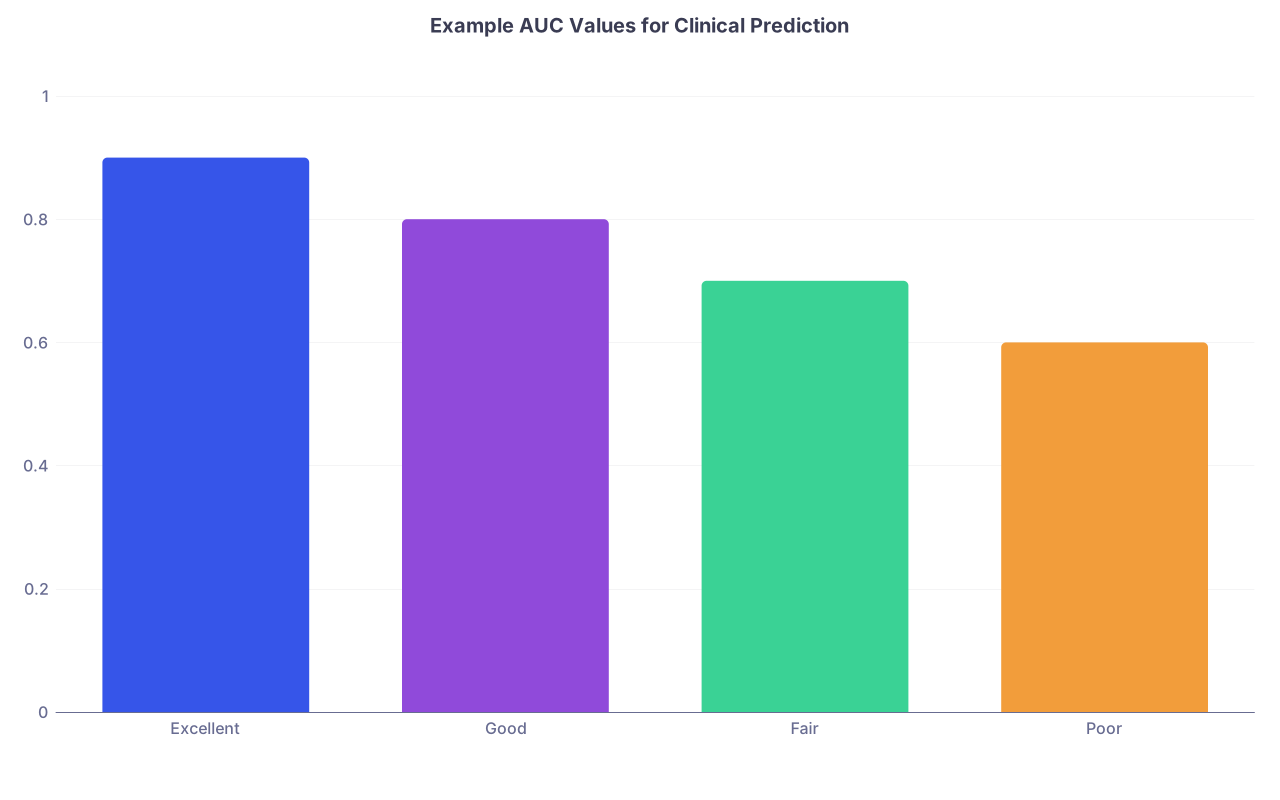
| Category | Value |
|---|---|
| Excellent | 0.9 |
| Good | 0.8 |
| Fair | 0.7 |
| Poor | 0.6 |
Rough, opinionated cutoffs:
- AUC < 0.65 → usually not clinically helpful
- 0.65–0.75 → maybe usable for supporting decisions, not dictating them
- 0.75–0.85 → often quite useful
0.85 → strong, but double-check you did not overfit
Also:
- Check face validity: do predictor directions make sense?
- Older age increasing risk? Plausible.
- Higher systolic BP decreasing risk in septic shock? Possibly wrong or confounded.
- Run subgroup checks: age groups, sex, key comorbidities. Look for glaring failures.
You do not need perfection. You need “good enough” plus conservative use.
6. Translate the Model Into a Simple, Usable Tool
Having a regression equation in a paper is not the same as having a usable clinical tool.
Your job now is to convert math into something a busy intern can use at 3 AM.
You have four main formats:
- Paper score (point-based rule)
- Web calculator
- Mobile form (e.g., REDCap)
- EHR-embedded decision support
Start with 1–2. You can add EHR integration later.
6.1 Create a point-based score (optional but powerful)
This is how things like CHADS₂, Wells, or CURB-65 stay alive.
Basic idea:
- Convert regression coefficients into integer points for each variable.
- Sum points to get a risk category.
Workflow with your statistician:
- Take logistic regression coefficients.
- Decide on a “base” coefficient (often divide all by the smallest non-zero).
- Round to nearest integer.
- Test how much performance drops vs. full model.
If AUC does not drop much (0.02–0.03), you now have a paper-friendly score.
You can display risk like:
- 0–3 points → low risk (predicted risk ~2%)
- 4–6 points → intermediate risk (~10%)
- ≥7 points → high risk (~30%)
7. Build a No-Code Web Calculator in Under an Hour
This is the part everyone overcomplicates. There are simple platforms designed exactly for this.
Option A: Google Sheets + simple front-end
Crude but effective for prototyping.
- Put variables and formula into a Google Sheet.
- Use
=EXP()and=1/(1+EXP(-x))to compute risk. - Share as “view only” and teach users to enter values in specific cells.
I have seen services run for months like this while a proper web app was developed.
Option B: No-code form builders (REDCap, Qualtrics, Airtable, Typeform)
Most health systems have REDCap. It is made for this.
You can:
- Create a form with:
- Age, vitals, comorbidities as fields
- Use calculated fields for:
- Logistic equation
- Final risk percentage
- Categorical risk (low / intermediate / high)
Prototype in REDCap, share within your institution; no programming required.

| Step | Description |
|---|---|
| Step 1 | Define Question |
| Step 2 | Get Data |
| Step 3 | Fit Simple Model |
| Step 4 | Check Performance |
| Step 5 | Create Points or Formula |
| Step 6 | Build REDCap or Web Form |
| Step 7 | Test with Clinicians |
Option C: Lightweight hosted calculators (no-code websites)
If you want a public calculator without hiring a developer:
- Use simple web form builders (e.g., Bubble, Softr, Webflow with logic tools)
- Some journals or academic groups host calculators for published tools
The pattern is always:
- Input fields → computation engine → display risk and recommendation.
You only need to specify the logic.
8. Put Your Tool in the Real World Without Hurting Anyone
Now the dangerous part: deployment.
The worst move is to quietly put a tool online and let it drift into use without oversight. Do not do that.
8.1 Start with a “silent pilot”
Run the model in parallel with current practice without changing decisions.
For a pilot:
- Have clinicians use the tool and record the predicted risk
- Do not change the actual decision based on it (yet)
- Collect:
- Predicted risk
- Actual decision (admit/discharge, test/no test)
- Actual outcome
After a few weeks/months:
- Compare tool predictions vs real outcomes
- Identify:
- Obvious miscalibration
- Scenarios where it fails (e.g., rare conditions, extremes of age)
8.2 Define clear usage rules
Write a one-page “Instructions for Use” that covers:
- Intended population (who it is for)
- Exclusions (who it is not for)
- Inputs required
- How to interpret outputs:
- Risk thresholds and suggested actions
- “Do not use if…” warnings
This should feel like a drug label, not a marketing brochure.
| Risk Range | Category | Suggested Action |
|---|---|---|
| < 3% | Low risk | Consider discharge |
| 3–15% | Moderate | Use clinical judgment |
| > 15% | High risk | Strongly consider admission |
9. Handle Governance, Ethics, and Documentation Like an Adult
This is the part most clinicians ignore until a committee blocks them.
You need three things: governance, transparency, and monitoring.
9.1 Governance
Bring your tool to:
- Quality and Safety committee
- Clinical decision support or Informatics committee
- Departmental leadership
You want:
- Approval for pilot use
- Agreement on monitoring plan
- Clarity on who “owns” the tool and updates it
9.2 Transparency
Document:
- Dataset used (time period, location, inclusion criteria)
- Modeling method (e.g., logistic regression)
- Performance metrics (discrimination, calibration)
- Limitations and known blind spots
- Version number and date
If it is used clinically, that documentation should be accessible to end users.
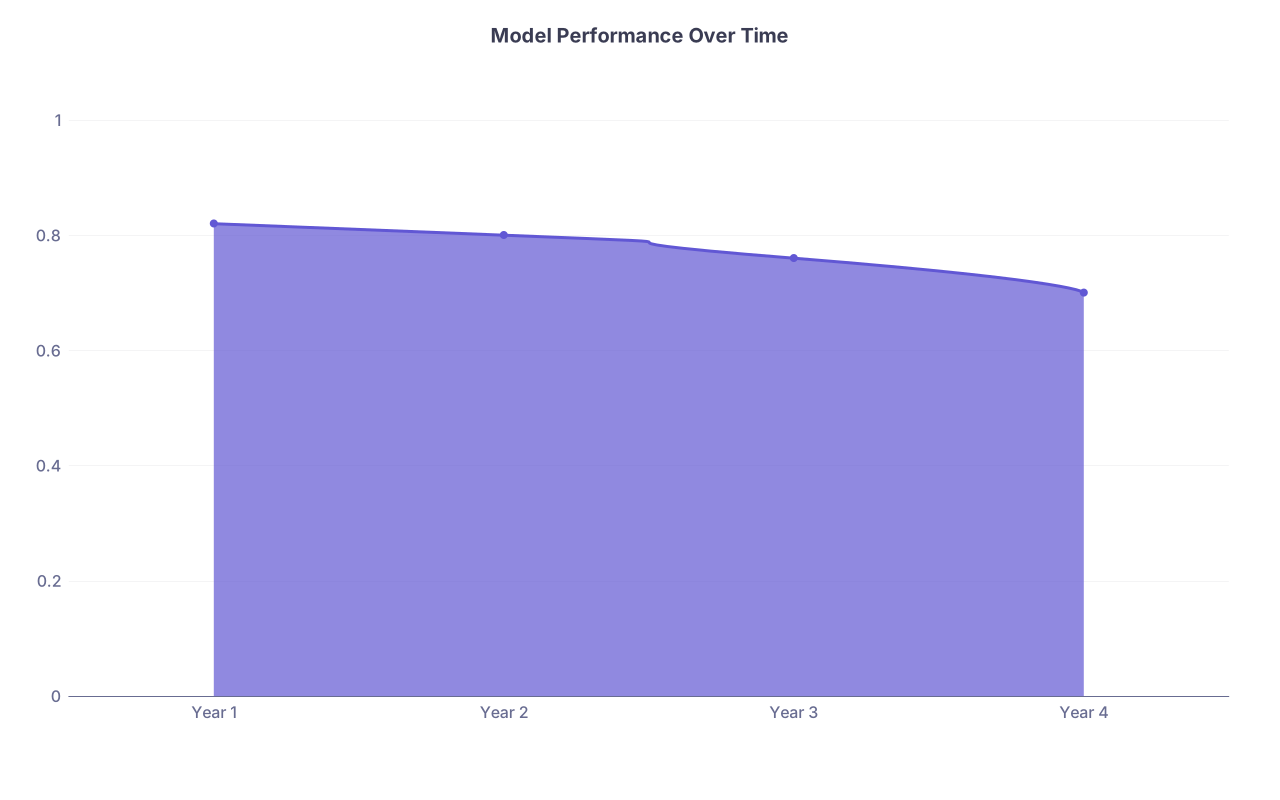
9.3 Monitoring and maintenance
No prediction tool is “build once, use forever.”
Basic monitoring plan:
- Recheck performance annually, or after major practice/EHR changes
- Periodically reassess:
- Calibration drift
- Performance in key subgroups
- Decide:
- Update, retire, or retrain the model
| Category | Value |
|---|---|
| Year 1 | 0.82 |
| Year 2 | 0.8 |
| Year 3 | 0.76 |
| Year 4 | 0.7 |
When AUC or calibration degrades meaningfully, you either:
- Retrain on newer data
- Limit tool scope
- Or kill it. Dead tools are better than misleading tools.
10. Leverage AI Carefully, Not Lazily
Given the category (Future of Healthcare), let me be blunt: AI is not a magic prediction button. But it can remove friction.
Here is where AI helps a non-coder:
- Variable brainstorming: AI can suggest plausible predictor sets (you still curate).
- Protocol drafting: IRB applications, project summaries, and data dictionaries.
- Interface design ideas: Wireframes for web calculators, language for output messages.
- Educational content: One-pagers for staff training on how and when to use the tool.
Where AI should not be trusted blindly:
- Auto-generating predictors without clinical rationale.
- Designing opaque “black box” models you cannot explain.
- Bypassing local data. A model trained on some U.S. tertiary center may not work in your district hospital.
Used correctly, AI is the assistant. You are the architect.

11. A Concrete Example From Start to Finish
To make this real, let me walk through a stripped-down scenario.
Scenario: 30-day readmission risk for heart failure discharges
Question
“Estimate probability of 30-day unplanned readmission for patients discharged with primary heart failure diagnosis.”Outcome
Unplanned admission to any hospital within 30 days of discharge.Predictors (all available at discharge):
- Age
- Prior admissions in past 12 months
- NYHA class at discharge
- Creatinine
- Systolic BP at discharge
- Whether a follow-up visit is scheduled within 7 days
Data
- 3 years of HF discharge data
- 5,000 discharges, 1,000 readmissions (20%)
Model
- Logistic regression via SPSS GUI or statistician in R
- Obtain coefficients, evaluate:
- AUC = 0.78
- Calibration slope ≈ 1.0
Check
- Older age → higher risk
- More prior admissions → higher risk
- No early follow-up → higher risk
All clinically reasonable.
Translate
- Create point-based score (0–15 points) from coefficients
- Map points to risk (using model or simple look-up table):
- 0–4 points → <10% risk
- 5–9 points → 10–25%
- ≥10 points → >25%
Tool build
- REDCap form:
- Fields: age, prior admissions, NYHA, creatinine, SBP, follow-up yes/no
- Calculated fields: points, predicted risk, risk category
- Output message:
- “Estimated 30-day readmission risk: 22% (moderate). Consider early follow-up, medication review, and social support assessment.”
- REDCap form:
Pilot
- Cardiology service uses tool for 3 months, no decisions changed.
- Compare predicted risks vs actual readmissions.
- Adjust thresholds slightly to optimize sensitivity for high-risk group.
Governance
- Present results to heart failure quality committee.
- Approve integration as discharge checklist item.
- Plan annual recalibration.
At no point did anyone write Python. The hardest part was getting decent data and keeping the model simple.
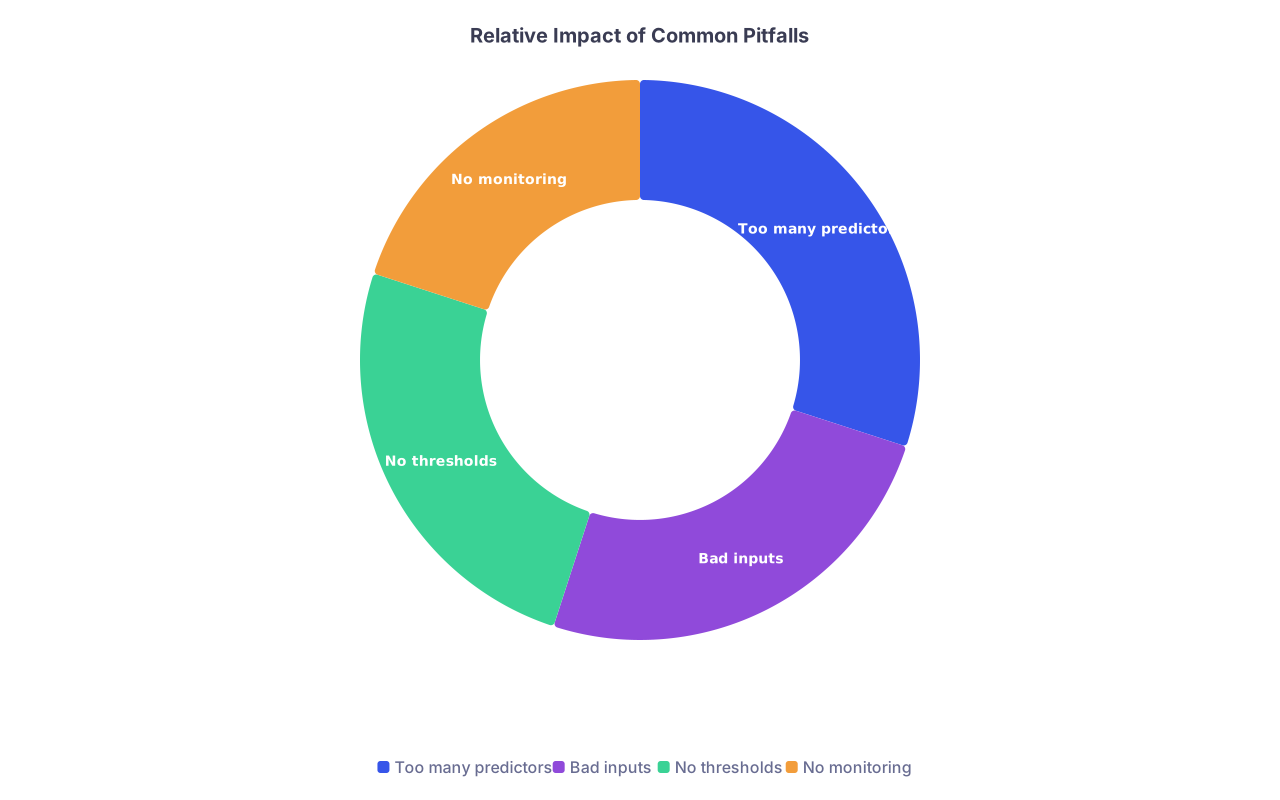
12. Common Pitfalls and How to Avoid Them
You will see these mistakes over and over.
Too many predictors, too little data
Fix: ruthless predictor selection and event-per-variable rule.Unusable inputs
e.g., “duration of symptoms in hours” when nobody documents it reliably.
Fix: only use variables that are consistently recorded.No defined clinical threshold
AUC looks nice, but nobody knows what to do with “18% risk.”
Fix: pre-specify action thresholds with your clinical team.Ignoring fairness and subgroups
Tool works great overall but fails in young women or minority groups.
Fix: subgroup performance review and domain expert review.Skipping monitoring
Tool becomes outdated as practice changes.
Fix: commit (in writing) to re-evaluation.
| Category | Value |
|---|---|
| Too many predictors | 30 |
| Bad inputs | 25 |
| No thresholds | 25 |
| No monitoring | 20 |
FAQ (exactly 2 questions)
1. I have zero statistics background. Is it realistic to lead a prediction tool project, or do I need to wait until I learn R or Python?
You can absolutely lead the project without learning to code, as long as you respect your own limits. Your job is to define the clinical question, the outcome, the predictors, and what decisions the tool should influence. A competent statistician or data scientist can handle the technical modeling. Use GUI tools like SPSS, Jamovi, or REDCap for the parts you want to touch directly. Do not pretend to understand methods you do not; instead, insist that your collaborator explain model behavior and limitations in plain language and keep the model simple and interpretable. That combination—your clinical judgment plus their technical skills—is usually better than a clinician trying to “DIY” a complex model.
2. Can I publish a clinical prediction tool that is only implemented as a spreadsheet or simple REDCap form, or do journals expect fully coded web apps?
Many respected journals have published tools whose initial implementation was a nomogram, score sheet, or spreadsheet. What they care about is methodological rigor, transparent reporting (TRIPOD guidelines are a good template), internal validation, and ideally some external validation. If your model is sound, your outcome is clinically relevant, performance is reasonable, and you document everything clearly—including how to calculate the score—then a spreadsheet or REDCap-based implementation is perfectly acceptable as an initial step. Later, you can work with developers or informatics teams to build a polished web or EHR-integrated version, but publication does not require that on day one.
Core takeaway: focus on a sharp clinical question, a clean and simple model, and a usable, transparent implementation. The code can always be upgraded later.