
The worst way to launch a digital health pilot in residency is to “just start building an app.” You’re not a startup. You’re inside a bureaucracy. Different game, different rules.
You need a timeline.
Below is a month‑by‑month playbook you can actually follow during residency without blowing up your schedule or annoying your PD. I’ll assume a 9‑month runway from idea to live pilot. If you have more time, stretch the early phases. If you have less, cut scope, not steps.
Month 0–1: Clarify the Problem and Get Quiet Buy‑In
At this point you should not be coding. You should be listening.
Week 1–2: Pick a problem, not a solution
In residency time, you have one major constraint: attention. You won’t get more than one serious pilot off the ground, so you’d better pick a problem that:
- Hurts every day
- Has a clear measurable outcome (time, errors, readmissions, pages, etc.)
- Involves a small, well‑defined user group
Examples that work:
- Automated discharge follow‑up texts for heart failure patients on your ward
- A simple photos + structured note intake for wound checks in your continuity clinic
- A digital pre‑visit questionnaire for new diabetes patients
Bad ideas at this stage:
- “Platform for all chronic disease management”
- “AI for all note‑writing”
- Anything that touches billing workflows across the whole hospital
At this point you should:
Write a one‑page problem brief:
- Who is affected (residents, nurses, a specific patient cohort)?
- How often?
- What’s the current workaround?
- What would success look like numerically?
Talk to 5–10 frontline people:
- 3–5 residents across different PGY levels
- 2–3 nurses
- 1 attending who’s seen everything
You are not selling. You’re confirming that the problem is real and painful.
Week 3–4: Quiet stakeholder scouting
Before you speak to leadership, you need “below‑the‑radar” intel.
At this point you should:
Identify:
- A sympathetic attending (your future clinical champion)
- A chief resident or senior who can protect your schedule a bit
- Someone who has already done a QI or informatics project and survived
Ask very blunt questions:
- “Who actually has the authority to say yes to a small pilot?”
- “Who kills these projects?”
- “Where have similar projects died before?”
Start a running stakeholder map. Nothing fancy. Just a list:
- Green – likely supporters
- Yellow – need convincing
- Red – likely blockers
Month 2: Formalize the Concept and Align with Institutional Priorities
Most resident pilots die here because they never move from “cool idea” to “institutionally acceptable project.”
Weeks 1–2: Draft your one‑pager + 5‑slide deck
You need two artifacts:
One‑page concept note (for emails and quick reviews)
- Problem (3–5 lines, grounded in your setting)
- Proposed digital solution (1–2 paragraphs, no jargon)
- Target population and size (e.g., “HF patients on 6E, 15–20/mo”)
- Outcomes:
- Primary: something the hospital cares about (readmissions, LOS, no‑show rate, nurse page volume)
- Secondary: satisfaction, usability
- Required resources: staff time, IT support, any hardware
- Rough timeline (when you’d start and for how long)
5‑slide mini‑deck for short sit‑downs:
- Slide 1: Problem (with one vivid example from your own call night)
- Slide 2: Proposed solution (single diagram or workflow)
- Slide 3: Why now / alignment with institutional goals
- Slide 4: Pilot design – who, where, how many patients, how long
- Slide 5: What you need & what you’ll deliver (data, report, poster, etc.)
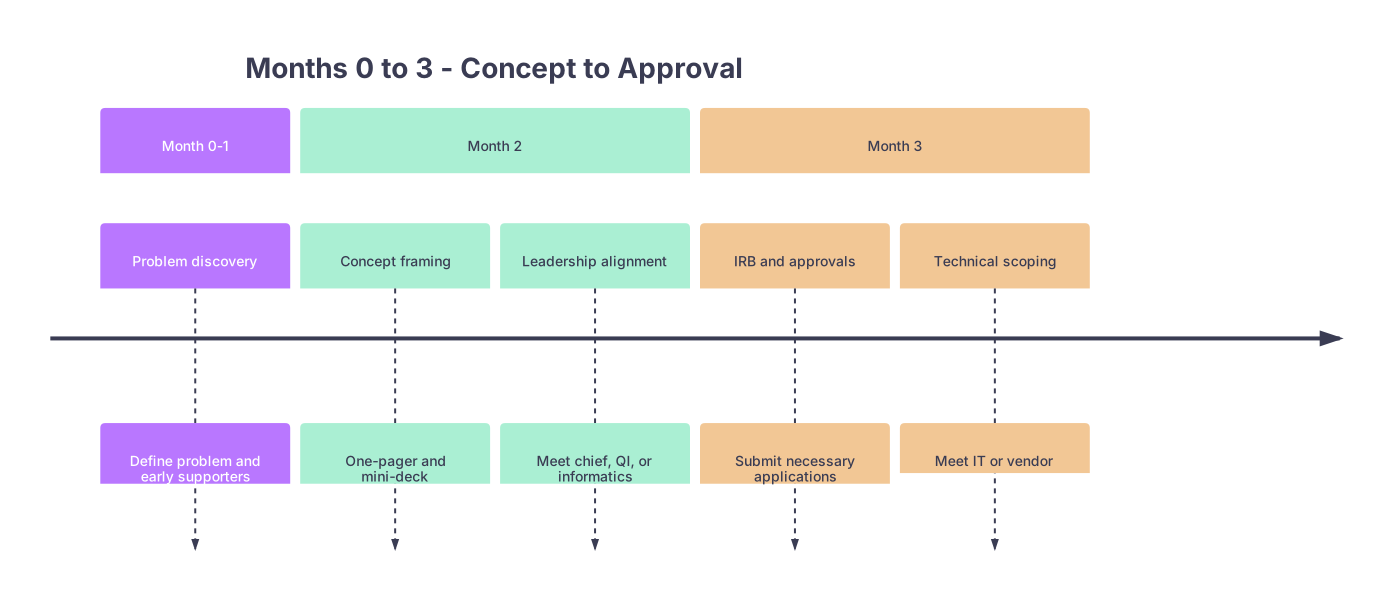
| Period | Event |
|---|---|
| Month 0-1 - Problem discovery | Define problem and early supporters |
| Month 2 - Concept framing | One-pager and mini-deck |
| Month 2 - Leadership alignment | Meet chief, QI, or informatics |
| Month 3 - IRB and approvals | Submit necessary applications |
| Month 3 - Technical scoping | Meet IT or vendor |
Weeks 3–4: Align with leadership and QI
At this point you should start surfacing the project to people with titles.
Schedule short, focused meetings with:
- Your program director or APD
- A QI lead or patient safety officer
- If your institution has one: Chief Medical Information Officer (CMIO) or clinical informatics lead
In those meetings:
- Lead with the problem and how it hurts your workflow and patients
- Explicitly tie to existing goals:
- Reduced readmissions
- Patient engagement
- Burnout reduction
- Value‑based care / ACO targets
Ask two direct questions in each meeting:
- “What are the 1–2 biggest institutional risks you’d be worried about with this pilot?”
- “Who else needs to bless this before I can run a 3‑month limited pilot in one unit/clinic?”
Write down names. Those become your Month 3 targets.
Month 3: Approvals, IRB, and Technical Reality Check
This is the least glamorous month. Skip it, and your pilot will never see daylight.
Week 1: Decide IRB vs QI categorization
Most small pilots can be classified as QI rather than full research, which massively simplifies things. But don’t guess.
At this point you should:
- Email your IRB with:
- Your one‑pager
- A clear statement: “We intend this as a limited quality improvement pilot. Does this qualify as non‑human‑subjects research/QI, or is full IRB review required?”
They’ll typically respond with:
- A QI determination form; or
- Instructions for expedited review; or
- “Yes, full IRB needed” (rare for low‑risk digital workflows, but it happens)
Week 2–3: Data, privacy, and IT reality
Now you find out what’s actually possible.
At this point you should:
- Meet (or email) someone from:
- Clinical IT / EHR team
- Information security
- Data analytics / quality office
Ask concretely:
- “We plan to do X, in Y clinic/ward, with Z patients/month.”
- “We need these data fields: [list them]. Is this feasible?”
- “Do we have existing tools? (texting platforms, patient portal messaging, survey tools like REDCap, Qualtrics, Twilio integrations, etc.)”
You’re trying to avoid custom builds. Standing up a pilot on top of:
- The existing patient portal
- Institutional texting platforms
- Pre‑approved survey tools
- Off‑the‑shelf remote monitoring devices
…is almost always smarter and faster than inventing infrastructure.
| Option Type | Pros | Cons |
|---|---|---|
| Patient portal | Integrated, secure | Clunky UX, limited features |
| REDCap/Qualtrics | Fast surveys, easy export | Not great for real-time care |
| SMS platform | High engagement | PHI risk if not approved |
| Vendor app | Turnkey workflows | Contract, cost, integration |
Week 4: Lock your scope
By the end of Month 3 you should have:
- IRB/QI status clarified or application submitted
- Confirmation from IT about:
- What tools you can use
- Any security/privacy constraints
- A hard‑scoped pilot:
- One unit/clinic
- One clear workflow
- One primary outcome
- A specific 8–12 week pilot window
If you’re still “thinking about adding a few more features,” you’re about to derail your own timeline. Freeze the scope.
Month 4: Design the Workflow and Content
Now you build the thing, but from the workflow backwards, not the screen forwards.
Week 1–2: Map the current and future workflows
At this point you should:
- Sit with actual users (nurses, residents, MAs) and sketch:
- Current‑state workflow: who does what, when, with which tools?
- Future‑state with your digital layer: exactly where it plugs in
Use a whiteboard, not Figma.
Key questions:
- Who triggers the digital intervention (orders it, enrolls patient)?
- When in the visit/admission does it happen?
- Who receives alerts or responses?
- What happens if no one responds?
If you can’t draw it step‑by‑step, they can’t execute it on a busy Monday.
Week 3–4: Build content and scripts
Digital health pilots fail more from bad content than bad tech.
At this point you should:
Write every patient‑facing message, question, and instruction:
- Keep to a 6th–8th grade reading level
- Translate into top language(s) in your population if possible
- Include clear opt‑out language for anything using SMS
Draft staff scripts:
- How residents explain the pilot in clinic or on the floor
- How nurses enroll patients
- What to say when patients ask, “Is this replacing my visit?”
Run the draft by:
- One nurse
- One resident
- One patient (if possible; grab someone from your clinic who’s game)
Adjust for clarity and time. If enrollment takes more than 60–90 seconds, it’s too complicated.

Month 5: Build or Configure the Tool and Test Internally
You now turn your paper design into something that actually runs. And then you try to break it.
Week 1–2: Configuration and light build
At this point you should:
- Work with:
- IT / informatics to set up forms, message templates, and triggers inside existing systems
- Or, if using an external vendor, configure:
- Patient enrollment logic
- Message schedules
- Alert thresholds
Don’t chase perfect integration. For a pilot, it’s fine if:
- Data export is manual once a week
- A nurse checks a web portal daily at 4 pm
- Residents get batched summaries instead of real‑time alerts, as long as clinical safety is maintained
Week 3: Dry runs with fake patients
This is the part most residents skip. Don’t.
At this point you should:
- Run 3–5 complete “fake” journeys:
- You play the patient
- A resident or MA plays the staff
- You simulate:
- Enrollment
- Message delivery
- Patient responses
- Alerts
- Documentation
Try:
- A best‑case patient
- A patient who never responds
- A patient who responds with unexpected text (“I have chest pain right now”)
Stress test:
- What happens if the system is down for a day?
- What if a message goes to the wrong time zone?
- How do you manually override or unenroll a patient?
Week 4: Micro‑pilot with staff only
Before going live with patients, test with your actual users.
At this point you should:
- Enroll 3–5 staff members as “test patients”
- Have real staff walk through:
- Enrollment clicks/taps
- Scripted explanations
- Checking and acting on alerts
Collect immediate feedback:
- Where did you get stuck?
- What took longer than expected?
- What would make this usable on a post‑call day?
Make only critical fixes. Don’t re‑architect.
Month 6–7: Launch the Pilot (Go‑Live and First Month Operations)
Now you’re live. This is where you shift from builder to operator.
Week 1: Soft launch
At this point you should:
Start with a soft go‑live:
- Limit to a subset (e.g., 3–5 patients/week, or only the Monday clinic)
- Explicitly tell staff, “This is week 1; hiccups are expected.”
Do:
- Daily quick check‑ins with frontline staff (5–10 minutes)
- Track immediate issues in a shared doc or simple spreadsheet
- Shadow the workflow for at least one half‑day
Resist the urge to “fix everything” instantly. Log patterns.
Weeks 2–4: Full pilot ramp‑up
Once basic stability is clear, increase enrollment to your target volume.
At this point you should:
Set a simple operating rhythm:
- Who checks the system and when?
- Who is backup?
- How are issues escalated?
Make a basic run chart for weekly tracking:
- Number of patients enrolled
- Completion/engagement rate
- Key clinical metric (e.g., calls avoided, readmissions, no‑shows)
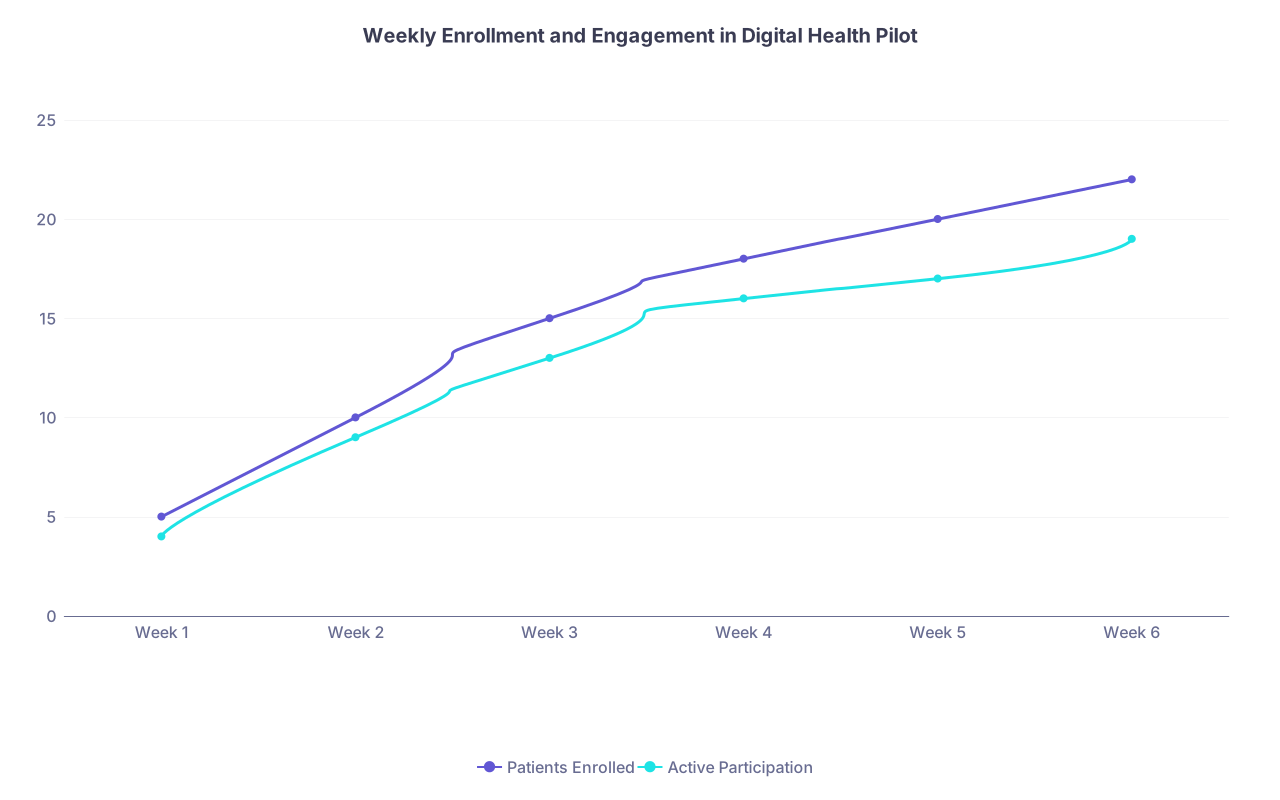
| Category | Patients Enrolled | Active Participation |
|---|---|---|
| Week 1 | 5 | 4 |
| Week 2 | 10 | 9 |
| Week 3 | 15 | 13 |
| Week 4 | 18 | 16 |
| Week 5 | 20 | 17 |
| Week 6 | 22 | 19 |
You don’t need sophisticated analytics. You just need to know if people are actually using the thing.
Month 8: Monitor, Iterate Lightly, and Protect the Data
Mid‑pilot is where attention drifts. You’re back on nights or on a brutal rotation. This is where your earlier groundwork pays off.
Week 1–2: Structured feedback loop
At this point you should:
- Run one short, structured feedback session with:
- 3–4 residents
- 2–3 nurses or MAs
- Your attending champion
Keep it 30 minutes max:
- What’s working? (Keep it.)
- What’s painful? (Tweak it.)
- Any unintended consequences? (Document them.)
Apply only low‑risk, non‑disruptive tweaks:
- Clarifying message wording
- Adjusting alert timing
- Simplifying enrollment steps
Avoid deep workflow changes mid‑pilot unless there’s a safety concern.
Week 3–4: Clean, label, and back up your data
You think you’ll remember what each column in your spreadsheet means. You won’t. Not in six months.
At this point you should:
Work with QI/analytics to:
- Pull clean, de‑identified data if possible
- Clearly label:
- Patient cohort definition
- Time windows (pre‑ vs during pilot)
- Any exclusions
Pre‑define your analysis:
- Primary outcome comparison (before vs during)
- Basic descriptive stats: adoption rate, completion, message volume
- Any balancing measures (e.g., nurse pages increased?)
If you want any chance of turning this into a poster, CV line, or publication, this month’s work is non‑negotiable.
Month 9: Analyze, Present, and Decide the Future
The project is not over when the last patient unenrolls. It’s over when you’ve squeezed the learning out of it and made a decision.
Week 1–2: Quick and dirty analysis
At this point you should:
- With a data‑savvy ally (QI, stats faculty, or analytics person):
- Run your primary analysis (even if underpowered)
- Visualize the key outcome over time (simple line or bar charts)
- Summarize usability/experience data (short quotes help)
Be honest. If the impact is modest, say it. Decision‑makers trust clean negatives more than over‑spun “trends toward improvement.”
Week 3: Debrief with stakeholders
You started with quiet 1:1s. You end with visible, structured reporting.
At this point you should:
- Present a short 10–15 minute debrief to:
- Your PD / APD
- Clinical leadership of the unit/clinic
- QI/informatics leads who supported you
Your structure:
- The problem we tackled
- What we built and how it fit into workflow
- What actually happened:
- Adoption
- Outcomes
- Staff/patient response
- What we’d do differently
- Specific next steps:
- Sunset?
- Modify and re‑pilot?
- Scale up to additional units?
Make a recommendation. Don’t punt the decision. Propose:
- “We should run a second 3‑month pilot with X change.”
- Or: “We should transition this to a standing workflow, with Y owner.”
- Or: “We should stop here; the benefit didn’t outweigh the complexity.”
Week 4: Package it for your future self
You’re not just doing this for your current hospital. You’re doing it for Future You, the attending or fellowship applicant.
At this point you should:
Create a clean package:
- 1–2 page executive summary
- Final slide deck
- De‑identified figures/tables
- Draft abstract for a conference (SCCM, SGIM, HIMSS, etc.)
Clarify:
- Who owns this if it continues?
- Where the code/configs live
- How someone else could restart it without you
This is how your pilot becomes part of your narrative, not just a side quest you barely remember.
Compressed 9‑Month Snapshot
If you want the entire thing in one shot:
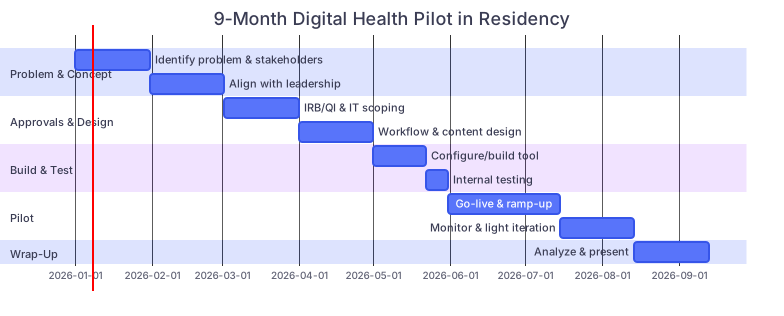
| Task | Details |
|---|---|
| Problem & Concept: Identify problem & stakeholders | a1, 2026-01-01, 30d |
| Problem & Concept: Align with leadership | a2, after a1, 30d |
| Approvals & Design: IRB/QI & IT scoping | b1, after a2, 30d |
| Approvals & Design: Workflow & content design | b2, after b1, 30d |
| Build & Test: Configure/build tool | c1, after b2, 21d |
| Build & Test: Internal testing | c2, after c1, 9d |
| Pilot: Go-live & ramp-up | d1, after c2, 45d |
| Pilot: Monitor & light iteration | d2, after d1, 30d |
| Wrap-Up: Analyze & present | e1, after d2, 30d |
Final Thoughts
Three points to keep straight:
- Scope small, but run it like it matters. One unit, one workflow, one main outcome. That’s enough for a real pilot.
- Sequence is everything. Problem → buy‑in → approvals → workflow → build → test → launch → analyze. Skip a step, and you’ll pay for it later.
- Leave a trail. Clean data, clear summary, and a simple story turn a chaotic 9‑month experiment into something that advances your career and actually helps your patients.