
52% of medical schools now collect detailed LMS analytics that no one actually knows how to interpret usefully.
That is the gap you are standing in. Your LMS is spewing out logins, clicks, quiz scores, and “engagement” graphs. IT tells you it is powerful. Vendors promise AI-driven insight. Faculty nod politely and go back to uploading PowerPoints.
Let me break down what actually matters, what is noise, and how to use learning analytics in medical education without drowning in dashboards.
1. What “Learning Analytics” Really Means in Med Ed
Most people think “learning analytics” = pretty graphs of quiz scores.
That is the shallow end.
In medical education, learning analytics is essentially three layers stacked on top of each other:
- Raw activity data from your LMS
- Meaningful educational indicators derived from that data
- Decisions and interventions you make based on those indicators
If you are not reaching step 3, you are not doing learning analytics. You are just watching numbers scroll by.

The 3 levels of LMS data
Most major LMS platforms used in medical schools and residency programs (Canvas, Moodle, Blackboard, D2L, proprietary hospital systems) give you three broad data strata:
Access and activity data
- Logins, last access, device types
- Page views, clicks, navigation patterns
- Video plays, pauses, rewinds, drop-off points
Assessment and performance data
- Quiz and exam scores
- Item-level performance (which MCQs are killing your students)
- Time-on-assessment, number of attempts
Progress and outcomes data
- Completion of modules and courses
- Alignment with competencies or EPAs (if your institution actually mapped them)
- Links to external outcomes: OSCE performance, shelf scores, workplace-based assessments
The trap is focusing only on whatever the LMS puts on the first “analytics” tab: usually access and basic quiz data. That is rarely where the real educational insight sits.
What you want is to move from “who clicked what” to:
- Who is at risk, and why
- Which learning activities are doing actual work, and which are decorative
- How your content and assessments align with required competencies
That means you must be very selective about which metrics you treat as signal.
2. Metrics That Matter vs. Metrics That Lie
Not all LMS metrics are created equal. Some are genuinely useful. Some look precise but are almost worthless in medical education context.
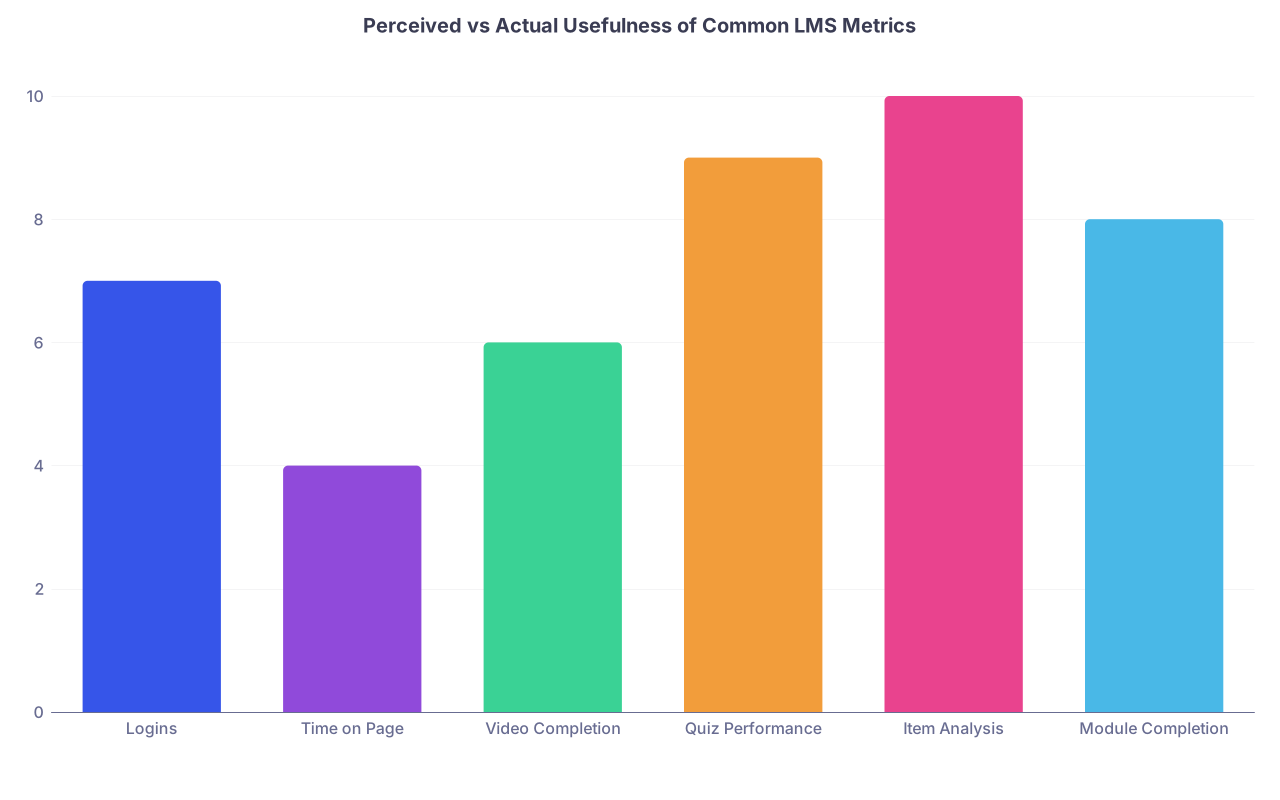
| Category | Value |
|---|---|
| Logins | 7 |
| Time on Page | 4 |
| Video Completion | 6 |
| Quiz Performance | 9 |
| Item Analysis | 10 |
| Module Completion | 8 |
(Scale 1–10: 10 = consistently useful for educational decisions)
The deceptively shiny but weak metrics
Let me be blunt: these are the ones people love to show at curriculum committee meetings that rarely drive good decisions.
Total logins
- Problem: It tells you who can remember a password. Not who is learning.
- A student can log in daily, download everything on day one, and never come back. They look “highly engaged” in raw counts.
Time on page
- Problem: It is often measured poorly (tab open ≠ attention).
- Medical students habitually leave PDFs open while on wards, in the gym, or making dinner. Your “average 47 minutes on page” is fantasy.
Raw click counts
- Problem: Clicks correlate more with confusing interfaces than with learning.
- If one module generates twice as many clicks, it might be because it is badly organized.
Use these as rough context, not decision drivers.
The metrics that actually help you teach better
Now the good stuff. These are the analytics I repeatedly see translate into specific educational improvements.
Item-level quiz and exam performance
- Difficulty (p-value) and discrimination (point-biserial) tell you:
- Which items are too easy or impossibly hard
- Which items separate strong from weak students
- For medical education, I watch for:
- Items with p < 0.3 and poor discrimination: often ambiguous, poorly written, or misaligned with teaching.
- Clusters of weak items in a single topic (e.g., acid–base, ECGs, antibiotic selection).
- Difficulty (p-value) and discrimination (point-biserial) tell you:
Pattern of attempts and mastery
- Number of quiz attempts per item or per module
- “Mastery over time”: Are scores improving across sequential quizzes on the same concept?
- A student who consistently needs 3+ attempts on pharmacology but 1 attempt on everything else is telling you where their conceptual cracks are.
Module completion relative to deadlines
- Early completers vs. last-minute crammers vs. non-completers
- When you correlate this with summative outcomes, you often see clear risk profiles:
- Chronic late completers have higher failure rates and professionalism flags. I have seen this pattern repeated across several schools.
Video engagement at the segment level
- Where do learners drop off or rewind?
- If half the cohort repeatedly replays the 12:30–14:00 mark of your cardiology lecture, that is where your explanation is either excellent or confusing. You can inspect and fix it.
Cross-linking analytics to external performance
- This is where medical education data finally becomes useful.
- Examples:
- Low engagement with ECG practice modules → higher OSCE failure on chest pain stations
- Poor performance on antibiotic quizzes → more prescribing errors flagged on ward assessments
If your LMS is not integrated enough for cross-linking yet, that is a strategic project worth pushing with your IT and curriculum leadership.
3. Turning LMS Exhaust Into Actionable Indicators
The core skill here is translation. Converting messy activity data into simple, clinically relevant questions:
- Who is falling behind?
- Where is the curriculum weak?
- Which resources are high value, and which are clutter?
| Raw LMS Metric | Actionable Indicator |
|---|---|
| Last login date | Risk of disengagement / attrition |
| Quiz attempts per item | Conceptual difficulty / item ambiguity |
| Video drop-off time | Problematic or dense content segment |
| Module completion date | Learning habits and professionalism risk |
| Question-level scores | Curriculum strengths and gaps by topic |
Building simple, interpretable indicators
You do not need machine learning models or “AI dashboards” to start. A few simple, human-readable indicators outperform most black-box systems in faculty hands.
Examples I routinely recommend:
“At-risk early warning” flag
Combine three things:- Non-completion of critical modules by X days before deadline
- Below-threshold performance on 2+ low-stakes quizzes in foundational topics
- Sudden drop in LMS activity compared to prior weeks
If 2 of 3 are true, student appears in a weekly “early concern” list for the course director. That is it. No neural networks, just a structured red flag.
“Content pain points” list
For each week or block:- Identify items with:
- p < 0.4 AND discrimination < 0.15
- Identify video segments (e.g., 1-minute intervals) with repeat rewinds or unusual drop-offs
- Identify pages/resources with very high view time but poor related quiz performance
Those three combined produce a shortlist of content that deserves faculty time for revision.
- Identify items with:
“High-yield resources” identification
Look at:- Resources with high access rates AND good downstream performance in related assessments
- For example, the renal pathophysiology concept map accessed by 80% of students, where high users score significantly better on relevant MCQs and OSCE stations.
That tells you what to preserve and highlight for future cohorts.
4. Concrete Use Cases: From Data to Decisions
Let us walk through scenarios I have actually seen play out in medical schools and residency programs.
Case 1: Pre-clinical physiology course
Problem: 18% failure rate on the final. Faculty insist, “We covered everything clearly.”
What the LMS showed:
- Quiz item analysis:
- All questions involving acid–base interpretation had:
- p-values around 0.25–0.35
- Discrimination near zero
- All questions involving acid–base interpretation had:
- Video analytics:
- Spike in rewinds around a particular 8-minute explanation segment in the acid–base lecture
- Resource usage:
- A “supplemental” acid–base worksheet had high access near the exam but poor correlation with improved performance.
Interventions:
- Faculty re-recorded the acid–base explanation with stepwise clinical examples and chunked segments (metabolic vs respiratory, compensation patterns).
- They replaced several MCQs that had ambiguous stems or unrealistic lab values.
- They moved the “supplemental” worksheet into the core module earlier, with integrated formative questions.
Outcome next year:
- Final failure rate dropped from 18% to 7%
- Acid–base item p-values normalized (~0.55), discrimination improved
- Students self-reported higher confidence during OSCEs involving ABGs
That is learning analytics used properly: targeted diagnosis, focused intervention, measurable improvement.
Case 2: Clerkship orientation modules
Problem: Students “not reading instructions,” repeated admin errors on rotations (vaccine status, scrubs, documentation). Faculty blame student professionalism.
LMS analytics:
- Completion data:
- 95% completed “Clerkship Onboarding” module, but
- 40% completed it within 24 hours of their first clinical day
- Time-on-module:
- Median 11 minutes for a module realistically needing ~30 minutes
- Quiz performance:
- Very high scores on trivial “check if read” questions
- Poor performance on practical process questions (who to call for sick leave, logging cases, etc.)
Interventions:
- Split onboarding into two short modules:
- Pre-rotation essentials (must be done 7 days before start; linked to enrollment)
- First-week reference (short, searchable, with quick reference PDFs)
- Replaced fact-recall quiz items with scenario-based questions:
- “You wake up ill on day 2 of surgery, what is your first contact step?”
- Sent automated reminders triggered 10 and 3 days before start for incomplete essential modules.
Results:
- Sharp drop in admin errors and professionalism concerns related to “not reading instructions.”
- Clerkship directors note smoother first weeks.
- Students report actually using the “first-week reference” during rotations.
No extra lectures. No punitive emails. Just better structuring of the same content informed by LMS behavior.
Case 3: Residency didactics and board performance
Problem: Internal medicine program with stable in-training exam scores except in cardiology and nephrology. Faculty insist the curriculum is robust.
LMS and assessment integration:
- Module usage:
- Cardiology ECG modules: high access for PGY1, steep drop for PGY2–3
- Nephrology modules: low access across all years
- Board-style quiz performance (per topic):
- Cardiology and nephrology questions show persistently lower scores, regardless of PGY level.
- Remediation module usage:
- Optional “ECG challenge” series had excellent correlation with improved cardiology scores, but only 25% of residents used it.
Interventions:
- Made ECG challenge series a required longitudinal element across all PGY years, with micro-quizzes in the LMS.
- Added brief, case-based nephrology “flipped” modules tied to real patients on the ward (accessible via LMS on mobile).
- Introduced quarterly dashboards to residents showing their topic-wise strengths and weaknesses, anonymized comparison to class mean.
Year-on-year:
- In-training exam cardiology and nephrology sections improved 8–10 percentile points.
- Residents reported feeling less “clueless” with nephrology consults.
- Faculty began using topic dashboards to target noon conferences.
Again, not magic. Just listening to what the data says about real usage and weaknesses, then adjusting.
5. Practical Workflow: How a Busy Med Educator Actually Does This
If you are a course or program director, you do not have hours to swim in CSV files. You need a simple, repeatable workflow.

| Step | Description |
|---|---|
| Step 1 | Define question |
| Step 2 | Select small set of metrics |
| Step 3 | Pull LMS data |
| Step 4 | Look for patterns not anecdotes |
| Step 5 | Identify 1-3 changes |
| Step 6 | Implement next cycle |
| Step 7 | Measure impact |
Step-by-step, concretely:
Start with one precise question
Examples:- “Why are OB-GYN OSCE scores low on contraceptive counseling?”
- “Which modules predict failing the pharmacology final?”
- “What distinguishes residents who pass boards on first attempt?”
Choose 3–5 metrics max
Depending on your question:- Logins almost never make this list.
- Think: item performance, specific module completion, topic-wise quiz results, video segment engagement.
Pull data at meaningful intervals
- For pre-clinical courses: after each major block and at end of course.
- For clerkships: mid-year and end-of-year.
- For residency: quarterly at most; monthly if there is a serious concern.
Look for patterns, not anecdotes
- Are multiple cohorts struggling with the same topic?
- Do high-performing learners show consistent usage patterns that weaker ones do not?
- Does module completion timing cluster before exams?
Decide on 1–3 specific, low-complexity changes
Examples:- Rewrite or replace the 10 worst-performing MCQs in your course.
- Re-record a 15-minute concept-heavy video into three 5-minute chunks, based on where drop-offs occur.
- Add a mandatory, short case-based quiz to a module that correlates with OSCE weakness.
Plan how you will measure impact
- Freeze a baseline: last year’s item statistics, exam scores, OSCE pass rates, etc.
- Compare after your change.
- If no change, revise again. If improvement, lock it in and move on.
6. Common Misuses and Ethical Traps
Learning analytics in medical education is powerful. It also goes off the rails fast if you are careless.
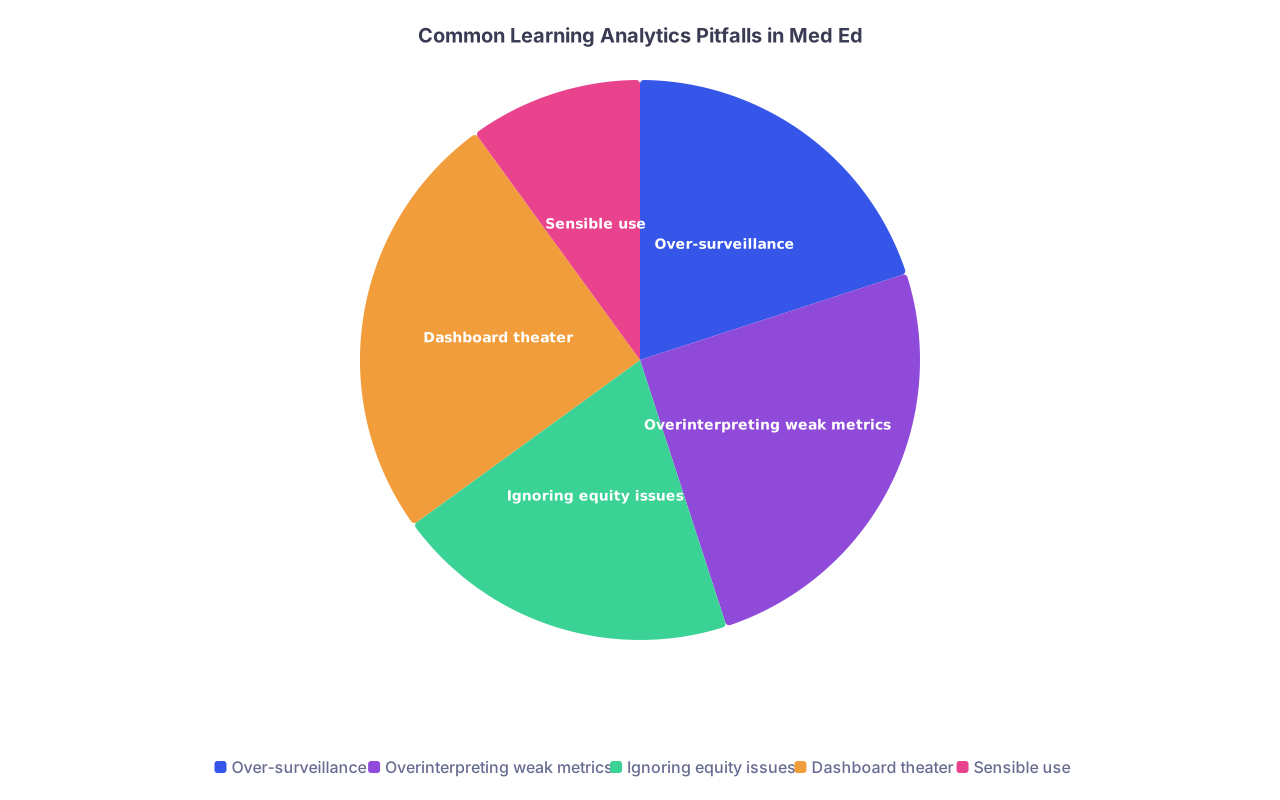
| Category | Value |
|---|---|
| Over-surveillance | 20 |
| Overinterpreting weak metrics | 25 |
| Ignoring equity issues | 20 |
| Dashboard theater | 25 |
| Sensible use | 10 |
Over-surveillance and trust erosion
I have seen programs proudly show heatmaps of individual student clicks in faculty meetings. That is surveillance disguised as “support.”
Guidelines I stand by:
- Never embarrass individual learners with public analytics. Aggregate or anonymize.
- Use individual-level data only for support and remediation, not for shaming or punitive surprises.
- Be transparent: tell learners what is tracked, why, and how it is used.
Mistaking correlation for causation
Example: “Students who watch all videos at 1x speed score higher; therefore, everyone must watch at 1x.” Nonsense.
High-performing students may have better baseline knowledge or time management. They also may use materials differently. Do not enforce behavior based on shallow correlations.
Instead:
- Use analytics as hypothesis-generating tools.
- Combine data with qualitative feedback: student focus groups, faculty observations.
- Be cautious about policy changes based solely on LMS data.
Equity and bias
Watch this carefully:
- Students with caregiving responsibilities or part-time jobs may show different access patterns (late-night logins, batch studying).
- Requiring synchronous engagement or tight LMS access windows can disproportionately harm them.
- Learners with disabilities may interact differently (e.g., transcripts instead of videos).
Any early-warning or “at-risk” system must be regularly audited for differential impact across demographic and socioeconomic groups. If you do not have access to that data, at least be skeptical and look for face-valid biases.
7. Building a Sustainable Learning Analytics Culture
If you want this to last beyond one enthusiastic faculty member, you need structure.

Minimum viable structure
I have seen the following work repeatedly:
- A small “learning analytics working group” (3–6 people):
- One data-savvy educator (can interpret item analysis, basic stats).
- One IT/analytics person who knows how to wrangle the LMS.
- One or two frontline faculty from key courses or clerkships.
- Clear scope:
- Each semester, pick 2–3 priority questions at institutional level.
- Each major course/clerkship picks 1 local question.
- Shared tooling:
- A common dashboard or even a shared spreadsheet template for item analysis, module usage, exam mapping.
- Avoid ten different homegrown data islands.
Training faculty to read data like clinicians
Faculty already know how to interpret labs and imaging. You just need to translate:
- Single metric out of context = single lab value without the clinical picture.
- Trends over time matter more than single snapshots.
- Outliers demand explanation, not knee-jerk reaction.
- Triangulation is key: analytics + student narratives + faculty experience.
I often literally frame it that way in faculty development sessions:
- Item difficulty = “vital sign” of your question health
- Discrimination = “does this test actually pick up disease, or is it noisy?”
- Module completion and quiz performance = “symptoms and signs” of curricular health
Done right, medical educators grasp this faster than most disciplines.
8. Where to Start This Month
If you are overwhelmed, start tiny and concrete.
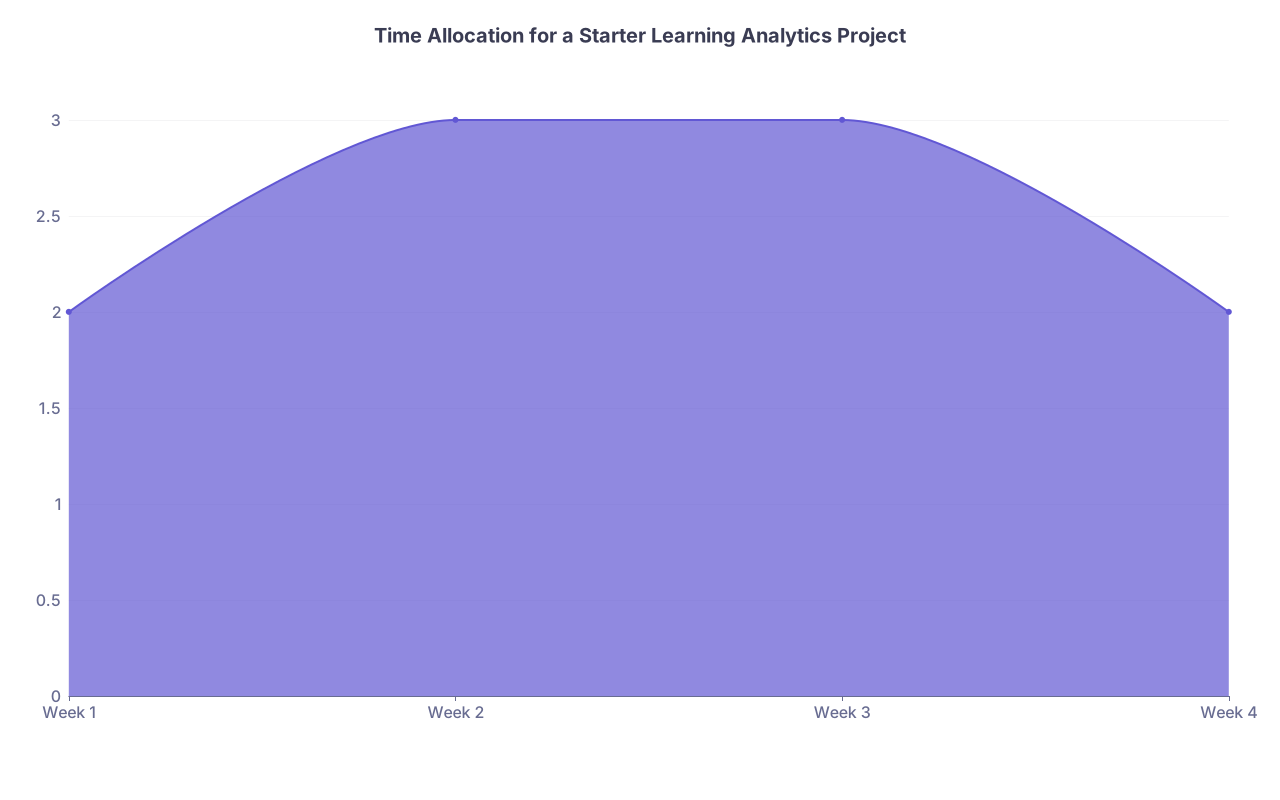
| Category | Value |
|---|---|
| Week 1 | 2 |
| Week 2 | 3 |
| Week 3 | 3 |
| Week 4 | 2 |
A realistic one-month starter project:
Week 1:
- Pick one course or clerkship block.
- Choose one question (e.g., “Why are dermatology OSCE scores so low?”).
- Meet with your LMS admin to identify what data is already available for that topic.
Week 2:
- Pull: item analysis, module completion times, video engagement for that topic.
- Identify 3–5 worst-performing items and any odd engagement patterns.
Week 3:
- Rewrite or fix the worst items.
- Make one concrete content change: shorten, clarify, or restructure the problematic segment.
Week 4:
- Document what you changed and why.
- Plan to re-extract the same analytics next cycle and compare.
That is it. One focused loop. Once you run that cycle a couple of times, you will be miles ahead of institutions drowning in unused dashboards.

FAQ (5 questions)
1. How often should I review LMS analytics for a typical pre-clinical course?
For most courses, two deep dives per term are enough: once mid-course and once after the final assessment. Mid-course, you are looking for immediate adjustments (broken items, confusing content). Post-course, you are doing surgery on the structure for the next year. Weekly review becomes performative and usually ends in fatigue without better decisions.
2. Should I give students access to their own learning analytics dashboards?
Yes, but keep it simple and actionable. Topic-wise performance, module completion status, and comparison to course benchmarks can be helpful. Do not dump raw click counts or “engagement scores” on them; it creates anxiety without guidance. Tie any dashboard to clear advice: what to do if they are below a threshold in a specific domain.
3. How do I convince skeptical faculty that learning analytics is not just extra work?
Show them one concrete win. For example, take their exam, run a basic item analysis, fix five awful questions, and show improved reliability or reduced student complaints. Or identify a single video where students repeatedly drop off and re-record that 5-minute segment. When faculty see that small changes based on data reduce headaches, they are much more open to the broader idea.
4. Can I reliably identify “struggling students” early using LMS data alone?
You can identify students at increased risk, but you should never label them as struggling based on LMS data alone. Use analytics for early outreach, not early judgment. A pattern of late module completion, low quiz performance, and dropping activity deserves a check-in: “How are you doing?” not “You are failing.” Combine LMS indicators with advisor meetings, self-reports, and other assessments.
5. What tools do I need beyond my existing LMS to do meaningful learning analytics?
For many programs, your LMS plus basic spreadsheet software is enough to start: exporting item statistics, module completion logs, and quiz scores. As you mature, integrating your LMS with assessment systems (OSCE software, exam platforms) and a simple data visualization tool (Tableau, Power BI, or even an institutional dashboard) makes life easier. Do not wait for a “perfect” enterprise solution before you begin; most real progress starts with very modest tooling and clear questions.
With these habits and structures in place, you are ready to move beyond course-level tweaks and start aligning analytics with program-wide competency progression and high-stakes outcomes. But that is the next chapter in your learning analytics journey.