
The right time to start saving teaching evaluations and evidence of impact is your very first teaching activity—not “once I’m faculty,” not “when I’m applying for promotion.” Day one.
You can’t retroactively manufacture a teaching record. And the people who wait usually regret it.
Let me break down exactly when to start, what to keep, and how to organize it so it actually helps you—for residency applications, fellowship, your first faculty job, and promotion down the road.
When Should You Start? Sooner Than You Think
If you’re asking the question, you’re already late. But you can still catch up.
Here’s the rule:
- Medical student: start with your first recurring teaching role
- Resident/fellow: start with your first rotation where you supervise learners
- Early faculty: start now, and backfill whatever you can from the past 1–3 years
Teaching “counts” the moment someone could reasonably say you had responsibility for someone else’s learning. That includes:
- Peer tutoring in pre-clinicals
- Leading small groups or anatomy review
- TA for an MS1/2 course
- Intern or resident running chalk talks for MS3s
- Leading morning reports, journal clubs, or skills sessions
- Simulation sessions where you’re a facilitator
- CME talks or hospital grand rounds
If you wait until you “feel like a real teacher,” you’ll throw away several years’ worth of evidence you could’ve used for:
- Academic CVs
- Teaching portfolios
- Residency/Fellowship applications
- Faculty job searches
- Promotion dossiers
- Teaching/education awards
So: if you’ve taught in any structured way before today, your answer is: start this week and reconstruct what you can.
What Exactly Should You Save?
People overcomplicate this. You don’t need a scrapbook. You need a trail of evidence that answers three questions:
- What did you teach?
- To whom and how often?
- Did it matter?
That translates into four main buckets of evidence:
1. Quantitative Teaching Evaluations
These are your backbone. They show patterns and growth.
Save:
- End-of-rotation evaluations mentioning your teaching
- Formal course/session evaluations (numeric scores)
- OSCE or simulation feedback where you were a facilitator
- CME or grand rounds evaluation summaries
You want:
- PDF or screenshots of end-of-block summaries
- Year-over-year or multiple-session comparisons when available
- Any comparative data (e.g., “above course average,” “top 10% of instructors”)
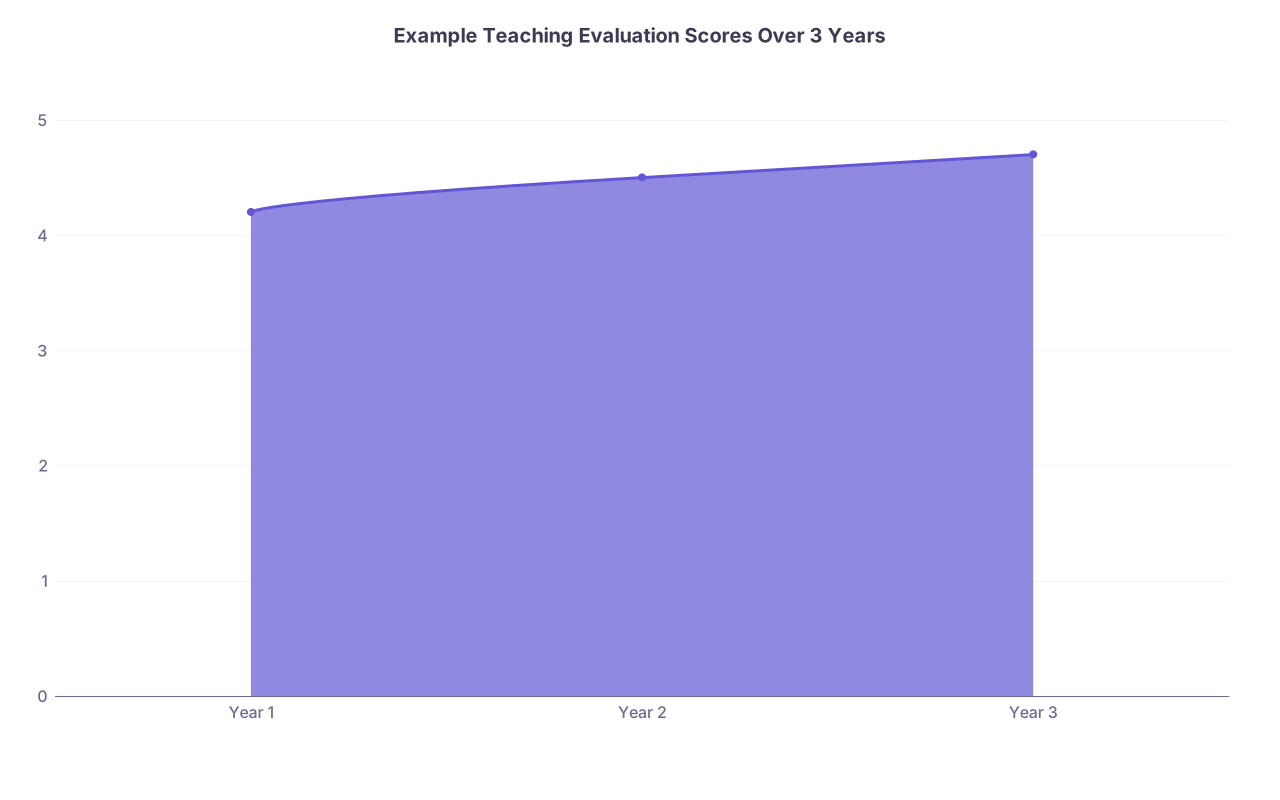
| Category | Value |
|---|---|
| Year 1 | 4.2 |
| Year 2 | 4.5 |
| Year 3 | 4.7 |
If your system emails you those end-of-course reports, auto-forward them to a dedicated email folder and save PDFs to a teaching folder. Don’t rely on institutional portals staying the same forever. They won’t.
2. Qualitative Comments
The numbers show trends. The words show impact.
Keep:
- Narrative comments from learners
- Quotes from emails thanking you for specific help
- Comments that describe how you teach, not just “great” or “nice”
Example comments that are gold:
- “She explained complex ventilator concepts in a way I finally understood after struggling for months.”
- “He created a safe space for questions; I felt comfortable admitting what I didn’t know.”
- “Because of his feedback, I changed how I present and my evaluations improved.”
Copy/paste those into a simple document or spreadsheet with:
- Date
- Setting (e.g., “IM ward month, MS3 eval”)
- Level of learner
- Actual quote (unchanged)
You’ll use these later in teaching statements and portfolios.
3. Evidence of Impact on Learners
This is where people fall short. You don’t just want “they liked me.” You want “their performance changed.”
Useful examples:
- Pre/post quiz scores for a workshop you designed
- OSCE pass rates before and after a curriculum revision you led
- Shelf exam or in-service score improvements after you implemented a new teaching strategy
- Board pass rates in a program after you overhauled a teaching block (if you were a key contributor)
- Simulation metrics improving over multiple sessions (time to defib, adherence to ACLS, etc.)
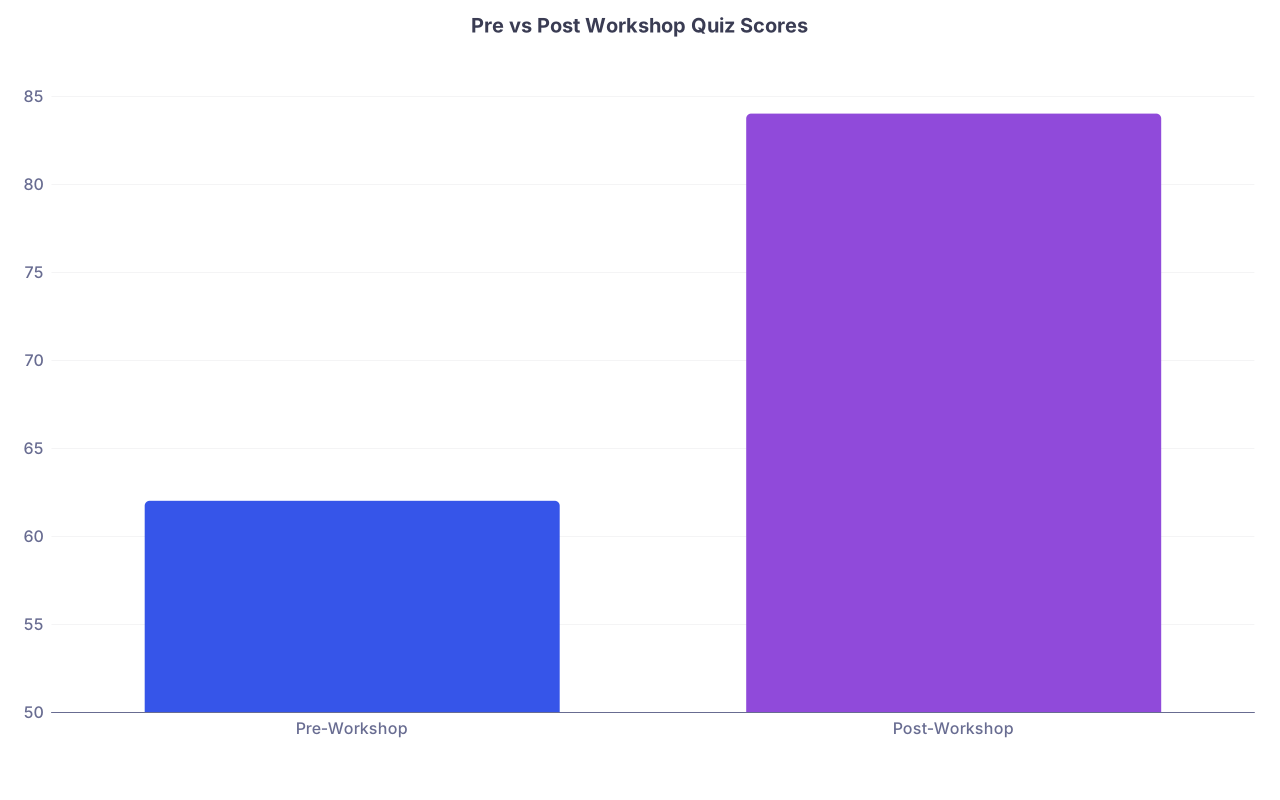
| Category | Value |
|---|---|
| Pre-Workshop | 62 |
| Post-Workshop | 84 |
You don’t have to run randomized trials. Even simple “before/after” data associated with your teaching shows you care about outcomes, not just performance.
4. Evidence of Educational Leadership & Products
This is where you start looking like an educator, not just someone who happened to teach.
Save documentation of:
- New curricula or series you created (slides, outlines, learning objectives)
- Role descriptions: “Resident educator,” “Chief resident for education,” “Clerkship liaison”
- Syllabi where you’re listed as course director or co-director
- Educational committees (curriculum committees, assessment working groups)
- Educational scholarship: posters, workshops, MedEd publications, podcasts
| Evidence Type | Simple Example |
|---|---|
| Teaching evaluations | End-of-rotation student eval PDF |
| Impact metrics | Pre/post quiz score summary |
| Leadership roles | Email confirming new educator role |
| Products | Slide deck for a created workshop |
If you helped create something but aren’t officially listed, keep emails or meeting minutes that show your role.
How to Organize It Without Losing Your Mind
If your “system” is random files in Downloads and screenshots in your photos app, that’s not a system.
You need one main home for teaching evidence, backed up and searchable.
Bare minimum setup:
- A cloud folder (Google Drive, OneDrive, Dropbox, or institutional)
- One ongoing document or spreadsheet that’s your teaching master log
Folder Structure That Actually Works
Something like:
Teaching Portfolio01_TrackersTeaching_Log.xlsxCurriculum_Projects_Log.docx
02_EvaluationsClinical_TeachingLectures_WorkshopsSimulation_OSCE
03_Impact_Data04_Leadership_Roles05_Educational_Scholarship06_Recognition_Awards
Name files in a way your future self can understand in 2 seconds:
2025_IM_Ward_Teaching_Evals_PGY2.pdf2024_MedStudent_Anatomy_SmallGroup_Evals.pdf

| Step | Description |
|---|---|
| Step 1 | Teach session |
| Step 2 | Receive evals or feedback |
| Step 3 | Save PDF or screenshot to folder |
| Step 4 | Update teaching log |
| Step 5 | Archive or ignore |
| Step 6 | Use for CV and portfolios |
| Step 7 | Worth saving? |
What Goes in the Teaching Log?
Columns that matter:
- Date
- Title of session / rotation
- Setting (clerkship, residency noon conference, CME, etc.)
- Audience (MS2, MS3, PGY1, nurses, interprofessional)
- Format (lecture, small group, bedside teaching, sim)
- Hours taught
- Evidence available (eval PDF, comments, quiz data)
- Notes (e.g., “pilot curriculum,” “repeated 4x/year”)
You’ll thank yourself when you need to fill out a faculty promotion form that demands: “List all teaching activities for the past 5 years with dates, audience, hours.”
How This Changes by Training Level
The core rule (start now) doesn’t change, but what you emphasize does.
As a Medical Student
You’re building early patterns and habits. You’re not expected to have a full teaching portfolio, but:
Prioritize:
- Any formal teaching roles: peer tutor, TA, small-group leader
- Documentation from the Office of Medical Education confirming roles
- Feedback where faculty mention your teaching on clerkships
Use it for:
- Residency applications (esp. clinician-educator tracks)
- Teaching or leadership scholarships/awards
- Showing a pattern of interest in education
As a Resident or Fellow
This is where teaching becomes part of your job. Programs and future employers look closely at it.
Prioritize:
- Consistent teaching evals from students and juniors
- Evidence you improved something (a lecture series, orientation, simulation)
- Leadership: chief resident, curriculum rep, workshop designer
- Any education-related projects that turn into posters or papers
Use it for:
- Fellowship applications (especially in academic/internal medicine, pediatrics, EM, etc.)
- Hospital or GME teaching awards
- Early faculty job applications (you’ll need a teaching statement)
As Faculty
Now the bar rises. You’re compared to peers.
Prioritize:
- Multi-year evaluation trends, not just one-off “great job” years
- Clear evidence of impact: curriculum built, outcomes improved, learners succeeding
- Formal roles: clerkship director, APD/PD, course leadership
- Educational scholarship tied to your teaching innovations
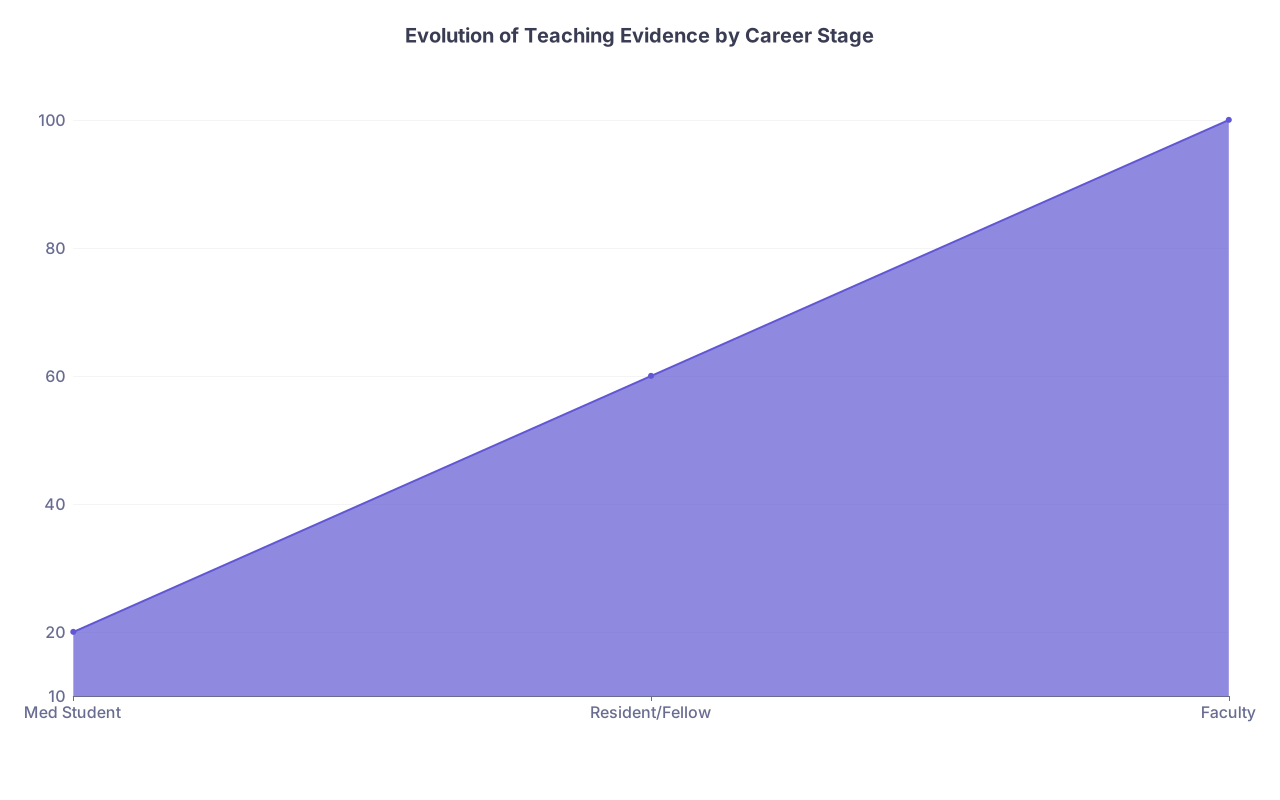
| Category | Value |
|---|---|
| Med Student | 20 |
| Resident/Fellow | 60 |
| Faculty | 100 |
The earlier you start saving, the more you’ll be able to show growth over time, which promotion committees love.
Red Flags and Common Mistakes
I’ve watched people sabotage themselves with a few predictable errors:
Relying only on institutional portals
Portals change. Old data disappears. Programs switch vendors. If it matters, export it.Saving everything, organizing nothing
A mess of 400 screenshots is unusable. Aim for: save selectively, label ruthlessly.Only keeping glowing comments
Committees care more about consistency and trajectory than perfection. A mix of comments with improvement over time is normal and fine.Not getting credit for invisible teaching
If you regularly informally teach (coaching for OSCEs, unofficial board review), formalize it. Ask to be added to a syllabus, listed on a flyer, or have attendance tracked. Then save that.Ignoring interprofessional and non-physician teaching
Nursing in-services, pharmacy teaching rounds, interprofessional sim—all count. Many educator tracks value this highly.
How Often Should You Update Things?
Here’s a cadence that works in the real world:
After every big teaching block or course:
Download evals, add to folder, update log line.Every 6 months:
Skim your teaching log, highlight anything with measurable impact or leadership.Once a year:
Refresh your CV and teaching portfolio with the last year’s teaching and impact. Flag anything that could be turned into scholarship (poster, paper, workshop).
Set a recurring calendar reminder. If you don’t, you won’t do it. And you’ll be that person on faculty review week digging through 6 different portals and 8 years of email.
FAQs
1. I’ve been teaching for years and never saved anything. Is it too late?
No, but you’ll have to reconstruct. Start now and:
- Pull what you can from institutional evaluation systems for the last 1–3 years
- Check old emails for evaluation summaries, thank-you notes, or role confirmations
- Ask course/clerkship directors if they have instructor eval archives
- Start documenting going forward so you don’t keep losing years
You won’t recover everything, but you can rebuild enough to show a credible pattern.
2. Should I save every single evaluation, even bad ones?
Save complete evaluation reports, not cherry-picked pages. Promotion committees get suspicious if everything is uniformly perfect. What matters more:
- Overall averages
- Comparison to peers
- Trend: are you stable or improving?
You’re allowed to privately reflect on weaker feedback and not spotlight it, but don’t delete whole reports because of a few harsh comments.
3. What counts as “evidence of impact” beyond evaluations?
Anything that suggests learner outcomes improved in connection with your teaching:
- Pre/post tests from sessions you designed
- Improvement in specific skills (e.g., handoff quality, documentation completeness)
- Higher pass rates or fewer remediation cases after your curriculum
- Qualitative feedback like, “This changed how I manage X” or “I used this on my next shift”
If possible, keep it simple and visual—one-page summaries or small tables.
4. Do informal hallway teaching and on-the-fly pearls matter?
Yes, but they don’t document themselves. The way they “show up” on paper is usually:
- In narrative trainee comments: “Always teaching on rounds,” “Great at using clinical cases to teach”
- In your role descriptions: senior resident supervising interns on wards, etc.
You don’t need to log every teaching moment. Just hold roles where that kind of teaching is expected, then let evaluations and comments reflect it.
5. Should I ask for copies of evaluations if the system doesn’t auto-send them?
Yes. This is normal and appropriate. Email the course/clerkship director or program coordinator:
“I’m building my teaching portfolio and would appreciate copies of any learner evaluations for the sessions/rotations I’ve taught in the past year.”
Most people are happy you care enough to ask. Do this once or twice a year, not every month.
6. When do I actually use all this stuff?
You’ll lean on this evidence for:
- Residency or fellowship applications (to show a real interest in teaching)
- Chief resident applications
- First faculty job applications (teaching statements, CV entries)
- Promotion packets (assistant to associate, etc.)
- Teaching and educator awards
- Applying to education-focused fellowships or degrees (MHPE, MEd)
If you start today, your future self has a clean, traceable story: not just “I like teaching,” but “Here’s what I did, here’s how often, and here’s what changed because of it.”
Key points:
- Start saving teaching evaluations and impact evidence as soon as you start teaching anything in a structured way.
- Keep it simple but consistent: one log, organized folders, regular exports.
- Focus not just on “they liked me” but on “they learned more and did better because of what I did.”