
The worst career mistakes physicians make in 2024 are not about salary. They’re about signing into terrible tech environments they cannot fix.
If you’re post‑residency and looking at job offers, you must stop thinking only about RVUs, call, and base salary. In a medical technology–heavy world, your day‑to‑day happiness lives or dies by the tech stack: EHR, hospital IT, devices, workflows, and how the organization handles change.
Here’s how to evaluate a job offer’s tech environment before you sign anything.
Step 1: Treat Tech Like a Core Part of the Job, Not an Afterthought
If you would never sign without understanding call schedule, you should never sign without understanding the tech environment.
You’re not just joining “a hospital” or “a group.” You’re joining:
- A specific EHR and how it’s configured
- A specific documentation burden
- A specific inbox and messaging structure
- A specific telehealth process (or lack of one)
- A specific culture around how tech gets chosen and changed
Your goal is to answer three blunt questions:
- How much of my time will be lost fighting bad systems?
- Who actually has the power to improve those systems?
- Do they listen to physicians when the tech breaks care?
If you cannot answer those clearly, you have homework left.
Step 2: Pin Down the Core Tech Stack – With Receipts
Do not accept vague answers like “We use Epic” or “We’re on Cerner, but it’s pretty streamlined.” That means nothing. Different sites on the same EHR can feel like different planets.
Ask specific, concrete questions and write the answers down.
| Area | Question |
|---|---|
| EHR | Which system, which version, and hosted where? |
| Imaging & PACS | Which viewer? Integrated into EHR or separate login? |
| Orders | Are order sets standardized? Who maintains them? |
| Telehealth | What platform, and how integrated is it? |
| Messaging | How are patient messages and refills routed? |
Ask these in your interviews:
- “Exactly which EHR do you use at each site, and is it the same build across locations?”
- “Is documentation mostly note templates, smartphrases, checkboxes, or free‑text?”
- “How many clicks is a standard clinic note? How long does a typical new‑patient note take your current attendings?”
- “Do you use separate logins for EHR, PACS, OR systems, and call schedule? Or is there single sign‑on?”
If people can’t answer this cleanly, that’s a sign: either tech is chaotic, or leadership doesn’t consider it important enough to understand. Both are bad.
Step 3: Quantify the Tech Burden Like You Quantify RVUs
You should walk away with real numbers, not vibes.
Ask current physicians (not just administrators) these direct questions:
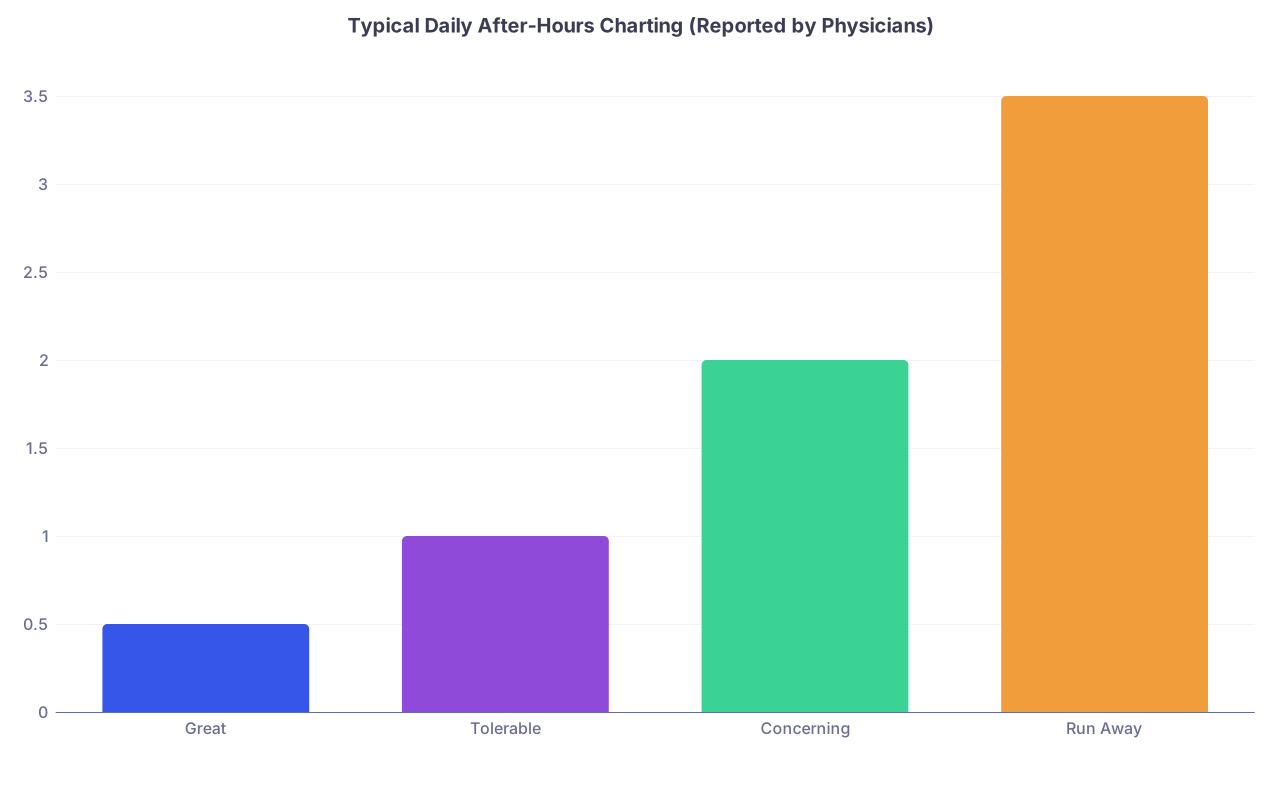
- “On average, how many hours do you spend charting after your scheduled day ends?”
- “How often do you log in from home to finish work?”
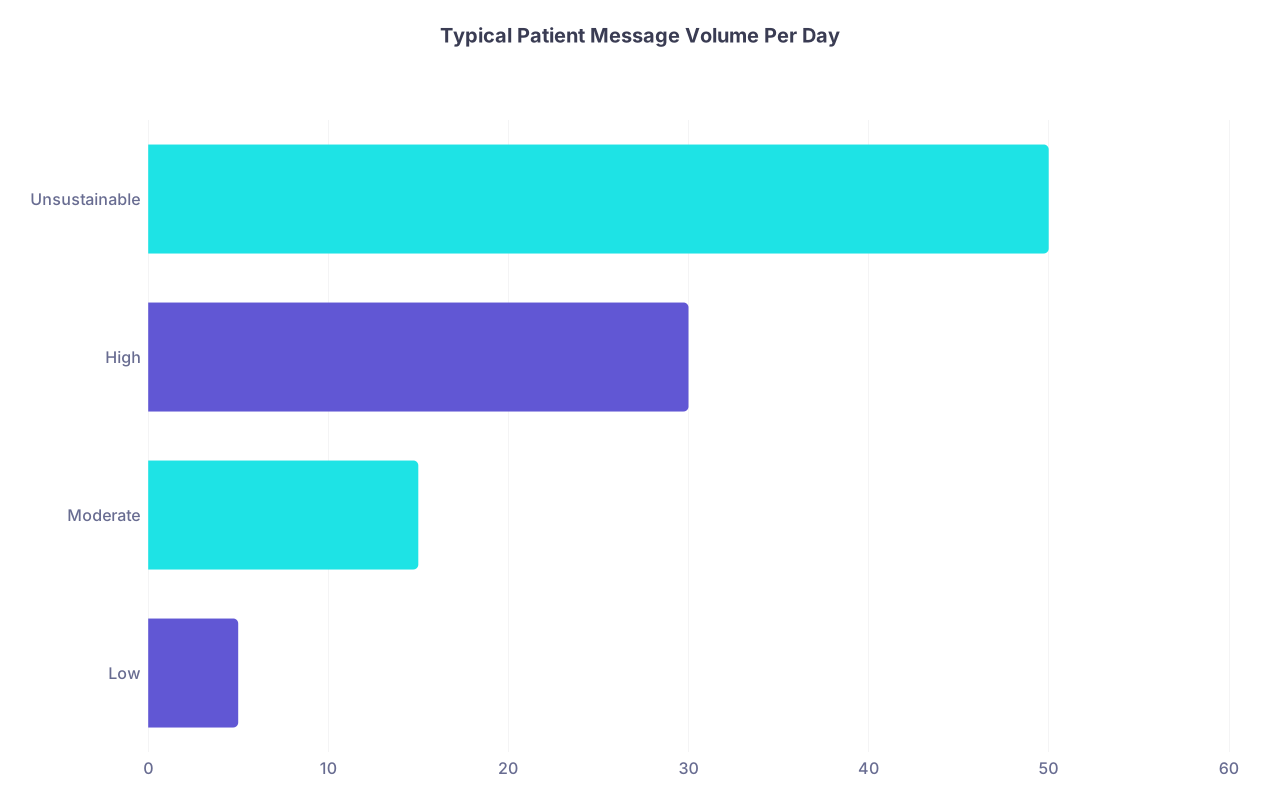
- “How many in-basket messages do you get daily?”
- “What percentage of those are: patient messages vs refill requests vs results to review?”
- “Do you routinely take charts home on weekends?”
| Category | Value |
|---|---|
| Great | 0.5 |
| Tolerable | 1 |
| Concerning | 2 |
| Run Away | 3.5 |
Interpret those numbers like this:
- 0–0.5 hours most days: Excellent for a modern system
- 1–1.5 hours: Manageable but not ideal; dig deeper
- 2+ hours most days: Burnout factory unless you love documentation
- 3+ hours or weekend charting as the norm: Huge red flag
If more than one physician shrugs and says “I just accept that I’ll always have notes at night,” understand what you’re walking into. That attitude often means leadership does not see this as a solvable problem.
Step 4: Inspect the Support Structure – Not Just the Tools
The same EHR with great support feels completely different than one with zero support. You’re not just evaluating software; you’re evaluating the ecosystem around it.
You want clarity on:
- Training
- On‑the‑ground support
- Physician input into tech changes
- Responsiveness when something breaks
Ask:
- “What does onboarding to your EHR look like for a new attending?”
- “How many hours of dedicated training do I get, and is it generic or specialty‑specific?”
- “Do you have in‑clinic ‘super users’ or informatics champions?”
- “When physicians need an order set or template changed, what’s the process and typical turnaround?”
- “Do you have a CMIO or physician informaticist who actually sees patients here?”

Good signs:
- A named CMIO or physician informatics lead you can actually talk to
- Dedicated super users in your specialty
- A clear process for change requests with defined timeframes
- Scheduled optimization sessions 3–6 months after you start
Bad signs:
- “We have tip sheets” as the main answer
- “IT handles that” with no physician names mentioned
- “We’re working on standardizing, but it’s taking time” for years
- No one can name the person in charge of clinical IT decisions
Step 5: Evaluate How Tech Affects Your Actual Clinical Day
You care about how the tech environment hits your clinic/OR/rounding schedule, not just the brand names of tools.
Walk through a typical day at that job. Literally.
Ask for a shadowing or sit‑in day before signing. If they refuse without a solid reason, that’s a separate red flag.
When you visit, pay attention to:
- How often staff complain about “the system being slow”
- Whether physicians are hunting for workstations or waiting for logins
- How many sticky notes are taped to monitors with passwords or workarounds
- Whether people document in real time or pile it up for later
- How many different apps/screens nurses and MAs have to bounce between per patient
Ask the physician you’re shadowing:
- “If you could change one thing about the tech here, what would it be?”
- “Do you feel the workflows were built around your clinical reality, or around billing/IT constraints?”
- “How often do you lose time because a system is down or glitchy?”

| Step | Description |
|---|---|
| Step 1 | Check In Patient |
| Step 2 | Rooming in EHR |
| Step 3 | Physician Opens Chart |
| Step 4 | Document in Real Time |
| Step 5 | Paper or Memory Workaround |
| Step 6 | Place Orders |
| Step 7 | In Basket Messages |
| Step 8 | On Time Finish |
| Step 9 | After Hours Charting |
| Step 10 | System Fast? |
| Step 11 | Handled During Clinic? |
Your goal is to figure out whether you’d live in box J or box K most days.
Step 6: Probe the Culture of Tech Decisions
Tech pain is inevitable. The question is how the organization responds when systems make physicians’ lives harder or patient care worse.
This is where you separate healthy from toxic environments.
Ask leaders and frontline physicians variations of:
- “Can you tell me about a recent tech change that went badly? What happened and how was it fixed?”
- “How are clinicians involved in deciding on new tools or changes?”
- “Have there been major EHR or workflow optimizations in the last two years?”
- “When there’s a conflict between billing/compliance and clinician usability, who usually wins?”
Listen for patterns. I’ve heard both extremes:
- Healthy: “We rolled out a new order set; surgeons hated it; we pulled it back, got a working group together, and relaunched it three months later.”
- Toxic: “Administration said this is how it is. We just had to adjust.”
Here’s what tends to predict your future:
| Signal | Green Flag | Red Flag |
|---|---|---|
| Physician input | Formal committees with real influence | Ad hoc “feedback” with no follow-up |
| Transparency | Communicated change logs and rationale | Sudden changes with no explanation |
| Ownership | Named clinical leads for tech | “IT decided” with no names |
| Response to pain | Rapid iterations and fixes | Blame users or tell them to “work faster” |
If the organization treats tech as something done to clinicians, not with them, do not expect it to get better after you arrive.
Step 7: Look Specifically at Patient Communication and Remote Workflows
Post‑COVID, patient communication channels and telehealth are where a lot of physicians drown. You cannot ignore these.
You want concrete answers to:
- “How are patient messages distributed? Pooled inbox? Direct to individual physicians?”
- “Who handles first‑pass triage on messages – nurses, MAs, or physicians?”
- “Is there protected time for inbox management in the schedule?”
- “What is your expectation for response time to messages and results?”
- “What percentage of visits in my specialty are telehealth vs in‑person?”
| Category | Value |
|---|---|
| Low | 5 |
| Moderate | 15 |
| High | 30 |
| Unsustainable | 50 |
Healthy setups:
- Team‑based inbox handling with protocolized triage
- Protected blocks in the schedule to deal with communication
- Clear expectations aligned with message volume
- Telehealth workflows that are integrated into the EHR, not bolted on
Unhealthy setups:
- “We just squeeze messages between patients”
- Message expectations like “respond to everything same day” with no support
- Physicians expected to do all refills and messages personally
- Telehealth on separate platforms requiring double documentation
Ask a simple question: “Is clinical volume ever adjusted based on message volume or telehealth load?” If the answer is no, they’re pretending digital work is free.
Step 8: Consider Hardware, Physical Setup, and Basic IT Competence
This sounds boring. It isn’t. Crappy hardware will quietly steal hours of your life every week.
Ask and/or observe:
- Age and speed of exam room and workstation computers
- Number of available workstations per physician
- Whether you’ll get a decent laptop with remote EHR access
- Multiple monitors vs single tiny screens
- Badge tap/single sign‑on vs constant password typing

You want to hear things like:
- “All our workstations are less than three years old and we refresh on a schedule.”
- “Dual monitors are standard; three in some workrooms.”
- “We use badge tap sign‑in for EHR access.”
- “IT ticket response times are usually within 24 hours; same day for clinical issues.”
Instead, if every doc is typing long passwords all day on decade‑old PCs that take two minutes to load each chart, your ‘high‑RVU’ job will be powered by quicksand.
Step 9: Adjust Your Negotiation Based on What You Find
Tech environment should change how you read the rest of the offer.
Good tech + good support + manageable digital workload = You can tolerate slightly lower pay or higher panel size, because your life won’t be death by a thousand clicks.
Bad tech + no support + message overload = The salary better be dramatically higher, and even then, burnout risk may not be worth it.
You can also negotiate around tech:
- Ask for protected admin time explicitly for EHR optimization, order set development, or informatics work if you like that stuff
- Ask for a reduced panel size during the first 6–12 months while you ramp up on a complex system
- Ask for explicit commitments: “Will I receive X hours of one‑on‑one EHR optimization after three months?”
Do not be shy about saying: “The tech burden is a significant part of my decision. What can we do to make this work better if I come on board?”
Some systems will step up. Others will blink. That tells you a lot.
Step 10: Sanity‑Check Across Multiple Offers
If you have more than one offer, compare the tech environments side by side just like you’d compare salary and call.
| Factor | Job A | Job B | Job C |
|---|---|---|---|
| EHR & version | |||
| After-hours charting (hrs/day) | |||
| In-basket messages/day | |||
| Telehealth integration | |||
| Physician informatics leadership |
You may find that the “less prestigious” regional system has:
- Far better EHR configuration
- More realistic expectations about digital work
- Actual physician voice in tech decisions
That might be the better long‑term career move than a brand‑name center that treats you like a data entry clerk.
Quick Reality Check Before You Sign
Before you put pen to paper (or e‑sign), make sure you can answer these without hand‑waving:
- How many hours will I realistically spend outside clinic dealing with EHR and inbox?
- Who are the named humans (by role) who can improve my workflows if they’re bad?
- How has this organization demonstrated, in the last 1–2 years, that it listens to clinicians about tech?
If those answers are vague, optimistic, or clearly out of sync with what rank‑and‑file physicians tell you, step back.
The Bottom Line
Three things to remember:
- You’re not just choosing a job; you’re choosing a tech environment that will shape every hour of your workday.
- Ask specific, quantifiable questions about EHR burden, inbox load, support, and who controls tech decisions. Vague answers are red flags.
- Use what you learn to negotiate or walk away. A shiny salary attached to a broken digital environment is not a good deal.