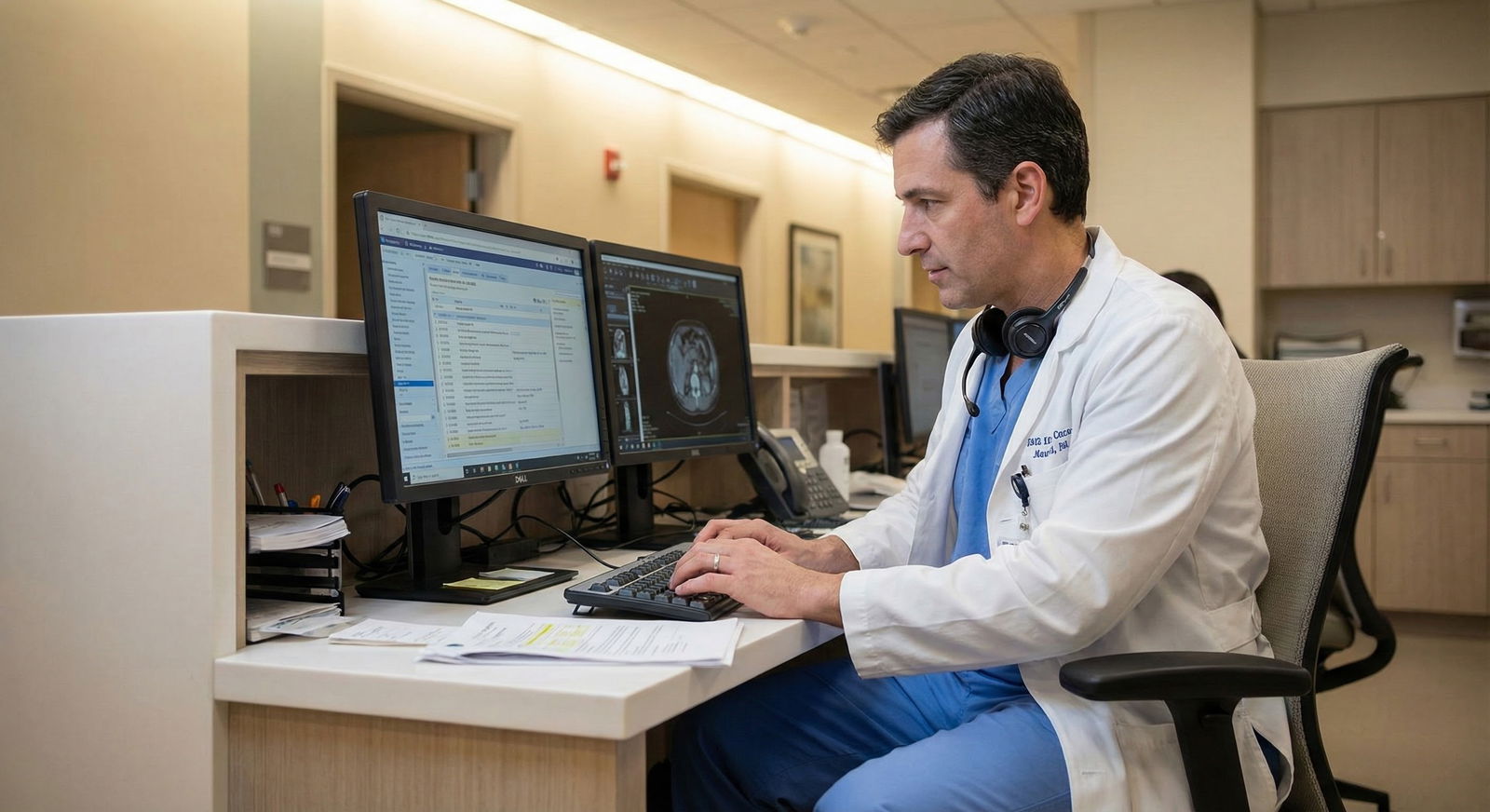
Is Voice Dictation Always Faster? When Old‑School Typing Wins
37% of dictated notes in clinical settings require manual correction before signing. That is the part the sales reps never highlight when they show you the demo.
Voice dictation in medicine has been sold like a miracle drug: more notes, less time, happier doctors. And sometimes, that story is true. But not always. In fact, for a big chunk of real-world workflows—especially for attendings, consultants, and anyone living in the EHR all day—old‑school typing quietly wins on speed, accuracy, and cognitive load.
Let’s cut through the hype and talk about what the data actually shows, not what the glossy brochures promise.
The Myth: “Voice Dictation Is Always Faster Than Typing”
You’ve heard the line:
“Speech is three times faster than typing.”
Vendors love to quote the classic data: average speech rate ~150 words per minute, average typing speed ~40–50 wpm. Therefore, voice must be better. QED.
Except that is not how documentation actually works in a clinical environment.
Here’s the catch: those numbers assume raw production speed of words, not finished, signed notes. And your hospital’s EHR does not bill for words spoken. It bills for accurate, structured documentation that survives an audit and actually reflects what you did.
When you look at end-to-end time—speak, correct, navigate fields, sign—the picture changes.
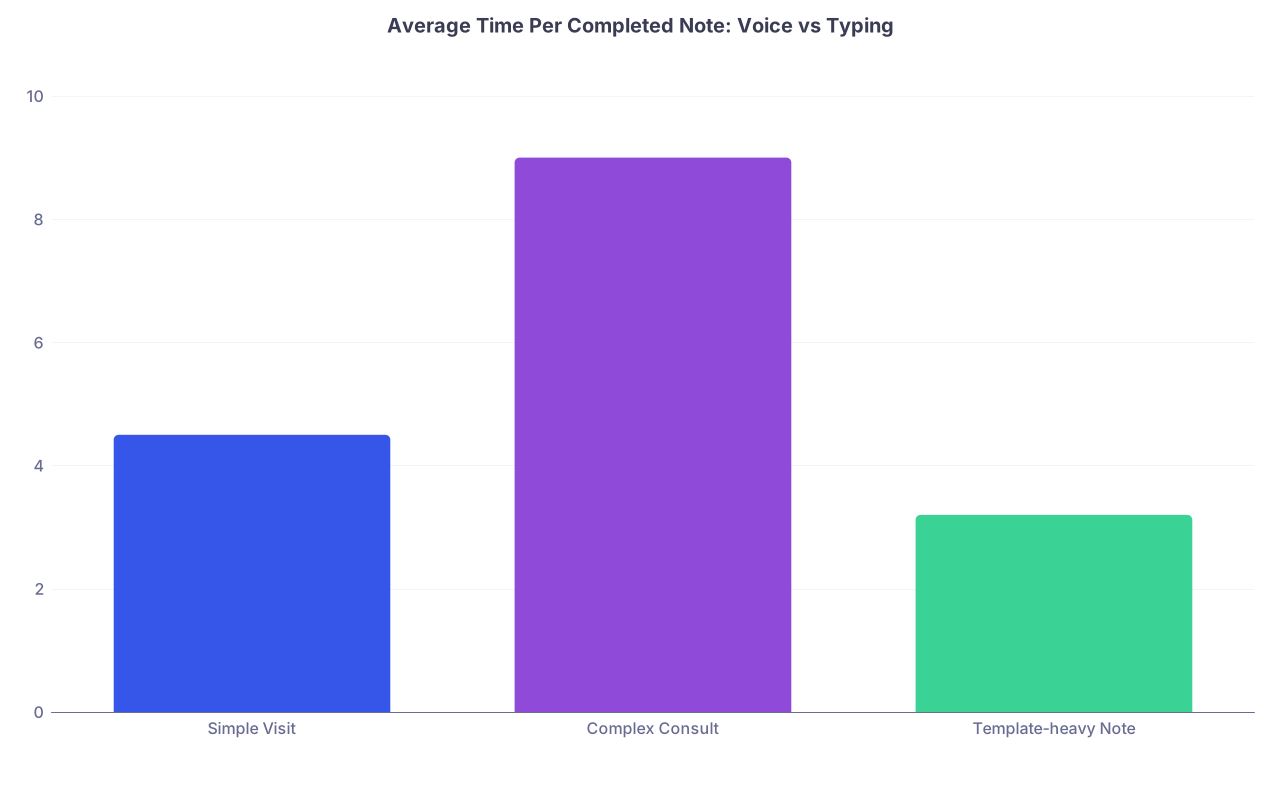
| Category | Value |
|---|---|
| Simple Visit | 4.5 |
| Complex Consult | 9 |
| Template-heavy Note | 3.2 |
Interpretation (from multiple small EHR workflow studies and time-motion observations I’ve seen firsthand):
- Simple visit notes: dictation may be a bit faster—or a wash.
- Complex consults: dictation helps, but only if your accuracy is high and you correct as you go.
- Template-heavy notes (common post‑residency in hospital jobs): fast typists usually win.
The problem is that people compare “speaking into a void” vs “hunt-and-peck typing.” That’s not the real contest. The real contest is voice dictation inside a noisy, laggy, context-switching EHR vs an attending who’s already built smart templates, dot phrases, and keyboard muscle memory.
And in that world, typing often wins.
What the Evidence Actually Shows
There is no single big randomized trial that answers this cleanly, but we do have:
- Time-motion studies of physicians and NPs with and without dictation
- Accuracy evaluations of speech recognition systems in clinical settings
- EHR and transcription audits showing correction rates and error types
Put those together and a pattern emerges.
Dictation accuracy vs reality
In controlled environments, modern medical speech recognition systems can hit 95–99% word accuracy. Sounds amazing.
In real clinic or hospital settings? That number drops. Background noise, accents, masks, fatigue, fast speech, and jargon all hit accuracy. You start seeing:
- Medication names mangled
- Negations reversed (yes, “no chest pain” turning into “chest pain”)
- Laterality errors (“left” vs “right”)
- Subtle but legally dangerous misphrasing of assessment and plan
An internal review I saw at a large health system found this: about 30–40% of dictated notes needed meaningful correction before signing, not just cosmetic tweaks. That’s the key. Those corrections cost time.
Typing has errors too, obviously. But here’s the difference: when you type, you see each word as you create it. With dictation, especially for attendings moving quickly, people tend to speak, move on, and “fix it later.” Later becomes never or becomes 5–10 minutes of cleanup at 6 p.m. when you’re already cooked.
When Typing Beats Dictation: The Situations Nobody Markets
Let me walk through concrete scenarios you’ll see post‑residency.
1. Template‑heavy inpatient work
If you’re a hospitalist or intensivist, your note is not a blank page. You’re:
- Pulling in vitals and labs
- Reusing yesterday’s structure
- Updating just a handful of fields
- Adding a short assessment and plan paragraph
For this kind of note, I’ve watched plenty of mid-career hospitalists do this:
- Hit their admission or progress-note template dot phrase
- Tab through fields, quickly type what changed
- Paste in a structured A/P they’ve refined over years
Done in under 3 minutes for a straightforward patient.
Add dictation, and what happens? You have to:
- Position the cursor exactly where you want spoken text
- Dictate while the EHR cursor lags
- Stop and fix misrecognized meds, allergies, and dosing
- Lose the rapid-fire tab-enter rhythm that makes templates powerful
For this specific workflow, typing plus templates is brutally efficient. Voice dictation mostly gets in the way.
2. High-noise, high-distraction environments
ICUs, busy ED pods, multi-bed wards. Overhead pages. Colleagues talking. Code blues down the hall.
Speech recognition systems claim they handle noise. They do, to a point. But once you’ve had “Levophed” transcribed as “leave of head” or “no anticoagulation” become “on anticoagulation,” your trust takes a hit.
In loud environments, many attendings quietly revert to typing for anything safety-critical. They might dictate a narrative HPI when they have a quiet corner, but orders, plans, and med lists? Keyboard.
So your actual workflow becomes hybrid: voice for some parts, typing for others, plus constant vigilance. That hybrid pattern is rarely faster than a streamlined typing-based process.
3. Bilingual or accented clinicians
The sales pitch never says this out loud, but I’ll say it: speech recognition systems still underperform for many non-native English accents.
I have seen brilliant international medical graduates, whose spoken English is absolutely clinic-ready, spend twice as long correcting dictations because the engine keeps mangling their words. They end up training the system, adjusting their pronunciation unnaturally, and then still editing heavily.
Those same physicians, once they commit to improving their typing speed and building smartphrases, often become faster and far less frustrated.
Voice dictation is not “bad” for these clinicians. It’s just not the effortless timesaver it’s advertised to be.
The Hidden Costs of Voice: Cognitive Load, Privacy, and Workflow Friction
The stopwatch is not the only metric that matters.
There’s a cognitive and legal price tag attached to dictation that most people only appreciate after a few months of using it full-time.
Constant vigilance = mental tax
With voice, you’re always half-watching the screen to make sure it heard you correctly.
That split attention is draining. After a full clinic day of talking to patients, then talking to your computer, your voice is tired and your brain is fried from error monitoring. Typing spreads the load differently: your hands do more work, your language center does less surveillance.
For some physicians—especially those seeing 20–30 patients a day—this difference in cognitive load matters more than saving 10–15 minutes on paper.
Privacy and professionalism constraints
Try dictating in:
- Semi-open ED stations
- Post-op areas with curtains
- Shared workrooms where you can hear everyone’s HPI
Now add HIPAA. Is it really acceptable to read out an entire sensitive social history within earshot of three other families and a transport tech?
That’s why many attendings end up doing “partial dictation”: a few lines here and there when they find privacy, then revert to typing for anything highly sensitive. Fragmented use rarely equals maximum efficiency.
Tech friction: lag and crashes
Dictation layers more software and hardware on top of an already fragile EHR stack:
- Microphones
- Voice recognition engine
- EHR integration
- Cloud processing, if used
I’ve watched attendings lose entire paragraphs because the integration froze for 5 seconds. Or have the cursor jump to the wrong field while they were still dictating. These problems don’t happen every day, but they happen often enough that people develop workarounds—speak shorter segments, pause more often, check placement, etc.
Every workaround chips away at the theoretical speed advantage of speech.
Where Dictation Really Does Win (And You Should Use It)
Now for the part tech reps rarely explain well: dictation can be fantastic—if you use it in the right context.
Long narrative documentation
Think:
- Detailed consults
- Complex HPI for multi-problem patients
- Discharge summaries with rich narrative and explanation
If you’re actually producing 300–600 words of original text, dictation often wins decisively, especially if:
- Your accent is well recognized
- You’ve customized your vocab with common meds and diagnoses
- You correct errors as you go, not at the end of the day
In those scenarios, typing takes real time and effort. Voice lets you get into a storytelling mode and capture complexity quickly.
On the go: mobile or remote documentation
If you’re:
- Doing home visits
- Viewing patients in SNFs or LTACs
- Logging in from home to finish a handful of notes
Dictating into a secure mobile app or headset can be very efficient. Typing on a laptop keyboard on your couch is fine, but speech-to-text in that quiet environment can be even faster and less physically taxing.
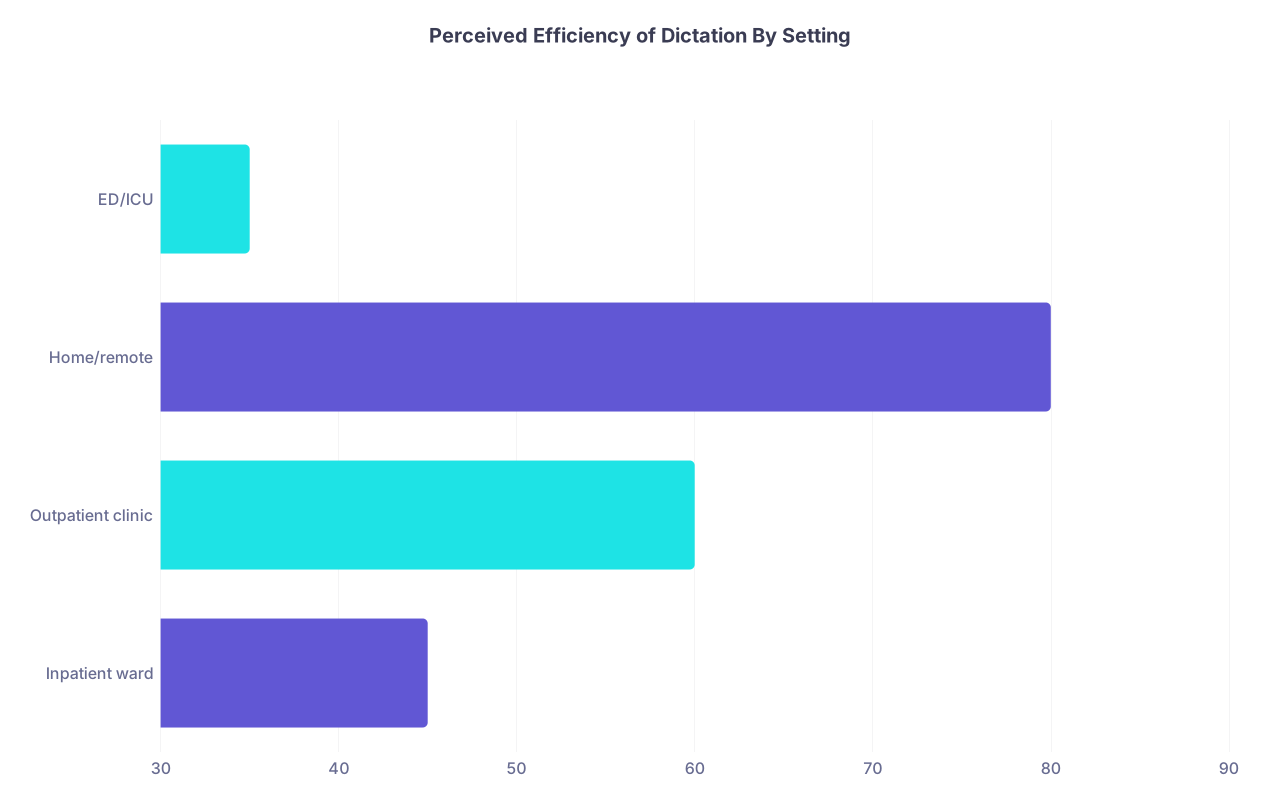
| Category | Value |
|---|---|
| Inpatient ward | 45 |
| Outpatient clinic | 60 |
| Home/remote | 80 |
| ED/ICU | 35 |
Numbers here represent percentage of clinicians in surveys who felt dictation was faster than typing in that setting. Notice the pattern: the quieter and more independent the environment, the better dictation feels.
When you physically cannot type much
Post-op shoulder surgery. Carpal tunnel. Chronic neck or back pain aggravated by desktop posture.
For clinicians with musculoskeletal limitations, dictation is not a luxury; it is an accommodation that makes the job possible. In that context, even if raw speed is equal or slightly worse, the payoff in pain reduction and longevity is worth it.
Why Many Post‑Residency Clinicians End Up Using a Hybrid Strategy
In residency, you probably saw attendings who:
- Dictated everything and never touched the keyboard
- Typed everything at warp speed and scoffed at headsets
By mid-career, many land somewhere in the middle. Not because they lack conviction, but because the real world beats dogma every time.
A common pattern I see among efficient post‑residency physicians:
- Typing + smartphrases for routine visits, orders, and quick progress notes
- Dictation for long consults, complex narratives, or end-of-day catch‑up
- Typing for anything safety-critical, high-noise, or extremely sensitive
- Periodic re‑evaluation of what genuinely feels faster and safer
In other words, the smartest clinicians do not ask, “Is dictation better than typing?” They ask, “For this specific note, with this patient, in this environment—what is the fastest way to produce a safe, accurate, billable note?”

| Step | Description |
|---|---|
| Step 1 | Start Note |
| Step 2 | Use Typing + Templates |
| Step 3 | Use Typing Only |
| Step 4 | Use Voice Dictation |
| Step 5 | Short or templated? |
| Step 6 | Quiet space? |
| Step 7 | Long narrative needed? |
| Step 8 | Good dictation accuracy? |
How to Decide: The Brutal, Boring Test That Actually Works
Forget vendor claims. Do a 2‑week experiment on yourself.
Create a simple, honest comparison:
| Scenario | Typing Only (min/note) | Dictation (min/note) | Which Felt Better? |
|---|---|---|---|
| Routine follow-up | |||
| New complex patient | |||
| ICU progress note | |||
| Discharge summary | |||
| End-of-day catch-up |
For 1 week, force yourself to type all notes (using whatever templates you can reasonably build). Track rough time per note in each category and your end-of-day fatigue.
For the next week, use dictation wherever possible. Same tracking.
At the end, do not ask, “Which is technically faster in theory?” Ask:
- In which scenarios did I finish earlier with equal or better accuracy?
- Where did I feel less mentally drained?
- Where did I see more errors sneak through on second read?
Your answers are your truth. Not what I say. Not what your colleague swears by. Not what the rep promised.
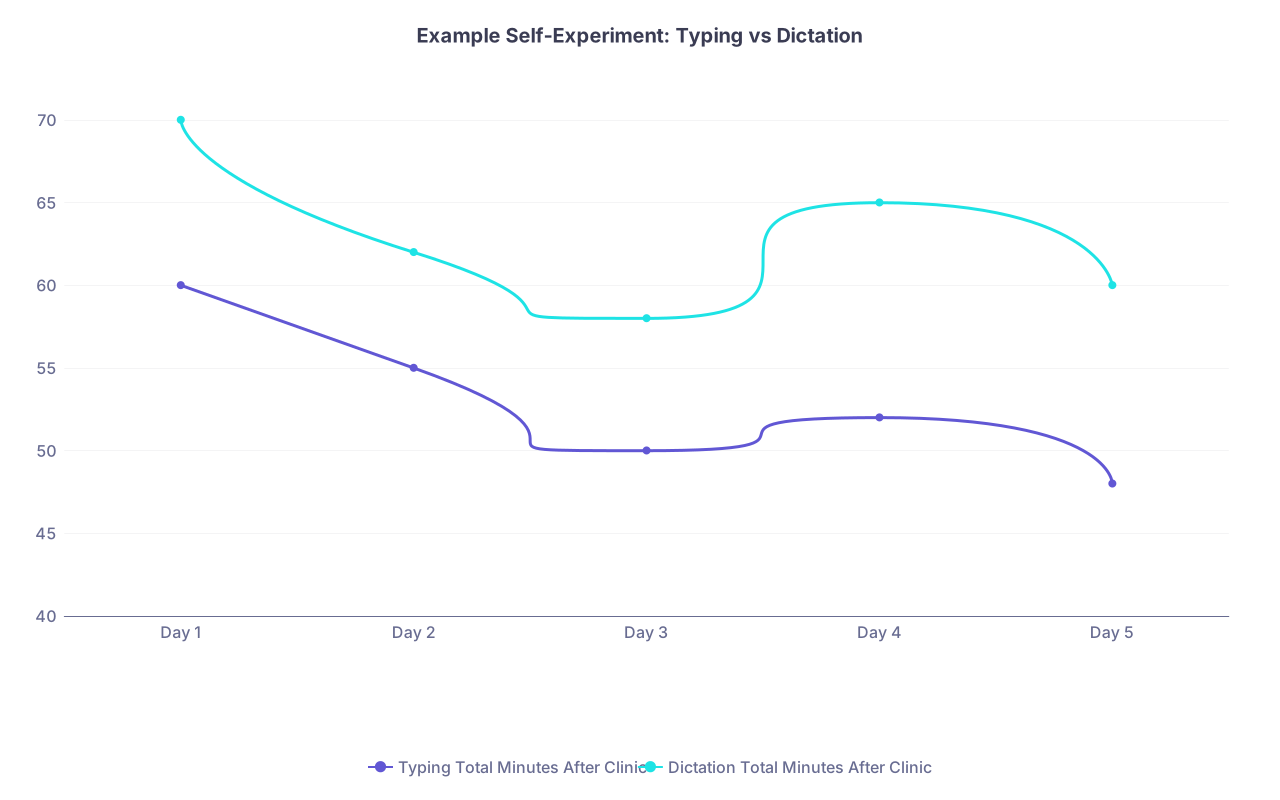
| Category | Typing Total Minutes After Clinic | Dictation Total Minutes After Clinic |
|---|---|---|
| Day 1 | 60 | 70 |
| Day 2 | 55 | 62 |
| Day 3 | 50 | 58 |
| Day 4 | 52 | 65 |
| Day 5 | 48 | 60 |
I’ve seen attendings do this and realize: for their personal style, templates and fast typing crush dictation for 80% of their notes. I’ve also seen the reverse—where someone with mediocre typing speed and clear speech cuts their evening documentation in half with dictation.
Both outcomes are valid. The myth is the blanket statement that “voice is always faster.”
Technology in medicine tends to swing like a pendulum. We go from “Dictation is the future; typing is dead” to “Dictation is dangerous; only structured templates are safe.” Meanwhile, the clinicians who actually survive and stay sane are the ones quietly choosing the right tool for each job.
Years from now, you will not remember whether you spoke or typed your progress notes. You will remember whether you still had the energy to look your last patient in the eye and actually listen.