
The biggest mistake new attendings make when “adding telemedicine” is treating it like a side feature instead of designing a hybrid clinic from day one. That is backwards.
If you are building a private practice post‑residency, telemedicine is not a bolt‑on. It is an entire parallel clinic with its own rules, tech stack, constraints, and revenue patterns. You either architect it deliberately, or you end up with chaos: double‑booked rooms, angry staff, billing denials, and patients who do not understand what they can or cannot do virtually.
Let me walk you through how to build this correctly.
1. Start with the Hybrid Model Blueprint (Before Buying Anything)
You do not begin with software. You begin with a clinic model.
Ask and answer, in writing, three non‑negotiable questions:
- What percentage of your visits do you want virtual vs in‑person once mature?
- What clinical problems will you never see virtually?
- What is your geographic and payer reality for telehealth reimbursement?
If you skip these, you will make bad tech and workflow decisions.
Decide your hybrid ratio and session structure
For most outpatient specialties, the sustainable mix early on is not “whenever it fits.” It is block‑based.
Examples from real practices I have seen:
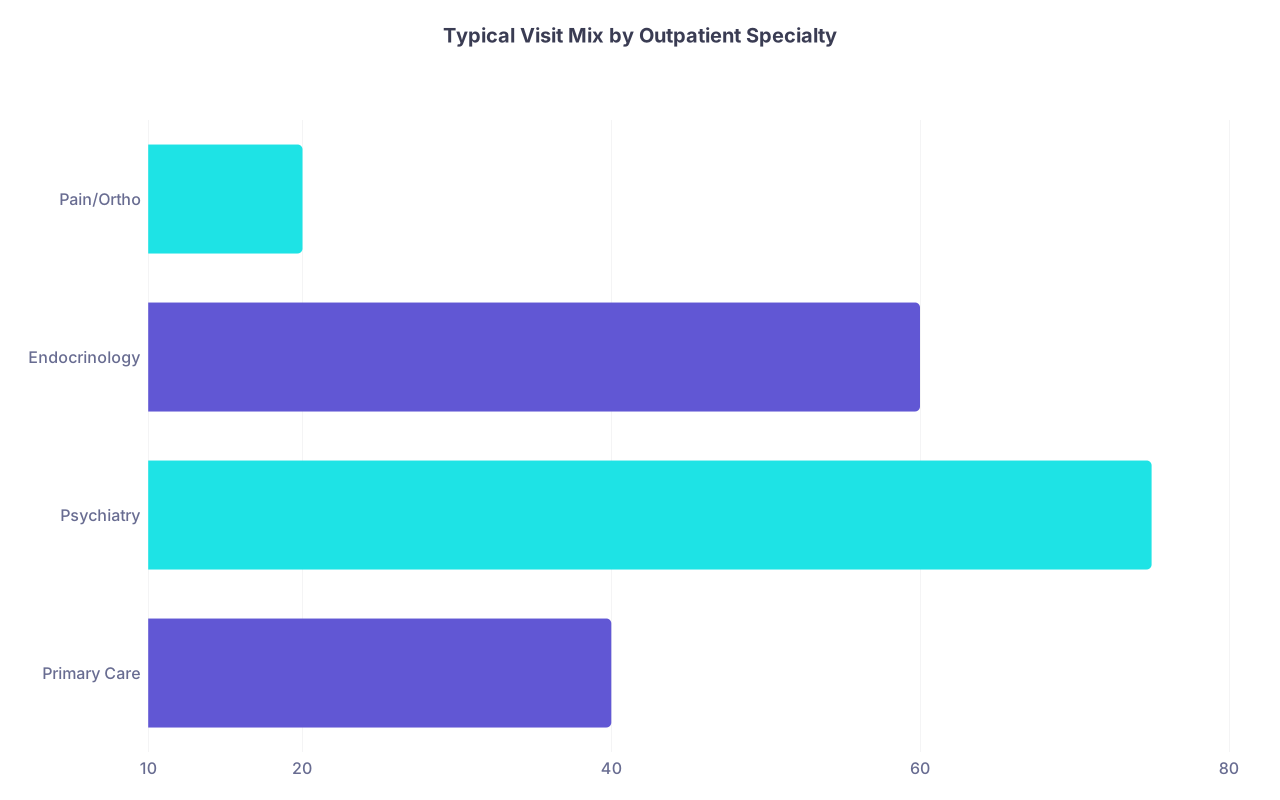
- General IM / FP:
- 30–40% telemedicine long‑term
- 1–2 half‑days per week reserved for telehealth only
- Endocrinology / Psychiatry:
- 50–80% telemedicine
- In‑person clustered for new patients and complex follow‑ups
- Pain / Ortho / Procedural:
- 10–25% telemedicine
- Telemedicine mainly for med checks, counseling, pre‑op, post‑op review
You want protected telemedicine blocks on the schedule, not scattered telehealth visits squeezed between roomed patients. Scattered = constant context switching, delays, and miserable staff.
| Category | Value |
|---|---|
| Primary Care | 40 |
| Psychiatry | 75 |
| Endocrinology | 60 |
| Pain/Ortho | 20 |
Target telemedicine percentage is not just about preference. It is constrained by:
- Your state licensing and whether you expect cross‑state patients
- Payer mix and how aggressively they pay for telehealth
- Your clinical comfort with managing risk without hands‑on exam
Define what is “Tele‑OK” and “In‑Person Only”
You need a written policy, shared with staff and patients, for visit types. Not a vague idea in your head.
Example for a general IM practice:
Telemedicine allowed:
- Stable chronic disease follow‑up (HTN, DM2, lipids) if labs are recent
- Medication refills (non‑controlled, stable controlled with safeguards)
- Simple acute complaints: URI, mild GI, stable rash with photo, med side effects
- Mental health: anxiety, depression follow‑ups, counseling
- Lab review, imaging review, care plan discussions
In‑person only:
- Chest pain, shortness of breath, high‑risk symptoms
- Abdominal pain (unless very clearly chronic and previously evaluated)
- New neurological complaints, unilateral weakness, acute confusion
- Procedures (obvious, but people forget to mark these correctly in scheduling)
- Annual physicals if your payers require in‑person for “wellness” codes
You encode this in your scheduling system templates, not just in a manual.
2. Build the Tech Stack for a Hybrid Clinic (Not Disconnected Tools)
You need a coherent stack, not 7 different logins loosely talking to each other.
Minimum viable components:
- EHR with integrated telehealth or rock‑solid video platform integration
- Scheduling and patient portal that can clearly distinguish visit type
- Telehealth video and messaging platform (HIPAA compliant, obviously)
- E‑prescribing (including controlled substances where allowed)
- Payment system that handles co‑pays for both virtual and in‑person
- Basic RPM / home monitoring support (BP, glucose, weight) for select patients
| Component | Must-Have Feature |
|---|---|
| EHR | Built-in or integrated telehealth |
| Scheduling/Portal | Clear virtual vs in-person slots |
| Video Platform | One-click, browser-based for pts |
| E-prescribing | EPCS + electronic PA integration |
| Payment System | Online co-pay collection |
| Analytics/Reports | Tele vs in-person visit tracking |
Choosing an EHR and telehealth stack that actually works
Two basic approaches:
All‑in‑one EHR with built‑in telehealth
- Pros: One vendor, fewer integration headaches, cleaner documentation + billing
- Cons: Video quality can be mediocre, features often lag behind stand‑alone tools
EHR + separate telehealth platform (integrated via API)
- Pros: Better video experience, more flexibility (virtual waiting rooms, group visits)
- Cons: More contracts, more logins, higher failure points
If you are solo or small group, I strongly favor an EHR that has at least adequate telehealth built in. The workflow wins are real.
Key capabilities your telehealth system must have:
- Browser‑based patient access (no massive app download for a 10‑minute visit)
- Automated invite links via SMS/email when visit booked
- Virtual waiting room with simple “provider join” interface
- Enough logging for documentation: timestamps, duration (helpful for time‑based billing)
- Support for screen sharing if you review images/reports live

Patient portal and communication layer
For hybrid clinics, the patient portal is not optional. It is your backbone.
You want:
- Online scheduling with clear virtual vs in‑person options
- Secure messaging tied to the chart (not random email)
- Lab and imaging result release with easy commenting
- Ability to upload images (for rashes, wounds) securely
- Pre‑visit questionnaires that differ by visit type
If your EHR’s portal is garbage, you will feel it immediately in telemedicine. Patients will call. Staff will spend half their time playing “tech support” instead of clinic.
3. Design the Schedule: The Hidden Engine of Hybrid Clinics
If your schedule design is wrong, nothing else will save you. This is where most new practices get crushed.
Use session templates, not one‑off decisions
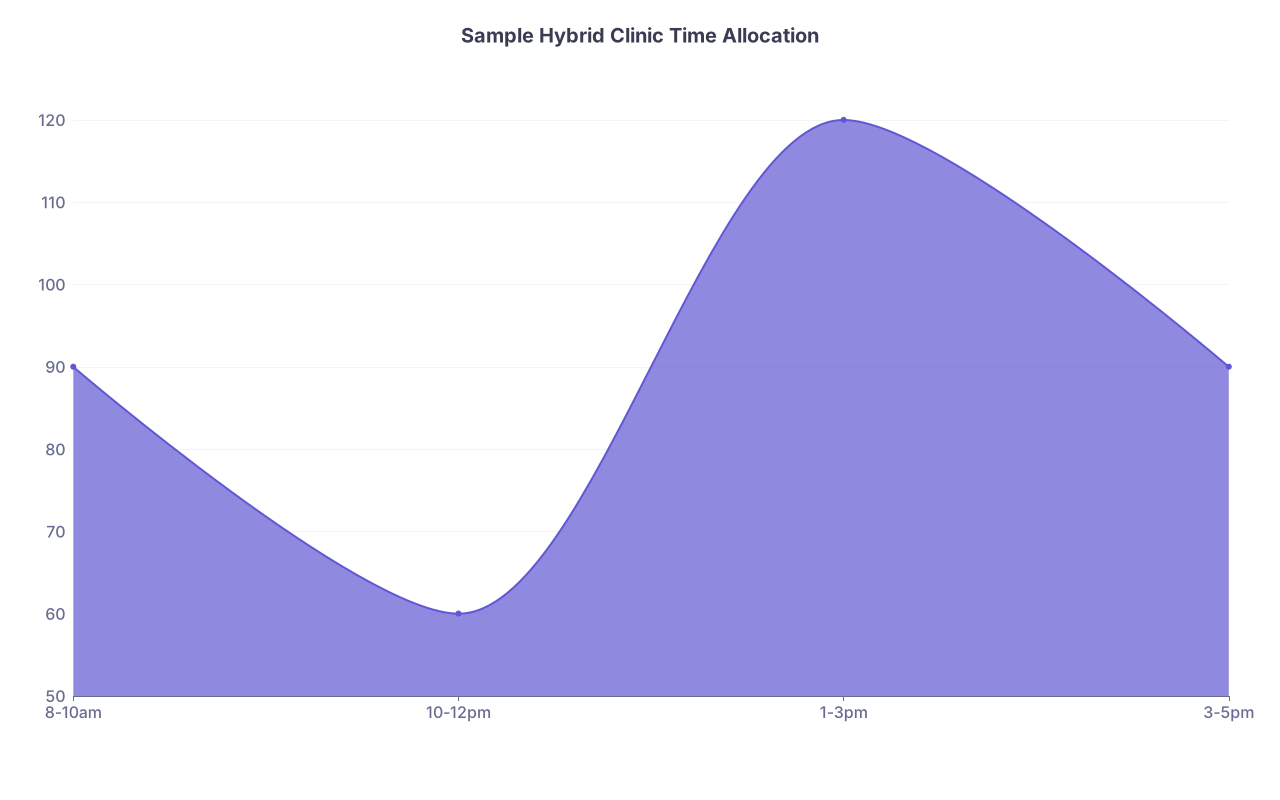
I recommend template blocks like this for a typical workday when you are at clinical capacity (after ramp‑up):
- Morning: In‑person only, with room turnover and nursing support
- Midday/early afternoon: Telemedicine block (patients slotted every 15–20 minutes)
- Late afternoon: Mixed or dedicated in‑person depending on your specialty
New practices can start with fewer blocks, but the structure should be there from week one.
| Category | Value |
|---|---|
| 8-10am | 90 |
| 10-12pm | 60 |
| 1-3pm | 120 |
| 3-5pm | 90 |
Example half‑day telemedicine block (3 hours):
- 6–8 follow‑ups at 20 minutes
- 1–2 new telemedicine consults at 30 minutes
- 1 “buffer slot” every 90 minutes for catch‑up / urgent add‑on
You do not run telemed back‑to‑back with no buffer. Clinical reality: tech issues, patients joining late, complex conversations.
Clearly label visit types and constraints in the schedule
Your scheduler (or you, if you are solo) must see at a glance:
- Is this slot virtual or in‑person only?
- If virtual, is it patient’s choice of video/phone or is video required?
- New vs established, and any age or geographic limitations
Never rely on “Notes” fields for critical rules. Use discrete visit types.
Example visit type labels:
- “New patient – in‑person – 40 min”
- “Follow‑up – virtual video – 20 min – established only”
- “Telemed med check – controlled – 15 min – current patients only”
You then restrict which visit types are visible for online self‑scheduling.
4. Map the End‑to‑End Workflow: Telemed vs In‑Person
Let me spell out the full path. Because this is where practices leak time and money.

| Step | Description |
|---|---|
| Step 1 | Patient schedules |
| Step 2 | Pre-visit intake |
| Step 3 | Pre-visit virtual intake |
| Step 4 | Check-in at front desk |
| Step 5 | Online check-in and consent |
| Step 6 | Rooming and vitals |
| Step 7 | Virtual rooming via phone/portal |
| Step 8 | Physician encounter |
| Step 9 | Orders and documentation |
| Step 10 | Check-out and payment |
| Step 11 | Visit type |
Telemedicine workflow: each step needs an owner
Scheduling
- Patient books telemedicine visit (online or by phone)
- System sends confirmation with technical requirements and consent language
Pre‑visit
- Automated pre‑visit questionnaire goes out: chief complaint, meds, allergies, vitals entry if available
- Staff reviews for appropriateness (this is where you redirect inappropriate telemed to in‑person before the day of visit)
Check‑in
- 15–30 minutes pre‑visit: automated SMS/email with link and “check‑in” reminder
- Co‑pay collection online or card‑on‑file authorization
- Consent for telehealth (once annually or per payer requirement)
Virtual “rooming”
- MA/ nurse logs in 5–10 minutes before scheduled time:
- Confirms identity
- Verifies meds, allergies, pharmacy
- Enters home vitals (BP, HR, weight) if available
- Confirms location (critical for emergency purposes and licensing)
- Then “transfers” to you in the telehealth platform
- MA/ nurse logs in 5–10 minutes before scheduled time:
Physician encounter
- You join the existing call; avoid making patients re‑connect
- Document exam appropriately (“Visual exam”, patient‑reported findings, any guided maneuvers)
- Decide if conversion to in‑person is needed and when
Post‑visit
- Orders placed, e‑prescribing done
- Patient summary released via portal
- Any follow‑up telemed or in‑person visit booked before they disconnect if possible
Notice: this is a parallel to in‑person workflow, not a random phone call you squeeze into lunch.
Build “conversion” rules: telemed to in‑person
You need a simple rule set for when telemed visits must be converted:
- If red‑flag symptoms emerge and cannot be adequately assessed remotely
- If the physical exam is necessary to safely make a decision
- If state or payer rules prohibit telemed for that exact scenario (e.g., certain controlled substance prescriptions for new patients)
You create a same‑ or next‑day in‑person slot policy for such conversions. Otherwise you end up telling patients, “This is concerning; go to urgent care,” which they will hate and rightly so.
Your staff should know exactly:
- Which time slots are protected for “telemed converted to in‑person” needs
- How to override standard scheduling rules for these cases
5. Exam Room and Physical Space Planning for Hybrid
Yes, even telemedicine affects physical layout.
Decide where you do telemedicine
Two common setups:
Telemed from your office in the clinic
- Pros: Access to staff, printer, scanner, exam rooms for conversion; better network
- Cons: Need a quiet space, risk of interruptions, room competition if space tight
Telemed from home office
- Pros: Flexibility, no commute for telemed blocks, easier after‑hours access
- Cons: Need rock‑solid internet, strict privacy, clear boundaries with staff and patients
In the first 1–2 years, many new practices do best doing telemed from the physical clinic. You are still establishing workflows, and your staff support matters.
Physical design considerations
- One small “telehealth room” or alcove with:
- Good lighting (patients notice)
- Neutral background, no clutter
- Dual monitors (one for EHR, one for video)
- Quality webcam and microphone (stop using the laptop mic if you want to look professional)
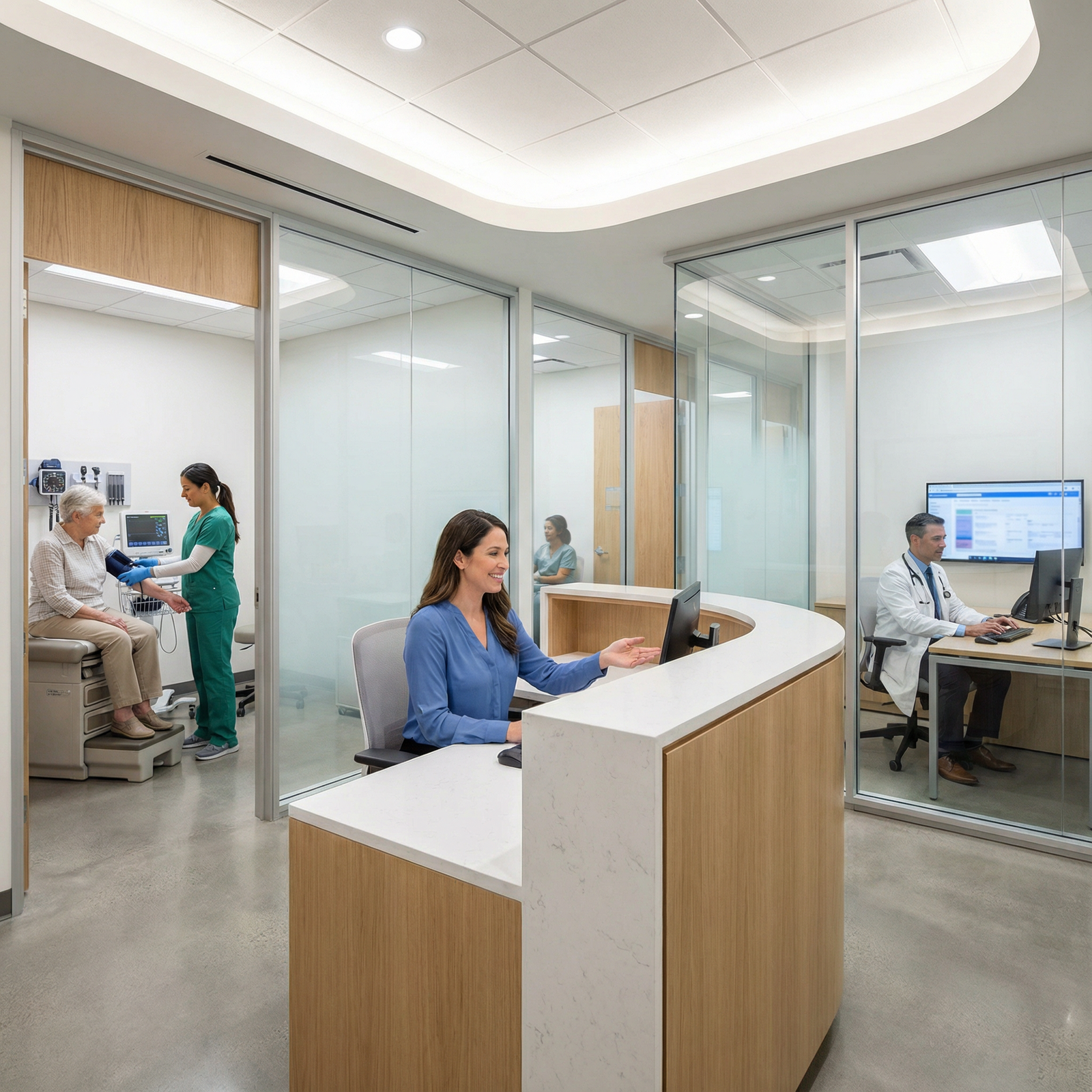
- Exam rooms laid out so that if a telemed visit turns into “come in now,” staff can pull a room quickly
I have watched practices trying to run telemed from an exam room between in‑person visits. It looks efficient on paper. In real life, it causes delays, because rooms are always “about to be needed.”
6. Billing, Coding, and Compliance: Where Hybrid Clinics Get Burned
This part is unglamorous but will absolutely determine if your model is sustainable.
Know your telehealth billing rules cold
Key dimensions:
- Synchronous video vs audio‑only vs asynchronous (portal messages)
- New vs established patients
- Site‑of‑service rules (office vs patient home)
- Parity laws in your state (payment equality or not)
You must distinguish:
- Telehealth E/M (video) – typically billed with standard E/M codes + telehealth modifiers and specific POS (e.g., 02 or 10, depending on payer)
- Audio‑only codes – often separate CPT codes; reimbursement may be lower
- Virtual check‑ins / e‑visits – short communications, usually patient‑initiated, via portal or phone, with specific time windows and restrictions
| Visit Type | Modality | Codes Used |
|---|---|---|
| Full telehealth E/M | Video | 99201–99215 + mods |
| Audio-only E/M | Phone only | Separate phone codes |
| Virtual check-in | Brief contact | G2012 or similar |
| E-visit | Portal msg | 99421–99423 |
You need your billing vendor or in‑house biller to:
- Set correct default POS and modifiers per payer
- Flag payers that require in‑person within X days to bill certain telehealth codes
- Track denials by modifier/POS so you adjust quickly
Don’t play games with “two visits” for conversions
If a telemed visit leads to “come in today,” you do not bill two full E/Ms for the same clinical problem on the same day. At best, you risk denials. At worst, you look like you are gaming.
Best practice:
- Treat telemed evaluation + same‑day in‑person as a single encounter for billing purposes, level set by the combined medical decision‑making or time.
- Document the timeline clearly in the note.
Malpractice and licensure
Telemedicine makes your geographic footprint fuzzy. Your legal risk does not care that “it was just a quick video.”
You must:
- Hold a medical license in the state where the patient is physically located during the visit
- Reflect telemedicine in your malpractice policy (most carriers now have explicit language; do not assume coverage)
- Have a clear out‑of‑state policy: if someone calls in from a state you are not licensed in, staff need a script and a workflow
7. Staffing and Roles in a Hybrid Clinic
Hybrid does not necessarily mean more FTEs. It means different task distribution.
Front desk / PSR
Their responsibilities change:
- Handle more online scheduling oversight instead of only phone calls
- Troubleshoot basic telehealth access issues (joining link, browser permissions)
- Collect virtual co‑pays and verify telehealth coverage in advance
MA / Nurse
Their job is the glue for telemedicine:
- Run virtual rooming:
- Reviewing pre‑visit questionnaires
- Calling if the patient is not logged in 5 minutes before visit
- Collecting home vitals
- Kick out or reschedule inappropriate telemed visits to in‑person when needed

Physician
You need to be disciplined:
- Start telemedicine sessions on time. Patients will not tolerate you joining 15 minutes late to a video more than once or twice.
- Use structured templates that match telemed exams to avoid documentation holes.
- Give very explicit safety net instructions (“If X happens, go to ED, not telemed.”)
8. Patient Experience and Education: Avoiding Confusion and Frustration
If you do not train your patients on how your hybrid clinic works, they will assume everything can be done virtually, at any time, with no boundaries. That is on you.
Create clear patient‑facing rules
You need:
- A simple one‑page “How our telemedicine visits work” handout:
- When to use telemed
- When in‑person is required
- Basic tech instructions
- Privacy expectations (no calling from a moving car, yes that happens constantly)
- Clear website language that:
- Lists appropriate telemed conditions by specialty
- Lists explicit exclusions (chest pain, suicidal ideation, etc.)
You repeat these rules at every touchpoint: website, portal messages, appointment confirmations.
Handle common telehealth breakdowns proactively
Typical pain points:
- Patient cannot connect to video
- Solution: automated “switch to phone only” escalation with documentation and proper coding when allowed
- Patient driving during visit
- Solution: firm policy – reschedule unless absolute emergency, document refusal
- Patient wants telemed for something clearly unsafe
- Solution: script for staff and you: “This requires a physical exam. Here are the next in‑person slots; if symptoms worsen, here is the ED/urgent care path.”
Done well, this does not anger patients. It reassures them that you have safety standards.
9. Metrics and Iteration: Making the Hybrid Model Actually Profitable
You cannot manage what you never measure. Telemedicine is no different.
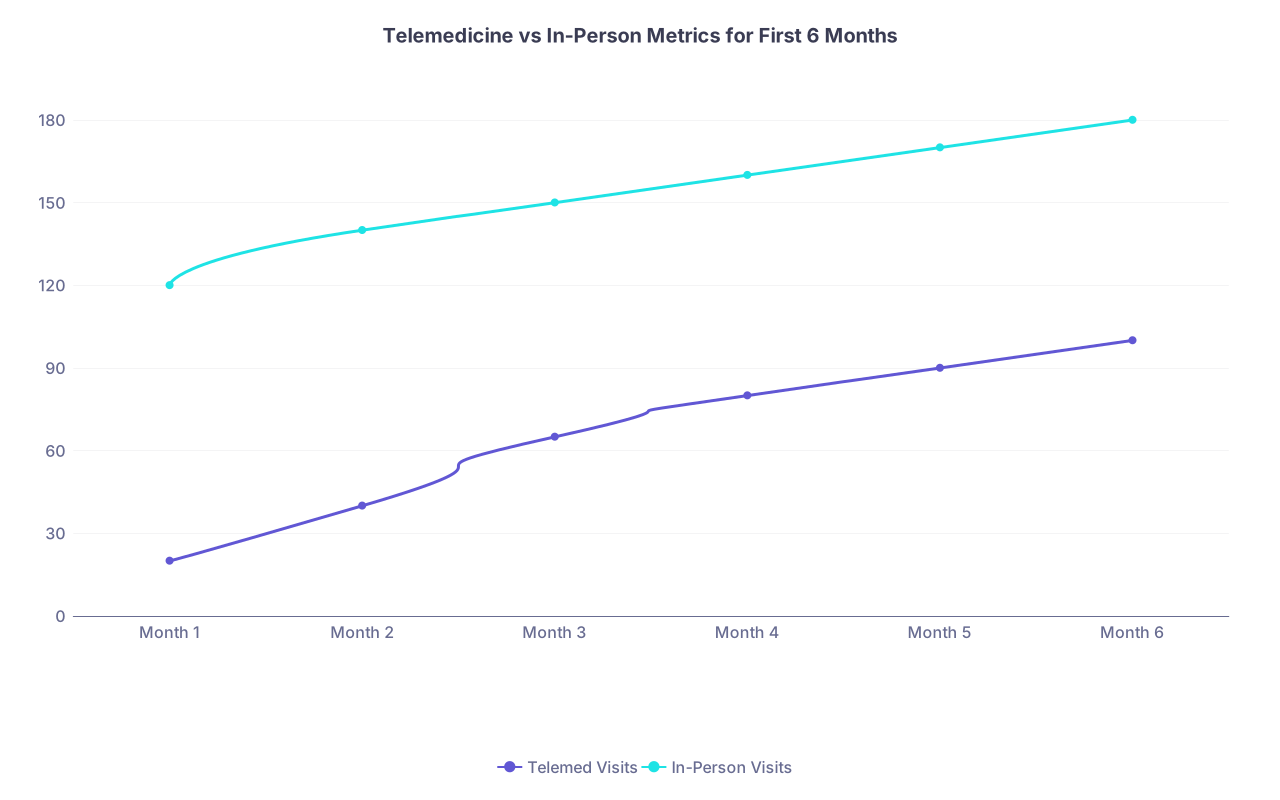
Track monthly:
- Telemedicine visit volume vs in‑person volume
- No‑show rates by visit type
- Average reimbursement per visit (virtual vs in‑person)
- Denial rates for telehealth claims
- Patient satisfaction by type (basic survey is fine)
| Category | Telemed Visits | In-Person Visits |
|---|---|---|
| Month 1 | 20 | 120 |
| Month 2 | 40 | 140 |
| Month 3 | 65 | 150 |
| Month 4 | 80 | 160 |
| Month 5 | 90 | 170 |
| Month 6 | 100 | 180 |
Adjust based on:
- If telemed no‑shows are higher, tighten reminder cadence and same‑day booking.
- If telemed reimbursement is markedly lower in your payer mix, you may choose to cap telemed percentage or adjust what you offer virtually.
- If telemed blocks always run over, you lengthen slots or add buffer time.
This is not theoretical. I have seen practices double their effective capacity by tightening their hybrid workflow, and others lose tens of thousands because they treated telehealth as “just another room.”
FAQ (Exactly 4 Questions)
1. Can I launch my practice as telemedicine‑heavy from day one, then add in‑person later?
You can, but it is risky. Pure or heavy telemedicine practices struggle with payer changes, licensing limits, and patient distrust if there is no physical anchor. A better approach is to open with at least one consistent in‑person session per week from the start, even if it is in a shared or part‑time suite. That gives you a base for examinations, procedures, and high‑risk patients, and you can still have 60–70% of your schedule be telehealth initially.
2. Do I really need separate telemedicine and in‑person visit types in the EHR?
Yes. If you simply use “Office Visit” for everything and mark telemed in free text, you will mis‑code, confuse your staff, and destroy your ability to track performance. Separate visit types let you enforce rules (established only, certain lengths, specific slots) and give billing clean data for correct modifiers and POS codes. This is one of the most common and most fixable mistakes in hybrid clinics.
3. How many exam rooms do I need if a big portion of my practice is virtual?
For a solo physician doing 30–50% telemedicine, two exam rooms is usually enough. You will not need three or four rooms unless you are doing procedures or see very high in‑person volume with a fast turnover pace. The telemed blocks reduce your physical room pressure. What you do need is one small, quiet workstation with dual monitors dedicated for telehealth, even if it is carved out of a larger office.
4. Is it worth investing in remote monitoring (BP cuffs, glucometers) for telehealth patients early on?
For most brand‑new practices, no. Start with basic home vitals collection: patients using their own BP cuffs, scales, or glucometers, and documenting values via portal or during virtual rooming. Formal RPM programs with billable device codes make sense once you have stable patient panels with chronic diseases and a predictable workflow. Launch RPM 6–12 months in, after your core hybrid clinic operations are stable, not on day one.
Key Takeaways
- Design your hybrid clinic intentionally: clear visit type rules, structured telemed blocks, and a parallel workflow, not ad‑hoc video calls.
- Pick an integrated tech stack that supports your scheduling, documentation, and billing for telehealth and in‑person without constant workarounds.
- Enforce boundaries—with staff and patients—around what belongs in telemedicine, when to convert to in‑person, and how the financial and legal rules apply.