
You just finished residency. You thought leaving 28-hour calls behind would make everything better. Yet three months into your new outpatient job or fresh private practice, you are more drained than you were as a PGY‑3.
Your day looks something like this:
- First patient at 8:00, but you are already behind by 8:20.
- “Just a quick form” visits that explode into five problems.
- Lunch becomes “catch up and call pharmacy” time.
- You stay 60–90 minutes after your last patient finishing notes and refills.
- You are snapping at staff and dreading Monday before the weekend even starts.
This is not about your resilience. This is about your design. Your schedule and boundaries are bad. Maybe inherited from an employer who sees you as RVU machinery. Maybe copied blindly from the senior partner who “has always done it this way.”
Let me show you how to fix it.
We are going to walk through a practical redesign of your clinic schedule and boundaries that you can actually implement in a real practice with real constraints. Not fantasy medicine.
Step 1: Diagnose Why Your Current Schedule Is Burning You Out
Before you rebuild anything, you need a clear diagnosis of the problem. “Too busy” is not specific enough.
For the next 2 weeks, track this. Literally on paper or a simple spreadsheet:
Start and stop times
- What time you see your first patient.
- What time you see your last patient.
- What time you actually leave the clinic.
- How many hours after leaving you spend doing charting/messages at home.
Visit mix and length
- For each hour block, write:
- Number of patients.
- Rough type: new, follow‑up, chronic train wreck, procedures, “urgent”.
- Flag any visit that:
- Ran >10 minutes over.
- Was emotionally draining (conflict, bad news, boundary-pushing).
- For each hour block, write:
Admin and message load
- Count daily:
- Portal messages.
- Refills.
- Lab/imaging results to address.
- Forms (disability, FMLA, letters, school forms).
- Count daily:
Energy ratings
- 3 times per day (mid-morning, after lunch, end of day), rate:
- Mental energy: 1–10.
- Emotional state: calm / tense / angry / numb.
- 3 times per day (mid-morning, after lunch, end of day), rate:
You are looking for patterns:
- Always dead by 3 pm? That is a schedule problem.
- 80% of message volume hitting between 4–6 pm? That is a boundary and workflow problem.
- One or two “black hole” patients blowing up your whole morning? That is a template and triage problem, plus boundary issues.
You need data. Guessing leads to cosmetic fixes.
Step 2: Decide What You Are Optimizing For (You Cannot Max All Metrics)
Most clinics optimize for one thing: maximum throughput. That is how new attendings end up with 22–28 patients a day by default. Then they wonder why they hate outpatient life.
You must choose your primary and secondary goals. Be explicit:
- Primary goal (choose one):
- Sustainable energy and low burnout risk
- Max revenue / RVUs
- Max access (lots of patients, short wait list)
- Procedural volume
If you are reading this, your primary goal is probably sustainable energy with a viable income. Treat that as the design target.
Then choose 2–3 non‑negotiables. Example:
- I leave the clinic by 5:30 pm 90% of days.
- I complete 90% of notes same day.
- I do not see more than 18 patients in a full day.
This drives your redesign. If you do not set these, admins and patients will set them for you.
Step 3: Build a New Visit Template That Matches Reality
Most young physicians get stuck because their visit template is absurd. 15 minutes for “follow‑up” regardless of complexity, squeezed back to back, with no protected time.
You fix this at the template level, not in the moment.
3.1 Right-size your visit lengths
Stop pretending you can do everything in 15 minutes. You cannot. That is how notes overflow into your nights.
Start with this as a baseline (adjust for your specialty):
| Visit Type | Suggested Duration |
|---|---|
| New patient (full intake) | 40–60 minutes |
| New patient (targeted) | 30 minutes |
| Complex follow‑up | 30 minutes |
| Standard follow‑up | 20 minutes |
| Simple acute (single issue) | 15 minutes |
Then look at your 2‑week data and be honest:
- If 70% of your “15 min follow‑ups” ran 10–15 minutes over, upgrade them to 20 or 30 minutes by default.
- If your new patients routinely had 5+ meds, 3+ chronic issues, or psych overlay, they are 40-minute visits, not 30.
Yes, this means your per‑day patient count may drop. Hold that thought. We will fix your revenue later.
3.2 Build in breathing space on purpose
You need controlled slack in the system:
1–2 admin blocks of 20–30 minutes in the morning and afternoon.
- For inbox, results, refills, quick calls.
- Marked as “admin only” in the schedule. Non‑bookable by front desk.
Micro-buffers:
- After every 3–4 patients, block a 10‑minute catch‑up slot.
- You will usually burn it without noticing. That is good. It is doing its job.
Protected lunch:
- 30–60 minutes. Not “held if schedule is full.” Actually protected.
- If your employer forces double booking into lunch “for access,” that is a negotiation item we will address later.
Here is what a rebalanced full clinical day might look like:
| Time | Block Type |
|---|---|
| 8:00–8:20 | Admin / inbox / prep |
| 8:20–9:00 | New or complex follow‑up |
| 9:00–9:20 | Standard follow‑up |
| 9:20–9:40 | Standard follow‑up |
| 9:40–9:50 | Buffer |
| 9:50–10:10 | Simple acute |
| 10:10–10:30 | Standard follow‑up |
| 10:30–10:50 | Complex follow‑up |
| 10:50–11:10 | Admin block |
| 11:10–12:00 | New / procedures |
| 12:00–1:00 | Lunch |
| 1:00–1:20 | Admin / results |
| 1:20–3:40 | Mix of 20–30 min visits + buffers |
| 3:40–4:00 | Admin / refills / calls |
| 4:00–4:40 | New or complex |
| 4:40–5:00 | Finish notes, hard stop |
This is not luxurious. It is sane. And it is surprisingly productive if you stop bleeding time between visits.
To visualize the impact of buffers and admin blocks on your day, compare it to a packed template:
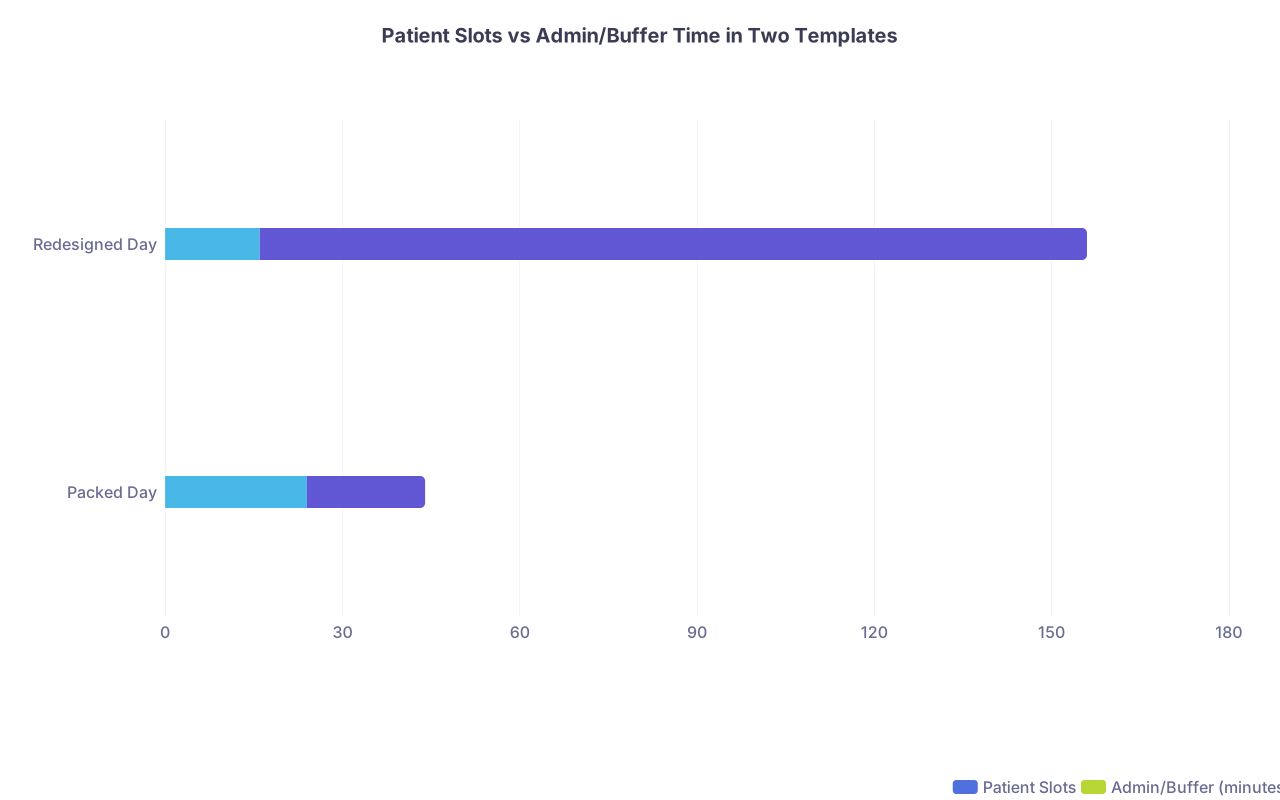
| Category | Patient Slots | Admin/Buffer (minutes) |
|---|---|---|
| Packed Day | 24 | 20 |
| Redesigned Day | 16 | 140 |
Most packed templates pretend you only need 20 minutes of admin all day. Reality says otherwise.
Step 4: Redesign Your Boundaries With Patients (Scripts Included)
You can have a gorgeous schedule template and still drown if you let every visit morph into a 5‑problem, 45‑minute marathon. Boundaries are not rude. They are clinical triage and self-preservation.
4.1 Set expectations before they ever see you
Use your website, new patient paperwork, and front desk scripts:
- “Most visits focus on 1–2 main concerns so we can handle them well.”
- “Back‑to‑back multiple new patient concerns may require additional visits.”
- “Portal messages are for brief questions, not new diagnoses or emergencies.”
If you are in private practice, that language is 100% under your control. If you are employed, you may still get it into your welcome packet or after-visit summary template.
4.2 Use in‑visit boundary scripts
You need specific phrases ready, so you do not fold under pressure.
Scenario: 15‑minute follow‑up, patient brings 5 new concerns.
Try:
“We booked 15 minutes today for your blood pressure and medication follow‑up. We can handle one more concern safely. For the others, I will ask the front desk to schedule a longer visit so we can do them properly.”
If they push:
“I want to help with all of this, but if we rush through everything today, something important will get missed. Let us do this in the safest way and book a dedicated visit for those additional issues.”
Scenario: Portal message turning into a full new problem consult.
“This is a complex new problem that really needs a visit so we can take a full history and exam. Messages are best for brief clarifications, not full evaluations. Let us get you on the schedule.”
Then stop answering the 10‑message back‑and‑forth. Offer 1–2 appointment slots and move on.
4.3 Limit after‑hours and off‑the‑books access
If you give out your personal cell, you already know this pain.
- Have one official channel: clinic phone/portal.
- Define response windows and stick to them:
- “Messages received after 4:30 pm may be answered the next business day.”
- No “quick favors” like reviewing outside labs over email for non‑patients.
- For existing patients who text your personal number: one time reset script.
“For safety and documentation, I need all clinical questions to go through the clinic phone or portal. I will not be able to respond to medical texts on my personal phone any more.”
You will feel guilty the first few times. That passes. The burnout does not.
Step 5: Fix the Inbox, Refills, and Results Nightmare
I have seen inbox chaos wreck more physicians than the visit schedule itself. If your inbox is a 24/7 firehose, you never mentally leave work.
You attack this on three levels: policy, delegation, and daily process.
5.1 Policy: what gets a message vs a visit vs a phone call
Create (and communicate to staff) clear rules. For example:
- Portal message appropriate:
- Simple med question (“Can I take this with food?”)
- Brief follow‑up on a recent change.
- Clarification of instructions.
- Visit required:
- New symptoms lasting more than 24–48 hours.
- Medication side effects that might require a change.
- Request for new diagnosis workup (“I think I might have ADHD…”).
- Phone call / urgent:
- Symptoms that could be emergent or safety issues.
Train front desk and nursing to enforce this triage. If they keep saying “Sure, just message the doctor,” you will drown.
5.2 Delegation: stop doing everything yourself
In private practice and many employed settings, you are doing work that can be safely delegated.
You should not be:
- Calling every normal lab result.
- Manually refilling every single chronic med for stable patients.
- Typing detailed responses to messages that an MA can answer with pre‑approved scripts.
Set up:
Result protocols:
- Normal labs: templated message sent by nurse/MA.
- Mildly abnormal but expected: templated reassurance plus specific note.
- Only complex/critical results bubble up to you with a “needs call” flag.
Refill protocols:
- Common stable chronic meds: MA or nurse refills for 90 days if:
- Last visit < 6–12 months.
- No red‑flag labs or vitals.
- You only see the exceptions.
- Common stable chronic meds: MA or nurse refills for 90 days if:
Message handling:
- MA triages messages first.
- 30–50% can be answered using standardized replies you create.
This is not “lazy.” It is working at the top of your license.
5.3 Daily inbox process
The worst approach: checking your inbox 40 times a day in microscopic bursts.
Instead:
- 2–3 inbox blocks per day, 15–30 minutes each.
- For example: 8:00–8:15, 12:10–12:30, 3:40–4:00.
- Between blocks, turn off email/portal pop‑ups.
- Clear using the 1‑touch rule:
- Read once.
- Respond/act/delegate/file.
- Do not leave it “for later” unless it truly needs info you do not yet have.
Over time, your inbox volume will drop if you consistently convert “new problem via message” into “needs visit.”
To see what typically kills clinic time, here is the approximate breakdown for many early attendings:
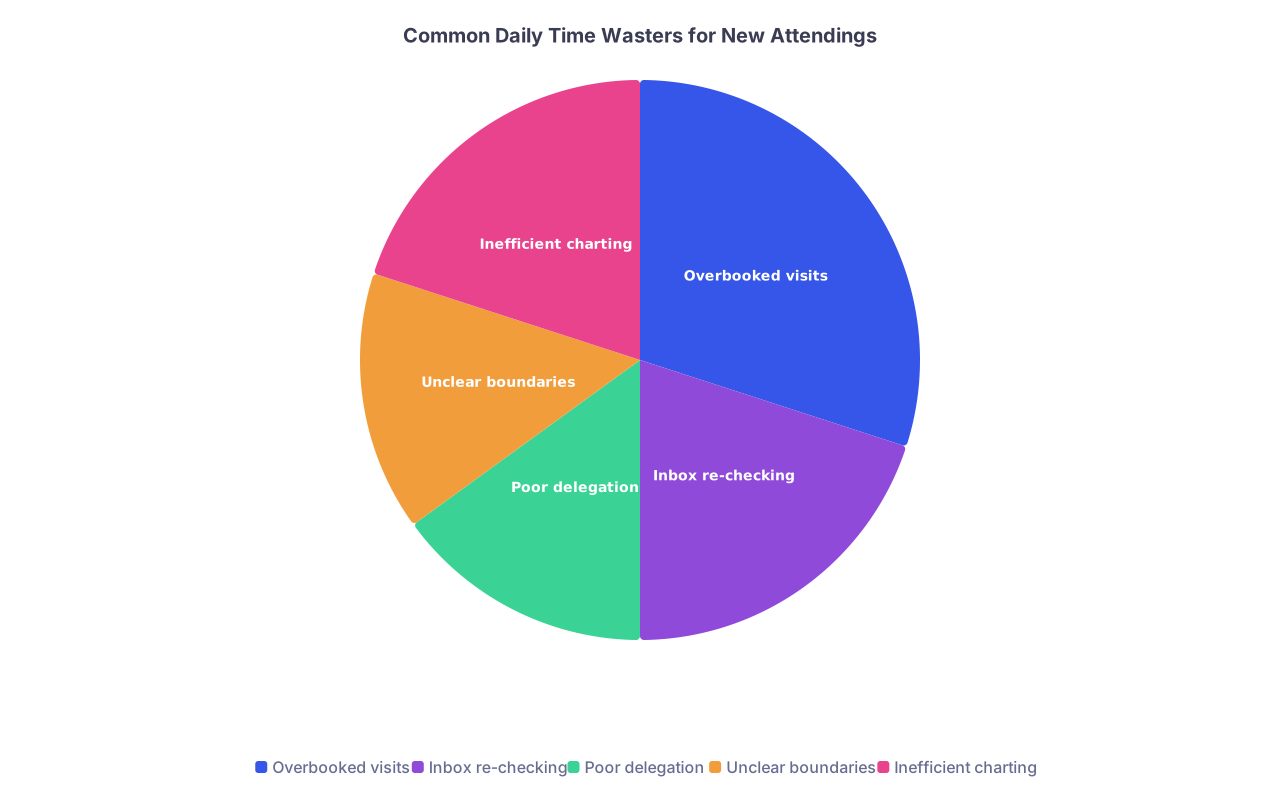
| Category | Value |
|---|---|
| Overbooked visits | 30 |
| Inbox re-checking | 20 |
| Poor delegation | 15 |
| Unclear boundaries | 15 |
| Inefficient charting | 20 |
You are often losing as much time to inbox chaos and poor delegation as to the schedule itself.
Step 6: Negotiate With Your Employer or Partners Without Burning Bridges
If you own your private practice, you have more control but also more fear: “If I cut visits, I cut revenue.” We will address that next.
If you are employed or in a group, you will need to renegotiate parts of your schedule. This is where most young docs fold and just accept misery.
Here is how you do it like a grown‑up, not a desperate intern.
6.1 Come with data, not feelings
From your 2‑week tracking:
- Average patients/day
- Average hours on-site and at home
- Number of messages, forms, refills
- Examples of safety or quality issues from being rushed (missed labs, errors caught late, patient complaints about rushed visits)
Frame the problem as:
“The current template is leading to X hours over schedule daily and Y hours of work at home, with an increasing risk of errors and poor patient experience. I want to adjust my template to maintain quality and long-term sustainability.”
6.2 Propose concrete alternatives
Do not just say “I need fewer patients.” Present options:
- Cap at 16–18 patients/day with mixed visit lengths.
- Add two 20‑minute admin blocks per day.
- Restrict certain days to new patients or procedures.
- No double‑booking without your explicit approval.
Example script:
“Here is my proposed template: 16–18 patients per day, two 20‑minute admin blocks, and properly lengthened complex visits. With this, I can commit to same‑day note completion and more consistent on-time performance, which improves patient satisfaction scores and reduces after-hours callbacks.”
Most admin people care about:
- Access metrics
- Revenue
- Patient satisfaction
- Direct complaints
Tie your proposal to those levers.
6.3 Be willing to trade
You may need to offer something in return:
- Slightly earlier start time (7:45 instead of 8:00) in exchange for no double booking.
- One “high access” day per week (more visits) in return for protected lighter days.
- Better portal responsiveness (since you now have admin blocks).
If the employer basically says, “Too bad, see more patients or leave,” you have learned something important: this is not a sustainable job. Start planning your exit, not your coping mechanisms.
Step 7: Make the New Schedule Financially Viable
If you are in private practice, reducing visit counts can trigger financial panic. Understandable. But an overloaded schedule is not long-term profitable either, because burnout leads to turnover, errors, and reputation damage.
You have three main levers:
- Optimize coding and documentation
- Adjust your payer mix and offerings
- Increase per‑visit value rather than visit count
7.1 Optimize coding (without gaming)
Many new attendings undercode like crazy. They bill 99213‑equivalents for everything out of fear or habit.
You likely are:
- Managing 3+ chronic conditions.
- Reviewing labs, imaging, outside notes.
- Providing moderate‑complexity decision making.
That is not a level‑3 equivalent. Learn your coding rules cold. Document appropriately. Bill for:
- Care coordination.
- Chronic care management (if applicable in your system).
- Telehealth follow‑ups (if payers allow).
A modest uptick in correct coding can offset some reduction in visit volume.
7.2 Payer mix and services
If you have any control over payer mix:
- Avoid loading your schedule with the lowest-paying plans unless they bring some strategic advantage.
- Consider:
- A limited number of cash‑pay or concierge slots.
- Value‑added services (procedures, testing, group visits) that reimburse better.
You do not have to become a concierge practice overnight. But you can, for example, reserve one afternoon a week for longer, higher‑value visits.
7.3 Make visits more productive
You are not selling time. You are selling expertise and outcomes.
- Use pre‑visit questionnaires to collect data before the visit.
- Have staff update meds, vitals, and screenings thoroughly so your time is decision‑making, not data entry.
- For complex chronic patients, bundle care: labs ordered in advance, care plans ready.
More value → better patient retention, more referrals, and often better reimbursement codes.
Step 8: Implementation: Rollout Plan for the Next 4–8 Weeks
You cannot flip your schedule overnight in most environments. You do not need to. Use a phased rollout.
Week 1–2: Data and design
- Track your current day as I described.
- Sketch your ideal template on paper.
- Draft boundary scripts, message policies, and inbox workflows.
- Meet with key staff (office manager, MA, nurse) and get their input. They know where time is leaking.
Week 3–4: Soft launch
- Implement:
- Admin blocks at least once per half day.
- One day per week with your new full template as a test.
- New triage rules for messages (with staff training).
- Start using boundary scripts with patients.
- Adjust based on what breaks.
Week 5–8: Full rollout
Convert the rest of the week to the new template.
Inform patients via:
- Brief message on the portal.
- Sign at front desk.
- Standard script staff use when scheduling:
- “Dr. X is structuring visits so that there is enough time to address your concerns thoroughly. Some visits may be longer, and some issues may require follow‑up appointments.”
Re‑measure:
- Time leaving clinic.
- After‑hours work.
- Patient complaints vs compliments.
Here is a simple visual of a reasonable timeline:
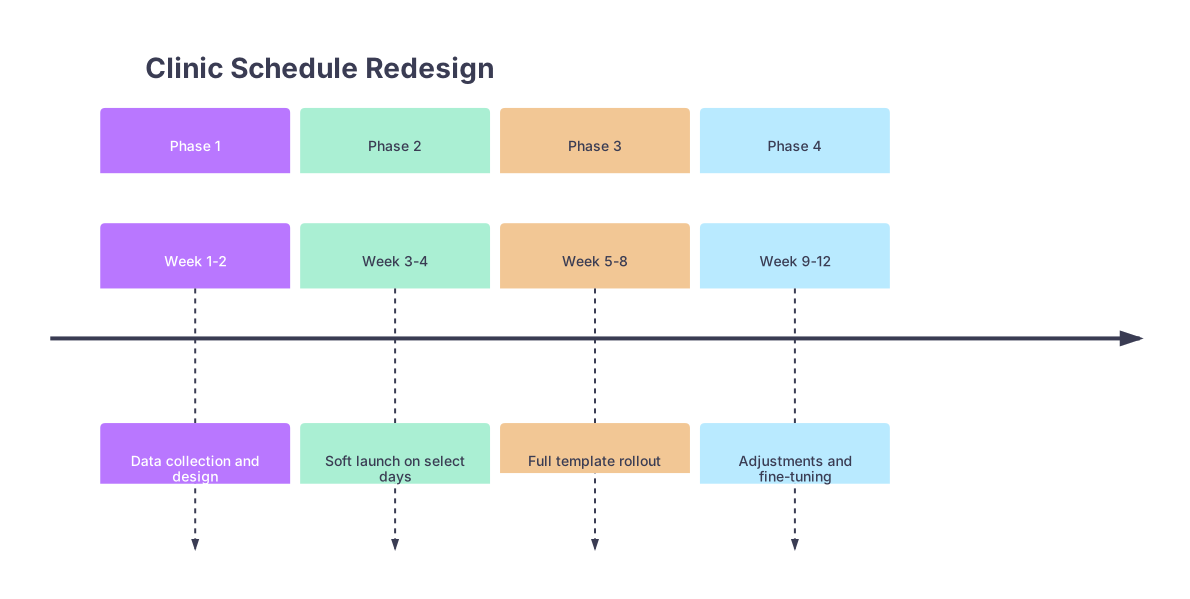
| Period | Event |
|---|---|
| Phase 1 - Week 1-2 | Data collection and design |
| Phase 2 - Week 3-4 | Soft launch on select days |
| Phase 3 - Week 5-8 | Full template rollout |
| Phase 4 - Week 9-12 | Adjustments and fine-tuning |
Expect some friction in weeks 3–5. Patients get used to anything they are given. They will adjust.
Step 9: Personal Boundaries Outside the Clinic
If your schedule improves but you still drag work home nightly, you have a second problem: you do not protect your off time.
You need explicit rules here too.
- Set a hard computer shut‑down time.
- Example: 7:30 pm. No EHR after that unless there is a true emergency.
- Designate 1 no‑clinic-work evening per week to start. Then expand to 2–3.
- Do not train friends and family to treat you as their personal on‑call doc 24/7.
- Script: “I cannot safely give medical advice outside of clinic where I do not have your chart. I want you to call your own doctor so this is done properly.”
You cannot be “on” all the time and expect to like this career in 5 years.
To keep yourself honest, once a week, do a quick self check:
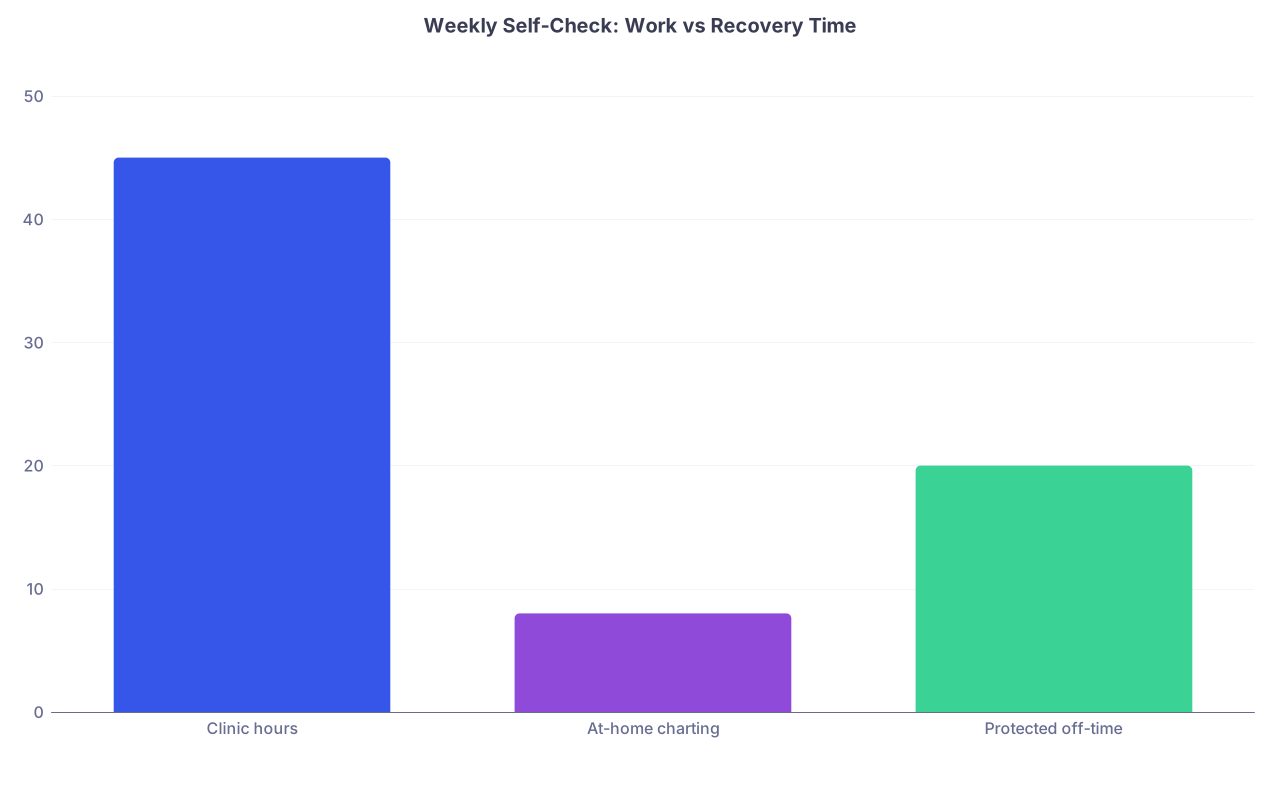
| Category | Value |
|---|---|
| Clinic hours | 45 |
| At-home charting | 8 |
| Protected off-time | 20 |
If your at‑home charting approaches your protected off‑time, your boundaries are slipping again.
Step 10: When to Pull the Ripcord and Change Jobs or Models
Sometimes, the problem is not you or your schedule. It is the system.
Signs your current job or partnership will not support a sustainable schedule:
- Every request for sane adjustments is met with “Our other doctors do it, why can’t you?”
- Double‑booking and over‑booking are standard with no option to opt out.
- Portal message volume is exploding but leadership refuses to consider compensation or staffing changes.
- You are already at 50–60 hour weeks consistently with no meaningful lever to pull.
At that point, the fix is not another productivity hack. It is a different job or practice model:
- Smaller private practice with more control and maybe lower volume but better payer mix.
- Hybrid or part‑time arrangement.
- Concierge or membership-based model.
You did not go through 11+ years of training to be an assembly line worker. If the model makes it impossible to practice safely with boundaries, redesign your career path, not your soul.
Two Final Things to Remember
Your schedule is a clinical tool, not just a logistics grid. Poor scheduling leads to rushed visits, more mistakes, and worse care. Rebuilding it is not selfish; it is part of safe practice.
Boundaries are skills, not personality traits. You are not “bad at saying no.” You are under‑tooled. Use scripts, clear policies, and structure so you do not have to renegotiate every boundary in every visit.
Redesign the system once, instead of trying to white‑knuckle through a broken one forever.