
If your new practice drowns you in paperwork, it will kill your schedule before it kills your income.
Most new attendings underestimate this. They think: “I’ll just work harder, be more efficient, maybe stay an extra hour or two.” Then 6 months later they are signing charts at 10:30 p.m., arguing with payers on hold, and wondering where the career they trained for actually went.
The good news: you can dramatically streamline your admin burden in 4 weeks if you treat it like a structured project, not an annoyance you swipe at between patients.
Here is a concrete, four‑week protocol to fix your administrative chaos and get your evenings back.
Week 0: Set the Baseline (One Focused Afternoon)
Before you change anything, you need to know what is actually wasting your time. Most doctors are wrong about this. They say “prior auths” or “messages” because those are irritating. Often the real time sink is something less obvious, like hunting for information in the EHR or retyping the same phrases 40 times a day.
Block one 3‑hour chunk this week. Close your door. Phone on silent. You are diagnosing your practice, not seeing patients.
Step 1: Time-tracking snapshot (Reality check)
For one full clinic day, track admin tasks in rough buckets. Use a notepad, Excel, or a simple timer app. Do not make it fancy.
Buckets to track:
- Charting / documentation
- Inbox / messages / refill requests
- Referrals / care coordination
- Billing / coding / claim corrections
- Prior authorizations
- Forms (FMLA, school notes, disability, work forms)
- Lab/imaging follow‑up
- Misc (scanning, faxing, tracking down results, etc.)
At the end of that day, you want something like:
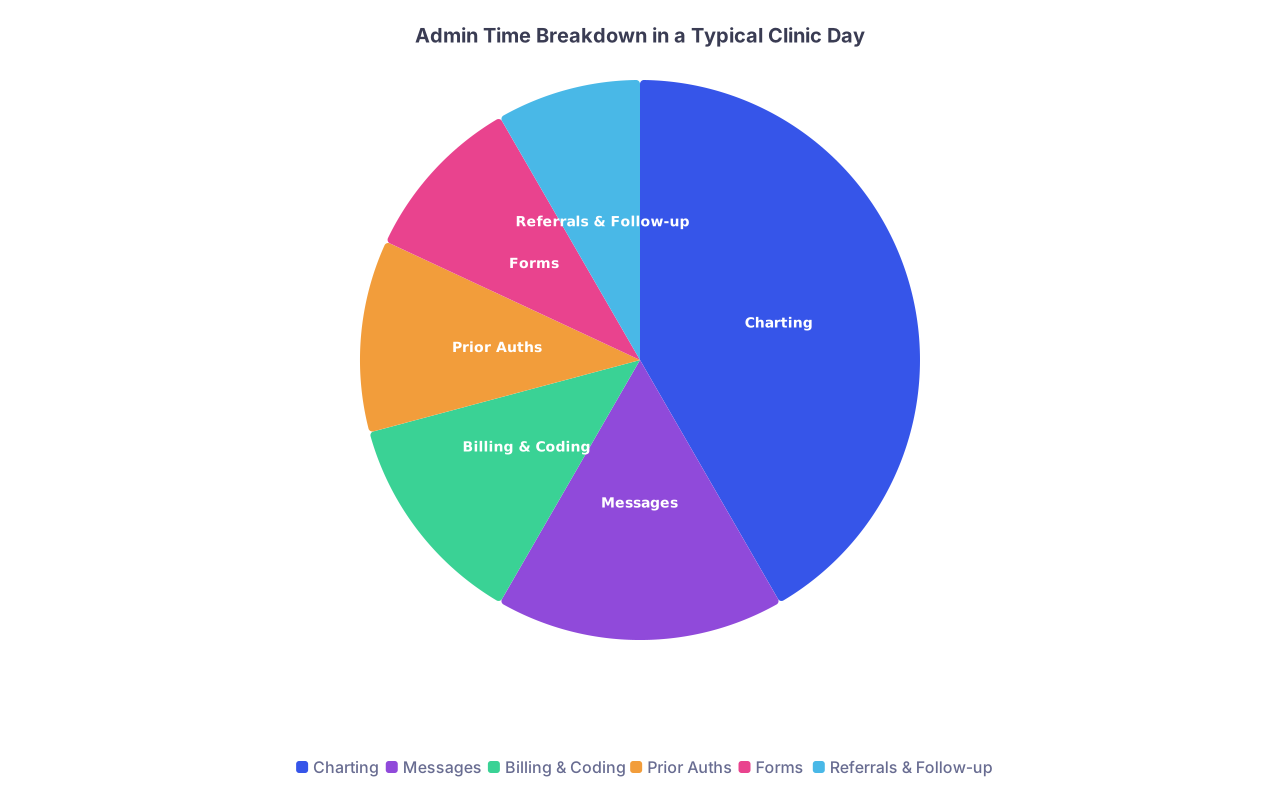
| Category | Value |
|---|---|
| Charting | 150 |
| Messages | 60 |
| Billing & Coding | 45 |
| Prior Auths | 40 |
| Forms | 35 |
| Referrals & Follow-up | 30 |
If you are over 2 hours of admin per clinic day outside direct patient interaction, you have a serious efficiency problem. Over 3 hours? It is critical.
Step 2: Define your “must-win” targets
Set three measurable 4‑week goals. Examples:
- Reduce average daily after‑hours charting from 2 hours to 30 minutes or less.
- Have 100 percent of routine refills and forms handled by staff using protocols.
- Cut prior auth time in half by shifting work to a defined process and template set.
Write them down. Put them where you will see them. If you do not define targets, you will drift.
Week 1: Stop the Bleeding – Triage the Worst Offenders
Your job in Week 1 is to attack the top two time-wasters you identified. Not “eventually.” Right now.
Step 1: Ruthless elimination and delegation
Take your time-tracking snapshot. Circle the top two categories by minutes spent.
Then run them through these three questions:
Can this be eliminated?
- Are you filling out redundant forms “because you always have”?
- Are you calling pharmacies for routine things that could be handled electronically?
- Are you personally calling normal labs “for thoroughness” when an automated message or staff call would suffice?
Can this be delegated?
Anything that does not require your license or judgment should default to staff. Period. Examples:- Calling patients with normal results (with a clear script from you).
- Sending referral packets.
- Preparing prior auths (non-clinical parts).
- Chasing missing outside records.
- Completing portions of forms that are purely demographic or clerical.
Can this be standardized?
If you repeat the same explanation 10+ times per week, it should be:- A template.
- A smart phrase.
- A patient handout.
- A pre-written script staff can use.
You will feel some resistance. “But my patients expect me to…” or “It is faster if I just do it myself.” That is how practices stay dysfunctional for years.
Step 2: Build “admin task lanes” for staff
If you have even one MA or front-desk person, you need clear lanes. Without them, everything boomerangs back to you.
Create a short, written one‑pager titled: “Admin Tasks – Who Does What”.
Example:
| Task Type | Primary Owner | Backup Owner |
|---|---|---|
| Normal lab result calls | MA | RN |
| Abnormal result escalation | Physician | — |
| Routine refills | RN using protocol | Physician |
| Prior auth data gathering | Front desk | MA |
| Form pre‑completion | Front desk | MA |
Print it. Review it with staff in a 15-minute huddle. Post it in your workroom. Expect to reinforce this repeatedly for 2–3 weeks.
Step 3: Design one “no‑doctor” workflow
Pick one category to completely offload from your daily mental load. Example: routine prescription refills.
Define the process end‑to‑end:
- Criteria for staff to approve vs route to you (e.g., “Seen in last 12 months, basic labs within 1 year, med not controlled”).
- EMR protocol (“Use refill smart set X, add note ‘per refill protocol’”).
- When to send you a message instead (“med flagged as controlled or flagged in chart”).
- What to say to the patient if refill is denied or needs visit.
Write it out step-by-step. Train your staff. Audit 10 cases at the end of the week for safety and accuracy.
Do not try to fix everything in Week 1. Get one major workflow off your plate safely. That momentum will matter.
Week 2: Rebuild Charting from the Ground Up
Documentation is where most new attendings bleed out hours. You will not fix this with “type faster.” You fix it with structure and tools.
Step 1: Create a standard note skeleton
You should not be reinventing your note structure for each encounter. For your top 3–5 visit types, build note templates that include:
- Chief complaint + concise HPI structure
- Focused ROS fields (not 14 systems of nonsense)
- Problem list assessment structure
- Plan organized by problem
- Standard counseling / education language
- Smart links to pull in vitals, labs, imaging
Typical visit types:
- New patient
- Established visit – acute problem
- Established visit – chronic care follow‑up
- Annual / wellness exam (if primary care)
- Procedure visit (if surgical/procedural practice)
Example skeleton for a chronic care follow‑up note:
- CC: “Follow‑up for [conditions]”
- HPI: structured bullets: control, adherence, side effects, red flags
- Medications: confirmation + changes
- Problem-based A/P:
- HTN – current control, changes, follow‑up interval
- DM – recent A1c, med adjustments, foot/eye follow-up
- Lipids – goals, statin use, labs
- Counseling: lifestyle, med adherence, warning signs
- Follow-up: time frame + reason
You then layer problem‑specific smart phrases on top.
Step 2: Build and aggressively use smart phrases
If you type the same sentence three times in a week, it deserves a shortcut. Simple rule.
Build smart phrases for:
- Common physical exam phrases
- Common patient instructions (“when to go to the ER,” “how to use inhaler,” “wound care instructions”)
- Common assessments (“Uncomplicated viral URI…”, “Stable chronic low back pain…”)
- Procedure notes and consent documentation
- Follow‑up plans by condition
The test: by the end of Week 2, you should be able to complete a straightforward follow‑up note in under 5 minutes using your templates and smart phrases.
Step 3: Decide your dictation strategy
Typing every note by hand in 2026 is self‑sabotage.
You have three viable options:
- Built‑in EMR dictation (Nuance, M*Modal, etc.)
- Third‑party speech‑to‑text tools (Dragon, etc.)
- AI ambient scribe tools (DAX, Suki, Tali, etc. where available and compliant)
Pick one. Trial it for a week. Do not spend a month comparing 10 products; this is how people stall.
A quick comparison frame:
| Method | Speed | Cost | Learning Curve |
|---|---|---|---|
| Typing only | Slowest | $0 | Low |
| Dictation | Fast | Low–Medium | Moderate |
| AI scribe | Fastest | Higher | Low–Moderate |
Set a rule: all new patient and complex follow‑up notes are dictated or AI‑assisted from now on.
Step 4: Implement “zero charting after 6 p.m.” policy
If you do not set guardrails, admin work will eat every available minute.
Starting at the end of Week 2:
- Build 2 mini charting blocks into your clinic schedule:
- 10–15 minutes mid‑morning
- 20–30 minutes mid‑afternoon
- During those blocks:
- No phone calls
- No refills
- No chart reviewing
- Just finishing notes from the last 2–3 patients
At 1 hour before you plan to leave, stop seeing new admin tasks entirely. Finish remaining notes from that day. Anything non-urgent that pops up now is tomorrow’s job.
If your group pressures you to “just squeeze in” more patients into all charting windows, you say no. Or you say yes and pay with your evenings. Your choice.
Week 3: Build Bulletproof Workflows for Recurring Pain Points
Now that charting is less chaotic, go after the next two high-friction areas: usually prior auths, forms, and results management.
Step 1: Standardize prior authorization
Prior auth is not going away. Stop treating each one as a unique disaster.
Create a prior auth packet for your top 10 medications/studies that commonly require it. For each:
- Standard indication criteria you actually use
- Key phrases payers want to see (“failed formulary alternative,” “medically necessary due to X”)
- Typical labs or imaging results needed
- Template letter of medical necessity (one per category)
Store these in a shared folder + EMR smart phrases.
Then create a workflow:
- Staff gathers:
- Insurance info
- Form required
- Recent relevant labs/imaging
- Past med trials (from chart)
- They pre-fill everything except the clinical justification paragraph.
- You review and drop in one of your standard prewritten justification blocks.
- Staff submits, tracks, and notes due date.
Your involvement should shrink to a 60–120 second review per case.
Step 2: Tame the results vortex
Random lab and imaging results arriving at random times is a recipe for missed follow‑up and endless interruptions.
You want three things:
A standard review time
- Eg: “All labs and imaging reviewed between 1:00–1:30 p.m. daily.”
- Staff only interrupt you for critical results.
A clear default for normal results
- Example:
- Normal results → MA calls or uses portal message + standardized smart phrase.
- Borderline but non-urgent → you send message + recommended action.
- Abnormal and urgent → MA pages you immediately.
- Example:
A tracking mechanism for “needs follow‑up”
- Use EMR task lists, reminders, or a simple shared spreadsheet.
- Every abnormal result that needs repeat labs, imaging, or visit gets:
- A due date
- A responsible staff member
- A concrete next step (book visit, repeat lab, etc.)
I have seen practices where this alone saved the physician 30–45 minutes a day and prevented dangerous “lost labs.”
Step 3: Industrialize form handling
Forms will multiply as your panel grows. You need a form “factory,” not case-by-case improvisation.
Build this workflow:
- All incoming forms logged on a forms log (simple list: patient, type, date received, due date, assigned to).
- Staff completes:
- Demographics
- Visit dates
- Diagnosis codes (if clearly known from last visit)
- Staff attaches the most recent relevant note and flags anything ambiguous.
- You:
- Review only the clinically relevant sections
- Sign and add brief clarifying comments where needed
- Push back incomplete or inappropriate requests (with a standard response template).
Decide your form SLA (service level agreement):
- Routine forms: 5 business days
- Work/school notes: 24–48 hours
- Disability/complex forms: schedule a visit if not seen within X months
Post this policy in your waiting room and on your website. Have your staff repeat it on the phone. Most patients accept clear boundaries if they are consistent.
Week 4: Automate, Measure, and Protect the System
By Week 4, the broad brushstrokes are in place. Now you tighten the system and make the improvements durable.
Step 1: Automate everything possible
Look at every recurring task and ask, “Can software do this better?”
Common targets:
-
- Text or email, fully automated.
- Include link to previsit questionnaires if you use them.
-
- Online forms that populate into the EMR.
- For example: ROS, med list updates, brief history for new patients.
Patient education
- Auto-send condition-specific handouts via portal after certain diagnoses or orders.
- Use EMR triggered messages where available.
Outstanding balance reminders
- Automated billing reminders (text/email) instead of staff calling.
This is not about turning your practice into a robot. It is about not paying humans (including yourself) to do machine work.
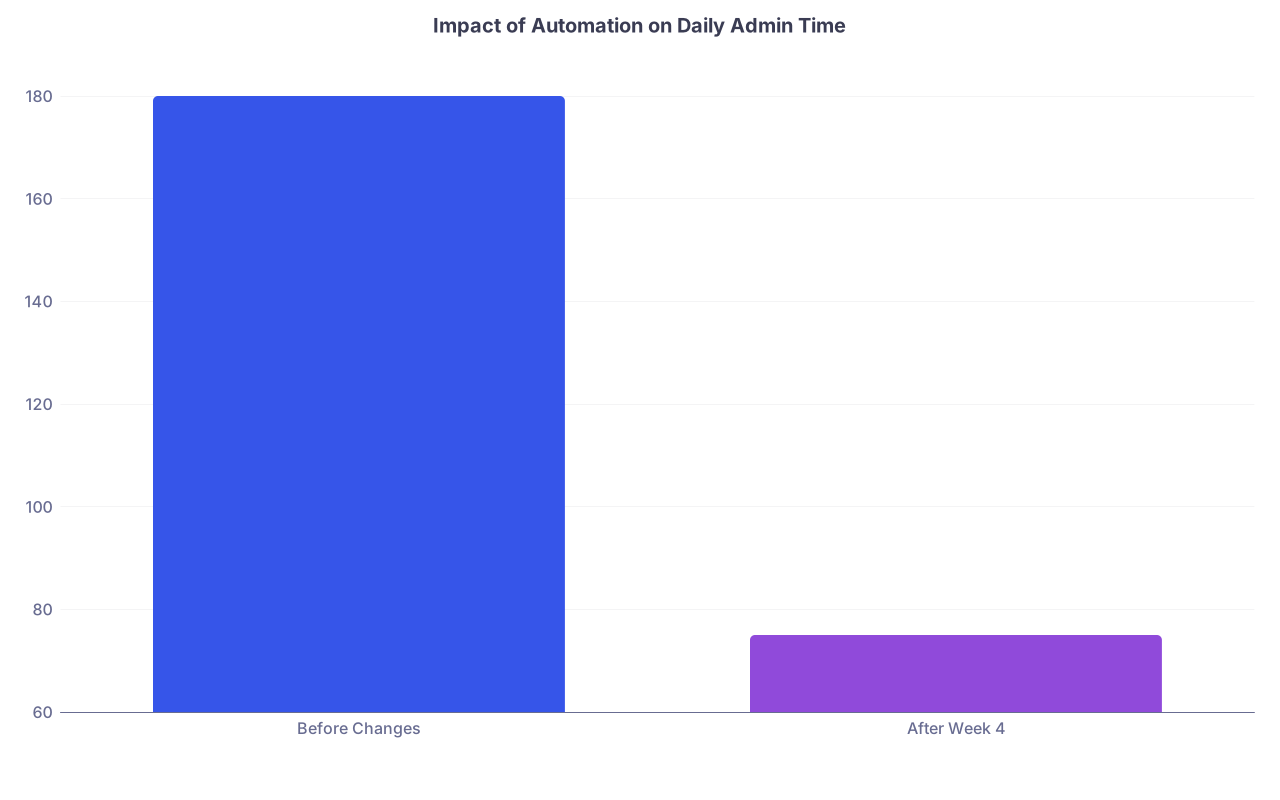
| Category | Value |
|---|---|
| Before Changes | 180 |
| After Week 4 | 75 |
Step 2: Re-measure and compare
Remember that initial time-tracking snapshot? Repeat it for one clinic day in Week 4 using the same categories.
Compare:
- Total admin minutes per day.
- After‑hours charting time.
- Number of tasks you personally touch vs staff.
You want to see a clear downward shift. If not, do not guess. Look category by category and ask: “What failed to change, and why?”
Maybe:
- Staff did not fully adopt the new protocols.
- You fell back into old habits and answered every message yourself.
- Your EMR templates are clunky and need refinement.
Fix those specific failure points, not “work harder.”
Step 3: Create a simple weekly “Admin Huddle”
Once a week, 10–15 minutes. Standing if needed. No agenda bloat.
You cover:
- Any backlog: forms, prior auths, unsigned notes, bill holds.
- Bottlenecks: “Where is stuff getting stuck?”
- Small process tweaks: “We are changing X step this week.”
- Wins: “We cut refills time in half last week by using the new protocol.”
Use this to keep the system from decaying back into chaos over 2–3 months.
Guardrails You Must Not Ignore
Streamlining admin work has risk if you get sloppy. You still practice medicine, not production line efficiency.
A few rules:
Never compromise safety for speed
- Results workflow must clearly route critical values to you immediately.
- Any doubt → you review, not staff.
Document enough for medico-legal protection
- Your templates should not produce clone-stamped garbage.
- Make sure your HPI, exam, and assessment actually reflect the individual patient.
Respect privacy with any AI tools
- Confirm HIPAA compliance and BAA (Business Associate Agreement) where relevant.
- Do not paste identifiable info into noncompliant tools.
Review delegation periodically
- Once a quarter, spot check:
- 10 refills done by protocol
- 10 prior auth packets
- 10 forms completed by staff
- Adjust protocols if you find consistent issues.
- Once a quarter, spot check:
Sample 4-Week Implementation Timeline
To keep this from living only as theory, here is how a realistic 4-week rollout might look:
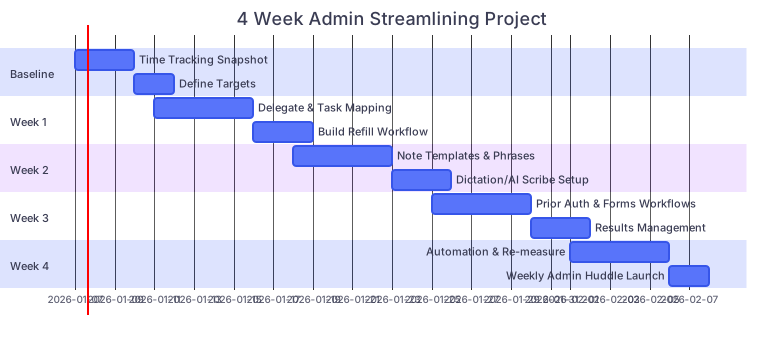
| Task | Details |
|---|---|
| Baseline: Time Tracking Snapshot | a1, 2026-01-07, 3d |
| Baseline: Define Targets | a2, after a1, 2d |
| Week 1: Delegate & Task Mapping | b1, 2026-01-11, 5d |
| Week 1: Build Refill Workflow | b2, after b1, 3d |
| Week 2: Note Templates & Phrases | c1, 2026-01-18, 5d |
| Week 2: Dictation/AI Scribe Setup | c2, after c1, 3d |
| Week 3: Prior Auth & Forms Workflows | c3, 2026-01-25, 5d |
| Week 3: Results Management | c4, after c3, 3d |
| Week 4: Automation & Re-measure | d1, 2026-02-01, 5d |
| Week 4: Weekly Admin Huddle Launch | d2, after d1, 2d |
This is aggressive but very doable if you treat it like a project, not an afterthought.
What This Looks Like When It Works
Here is the difference I see between new attendings who get this right in their first year of private practice and those who do not.
Failed pattern:
- Clinic ends at 5:00 p.m.
- They finally close the last chart at 8:30–9:00 p.m.
- Inbox shows 50+ messages by morning almost every day.
- Prior auths and forms spill over to weekends.
- They feel constantly behind, vaguely guilty, and resentful.
Successful pattern after streamlining:
- Clinic ends around 4:45–5:00 p.m.
- Last note done by 5:15–5:30 p.m.
- Inbasket down to a manageable number (10–20 messages, most staff-handled).
- Prior auths and forms are processed in clear batches by staff with short, focused physician input.
- Evenings are mostly theirs. They think about practice design, not survival.
The core difference is not intelligence or “being efficient by nature.” It is that the second group engineered their workflows deliberately, early.
Your Next Step Today
Do not plan. Do not “think about this.” Start.
Today, before you leave:
- Print or write a simple sheet with your admin time categories (charting, messages, refills, prior auths, forms, billing, results).
- Commit to tracking them for one clinic day this week, hour by hour.
- Block a 2–3 hour window on your calendar in the next 7 days labeled:
“Admin Overhaul – Do Not Book Patients.”
When that window arrives, you will have real data instead of vague frustration. Then you can start triaging, delegating, and rebuilding using the steps above.
Open your schedule right now and create that blocked window. If it is not reserved, the admin chaos will fill it for you.