
The insurance credentialing delays you are facing are not “just how it is.” They are, in large part, a process problem—and process problems can be engineered, pressured, and hacked into moving faster.
You do not have to sit for six months waiting while payers “review” your application in a black box. If you treat credentialing like a passive paperwork chore, you will lose weeks and sometimes months of billable time. If you treat it like a project with hard timelines, escalation pathways, and a playbook, you can cut that delay down dramatically.
Let me walk you through the playbook.
1. Understand Exactly Where Time Is Wasted
Most physicians blame payers for all delays. Payers are slow, sure, but half the lost time happens before your application even lands on someone’s desk.
Here is where credentialing time typically disappears:
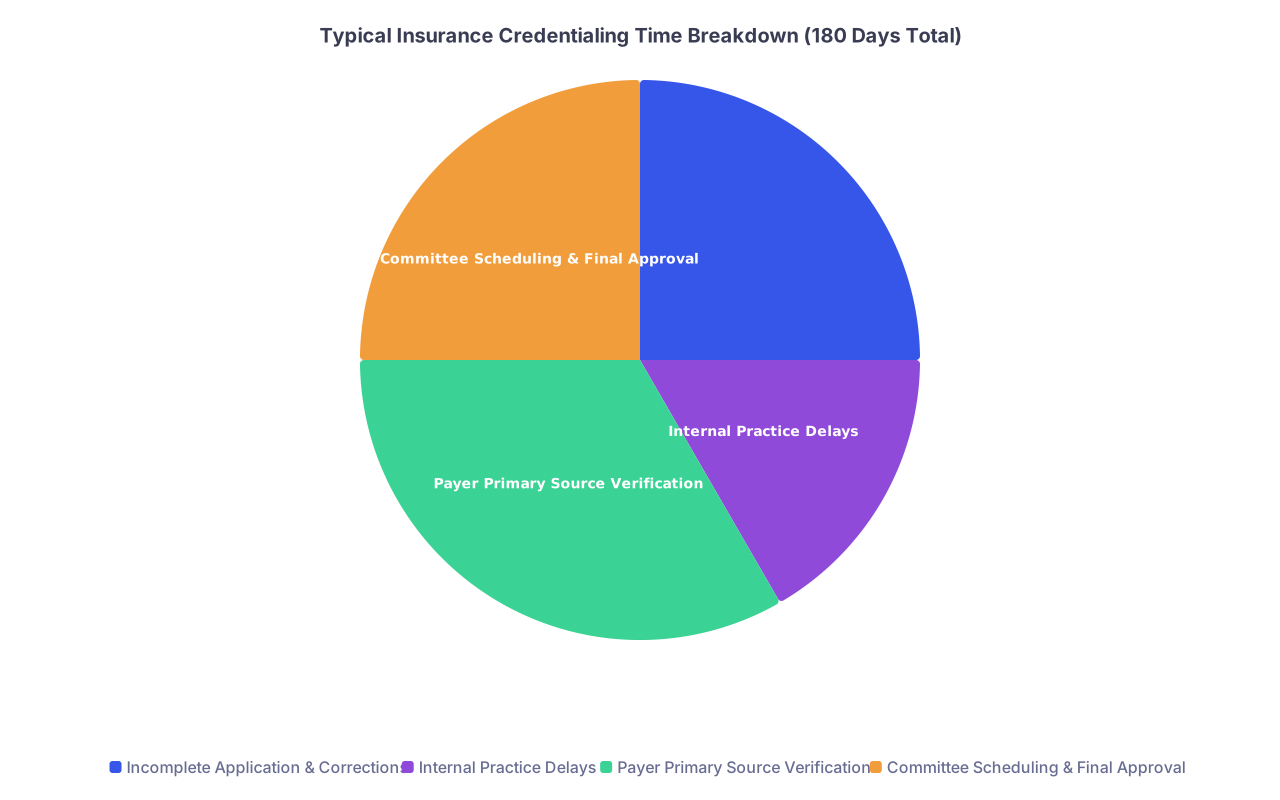
| Category | Value |
|---|---|
| Incomplete Application & Corrections | 45 |
| Internal Practice Delays | 30 |
| Payer Primary Source Verification | 60 |
| Committee Scheduling & Final Approval | 45 |
- 1–3 weeks lost: Incomplete applications, missing documents, outdated CV.
- 1–4 weeks lost: Internal delays (you, your office manager, or your outsourced service slow to respond or submit).
- 4–10+ weeks: Payer primary source verification and internal processing.
- 2–6 weeks: Committee review, board meetings, or “paneling” decisions.
If you do not aggressively compress the first two, you have no moral right to complain about the last two. The fastest credentialing outcomes I have seen came from practices that were absolutely relentless about:
- Submitting complete, error-free applications the first time.
- Starting early—months before seeing patients.
- Calling, not emailing, and escalating the moment things stalled.
So we start by cleaning your side of the street.
2. Build a Complete Credentialing Packet Before You Apply
If you start filling out payer applications before you assemble your packet, you are doing it backward. You will stop, search, re-request documents, and stretch a 2‑hour task into a 2‑week saga.
Create a “credentialing packet” that lives in a single, organized folder (cloud + local). Most delays vanish when you can respond to any request within 10 minutes instead of 10 days.
Your packet should include:
- Updated CV (month/year format, no unexplained gaps).
- Medical school diploma & residency/fellowship certificates.
- All current state licenses (every state where you practice or will practice).
- DEA registration & any state-controlled substance registrations.
- Board certification(s) or board-eligibility proof.
- Current malpractice insurance face sheet (with limits & dates).
- Malpractice claims history/“loss runs” for last 5–10 years.
- Hospital privileges letters (or proof your application is pending).
- Training history, employment history, and explanations for any gaps.
- Work history letters if required (some payers want references or verification).
- W‑9 for your practice entity & NPI (Type 1 and Type 2 if applicable).
- Practice address(es), phone/fax, tax ID, CLIA if applicable.
- CMS Medicare enrollment (PECOS) if you will take Medicare.
- CAQH profile printout with attestation date current.
Create a single-page “Credentialing Summary Sheet” with:
- Full legal name and any former names.
- DOB, SSN (you will not share this sheet broadly; use it for forms).
- NPIs (individual and group).
- Tax ID and legal business name.
- Primary practice address, phone, fax, email.
- Contact person for credentialing (you or your practice manager).
- Hospital affiliations and admitting arrangements.
Then you use this packet to blast through applications without stopping.
3. Fix CAQH and NPPES First (Non‑Negotiable)
If your CAQH and NPI data are sloppy or outdated, your “fast credentialing” dream dies before it starts. Many commercial payers lean heavily on CAQH and NPPES. If those are wrong, they will kick your file back or just let it rot.
Step-by-step: Tighten up CAQH
- Log in to your CAQH ProView profile.
- Update:
- Practice locations, phone, fax, emails.
- Hospital affiliations.
- Licenses and DEA with accurate dates.
- Malpractice coverage and claims.
- Work history with no date gaps.
- Upload clean, legible PDFs of:
- Licenses.
- DEA.
- Board cert.
- Malpractice face sheet.
- Sign/attest at the end. Many payers will not even pull your data if attestation is older than 90 days.
- Confirm “Authorize all participating organizations” is set to YES, so you do not have to approve each payer individually (unless you have a specific reason not to).
Step-by-step: Fix your NPI (NPPES)
- Go to the NPPES site and check:
- Individual (Type 1) NPI details.
- Organization (Type 2) NPI if you have a group practice entity.
- Make sure:
- Practice address is not a long-gone residency clinic.
- Phone and fax are correct.
- Taxonomy codes match your specialty.
- Update and submit. Print or save a PDF.
You do this before contacting a single payer. It cuts down on “we could not verify” excuses.
4. Sequence Your Payers Strategically
You cannot push all payers equally. Some move, some crawl, some ignore you unless you scream. You need a targeting strategy, not random chaos.
Here is the practical reality of typical timelines:
| Payer Type | Typical Range | How Hard You Can Push |
|---|---|---|
| Medicare (PECOS) | 30–90 days | High |
| Medicaid (state) | 60–180 days | Medium |
| Large National Commercial | 60–120 days | Medium–High |
| Local/Regional Plans | 60–150 days | Variable |
| Hospital Medical Staff | 60–180 days | High (if employed) |
You prioritize based on:
- Patient mix you expect (Medicare-heavy? Commercial-heavy? Medicaid?).
- Local employer contracts (which plans are dominant).
- Your cash flow plan (which payers you absolutely need in months 1–3).
Concrete sequencing approach
- Start Medicare and Medicaid first (if applicable).
- These have more rigid processes but are relatively rule-bound. If your forms are clean and you respond quickly, you can often keep them on the shorter end of the range.
- Simultaneously hit top 3–5 commercial payers in your region.
- Blue, United, Aetna, Cigna, plus any dominant regional plan.
- Layer in smaller/comparatively less important plans once your core pipeline is moving.
- Workers comp networks.
- Niche HMOs.
- Telehealth carve-outs.
And you absolutely do not wait until your clinic doors open to start. You start 90–180 days before your first scheduled patient. Earlier if your state Medicaid is famously slow.
5. Use a Real Credentialing Timeline and Work the Process
Credentialing is a project. Treat it like one. That means dates, tasks, and escalation points.
Here is a simple, aggressive but realistic 16‑week timeline:
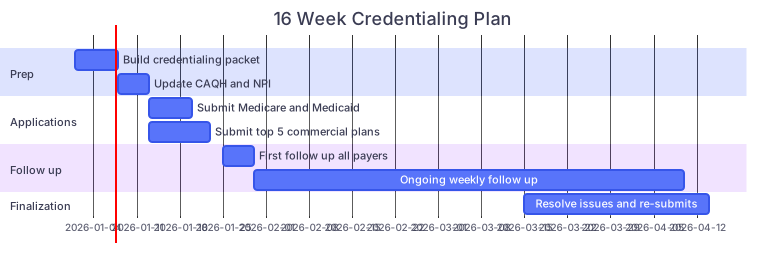
| Task | Details |
|---|---|
| Prep: Build credentialing packet | a1, 2026-01-01, 7d |
| Prep: Update CAQH and NPI | a2, after a1, 5d |
| Applications: Submit Medicare and Medicaid | b1, after a2, 7d |
| Applications: Submit top 5 commercial plans | b2, after a2, 10d |
| Follow up: First follow up all payers | c1, 2026-01-25, 5d |
| Follow up: Ongoing weekly follow up | c2, after c1, 70d |
| Finalization: Resolve issues and re-submits | d1, 2026-03-15, 30d |
You can shift the exact dates, but the structure stands:
- Week 1: Packet + CAQH + NPI.
- Weeks 2–3: Mass submission to Medicare, Medicaid, and majors.
- Week 4: First follow-up on every application.
- Weekly thereafter: Structured follow-ups.
- Week 12–16: Clean-up, resubmits, catching stragglers.
If you are not tracking every payer with dates and status, you are flying blind. Use a sheet.
6. Build a Tracking Sheet That Forces Action
I have seen tiny practices outrun hospital systems simply because a sharp office manager had a brutal spreadsheet and zero tolerance for “we never got that fax.”
Your tracking sheet (Excel, Google Sheets, Airtable—pick one) should include:
- Payer name.
- Type (Medicare, Medicaid, commercial, workers comp).
- Contact info (phone, fax, email, provider rep if known).
- Submission method (portal, paper, email).
- Date submitted.
- Confirmation number or ticket ID.
- Status (not submitted / submitted / in review / pending info / approved / denied).
- Last contact date.
- Next follow-up date.
- Notes (who you spoke with, what they said, promised turnaround).
You or your staff then follow one rule: if “next follow‑up date” is today or earlier, you call. Not email. Call.
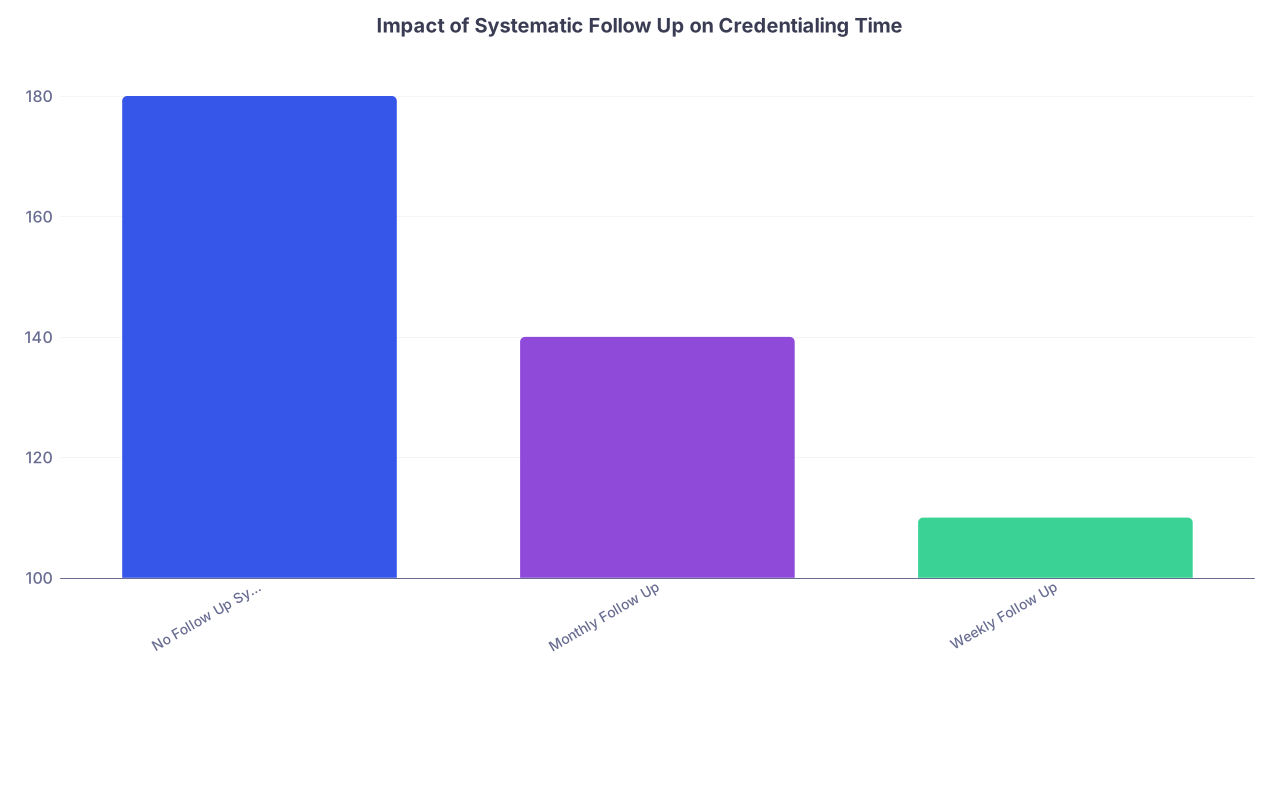
| Category | Value |
|---|---|
| No Follow Up System | 180 |
| Monthly Follow Up | 140 |
| Weekly Follow Up | 110 |
Most payers will not move without friction. Your tracking system is the friction.
7. Call Like a Professional Nuisance (Scripts Included)
Credentialing departments respond to squeaky wheels. Not rude wheels, not desperate wheels—calm, organized, relentless wheels.
First follow-up call (about 2 weeks after submission)
Goal: Confirm receipt, get reference number, and verify nothing obvious is missing.
Script outline:
“Hi, this is Dr. [Name] (or ‘I am calling on behalf of Dr. [Name]’).
I am calling to confirm receipt and status of a credentialing application submitted on [date] for [specialty].
Can you please check if it has been received and is complete?”
Then you ask very specific questions:
- “What is the reference or tracking number for this file?”
- “Is the application considered complete, or is anything missing or pending?”
- “What is the current stage of the review process?”
- “What is the typical remaining turnaround time for this stage?”
Document every call in your tracking sheet.
Subsequent follow-ups (weekly or biweekly)
Goal: Prevent the file from going cold and surface any hidden issues early.
Script backbone:
“I am calling to check the status of a credentialing application for Dr. [Name], reference [number].
Last time we spoke on [date], you mentioned it was in [stage].
Has there been any progress or additional requirements since then?”
If they say “still in review” for the third time, you escalate politely:
“Is there a supervisor or credentialing specialist I could speak with to understand what is needed to move this forward?
Our clinic opening date is [date], and we want to avoid disruption for your members.”
You do not threaten. You apply steady, professional pressure.
8. Blow Up Common Bottlenecks Before They Cost You Weeks
There are predictable landmines that routinely slow credentialing by 30–60 days. You can preempt most of them.
8.1. Employment and training gaps
Payers hate date gaps with no explanation. If you have:
- A few months between residency and practice.
- Time off between jobs.
- Nonclinical work spells.
Pre-write simple explanations:
- “Between 07/2022 and 10/2022, I relocated and completed onboarding and licensing for my current position.”
- “Between 01/2020 and 06/2020, I focused on research and family responsibilities; I was not clinically employed.”
You paste those explanations into forms or attach them once, not invent them on the phone with a rep.
8.2. Malpractice history
If you have claims:
- Obtain an up‑to‑date “loss run” from each prior carrier.
- Prepare a short, factual explanation for each closed claim: allegation, your role, outcome, any system changes.
- Keep emotion and legal speculation out of it. Payers want risk context, not a confession or a fight.
Delays often happen while chasing old carriers for documentation. Do this on day one.
8.3. Hospital privileges
Some payers require active hospital privileges or at least a pending application. If you are outpatient only:
- Get a formal coverage or admission agreement with a hospitalist group or another physician who admits for you.
- Have a written document or letter that explains your arrangement.
If you are pursuing hospital privileges:
- Start that application in parallel; hospital credentialing is often as slow or slower than insurance.
- Keep a copy of your “application in process” letter if available.
9. Decide: In‑House vs Outsourced Credentialing (and How to Keep Either Fast)
Outsourcing credentialing is not magic. I have seen physicians pay firms thousands of dollars to…submit sloppy forms and never follow up. Outsourcing can help, but only if you manage it.
| Approach | Pros | Cons |
|---|---|---|
| In-House | Full control, cheaper | Time intensive, learning curve |
| Outsourced Firm | Saves time, expertise | Costly, variable quality |
| Hybrid | You track, firm submits | Requires your oversight |
If you keep it in‑house:
- Designate one point person (not “whoever has time”).
- Give them protected hours each week for credentialing work.
- Train them with 2–3 payer portals and phone scripts.
- Review the tracking sheet with them weekly.
If you outsource:
- Demand a detailed onboarding list of exactly what they will do and when.
- Require a shared tracking document that you can see at any time.
- Set expectations: “We want weekly status updates and copies of all submissions.”
- Consider bonuses tied to specific milestones (e.g., “X major payer approvals by Y date”), not just a flat fee to “handle credentialing.”
Your mantra: outsource execution, never oversight.
10. Use Temporary Solutions While Credentialing Catches Up
You will not have every payer on board on day one. That is normal. The question is whether you have fallback strategies or you just…do not get paid.
Here are practical stopgaps:
10.1. Out‑of‑network billing (with disclosure)
For commercial plans where you are not yet in‑network:
- Many plans will still pay you as out‑of‑network.
- You must explicitly inform patients of your status and potential higher costs.
- Use this selectively and ethically.
Some payers will even do a “gap exception” if:
- There is a limited number of in‑network specialists in your area.
- You document medical necessity and network inadequacy.
Your staff can request these on a case-by-case basis.
10.2. Cash pay options
Have a clear, fair cash-pay fee schedule ready:
- Transparent rates.
- Payment at time of service.
- Option to provide a superbill for patients to submit to their insurance for possible reimbursement.
This is not your forever model, but it keeps lights on when credentialing drags.
10.3. Provisional or “delegated” credentialing
In some arrangements:
- Large groups or health systems with delegated credentialing can bring you on faster internally, then backfill payer credentialing.
- IPAs and some ACOs have their own credentialing processes that payers accept.
If you join such an entity or clinically align with one, push to understand if delegated credentialing applies. It can cut weeks.
11. Escalation Tactics When Payers Drag Their Feet
Sometimes, despite your clean paperwork and steady calls, a payer just sits. You will need to escalate—professionally, but firmly.
Escalation ladder:
Ask for a supervisor in credentialing
“I appreciate your help. Given the length of time this file has been in review, is there a supervisor or credentialing specialist who can review this directly?”Contact your assigned provider relations rep
- Every big payer has provider reps.
- Ask credentialing for their name and contact, or look it up on the payer’s provider portal.
- Explain that delays are affecting their members’ access to care.
Use written escalation
- Send a brief, factual email or letter summarizing:
- Submission date.
- Reference number.
- Number of follow-ups.
- Impact on patient access (especially in underserved areas).
- Copy provider relations and, if appropriate, local medical society contacts.
- Send a brief, factual email or letter summarizing:
Leverage patient access arguments
- “We are the only [specialty] taking new patients within X miles.”
- “Our referral partners have patients waiting.”
Payers do not like documented access problems.
As a last resort: Regulatory channels
- Some states have insurance commissioners or managed care ombudsmen that handle network access concerns.
- You do not threaten lawsuits casually; you document patterns and, if egregious, consult legal counsel.
The key: escalation is methodical, not emotional.
12. Design Your Practice Workflow Around Credentialing Reality
You cannot assume “we will be in‑network with everyone by opening day.” That is fantasy. You build your opening around what is realistic.

Practical steps:
Stagger your marketing
- Start with marketing to patients whose plans you already know you will be in‑network with by opening.
- Do not blast a big regional campaign if you are still out‑of‑network with the dominant payer.
Control your schedule
- For the first 1–2 months, keep your schedule slightly lighter to account for:
- Coverage issues.
- Upfront patient education about network status.
- Billing edge cases.
- For the first 1–2 months, keep your schedule slightly lighter to account for:
-
- They must be able to say, confidently:
- “We are in‑network with A, B, and C.”
- “We are currently out‑of‑network with D; here is what that means for you.”
- Give them a one-page script and update it weekly as payer approvals come in.
- They must be able to say, confidently:
Update your website in real time
- Post your current insurance list and a note:
- “We are actively adding additional insurance plans; please call to confirm coverage.”
- Patients appreciate honesty more than discovering surprises at checkout.
- Post your current insurance list and a note:
13. Common Ways Physicians Accidentally Slow Their Own Credentialing
I have to be blunt here. A lot of delay is self-inflicted. You shorten timelines by not being your own worst enemy.
Big offenders:
- Slow document responses: Payer requests “copy of updated DEA” and you send it three weeks later. That is three weeks you gifted them.
- Messy CVs: No dates, overlapping jobs, unexplained gaps. Every confusion triggers more verification.
- Not checking spam or portals: Payers love sending “we need more info” messages through clunky portals. If no one logs in, files just sit.
- Changing practice info mid-process: You submit with one address and phone, then change both before approval. Now they have to re-verify.
Put systems in place:
- One monitored email for all credentialing correspondence.
- Weekly portal check for each large payer.
- A single source of truth for your practice address, phone, fax, and tax ID.
14. What a Mature Credentialing System Looks Like
After 6–12 months, your new practice should not be “winging it.” Credentialing becomes an ongoing, cyclical process, not a one-time crisis.
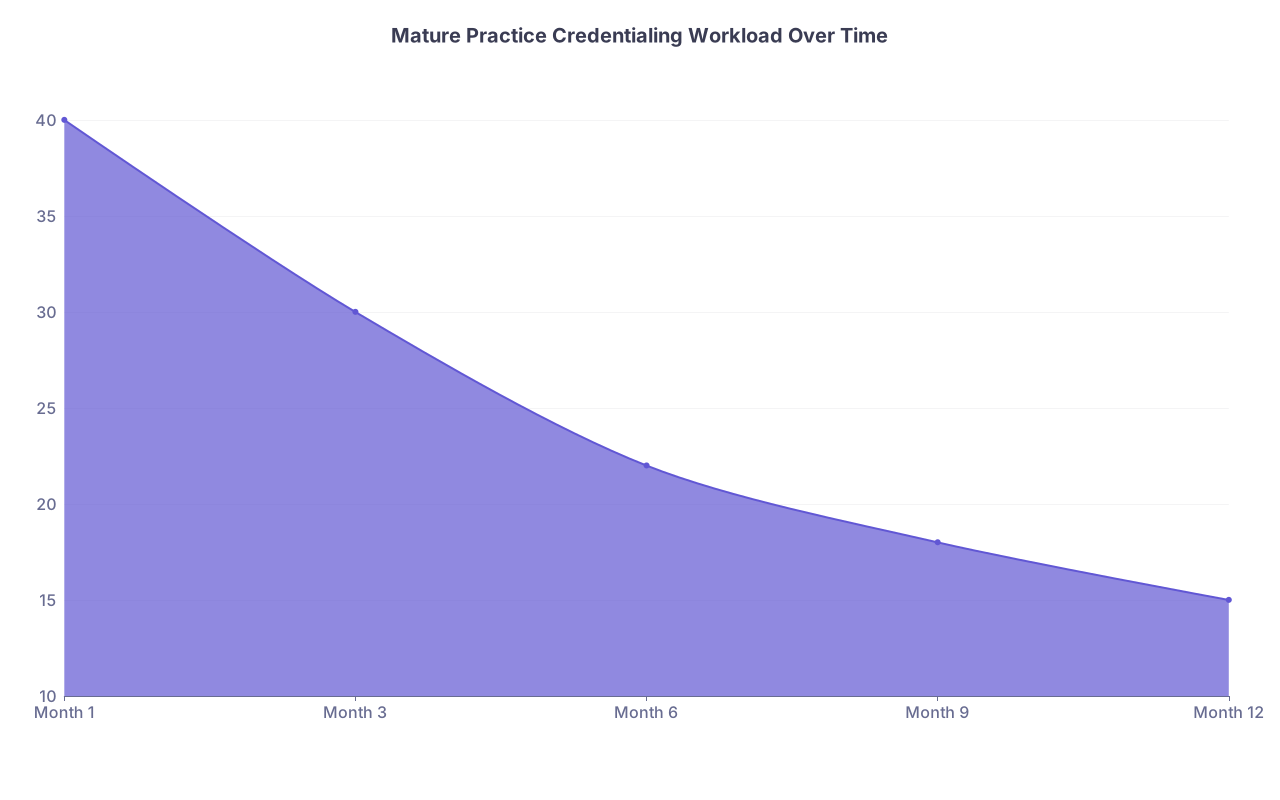
| Category | Value |
|---|---|
| Month 1 | 40 |
| Month 3 | 30 |
| Month 6 | 22 |
| Month 9 | 18 |
| Month 12 | 15 |
Signs you have grown up as a practice:
- You have a living tracking sheet with:
- Renewal dates for licenses, DEA, and malpractice.
- Recredentialing cycles for each payer (often every 2–3 years).
- CAQH attestation is updated every quarter without being chased.
- New clinicians (NPs, PAs, associates) are onboarded using the same packet-and-timeline system, not starting from scratch.
- Someone on your team owns this process and reports to you monthly on:
- Approvals obtained.
- Pending applications.
- Upcoming renewals and expirations.
At that point, credentialing stops being a crisis and becomes just another business function that runs on rails.

15. Quick Implementation Checklist
If you want this condensed down to “what do I do this month,” here it is.
- Build your complete credentialing packet and summary sheet.
- Clean and attest CAQH; update NPPES for both NPIs.
- Create a credentialing tracking sheet and pick a “credentialing owner.”
- Submit to Medicare, Medicaid (if needed), and top 3–5 commercial payers within 2–3 weeks.
- Start weekly follow-ups; document every interaction.
- Preempt gaps, malpractice history issues, and hospital privilege questions with written explanations and documents.
- Decide in‑house vs outsourced; if outsourcing, demand transparency and track everything anyway.
- Set up temporary coverage options (OON billing, cash pay, gap exceptions) while waiting.
- Design your opening schedule and marketing knowing not all payers will be live on day one.
- Transition from “one‑time scramble” to a recurring, monitored credentialing system.

Key points to remember:
- Fast credentialing is mostly about process, not luck: complete packet, clean CAQH/NPI, aggressive tracking, and relentless follow-up.
- You must manage payers actively—call, escalate, and document—or your file will sit at the bottom of someone’s queue.
- Build your business plan around credentialing reality: stagger marketing, train staff, use temporary billing options, and make credentialing a permanent, well-run system in your practice.