
You are six months into your first attending job. Your small private practice is finally seeing some volume. The schedule looks full, clinic days feel packed, and you are working late finishing notes.
Then you log into your practice bank account.
The deposits do not match what you expect from your charges. You pull an aging report: 60% of your AR is over 60 days. A denials report shows line after line of “CO‑16: Claim/service lacks information,” “CO‑50: Not medically necessary,” “CO‑97: Payment included in allowance for another service.”
You are not short on patients. You are bleeding on billing.
This is where most new private practice physicians get crushed. Not by medicine. By revenue cycle.
Let me be blunt: if you do not fix this fast, you will quietly subsidize your patients and payers with your free labor, then wonder why your “busy” practice is broke.
Here is the protocol I use when I walk into a practice that is drowning in denials. Step‑by‑step. No fluff.
Step 1: Get a Clear, Brutal Picture of the Damage
You cannot fix what you cannot see. Right now, your denials are probably a blur: “lots of stuff not getting paid.” That is useless.
You need a snapshot that answers three questions:
- How bad is it?
- Where is it worst?
- What patterns keep repeating?
1.1 Pull the Right Reports (Do Not Guess)
From your practice management (PM) system, pull for the last 90 days:
- Denials by payer (count and dollar amount)
- Denials by denial code (grouped, count and dollar value)
- Denials by provider (if more than one clinician)
- First pass claim acceptance rate (clearinghouse plus payer)
- AR aging split by:
- 0–30 days
- 31–60 days
- 61–90 days
90 days
- Top 20 CPT codes by volume and associated denial rates
If your billing company or in‑house biller cannot produce these in a clean format within a week, that is already one diagnosis: your data infrastructure is broken.
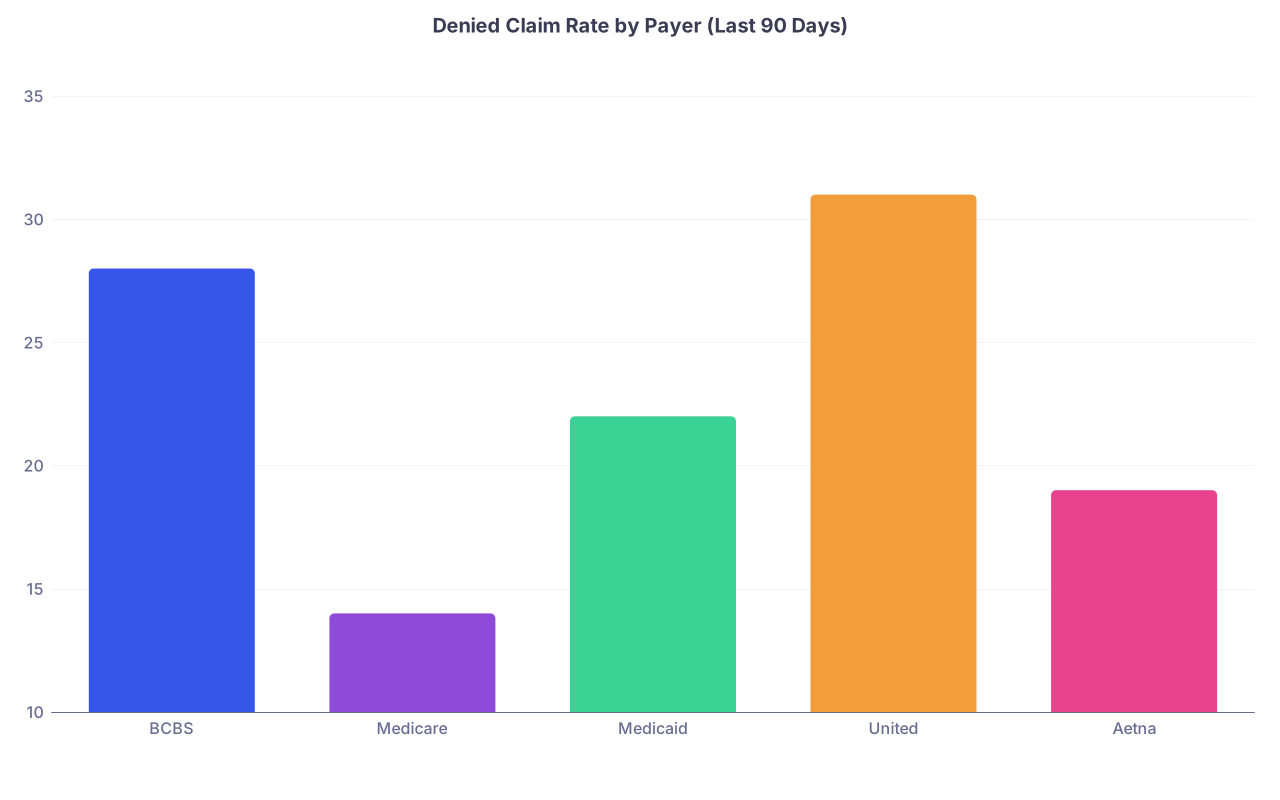
| Category | Value |
|---|---|
| BCBS | 28 |
| Medicare | 14 |
| Medicaid | 22 |
| United | 31 |
| Aetna | 19 |
1.2 Sort the Problems by Impact
Do not try to fix everything at once. You will fail.
Sort your denial data by dollar amount, not by count. A thousand $12 lab add‑ons are less urgent than twenty $600 procedures denied for a fixable reason.
Create a simple 2‑column working list:
- Column 1: Denial category (e.g., “Eligibility,” “Authorization,” “Coding/bundling,” “Medical necessity,” “Documentation,” “Timely filing”)
- Column 2: Approx monthly lost revenue
Then circle the top 3 categories. That is where you start.
Step 2: Map Your Current Billing Workflow (Reality, Not Theory)
Most new practices think they have a workflow. They have habits. Usually sloppy ones.
You need to see where the system is leaking.
2.1 Draw the Actual Flow
Sit down with whoever touches billing: front desk, MA, biller, office manager. Whiteboard this, step by step. No “shoulds.” Only “what really happens most of the time.”
Use something like this:

| Step | Description |
|---|---|
| Step 1 | Patient scheduled |
| Step 2 | Eligibility check |
| Step 3 | Visit completed |
| Step 4 | Provider documents |
| Step 5 | Codes selected |
| Step 6 | Claim created in PM |
| Step 7 | Scrubber/Edits |
| Step 8 | Submitted to clearinghouse |
| Step 9 | Payer adjudication |
| Step 10 | Payment posted |
| Step 11 | Denial work queue |
| Step 12 | Corrected and resubmitted |
Now annotate where variation occurs:
- “Sometimes we skip eligibility if they are ‘regulars’.”
- “If the provider does not sign by 5 pm, we bill it next week.”
- “We do not run everything through a scrubber. Just send.”
Every box where the answer is “sometimes” or “depends” is a risk point. Those are denial factories.
2.2 Identify System Failures vs People Failures
You are not trying to blame your front desk or biller. You are trying to separate:
- System failures – no standard process, no tools, no automation, no training.
- People failures – process exists but is ignored or inconsistent.
System failures need protocols and infrastructure. People failures need accountability and sometimes different people.
Most young practices underestimate system failures. They think “my biller sucks” when the real problem is “we never verify insurance and we code visits randomly.”
Step 3: Plug the Front‑End Holes (Prevents 50–70% of Denials)
More than half of your denials are probably avoidable if you clean up the front end: scheduling, registration, eligibility, authorizations, and documentation.
3.1 Standardize Eligibility Checks
If denials for “not covered” or “plan inactive” show up on your reports, this is non‑negotiable.
Protocol:
- Every visit, every patient (yes, including “they have been here for years”):
- Verify insurance eligibility 24–72 hours before the visit.
- Confirm:
- Plan active on date of service
- PCP designation (if HMO)
- Copay / coinsurance / deductible status
- Document the verification in your PM system (screenshot, note, eligibility response ID).
If you do not have real‑time eligibility in your PM system, fix that this month. It pays for itself instantly.
3.2 Lock Down Prior Authorizations
Common denial: “No prior authorization on file.”
For your top 20 CPT codes, build a payer‑specific PA matrix.
| CPT Code | Description | BCBS PA Needed | Medicare PA Needed | Medicaid PA Needed |
|---|---|---|---|---|
| 90792 | Psych eval | Yes | No | Yes |
| 45378 | Colonoscopy | Sometimes | No | Yes |
| 29827 | Shoulder arthroscopy | Yes | Yes | Yes |
| 20550 | Tendon injection | No | No | Sometimes |
| 99204 | New patient visit | No | No | No |
Create a rule:
- No elective high‑RVU service is scheduled without checking the grid and:
- Documenting PA number in the appointment record, or
- Documenting “PA not required per payer” with date/time and reference source.
If the staff is “not sure” whether PA is needed, the standing order is: check. No guessing.
3.3 Clean Up Documentation Habits
Most “medical necessity” and “insufficient documentation” denials trace back to lazy or inconsistent notes.
You do not need dissertation notes. You need targeted completeness.
Action steps:
- For each of your most denied CPTs, pull 5–10 denied notes and compare them with 5–10 paid ones.
- Identify what is missing in the denied set:
- No clear indication or diagnosis supporting the service
- No failed conservative therapy documented
- Missing required elements (e.g., time, complexity factors)
- Build smart phrases or templates that bake these required elements in:
- Example for a joint injection:
- Prior treatments tried and failed
- Exam findings
- Imaging results (if relevant)
- Functional impact
- Reason injection is now indicated
- Example for a joint injection:
Then train yourself and any partners: these fields are not optional “if I have time.” They are how you get paid.
Step 4: Fix Coding and Claim Construction (What You Send Out)
The next batch of denials you can control are coding, bundling, modifiers, and data entry issues.
4.1 Audit Your Top 20 Codes
Take your top 20 CPT codes by revenue and ask three questions for each:
- Are we using the correct code family?
- Are we using appropriate modifiers (or overusing them)?
- Are our diagnosis codes strong enough to justify the service?
Spend an afternoon with:
- Payer policies (online medical policies and LCDs for Medicare).
- A decent coding reference (AAPC, specialty society guides).
- Your last 50–100 claims with those codes.
Spot patterns:
- E/M levels always at 4 or 5 with thin documentation → red flag.
- Procedures billed without supporting Dx → likely denials.
- Modifier 25 slapped on everything that moves → asking for trouble.
If you are not comfortable doing this, pay a certified coder for a focused 4–8 hour review. Money well spent.
4.2 Use an Edits/Scrubber Layer
If you are submitting claims raw from your PM system with no rules engine, you are flying blind.
Your PM or clearinghouse should allow:
- Custom edits like:
- “If CPT 45378 billed without Dx K63.5, K62.5, etc., flag.”
- “If modifier 25 used, require separate Dx and problem‑oriented documentation.”
- “If patient age < 18 and CPT X used, flag.”
Set these up for your most denied patterns first, not hypotheticals.
Every preventable error that makes it to a payer was a missed opportunity to stop it in‑house for free.
Step 5: Build a Denial Management Machine (Not Random “Rebilling”)
Right now, your denied claims are probably handled like this: someone occasionally “works the rejections” when they have time. Then wonders why cash flow is a mess.
You need a tight denial management protocol.
5.1 Centralize and Categorize Denials
Every denial must land in a work queue categorized by:
- Payer
- Denial reason (use broad buckets)
- Age
Non‑negotiable fields in the denial work queue:
- Original date of service
- Date of denial
- Denial code(s)
- Dollar amount at stake
- Last action taken and by whom
- Next action and due date
5.2 Set Response Time Standards
If you do not define response times, denials will age out and die.
Minimum standard:
- All denials: first action within 7 calendar days of posting.
- Timely filing risk (second denials or short payer filing limits): action within 3 days.
You can set more aggressive goals later. For now, make “no untouched denial after 7 days” a core rule.
5.3 Use a Denial Decision Tree
Your staff should not be making creative decisions every time. They should follow a script.
Something like:
- Category: Eligibility / Coverage
- Check eligibility record:
- If coverage was inactive on DOS and we failed to check eligibility → bill patient with explanation.
- If coverage was active and payer is wrong → correct insurance, resubmit.
- If coverage active but denied as “not covered benefit” → verify benefit; if payer error, appeal with proof of coverage.
- Check eligibility record:
- Category: Authorization Missing
- If service truly required PA and none was obtained:
- If internal error: write‑off as “practice error” (do not bill patient if your fault).
- If payer mis‑flagged requirement: appeal with policy citation.
- If service truly required PA and none was obtained:
- Category: Coding/Modifier
- Verify coding rules for payer.
- Correct code or modifier, resubmit as corrected claim.
- Category: Medical Necessity
- Pull chart.
- If documentation was weak:
- If legitimately medically necessary and can be clarified without altering facts: add an addendum, then appeal.
- If not supportable: adjust off.
- If payer applied wrong policy: full appeal with citations and supporting notes.
Codify this into a simple written guide. Train on the guide. No improvisation.
Step 6: Tighten the Back End – Posting, Reconciliation, and AR Follow‑Up
Denied claims are half the story. Slow or incomplete follow‑up turns small leaks into financial hemorrhage.
6.1 Make Payment Posting Accurate and Fast
Payment posting is not data entry. It is how you see balance shifts and decide what to chase.
Rules:
- All payer remits posted within 3 business days of receipt (EDI or paper).
- All posting tied to the correct claim and line item, not “bulk posting” that hides adjustments.
- Contractual adjustments labeled correctly, not dumped into “write‑off” with no reason.
You should be able to look at a line item and instantly see:
- Billed amount
- Allowed amount (per contract)
- Paid amount
- Patient responsibility
- Adjustment reason
If your biller is “batch adjusting” by payer without line detail, you are blind.
6.2 Run AR Like a Collections Shop, Not a Hobby
Set hard AR standards. Something like:
- Total AR > 90 days: aim for < 15–20% of total AR. If you are a new practice, you may start worse. But you need a target.
- No claim over 45 days without at least one follow‑up action documented.
Use your PM system to:
- Generate AR by payer and AR by age weekly.
- Assign specific buckets to specific staff:
- Example: One person owns Medicare AR, another owns commercial plans.
- Track how many touches each claim has had and the outcomes.
Here is what you are aiming to see over time:
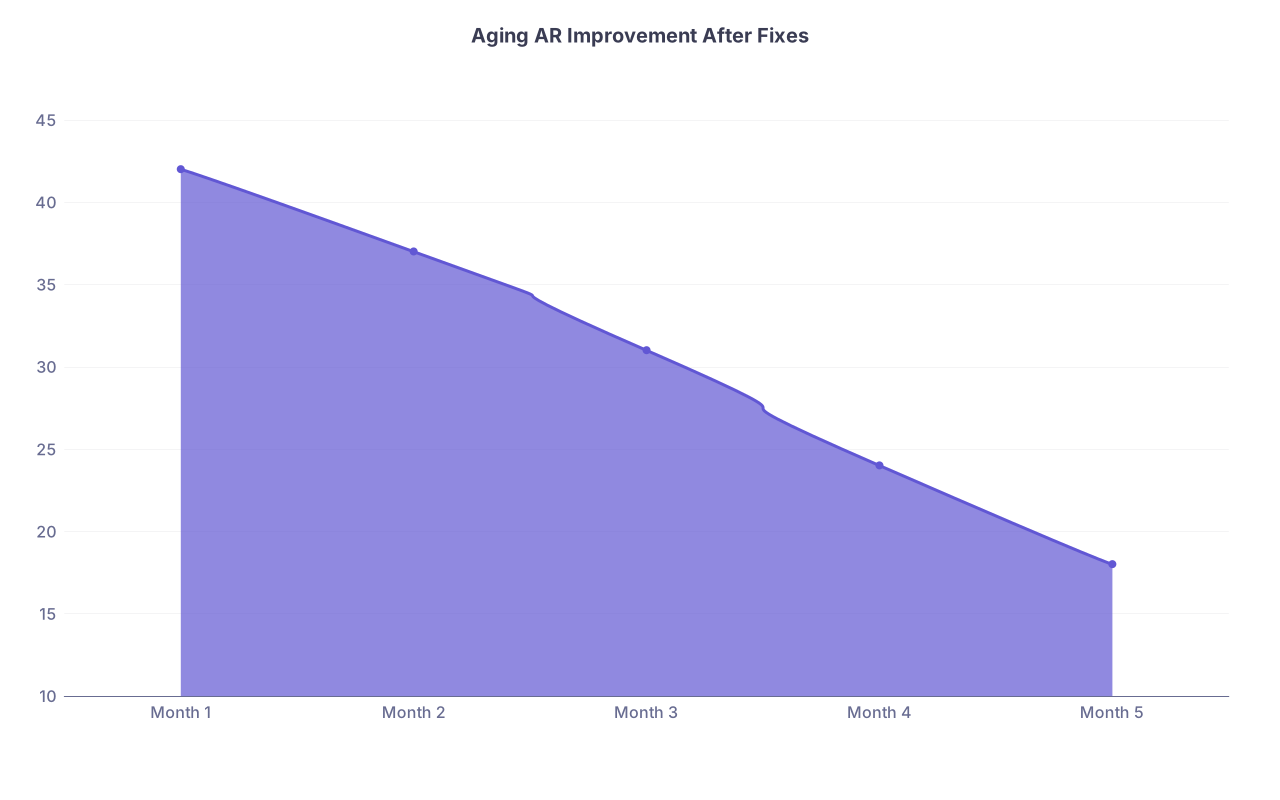
| Category | Value |
|---|---|
| Month 1 | 42 |
| Month 2 | 37 |
| Month 3 | 31 |
| Month 4 | 24 |
| Month 5 | 18 |
(Values represent % of AR over 90 days.)
Step 7: Hold Your Biller or Billing Company Accountable
Whether you have one in‑house biller, a small billing team, or an outsourced company, you cannot abdicate oversight. It is your revenue.
7.1 Define Clear Metrics
Do not accept vague reassurances like “we are working denials.” Demand numbers.
Minimum monthly metrics:
- Clean claim rate (claims accepted by payer on first submission).
- Denial rate by claim volume and by dollar value.
- Average days in AR.
- % AR over 90 days.
- Appeal success rate (number and dollars reversed on appeal).
If a billing company refuses or “cannot” provide this consistently, that is a sign. They either lack capacity or transparency. Both are problems.
7.2 Audit Their Work Periodically
Twice a year (minimum), pick:
- 50 paid claims
- 50 denied claims
And audit:
- Was each denial worked according to your expected timelines?
- Were obvious appealable denials left to die?
- Are there underpayments that were never challenged?
If you do not know how to do this, bring in a consulting coder/revenue cycle expert for a focused 1–2 day review. It is cheaper than months of lost revenue.
7.3 Know When to Fire and Replace
If, after you implement front‑end fixes and provide clear expectations:
- Denial rates stay high
- Appeal success is near zero
- Metrics are missing or inconsistent
You do not “work on the relationship” forever. You replace them.
Yes, switching billing vendors is painful. Keeping a bad one is usually worse.
Step 8: Build Simple Checklists and Scripts So the Fix Sticks
You can design the perfect process and watch it fall apart in 30 days if you do not turn it into routines people can actually follow.
8.1 Create 3–4 Critical Checklists
Keep them short and brutal. Examples:
New Patient Scheduling Checklist
- Full name, DOB, address
- Front/back of insurance card uploaded
- Eligibility verified and documented
- Copay amount communicated to patient
- PA required? If yes, status documented
Pre‑Visit Chart Prep Checklist
- Insurance verified within 72 hours
- Outstanding balances reviewed
- Required PA numbers in chart
- Correct referring provider info (if needed for payer)
Claim Submission Checklist
- Signed note completed
- Correct provider NPI and tax ID
- CPT and Dx mapped correctly
- Modifiers applied per policy
- Attachments (if required) included
Laminate them. Put them at front desk, workstations, your desk. People roll their eyes at checklists until they see their denial rates drop.
8.2 Train With Real Cases, Not PowerPoints
Do one‑hour sessions once a month for 3–4 months. Each session:
- Pick 5–10 recent denials.
- Project them on a screen.
- Walk through:
- What happened.
- Where the process failed.
- How it should go next time.
Real examples stick. Abstract lectures do not.
Step 9: Decide What to Automate and What to Keep Manual
You do not need a million‑dollar revenue cycle system. You do need to be smart about where software can save you time and reduce errors.
9.1 Automate Routine and Repetitive Tasks
Good places to automate:
- Eligibility checks: automatic runs 48–72 hours before appointments.
- Basic claim edits: “if field X empty, do not send.”
- Statement generation: weekly or monthly patient statements triggered automatically.
- Reminder tasks: denials sitting untouched >7 days generate a task.
Bad places to over‑automate:
- Complex appeals
- Medical necessity denials
- Coding decisions on nuanced visits/procedures
Those still need a human brain.
9.2 Keep Control of High‑Value Claims
For high‑ticket claims (e.g., procedures, surgeries, high‑RVU services), consider a manual pre‑flight check:
- Verified correct insurance and PA
- Confirmed coding matches documentation
- Confirmed all required fields, NDCs, units, etc.
Yes, it is more work. But if you bill a $4,000 procedure incorrectly and it denies, you may never see that money. Spending an extra 3 minutes up front is a very good trade.
Step 10: Set a 90‑Day Turnaround Plan
You do not fix a broken billing system overnight. But you can see real improvement in 90 days if you are deliberate.
Break it down:
Weeks 1–2: Assessment and Triage
- Pull all reports.
- Map workflow.
- Identify top 3 denial categories by dollar value.
- Start weekly denial and AR review meetings (30 minutes).
Weeks 3–6: Front‑End and Coding Fixes
- Implement eligibility and PA checklists.
- Roll out documentation templates for top 10 CPT codes.
- Configure edits/scrubber rules for most common errors.
- Start denial decision tree training.
Weeks 7–10: Denial Machine and AR Discipline
- Formalize denial work queue standards.
- Implement “touch within 7 days” rule.
- Tighten payment posting and AR follow‑up protocols.
- Monitor metrics weekly:
- Denial rate
- Clean claim rate
- % AR > 90 days
Weeks 11–13: Audit, Adjust, and Lock In
- Audit a sample of denials and paid claims.
- Adjust workflows where reality does not match the plan.
- Finalize written SOPs and checklists.
- Decide if billing staff/vendor is salvageable or needs replacing.
If you execute this with some discipline, you should see:
- Denial rate dropping.
- Cash collections increasing.
- AR aging trending in the right direction.
Not perfect. But clearly better.
Final Thoughts: What Actually Matters
Keep three things in your head while you do this:
Most denials are self‑inflicted. That is the bad news. The good news is you can stop inflicting them with clear processes and a little ruthlessness.
You cannot outsource responsibility. You can hire a biller or a company. You cannot hire someone to care as much about your revenue as you do. Oversight is not optional.
Simple, boring consistency beats “fancy” systems. Eligibility every time. PA checklists. Denial queues with real follow‑up. These unglamorous pieces are what separate busy broke practices from busy profitable ones.
You did not train this long to work for free. Fix the billing system. Then your clinical work can actually show up in your bank account.