
Your new-patient intake is either building your practice or bleeding it. There is no middle ground.
If every new patient visit feels like a circus—missing forms, double-booked slots, frantic staff, insurance surprises—this is not “just how it is.” It is a broken workflow problem. And it is fixable. Fast.
You are post-residency, trying to grow a private practice in a ruthless market. Referrers have options. Patients are impatient. Staff are burned out. The practices that win are not necessarily the ones with the best medical care; they are the ones that feel seamless.
Let’s build that for you. Step by step. No fluff, no theory. A concrete onboarding workflow you can actually implement in a few weeks, not “over the next several quarters.”
Step 1: Define One Clear Intake Path (Stop Letting Every Front-Desk Call Be Custom)
Most chaotic intakes start here: zero standardization. Every staff member “does it their way.” One promises same-week visits. Another forgets to verify insurance. Another books 60 minutes for something that should be 20.
You fix this by defining a single, standard new-patient path.
1.1 Decide Your New-Patient Visit Types
You need very few options. More choices = more errors.
For a typical outpatient specialty, I recommend:
- New patient – standard (e.g., 40–60 minutes)
- New patient – complex (e.g., 60–90 minutes; for multiple comorbidities, second opinions)
- New patient – procedure-focused (if applicable; e.g., 30 minutes)
- Telehealth new patient (if allowed for your specialty/payer mix)
Lock those definitions in writing. Include:
- Duration
- Whether it can be telehealth or must be in-person
- What must be completed before the visit (forms, labs, imaging, outside records)
Now your staff are not guessing. They are following a script.
| Visit Type | Duration | Telehealth Allowed | Requirements Before Visit |
|---|---|---|---|
| New - Standard | 40 min | Yes | Intake + ROS + insurance |
| New - Complex | 60 min | Case by case | Intake + records + meds |
| New - Procedure-Focus | 30 min | No | Intake + prior imaging |
| New - Telehealth Only | 30–40 min | Yes | Intake + consent + ID |
Any appointment that does not fit one of these types? Front desk asks you or your practice manager. Not the scheduler’s “best guess.”
1.2 Standardize How New Patients Enter Your System
You need one intake “front door” with a small number of entry channels that all land in the same workflow.
Most common entry points:
- Phone call
- Website form or “Request Appointment” button
- Referral (faxed, EMR-to-EMR, or emailed)
- Patient portal self-scheduling (if enabled)
Right now, they likely go into different black holes. That is why you double-book or lose people.
You fix this with a simple rule:
“Every new-patient request ends as a single ‘New Patient – Pending’ task in our system within 24 hours.”
“System” can be:
- Your EHR’s task list
- A shared inbox folder
- A ticketing tool like Trello/Asana if your EHR is terrible (not ideal, but workable)
Step 2: Build a Pre-Visit Intake Checklist That Actually Works
The goal is brutal clarity: “What must be done before a new patient can walk through the door or log into telehealth?”
If staff improvise this each time, you will always be behind.
2.1 Create a 10–15 Point Pre-Visit Checklist
You want one master checklist for new patients that sits inside your EHR or is printed and clipped to every new-patient chart until staff internalize it.
Typical checklist (modify for your specialty):
- Patient demographics entered and verified
- Preferred contact method (SMS/email/phone) documented
- Insurance verified; eligibility run; copay / estimated responsibility documented
- PCP and referring provider captured (name, NPI, contact)
- New-patient intake form sent (portal link or PDF)
- Medical history + medication list requested (through portal or upload)
- Release of information signed (if outside records needed)
- Outside records requested (specify which: notes, labs, imaging, operative reports)
- Appointment confirmation sent (email/SMS) with prep instructions
- Telehealth tech check + consent completed (if virtual)
- Photo ID + insurance card on file (photo upload or front-desk scan)
- Payment method on file (if your practice uses this)
- Pre-visit questionnaires (PHQ-9, GAD-7, specialty-specific scales) sent/completed
- Internal flag added for special needs (interpreter, mobility issues, behavioral concerns)
- All intake documents >80% complete at least 24–48 hours before visit
You do not need this complicated forever. But you absolutely need it for the first 3–6 months while you stabilize your process.
Pin this checklist next to your front desk. Make completion of this checklist the required standard, not “nice to have.”
Step 3: Stop Using Random Forms — Design an Intake Packet That Does Real Work
Most practices copy someone’s ancient clipboard packet and keep reusing it. Half of what they collect is useless. The other half they never read.
Your intake packet should do three jobs:
- Collect legally required consents and disclosures
- Gather clinically relevant data in a structured way you will actually use
- Set expectations and boundaries (cancellation policy, after-hours, portal messaging)
3.1 The Core Components of a Modern Intake Packet
Build or revise your packet with these sections:
Demographics and contact
- Name (with preferred name), DOB, address, emergency contact
- Preferred pharmacy
- Permission to leave voicemails / text
Insurance and financial policy
- Insurance details
- Financial responsibility + card on file consent if you use it
- No-show / late cancellation policy (with fees and timeframes)
Medical history
- Past medical history (with checkboxes for common conditions)
- Past surgical history with dates if relevant
- Family history (limited to conditions relevant to your specialty)
Medication and allergy list
- Structured medication list: name, dose, frequency, reason
- Allergies with reaction type
Reason for visit and goals
- Chief concern in patient’s words
- When it started, what makes it better/worse
- What they hope will be different in 3–6 months
Screening tools (specialty-specific)
- Example: PHQ-9, GAD-7, ADHD scales, pain scales, sleep scales
Legal and consent
- Consent to treat
- Notice of Privacy Practices acknowledgement
- Telehealth consent (if applicable)
- Communication consent (SMS/email)
Practice expectations
- Refill policies
- Portal messaging expectations (response times, what is appropriate)
- After-hours and emergencies
If you are still making people handwrite all this, you are wasting staff time on data entry and generating unreadable medication lists. Use digital forms integrated with your EHR wherever possible.
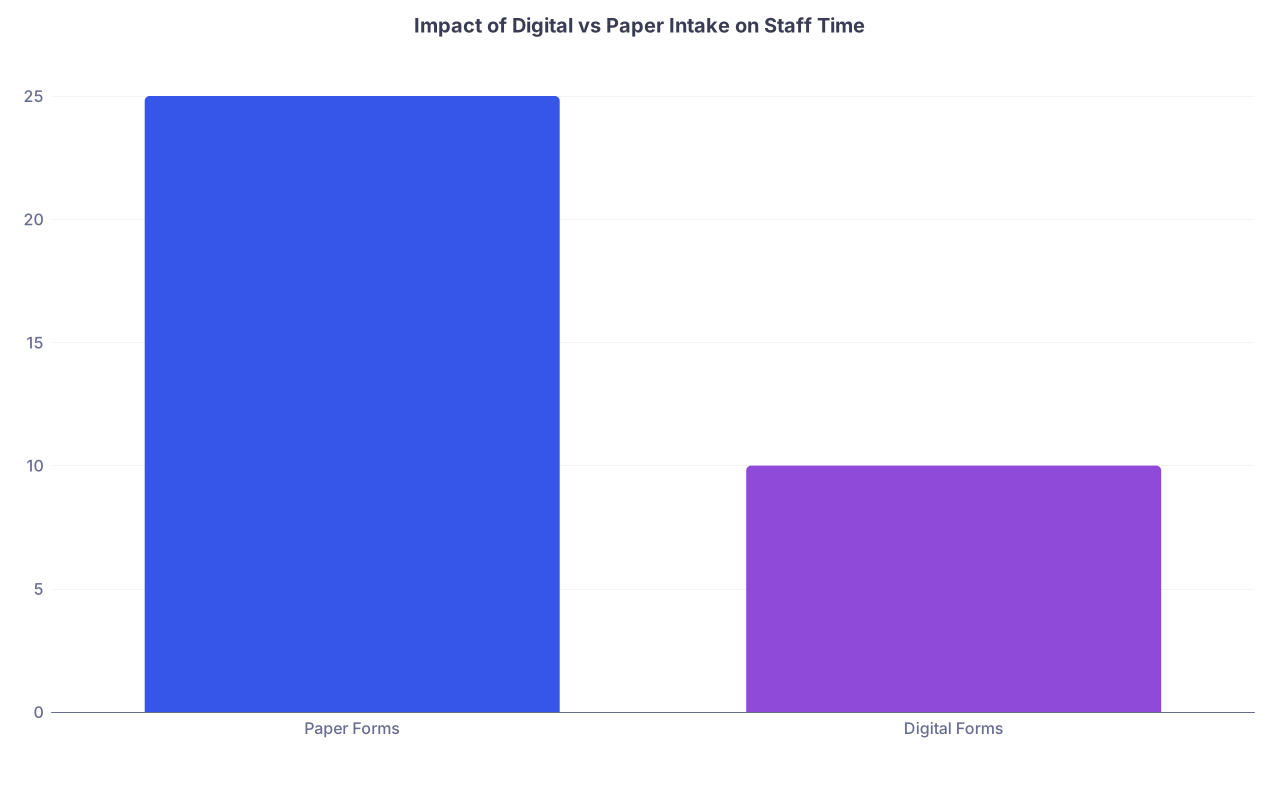
| Category | Value |
|---|---|
| Paper Forms | 25 |
| Digital Forms | 10 |
(Values = average staff minutes spent per new patient on intake-related admin.)
3.2 Use Conditional Questions, Not Walls of Text
If your digital intake tool allows it, use conditional logic.
Example:
- If patient selects “No” for surgeries, skip the detailed surgery list
- If patient is under 18, skip pregnancy-related questions
This reduces form fatigue and increases completion rates. I have seen digital conversion jump from 40% to 80%+ just by cutting obviously irrelevant questions.
Step 4: Automate Everything You Can Between Scheduling and First Visit
You do not need fancy AI to do this. You just need simple, predictable automation.
Your goal: once a new patient is scheduled, all the standard boring stuff happens on its own.
4.1 Build a Simple Automation Sequence
Trigger: “New patient appointment scheduled” in your EHR or scheduling tool.
Then:
Instantly send:
- Appointment confirmation
- Link to digital intake packet
- Short message about what to expect at first visit
72–96 hours before visit:
- Reminder if intake incomplete: “You are almost there. Please complete your forms so your visit can start on time.”
- Staff task generated if forms still <50% completed (someone calls them)
24 hours before visit:
- SMS/email reminder with:
- Date, time, location / telehealth link
- Parking info (if in-person)
- Clear arrival instructions (“Arrive 10 minutes early if you completed forms online; 25 minutes if not.”)
- SMS/email reminder with:
2 hours before visit (telehealth only):
- Tech check reminder:
- Prompt to test video link
- Reminder to be in a private, quiet space
- Tech check reminder:
You can do this with:
- EHR native automations (eClinicalWorks, Athena, DrChrono, etc.)
- Add-ons like Klara, OhMD, or Spruce
- Even a combination of Google Workspace + a scheduling tool like Calendly for solo micro-practices

| Step | Description |
|---|---|
| Step 1 | New patient scheduled |
| Step 2 | Send confirmation and intake link |
| Step 3 | Send normal reminder |
| Step 4 | Send completion reminder |
| Step 5 | Create staff call task |
| Step 6 | 24 hour reminder |
| Step 7 | 2 hour tech reminder |
| Step 8 | No extra reminder |
| Step 9 | Forms completed 72 hours before? |
| Step 10 | Telehealth visit? |
The key: automation handles the 80%. Staff intervene on the 20% of patients who do not respond.
Step 5: Tighten Front-Desk Scripts So Calls Stop Going Off the Rails
I have listened to hundreds of intake calls. Most are chaos: staff over-explain, promise things they cannot deliver, or forget half the key questions.
Script it. Not word-for-word robotic. But structured.
5.1 The Core New-Patient Phone Script
Rough outline your staff can keep in front of them:
Greeting and identification
- “Thank you for calling [Practice]. This is [Name]. How may I help you today?”
- Confirm: “Are you a new or existing patient?”
Reason for visit (screen out emergencies)
- “Can you briefly share what you are looking to be seen for?”
- If emergent red flags → direct to ER/urgent care per your protocol
Basic info and visit type
- Gather name, DOB
- Decide visit type using your defined categories (standard vs complex vs procedure)
Insurance and payment
- “Do you have your insurance card with you?”
- Check if in-network. If not, present options (self-pay, out-of-network).
- Script for financial policy: “We collect copays and any known patient responsibility at check-in.”
Schedule the appointment
- Offer two options, not five: “We have [Day, time] or [Day, time] available. Which is better?”
- Mark in EHR as “New patient” with visit type selected.
Set expectations
- “You will receive a link by [text/email] to complete your new-patient forms. Completing these at least a day before your visit helps us start on time and focus more on your care.”
- “Please arrive 10 minutes early if your forms are completed, 25 minutes early if not.”
Close
- “Do you have any questions about your first visit?”
- “We look forward to seeing you on [date].”
Train this. Listen to a few calls each week at first. Give feedback. It will feel awkward for a week and then become natural.
Step 6: Fix Day-Of-Visit Chaos with a Simple Front-Desk Workflow
You can have perfect pre-visit intake and still blow it at check-in.
The problem is usually one of two things:
- No clear division of labor (who does what)
- No simple visual system for “ready vs not ready”
6.1 The Day-Of New-Patient Flow
For each new patient, staff should follow a short, visible front-desk workflow:
Arrival and greeting
- Confirm name and DOB
- Check EHR flags: new patient, forms completion status
If forms are complete:
- Verify ID and insurance card
- Collect copay or deposit
- Confirm pharmacy
- Mark status as “Ready – New Patient” in EHR / waiting room board
If forms are not complete:
- Decide quickly: can they complete on tablet/phone in 10 minutes, or are they too far behind?
- Hand them a tablet or paper packet with only the essentials if tight on time
- Let them know: “We will do our best to stay on time, but there may be some delay while we gather this information.”
Hand-off to clinical staff
- MA or nurse opens the chart with all intake visible
- MA confirms priority items: meds, allergies, chief concern, and flag any missing pieces for you
The key is that you walk into the room with information that is at least 80% usable. You are not starting from, “So what brings you in?”

Step 7: Use a Short Post-Visit Check to Capture Problems and Fix Them Fast
You will not build a perfect onboarding workflow on the first pass. But you can get to “good enough” quickly if you have a tight feedback loop.
7.1 Run a Weekly 15-Minute “New-Patient Huddle”
Do not make this a 90-minute disaster meeting. Fifteen minutes. Standing, if needed.
Questions:
- “What went wrong with new-patient visits this week?”
- “Where did we have to scramble?”
- “Which steps took too long?”
- “Which patients showed up with zero forms completed—what happened upstream?”
Then identify one small fix per week:
- Tweak an automation message
- Add or remove a question from intake forms
- Update the phone script
- Change the cutoff for telehealth vs in-person first visits
Document changes, but do not overthink them. Ship small fixes weekly.
7.2 Track Three Simple Metrics
You can drown in data. You do not need to. Track three:
- New-patient no-show rate
- Percentage of new patients with intake forms >80% complete before arrival
- Average “door to room” time for new patients
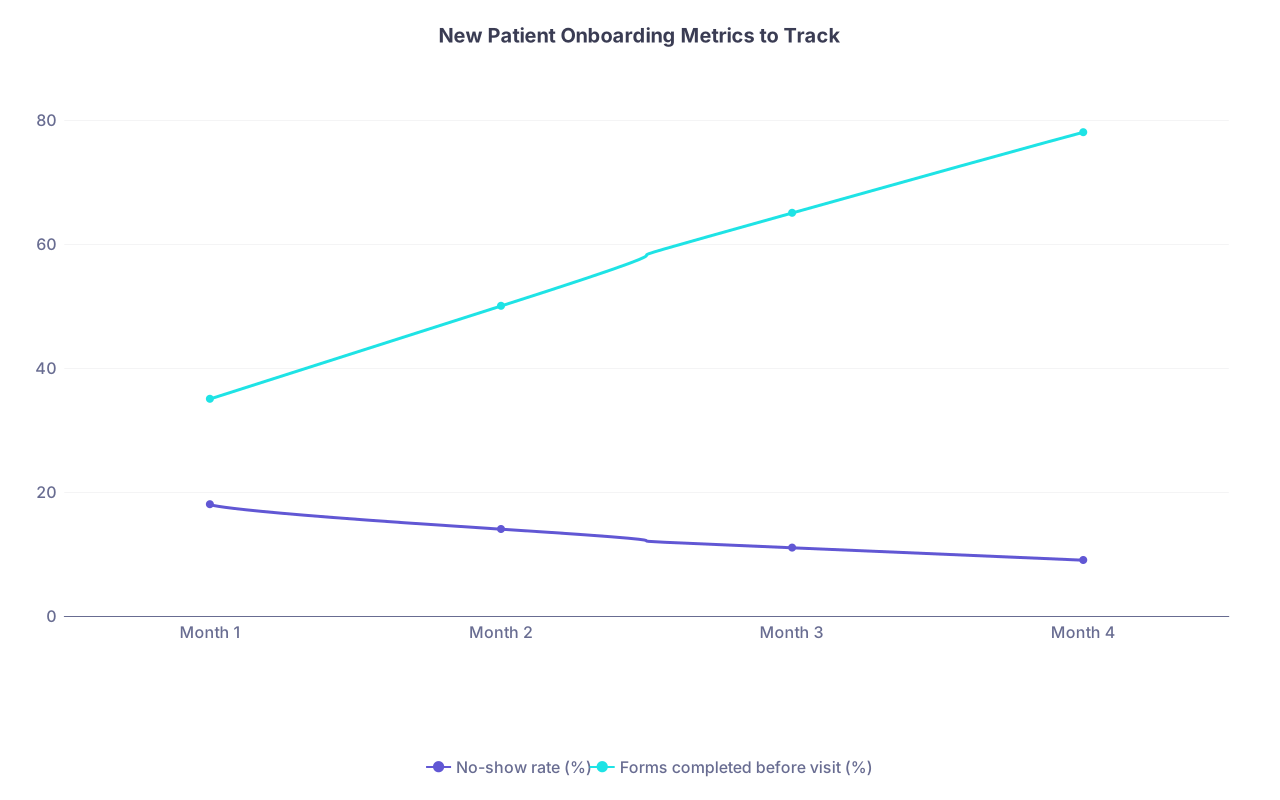
| Category | No-show rate (%) | Forms completed before visit (%) |
|---|---|---|
| Month 1 | 18 | 35 |
| Month 2 | 14 | 50 |
| Month 3 | 11 | 65 |
| Month 4 | 9 | 78 |
If:
- No-shows are high → improve confirmations and reminders; clarify financial policies so people do not vanish at the last minute.
- Forms-completed is low → shorten packet; send reminders earlier; staff call high-risk patients.
- Door-to-room time is long → fix front-desk workflow and eliminate redundant questions.
You fix what you measure. So measure things that show whether onboarding is actually smoother.
Step 8: Choose Tools That Match Your Stage (Solo vs Growing Group)
You do not need to buy an enterprise system because some consultant said so. You need tools that match your size and complexity.
8.1 For a Solo or Micro-Practice
Minimum viable tool stack:
- EHR with basic intake and messaging (e.g., SimplePractice, Charm, DrChrono, Elation with a portal)
- Online scheduling (either in EHR or using something like Calendly integrated with your website)
- Digital forms (built into EHR or with a HIPAA-compliant form tool like Jotform, IntakeQ)
- Simple communication platform (Spruce, OhMD, or Spruce-like features in your EHR)
Spend your money here:
- Digital forms and automation that reduce staff load
- Reliable SMS/email reminders and portal integration
8.2 For a Small Group Practice
You can afford a bit more sophistication:
- EHR with robust patient portal and e-forms
- Integration with referral management (so referrals automatically create “New patient – Pending” tasks)
- Centralized call center or at least a standardized call script and training
| Practice Size | Top Priority Tools | Nice-to-Haves |
|---|---|---|
| Solo | EHR + digital forms + reminders | Basic online scheduling |
| 2–5 Clinicians | EHR + portal + automations | Referral management tools |
| 6+ Clinicians | Integrated scheduling + call center | Analytics dashboards |
Whatever you use, the non-negotiable is this: front desk, clinical staff, and you must all see the same intake status in one place. No juggling three systems that do not talk.
Step 9: Protect Your Time and Sanity During New-Patient Visits
Here is the part most physicians ignore: your onboarding workflow is not just for the front desk. It is for you.
If your new-patient visits run 30 minutes over, your day is wrecked and everyone feels it. That is not a personality trait. That is a workflow defect.
9.1 Use a Standard New-Patient Note Template That Mirrors Your Intake
Design your note template so it lines up with what the patient already filled out.
Sections:
- Chief concern (auto-pulled from intake if your EHR allows)
- History of present illness (you refine, not start from scratch)
- Past medical/surgical history (pre-filled from forms)
- Medications/allergies (you verify, not re-enter)
- Relevant screening scores (PHQ-9, etc., auto-populated)
- Assessment and plan with common items pre-templated
You are not “cheating.” You are using the patient’s time and your tools so you can spend your face-to-face time on thinking, not typing demographics.
9.2 Protect the Visit from Last-Minute Surprises
Common killers of new-patient visits:
- They show up with no imaging/labs that are critical for decision-making
- They assume the visit includes a procedure that you did not plan for
- They bring five separate issues to “get their money’s worth”
You address this before the visit:
- Intake form asks: “What are the top 1–2 issues you most want to address today?”
- Pre-visit automation includes: “Today’s visit is focused on your [primary concern]. If there are additional issues, we will plan future visits for these.”
- Staff requests imaging/labs clearly and early: “The doctor will need to review your [MRI/CT/labs] before making treatment recommendations. Can you arrange for those to be sent to us before your visit?”
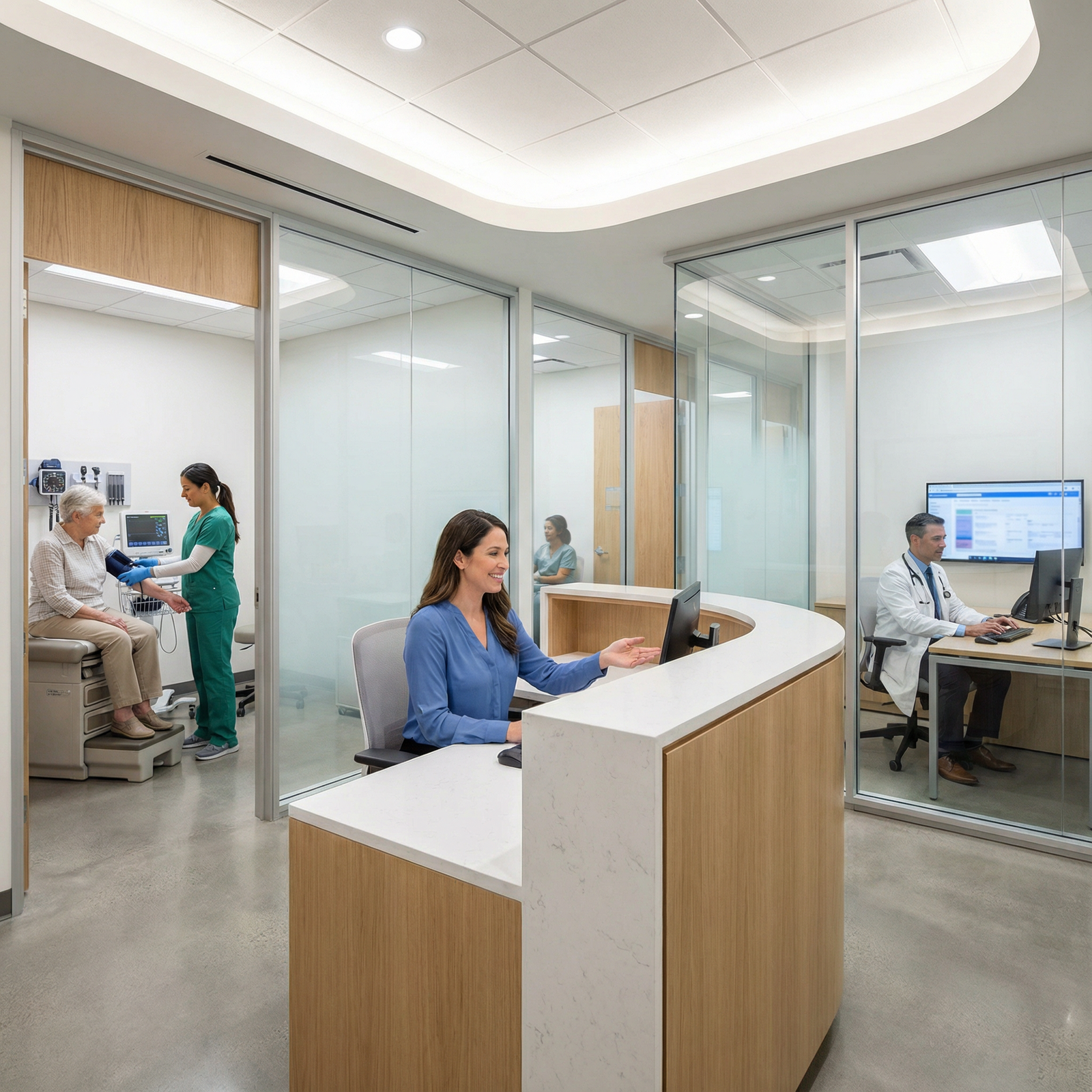
You should not be discovering deal-breaking missing data while the patient is already in the room. That is the whole point of a good onboarding workflow.
Step 10: Launch This in 3–4 Weeks, Not “Someday”
Let me give you a realistic rollout plan so this does not become another nice idea you never implement.
Week 1: Design
- Define your new-patient visit types
- Draft the pre-visit checklist
- Outline your intake packet sections (you can refine later)
- Sketch the automation sequence (triggers and messages)
Week 2: Build
- Configure or update digital forms in your EHR or form tool
- Implement your pre-visit checklist inside your EHR (tasks, tags, or checkboxes)
- Write and load message templates for confirmations and reminders
- Draft front-desk phone scripts
Week 3: Test
- Run 5–10 “dummy” new-patient scenarios with staff
- Simulate phone calls, email confirmations, portal logins, form completion
- Fix where people get stuck or confused
- Shorten any part that feels too long or redundant
Week 4: Go Live (With Guardrails)
- Start using the new workflow for all new patients from a specific date
- Keep a running list (on a whiteboard or shared doc) of problems that pop up
- Hold a 15-minute huddle at the end of each week for the first month to tweak
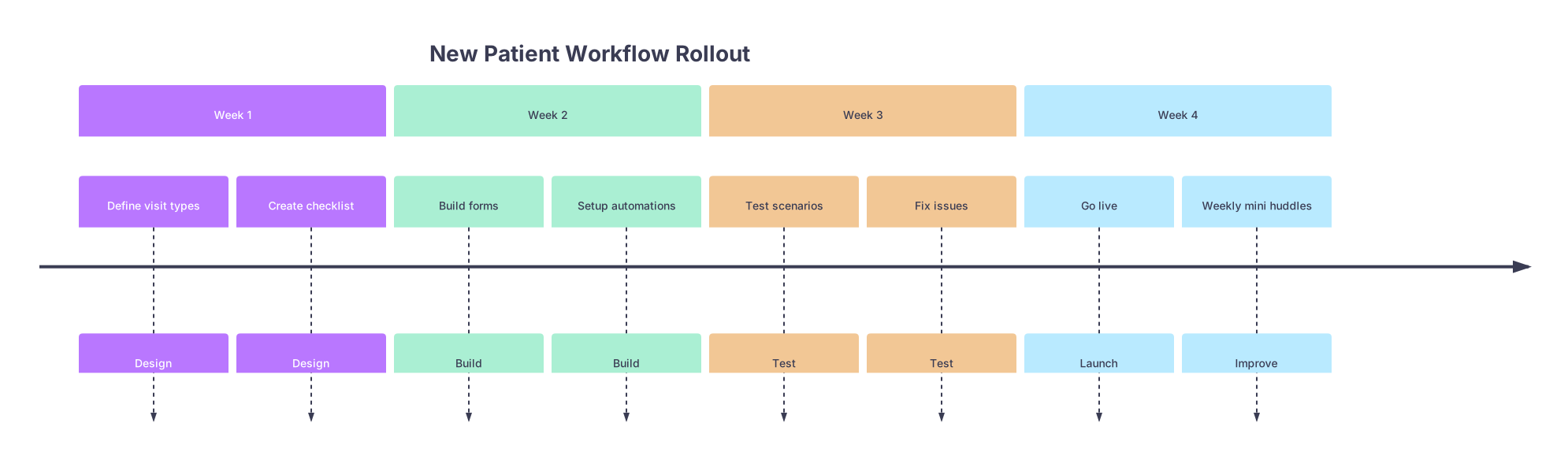
| Period | Event |
|---|---|
| Week 1 - Define visit types | Design |
| Week 1 - Create checklist | Design |
| Week 2 - Build forms | Build |
| Week 2 - Setup automations | Build |
| Week 3 - Test scenarios | Test |
| Week 3 - Fix issues | Test |
| Week 4 - Go live | Launch |
| Week 4 - Weekly mini huddles | Improve |
You do not need permission from anyone to do this. You just start. One piece at a time.
The Bottom Line
Three core points, and then you can get back to clinic:
- Chaos in new-patient intake is not a personality problem. It is a workflow problem. Standardize your visit types, checklists, and scripts, and half the chaos disappears immediately.
- Automation should handle the routine; humans handle the exceptions. Use digital forms, reminders, and simple triggers so staff focus on the 20% of patients who actually need a phone call.
- Short feedback loops beat perfect plans. Launch a “good enough” intake workflow in a month, then refine it weekly based on concrete problems, not hypotheticals.
You fix onboarding, you fix a big slice of your burnout, your staff’s stress, and your practice’s reputation. Start with the checklist and the intake packet. The rest falls into place faster than you think.