
It is 4:15 p.m. You blocked 30 minutes for a new patient at 4:00 p.m. because “complex diabetes, lots of issues” per the referral. You stayed on time all afternoon to make space. They are not here. No call. Front desk tried once, straight to voicemail. You are now doing inbox messages and refills instead of billable work. Again.
If you feel like your schedule is a suggestion, not a commitment, welcome to private practice.
Let me be direct: you will never get your no‑show rate to zero. But you can absolutely cut it in half with systems. Not pep talks. Not “be nicer and they’ll respect your time.” Systems.
Below is exactly how I would design a no‑show system in a new private practice, post‑residency, with limited staff and real financial pressure.
Step 1: Get Real Numbers On Your No‑Show Problem
You cannot fix what you are guessing about. “Feels like 30%” is useless.
1. Define your buckets
Every appointment that does not happen on time should fall clearly into one of these:
- Completed
- Cancelled with adequate notice (e.g., >24 hours)
- Late cancellation (within policy window)
- No‑show (no contact before or during visit time)
- Same‑day reschedule
Pick definitions and write them down in your scheduling SOP (yes, you need one).
2. Track a baseline for 4–6 weeks
Use a very simple weekly tally. Front desk (or you, if solo) logs for each scheduled slot:
- Appointment type (new, return, procedure)
- Visit mode (in‑person, telehealth)
- Insurance vs self‑pay
- Outcome (from the buckets above)
End of each week, add it up.
| Metric | Week 1 | Week 2 | Week 3 | Week 4 |
|---|---|---|---|---|
| Total scheduled | 120 | 118 | 122 | 119 |
| No-shows | 24 | 21 | 23 | 20 |
| Late cancellations | 10 | 12 | 9 | 11 |
| Same-day reschedules | 8 | 9 | 7 | 8 |
| Effective no-show rate (NS+LC) | 28% | 28% | 26% | 26% |
Now you know the enemy.
3. Find your “bad actors” by category, not just individuals
You do not want to build a global policy around one unreliable patient. You want patterns:
- Do new patients no‑show more than established?
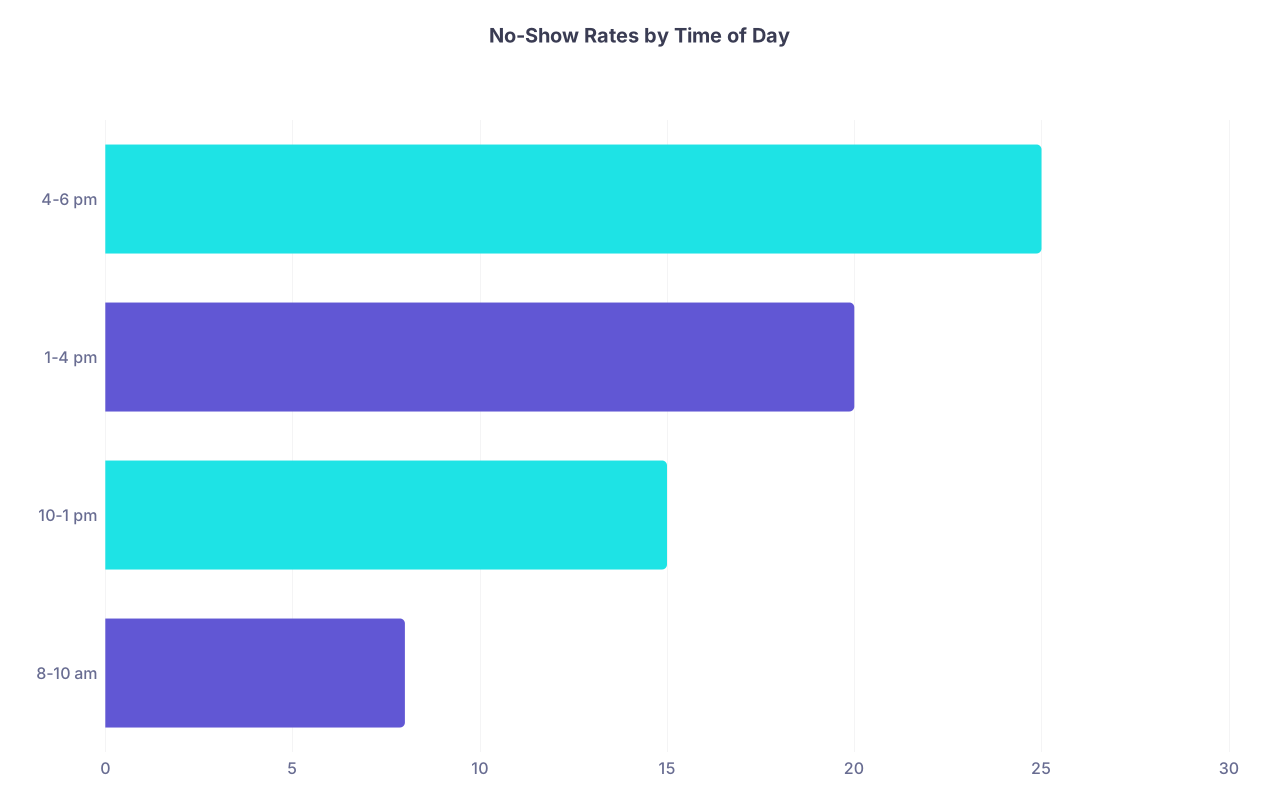
- Are 4:00–5:00 p.m. slots worse?
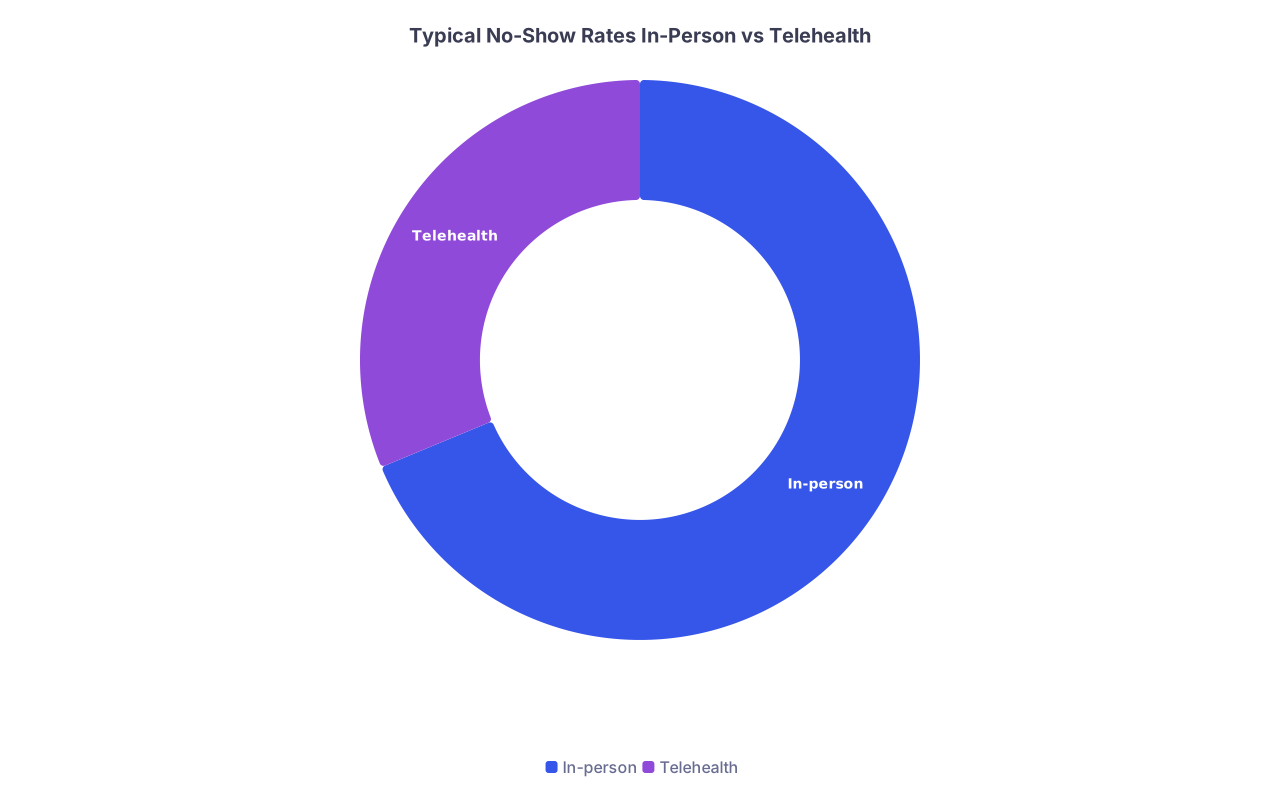
- Is telehealth better or worse?
- Is there one referral source with flaky patients?
You are looking for leverage points. Because you cannot fix everything at once.
Step 2: Fix the Low‑Hanging Fruit – Reminder System That Actually Works
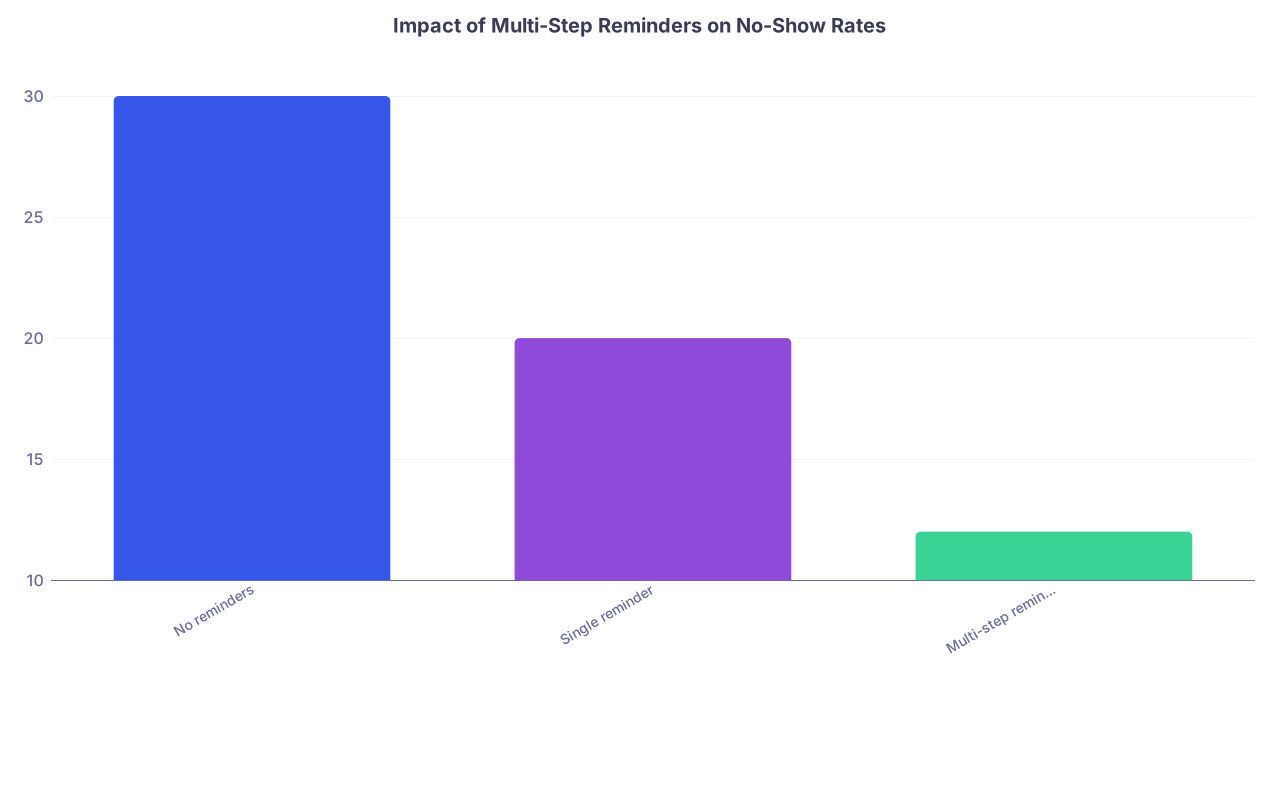
If your “reminder protocol” is a single text 24 hours before, that is not a protocol. That is a hope.
You want a multi‑touch system that runs without you thinking about it.
1. Structure your reminder timeline
Here is the backbone I recommend for most outpatient practices:
- At scheduling (live or online)
- Patient receives confirmation with:
- Exact date and time
- Location or telehealth link
- Key prep instructions
- Cancellation policy (one short line)
- Patient receives confirmation with:
- 5–7 days before (for new patients or procedures)
- Email: confirmation + intake packet + policy reminder
- 72 hours before
- Text: friendly reminder, “Reply C to confirm or X to cancel.”
- 24 hours before
- Second text if not confirmed yet
- Automated call for older or less tech‑savvy demographics
- 2–3 hours before
- Short final text: “We are expecting you at [TIME]. Reply if issues.”
| Category | Value |
|---|---|
| No reminders | 30 |
| Single reminder | 20 |
| Multi-step reminders | 12 |
That last touch (2–3 hours) often saves people who simply forgot.
2. Use confirmation, not passive reminders
One huge error: using only one‑way reminders. You want a yes/no moment.
- Text: “Reply C to confirm, X to cancel, R to reschedule.”
- Auto‑cancel if they explicitly choose X and open the slot.
- If they do not respond at all:
- Front desk runs a quick “unconfirmed list” call‑through for high‑value slots (new consults, procedures).
Now you are not just reminding. You are cleaning your schedule before it craters your day.
3. Make content short and specific
Do not send a novella.
Examples:
New patient (3 days before):
“Hi [First], this is [Practice]. New patient visit with Dr [Name] on [Day] at [Time]. Location: [Address]. Reply C to confirm, X to cancel, R to reschedule. Please complete your intake forms here: [link].”Established (24 hours before):
“Reminder: appointment with Dr [Name] on [Day] at [Time]. We look forward to seeing you. Reply C to confirm, X to cancel, R to reschedule.”
Do not negotiate policy inside the reminder. That lives elsewhere.
Step 3: Build a Real Cancellation / No‑Show Policy (And Enforce It)
A policy that exists only in your brochure does not exist.
1. Decide your actual rules
For a typical outpatient practice, a reasonable starting point:
- Standard visits:
- Required notice: 24 business hours
- Late cancel or no‑show: fee (e.g., $25–$75 depending on market)
- New patient / long visits / procedures:
- Required notice: 48 business hours
- Late cancel or no‑show: higher fee (e.g., $75–$150, or a percent of visit)
Make it simple enough your front desk can recite it without thinking.
2. Get explicit patient acknowledgment
Do not bury this in fine print.
- At initial scheduling:
- “We do have a 24‑hour cancellation policy with a [$$] fee for missed visits. Is that OK with you?”
- On intake forms:
- Short policy statement + patient signature or checkbox
- On website and reminder messages:
- One concise line in the footer: “24‑hour cancellation policy applies.”
Now when you enforce it, it is not a surprise ambush.
3. Enforce consistently with a clear script
Here is where most young practices fall apart. They are afraid of bad Google reviews. So the policy is “soft.” Translation: meaningless.
Front desk script for a first offense (standard visit):
“We did have you scheduled today at 3:00 p.m. and we were not able to fill that time. As you agreed in our intake forms, there is a $50 late cancellation fee. The goal is simply to keep appointments available for patients who urgently need them.”
You can build in a one‑time courtesy:
“Since this is your first missed visit with us, we can waive it once as a courtesy. Going forward, the fee will apply.”
Good patients understand. Chronic no‑showers will test boundaries. You want them to realize your time is not free.
Step 4: Design Your Schedule to Absorb Risk, Not Magnify It
Your template can make your no‑show problem much worse than it needs to be.
1. Double‑book strategically, not emotionally
Do not rage double‑book “because people always no‑show.” That is how you burn out.
Use your data:
- If new patients at 4 p.m. on Friday no‑show 35% of the time, consider:
- Double‑booking one extra lower‑complexity return visit into that slot.
- Or making that slot telehealth only, which often has lower no‑show.
Do NOT double‑book:
- Complex visits
- Procedures
- First visits with high‑risk or fragile patients (where rushing is dangerous)
2. Use shorter, more flexible blocks
Long, rigid appointment blocks are more vulnerable. For example:
- New patient: 60 minutes
- Follow‑up: 30 minutes
New patient no‑show? You just lost an hour.
Instead, use something like:
- New patient: 40 minutes face‑to‑face, plus 20 minutes charting/admin floating elsewhere
- Follow‑up: 20 minutes, plus short overflow charting blocks
If a new patient cancels, you move admin/charting into that hour and use overflow time later for squeezing in same‑day acutes or telehealth.
3. Align schedule with your population’s life
If your patients are hourly workers, daytime appointments are expensive to them. They will no‑show more.
Consider:
- Early morning or early evening blocks
- One “late day” per week
- A certain percentage of slots reserved for same‑day / next‑day, which are less likely to no‑show because the need is immediate
| Category | Value |
|---|---|
| 8-10 am | 8 |
| 10-1 pm | 15 |
| 1-4 pm | 20 |
| 4-6 pm | 25 |
You cannot fight people’s lives. You design around them.
Step 5: Make It Easier to Reschedule Than to Disappear
A big chunk of no‑shows are not malicious. They hit a barrier and take the path of least resistance: doing nothing.
Your job is to make changing the appointment slightly easier than ghosting.
1. Offer low‑friction reschedule options
- “Reply R to reschedule” in reminders
- Quick reschedule link in emails:
- Takes them to a limited view of open slots (not your entire schedule)
- Voicemail script:
- “To cancel or reschedule, you can also text us at [number] or reply to your reminder message.”
Patients hate making phone calls. Fine. Meet them where they are.
2. Use a “reschedule window” rule
To prevent people from pushing indefinitely:
- If they cancel more than X times in a row (e.g., 3), require:
- Next booking must be by phone with front desk
- Or deposit / card on file for next visit
- For high‑risk meds (e.g., controlled substances, chemo follow‑ups), you can tie refills to upcoming visits with some flexibility, but not infinite.
You are not running a free, permanent “hold my spot” service.

| Step | Description |
|---|---|
| Step 1 | Appointment scheduled |
| Step 2 | Reminder sent |
| Step 3 | Keep on schedule |
| Step 4 | Front desk call if high value |
| Step 5 | Offer reschedule |
| Step 6 | Keep with low priority |
| Step 7 | Visit completed |
| Step 8 | Mark as no show |
| Step 9 | Apply policy and fee |
| Step 10 | Patient confirms? |
| Step 11 | Reached patient? |
| Step 12 | Patient arrives? |
Step 6: Use Telehealth Intelligently to Lower No‑Shows
Telehealth is not magic, but it absolutely reduces friction. Used correctly, it cuts no‑shows for certain visit types by a lot.
1. Identify “telehealth‑friendly” visit types
Good candidates:
- Stable chronic disease follow‑ups
- Medication checks
- Lab review discussions
- Mental health visits
- Pre‑visit counseling before procedures
Bad candidates:
- Anything requiring a physical exam or in‑office procedure
- First visits when diagnostic uncertainty is high (varies by specialty)
2. Offer telehealth as a backup, not just a separate product
Example:
- It is 3:30 p.m., patient at 4 p.m. calls:
- “I cannot get off work.”
- Front desk script:
- “We can convert this to a telehealth visit at the same time if you have privacy and internet. Would you like to do that instead of cancelling?”
No‑show avoided. Revenue preserved. Patient happy.
| Category | Value |
|---|---|
| In-person | 22 |
| Telehealth | 10 |
3. Use telehealth for high‑risk no‑show populations
If your data show certain zip codes, age ranges, or referral sources have sky‑high no‑show rates for in‑person visits, front‑load telehealth for them where clinically reasonable.
No, you do not publicly advertise “If you are unreliable, we will stick you on telehealth.” You just bias the offer that way.
Step 7: Handle Chronic No‑Showers Without Losing Your Mind
There will be a subset of patients who do this repeatedly. You need a protocol that protects your schedule and your staff’s sanity.
1. Flag in the EMR
Simple rule set:
- 2 no‑shows in 6 months:
- Chart flag: “High no‑show risk”
- Require confirmation by voice or text reply or slot gets auto‑released 24 hours before
- 3 no‑shows in 12 months:
- Move to “same‑day only” scheduling for non‑urgent visits
- Or require deposit / card on file to schedule future non‑urgent visits
Make sure these rules are written and approved by you, and trained to staff. Not invented ad hoc by a frustrated receptionist.
2. Consider dismissal only as a last resort – but do not be afraid of it
For primary care or continuity specialties, you have an ethical obligation not to dump people casually. But chronic non‑attendance that interferes with safe care is a legitimate reason for discharge.
Template approach:
- 1 warning letter:
- “You have missed multiple appointments without notice. This disrupts your care and prevents other patients from being seen. If this pattern continues, we may need to ask you to find another physician.”
- If pattern continues:
- Formal discharge letter with 30 days of emergency coverage and list of referral options.
You are not obligated to endlessly reserve time and energy for someone who refuses to participate in their own care.
Step 8: Close the Loop – Measure, Adjust, Repeat
You put all this in place. Now what?
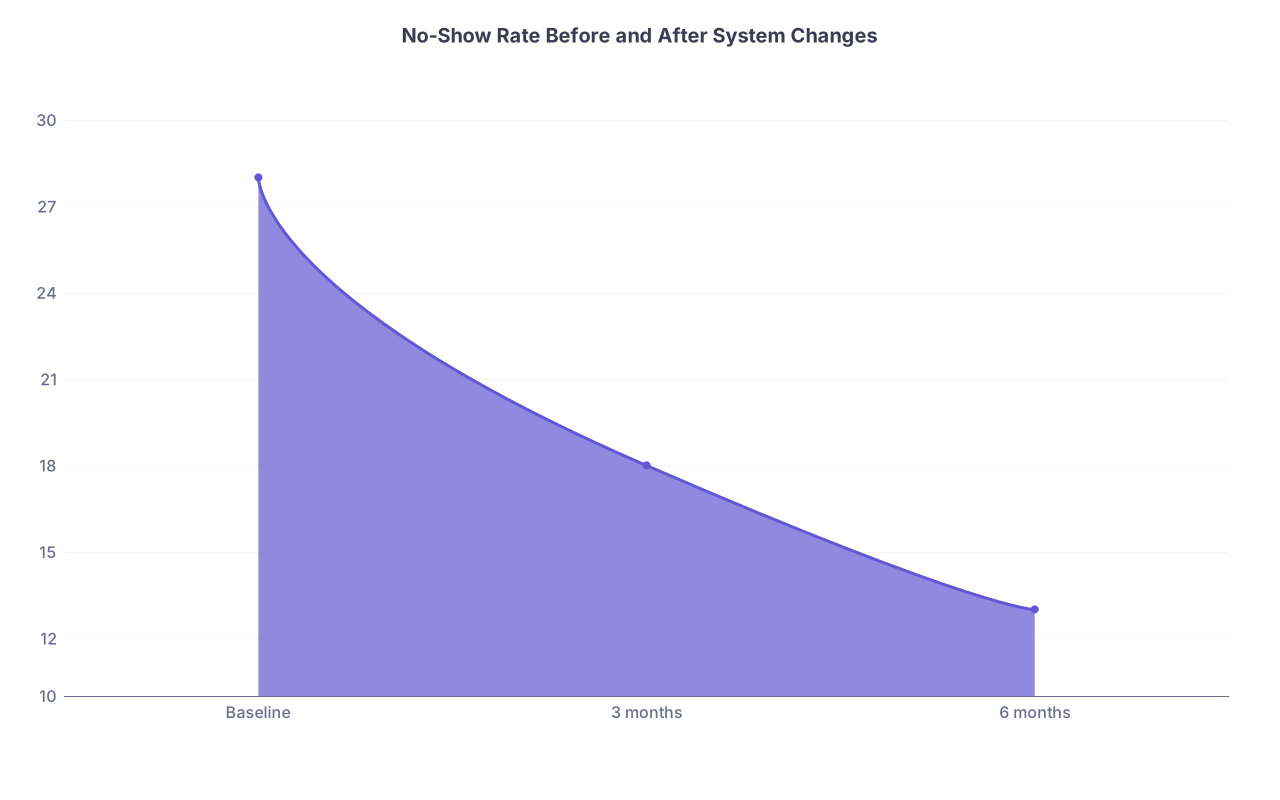
1. Re‑measure at 3 months and 6 months
Track the same metrics as in Step 1, and compare.
| Category | Value |
|---|---|
| Baseline | 28 |
| 3 months | 18 |
| 6 months | 13 |
Look for:
- Overall no‑show rate change
- Specific improvements by:
- Appointment type
- Time of day
- Telehealth vs in‑person
If you are not seeing at least a 25–50% reduction by 6 months, something’s off:
- Policy not being enforced
- Reminders not actually sending
- Staff not following scripts
- Schedule template still working against you
2. Ask your staff what is actually happening
Your front desk knows the truth. They hear the excuses. They see which scripts feel natural and which feel impossible.
Ask:
- “What makes it hard to enforce the policy?”
- “What excuses do you hear most?”
- “Where do you feel like we are being too rigid or too soft?”
Then adjust. Without undermining the overall framework.
3. Use simple, clear practice rules
You do not need a novel. You need 5–7 bullet points on a one‑page “How We Run Our Schedule” doc that every staff member has in front of them.
Examples:
- All new visits get 3 reminders (email + 2 texts).
- Every missed visit is coded correctly same day.
- First no‑show: courtesy waiver + policy reminder.
- Second no‑show: fee charged, flagged in chart.
- Third no‑show: discuss same‑day only or possible dismissal.
- High‑risk no‑show blocks can be double‑booked with low complexity returns per template.
That is how a grown‑up practice behaves.
Quick Case Example: How This Looks in Real Life
You open a small allergy/immunology practice. You notice:
- New patient consults (60 minutes) are no‑showing at 30%.
- Telehealth follow‑ups hardly ever no‑show.
- Friday afternoons are a wasteland.
You implement:
- Multi‑step reminders with C/X/R replies.
- 48‑hour policy for new visits with a $75 late cancel fee.
- New patient block changed from 60 to 40 minutes + 20 minutes charting.
- Friday afternoons used for:
- Telehealth follow‑ups
- Same‑day urgent consults from PCPs
- Chronic no‑shower rule: after 2 missed new visits, require telehealth first or PCP follow‑up before any more scheduling.
Six months later:
- New patient no‑shows down from 30% to 14%.
- Overall schedule utilization up.
- Front desk less angry.
- You are not sitting alone in a room at 4 p.m. nearly as often.
Not perfect. But massively better.
FAQs
1. Should I charge no‑show fees to Medicaid patients or those with financial hardship?
You need to respect both ethics and survival. My stance:
- The policy should be consistent for everyone.
- The application can include discretion. For example:
- Keep the fee on the books but quietly waive once or twice for clear financial hardship, while documenting an explanation and re‑educating on the policy.
- Use same‑day only scheduling as an alternative consequence when fees are not reasonable.
- Do not build a system that requires your staff to guess who “looks poor.” Base adjustments on explicit conversations and documented hardship, not vibes.
If you go too soft out of guilt, your reliable patients subsidize the chaos. That is not morally superior.
2. How do I reduce no‑shows without sounding harsh and driving patients away?
You can be firm and kind at the same time. The message is:
- “We respect your time and we ask you to respect ours.”
- “This policy helps us keep appointments available for patients who are waiting to be seen.”
Use scripts that emphasize fairness and access, not punishment. Example:
“We use this fee not to profit from missed visits, but to encourage notice so we can offer that time to another patient who may be waiting.”
People respond better when they see the policy as protecting the group, not attacking the individual.
Key points to walk away with:
- Treat no‑shows like a systems problem, not a moral failing. Measure, then fix the process.
- Combine multi‑step reminders, real policies, smarter scheduling, and telehealth backup. They work together.
- Enforce your rules consistently and professionally. Patients adapt very quickly when they realize the system is real.