
The biggest threat to a new private practice is not bad reviews. It is an empty schedule.
You can be clinically brilliant and still fail if you do not solve the volume problem quickly. The good news: patient flow in the first 30–60 days is far more about systems and activity than reputation or “word of mouth.” You can control this.
This is a hard-nosed, 30‑day action plan to get bodies in rooms and your schedule off life support.
Ground Rules Before You Start
Let me be blunt. If your schedule is empty, you do not have a marketing issue. You have an activity issue.
For the next 30 days, your job is:
- 60%: Volume generation (outreach, relationships, access).
- 20%: Operations tuning (phone, online booking, front desk).
- 20%: Clinical / admin.
If you are spending most of your time polishing your logo or rewriting your website copy for the tenth time, you are doing it wrong.
Non‑negotiables for the next 30 days
Same‑day / next‑day access
- You must have at least 4–8 slots per day that can be offered as same‑day / next‑day for new patients and referrals.
- Script: “We can see your patient this afternoon or tomorrow morning.”
Live answer during business hours
- No phone tree hell. No “leave a message and we will call you back.”
- Someone picks up. Every time. If you cannot afford full‑time staff, you use a medical answering service that live‑answers with your practice name.
Online booking that actually works
- Simple, obvious “Book Now” button on your website.
- New patients can self‑schedule basic visits without a portal login.
You personally own outreach
- For 30 days, you—yes, the physician—will spend time daily calling, visiting, and emailing potential referral sources. Not delegating this away.
Lock those in mentally. Now we move to the 30‑day plan.
Day 1–3: Fix Access and Messaging
Your first task is to make it stupidly easy for anyone to send you patients today.
Step 1: Check your “front door” (phones + online)
Call your own office from your cell. Pretend you are:
- A referring PCP’s MA with a patient in the room.
- A new patient who has afternoon off work.
- A specialist office looking to send a post‑hospital follow‑up within 48 hours.
Audit what happens, minute by minute.
You should be asking:
- How many rings before a human answers?
- Does the person sound competent, warm, and confident?
- Can they offer same‑day / next‑day?
- Is hold time under 60 seconds?
- Can they book directly, or do they “take a message”?
If any of these are failing, solve them now:
- Train staff with simple scripts.
- Add a second phone line.
- Use a live medical answering service for overflow.
- Enable direct scheduling in your EMR’s patient‑facing tools.
Write one clear policy: “No call goes to voicemail during business hours.” Put it by the phones.
Step 2: Tighten your value message
You need a 1‑sentence, plain‑English pitch that answers: “Why should someone send a patient to you instead of the big system down the street?”
Examples:
- Primary care: “We guarantee same‑week new patient visits and 30‑minute appointments for complex patients.”
- Psychiatry: “We can see new adult patients within 7 days and coordinate directly with your PCP.”
- Ortho: “We offer same‑day urgent musculoskeletal visits and on‑site X‑ray.”
Make it:
- Specific.
- Measurable.
- About access or convenience or coordination, not generic “high quality care.”
Put this line:
- On your website above the fold.
- On your business cards.
- In every email introduction.
- On a one‑page referral sheet.
Step 3: Clean up your “findability”
You cannot get volume if people cannot find you, or think you are closed.
Minimum checklist:
- Google Business Profile: Claimed, verified, correct hours, phone, website, and a short description with your value message.
- Major insurance panels: Check your name shows as “accepting new patients” and the phone / address are correct.
- Your website: Mobile‑friendly, loads quickly, shows:
- Phone number at top.
- “Accepting new patients” clearly.
- Online booking button.
- Insurances accepted.
| Item | Status Options |
|---|---|
| Google Business Profile | Not done / Needs edit / Good |
| Insurance directory info | Broken / In progress / Accurate |
| Website mobile view | Unusable / OK / Great |
| Online booking | None / Partial / Working |
| “Accepting new patients” message | Missing / Vague / Clear |
Be ruthless here. If anything is off, you fix it in these first 3 days.
Day 4–7: Build a Fast‑Track Referral Engine
Volume in a new practice almost never starts with SEO. It starts with other clinicians and staff who control patient flow today.
Your mission for this week: make it easier and faster to send a patient to you than to the hospital‑owned clinic.
Step 4: Build a simple referral packet
You need a 1–2 page packet you can drop physically and email.
Contents:
- One‑page “About our practice”
- Who you see (age, conditions).
- What you do not see (be explicit).
- Your access promise (same‑day, 48‑hour discharge follow‑up, etc.).
- Coordination promise: “We send a note within 24 hours of seeing your patient.”
- One‑page referral instruction:
- Single direct phone line for offices.
- Fax number (yes, they still use it).
- Option for secure email.
- How to mark “urgent” and what turnaround you guarantee.
Print 50 sets. PDF it for email.
Step 5: Identify 20–40 high‑yield referral targets
You are not trying to “be everywhere.” You are building a short list of people who touch many patients in your niche.
Examples:
- PCPs if you are a specialist.
- Hospitalists and SNFs if you do post‑acute care.
- OB/GYNs if you are a pelvic floor PT.
- Therapists if you are a psychiatrist.
- Urgent cares and EDs for almost any outpatient specialty.
Make a quick spreadsheet:
- Name of clinic / provider.
- Address.
- Main office phone.
- Practice manager or referral coordinator (if known).
- Notes from contact.
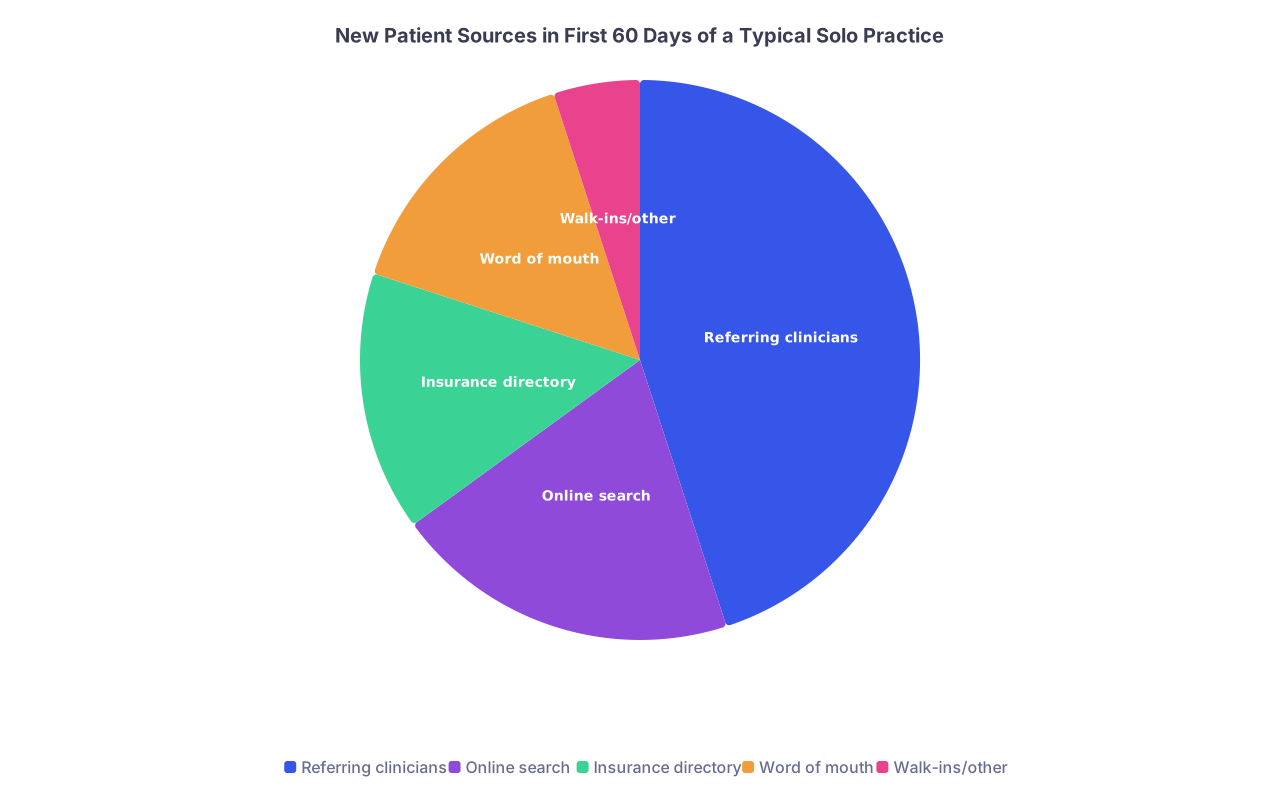
| Category | Value |
|---|---|
| Referring clinicians | 45 |
| Online search | 20 |
| Insurance directory | 15 |
| Word of mouth | 15 |
| Walk-ins/other | 5 |
For new practices I have seen, nearly half of early volume comes from referring clinicians. That is where you focus right now.
Step 6: Do the uncomfortable thing – in‑person outreach
This is where many physicians quietly sabotage themselves with “I am not a salesperson” nonsense. Get over it. You are introducing yourself as a colleague and solving their access problem.
For Days 4–7:
- Block 2–3 hours per day for outreach.
- Aim for 3–5 in‑person visits per day.
How to execute:
- Call ahead: “Hi, this is Dr. X, I am opening a [specialty] clinic nearby. May I drop off some information about our same‑week access for your patients?”
- When you arrive:
- Ask for practice manager or lead MA.
- Keep it under 5 minutes.
- Script:
- “We are close by, we take [their major insurances], and we can see your new patients within [X] days. Here is our direct line just for your staff. If you mark a referral ‘urgent,’ we will see them same‑ or next‑day and send you a note within 24 hours.”
- Hand them the packet and business cards.
- Before leaving:
- “Who usually handles referrals? May I add them to our fax / email list when we have open access updates?”
You are not begging for referrals. You are solving their daily headache: “Who can see my patients quickly without drama?”
Week 2 (Day 8–14): Make Your Practice Stupidly Easy To Use
Once you have the front door open and some early relationships, you focus on friction removal.
Step 7: Build “Red Carpet” access for referrers
You want referring offices to think: “If I send a patient here, my work is done.”
Create:
Dedicated phone line and option for text/fax
- Separate “Clinician / Staff Line” number, answered with: “Dr. X’s office, this is [Name]. Is this a referring office?”
- Give this number only to clinics, not patients.
Same‑day contact guarantee
- Policy: “All referring offices get a callback within 1 business hour.”
- Train your staff how to triage: new referral vs refill vs medical question.
Standard referral form
- Super simple: patient name, DOB, reason for referral, urgency, last visit note, meds list.
- Accept any format, but having a form makes it easier.
Fast documentation back
- Template your new patient note so you can fax / send a concise summary to the referring clinician same day:
- Diagnosis.
- Plan.
- Follow‑up.
- Anything needed from them.
- Template your new patient note so you can fax / send a concise summary to the referring clinician same day:
Step 8: Audit and shorten your intake process
Sit with your front desk and walk through what a new patient has to do before seeing you.
You are looking for any step that screams “I do not have time for this.”
Check:
- Total number of forms and pages.
- Duplicated questions (e.g., asking meds list 3 times).
- Requirement for printing/scanning (kill this if possible).
- Portal registration barriers.
Your goal: 10–15 minutes max for new patient intake online.
Several practices I have worked with cut their intake from 12 pages to 4, and new patient no‑show rates dropped. Because patients were not annoyed before even setting foot in the building.
Step 9: Put a human face on your online presence
People do not book with a logo. They book with a person.
Update your website:
- Professional headshot.
- 2–3 sentences in plain language:
- “I help adults with [problem] who are tired of [common frustration]. We focus on [specific approach].”
- Clear statement: “Accepting new patients. Typical wait time: [X] days.”

You now have:
- Clear value message.
- Easy access.
- Early referral channels starting.
Time to structure the full 30‑day plan by weeks and daily actions.
30‑Day Action Plan Overview
| Timeframe | Primary Focus |
|---|---|
| Days 1–3 | Access, phones, online presence |
| Days 4–7 | In-person and phone outreach |
| Week 2 (8–14) | Reducing friction, intake, referrer convenience |
| Week 3 (15–21) | Patient experience + reviews + simple digital ads |
| Week 4 (22–30) | Systematize, double down on what works |
Let us walk through Weeks 3 and 4 in detail.
Week 3 (Day 15–21): Turn Every Patient Into Three
By now, if you have been doing the outreach, you should see at least a trickle of new patients. Might be 1–3 per day. That is enough to start the next step: leverage.
Step 10: Deliver a “sticky” first visit experience
You want patients to:
- Come back.
- Recommend you.
- Leave a review.
Do not overcomplicate this. The bar in many large systems is low.
Focus on:
- On‑time starts. Aim for <10 minute wait for new patients.
- Front desk warmth. Train them to use the patient’s name twice. “Hi Ms. Lopez, it is nice to meet you. Can I get you anything while you finish your form?”
- A clear, written plan. Patients leave with:
- Diagnosis in plain language.
- Next steps.
- When to follow up.
- Simple follow‑up system. Before they leave, they book their next appointment if appropriate.
Step 11: Ask for reviews the right way
Reviews are social proof. In a new market, they matter.
But you cannot say, “If you liked your visit, please leave us a review on Google.” Patients will nod and forget.
Create a process:
- Identify “happy moment” in visit:
- Pain improved.
- Clear diagnosis after years of confusion.
- A parent who feels heard about their child.
- Say this (your version, but do not get cute):
- “Patients find us mostly through word of mouth and Google. If this visit was helpful, would you be willing to leave a quick review so others know we are taking new patients?”
- Make it easy:
- Text or email with direct review link before they leave the building.
- Small card with QR code at checkout.
Staff script at checkout:
- “I just sent you a text with a link to leave feedback on your visit today. It really helps us grow as a new practice.”
Do not incentivize reviews with gifts. It is tacky and, in some jurisdictions, illegal.
Step 12: Consider a small, hyper‑focused ad test
If you have zero online presence in a competitive area, you can jump‑start with a small budget.
If you are broke, skip this. If you have some runway, do:
- Google Ads:
- Budget: $10–$30/day for 14 days.
- Keywords: “[your specialty] near me”, “[your city] [specialty]”, “accepting new [specialty] patients”.
- Geo‑target: Your city + 10–15 miles.
- Ad text includes your value message and “Accepting new patients” and “same‑week appointments.”
Track daily:
- Calls from ad tracking number.
- Online bookings from the ad landing page.
Kill any ad that spends 3x your typical visit revenue without generating at least 1 visit.
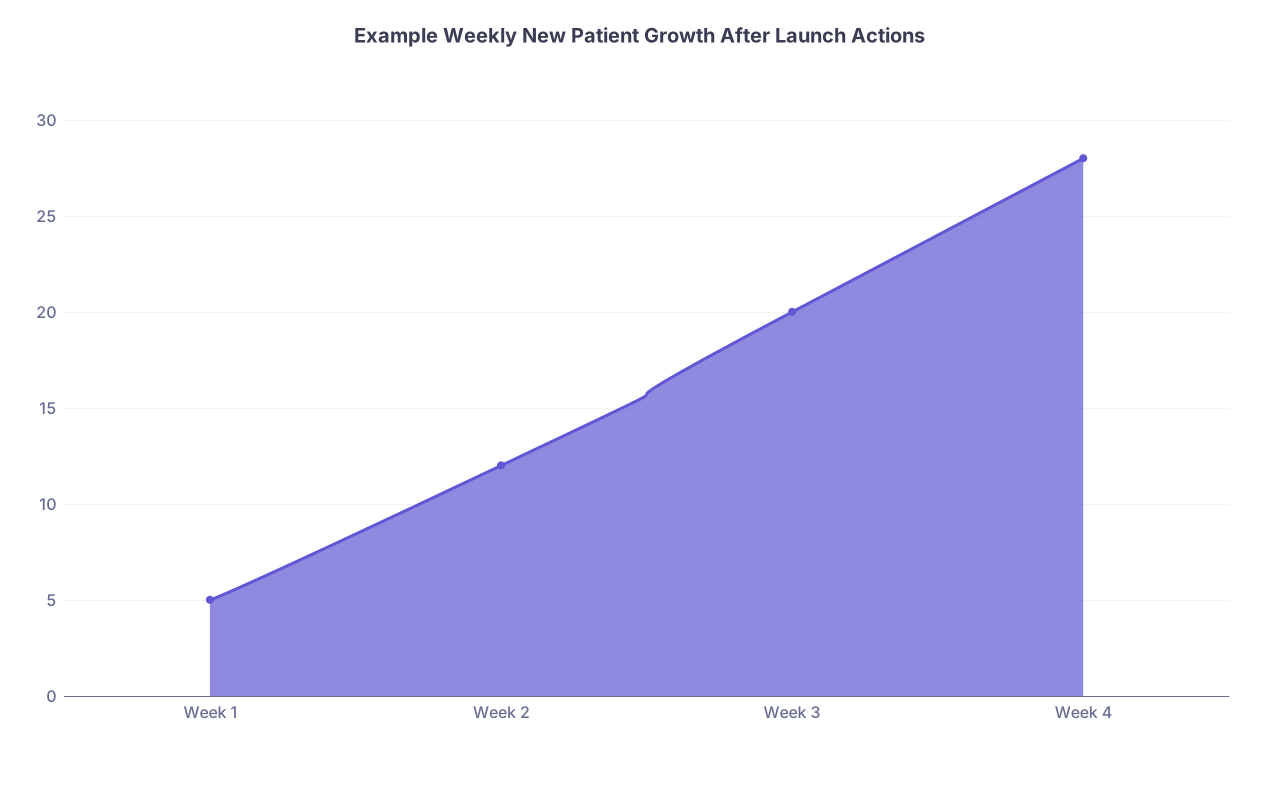
| Category | Value |
|---|---|
| Week 1 | 5 |
| Week 2 | 12 |
| Week 3 | 20 |
| Week 4 | 28 |
This is roughly what I have seen in well‑executed launches: not magic, but a steady climb as systems and relationships kick in.
Week 4 (Day 22–30): Systematize and Scale What Works
At this point, you should know what is actually working instead of guessing.
Step 13: Do a 20‑minute data review
Pull a simple list of where new patients came from in the first 3 weeks:
- Self‑reported (“How did you hear about us?” on intake).
- Referral log (office name).
- Google / search.
- Insurance directory.
- Ads (if used).
You do not need a fancy dashboard. A spreadsheet is fine.
Look for:
- Top 3 referring clinics.
- Whether online bookings are increasing.
- Any days of week with consistent empty slots.
Then decide:
- What do you double down on?
- What do you drop?
If one PCP group has sent you 8 patients already, they get more of your time. If three clinics never responded, they move down the list.
Step 14: Deepen relationships with your top 5 referrers
Call or visit your top contributors.
Approach:
- Call: “We have seen several of your patients this month and wanted to thank you and see what we can do better for your team.”
- Ask:
- “Are you getting our notes in a timely way?”
- “What kinds of patients are hardest for you to place right now?”
- Offer:
- “We can hold 2 urgent slots per day just for your office, if that would help.”
You want to become their default. Not one of five options.
Step 15: Build a weekly outreach block that becomes permanent
Your first 30 days are about survival. The next 6 months are about momentum.
Carve out:
- 2 hours every week (same day, same time) blocked for:
- Calling new potential referrers.
- Checking in with existing ones.
- Tweaking access if you see bottlenecks.
Guard this time. This is revenue‑generating work, not optional fluff.
Step 16: Clean up schedule management
Empty days and overbooked days usually come from poor template design.
Look at the next 4 weeks and ask:
- How many new patient slots per day? (You likely need more than you think early on.)
- Are new patient slots spread across different times (morning / afternoon)?
- Do you have clear rules for same‑day / urgent slots?
For a new practice, I like:
- 8–10 total visits per day in the first month:
- 4–6 new patients.
- 2–4 follow‑ups.
- 2 urgent / same‑day slots held until 11 a.m., then released.
Adjust based on your specialty and visit length.
Common Pitfalls That Kill Volume (And How To Avoid Them)
You can do 80% of the above and still stall if you make these mistakes.
Mistake 1: Acting like a busy, established practice
Examples:
- 3+ week wait for new patients “to protect your time.”
- Strict no‑show policies with fees front and center on your website.
- Complicated referral forms that make PCPs do extra work.
Solution: You are a start‑up, not the Mayo Clinic. Your policies should reflect that. Lead with access and flexibility. You can tighten policies later, once you have more demand than capacity.
Mistake 2: Delegating all outreach to staff or a rep
I have seen this fail repeatedly. The MA or marketer cannot answer clinical nuance or build trust the way you can in 5 minutes face‑to‑face with a PCP.
Solution: You personally do the key outreach for the first 3–6 months. Later you can scale and support, but the clinician‑to‑clinician relationship is the anchor.
Mistake 3: Hiding your availability
New practices sometimes weirdly pretend to be busier than they are. They do not show online booking. They say “limited availability” on voicemail. Why? Pride.
Solution: Be honest and confident: “We are a new practice and are currently able to offer same‑week appointments for new patients.” That is a selling point, not a weakness.
Putting It All Together
If you want a brutally simple daily checklist for the first 30 days, here it is:
Every day:
- Ensure phones are answered live.
- Scan schedule for same‑day / next‑day open and communicate to referrers.
- See every patient as a potential source of three more:
- Deliver good care.
- Ask for reviews where appropriate.
- Make follow‑up easy.
Every week:
- 2–3 hours of outreach (calls, visits).
- 20‑minute review of where patients are coming from.
- 30‑minute team huddle:
- “What annoyed patients this week?”
- “Where did we drop calls or lose referrals?”
- “What is one thing we fix next week?”
If you work this plan for 30 days with discipline, your schedule will not be full yet, but it will no longer be empty. You will have:
- Multiple active referral sources.
- A clear value message in the community.
- Early online presence and reviews.
- Systems that scale as volume grows.
The real advantage is not some clever marketing trick. It is your willingness to treat patient volume like a clinical problem: diagnose, intervene, monitor, adjust.
FAQ (Exactly 3 Questions)
1. How many new patients per week should I realistically expect in the first month if I follow this plan?
In a typical outpatient specialty or primary care practice in a reasonably populated area, I expect 5–10 new patients in Week 1 (mostly from insurance directories and basic online presence), 10–20 in Week 2 as outreach hits, and 20–30 per week by Weeks 3–4 if you are aggressive with relationships and access. Rural or highly saturated markets may be slower, but if you are below 10 per week by the end of Month 1, you either have an access bottleneck (phones, scheduling) or you are not doing enough direct outreach.
2. Should I discount my services or offer “free consults” to attract patients early on?
Generally, no. Discounting signals low value and trains patients to expect deals. What works better is reducing non‑financial friction: fast access, easy scheduling, clear communication about insurance coverage, and transparent pricing for self‑pay if applicable. If you want an early incentive, focus it on convenience (“evening appointments,” “same‑day sick visits”) rather than cutting your professional fee.
3. Is hiring a marketing agency worth it in the first 30 days of a new practice?
Usually not. Agencies are good at polishing an existing flow of patients, not creating one from zero. Early on, the highest ROI activities are under your direct control: fixing phones, tightening access, visiting referrers, optimizing Google Business, and collecting reviews. If, after 3–6 months, you have basic volume and want to scale or refine digital strategy, then a focused agency or consultant can be useful. But they will not replace the clinician‑to‑clinician relationship building that actually drives your first wave of growth.