
The fastest way to cripple a new clinic is to screw up your EMR implementation.
I’ve watched smart, motivated physicians open beautiful practices and then bleed time, staff, and money because they treated the EMR like an afterthought or a quick software install. Six months later they’re burned out, their staff hates them, and patients are bailing because “the office is always behind.”
You’re post‑residency, trying to build a practice, not an IT project. But if you get this wrong, the practice becomes an IT problem.
Let’s walk through the dangerous mistakes that quietly destroy workflow—and how to avoid each one before you flip the switch.
1. Picking the Wrong EMR for the Wrong Reasons
The worst EMR mistake happens before you ever log in: choosing based on sales pitches, not workflow.
Common bad reasons I see doctors choose an EMR:
- “It’s what we used in residency.”
- “The salesperson said it’s ‘industry-leading.’”
- “My friend uses it for inpatient.”
- “It’s the cheapest.”
- “It integrates with a hospital I might affiliate with someday.”
Here’s the core problem: most EMR demos are choreographed lies. Smooth clicks, perfect templates, no interruptions. That’s not how your clinic day looks.
The danger: You commit to a system that doesn’t match your visit types, staffing, or pace. Then you twist your workflow into knots to fit the software.
You must flip that: the EMR should bend to your workflow, not the reverse.
Non‑negotiable tests before signing anything:
- Watch real outpatient workflows: check‑in, nurse intake, physician note, orders, referrals, check‑out.
- Ask your specialty‑specific colleagues what they hate about it. Not just what they like.
- Confirm it handles your core visit types efficiently (e.g., chronic disease management, procedures, behavioral health, telehealth).
- Verify the “customization” is actually doable without a full-time IT person.
If they can’t show you a realistic primary care, derm, psych, GI, etc. day in your specialty, you’re being sold—not shown.
| Red Flag Reason | Safer Alternative Criterion |
|---|---|
| Used it in residency | Tested in 3+ comparable private clinics |
| Cheapest monthly quote | Best total cost per visit over 3 years |
| “Everyone uses it” | Proven in your specialty workflow |
| Great sales demo | Great live demo with *your* scenarios |
| Hospital uses it | Works for independent outpatient practice |
If you choose based on the wrong criteria, everything that follows—templates, training, billing—starts from a bad foundation. Fixing that later is painful and expensive.
2. No Real Workflow Mapping Before Go‑Live
If you try to “figure it out as we go,” you’re signing up for chaos.
Here’s the mistake: You buy the EMR, get generic training, then open the doors and hope your team “adapts.” What actually happens:
- Front desk doesn’t know who clicks what to start a visit.
- MAs double document vitals because they’re not sure it saved.
- You’re halfway into day one and realize you don’t know how to send a prescription or print a work note.
- Everyone invents their own workaround, and now you’ve got 5 different ways to do the same task.
You need clear, documented workflows before go‑live.
At minimum, map these core flows:
- New patient scheduling → check‑in → intake → visit → check‑out
- Existing patient follow‑up
- Lab/imaging orders and result review
- Medication refills
- Referrals and prior auths
- Messaging: patient portal, phone calls, tasking between staff
- No‑show and cancellation handling
Do this with your actual staff, not just you and the rep. Have them walk through: “Who clicks what, when, and where does it show up next?”
If you can’t easily answer “What’s the exact path of a refill request from patient phone call to pharmacy confirmation?” you’re not ready.

| Step | Description |
|---|---|
| Step 1 | Appointment Scheduled |
| Step 2 | Patient Check in |
| Step 3 | MA Intake |
| Step 4 | Physician Note and Orders |
| Step 5 | Check out and Billing |
| Step 6 | Result Follow up |
Skipping this step doesn’t just slow you down. It creates inconsistency, errors, and finger‑pointing. And once your staff learns a messy, improvised process, unlearning it takes twice as long.
3. Underestimating Training (And Training the Wrong People)
The laziest assumption: “The EMR is intuitive, we’ll just click around and learn.”
That is how you get:
- Physicians running 60–90 minutes behind.
- MAs ignoring structured fields and typing everything into free‑text.
- Front desk creating duplicate patient charts.
- Billing staff quietly losing thousands in unbilled visits.
You need role‑specific training. Not one giant webinar.
Different people need different things:
- Front desk: registration, insurance, eligibility, schedule views, messaging.
- MAs/nurses: rooming, vitals, histories, tasking, order pends, documentation support.
- Physicians: templates, order sets, e‑prescribing, messaging, routing, in‑basket management.
- Billing: charge capture, coding tools, claim submission, denial work queues, reports.
And not just “once.” The dangerous pattern: one rushed training the week before go‑live, then never again.
Here’s the safer structure:
- Initial training 2–4 weeks before go‑live.
- Short, focused refreshers the week of go‑live.
- Follow‑up optimization sessions 4–6 weeks after, once real pain points appear.
One more trap: relying only on vendor trainers who don’t understand actual clinic flow. Appoint at least one super‑user on your team (often an MA or office manager) who gets extra training and becomes the internal problem solver.
If your staff is embarrassed to admit they don’t understand something, they’ll start “making do.” Those workarounds are where errors and inefficiency breed.
4. Ignoring Templates, Order Sets, and Note Design
The EMR will not magically learn how you practice. If you don’t shape it, it will waste your time.
The mistake: using generic, out‑of‑the‑box templates and never customizing them. That’s how you end up with:
- 15‑click ROS that no one reads.
- Bloated notes with copied nonsense (“The patient denies pregnancy” in a vasectomy follow‑up).
- No quick way to document your bread‑and‑butter visits efficiently.
You should have core templates and order sets ready before go‑live:
- Common visit types: new patient, follow‑up, chronic disease follow‑up, annual physical, post‑op, medication check, etc.
- Procedure notes relevant to your specialty.
- Order sets for common conditions: diabetes labs + referrals, hypertension follow up, depression initial eval + screening tools, etc.
If you walk into day one with blank or generic templates, you will:
- Type too much.
- Copy‑paste too much.
- Document just enough for survival, not enough for quality or billing.
That’s a malpractice and audit risk.
Do a test: build a complete note for a very common scenario (e.g., 15‑minute follow‑up for HTN and DM2) before go‑live. Time yourself. If it takes more than a few minutes and 6–8 clicks more than it should, fix the template.
And yes, this takes real time up front. But you either invest hours building templates now, or you bleed 2–3 hours a day forever.
5. No Realistic Go‑Live Schedule (Trying to Run Full Speed on Day One)
Here’s the bravado mistake: “We’ll just keep a full schedule; we have to pay the bills.”
What actually happens when you do that:
- You’re 30 minutes behind by the second patient.
- Staff is running room to room asking, “Where do I put this? How do I send that?”
- You’re documenting entirely after hours because the day is consumed by tech problems.
- Patients sense the chaos and lose confidence fast.
You will be slower the first 2–6 weeks. Pretending otherwise is fantasy.
Plan a ramp‑up schedule:
Week 1:
- 50–60% of your usual expected volume.
- Block the first and last hour for system issues and cleanup.
- Extra time after each session for documentation.
Week 2:
- 60–70% volume.
- Keep some daily buffer blocks.
Week 3–4:
- Gradually push toward 80–90%, if things are stable.
If your EMR vendor or consultant says, “You can go full volume right away, most practices do fine,” that’s a red flag. That person never had to walk into a waiting room full of angry patients.
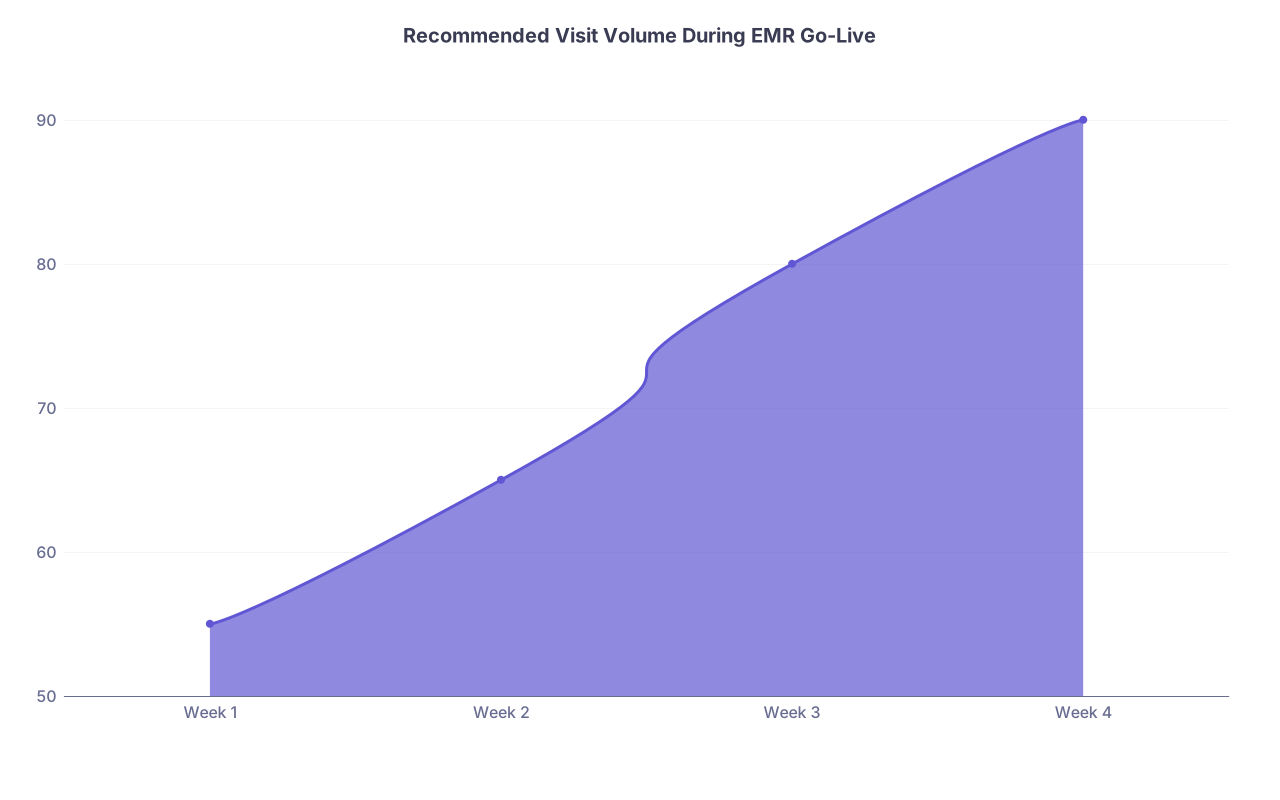
| Category | Value |
|---|---|
| Week 1 | 55 |
| Week 2 | 65 |
| Week 3 | 80 |
| Week 4 | 90 |
Cutting visits for a few weeks hurts. But constantly running behind, burning out staff, and scaring off early patients hurts more.
6. Botching Data Migration and Chart Conversion
If you’re transitioning from paper or an old EMR, this is where a lot of quiet, dangerous mistakes happen.
Underestimating chart conversion can lead to:
- Missing problem lists or med lists.
- Allergies not carried over.
- Old notes stranded in scanned PDFs no one ever opens.
- Labs and imaging not linked to the correct patient or not viewable in context.
Here’s the trap: “We’ll just scan the old chart and move on.”
Scanning everything into a big “Media” tab is basically medical record graveyard. No one has time in a 15‑minute visit to click through 40 PDFs.
You need a minimum clinical dataset that’s entered in structured form for active patients:
- Problem list (cleaned up).
- Active medications.
- Allergies.
- Key past surgeries/major diagnoses.
- Recent critical labs and imaging.
And you must decide:
- Who enters it (MA, nurse, temp staff, vendor)?
- For which patients (all active, last 2–3 years, only chronic disease patients)?
- By when (before first visit, at first visit, as pre‑visit planning)?
The critical mistake is dumping everything in and never cleaning it. Then you walk into each visit blind, or you waste time trying to decode PDFs.
One more hazard: not validating migrated data. Spot‑check at least 20–30 charts and verify:
- Demographics accurate.
- Meds/allergies make sense.
- Problem list looks reasonable.
- Lab history is correct.
If you find consistent errors, stop and fix that process before go‑live. Bad data at scale is very hard to unwind.
7. Treating Billing and Coding Like an Afterthought
A shiny EMR with broken billing is just an expensive note‑writing tool.
The deadly assumption: “The EMR will handle coding; we’ll be fine.” No—it will offer coding tools. You can still use them badly.
Symptoms of billing‑related implementation errors:
- Charges never posted because no one knew how to finalize encounters.
- Incorrect provider selected (e.g., supervising doc vs NP/PA) causing denials.
- Incorrect place‑of‑service for telehealth vs in‑person.
- Chronic undercoding because the default “safe” level is always 99213.
You must design a charge capture workflow:
- Who enters codes? Physician? Coder? Shared responsibility?
- How does each visit get from “seen” to “coded” to “billed”?
- What reports show you unbilled or open encounters?
Sit with whoever handles your billing (in‑house or outsourced) and walk through:
- A new patient visit.
- A follow‑up visit with multiple problems.
- A procedure plus E/M same day.
- Telehealth visit.
- No‑show fee or late cancellation.
If your EMR offers “coding suggestions,” don’t blindly accept them. You’re still the one on the hook in an audit.
Also, use the EMR’s rules to your advantage: flags for missing diagnoses, missing modifiers, unsigned notes, etc. Not turning those on is like turning off your car’s dashboard lights and driving at night.
8. Ignoring Staff Input and Forcing Top‑Down Decisions
Here’s a fast way to wreck morale: pick an EMR, configure it in a vacuum, then hand it to your staff and say, “Here’s how we’ll do things now.”
You might own the practice, but your MAs, front desk, and billers see the cracks long before you do. When they’re not in the room for configuration decisions, you’ll miss obvious problems like:
- Too many required fields at check‑in slowing the line.
- MA workflows that require switching screens 10 times per patient.
- Referral or prior auth workflows that don’t match the real world.
Two specific mistakes:
- Not involving at least one representative from each role during setup.
- Punishing or ignoring complaints instead of mining them for fixes.
You want your team saying, “This part doesn’t work, can we change it?” not, “Fine, I’ll just find my own way around it.”
I’ve seen practices where front‑desk staff secretly kept a paper log because they hated the scheduler. Once that happens, you get double‑booking, inaccurate no‑show data, and a total disconnect between your EMR’s schedule and reality.
Create a simple feedback loop:
- A shared list (even a whiteboard) of EMR “pain points.”
- Weekly quick huddle to decide which 1–2 to fix next.
- A clear person (often your super‑user) who owns small configuration changes.
Ignoring staff signals is how you end up with turnover. And turnover during or right after go‑live is brutal.
9. Underusing Support, Reports, and Optimization
The EMR is not “set it and forget it.” That mindset is another slow killer.
After the first month, most practices:
- Stop talking to their vendor rep.
- Never look at usage reports.
- Leave half the features untouched.
You’re paying for support and tools—use them.
Some specific misses I see:
- Not tracking average chart completion time.
- Not monitoring open in‑basket messages and refills.
- Ignoring report tools that could show which parts of the workflow are slow.
Most systems can tell you things like:
- How many encounters are left unsigned.
- How long from visit to charge posting.
- Which templates are used most/least.
- Portal adoption and message volume.
If your days feel chaotic but you have no data, you’re flying blind.
Schedule at least 1–2 “optimization” calls with your EMR vendor at 1 month and 3 months post‑go‑live. Bring a specific list of pain points. Force them to earn their money by showing you:
- Shortcuts and settings you’ve overlooked.
- Better ways to handle specific scenarios (e.g., bulk messaging labs).
- Updated features you haven’t turned on.
The dangerous mistake is accepting, “This is just how it is,” when in reality it’s just how your current configuration is.
10. Disregarding Patient Experience in EMR Choices
One more blind spot: focusing only on your side of the screen.
Patients experience your EMR through:
- Online scheduling (or lack of it).
- Electronic check‑in or paper clipboards.
- Patient portal usability.
- How quickly they receive lab results or message responses.
- How chaotic or smooth the visit feels.
If your EMR portal is clunky, confusing, or inaccessible on mobile, patients simply won’t use it. Then your staff spends hours on the phone handling things that could’ve been self‑service.
Even worse, if your documentation takes so long that you’re constantly facing the computer instead of the patient, they’ll notice. They’ll say the line I hear all the time: “The doctor never even looked at me, just the screen.”
You must design:
- A sane portal messaging policy (response times, who handles what).
- Clear patient instructions for portal sign‑up and use.
- A visit style where you use the EMR with the patient, not as a barrier. (Turn the screen, review labs together, show trends.)
If you ignore the patient side, your workflows might feel “efficient” internally but still drive patients away.

Quick Reality Check: Are You Walking Into These Traps?
Ask yourself, honestly:
- Do you have documented workflows for at least your top 5 visit types?
- Have your front desk, MA, billing staff, and at least one nurse had separate, role‑specific training sessions?
- Is your schedule reduced for at least the first two weeks of go‑live?
- Is there a designated super‑user on your team?
- Have you sat through a realistic live demo using your actual visit scenarios and not just a canned sales pitch?
If the answer to any of those is “no,” you’re headed straight toward one of the mistakes above.
Slow down now, or go slower for months after go‑live. Those are your only real options.
FAQ (Exactly 4 Questions)
1. Should I avoid EMR implementation right when I open my practice and start on paper instead?
Starting on paper to “avoid EMR headaches” is usually a bad move. You end up duplicating work and confusing staff when you switch later. If you’re opening a new practice, it’s cleaner to start with EMR from day one—but with a deliberately lighter schedule and real training. The exception is extremely low‑volume, niche practices where tech adds more burden than benefit, but that’s rare.
2. Is it safer to pick the same EMR my local hospital uses?
Not automatically. Hospital EMRs are often overbuilt and inefficient for small, independent clinics. If your main reason is “integration with hospital records,” that can be a bonus, but only if the outpatient workflows truly support your volume and staffing model. Compare them directly with systems designed for small practices before deciding.
3. How long does it realistically take to feel efficient in a new EMR?
Most clinicians feel clumsy for 2–4 weeks, then “functional but slower” for another 1–2 months. Full comfort often lands around 3–6 months, especially if you invest in templates and optimization. If you’re still drowning at 3 months, that’s a sign your workflows or configurations—not just your learning curve—need fixing.
4. What’s the single most expensive EMR mistake for a new practice?
Running full patient volume at go‑live is probably the most expensive. It leads to errors, missed charges, burned‑out staff, angry patients, and often a long‑term reputation hit. Losing just a handful of early patients who might have become long‑term, high‑value panel members costs you far more than a few weeks of deliberately lighter scheduling.
Key takeaways:
- Don’t let the EMR dictate your clinic—design your workflows first, then configure the system around them.
- Invest heavily in role‑specific training, reduced schedules, and early optimization, or you’ll pay for it in burnout and lost revenue later.