
What do you think a new patient does when your website says “open” but Google says “closed”? They don’t call to clarify. They book with the clinic whose info actually matches.
You’re post‑residency, you’re finally launching or joining a private practice, and you’re focused on credentialing, build‑out, and covering call. Meanwhile, your online presence is quietly bleeding patients to other clinics. For dumb, preventable reasons.
Let me walk you through the landmines I see over and over.
1. Inconsistent NAP: The Silent Patient Repellent
NAP = Name, Address, Phone. This is the backbone of your online identity. Screw this up, and everything else is handicapped.
Here’s the mistake:
Your website says “River Valley Internal Medicine, Suite 310.”
Your Google Business Profile says “River Valley Medical Group, Ste 300.”
Healthgrades has an old number from your resident moonlighting gig.
The insurance directory lists your old office from a locums assignment.
Patients are not going to debug your life history.
What goes wrong:
- Patients drive to the wrong location.
- They call a disconnected number or a shared hospital line.
- They see multiple slightly different names and assume you’re not legit or not organized.
Search engines also hate this. Inconsistent NAP = lower local ranking. Translation: patients searching “primary care near me” literally won’t see you.
Do not make this mistake:
- Decide on your exact practice name, address format, and main phone line before doing anything online.
- Use that exact NAP everywhere. Same spelling, same abbreviations, same suite, same phone.
- Keep a master NAP document. Every time you create or update:
- Website
- Google Business Profile
- Apple Maps
- Yelp
- Healthgrades, Vitals, WebMD
- Insurance directories
you copy‑paste from the master, not from memory.
| Field | Example (Pick One Style and Stick to It) |
|---|---|
| Practice Name | River Valley Internal Medicine |
| Address Line 1 | 1234 Oak Street, Suite 310 |
| City/State | Springfield, IL |
| Phone | (555) 123-4567 |
| Website URL | https://www.rivervalleymed.com |
If you’re already messy: fix Google first, then your website, then the biggest health directories and your top three insurers. Patients check those most.
2. Treating Your Website Like a Digital Brochure (Instead of a Decision Tool)
A lot of new attendings think: “We just need something up. A basic site. Nothing fancy.” That’s how you end up with a beautiful, useless brochure that drives people straight to the urgent care down the street.
Patients come to your site with 5 questions:
- Do you see my problem?
- Do you take my insurance?
- How soon can I be seen?
- Where exactly are you, and is parking a nightmare?
- How do I book?
If they can’t answer those within 30–60 seconds, they leave.
Common website mistakes that cost you patients:
- No online booking or request form — just “Call us!” (during their work hours, of course).
- No clear list of insurances accepted.
- No practical info: parking, wheelchair access, telehealth options.
- Walls of academic text about your training, zero about “Here’s how we help you.”
- Stock photos of random smiling models instead of clear info.
Let me be blunt: your fellowship and research line mean very little to a patient with back pain at 10 p.m. trying to find someone who can see them this week and takes their insurance.
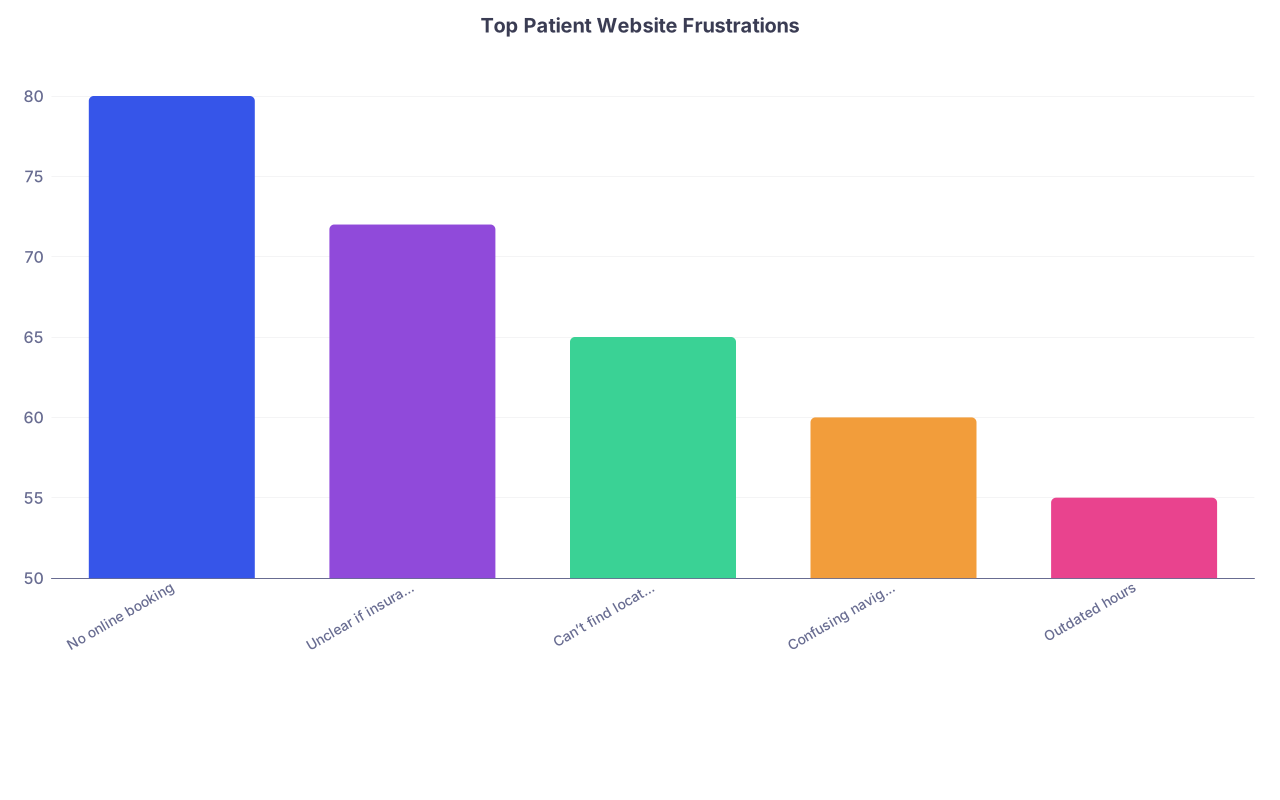
| Category | Value |
|---|---|
| No online booking | 80 |
| Unclear if insurance accepted | 72 |
| Can’t find location info | 65 |
| Confusing navigation | 60 |
| Outdated hours | 55 |
You should have, at minimum:
- Clear “Book Appointment” button on every page (top right + mid‑page).
- A simple new patient page with:
- What conditions you treat.
- Insurances you accept (or at least “We are in network with major plans including X, Y, Z”).
- What to bring to first visit.
- Location page with:
- Map, parking guidance, building landmarks.
- Photos of the entrance (patients get lost more than you think).
The mistake: building a site that impresses colleagues but doesn’t answer actual patient questions.
3. Broken, Hidden, or Annoying Booking Systems
This one is brutal because it undermines everything else.
You pay for a nice site. You run a small Google Ads campaign. Patients click. They like what they see. They hit “Schedule.” Then:
- The link is broken.
- It opens a third‑party portal that looks sketchy.
- It forces them to create a full account before they even see open slots.
- It times out on mobile.
They are gone. They go to whoever has a working, simple booking flow.
I’ve literally watched a friend try to book her PCP. She clicked through three pages of nonsense, then said, “Forget it, I’ll just go to the minute clinic.” You do not want to be that story.
Avoid these traps:
- “Request appointment” forms with no confirmation and no timeframe for response.
- Forcing portal registration for new patients just to see availability.
- Not saying up front what types of visits can be booked online (new patients? physicals? urgent issues?).
Better pattern:
- “Book Now” leads to a clean page:
- Choose visit type (New patient, Follow‑up, Annual exam, Telehealth).
- Choose provider (if multi‑physician).
- Choose time.
- Basic info: name, DOB, phone, email, insurance plan.
- Immediate on‑screen confirmation + email/text.
If you’re not ready for true online scheduling, fine. Then put a short, realistic message:
“New patients: Call (555) 123‑4567, option 2, between 8–5. Average hold time under 2 minutes.”
But do not lie with a fake “online scheduling” button that dumps into a dead form.
4. Letting Inaccurate Hours and Availability Stay Live
Nothing drives patients crazier than driving to your office to find a dark waiting room and a locked door — when Google said you were open.
Here’s what gets practices in trouble:
- Summer schedule changes. Short Fridays. Extended hours. Never updated.
- Holiday schedules only on a paper sign on the door.
- Telehealth‑only days labeled the same as in‑office days online.
You might think, “People will call first.” No. Many don’t. They trust what Google Maps tells them.
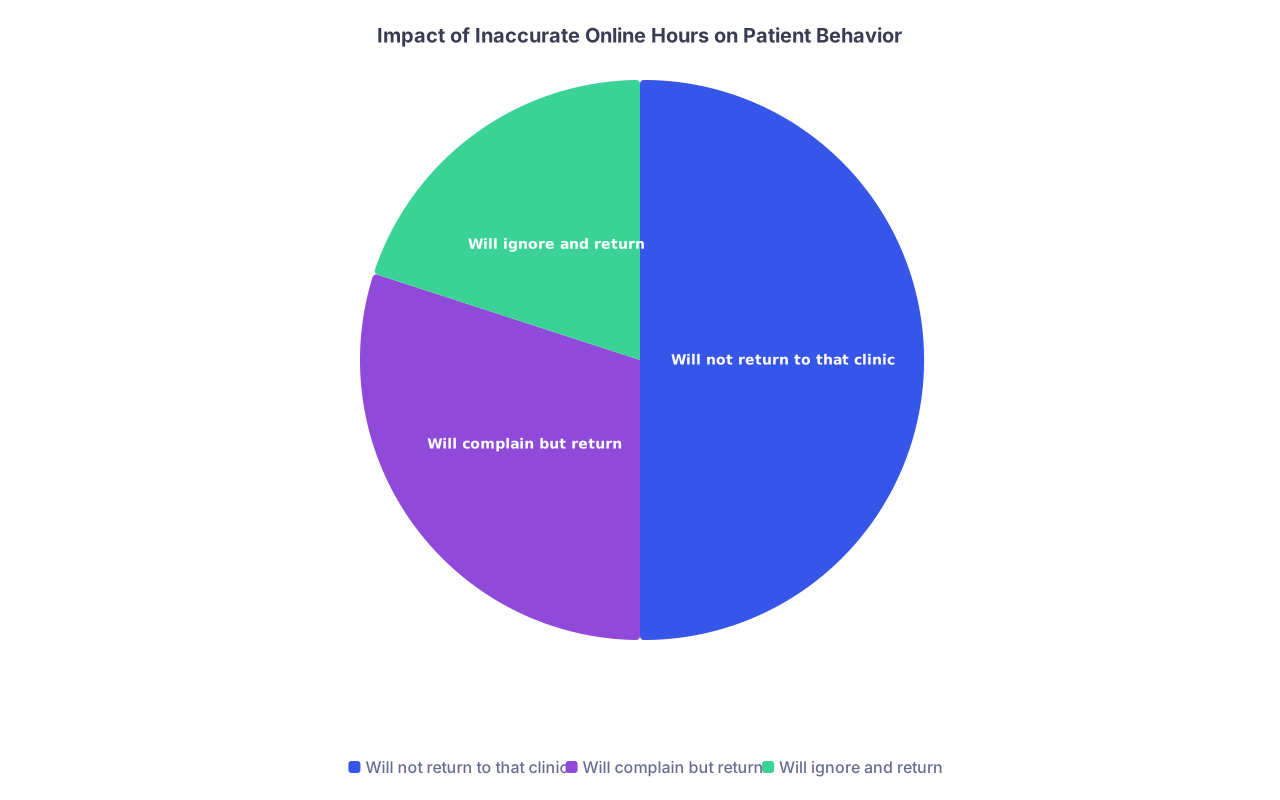
| Category | Value |
|---|---|
| Will not return to that clinic | 50 |
| Will complain but return | 30 |
| Will ignore and return | 20 |
Don’t make this mistake:
- Update your Google Business Profile hours anytime your schedule changes for more than 1 week.
- Use “Special hours” for holidays and one‑off closures.
- On your website, add a bold note on the homepage and contact page for ANY temporary change:
- “July only: Closed Fridays at noon.”
- “Telehealth only on Tuesdays; office physically closed.”
- Train your front desk: any permanent schedule change triggers:
- Website update
- Google update
- Voicemail update
Do not rely on “We told patients last visit.” That’s fantasy.
5. Confusing Online Listings with Old Jobs, Locums, and Hospital Affiliations
You’ve been a resident, maybe did some moonlighting, maybe worked locums or as an employed doc before starting your own practice. The internet still thinks you’re in all those places at once.
Here’s the mess I see constantly:
- Doctor listed at:
- The residency clinic they left 2 years ago.
- The urgent care they moonlighted at one winter.
- The big hospital where they’re now just on courtesy staff.
- All with different phone numbers and addresses.
Patients try to follow you. They end up at the wrong clinic. They get annoyed. They stick with whoever sees them there.
You can’t control everything, but you can control more than you think.
Steps to avoid this:
- Make a list of all places you’ve worked clinically in the last 5–7 years.
- Search your name plus each practice name on:
- Healthgrades, Vitals, Zocdoc, WebMD
- Yelp
- Where listings are outdated:
- Claim the profile when possible.
- Update your primary location to your new practice.
- Add a clear line in the bio: “Now seeing patients at River Valley Internal Medicine in Springfield.”
And yes, call old employers if they’re still listing you as “accepting new patients.” That’s their mistake, but you’re the one losing actual new patients over it.
6. Ignoring Reviews or Responding Like a Robot (or a Lawyer)
Online reviews are not a “nice to have” anymore. They are part of the decision tree. Not having reviews looks weird now. Having only old reviews looks dead.
The big mistakes:
- Never claiming your Google Business Profile, so you can’t respond at all.
- Ignoring reviews completely — no replies, no acknowledgment.
- Responding defensively or clinically (“We deny this incident occurred.”).
- Violating privacy in replies (“You were actually late to your appointment, Mrs. X.”).
Patients read your responses, not just the star rating. They’re not stupid — they can spot a chronic complainer. What they’re judging is: “Does this practice treat people with respect when something goes wrong?”
Do not make these mistakes:
- Leaving a 1‑star “They never answered the phone” review sitting in silence for 2 years.
- Having canned, obviously copy‑pasted responses under all reviews.
Better approach:
- Claim your Google and Yelp profiles.
- Check reviews weekly.
- Respond to most (not all) reviews:
- Positive: “Thank you for your kind words. We’re glad you had a good experience.”
- Negative (generic template you adapt): “We are sorry to hear about your experience. We take patient feedback seriously and would like to discuss this with you directly. Please call our office at (555) 123‑4567 and ask for our practice manager.”
Never argue. Never discuss details. Never confirm they’re a patient. Just show you’re a human and you care.
7. Making Everything About You Instead of the Patient
This one is subtle but powerful.
Academic culture trains you to list your credentials, your publications, your training pedigree. So your “About” page becomes:
“Dr. Smith completed medical school at X, residency at Y, fellowship at Z. His research interests include A, B, and C.”
Patients don’t care. They want to know:
- Can you explain things clearly?
- Are you decent to talk to?
- Do you treat people like humans?
The mistake is not having credentials — those matter. The mistake is stopping there.
Fix it:
- Keep your training info, but add patient‑centered lines:
- “I focus on helping adults with multiple chronic conditions simplify their care.”
- “My goal is that every patient leaves understanding their treatment plan.”
- Add one or two concrete, relatable details:
- “Outside of clinic, I enjoy running along the river and coaching my kids’ soccer team.”
You’re not writing a dating profile. You’re reassuring people you’re a human being they can talk to about embarrassing, scary problems.
8. Bad Mobile Experience: Making Patients Pinch and Zoom
Most new patients will see your site for the first time on their phone. If your layout breaks, your text is tiny, and your “Call now” button is microscopic, they bail.
Common mobile crimes:
- Desktop‑only design that shrinks on phones.
- Pop‑ups covering half the screen with newsletter sign‑ups.
- Tiny links for phone and address instead of big tap targets.
- Online forms that are impossible to complete on mobile.
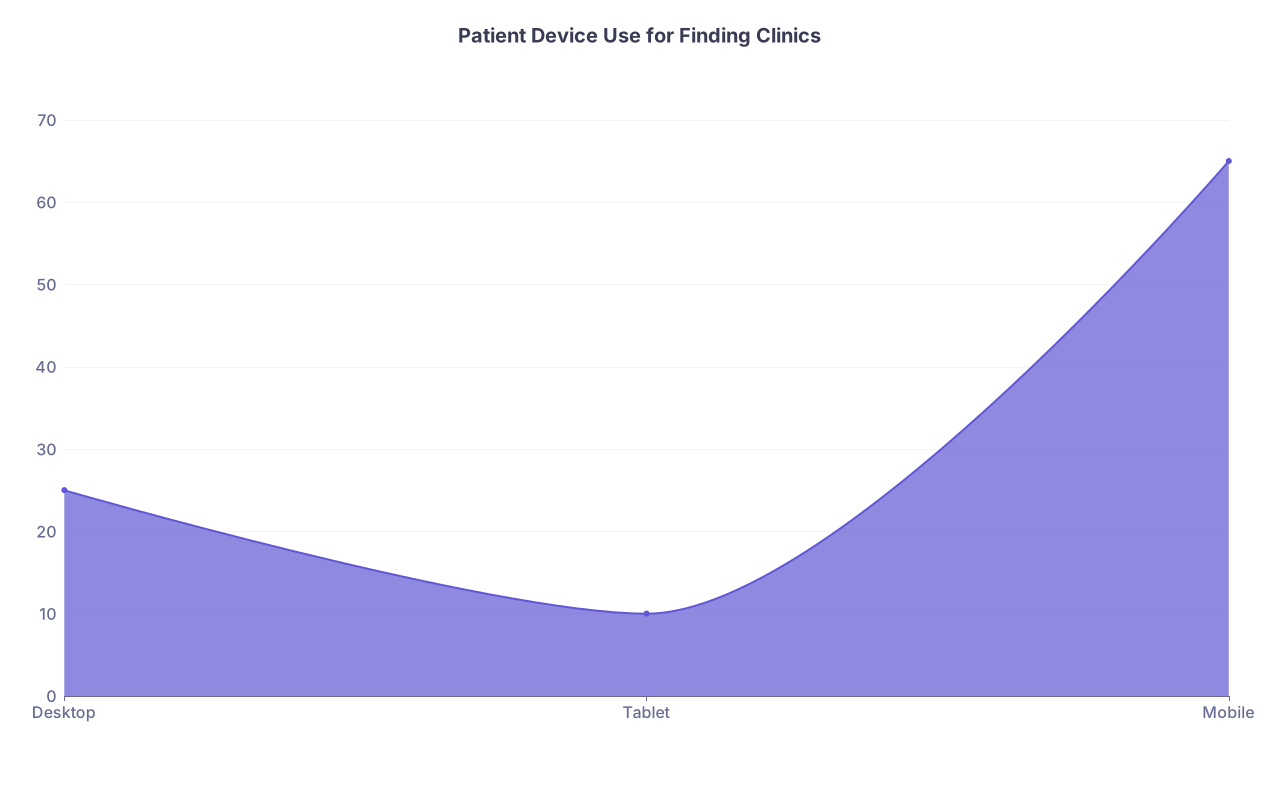
| Category | Value |
|---|---|
| Desktop | 25 |
| Tablet | 10 |
| Mobile | 65 |
You don’t need cutting‑edge design. You need clean, fast, readable pages.
Non‑negotiables:
- “Call” and “Directions” buttons always visible and thumb‑friendly.
- Text readable without zoom.
- Forms tested on iPhone and Android — by you, not just your web designer.
One more thing: site speed. Huge hero images and bloated scripts slow everything down. Patients will not wait 8 seconds for your glossy homepage video to load.
9. Outdated or Misleading Insurance Information
Insurance is messy. Patients know that. But if your online info says “We accept BlueCross” and then front desk tells them “We’re actually not in network with your specific plan,” that patient is furious. Rightfully.
Big mistakes:
- Listing every insurer you’ve ever been paneled with, without removing terminated contracts.
- Saying “We accept most insurances” with no examples.
- Not clarifying self‑pay options or direct primary care models.
To avoid this:
- Keep a living insurance list that’s updated any time a contract changes.
- On your website, have an “Insurance and Billing” page that:
- Lists the major plans you’re in network with.
- Includes a disclaimer: “Coverage can vary by plan. Please call your insurer to verify in‑network status with our practice.”
- On Google, avoid listing individual plans — they’re often wrong or outdated. Rely on your site for the specifics.
If you’re out‑of‑network or cash‑based, be direct. Don’t hide it in fine print. Patients respect honesty more than surprise bills.
10. No Clear Path for Referrals and Specialist Communication
For many practices, especially specialties, a big chunk of volume comes from other physicians. If your online presence makes it hard for referring offices to figure out how to send you a patient, they’ll just send to your competitor with clearer instructions.
I’ve been in clinics where the MA says, “We tried to refer to Dr. X, but we couldn’t find a fax number, so we sent to Dr. Y instead.” That’s the reality.
Mistakes:
- No dedicated “For Referring Providers” section on your website.
- No clear instructions on how to send records or imaging.
- Multiple fax numbers floating around online.
Fix it:
- Create a simple “Referring Providers” page:
- Referral fax number (just one).
- Direct phone line for urgent consults.
- Downloadable referral form (PDF).
- Typical wait times for new consults.
- Keep that info identical on:
- Your site
- Your Google Business description
- Any specialist directory you’re in
You don’t need bells and whistles. You need clarity.
Quick Visual: The Basic Patient Journey Online

| Step | Description |
|---|---|
| Step 1 | Search for clinic or symptom |
| Step 2 | See search results and ratings |
| Step 3 | Click website or map listing |
| Step 4 | Back to search results |
| Step 5 | Check insurance, hours, location |
| Step 6 | Book appointment |
| Step 7 | Receive confirmation and attend visit |
| Step 8 | Find clear info? |
| Step 9 | Easy to book? |
Your website and listings are either smoothing this path or pushing people back to “E: Back to search results.”
FAQ (Exactly 5 Questions)
1. I’m just starting out and low on cash. What’s the single most important online thing to fix first?
Your Google Business Profile. Claim it, make sure your NAP (name, address, phone) is correct, set your hours, add your website link, and upload a few real photos of the office. That’s what shows up on Maps, and for many patients, that’s their first and only impression before they call or book.
2. Do I really need online booking, or is a phone number enough for a new practice?
If you can offer online booking, do it. Many patients prefer it, especially younger and working adults who don’t want to sit on hold. If you can’t, then your phone experience has to be flawless: short hold times, clear voicemail, and realistic callbacks. A clunky or unreliable phone system is one of the fastest ways to send patients to urgent cares and large corporate clinics.
3. How often should I update my website and listings?
Anytime something changes that affects a patient: hours, location, phone, insurance participation, major service offerings. At a minimum, review everything quarterly. Put a recurring calendar event for a 30‑minute “online presence check” and actually click through like a patient would: Google search, website, maps, and top directories.
4. Are paid listing services and reputation “management” companies worth it?
Most aren’t. Many charge you to “fix” things you or a competent web person could do in an afternoon: claim profiles, update NAP, respond to reviews. If a service can’t show you exactly which listings they update, how often, and what you’ll own when you stop paying, skip them. Spend money on a solid website and a decent scheduling system first.
5. What’s a good quick test to see if my online presence is driving patients away?
Ask three non‑medical friends or relatives to pretend they’re new patients trying to see you. Give them your name and city only. Have them screen‑record their phone as they: 1) find you, 2) figure out what you do, 3) check insurance/hours, and 4) try to book. Watch those recordings. Anywhere they hesitate, backtrack, or get annoyed is exactly where you’re losing real patients.
Open a browser right now, type your name and city into Google, and click on your own listings and website as if you were a new patient. Every time you feel even a moment of “Hmm, that’s not clear,” write it down and fix it this week.