
4 out of 5 procedure-heavy outpatient clinics I walk into are effectively losing one room’s worth of revenue a day. Not because they lack space. Because their layout quietly sabotages throughput.
You feel it the moment you step in: bottleneck at triage, staff walking circles, scope towers stuck in the wrong room, patients parked in chairs waiting on consents that should have been signed 20 minutes earlier. The schedule looks “full,” but the day never runs on time.
Let me break down how to design a layout that actually supports a procedure-heavy outpatient practice, instead of fighting it.
1. Start with the math of throughput, not the architect’s brochure
Most practices let the landlord or architect drive the floor plan. That is backwards. For a procedure-heavy clinic, the layout must be engineered from your throughput targets and procedure mix.
Define your core volume assumptions
You cannot design intelligently until you answer—on paper—four ugly but critical questions:
- How many procedure “slots” per day are you targeting, per provider, once the practice is mature?
- What is your case mix? (Fast procedures vs longer ones.)
- How much room turnover time do you realistically need?
- How many rooms can you actually staff on a typical day?
For example, imagine a post-residency interventional pain physician:
- Goal: 16–20 procedures per day
- Case mix:
- 60% fast (ESI, MBB, RFA) – 15–20 min room time
- 40% moderate (SCS trial, joint injections) – 30–40 min room time
- Realistic room turnover (wipe-down, trash, re-stock, basic changeover): 8–10 min
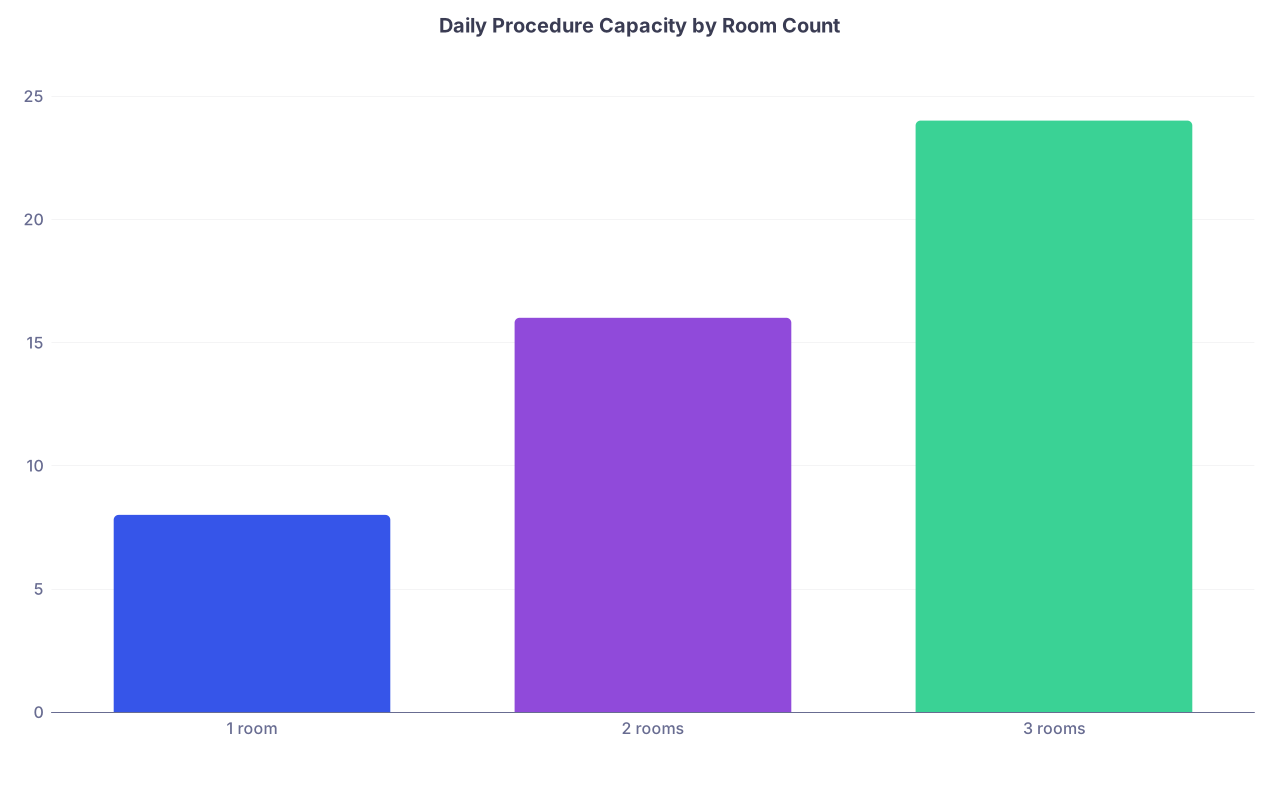
Now look at what different room counts actually allow you to do.
| Category | Value |
|---|---|
| 1 room | 8 |
| 2 rooms | 16 |
| 3 rooms | 24 |
That chart assumes:
- Single provider
- Average 30 minutes of actual room use per case + 10 minutes turnover
- 8-hour day, no major gaps
With one room, you cap yourself at ~8 procedures, even if demand is there. With two rooms, you can realistically hit 16. Three gives you buffer for emergencies, longer cases, or a second provider half-day.
Point: The number and type of rooms you build is not a décor decision. It is a revenue and capacity decision.
Basic functional zones for a procedure-heavy practice
You are not building “hallway + exam rooms.” You are building an assembly line with specific stations. At minimum, you need:
Arrival / front-of-house
- Reception / check-in
- Waiting area (ideally divided: new consults vs post-procedure drivers)
- Checkout / scheduling zone distinct from check-in line
Pre-procedure zone
- Triage / vitals alcove (or room)
- Pre-procedure bays or rooms (consents, IVs, pre-meds, last-minute questions)
- Medication prep / clean supply room
Procedure zone
- Dedicated procedure rooms (not “exam rooms with a table”)
- Image storage or PACS viewing access, if using ultrasound, C-arm, etc.
Recovery / post-procedure zone
- Short-stay recovery bays or reclining chairs (for sedation or post-block observation)
- Restroom immediately adjacent
- Storage for blankets, monitors, crash cart access
Back-of-house / support
- Clean supply room
- Soiled utility
- Equipment storage (scope towers, ultrasound, C-arm, pumps)
- Staff work area and provider dictation space
Most new attendings underestimate the square footage needed for the “invisible” support pieces and overbuild the pretty spaces up front. That is how you end up with a magazine-worthy lobby and a single shared closet for all your equipment.
2. Room types, counts, and sizes: where you win or lose your day
You should design your room mix around your workflow, not historical norms. The default “6 exam rooms, 1 procedure room” template is wrong for a procedure-heavy model.
Think in patient states, not room labels
Every patient is in one of five states:
- Not yet in the clinical area (lobby)
- Prepped but not yet in procedure room
- In procedure
- Recovering
- Done and out
Your room design must allow different states to coexist without traffic jams.
For a single-proceduralist, full-time schedule, a very functional baseline is:
- 1–2 exam rooms (for new consults / follow-ups)
- 2 procedure rooms (primary + overflow / long cases)
- 2–4 pre/post bays (can serve as both pre and recovery if designed correctly)
- 1 dedicated triage/vitals space
- Support rooms as noted above
| Room Type | Recommended Count | Notes |
|---|---|---|
| Exam rooms | 1–2 | Keep compact |
| Procedure rooms | 2 | Core driver of revenue |
| Pre/recovery bays | 2–4 | Flexible, stretcher or chairs |
| Triage/vitals area | 1 | Alcove or small room |
| Clean utility | 1 | Near procedure rooms |
| Soiled utility | 1 | Code-compliant placement |
If you are doing sedation-heavy GI, endoscopy, or ambulatory anesthesia, recoveries matter more: you will want more bays and possibly 3 procedure rooms if you have enough staff.
Size and layout of procedure rooms
Architects love symmetry. You should love usability.
For procedure rooms (non-OR, non-hospital ASC):
- Size: 150–220 sq ft usually works. Enough for:
- Procedure table or stretcher
- Provider + assistant
- C-arm or ultrasound cart + monitor
- Anesthesia cart if used
- Circulating nurse space
- Door width: Wide enough for stretcher and C-arm to move easily (often 4’ door or double-leaf).
- Ceiling height: Sufficient for C-arm if used, with no low-hanging fixtures obstructing.
Two key rules:
Rooms must be mirrored in function, not necessarily geometry. You want the provider to walk into either room and have:
- Same wall for primary monitor
- Same side for medication counter
- Same side for sharps disposal
- Same location for suction, O2, and power
Minimize cords crossing walking paths. Floor outlets or ceiling booms beat extension cords every time. I have watched more near-falls over dumb power cord placement than any other single environmental hazard.

Exam rooms: keep them lean and proximate, but do not overbuild
Consults are necessary, but they are not your primary margin. Resist the urge to have six hotel-style exam rooms.
For a one-proceduralist model:
- One consult room near the front, near provider office.
- One exam room closer to the procedure zone for quick re-evals, follow-up injections, suture checks, etc.
Keep them 90–110 sq ft. Sink if required by local codes, but do not turn these into mini-ORs.
3. Flow: reduce backtracking and crossed paths
Once you know what rooms you need, the real game is flow.
Aim for a loop or racetrack, not a cul-de-sac
Dead-end corridors are throughput killers. Staff walk more. Carts get stuck. Patients see each other awkwardly backing up in wheelchairs.
The best procedure-heavy layouts usually follow one of two patterns:
- Racetrack: Central core (nurses’ station, clean supply) with a loop corridor and rooms off both sides.
- Half-loop with shared entry/exit: Patients come in from front corridor, loop through pre, procedure, post, and return to front near checkout.

| Step | Description |
|---|---|
| Step 1 | Check in |
| Step 2 | Triage |
| Step 3 | Pre bay |
| Step 4 | Procedure room |
| Step 5 | Recovery bay |
| Step 6 | Checkout |
Key point: minimize situations where:
- Pre-procedure patients must pass recovering patients in visible distress.
- Family members are hovering in the clinical corridor because there is nowhere else to wait.
- Staff are crossing paths constantly between clean and dirty traffic.
Clean vs dirty movement
For anything involving blood, scopes, or higher infection risk, clean and dirty flows must be explicit.
Soiled utility should allow:
- Direct route from procedure rooms without passing through clean supply.
- Access for waste pickup that does not run through patient corridors if possible.
Clean supply room:
- Near the procedure rooms.
- No reason to traverse lobby or visa versa.
Even in “minor procedure” clinics (e.g., dermatology, office ENT, podiatry), separating clean from dirty flow prevents regulatory headaches later when you expand sedation or add more invasive work.
4. Pre-op and recovery: the underrated bottlenecks
Most new owners under-design pre and post spaces. Then they discover that they are waiting on IV starts and consents while the procedure room sits empty. That is just burning money.
Design pre and post for parallel processing
Your goal is simple: while one patient is in the procedure room, the next one is being prepped.
That means your pre-op area must be able to:
- Hold at least 1–2 “next up” patients per procedure room.
- Allow private or semi-private consents.
- Provide space for IV poles, monitors if needed, and staff charting.
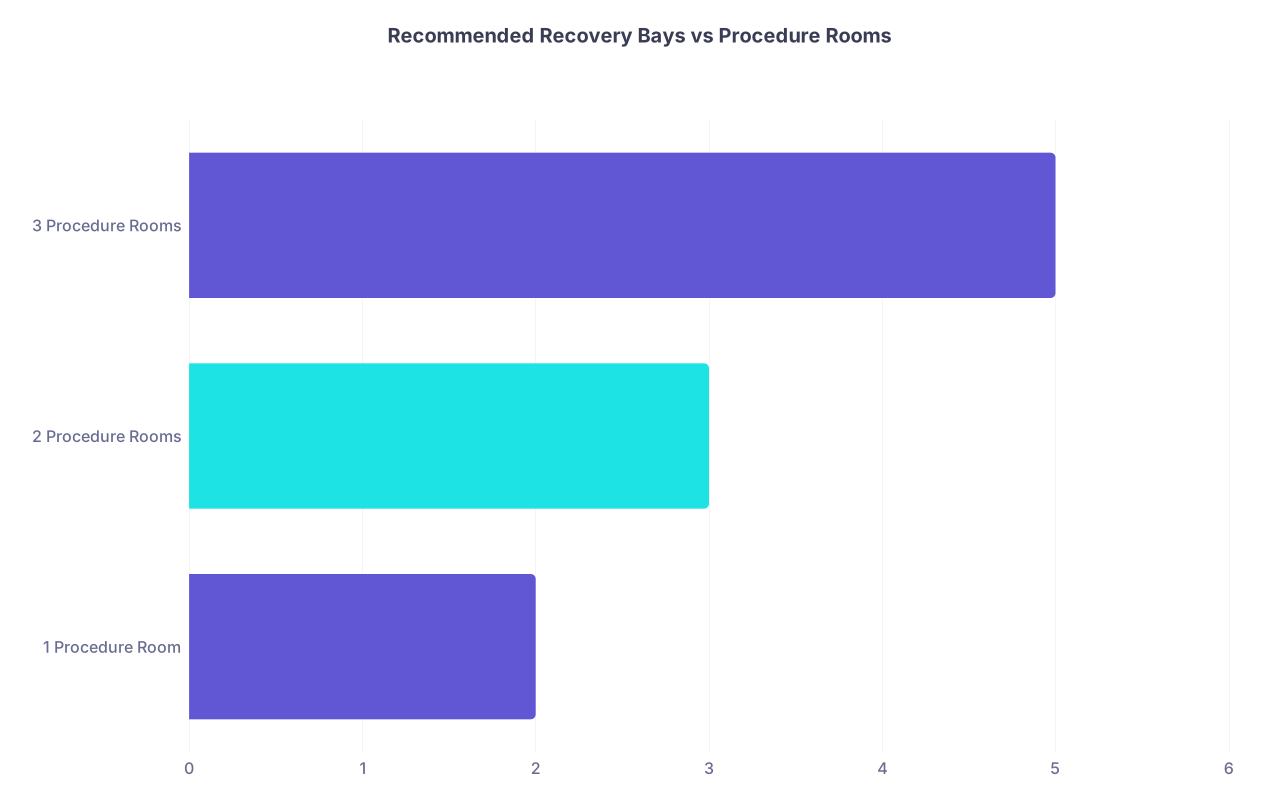
For moderate/deep sedation practices:
- Good rule of thumb:
Number of recovery bays = number of procedure rooms + 1 or 2.
So, for 2 procedure rooms, 3–4 bays is reasonable.
For local-only practices (e.g., dermatology excisions, some pain injections):
- You can often get away with multi-use bays:
- Patients get consented and prepped in the same chairs where they recover.
- Emphasis on privacy screens and easy recline.
| Category | Value |
|---|---|
| 1 Procedure Room | 2 |
| 2 Procedure Rooms | 3 |
| 3 Procedure Rooms | 5 |
Place a restroom adjacent to recovery. Post-anesthesia patients “almost made it” down the hall is a disaster you do not want.
Acoustic and visual privacy
Recovery is where patients vomit, cry, or snore. You do not want your waiting room or pre-op area hearing that.
Design recovery with:
- Sound-dampening materials.
- Curtains or half-walls that preserve monitoring line-of-sight but not expose everyone to everyone.
- Clear sightlines from the nurses’ station.
Noise and visibility are not just patient-experience issues. They affect your ability to staff efficiently; if nurses cannot see monitors easily, you need more staff or you start taking shortcuts.
5. Equipment, storage, and the tyranny of carts
I walk into too many clinics where the most expensive bottleneck is a single shared piece of equipment walled into a corner.
Treat mobile equipment like staff members
Ask yourself three blunt questions:
- How many procedures per day require the C-arm / ultrasound / scope tower?
- How long is each piece needed in-room per case?
- Where does it live when not in use?
For heavy users (e.g., 80% of your cases use ultrasound):
- You may need one machine per procedure room.
- Or a dedicated alcove directly between two rooms with sliding access.
For moderate users:
- A single machine might serve two rooms if:
- Doorways are aligned.
- Corridors are wide.
- Power access is good in both rooms.
But if staff need to do a 10-point turn with a C-arm around a corner, your schedule is going to slip. Every. Single. Day.
Storage: do not cheap out
If there is one place not to be “efficient” with space, it is storage. Clogged corridors are safety hazards and productivity killers.
You need:
Clean supply room:
- Shelving to ceiling, labeled bins.
- Space to stage back-up kits (suture, injection, biopsy, etc.).
- Counter for tray setup if centralizing prep.
Equipment storage:
- A specific closet or alcove for items not in constant rotation:
- Extra stretchers
- Backup scope tower
- Infusion pumps
- Wide enough for staff to get items in or out without blocking a hallway.
- A specific closet or alcove for items not in constant rotation:

If you are doing endoscopy, pain, or any fluoroscopy, plan lead apron storage near the room doors, not across the hall.
6. Staff workflow and visibility: design for the people doing the real work
Physicians usually fixate on where their desk goes. They should be fixating on where the nurses’ station and MA work areas go.
Centralized clinical work core
You want a clinical work core with:
- Direct line of sight to:
- Pre-op bays
- Recovery bays
- Procedure room doors
- Space for:
- EMR workstations
- Phone, printer, fax/scanner if you still live in that world
- Pyxis or locked med cabinet if necessary
Nurses should be able to pivot from a workstation, look up, and immediately see which bays are full, which monitors are alarming, and whether a room has turned over.

| Step | Description |
|---|---|
| Step 1 | Nurse Station |
| Step 2 | Pre bay 1 |
| Step 3 | Pre bay 2 |
| Step 4 | Recovery 1 |
| Step 5 | Recovery 2 |
| Step 6 | Procedure 1 |
| Step 7 | Procedure 2 |
Put the nurses’ station too far away or around a blind corner and you will pay for it in either delays or staffing costs.
Workstations and charting
Do not build a single shared “computer room” thinking it will keep the hallways clean. It will keep your charting late and fragmented.
You want:
- One workstation near pre/post (nurse documentation).
- One in or immediately adjacent to each procedure room (provider documentation, imaging).
- One in provider office/consult area (non-procedural work).
Computers on wheels (COWs) can help, but they are not substitutes for intelligent fixed workstation placement.
7. Front-of-house: fast check-in, clean hand-offs, no backflow
Even in a procedure-heavy practice, your first 10 minutes of contact can either prime patients for a smooth day or set them on edge.
Split arrival from departure
Check-in and checkout fighting for the same counter is amateur hour. It produces lines, privacy issues, and staff conflict.
Ideal:
- Check-in desk near the entrance:
- ID, insurance, basic forms.
- Checkout station tucked slightly away:
- Scheduling, payments, postop instructions, follow-up coordination.
If you lack square footage for separate desks, at least use:
- Clearly demarcated “Arrivals” vs “Departures” windows or sides.
- Physical divider so patients checking out do not overhear those checking in.
Waiting areas to match your patients
Procedure-heavy clinics often have:
- Drivers / family waiting (especially for sedation).
- New consults.
- Existing patients waiting to be roomed for quick procedures.
If possible, carve:
- A main waiting area for all arrivals.
- A smaller “post-procedure family” area closer to recovery exit, so staff can call drivers without dragging them through the whole clinic.

Consider line of sight: you do not want drivers staring directly into recovery bays when the door opens.
8. Safety, codes, and scalability: design once, expand once
You do not need to build a hospital OR suite. But you do need to anticipate regulatory creep and your own future.
Build to the higher standard you are likely to need
If you think you might:
- Add moderate sedation
- Perform more invasive procedures
- Convert to an ASC in 3–5 years
Then:
- Over-size procedure rooms now.
- Include proper medical gas infrastructure even if you do not hook it up day 1 (or at least rough-ins if local regulations and landlord allow).
- Ensure corridor widths meet or exceed ASC codes if at all possible.
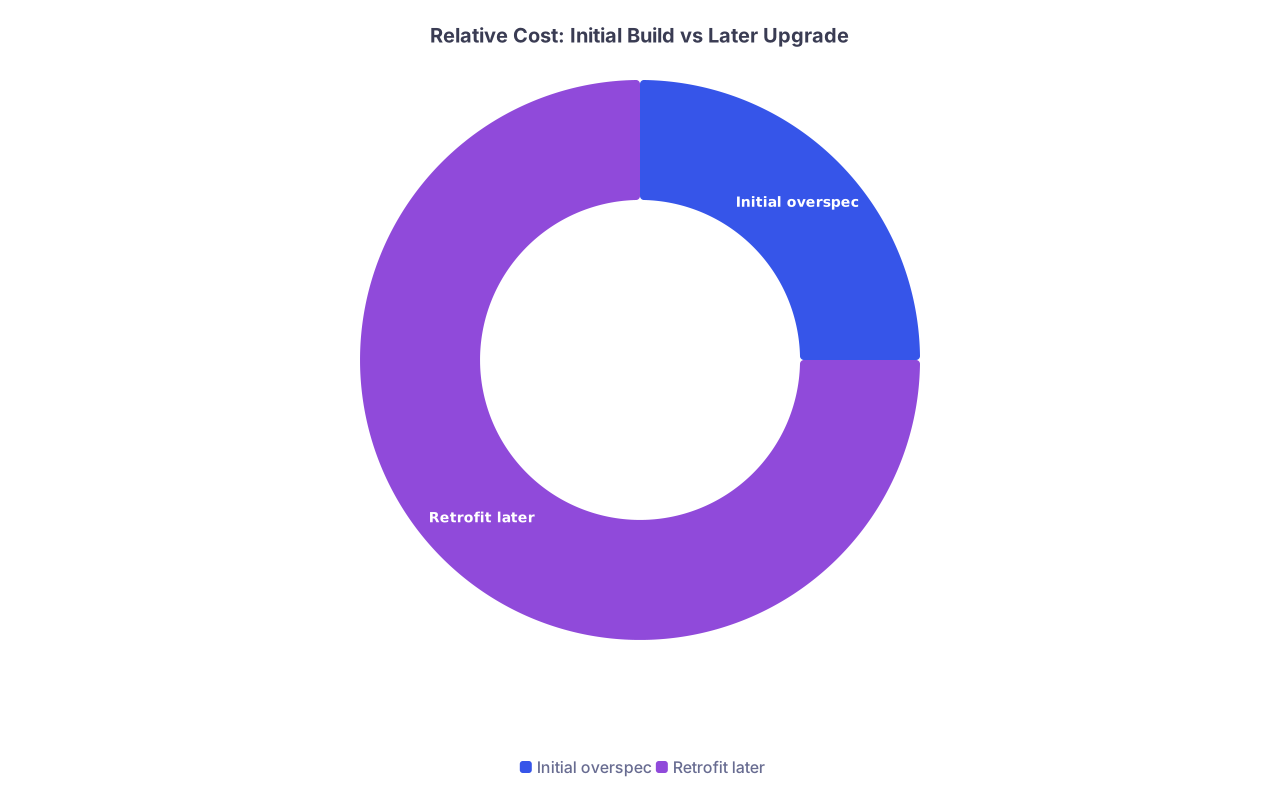
It costs far less to overspec infrastructure in the original construction than to rip out walls later.
| Category | Value |
|---|---|
| Initial overspec | 1 |
| Retrofit later | 3 |
(Those ratios are not fantasy. I have seen relatively minor corridor widening and gas line additions come in at 3–4 times what it would have cost initially.)
Fire, egress, and crash response
You must be able to:
- Get a stretcher out of any procedure room and into an ambulance without awkward tight turns or blocked doors.
- Access a crash cart quickly from recovery and procedure rooms.
Map it. Literally. On paper.

| Step | Description |
|---|---|
| Step 1 | Procedure 1 |
| Step 2 | Main Hall |
| Step 3 | Procedure 2 |
| Step 4 | Recovery Area |
| Step 5 | Exit to EMS access |
A sedation patient coding in a room with no clear exit path to EMS access is a lawsuit waiting to happen.
9. A concrete example layout that actually works
Let me put this together into a concrete single-provider, procedure-heavy layout that functions in the real world.
Target practice:
- Interventional pain or GI, single proceduralist, 2–3 procedure days per week, 2–3 clinic (consult/follow-up) days.
- Procedures:
- Mix of short and moderate duration
- Some moderate sedation
Layout (approx 3,200–3,600 sq ft):
Front:
- Entry → Check-in desk directly visible.
- Main waiting area, 12–18 seats.
- Doorway from waiting into clinical corridor controlled by staff (no wandering).
Clinical core (racetrack loop):
- Immediately past staff door: triage/vitals alcove on right.
- Ahead: small nurse station / clinical work core.
- To right of core:
- Two pre/post bays (chairs with privacy curtains).
- One restroom.
- To left of core:
- Two additional pre/post bays.
- Small family waiting alcove near exit from recovery.
Beyond the core:
- Two procedure rooms, side by side, doors facing nurse station.
- Clean supply room directly adjacent to procedure room 1.
- Soiled utility adjacent to procedure room 2, with secondary door for environmental services access.
Side wing off the main corridor:
- Two compact exam rooms.
- One consult room (slightly larger, nicer seating, near provider office).
- Provider office and small dictation / telehealth space.
Storage:
- Dedicated equipment alcove opposite procedure rooms for C-arm and ultrasound docking.
- Lead apron rack wall near procedure rooms.
This layout allows:
- Parallel pre-op for at least 2 patients per procedure room.
- Direct nursing visibility to all critical zones.
- C-arm to roll from storage to either room without gymnastics.
- Drivers to wait near but not in recovery.
It is not glamorous. It works.
10. How to sanity-check your design before you build
Before you sign off on anything, do three things.
Run a mock day on paper.
Literally schedule 14–18 procedures and a few consults. Walk through where each patient is at each 15-minute block, which rooms they occupy, and where staff are physically located.Walk the path in the shell space.
Use tape on the floor for walls and room outlines. Push an old office chair like it is a stretcher. Move as if you are carrying a C-arm. You will immediately see tight corners and bad sightlines.Make your lead nurse or MA design the cart routes.
They know where supplies should live, which rooms should mirror, and what will be maddening day to day. Listen to them.
Key takeaways
- Throughput drives layout. Decide your procedure volume and case mix first; build room count and type around that, not the other way around.
- The core engine is pre → procedure → post flow. Two procedure rooms, properly supported by pre/post bays, a central nurse station, and smart storage, will outperform a larger but poorly organized space.
- Design for staff and equipment movement as aggressively as you design for patient experience. A layout that keeps carts, cords, and people from crossing paths all day will quietly add hours of usable time back into every clinic day.