
It’s Monday morning, Day 1 in your new private practice. Your boxes are half-unpacked, your EHR is technically “live,” and your front desk is asking you how you want to handle same‑day add‑ons. You’re no longer a resident. You’re the business.
Over the next 90 days, you either build a machine that will support your career… or you build chaos that you’ll be cleaning up for years. This is where the details matter.
Here’s your week‑by‑week, no‑nonsense roadmap.
Big Picture: Your First 90 Days at a Glance
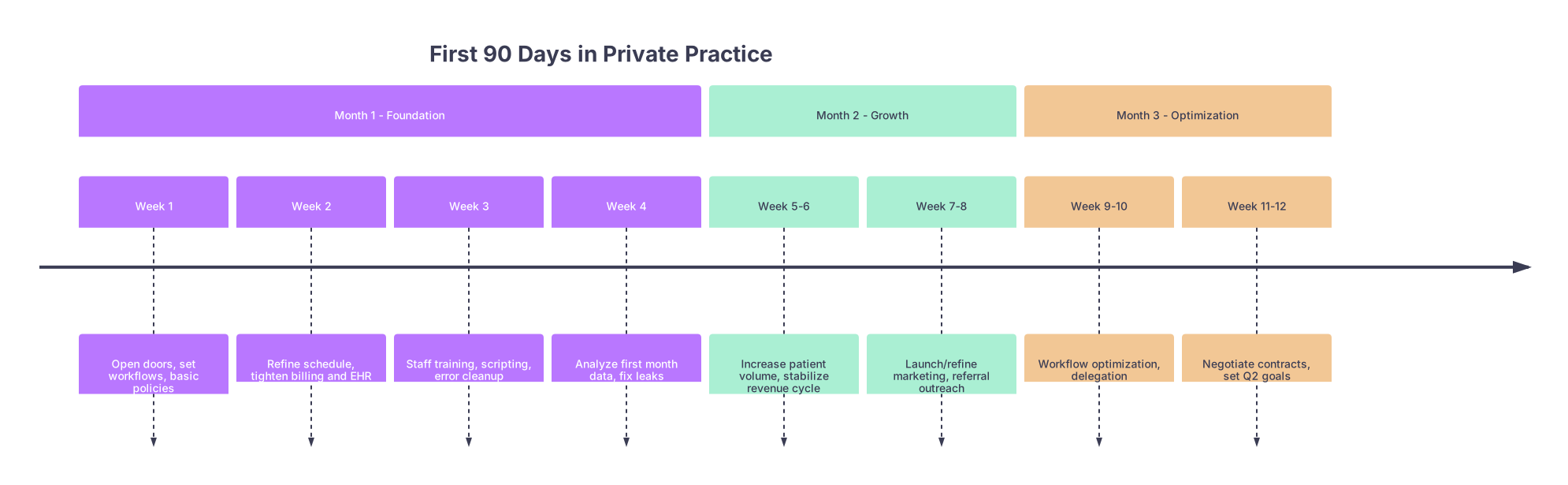
| Period | Event |
|---|---|
| Month 1 - Foundation - Week 1 | Open doors, set workflows, basic policies |
| Month 1 - Foundation - Week 2 | Refine schedule, tighten billing and EHR |
| Month 1 - Foundation - Week 3 | Staff training, scripting, error cleanup |
| Month 1 - Foundation - Week 4 | Analyze first month data, fix leaks |
| Month 2 - Growth - Week 5-6 | Increase patient volume, stabilize revenue cycle |
| Month 2 - Growth - Week 7-8 | Launch/refine marketing, referral outreach |
| Month 3 - Optimization - Week 9-10 | Workflow optimization, delegation |
| Month 3 - Optimization - Week 11-12 | Negotiate contracts, set Q2 goals |
At each point you should be tracking a handful of numbers. If you are not measuring, you’re guessing. And guessing is how practices go broke while the waiting room “seems busy.”
Before Day 1: Non‑Negotiables You Should Already Have
If you’re reading this and you haven’t opened yet, you’re in pre‑game. Before your first patient walks in:
- Business entity formed and NPI/CAQH updated
- Malpractice coverage active
- EHR selected, basic templates built
- Clearinghouse set up, payor enrollments at least submitted
- Basic scheduling rules configured (new vs follow‑up, procedure slots, double‑booking rules)
- At least one bank account for operations and a separate account for taxes
- Staff hired for front desk/billing (or a contracted billing company)
If two or three of these are missing, fine. If half are missing, push your “grand opening” and fix it. Opening with no billing structure is how you work for free for three months.
Month 1 (Days 1–30): Survival and Foundation
Week 1 (Days 1–7): Opening and Baseline
At this point you should be:
- Seeing patients, even if volume is modest
- Testing every system in real time
- Documenting every problem that occurs more than once
Daily focus (yes, daily this week):
Patient volume check (end of each day)
- New patients seen
- Follow‑ups seen
- No‑shows/cancellations
Revenue process check
For each patient:- Was insurance verified before visit?
- Was copay/coinsurance collected?
- Was the claim queued in the EHR by end of day?
Workflow sanity check
- How many times did staff interrupt you in a visit for “quick questions”?
- How many tasks did you personally do that a staff member could have done with training?
You should formalize 5–10 “Day 1–7 policies” quickly:
- Same‑day cancellations: fee or not? How strict?
- Late arrivals: cut‑off time? (Common: 15 minutes)
- New patient slot length (30 vs 40 vs 60 minutes)
- Follow‑up slot length
- Prescription refill process (who fields requests, how often you check inbox)
- Lab/imaging results workflow (who calls, what gets portal message vs phone call)
Do not aim for perfect policies. Aim for “good enough to standardize,” then improve.
End of Week 1 – Key Milestones
You should be able to answer:
- How many patients you saw each day
- Your no‑show rate
- How many claims actually went out (not just “encounters created”)
- Your average visits per half‑day clinic session
If you cannot pull those numbers, your EHR setup or billing process is already behind.
Week 2 (Days 8–14): Tightening Scheduling and Billing
Volume is still low, which is perfect. This is your chance to run fire drills.
At this point you should:
- Have your schedule template mostly filled out 1–2 weeks ahead
- Be doing same‑week chart reviews to estimate revenue and spot problems
- Have someone—anyone—looking at rejected claims daily
Key weekly metrics to track now:
| Metric | Target (Early) |
|---|---|
| Average patients/day | 6–12 (starting out) |
| No-show rate | ≤ 15% |
| Claims rejected rate | ≤ 10% |
| Time to close charts | Same day for 80%+ |
Concrete tasks for Week 2:
Walk through 10 random charts
- Did each have a diagnosis code that matches the documentation?
- Was a charge code attached?
- Was the claim submitted?
Review every claim rejection reason (with your biller or billing company)
- Fix at the root (template, front desk script, insurance verification process)
- Not just per‑claim band‑aids
Clean your schedule rules
- Block times when you reliably run late (e.g., after procedures)
- Add minimum notice rules for new patients (e.g., no same‑day new patients initially)
By the end of Week 2, your day should feel slightly more predictable. If every day still feels like a new chaos experiment, you need tighter rules, not more effort.
Week 3 (Days 15–21): Staff Training and Standardization
Now that you’ve got a sense of the recurring problems, you start fixing them with scripts and training, not wishful thinking.
At this point you should:
- Schedule two focused staff training blocks (1–2 hours each)
- Finalize front desk scripts for:
- Answering the phone
- Explaining financial policies
- Handling angry patients
- Scheduling follow‑ups before the patient leaves
Make these things explicit:
Phone script basics
- Greeting: “Thank you for calling [Practice], this is [Name], how can I help you?”
- Triage: Is this urgent, appointment request, refill, billing, or other?
- Data capture: Always confirm DOB, phone, email.
Check‑in workflow
- Confirm demographics and insurance every visit for first 90 days
- Collect copays before the visit
- Verify outstanding balances and request payment or payment plan
Check‑out workflow
- Every patient leaves with:
- Next appointment scheduled (if needed)
- Patient portal activated (if you have it)
- Clear instruction sheet for tests/follow‑up
- Every patient leaves with:
You should create a simple mistake log: a running list of repeated issues (wrong insurance, missing referrals, “patient showed without auth,” etc.) and how you fixed the process.
End of Week 3 – Milestones
- Staff can handle 80% of routine questions without pulling you out of rooms
- Your phone greeting and voicemail are professional, clear, and consistent
- There is a written policy (even if it’s a one‑pager) for refills, results, and after‑hours calls
Week 4 (Days 22–30): First Real Look at the Numbers
You now have almost a month of data. Imperfect data, but data.
At this point you should pull:
- Total encounters for the month
- Total charges submitted
- Total payments received
- % of claims denied or rejected
- No‑show and late‑cancel rates
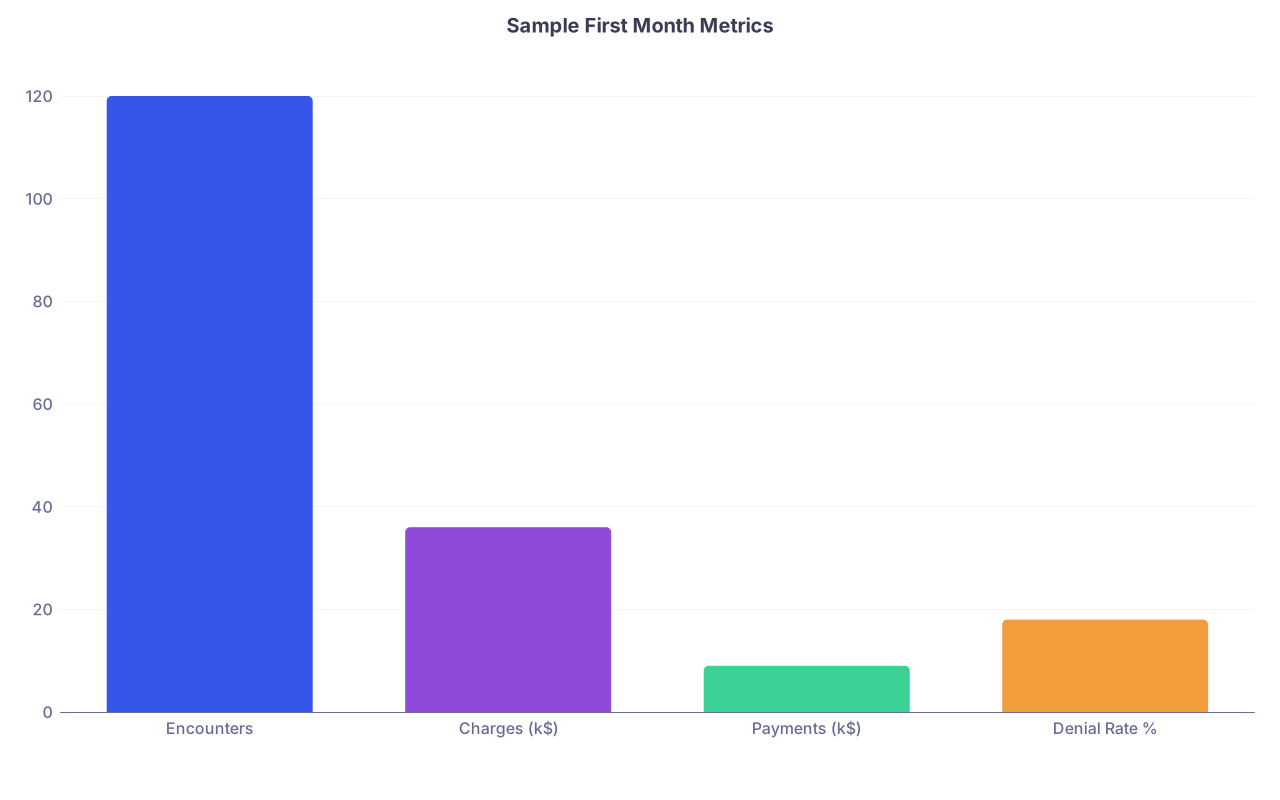
| Category | Value |
|---|---|
| Encounters | 120 |
| Charges (k$) | 36 |
| Payments (k$) | 9 |
| Denial Rate % | 18 |
You’ll notice something irritating: the money received looks tiny compared to what you billed. That’s normal in month 1—revenue lags. What’s not normal is having no idea where the money is stuck.
Week 4 projects:
Aging report review (with biller)
- How many claims are >30 days with no payment?
- Are they pending, denied, or never submitted?
- Who is responsible for follow‑up and when?
Time study for you
For 3–4 clinic days, track:- Time spent on documentation
- Time spent on messages and inbox
- Time spent on nonclinical tasks (calling pharmacies, fixing billing errors, etc.)
Anything that happens more than twice a week and does not require an MD/DO license gets put on a “to delegate” list for Month 2.
End of Month 1 – You should know:
- Rough daily visit volume baseline
- Your top 3 revenue leaks (common denial reasons, missing charges, etc.)
- Whether your staffing model is adequate or you’re drowning
Month 2 (Days 31–60): Growth and Stabilization
By now, the basic fires are controlled. You’re not done; you’re just stable enough to build.
Weeks 5–6 (Days 31–42): Controlled Volume Increase
At this point you should:
- Start increasing patient volume in a planned way
- Keep a close eye on your own time and burnout signals
Concrete steps:
Open more appointment slots gradually:
- Example: +2–3 slots per half‑day this week
- Protect at least one “admin block” per week (2–4 hours) with no patient visits
Revisit appointment lengths:
- Shorten follow‑ups by 5–10 minutes if you’re consistently finishing early
- Protect longer slots for complex patients—do not just cram everyone into 15 minutes
Monitor these weekly metrics now:
| Metric | Target Range |
|---|---|
| Patients per clinic day | 10–18 (depending on field) |
| Same-day chart completion | ≥ 90% |
| Phone abandonment rate | ≤ 10% |
| First available new pt slot | Within 2–3 weeks |
If your first new‑patient slot is >6 weeks out already, you either need more capacity or to raise your standards on who you accept as a new patient.
End of Week 6 – Milestones
- You’ve increased volume without breaking documentation or billing
- Your staff is keeping up with phones, messages, and check‑in/out
- You’re not taking charts home every night (occasional spillover is fine; nightly is not)
Weeks 7–8 (Days 43–60): Marketing and Referral Relationships
You can be the best clinician in town; if nobody knows you exist, it does not matter. Month 2 is when you deliberately build your referral and patient pipeline.
At this point you should:
- Have a basic web presence live
- Be on at least the major insurer directories (check your name and address yourself)
- Start systematically reaching out to referral sources
Weekly tasks:
Website and online presence check
- Is your practice website live with: services, hours, address, phone, online forms or portal link?
- Do Google/Maps show correct info? Search your practice and fix it if not.
- Are online reviews starting to appear? (You don’t need hundreds—just something real.)
Referral outreach (minimum goal per week):
- 3–5 primary care offices visited or called
- 2–3 therapists, PTs, or other allied professionals (depending on your specialty)
- 1 local hospitalist or ED group contact (if relevant)
Keep it simple:
- Short intro email or fax
- One‑page referral sheet
- Clear statement of what you see and how quickly you can get patients in
- Internal marketing: your existing patients
- Teach staff to say: “If you know anyone who might benefit from Dr. [You], feel free to share our card.”
- Make follow‑up scheduling easy; decrease friction everywhere.
End of Month 2 – You should know:
- Your top 2–3 referral sources by volume
- Your average time to next available appointment (new vs follow‑up)
- Whether your current office hours and days fit patient demand (early mornings? late days?)
Month 3 (Days 61–90): Optimization and Strategic Decisions
Now you have patterns. Good and bad. Month 3 is where you stop “just surviving” and start engineering the practice you actually want.
Weeks 9–10 (Days 61–75): Workflow and Delegation
At this point you should:
- Have clear pain points: inbox backlog, refill chaos, prior auth hell, etc.
- Be ruthless about what stays on your plate vs gets delegated
Steps this period:
Refine your EHR templates
- Build or refine macros for your top 10 visit types
- Standardize orders and counseling documentation so you’re not reinventing it each note
Inbox and messaging rules
- Create written rules:
- What staff can answer directly
- What must go to you
- Turnaround expectations (24–72 hours by category)
- Create written rules:
Delegation push
Everything below gets pushed to staff where legally allowed:- Reminder calls and portal messages
- Requesting outside records
- Submitting prior auths (you write the clinical justification once; they handle forms and calls)
- Drafting responses to nonclinical portal messages for your sign‑off
Your job is progressively more “final decision and signature,” less “human fax machine.”
Metrics to start tracking monthly now:
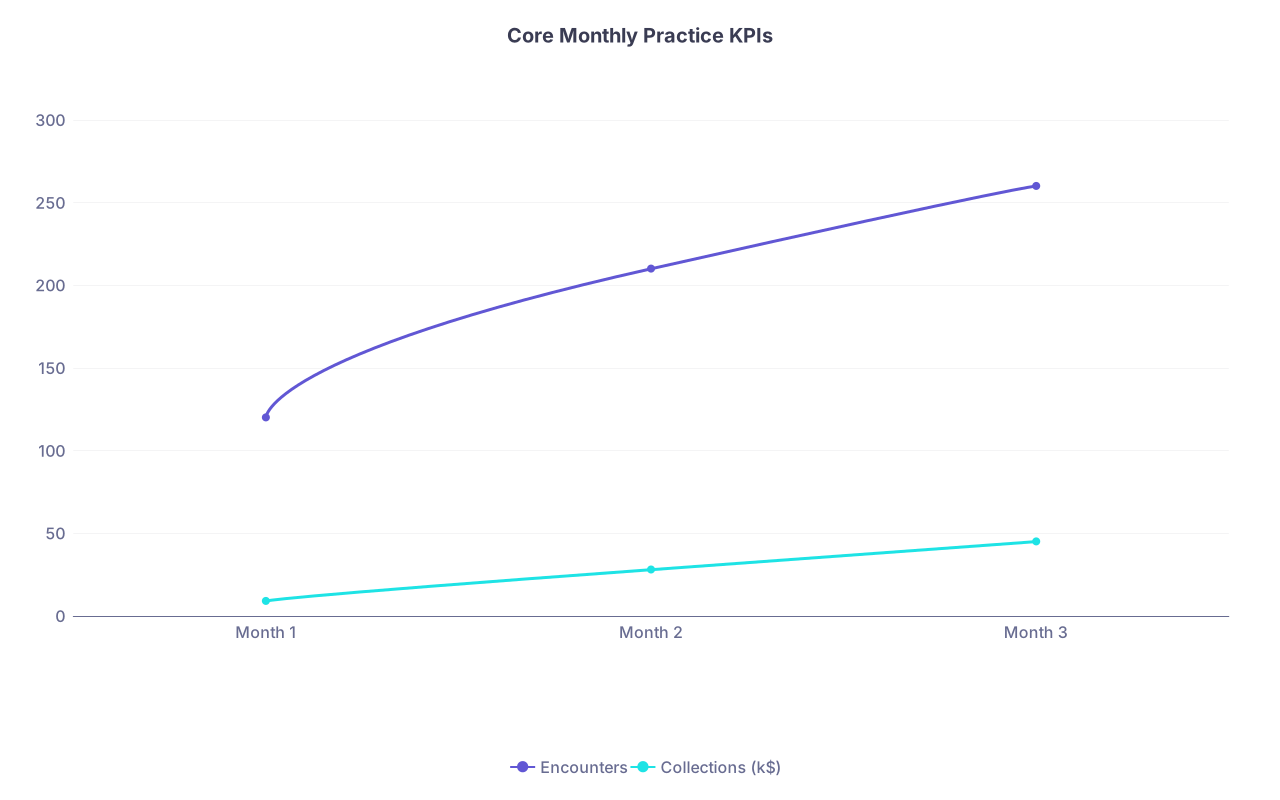
| Category | Encounters | Collections (k$) |
|---|---|---|
| Month 1 | 120 | 9 |
| Month 2 | 210 | 28 |
| Month 3 | 260 | 45 |
- Encounters
- Collections (money actually received)
- Days in A/R (ask your biller if you don’t know how to pull this)
- Denial rate percentage
- Average lag: date of service → date claim submitted → date paid
End of Week 10 – Milestones
- You spend <30–60 minutes per day on inbox/messages on average
- Most days end with charts done
- You have at least a primitive dashboard (even if it’s a spreadsheet) for your key metrics
Weeks 11–12 (Days 76–90): Strategic Adjustments and Next‑Quarter Plan
Now you’re planning beyond survival. This is where you make deliberate choices about your practice model.
At this point you should:
- Have a 3‑month revenue history (even if incomplete)
- Know your rough monthly overhead (rent, staff, malpractice, EHR, etc.)
- Have a sense of your own burnout/energy level
Key decisions to consider in Weeks 11–12:
Panel and scheduling strategy
- Are you going to cap your patient panel at a certain size?
- Do you need to adjust visit lengths up or down?
- Do you need dedicated procedure or telehealth blocks?
Payor mix and contracts
- Which insurance plans are sending you the most volume?
- Which pay the worst or create the most denial headaches?
- Start a list: plans to keep, plans to reconsider when you’re busier.
Staffing plan
- Is your current team sufficient?
- Do you need:
- A part‑time scribe?
- More front desk coverage?
- In‑house vs outsourced billing?
Personal sustainability
- How many clinic days per week are you doing now?
- Are you working nights/weekends to keep up?
- What ONE change would most improve your week—longer visits, fewer days, better staffing?
End of Day 90 – You should be able to answer clearly:
- Your average daily patient volume
- Your monthly collections vs monthly expenses
- Your denial rate and the top 2 reasons for denials
- Your primary referral sources
- Whether the practice is on track to be financially viable over the next 6–12 months
A Quick Reference Summary: What to Track and When

Here’s a stripped‑down view of when each set of metrics should come online.
| Timeframe | Metrics You Should Track |
|---|---|
| Week 1 | Daily volume, no-shows, claims submitted |
| Week 2–3 | Denial rate, chart closure time, phone metrics |
| Week 4 | Monthly encounters, charges, payments, aging A/R |
| Month 2 | Referral sources, wait times for new/follow-up |
| Month 3 | Collections trends, days in A/R, payor mix |
Final Thoughts: The First 90 Days, Distilled
By the end of Month 1, you’re not aiming for perfection. You’re aiming for stability—claims going out, charts closed, phones answered with minimal embarrassment.
By the end of Month 2, your priority is controlled growth—more patients without destroying your evenings and weekends, and a real referral pipeline starting to form.
By the end of Month 3, you’re shifting into strategy—fixing bottlenecks, delegating aggressively, and making conscious decisions about how you want this practice to look a year from now, not just how to get through tomorrow.
Follow the timeline. Measure relentlessly. Fix systems, not just individual problems. That’s how you turn the first 90 days from survival mode into the start of a sustainable private practice.